

Sage ransomware gets active online again
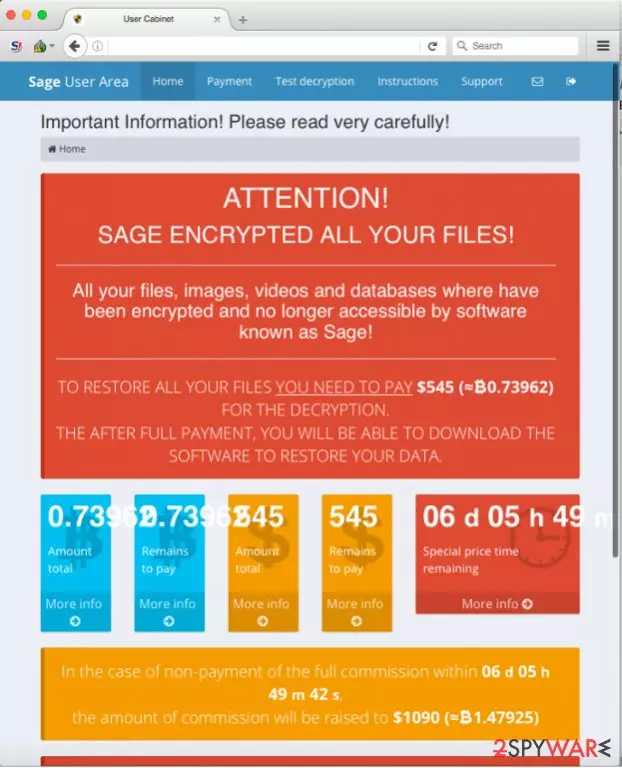
Sage virus operates similarly to the infamous Cerber ransomware, which delivers a well-structured payment website for each victim. The crypto-malware infiltrates the computer system using illegal and fraudulent ways, and encodes files with RSA 4096 public key[1], adding .sage file extension on its way.
The private key is kept in criminals’ servers, and there is no way to reach it. The virus then changes desktop background with AVuKmu.bmp picture, which contains information about the ransomware attack. This desktop image commands the victim to download Tor Browser[2] and access secret payment website.
To access this site, the victim needs to know his personal ID, which is stored in !Recovery_AVuKmu.txt, AVuKmu.bmp and !Recovery_AVuKmu.html files. The personal payment site is entitled “Sage User Area” and has five sections – Home, Payment, Test Decryption, Instructions, and Support page.
The Home page informs the victim about the ransom price (0,73962 BTC) and displays a countdown clock, which urges the victim to pay up. According to the virus, the unique decryption key “will be destroyed” when the given period passes.
In the Payment page, virus explains how to buy Bitcoins[3]. What is interesting is that frauds set up individual Bitcoin wallets for each victim, in other words, victims do not transfer the money to the same wallet, but to thousands of them. Criminals even provide the QR code of the wallet so that victims would transfer the ransom to the correct wallet.
Just like Cerber or other advanced-level ransomware viruses, Sage malware offers decrypt-1-file service for free. This way, it gives the victim a proof that criminals actually can decrypt those encrypted files. Instructions page explains how to use the Sage Decryptor, and the Support page allows victims to communicate with malware authors.
Malware drops various files on the system, and inexperienced computer users might not be able to fetch all of them down. That is why we strongly recommend removing them with anti-malware programs like FortectIntego or SpyHunterCombo Cleaner. Before Sage removal, consider what anti-malware program you wish to use.
If you already have one, make sure you update it when the computer is in a Safe Mode with Networking. If you do not have an anti-malware program, remove Sage virus using our recommended ones or any other reliable anti-malware program. You can find useful software reviews in the Software section on our site.
Other Sage variations
Sage 2.0 ransomware virus. This variation did not only become a big headache for the virtual community but it also attracted scientific interest. Due to emerging new versions, the malware fortified the assumptions that the same menacing Cerber virus is in the shell of this new threat. It activates itself with the help of a VBScript.
During the very hijack process, it deletes the initial executable file, and places its copy in %AppData%. The felons make a diversion by naming the executable files differently in each infected machine. In the !Recovery_ .html instructions, victims find further information how to access a unique Sage 2.0 payment site. Speaking of which it, it greatly resembles another rapidly evolving threat – Spora ransomware.
Sage 2.0 is also able to delete shadow volume copies leaving fewer data recovery options for the virtual community. In addition, it places its link in the Startup folder which enables the malware to continue the decryption process even if a computer is rebooted. Its distribution campaigns include phishing and spam emails.
Do not rush to open the emails which are addressed personally, e.g. EMAIL_[random set of numbers]_recipient.zip. It contains JavaScippt, one of the key files responsible for the activation.
Sage 2.2 ransomware virus. This time the felons decided to improve the technical capabilities of the threat, but its veneer as well. The ransom text changed from red to green. Additionally, the name of the instructions file has been also altered. Now the necessary information about payment and data recovery is presented in !HELP_SOS.bmp file. It redirects to a specific website, where victims are required to pay a specific amount of money. It may vary from $99 to 2000 dollars.
Interestingly, that this version shows more Cerber' s features. Sage 2.2 contains an audio file which alerts victims even more and encourages making the transactions. The ticking clock with the elapsing time becomes a nerve-wracking site as well. Speaking of the encryption, it appends the same .sage file extension.
Regarding its payment site, it presents the residents of targeted 18 countries the ability to choose their language preference. Like in the case of Cerber, it also omits several countries such as Ukraine, Belarus, Kazakstan, Russia, Latvia. If you occasionally review the processes in the Task Manager, you might notice that the threat ends or limits several crucial processes in order for the encryption process to go smoothly.
It seems that the malware does not target common system directories, but may paralyze your “League of Legends” game as well. Spam and phishing emails remain to be the main distribution method. Note that it might benefit from exploit kits as well.
Updated October 23, 2017. The latest version has kept a low profile since the emergence in the beginning of 2017. Currently distributed versions do not seem to have been significantly altered. It still speaks up to users using Microsoft SAPI command. There is a small but crucial amendment – now the malware deletes backup catalogs.
Unfortunately, there is no free Safe 2.2 Decrypter available yet. The malware demands 0.17720 bitcoin which is approximately 1000 dollars. The payment site is divided into Payment, Test decryption, Instructions, and Support tab. There are no changes concerning the file extension. The ransomware still attaches .sage to mark the encrypted data.
Ways to infect users with the ransomware
Sage virus is distributed via advanced malware dissemination techniques[4]. In most cases, malware can be downloaded from malicious websites, compromised sites, deceptive email attachments, malware-laden ads, or exploit kits.
In some cases, malware can be installed along legitimate programs, but only if you download them from suspicious websites. Sometimes it is easy to avoid malware attacks, but in the vast majority cases, malicious programs travel using Trojan horse techniques, which means that they are masked.
For instance, they can pretend to be legitimate Flash Player or Java updates[5], free games, files, documents, and other records that do not seem dangerous at first sight. However, if you open such file or program without realizing that it is an infectious one, the computer gets contaminated rapidly. To avoid such situations, we strongly recommend you protect your PC with anti-malware software.
Sage 2 makes its appearance in February 2017
The developers of this ransomware project seem to be serious about their goals, and therefore they have recently developed a new version of the infamous ransomware. Sage 2 virus is currently distributed via spam emails that have a .ZIP file added to them. This file is named as EMAIL_[random chars]_recipient.zip or just [random chars].zip. This archive might contain another .zip file with either JS or Word file inside of it.
Once executed, JS file will download ransomware from an online server, whereas the Word file requires the victim to enable Macros function first. If the victim does that, it also downloads malware onto the PC. First of all, the ransomware stays idle for a while and then saves a copy of itself to computer's \AppData\Roaming folder.
This file automatically opens and triggers User Account Control table. The ransomware then encrypts all files described in its target list and saves !Recovery_[3 random chars].html as a ransom note on the desktop. The ransom note commands the victim to visit Sage 2.0 payment website. Here, the victim finds out how much money this virus demands – it wants to get $2000 in Bitcoins.
If the victim fails to pay the ransom in 7 days, the ransom price doubles. Sadly, this virus cannot be decrypted using any free data recovery tools. For more information about Sage 2.0, we suggest reading this article.
Sage ransomware elimination options
Sage virus drops a variety of malicious files, including AVuKmu.bmp, 1.tmp, hPBic1zL.tmp, VIxkxhFa.lnk, and more. The virus assigns itself to Startup programs to automatically run itself whenever the victim boots the PC.
To remove Sage ransomware, we suggest you reboot your PC in a Safe Mode w/ Networking[6] (instructions on how to do it are already prepared and awaits for your attention – you can find them below!).
Do not start Sage removal without rebooting your PC as explained because the virus might simply disable your antivirus every time you attempt to run it. Although at the moment we cannot offer you any 100% efficient data decryption tools that could decrypt .sage file extension files, please take a look at data recovery options provided below.
Did this guide help?
3 comments
Petrol
Im glad I had a backup. Dont know what wouldve happened if I didnt...
Vega
Finally eliminated this virus. I am not going to pay the ransom no matter what. Criminals have no right to take away my files and demand money. I am not giving them what they want!
denver
Youre right, but I lost all my documents that I worked on for a long time..