

News-fujopo.cc – a deceptive website that shows misleading notification requests

News-fujopo.cc is a questionable website that individuals may stumble upon while navigating through insecure web domains. These domains typically include sites that provide illicit software downloads or offer access to pirated content. Furthermore, the presence of adware on a computer can cause unintentional redirections to this website during internet browsing activities.
When users land on News-fujopo.cc, they are greeted with a prompt requesting them to activate notifications. This request is accompanied by an image that carries a persuasive message, encouraging users to click the “Allow” button. Employing cunning tactics, the website utilizes misleading approaches and presents false reasons to coax users into consenting to its demands.
Those who succumb to these tactics are then bombarded with continuous and undesired advertisements originating from News-fujopo.cc. These ads, unlike typical ones that appear due to user engagement, are propelled by the website's authorization to send push notifications.
Encountering such situations is not only bothersome but also poses potential risks. Users may be lured into interacting with deceptive content and links, which could redirect them to harmful websites. There exists a danger of being tricked into enabling further notifications, downloading dangerous software, or inadvertently disclosing sensitive personal information.
To maintain utmost online safety, it is vital to steer clear of websites engaging in such deceptive techniques. Moreover, following comprehensive guides to remove any advertisements from News-fujopo.cc, as well as eradicating any associated adware or malicious programs that have infiltrated your computer, is essential for ensuring your digital security.
| Name | News-fujopo.cc |
| Type | Push notifications, ads, pop-ups, scam |
| Distribution | Pop-ups show up on a regular basis on the screen – these ads often include inappropriate, scam, phishing, or other similar content |
| Symptoms | Notifications show up at the bottom-right corner of the screen – these include fraudulent content and links to potentially dangerous websites |
| Dangers | If you click on links provided by the website, you might end up infecting your system with malware/PUPs, disclosing your personal information to cybercriminals, or losing money for useless services |
| Removal | Removing push notifications from your desktop requires you to access browser settings and block the unwanted URL. Scanning the system with SpyHunterCombo Cleaner is also recommended |
| Tips | We recommend using FortectIntego to fix any virus damage that might have occurred due to a system infection. The app can also remove various trackers for better privacy |
The introduction of push notifications by Google Chrome in 2015 marked a significant shift in how websites interact with their audience. As this feature became more widespread, other browsers adopted it, leading numerous websites to implement push notifications for their visitors. Although these notifications can be advantageous when used appropriately, they have also been leveraged by dubious entities to distribute intrusive and unwelcome advertisements.
News-fujopo.cc, akin to similar sites such as Rechanque.com, Ritingsynther.com, and Misground.com, takes advantage of this functionality by coaxing users into activating push notifications under deceptive circumstances.
This website cunningly prompts users, enticing them to allow push notifications. Once users consent, they are inundated with a deluge of advertisements. These ads not only interrupt the online experience but can also direct users to phishing websites, significantly endangering their security and privacy.
The strategies employed by News-fujopo.cc are ingeniously deceptive, appearing innocuous to the untrained eye. The website concocts various scenarios to trick users into enabling push notifications. Examples of such misleading prompts include:
- Press “Allow” bot verify, that you are not robot
- If you are 18+, click Allow
- Browser verification in progress – click the button “Allow” to access
- Click Allow to watch the video
- Click “Allow” to win a prize and get it in our shop!

These deceitful messages are typical of scam websites, aiming to trick users into permitting push notifications. Following this permission, these sites overwhelm users with disruptive ads leading to potentially harmful and malicious websites. Fortunately, removing these notifications is manageable, provided you know the correct procedures to follow.
Crooks use a legitimate browser feature to mislead people
Push notifications serve as automated messages sent by websites or applications directly to a user's device. They can appear on a wide range of devices, including desktop computers, laptops, and smartphones, even when the associated application or website isn't actively in use.
They offer immediate alerts, reminders, and updates, keeping users informed about important developments. This could range from breaking news and special offers to critical updates. For instance, a weather app may use push notifications to inform users about changes in the weather forecast, or a news platform might provide instant updates on major news events.
This functionality relies on a specialized communication channel established between the server (which represents the website or application) and the client (the user's device).
However, when visiting websites such as News-fujopo.cc, users are often greeted with a dialogue box asking if they wish to allow or deny notifications from the site in question. If the user agrees, their device will start to receive notifications from that website. Unfortunately, the content of these notifications is often of poor quality and can even be malicious.
Remove unwanted browser notifications and redirects
In our previous discussion, we delved into how adware can lead to unwanted diversions to websites that bombard users with unsolicited notifications and engage in other misleading practices. Due to their clandestine nature, such programs can remain unnoticed, operating silently in the background.
To thoroughly eliminate any remnants of malware or hidden malicious elements, it's crucial to conduct a detailed system scan using reputable security solutions such as SpyHunterCombo Cleaner or MalwarebytesMalwarebytes. Afterward, utilizing FortectIntego can help repair any damaged areas of your system and remove browser trackers, thereby enhancing your digital privacy.
Once you've confirmed the removal of adware and any other potential threats from your system, you can address the issue of News-fujopo.cc ads by adjusting your browser settings. It's important to recognize that although security software is effective in removing malware, stopping push notifications requires manually blocking the specific website's URL through your browser's preferences. We will provide step-by-step instructions on how to achieve this later on.
Google Chrome
- Open the Google Chrome browser and go to Menu > Settings.
- Scroll down and click on Advanced.
- Locate the Privacy and security section and pick Site Settings > Notifications.
- Look at the Allow section and look for a suspicious URL.
- Click the three vertical dots next to it and pick Block. This should remove unwanted notifications from Google Chrome.


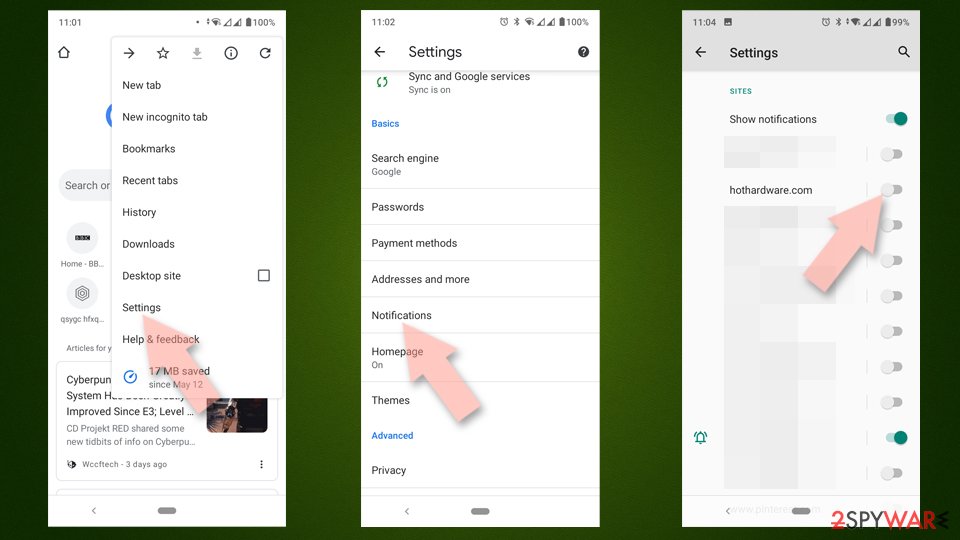
Google Chrome (Android)
- Open Google Chrome and tap on Settings (three vertical dots).
- Select Notifications.
- Scroll down to the Sites section.
- Locate the unwanted URL and toggle the button to the left (Off position).

Mozilla Firefox
- Open Mozilla Firefox and go to Menu > Options.
- Click on Privacy & Security section.
- Under Permissions, you should be able to see Notifications. Click the Settings button next to it.
- In the Settings – Notification Permissions window, click on the drop-down menu by the URL in question.
- Select Block and then click on Save Changes. This should remove unwanted notifications from Mozilla Firefox.


Safari
- Click on Safari > Preferences…
- Go to the Websites tab and, under General, select Notifications.
- Select the web address in question, click the drop-down menu and select Deny.


MS Edge
- Open Microsoft Edge, and go to Settings.
- Select Site permissions.
- Go to Notifications on the right.
- Under Allow, you will find the unwanted entry.
- Click on More actions and select Block.


Internet Explorer
- Open Internet Explorer, and click on the Gear icon at the top-right of the window.
- Select Internet options and go to the Privacy tab.
- In the Pop-up Blocker section, click on Settings.
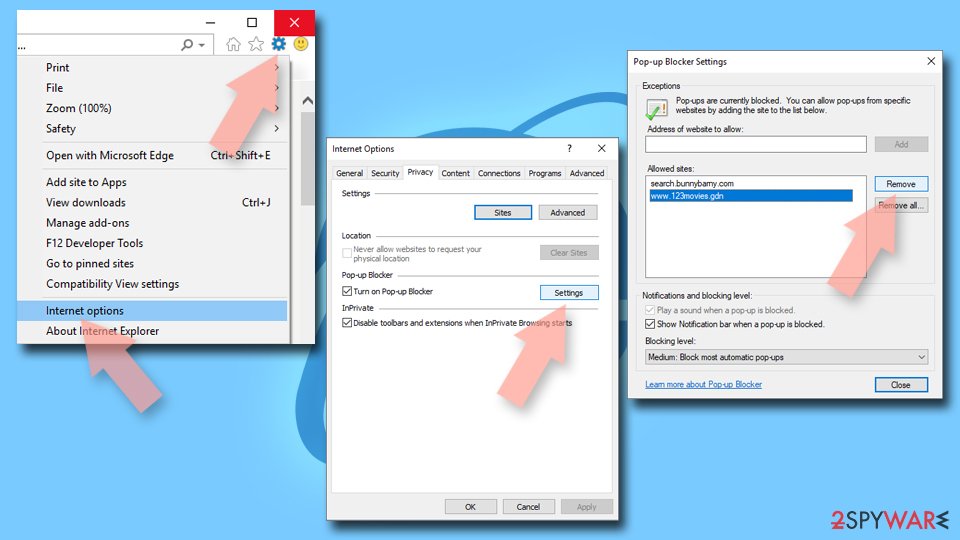
- Locate the web address in question under Allowed sites and pick Remove.

Did this guide help?
Be the first to comment