
Opt Out virus, Opt Out ads: what it is and how to remove it
Opt Out is a version of the Android virus that has been around for at least several years. Users on Reddit and other platforms started complaining about unusual activity on their Android devices, regardless of which browser (Google Chrome, Mozilla Firefox, Opera, or any other) is used.
Facts checked October 7, 2026. Removal steps tested on Windows 11 (26H2) and checked against Microsoft's and the browser makers' current documentation. Sections marked as our earlier report are the original text: they describe the threat as it was then and have not been reviewed since. The 2026 status, the removal steps and the questions are current.
Automatic
Get a free scan and check if your PC is infected.
Fortect finds malware, unwanted programs and the Windows damage they leave behind, and repairs it in one pass.
If Opt Out virus, Opt Out ads keeps coming back after uninstalling, a scan can find what reinstalls it.
Do it yourself · free Remove Opt Out virus, Opt Out ads yourself 4 steps, about 12 minutes, no software needed.
Start the steps
Opt Out virus, Opt Out ads: summary
| Damage | Installation of other potentially unwanted or malicious software, monetary losses due to scams, personal information disclosure, etc. |
|---|---|
| Name | Opt Out virus, Opt Out ads |
| Type | Adware, Android virus |
| Infiltration | Potentially unwanted and malicious apps are typically installed from third-party sources, although even Google Play does not avoid adware, which is later removed as soon as suspicious activity is detected |
| Related | optout.tracker.ared.re/optout/mobile= |
| Symptoms | Pop-up, interstitial, auto-play and other type of ads marked by "Opt Out" are shown anywhere on the screen at random times |
| Removal | Scan the PC with security software to find and remove the malware and anything installed with it. Fortect scans Windows for malware and repairs the system files and settings it damaged. Remove it nowTo use the full-featured product, you have to purchase a license for Fortect. The scan is free. |
Show 6 more facts
| Detection names | No Microsoft detection name is known |
|---|---|
| Distribution | Not recorded in the old report |
| Evidence | 4 write-ups by security sites; details still limited |
| Program | Opt Out virus, Opt Out ads |
| First seen | 16 April 2020 |
| Facts checked | 7 October 2026 |
Is Opt Out virus, Opt Out ads dangerous?
From our report of Apr 2020 · not reviewed since
Opt Out virus is mostly Android device infection that displays intrusive ads during web browsing sessions
Opt Out is a version of the Android virus that has been around for at least several years.
Users on Reddit and other platforms started complaining about unusual activity on their Android devices, regardless of which browser (Google Chrome, Mozilla Firefox, Opera, or any other) is used.
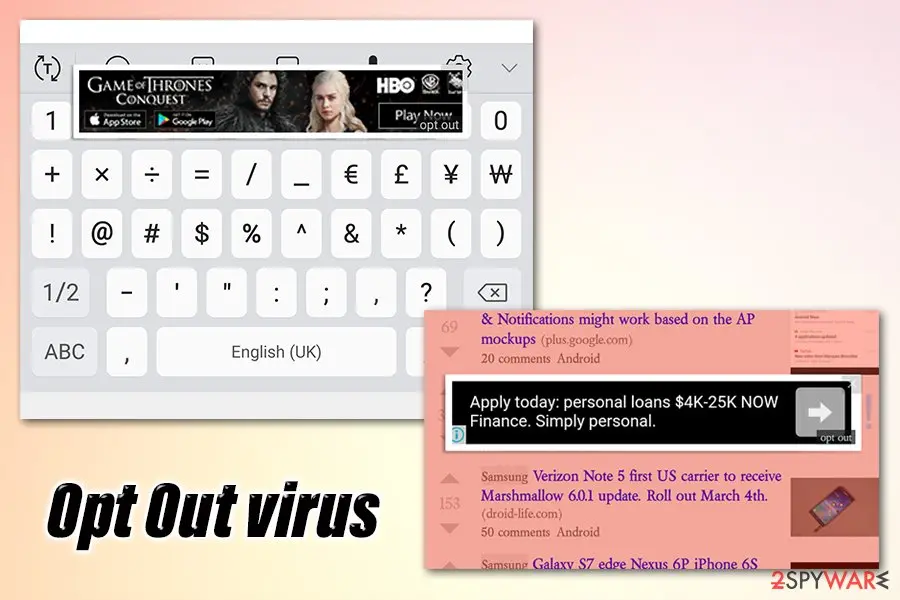
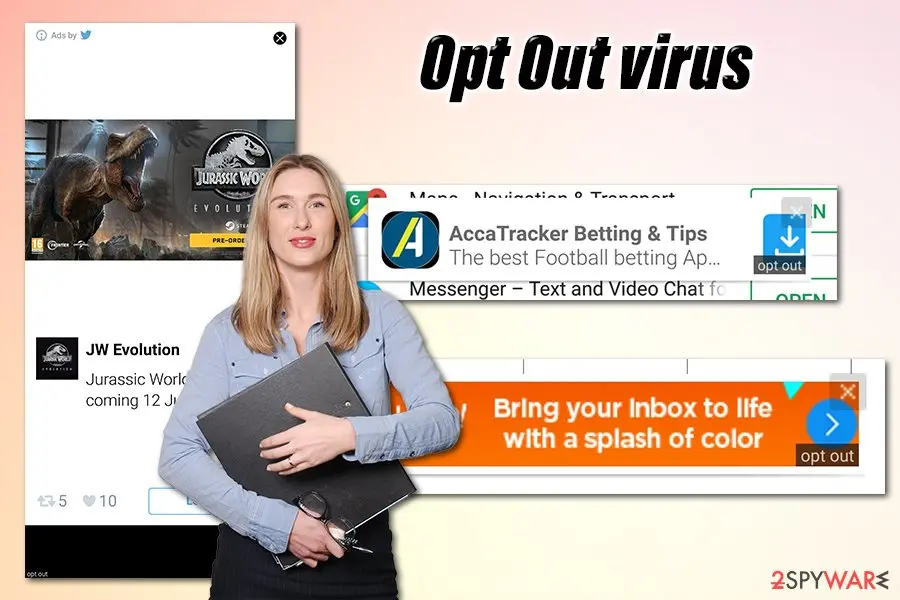
The Opt Out ads start appearing on random places on the screen and are often covering vital parts of it, such as a keyboard. Without a doubt, such activity is intolerable, and many started looking for ways to get rid of it.
However, Opt Out virus is not only intrusive but also might be dangerous - users reported that pop-ups, auto-play, interstitial and other ads redirect them to the optout.tracker.ared.re/optout/mobile=XXX URL, where they are asked to download additional applications.
This activity can be damaging, as downloaded apps might be unsafe, bring even more ads, or compromise the device with malware. The likely cause of the suspicious activity is an unwanted app (adware) installed on an Android device, which needs to be identified and eliminated as soon as possible.
Since the displayed ads are very persistent, users tried various ways to remove Opt Out virus from their devices, such as uninstalling most recent apps and performing a scan with anti-virus, but to no avail. Nonetheless, a full system scan can still sometimes detect which app is the culprit and eliminate it for you.
Android malware is becoming a real problem in recent years, as even official sources like Google Play had to pull out numerous malicious apps that bypassed its initial security checks. In most cases, users suffer from threats like Opt Out ads (adware), although something more sinister is also not a rarity - banking malware, for example.
Opt Out ads can be caused by a number of applications, although it is highly likely that they were downloaded from third-party sources. Some user claimed that he downloaded the BBC News app from an unofficial source, which caused the intrusive ad activity on the device:
Many might wonder why threats like the Opt Out virus spread so easily, and there are multiple reports of infections. The main goal of ad networks and all the participants are to gain financial benefit, as each of the served ads is generating money for the relevant parties. Nonetheless, users' time while using their phones is ruined due to intrusive ads, which also drain the battery in the process.
While seeing annoying ads is something that nobody wants to deal with while using their smartphones, it is not the most threatening trait of the Opt Out virus. Since ads are served from a rogue application, it is not clear whether ads can be trusted in the first place. In some cases, users might be directed to phishing, scam, or even malware-laden websites.
Since Opt Out ads are shown all over the screen and can appear at any time, users might click on the ad without anticipation and be immediately redirected to a potentially dangerous website. Therefore, it is important to be vigilant until the PUP is completely eliminated from the device.
To sum it up, Opt Out virus removal can be performed when the malicious app is identified. However, sometimes it is very difficult to determine, especially for users who like to download many applications. As previously mentioned, one way to find the culprit is to scan the phone/tablet with anti-malware software.
If that does not help, there is no need to factory reset your phone. Instead, you can find out which app is responsible for Opt Out ads in other ways - please check the bottom section for more elimination details.
From our report of Apr 2020 · not reviewed since
Ways to avoid potentially unwanted programs on Android devices
Phones and tablets are now sophisticated devices and sometimes even surpass desktop computers in the processing power.
Thus, we should treat these portable gadgets as computers - anti-malware software is mandatory, as Android malware has been on the rise for the past few years.
Nevertheless, there are still several ways of how potentially unwanted and malicious programs could get into users' devices, and there are several ways to reduce this possibility to a minimum.
As mentioned, anti-malware is a good start, although due to the frequency of new apps for the platform is deployed, no security tool would be able to catch all suspicious software. Therefore, it is best to be vigilant when using the phone.
There are few ways that users might install PUPs on their devices - they either download them intentionally from third-party sources or are tricked into doing so by a fake alert or a message on a scam website.
In the case of the latter, users do not anticipate that their phones will be bombarded with ads, although it is likely the case. In other words, Android apps should only be downloaded from official sources like Google Play, Amazon, and similar.
Another way to install a PUP on your device is fake updates and other scams. Typically users are told that their devices are infected with malware or that their web browsing sessions are being monitored or something along those lines. Please do not trust these claims and do your research before installing anything on the phone!
From our report of Apr 2020 · not reviewed since
More from our earlier report on Opt Out virus, Opt Out ads
- Some anti-malware programs might work to eliminate the PUP, although manual removal will most likely required.
- Check bottom section for more details
- Turns out I had a jarg version of the BBC News app.
- No idea where I downloaded it if not from the Play Store...
How to remove Opt Out virus, Opt Out ads
How to remove the Opt Out virus, Opt Out ads extension
Do the browser steps in every browser and profile on the PC, then check Windows for the program that installed the extension.
Step 1: Remove extensions you did not add
Opt Out virus, Opt Out ads often works through an extension, so go through the extension list of each browser:
chrome://extensionsedge://extensions- Extensions and themes in Firefox
Switch suspicious extensions off one at a time and reload the page where the problem shows, then remove the one that stops it, and any other you did not add.
Remember the other browsers and profiles on the PC. If Remove is missing or greyed out, a policy forces the extension, which the policy step deals with. Windows 11 and Windows 10 show the same pages.
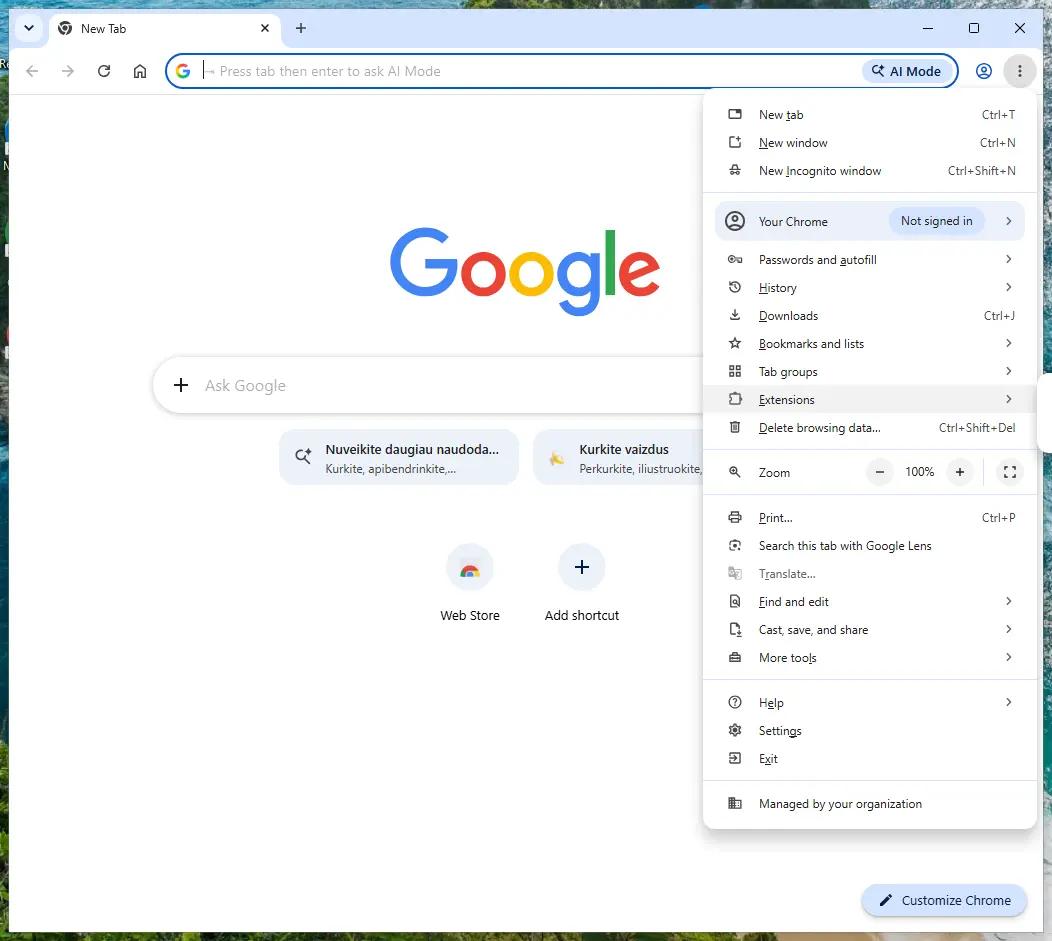
Chrome on Windows 11: More > Extensions > Manage extensions. Full procedure with screenshots: Remove a browser extension
Step 2: Uninstall Opt Out virus, Opt Out ads
Open Settings > Apps > Installed apps in Windows 11, or Settings > Apps > Apps & features in Windows 10.
Sort the list by install date and find Opt Out virus, Opt Out ads, then choose Uninstall from the three-dot menu next to it (in Windows 10, click the entry and then Uninstall).
Remove anything else installed on the same day that you do not recognise, because such programs usually arrive together in one installer. If the uninstaller opens a browser page with an offer or a survey, close it: the program is removed either way.
Full procedure with screenshots: Uninstall a program or app in Windows On uGetFix
Step 3: Reset the browser
Finish the browser part with a reset, which puts the search engine, start page, new tab page and site permissions back to their defaults and switches extensions off. Chrome: Settings > Reset settings > Restore settings to their original defaults.
Edge: Settings > Reset settings. Firefox: Help > More troubleshooting information > Refresh Firefox, which also removes its extensions. Your bookmarks and saved passwords are kept, and the menus are the same on Windows 11 and Windows 10.
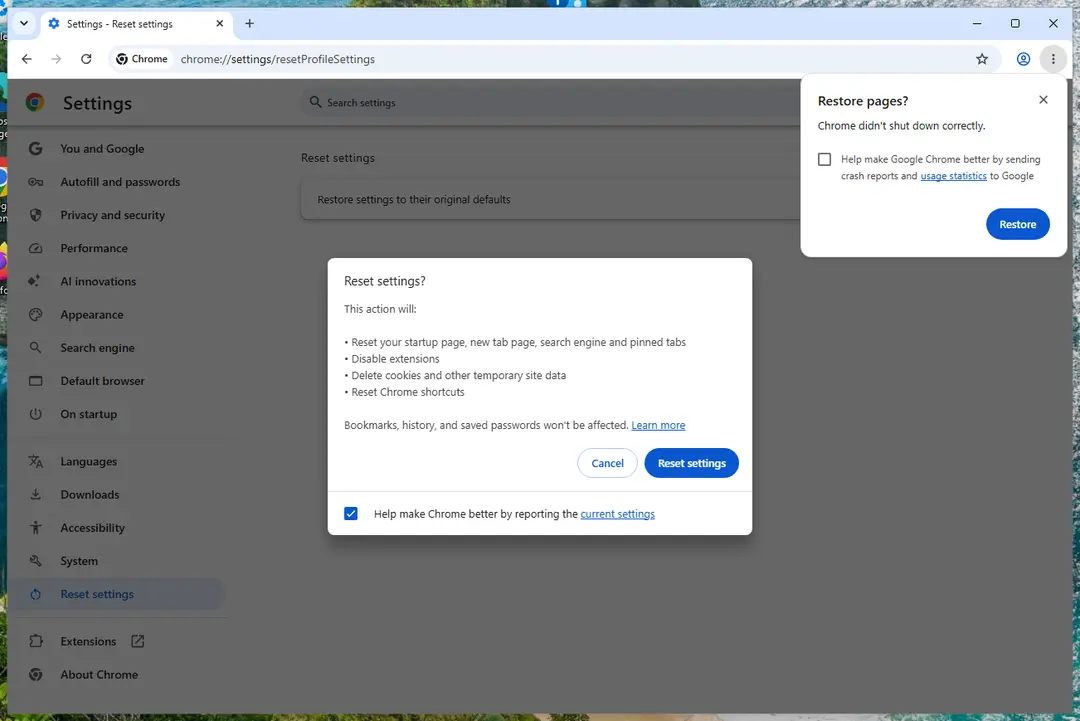
Chrome on Windows 11: Settings > Reset settings. Full procedure with screenshots: Reset a browser and fix a hijacked search engine
Step 4: Scan the PC, then run the offline scan
Open Windows Security > Virus & threat protection > Scan options, run a Full scan and remove everything it finds. Then select Microsoft Defender Antivirus (offline scan) and click Scan now: the PC restarts and scans before Windows loads, which finds files that hide while Windows runs.
Save your work first, because the offline scan takes about 15 minutes. Both scans are built into Windows 11 and Windows 10, and a second scanner from another vendor is a useful extra opinion.

Windows 11: Windows Security > Virus & threat protection > Scan options. Full procedure with screenshots: Run a Microsoft Defender Offline scan
Protect your privacy - employ a VPN
There are several ways how to make your online time more private - you can access an incognito tab.
However, there is no secret that even in this mode, you are tracked for advertising purposes. There is a way to add an extra layer of protection and create a completely anonymous web browsing practice with the help of VPN. This software reroutes traffic through different servers, thus leaving your IP address and geolocation in disguise.
Besides, it is based on a strict no-log policy, meaning that no data will be recorded, leaked, and available for both first and third parties. The combination of a secure web browser and VPN will let you browse the Internet without a feeling of being spied or targeted by criminals.
No backups? No problem. Use a data recovery tool
If you wonder how data loss can occur, you should not look any further for answers - human errors, malware attacks, hardware failures, power cuts, natural disasters, or even simple negligence.
In some cases, lost files are extremely important, and many straight out panic when such an unfortunate course of events happen. Due to this, you should always ensure that you prepare proper data backups on a regular basis.
If you were caught by surprise and did not have any backups to restore your files from, not everything is lost. is one of the leading file recovery solutions you can find on the market - it is likely to restore even lost emails or data located on an external device.
From our report of Apr 2020 · not reviewed since
Opt Out virus removal guide
There are plenty of free AVs available, although ensure that they are legitimate since some independent tests determined that most antivirus apps provided on official sources like Google Play are useless. . Rogue anti-spyware might not only fail to remove the Opt Out virus but also bring in more ads and even compromise your phone or tablet. Once you download a legitimate anti-malware, perform a full system scan immediately.
If nothing was found and you continue to suffer from ads, you will have to perform Opt Out virus removal manually.
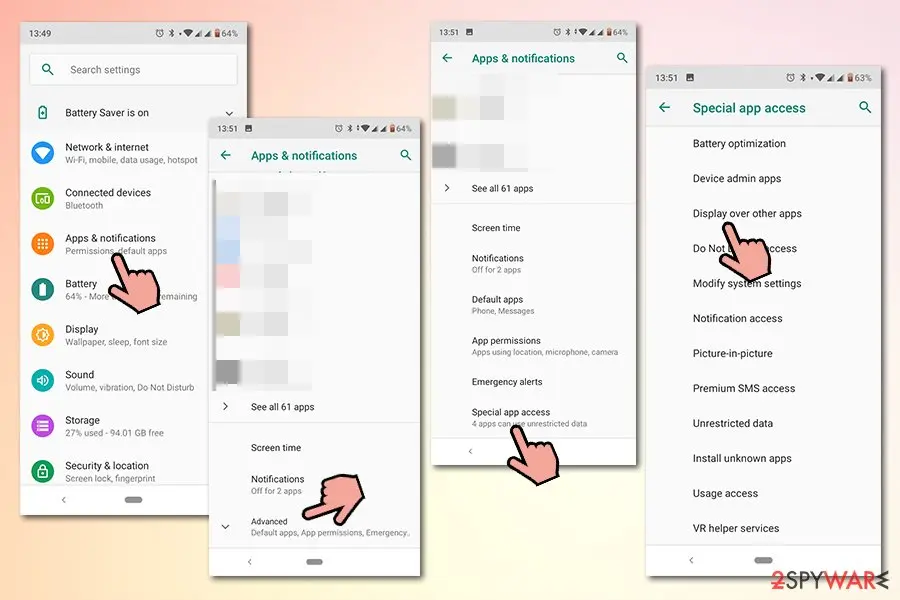
First of all, you should uninstall applications that you have recently installed, such as weather, sports, food apps, widgets, etc. If that does not work still, you should check which apps are allowed to show content over other apps, so it can be a good hint to determine which application is behind the Opt Out virus.
Here's how to do it (note that instructions might vary depending on your Android OS version and phone model):
- Tap on Settings and select Apps/Apps & Notifications
- You should see the list of most recently opened apps or a full list of installed apps
- Select Display over other apps
- You should be able to see a list of apps that can display notifications above other apps - remove everything suspicious/non-essential
Questions about Opt Out virus, Opt Out ads
What is Opt Out virus, Opt Out ads and why is it on my PC?
Opt Out virus, Opt Out ads is a program that was installed on the PC, most likely together with something else you downloaded. Free software sites and many installers add extra programs on setup pages with pre-ticked boxes, so the extra install looks like your choice even though nobody read the page.
Check the install date in Settings, Apps, Installed apps: the program you installed that day is the probable carrier. If you do not need Opt Out virus, Opt Out ads, uninstall it. If it belongs to your hardware or to a program you use, search its exact name and publisher first, because drivers and their tools can have unfamiliar names.
Opt Out virus, Opt Out ads will not uninstall. What can I do?
First restart the PC and try again, because the program may have been running and locked its own files. If the uninstaller is missing or fails, start Windows in Safe Mode, where most third-party programs do not start, and remove Opt Out virus, Opt Out ads from Installed apps there.
If it still refuses, delete its startup entry and its scheduled task, restart, and try once more. A program that actively prevents removal is behaving like malware, so finish with a Microsoft Defender offline scan. Avoid third-party uninstallers offered on search ads; several of them are unwanted programs themselves.
Did Opt Out virus, Opt Out ads collect my data?
Adware typically collects what it needs to choose ads:
- the sites you visit
- search terms
- approximate location
- browser and system details
Extensions with permission to read and change data on all websites can technically see everything on those pages, including forms. That is a privacy problem rather than proof of theft.
If you typed card details or passwords while it was active, changing the most important passwords is a reasonable precaution. Clearing cookies after removal ends the tracking sessions it may have started.
Why is my browser so slow since the ads started?
Each page now does extra work. An adware extension reads the page, decides where to put ads, loads them from ad servers and reports your visit, and that happens on every tab. Ad-supported programs add their own background activity.
Removing the extension or program usually makes the browser fast again at once. If it stays slow, open the browser's own task manager with Shift+Esc in Chrome or Edge and look for extensions using a lot of memory or processor time.
I let a "support technician" from an ad connect to my PC. What should I do?
Act quickly but calmly. Disconnect the PC from the internet first, so the connection ends. Uninstall the remote access tool they asked you to install and check Installed apps for anything else added during the call.
Run a Microsoft Defender full scan and offline scan. From another device, change your e-mail and banking passwords and sign out of all sessions.
If you paid by card, bank transfer or gift card, contact your bank or the card issuer immediately, and report the scam to the police. Do not answer if they call back.
My scan found nothing, but the ads continue. Why?
Because the source may not be a file a scanner looks for. Browser notifications are a permission stored in the browser, and many adware extensions are not flagged because they come from an official store.
Some ad-supported programs are only reported if you enable detection of potentially unwanted apps. So a clean scan does not mean the job is done. Check each browser's notification permissions and extension list by hand, and turn on Potentially unwanted app blocking in Windows Security before scanning again.
Can an adware pop-up infect my PC just by appearing?
No. A pop-up, a notification or a new tab is only a web page or a message. It cannot run programs on Windows by itself, provided the browser and Windows are up to date. Infection needs a step from you:
- running a downloaded file
- installing an extension
- giving a stranger remote access
That is why scam pages work so hard to make you click. Close such pages with the tab's X or by closing the browser, not with buttons inside the page, which may start a download.
Do I need to reset my browser after removing Opt Out?
A reset is a good last step, because it undoes settings that the program changed. A reset restores the home page, new tab page and default search engine, and turns off extensions.
It does not delete your bookmarks or saved passwords in the main browsers. Add back only the extensions you trust, one at a time.
Will Fortect remove Opt Out virus, Opt Out ads?
Fortect scans Windows for malware and unwanted programs and repairs the system files and settings they change, and its free scan shows what it finds on your PC before you decide anything.
For Opt Out virus, Opt Out ads, follow the plan above as well: the browser steps take back permissions and settings that no scanner treats as a threat, and uninstalling the program that brought it removes the source.
Run Microsoft Defender's full scan and, if anything was found, its offline scan as a second opinion. If the symptoms are gone after the plan and both scans are clean, there is nothing more to do.
Sources
- ZDNet: Google removes 600 Android apps in Play Store adware crackdown (read October 7, 2026)
- Reddit: Android 'Opt-out' Ads EVERYWHERE (read October 7, 2026)
- TechRadar: Two-thirds of Android's antivirus apps found to be completely useless (read October 7, 2026)
- Google Chrome Help: Use notifications to get alerts (no longer online) (read October 7, 2026)
- FTC: How to recognize, remove and avoid malware (read October 7, 2026)