
GuardBytes Plus: what it is and how to remove it
GuardBytes Plus is a rogue anti-spyware, which was released at the beginning of December 2014. This program looks like a normal anti-spyware, so don't get surprised after discovering that this program is capable of scanning your computer and then showing trustworthy-looking scan results.
Facts checked October 6, 2026. Removal steps tested on Windows 11 (26H2) and checked against Microsoft's and the browser makers' current documentation. Sections marked as our earlier report are the original text: they describe the threat as it was then and have not been reviewed since. The 2026 status, the removal steps and the questions are current.
Automatic
Get a free scan and check if your PC is infected.
Fortect finds malware, unwanted programs and the Windows damage they leave behind, and repairs it in one pass.
If GuardBytes Plus keeps coming back after uninstalling, a scan can find what reinstalls it.
Do it yourself · free Remove GuardBytes Plus yourself 5 steps, about 15 minutes, no software needed.
Start the steps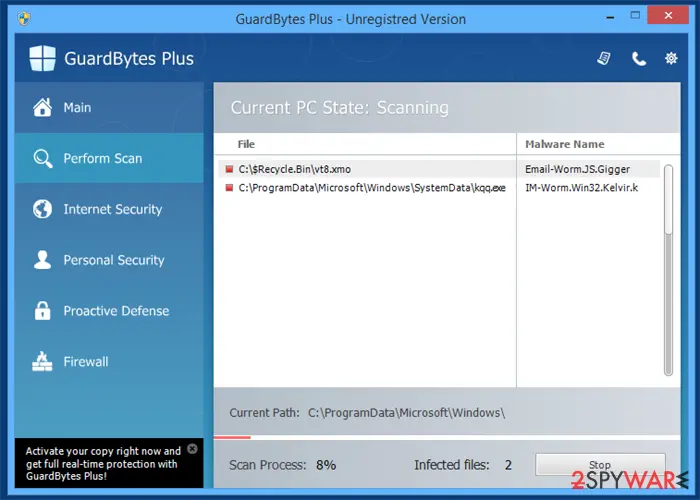
GuardBytes Plus: summary
| Distribution | The program can be added as the piece from freeware installations due to bundling or promoted on various sites and commercial content |
|---|---|
| Name | GuardBytes Plus |
| Type | Fake antivirus tool, PUP |
| Claims | The application should keep the machine safe and virus-free, block possible intruders |
| Price | $99,95 for the alleged licensed version |
| Detection names | No Microsoft detection name is known |
| Removal | Scan the PC with security software to find and remove the malware and anything installed with it. Fortect scans Windows for malware and repairs the system files and settings it damaged. Remove it nowTo use the full-featured product, you have to purchase a license for Fortect. The scan is free. |
Show 6 more facts
| Damage | Not recorded in the old report |
|---|---|
| Symptoms | An unknown program in Installed apps |
| Evidence | One write-up by a security site; details still limited |
| Program | GuardBytes Plus |
| First seen | 15 December 2014 |
| Facts checked | 6 October 2026 |
Is GuardBytes Plus a real security program?
From our report of Dec 2014 · not reviewed since
GuardBytes Plus is the rogue antispyware that costs $99,95
GuardBytes Plus is a rogue anti-spyware, which was released at the beginning of December 2014.
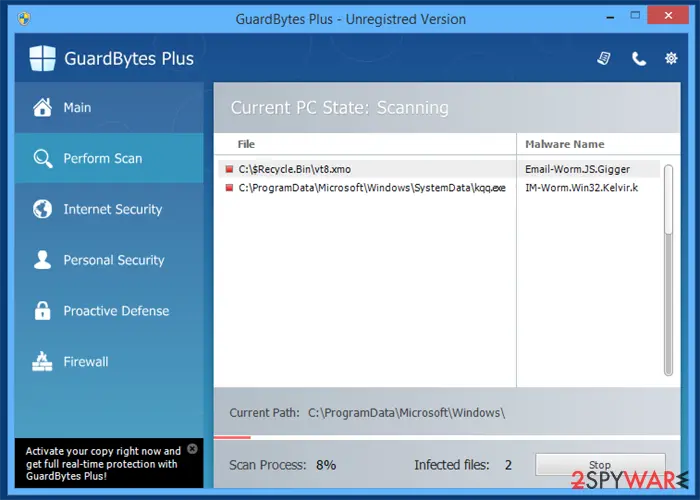
This program looks like a normal anti-spyware, so don't get surprised after discovering that this program is capable of scanning your computer and then showing trustworthy-looking scan results. In reality, these scan results are forged and should never be trusted because they seek the only thing - to trick people into believing that their PCs are dangerously infected and that they need to purchase the licensed version.
This paid version is also fake and should never be purchased because it does the only thing - disables the trial version of this rogue anti-spyware and takes people's money. Besides, purchasing such dangerous programs as this one can also lead you to the loss of your personal information and other issues.
If you have already purchased the GuardBytes Plus virus, you should contact your credit card company to dispute the charges. In addition, we highly recommend you remove this fake security software because it won't stop showing you its fake alerts.
Clicking on these alerts may redirect you to malicious websites, so you should stay away from them as far as you can. To sum up, if you have already started seeing warnings and alerts, notifications, you should ignore them. Also, you should remove this rogue anti-spyware from your computer and fix it.
Once it infiltrates the system, it drops its predetermined registry entries and files that are used to launch this virus. After that, it starts causing annoying system scanners and alerts that are set to report about tens or even hundreds of different viruses. For example:
In order to stay safe, you should never fall for such alerts. Instead of clicking them and purchasing a GuardBytes Plus license, you should remove this virus from the system. Paying for a program that is useless is also dangerous since these tools are not reliable.
From our report of Dec 2014 · not reviewed since
Programs infect the computer silently
It is known that there are several methods that are used for spreading this rogue anti-spyware.
The first of them rely on spam, which is usually filled with infected email attachments. Such fake email messages are set to report about such tricky things as missing payments, unexpected money transactions, refunds, and other things that have always been tricking users into falling for downloading the fake attachments to their computers.
In addition, the virus can also get inside your PC system after clicking on a misleading pop-up message. In most cases, such messages offer free Flash Player, FLV Player, and similar updates. Please, be very careful with such alerts because there are lots of malicious programs that are spread with their help.
Finally, we highly recommend you to avoid visiting illegal websites and installing free tools, such as online scanners, security scanners, and other suspicious programs because they can also lead you to the infiltration of this rogue.
The guide that helps remove GuardBytes Plus virus
If you have been bothered by these false security alerts, you should run a full system scan with reputable anti-spyware. Of course, before you do so you should update it. You might need to enter the special Safe Mode before you do so. If you need a detailed guide explaining how to do that, read the guide below.
When trying to remove Guard Bytes virus, our recommended programs are and because they can easily detect every hidden component that belongs to this and other cyber threats. Make sure to use a trustworthy tool if you choose to rely on a different application.
This suspicious and potentially dangerous app may try to block the installation and activity of legitimate security programs, including AV tools. Your machine might also get damaged during the processes of the program, so run to find and fix any file damage.
From our report of Dec 2014 · not reviewed since
More from our earlier report on GuardBytes Plus
- Try to find and fi any system damage with
- GuardBytes Plus has blocked a program from accessing the internet - This program is infected with Trojan-BNK.Win32.Keylogger.gen Private data can be stolen by third parties, including credit card details and passwords
How to remove GuardBytes Plus
Nothing it reports is real.
These steps remove it and undo a payment if you made one.
Step 1: Do not pay, and undo a payment if you made one
Nothing that GuardBytes Plus says it found needs fixing by GuardBytes Plus. Close its windows and do not enter card details.
If you bought it, contact your bank or card issuer about a dispute and cancel any renewal, keeping the receipt e-mail as evidence. Uninstalling it from Windows 11 or Windows 10 removes the program but leaves the subscription running.
Full procedure with screenshots: What to do after paying a scammer
Step 2: Uninstall GuardBytes Plus
GuardBytes Plus is removed like any other program, from the list of installed apps. In Windows 11 that is Settings > Apps > Installed apps, in Windows 10 Settings > Apps > Apps & features, and in both you can also use Control Panel > Programs and Features.
Select GuardBytes Plus, click Uninstall and follow the uninstaller to the end. Then look at the entries just above and below it when the list is sorted by date: bundled programs install at the same minute.
Full procedure with screenshots: Uninstall a program or app in Windows On uGetFix
Step 3: Remove it from startup
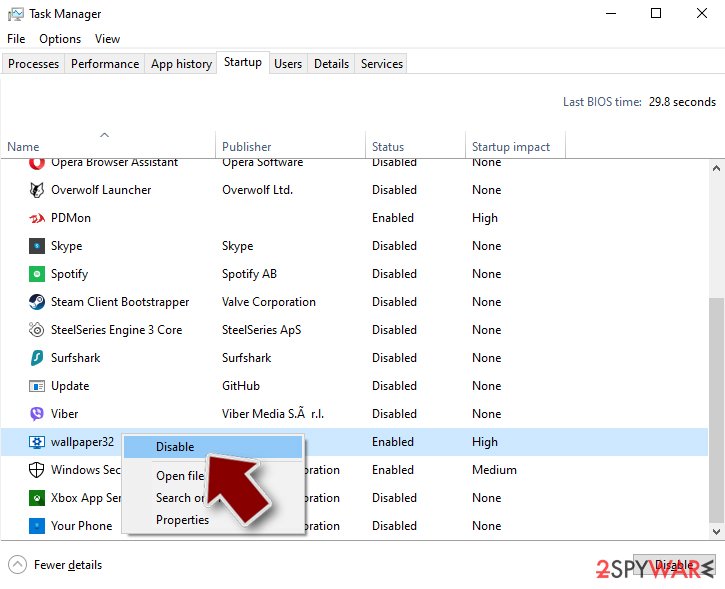
Press Ctrl + Shift + Esc to open Task Manager and select Startup apps (Windows 11) or the Startup tab (Windows 10). Disable entries you do not recognise, especially ones with no publisher or with a name that copies a Windows component.
Right-click an entry and choose Open file location to see where it runs from: programs in
%AppData%or%Temp%deserve a closer look. Some entries are not listed there but in the registry Run keys, which the procedure below shows how to check.Full procedure with screenshots: Stop apps from opening at startup On uGetFix
Step 4: Delete the folders left behind
Uninstalling often leaves the program's folders, and some threats reinstall themselves from them.
Press Windows + R, type
%LocalAppData%and press Enter, then do the same for%AppData%and %ProgramData%, and look for folders named after GuardBytes Plus, its publisher or created on the day the problem started.Delete those folders, and check
C:\Program FilesandC:\Program Files (x86)too.If Windows says a file is in use, end it in Task Manager or delete the folder after a restart in Safe Mode. The folders are the same in Windows 11 and Windows 10.
Full procedure with screenshots: Remove what malware leaves behind in Windows
Step 5: Scan the PC, then run the offline scan
A scan finds the parts of GuardBytes Plus that the manual steps cannot see. In Windows Security > Virus & threat protection > Scan options, start a Full scan and quarantine what it reports.
Follow it with Microsoft Defender Antivirus (offline scan) > Scan now, which restarts the PC and checks the disk while Windows and the malware are not running.
It takes about 15 minutes and works the same in Windows 11 and Windows 10. If either scan finds something, run the full scan again after removal until it comes back clean.

Windows 11: Windows Security > Virus & threat protection > Scan options. Full procedure with screenshots: Run a Microsoft Defender Offline scan
Instructions for each browser and system
The detailed steps for every browser and system this guide covers. Open the one you use.
Repair damaged system components
Once a computer is infected with malware, its system is changed to operate differently. For example, an infection can alter the Windows registry database, damage vital bootup and other sections, delete or corrupt DLL files, etc. Once a system file is damaged by malware, antivirus software is not capable of doing anything about it, leaving it just the way it is. Consequently, users might experience performance, stability, and usability issues, to the point where a full Windows reinstall is required.
Therefore, we highly recommend using a one-of-a-kind, patented technology of repair. Not only can it fix virus damage after the infection, but it is also capable of removing malware that has already broken into the system thanks to several engines used by the program. Besides, the application is also capable of fixing various Windows-related issues that are not caused by malware infections, for example, Blue Screen errors, freezes, registry errors, damaged DLLs, etc.
- Download the application by clicking on the link above
- Click on the ReimageRepair.exe

- If User Account Control (UAC) shows up, select Yes
- Press Install and wait till the program finishes the installation process
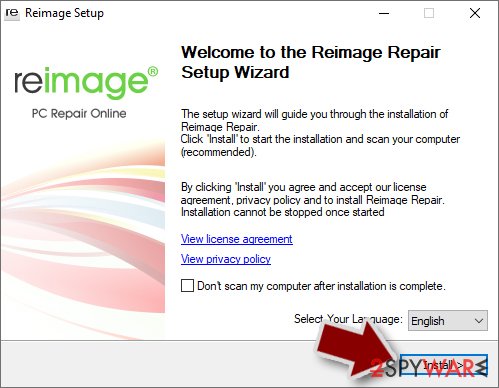
- The analysis of your machine will begin immediately
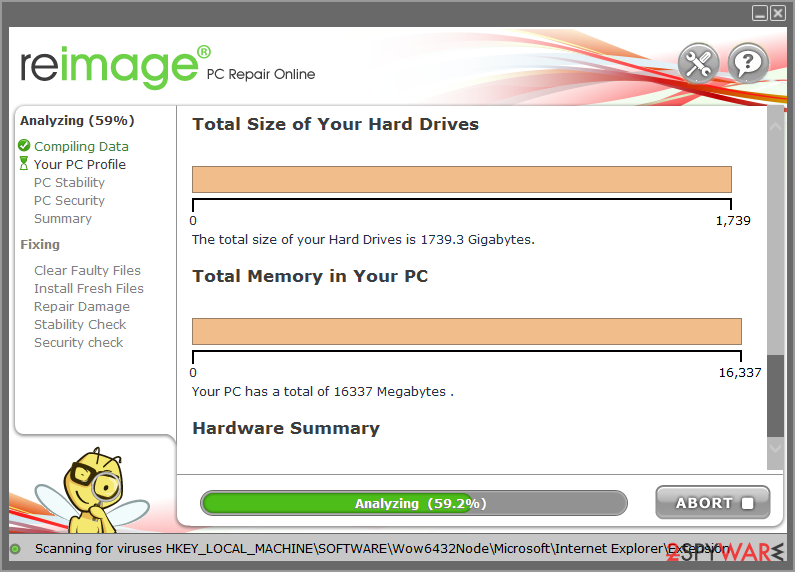
- Once complete, check the results - they will be listed in the Summary
- You can now click on each of the issues and fix them manually
- If you see many problems that you find difficult to fix, we recommend you purchase the license and fix them automatically.
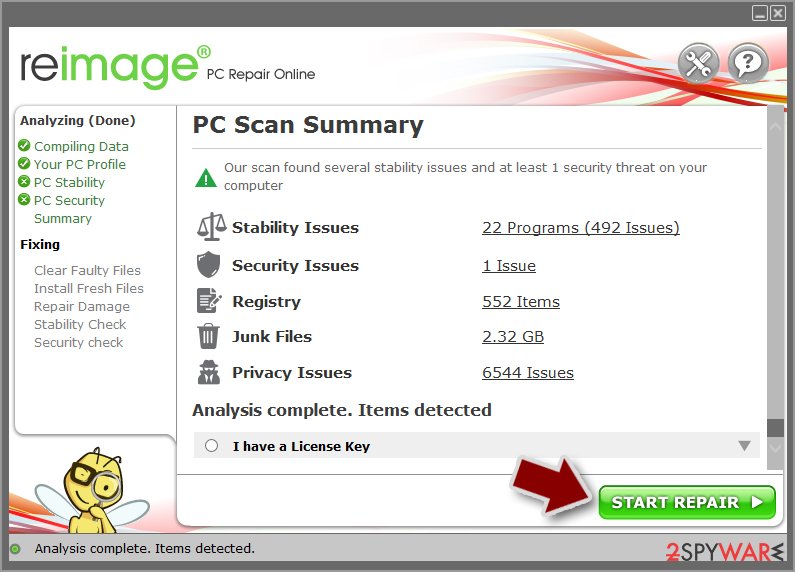
By employing , you would not have to worry about future computer issues, as most of them could be fixed quickly by performing a full system scan at any time. Most importantly, you could avoid the tedious process of Windows reinstallation in case things go very wrong due to one reason or another.
Manual removal using Safe Mode
Important! →
Manual removal guide might be too complicated for regular computer users. It requires advanced IT knowledge to be performed correctly (if vital system files are removed or damaged, it might result in full Windows compromise), and it also might take hours to complete. Therefore, we highly advise using the automatic method provided above instead.
Step 1. Access Safe Mode with Networking
Manual malware removal should be best performed in the Safe Mode environment.
Windows 7 / Vista / XP
- Click Start > Shutdown > Restart > OK.
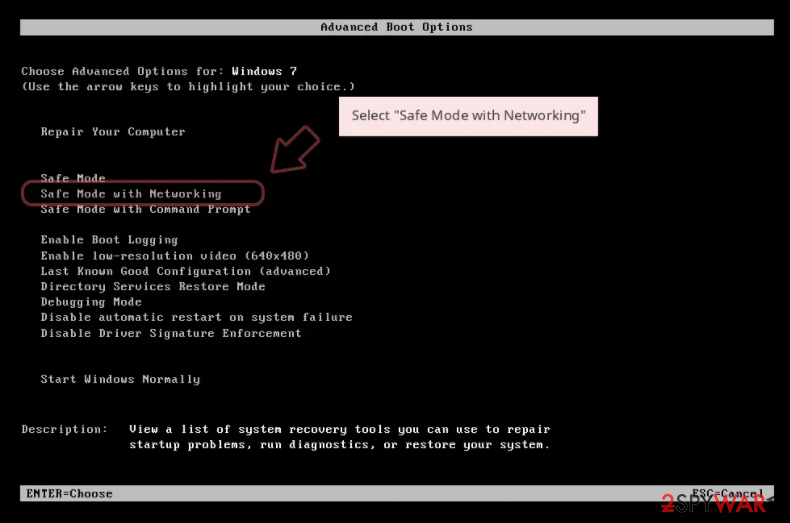
- When your computer becomes active, start pressing F8 button (if that does not work, try F2, F12, Del, etc. - it all depends on your motherboard model) multiple times until you see the Advanced Boot Options window.
- Select Safe Mode with Networking from the list.
Windows 10 / Windows 8
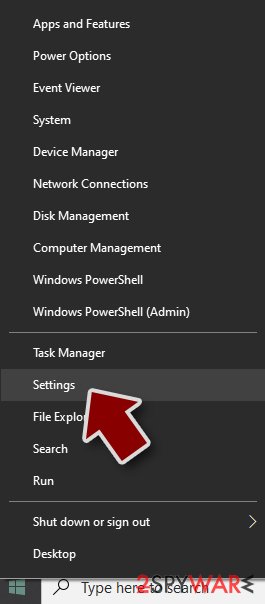
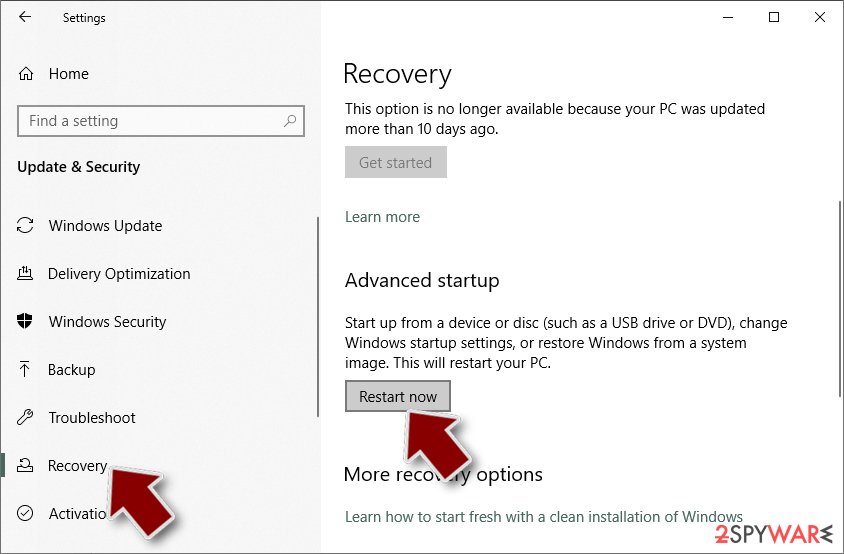
- Right-click on Start button and select Settings.
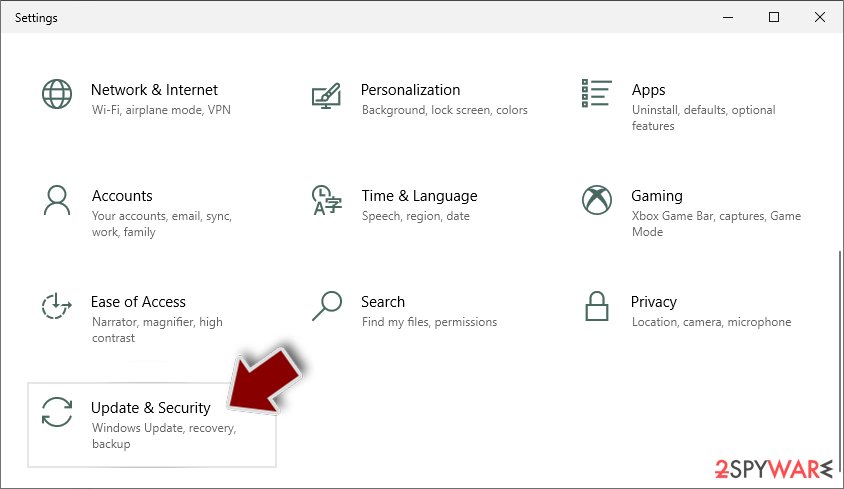
- Scroll down to pick Update & Security.
- On the left side of the window, pick Recovery.
- Now scroll down to find Advanced Startup section.
- Click Restart now.
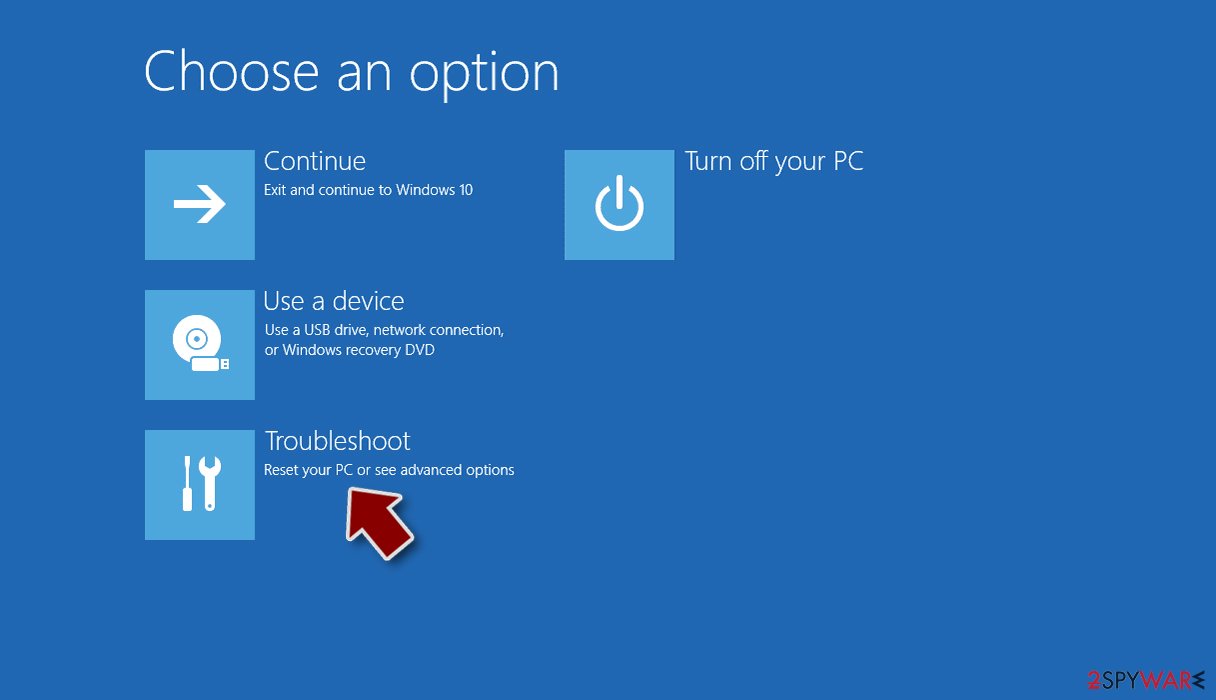
- Select Troubleshoot.
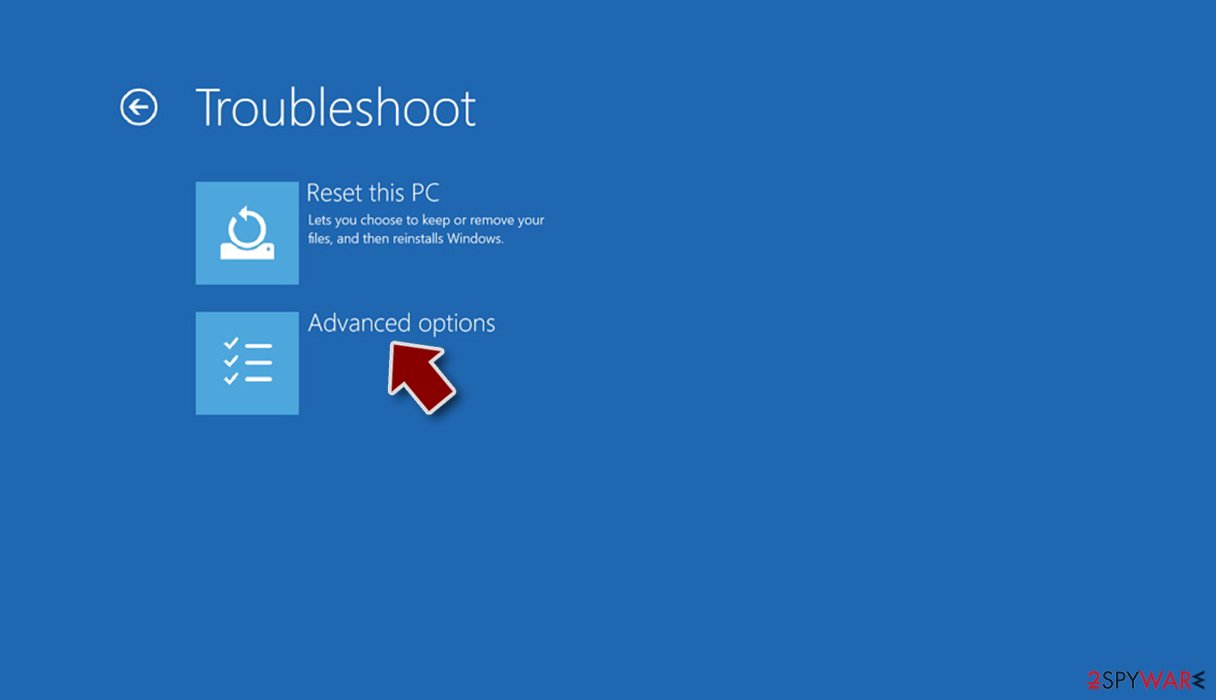
- Go to Advanced options.
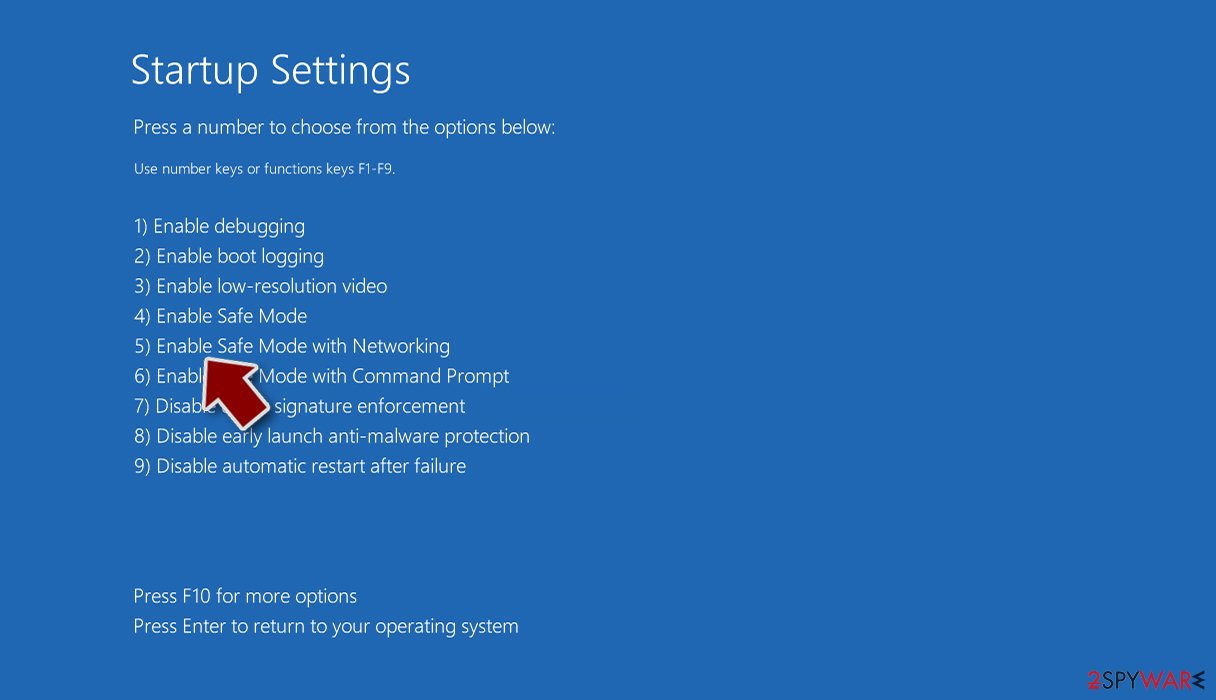
- Select Startup Settings.
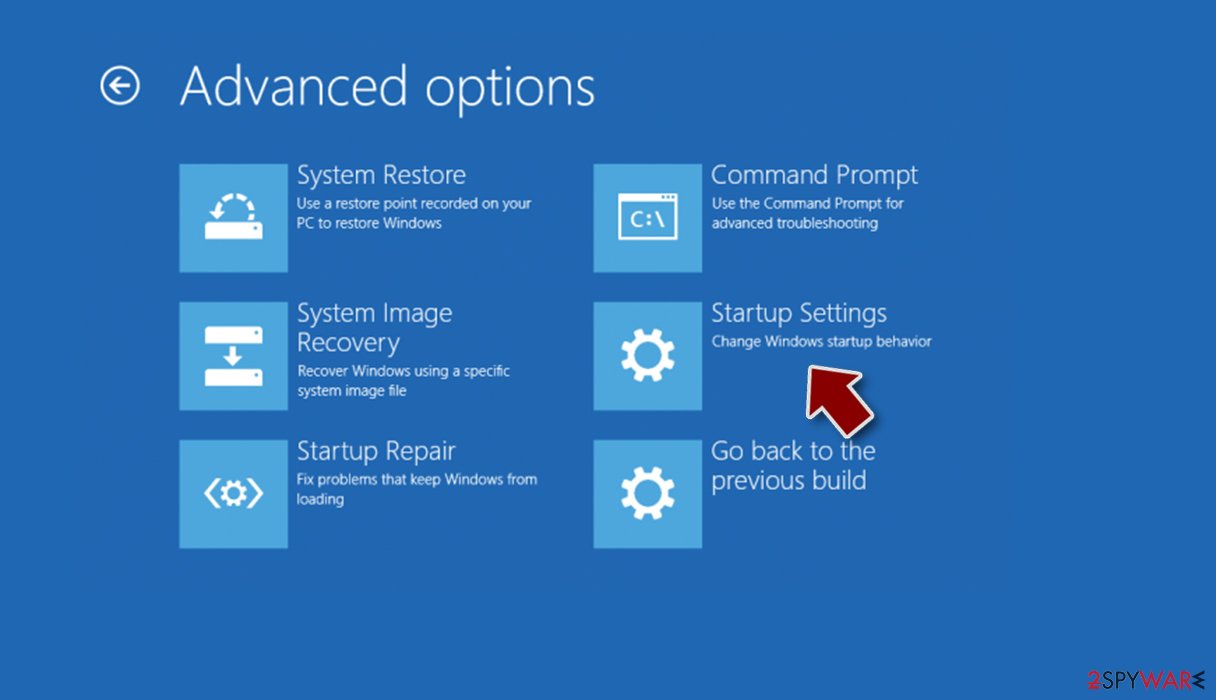
- Press Restart.
- Now press 5 or click 5) Enable Safe Mode with Networking.
Step 2. Shut down suspicious processes
Windows Task Manager is a useful tool that shows all the processes running in the background. If malware is running a process, you need to shut it down:
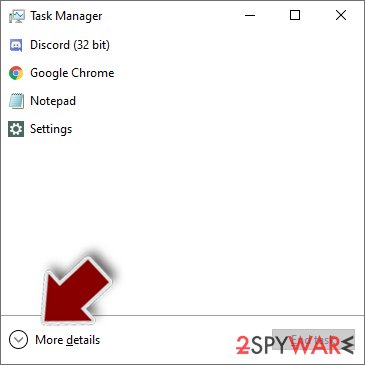
- Press Ctrl + Shift + Esc on your keyboard to open Windows Task Manager.
- Click on More details.
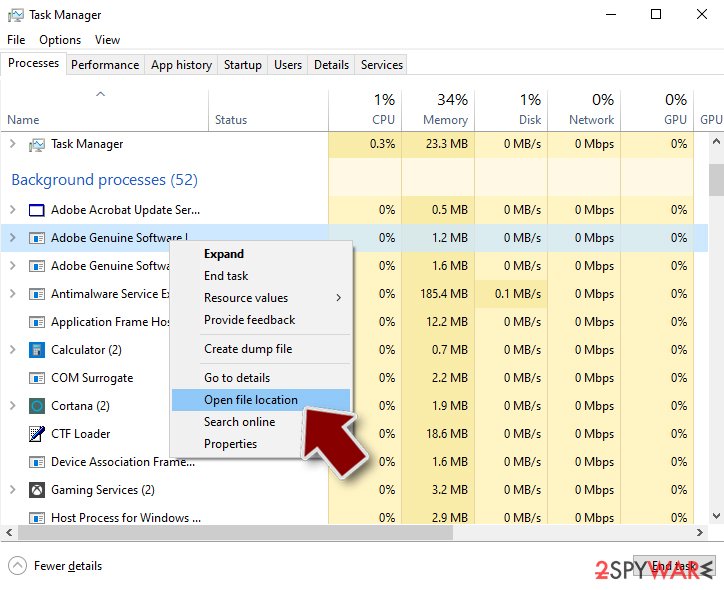
- Scroll down to Background processes section, and look for anything suspicious.
- Right-click and select Open file location.
- Go back to the process, right-click and pick End Task.
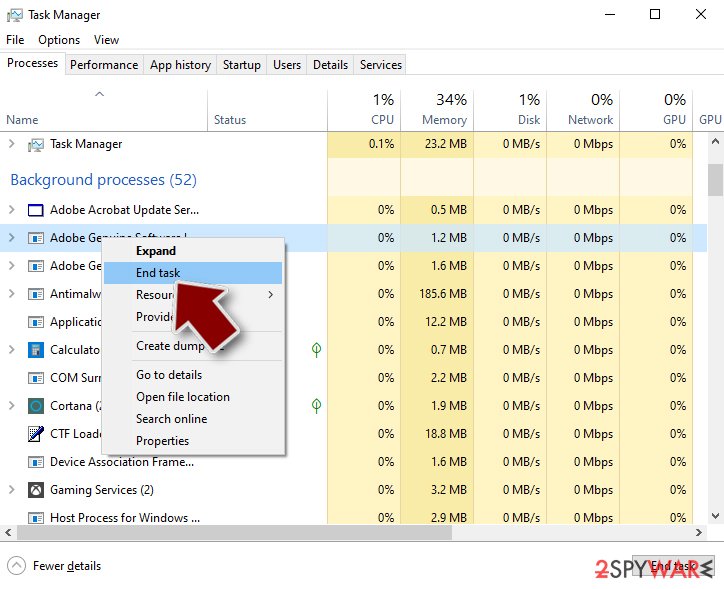
- Delete the contents of the malicious folder.
Step 3. Check program Startup
- Press Ctrl + Shift + Esc on your keyboard to open Windows Task Manager.
- Go to Startup tab.
- Right-click on the suspicious program and pick Disable.
Step 4. Delete virus files
Malware-related files can be found in various places within your computer. Here are instructions that could help you find them:
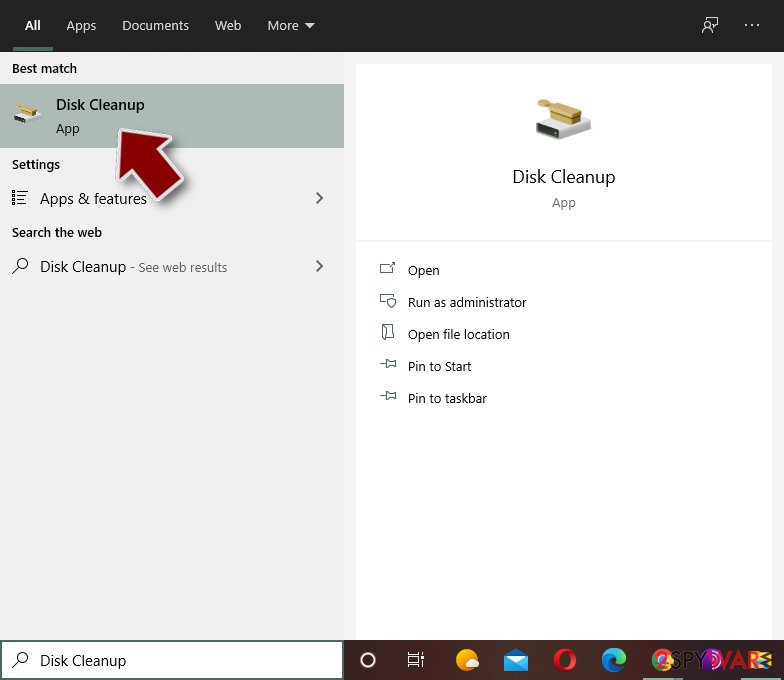
- Type in Disk Cleanup in Windows search and press Enter.
- Select the drive you want to clean (C: is your main drive by default and is likely to be the one that has malicious files in).
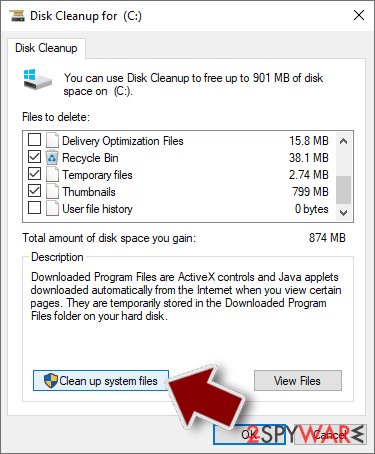
- Scroll through the Files to delete list and select the following:
Temporary Internet Files
Downloads
Recycle Bin
Temporary files - Pick Clean up system files.
- You can also look for other malicious files hidden in the following folders (type these entries in Windows Search and press Enter):
%AppData%
%LocalAppData%
%ProgramData%
%WinDir%
After you are finished, reboot the PC in normal mode.
Access your website securely from any location
When you work on the domain, site, blog, or different project that requires constant management, content creation, or coding, you may need to connect to the server and content management service more often. The best solution for creating a tighter network could be a dedicated/fixed IP address.
If you make your IP address static and set to your device, you can connect to the CMS from any location and do not create any additional issues for the server or network manager that needs to monitor connections and activities. VPN software providers like can help you with such settings and offer the option to control the online reputation and manage projects easily from any part of the world.
Recover files after data-affecting malware attacks
While much of the data can be accidentally deleted due to various reasons, malware is one of the main culprits that can cause loss of pictures, documents, videos, and other important files.
More serious malware infections lead to significant data loss when your documents, system files, and images get encrypted. In particular, ransomware is is a type of malware that focuses on such functions, so your files become useless without an ability to access them.
Even though there is little to no possibility to recover after file-locking threats, some applications have features for data recovery in the system. In some cases, can also help to recover at least some portion of your data after data-locking virus infection or general cyber infection.
Questions about GuardBytes Plus
Is GuardBytes Plus a virus?
Most programs that appear the way GuardBytes Plus did are not viruses in the strict sense. They are potentially unwanted programs:
- real software that arrives bundled with other downloads and then shows offers
- changes browser settings
- starts with Windows
Some are harmless, some are annoying and a few carry adware. What makes it worth removing is that you did not choose it.
Uninstall it from Installed apps and check the startup list and the browsers for anything added the same day. If it refuses to uninstall or returns after a restart, treat it as more serious and run a Microsoft Defender offline scan.
GuardBytes Plus will not uninstall. What can I do?
First restart the PC and try again, because the program may have been running and locked its own files. If the uninstaller is missing or fails, start Windows in Safe Mode, where most third-party programs do not start, and remove GuardBytes Plus from Installed apps there.
If it still refuses, delete its startup entry and its scheduled task, restart, and try once more. A program that actively prevents removal is behaving like malware, so finish with a Microsoft Defender offline scan. Avoid third-party uninstallers offered on search ads; several of them are unwanted programs themselves.
Is my card safe after buying GuardBytes Plus?
Treat it as exposed. The order page belongs to the seller of GuardBytes Plus, and you cannot know how the number is stored or shared. Ask your bank for a replacement card, which is usually free, and dispute the original charge as a misrepresented product.
Until the new card arrives, check your account daily for small or foreign transactions. If the bank offers alerts for every card payment, turn them on. Keep the receipt and screenshots, because they support the dispute.
Why does GuardBytes Plus look so official?
Because copying the design costs nothing and makes people trust it. The program behind guardBytes Plus in the list of installed apps borrows Windows colours, icons and wording, sometimes even the name of a well-known security brand. None of that gives it access to real security information.
A real alert can be checked in seconds: open Windows Security from the Start menu and look at Protection history. If nothing is listed there, the official-looking window is fake, and the program that draws it is what needs to be removed.
What if I paid GuardBytes Plus?
Contact your bank or card issuer the same day, explain that the payment went to a fake security program and ask for a chargeback. Keep screenshots of guardBytes Plus in the list of installed apps, the payment receipt and any e-mails.
If you gave card details in the program, ask the bank to block and replace the card. Then uninstall the program and run a full scan in Windows Security. If you also called a number and let someone connect to your PC, uninstall the remote-access tool they used and change your passwords from another device.
What could the caller do while connected to my PC?
Anything you could do. Callers working with fake alerts like GuardBytes Plus typically show you Windows logs as "proof", install their own remote tool for later, and steer you to online banking or a gift card purchase. Some add a password to Windows or lock the PC if you refuse to pay.
Remove every remote access program you did not install yourself, check Settings > Accounts > Other users for new accounts, and change important passwords from a clean device. If you cannot be sure what was changed, a reset of Windows is the safe choice.
Do I need to reinstall Windows to get rid of GuardBytes Plus?
Usually not. A thorough clean-up is enough when the offline scan finds nothing afterwards and you do not see guardBytes Plus in the list of installed apps again. A reset is the safer choice if an attacker had remote control, if security tools were switched off, or if detections come back after every clean-up.
Windows 11 can reset itself without a USB stick under Settings > System > Recovery > Reset this PC. Copy documents and photos out first and scan the copies. A reset does not change passwords or undo stolen data, so the account steps still apply.
Is Windows Security enough to protect me from programs like GuardBytes Plus?
For most home users, yes, especially with Potentially unwanted app blocking turned on in Windows Security > App & browser control > Reputation-based protection settings. That setting blocks many scareware installers before they run.
No security tool stops every scam, though, because programs like GuardBytes Plus are usually installed by the user after a frightening message. The habit that helps most is simple: ignore any website or pop-up that claims to have scanned your PC, and never call a number shown in a warning.
Is GuardBytes Plus an antivirus?
No. It looks like one, with a shield, a scan and a list of threats, but GuardBytes Plus is a rogue antivirus: its scans are designed to find something every time, and every fix leads to a payment page.
A real antivirus detects the same threats consistently, removes them without asking for money first and does not block other security tools. Windows 11 and Windows 10 already include Microsoft Defender in Windows Security, which is enough for most home users. Remove GuardBytes Plus and keep Defender on.
Will Fortect remove GuardBytes Plus?
Fortect scans Windows for malware and unwanted programs and repairs the system files and settings they change, and its free scan shows what it finds on your PC before you decide anything.
For GuardBytes Plus, follow the plan above as well: the browser steps take back permissions and settings that no scanner treats as a threat, and uninstalling the program that brought it removes the source.
Run Microsoft Defender's full scan and, if anything was found, its offline scan as a second opinion. If the symptoms are gone after the plan and both scans are clean, there is nothing more to do.
Sources
- FTC: How to recognize, remove and avoid malware (read October 6, 2026)
- Microsoft Learn: Microsoft Defender Offline (read October 6, 2026)
- Microsoft Learn: How Microsoft names malware (read October 6, 2026)