
Mirai: what it is and how to remove it
Mirai botnet or Mirai virus is sophisticated malicious software that was first potted by a whitehat malware research group MalwareMustDie in August 2016. The virus focuses on abusing vulnerabilities on IoT devices that run on Linux operating system.
Facts checked October 7, 2026. Removal steps tested on Windows 11 (26H2) and checked against Microsoft's and the browser makers' current documentation. Sections marked as our earlier report are the original text: they describe the threat as it was then and have not been reviewed since. The 2026 status, the removal steps and the questions are current.
Automatic
Get a free scan and check if your PC is infected.
Fortect finds malware, unwanted programs and the Windows damage they leave behind, and repairs it in one pass.
Programs like Mirai usually arrive in groups; a free scan lists the companions that are easy to miss.
Do it yourself · free Remove Mirai yourself 5 steps, about 15 minutes, no software needed.
Start the steps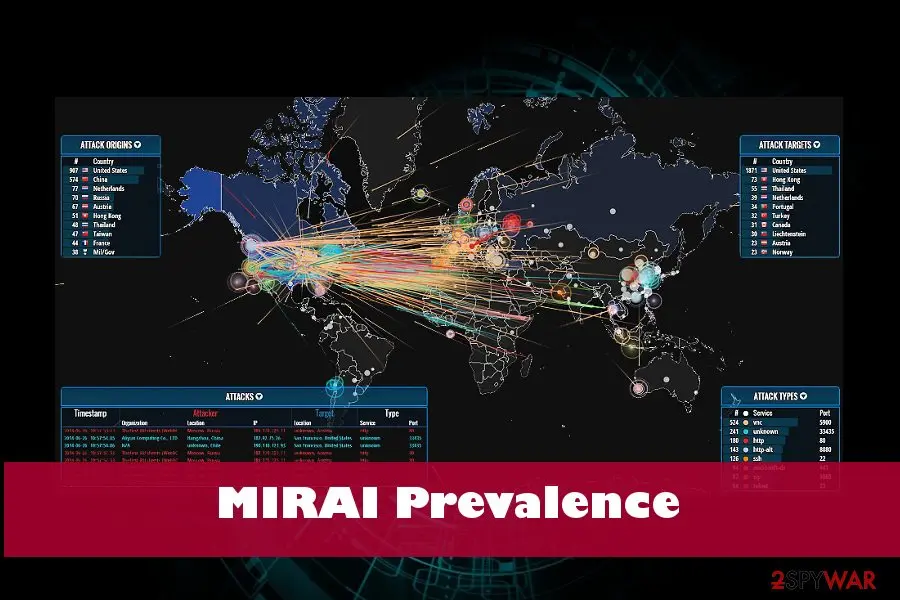
Mirai: summary
| Distribution | Exploits IoT vulnerabilities |
|---|---|
| Name | Mirai |
| Type | Malware/botnet |
| Symptoms | Causes massive DDoS attacks, outage of popular websites, disables the Internet for thousands of people |
| First detected | In 2016. Suspended in 2016 as well. The source code leaked allowed hackers to release altered Mirai malware versions |
| Versions known | Clickfraud, OMG, Okiru |
| Removal | Scan the PC with security software to find and remove the malware and anything installed with it. Fortect scans Windows for malware and repairs the system files and settings it damaged. Remove it nowTo use the full-featured product, you have to purchase a license for Fortect. The scan is free. |
Show 5 more facts
| Detection names | No Microsoft detection name is known |
|---|---|
| Damage | Not recorded in the old report |
| Evidence | 12 write-ups by security sites; details still limited |
| First seen | 23 November 2018 |
| Facts checked | 7 October 2026 |
What Mirai does on an infected PC
From our report of Nov 2018 · not reviewed since
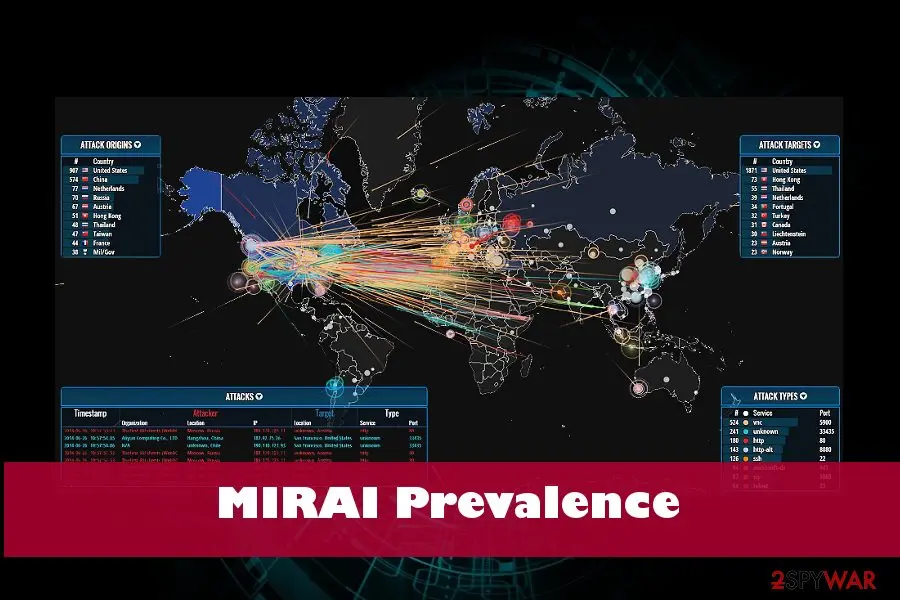
Mirai malware is a sophisticated botent launched by cybercriminals in 2016 and is still active today
Mirai botnet or Mirai virus is sophisticated malicious software that was first potted by a whitehat malware research group MalwareMustDie in August 2016.
The virus focuses on abusing vulnerabilities on IoT devices that run on Linux operating system. The primary goal of Mirai was to create a worldwide botnet which hosted DDoS attacks targeted towards large organizations like DNS provider Dyn and cloud computing company OVH, as well as security website Krebs on Security, although it was also used for fraud like click-bait.
According to its creator, Anna-senpai, the name of the threat came from anime series Mirai Nikki and generally means "Future" in Japanese. At the end of 2016, Mirai malware was leaked to the public for everybody else to use. Since then, multiple attacks have been launched, and the most recent one seems to be utilizing Hadoop YARN vulnerability to attack Linux machines instead of IoT devices.
In 2017, USA officials unsealed court document indicating the names of the three men responsible for the Mirai botnet development and massive DDoS attacks. Paras Jha, Josiah White, and Dalton Norman were indicted by Alaska court on multiple charges.
All of them acknowledged the participation in the attacks and were plagued guilty. Each of them was imposed for up to five years imprisonment and a fine of at least $250,000.
Mirai botnet and Mirai malware are the terms that are used interchangeably and can be. The core difference is that the system should initially be infected with Mirai malware to be connected to Mirai botnet later.
Mirai botnet refers to a "bot" of networked devices running Linux that are joint together and controlled remotely by a group of hackers. The interconnected devices are further scanned for IP address of Internet of things (IoT) devices. The scan allows the malware to identify the vulnerabilities in IoT devices (routers, cameras, DVRs, and other Internet of Things) by applying a table of 60 common factory default usernames and passwords.
Once the botnet detects vulnerable devices, they are infected with Mirai malware. Infected machines are initially hard to recognize as they keep working in a quite usual manner despite some periods of slowdowns or random crashes. However, the Mirai is a severe IoT malware that can be used for launching DDoS attacks massively and causing real havoc on the Internet infrastructure worldwide.
From our report of Nov 2018 · not reviewed since
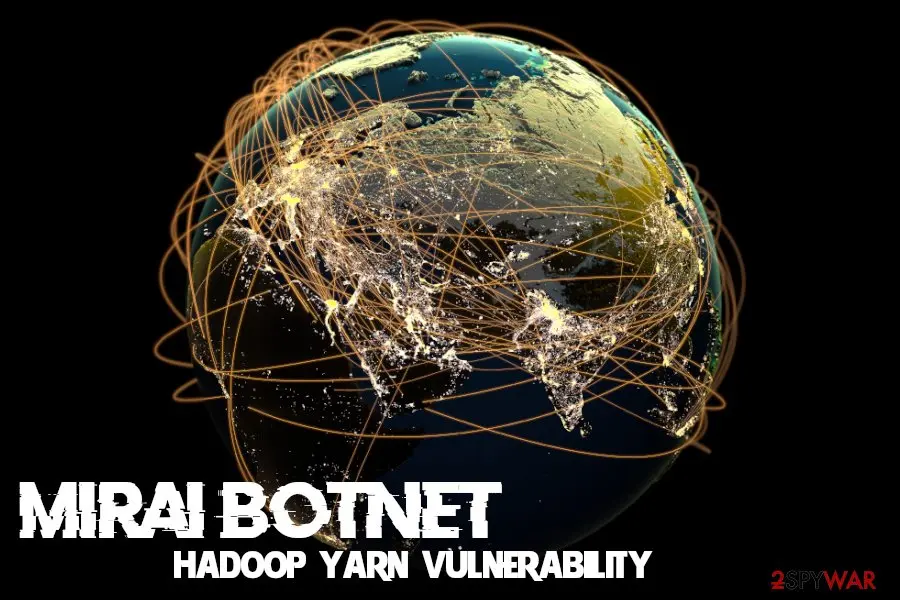
Mirai botnet utilizes Hadoop vulnerability to attack Linux servers
Security researchers at NETSCOUT ASERT spotted a variant of Mirai which avoids IoT devices and seeks to infect Linux operated servers instead.
It abuses Hadoop YARN vulnerability CVE-2017-15718 that can execute arbitrary shell commands on an unpatched server. According to research, there are over 1,000 vulnerable servers that are exposed.
In November alone, experts observed 225 unique attacks, from which 152 were delivered from one address. A large amount of exploit attempts coming from only a few sources led researchers to the conclusion that there is only a small number of attackers who are scanning the internet to exploit the vulnerable machines (Mirai does not rely on a botnet to propagate).
This time, bad actors depend on x86 machines only, as Hadoop YARN (Yet Another Resource Negotiator) services are only running on x86 Linux servers.
Once injected, the payload then starts brute-forcing Telnet credentials, just as the original version did. Mirai virus also uploads DemonBot DDoS bot and cryptocurrency mining malware.
One of the variants observed by researchers was called VPNFilter, although it has nothing to do with the sophisticated malware that infected 500,000 devices in May.
From our report of Nov 2018 · not reviewed since
Attacks against famous companies attract attention to Mirai botnet
Mirai virus got into the spotlight again after disrupting the Internet connection for German telecommunication company, Deutsche Telecom, users .
While the virus occasionally appeared here and there since then, daily Internet users might not have worried about its threatening presence. However, the attack against Deutsche Telecom has been a serious warning for the entire virtual community.
After updating its source code, hackers employed the malware for disabling the Internet connection for about million users of Deutsche Telecom customers. Specialists suspect that the cyber criminals did not plan to shut down the connection but merely steal vital information from the affected devices. However, as the server was overloaded with malware signals, the campaign did not work out as expected.
Luckily, only 5% of all clientele might have suffered from the cyber attack. Zyxel routers happen to be one of the most vulnerable devices . Though virus researchers expect the malware to slow down in the following days, signs of related DDoS attacks have been traced to Africa.
What is more, the origin of September attacks on Japan's defense and SDF (Self Defense Forces) and Korea's military cyber systems are questioned as well. Such Internet disrupting cyber assaults were not the only ones recently. Last month, several US telecommunications companies experienced a similar attack.
From our report of Nov 2018 · not reviewed since
The origin of the Mirai
Mirai malware is supposedly originated from Japan as the title means "future" in Japanese .
What is more, is an author is expected to be a user under the pseudonym "Anna-senpai" . The very name originated from Japanese anime culture. Though daggers are pointed to Japanese hackers, these attacks are most likely the wrongdoings of foreign cyber criminals.
However, international racketeers have joined this ominous business as the latter version of Mirai (Linux.Gafgyt.B) might have come from Brazil. Brazilian hackers have been the primary suspects for launching banking trojans.
The original version of Mirai malware targets mainly IoT technologies and Linux systems. By exploiting vulnerable IoT devices, the virus turns them into a virus-distributing botnet. Mirai network has been used for delivering massive DDoS (distributed-denial-of-services) attacks as well.

From our report of Nov 2018 · not reviewed since
Clickfraud botnet allowed crooks to generate revenue artificially
Within a year since 2016 to 2017, the group of three American programmers managed to infect more than 100,000 computing devices and connected them to a bot, later named as Clickfraud.
The infamous Clickfraud bot allowed crooks to generate revenue by scamming online ad networks and simulating clicks. After the attacks were unraveled, John Cronan, an assistant attorney general, stated:
The scheme earned Jha and his team nearly 100 bitcoin, which was worth then approximately $180,000. Currently, the earning would exceed $7.5 million
From our report of Nov 2018 · not reviewed since
Terminating Mirai malware
Though Mirai virus mainly attacks IoT devices, it is destructive to think that Windows OS or Mac OS owners users are safe from this cyber misfortune.
Since the developers got determined to surprise the world with unseen hijack techniques, arming with reliable protection is of primary importance. In the case of mentioned operating systems, you can remove Mirai by using or .
Keep in mind that the utilities have to be updated for them to work properly. In order to terminate Mirai hijack, disconnect from the internet and enter Safe Mode with networking. Further instructions will explain in detail how to do that. They will also come in handy if you cannot complete Mirai removal.
From our report of Nov 2018 · not reviewed since
More from our earlier report on Mirai
- Use a professional anti-virus tool.
- The Mirai and Clickfraud botnet schemes are powerful reminders that as we continue on a path of a more interconnected world, we must guard against the threats posed by cybercriminals that can quickly weaponize technological developments to cause vast and varied types of harm.
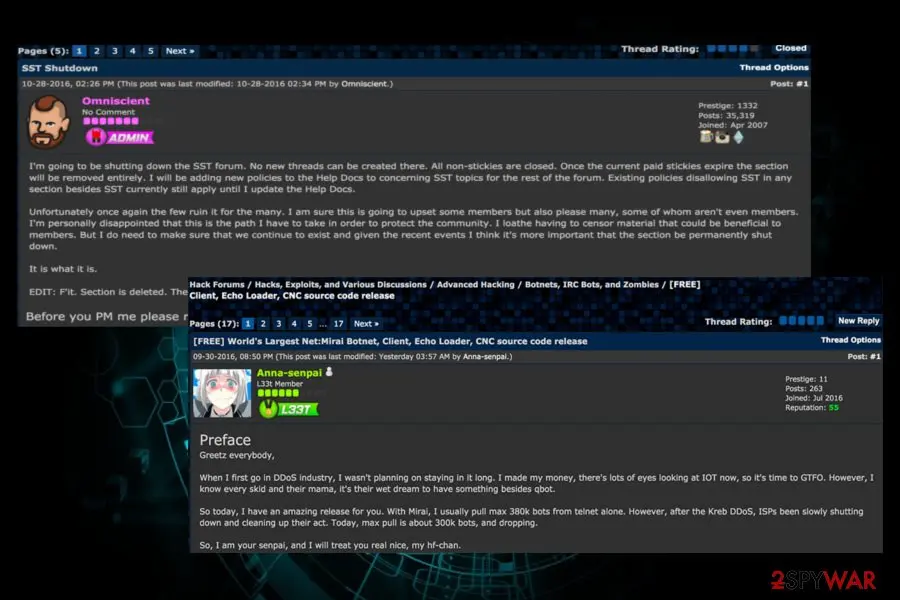
- When I first go in the DDoS industry, I wasn't planning on staying in it long," Anna-senpai wrote.
- "I made my money, there are lots of eyes looking at IOT now, so it's time to GTFO .
- So today, I have an amazing release for you.
- With Mirai, I usually pull max 380k bots from telnet alone.
- However, after the Kreb DDoS, ISPs been slowly shutting down and cleaning up their act.
- Today, the max pull is about 300k bots and dropping.
How Mirai got on your PC
From our report of Nov 2018 · not reviewed since
Mirai source code leaked after the massive DDoS attack
Jha, the developer of Mirai malware's source code, has released it publicly a week after the massive DDoS attack was being held.
It has been first published in the English-language hacking community called Hackforums. Disguised under the nickname "Anna-senpai," the Jhas told community members:
Once the Mirai botnet source code has been unraveled, cybercriminals started exploiting it for multiple DDoS attacks against Internet infrastructure and websites.
Currently, there altered versions of Mirai have been spotted on the Internet. Mirai Okiru Botnet is one of the examples. Experts spotted it at the beginning of 2018 by MalwareMustDie team. It targets ARC-based embedded devices running Linux operating system.
In February, FortiGuard Labs research team found another botnet dubbed OMG, which has been found selling credential access to the proxies for profit. According to experts, OMG report uses the original Mirai module that kills processes, scan for vulnerabilities, use brute-force login attacks, and eventually cause DDoS attacks. However, it renders two random ports to set up 3proxy.
Thus, despite the fact that the initiators of the Mirai botnet have been arrested and jailed last year, the released source code allows crooks to keep distributing the malware worldwide.
From our report of Nov 2018 · not reviewed since
Malware distribution explained
Since the malware exploits the vulnerabilities in the specific devices, manual tracking Mirai botnet might be a futile task.
If you are about to purchase IoT device, look up its manual and identify its manufactured company. After obtaining the device, change the default password into a long code containing marks, characters, and numbers.
You might also set an elaborate encryption technique to your Wi-FI or wired Internet network. Modifying security settings is a useful prevention method as well. Turn off Telnet login and employ SSH. Check your IoT manufacturer for latest updates.
How to remove Mirai
A loader's job is to install other malware, so treat the PC as infected with more than one program until the scans are clean.
Step 1: Delete scheduled tasks that bring it back
Open Task Scheduler from the Start menu and click Task Scheduler Library. Select each task you do not recognise and read the Actions tab:
- a task that starts a file in
%AppData%or%Temp% - runs
powershellwith a long encoded line - opens a web address belongs to Mirai or a similar program
Right-click such a task and choose Delete, and check the subfolders too. Leave tasks from Microsoft, your PC's maker and programs you use. Task Scheduler is the same in Windows 11 and Windows 10.

Windows 11: Task Scheduler Library, the task selected, the Actions tab shows the file it runs. Full procedure with screenshots: Remove what malware leaves behind in Windows
- a task that starts a file in
Step 2: Remove it from startup
Whatever Mirai installed usually starts with Windows. Open Task Manager with Ctrl + Shift + Esc, go to Startup apps in Windows 11 or the Startup tab in Windows 10, and disable what you do not know, starting with entries that have an empty Publisher column.
Open file location on the right-click menu shows the file, which helps you decide and tells you what to delete later. Disabling is safe: if something you need stops working, switch it back on.
Full procedure with screenshots: Stop apps from opening at startup On uGetFix
Step 3: Delete the folders left behind
What the uninstaller leaves behind is usually in the user folders. Open File Explorer, switch on View > Show > Hidden items (in Windows 10 View > Hidden items), and go through
%LocalAppData%,%AppData%, %ProgramData% and the two Program Files folders.Sort by Date modified and delete folders that appeared together with the problem and belong to no program you use. Folders with random names that hold
.exe,.dll, .js or .ps1 files are the strongest sign.Full procedure with screenshots: Remove what malware leaves behind in Windows
Step 4: Scan the PC, then run the offline scan
Open Windows Security > Virus & threat protection > Scan options, run a Full scan and remove everything it finds. Then select Microsoft Defender Antivirus (offline scan) and click Scan now: the PC restarts and scans before Windows loads, which finds files that hide while Windows runs.
Save your work first, because the offline scan takes about 15 minutes. Both scans are built into Windows 11 and Windows 10, and a second scanner from another vendor is a useful extra opinion.

Windows 11: Windows Security > Virus & threat protection > Scan options. Full procedure with screenshots: Run a Microsoft Defender Offline scan
Step 5: Change passwords from another device and sign out other sessions
Assume that the passwords saved in this PC's browsers, and the accounts that were open in them, are known to the attacker. From a phone or a clean computer, change the e-mail password first, then banking, shopping, social and gaming accounts.
Use each service's option to sign out of all other sessions, because stolen cookies keep a session open even after a password change. Turn on two-step verification on each account. Wait with the infected Windows 11 or Windows 10 PC until the scans are clean.
Full procedure with screenshots: Turn on two-step verification / secure a hacked account
Instructions for each browser and system
The detailed steps for every browser and system this guide covers. Open the one you use.
Manual removal using Safe Mode
Important! →
Manual removal guide might be too complicated for regular computer users. It requires advanced IT knowledge to be performed correctly (if vital system files are removed or damaged, it might result in full Windows compromise), and it also might take hours to complete. Therefore, we highly advise using the automatic method provided above instead.
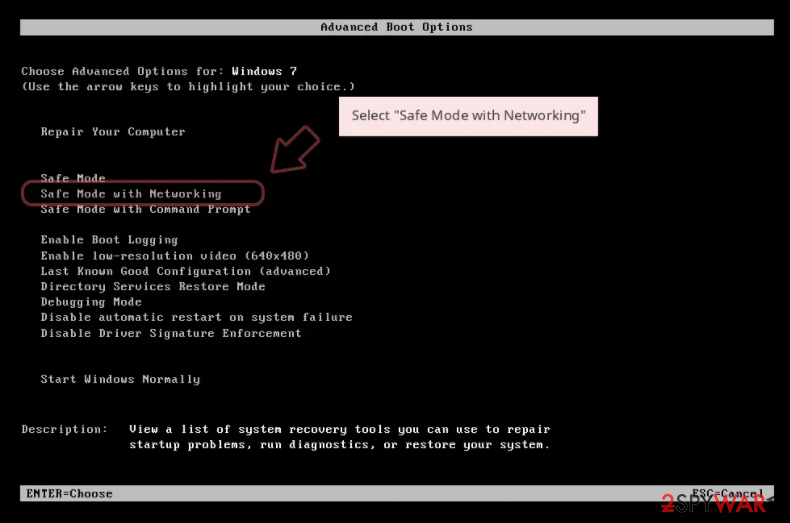
Step 1. Access Safe Mode with Networking
Manual malware removal should be best performed in the Safe Mode environment.
Windows 7 / Vista / XP
- Click Start > Shutdown > Restart > OK.
- When your computer becomes active, start pressing F8 button (if that does not work, try F2, F12, Del, etc. - it all depends on your motherboard model) multiple times until you see the Advanced Boot Options window.
- Select Safe Mode with Networking from the list.
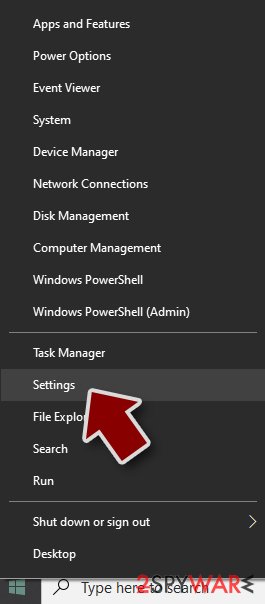
Windows 10 / Windows 8
- Right-click on Start button and select Settings.
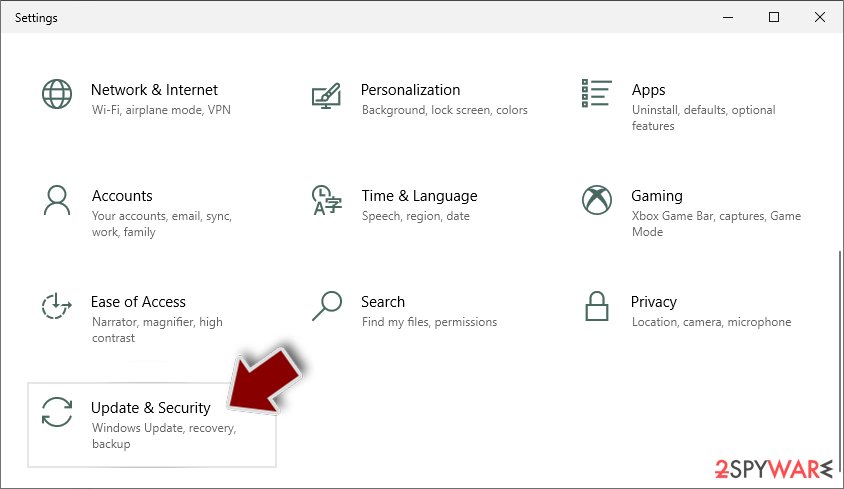
- Scroll down to pick Update & Security.
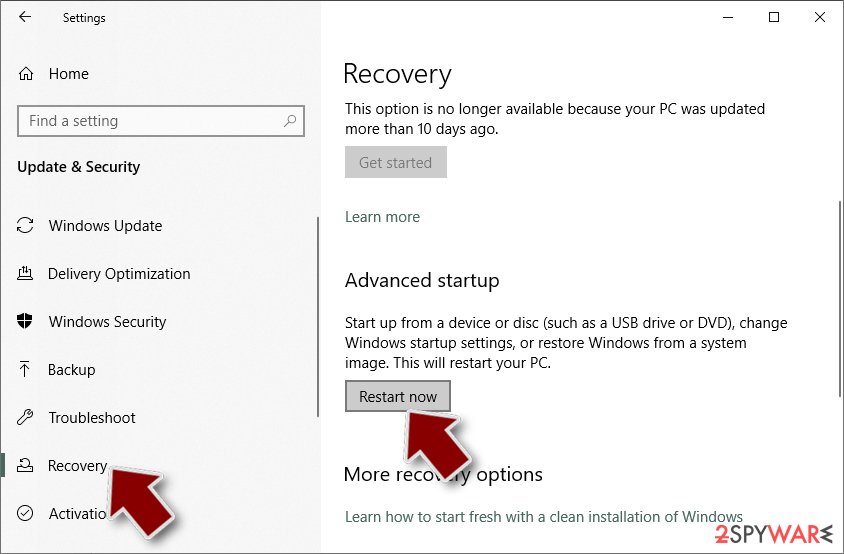
- On the left side of the window, pick Recovery.
- Now scroll down to find Advanced Startup section.
- Click Restart now.
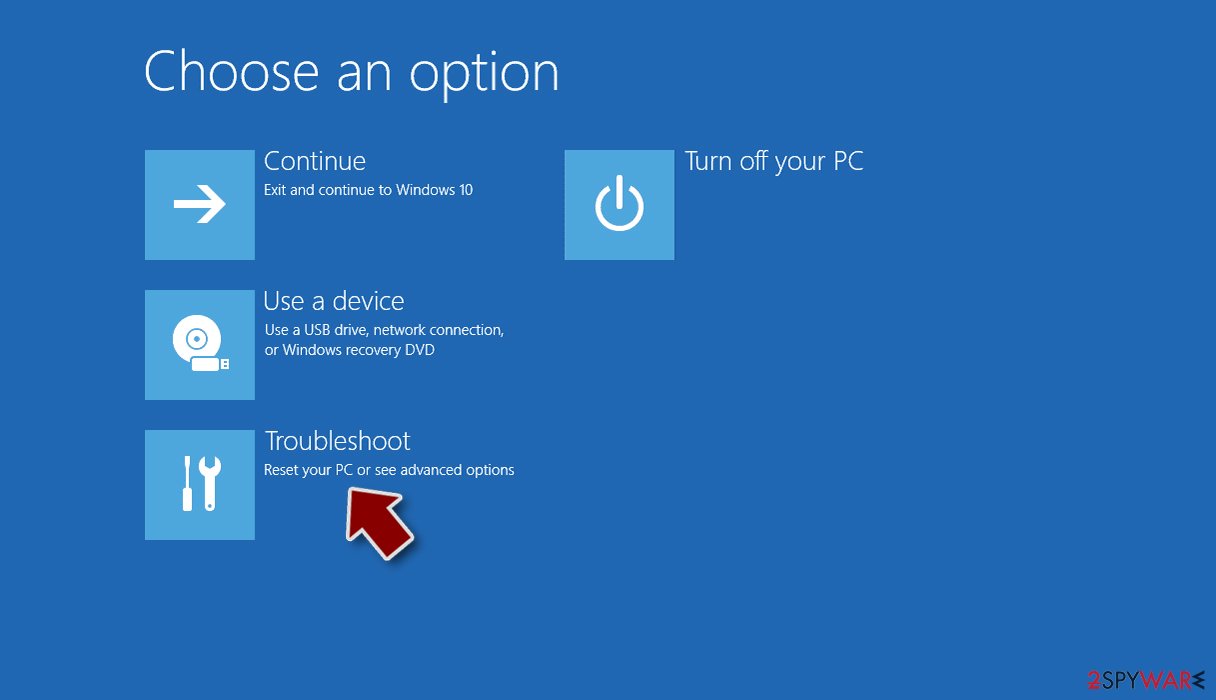
- Select Troubleshoot.
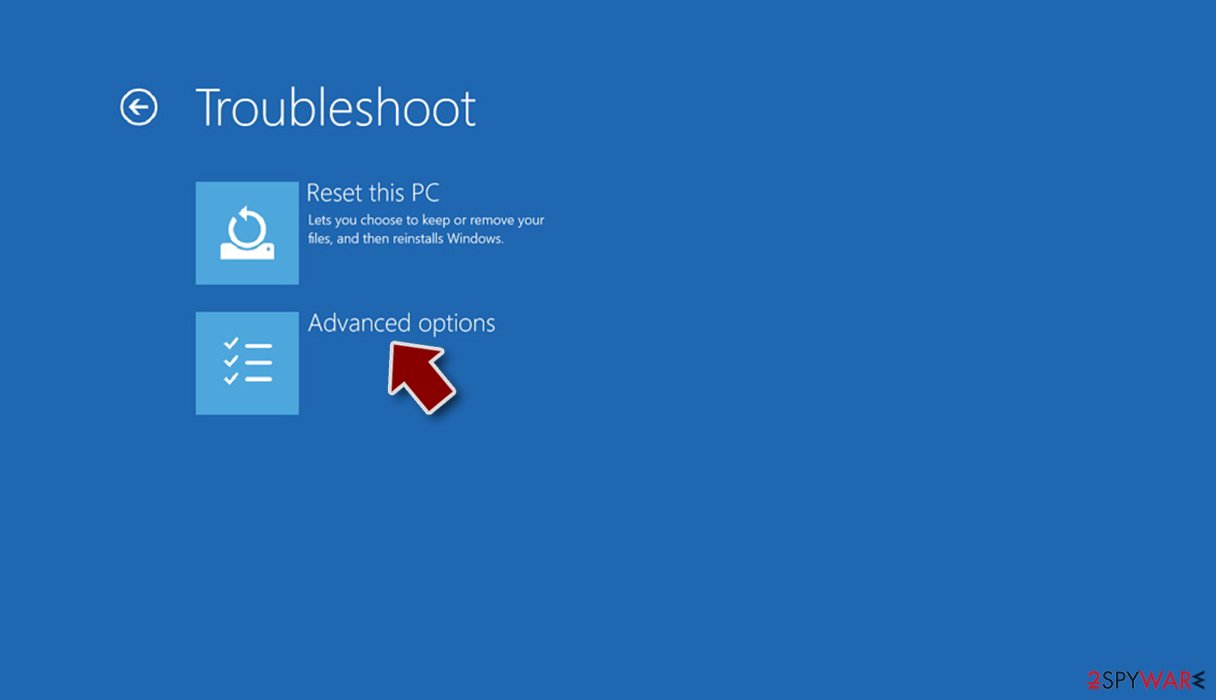
- Go to Advanced options.
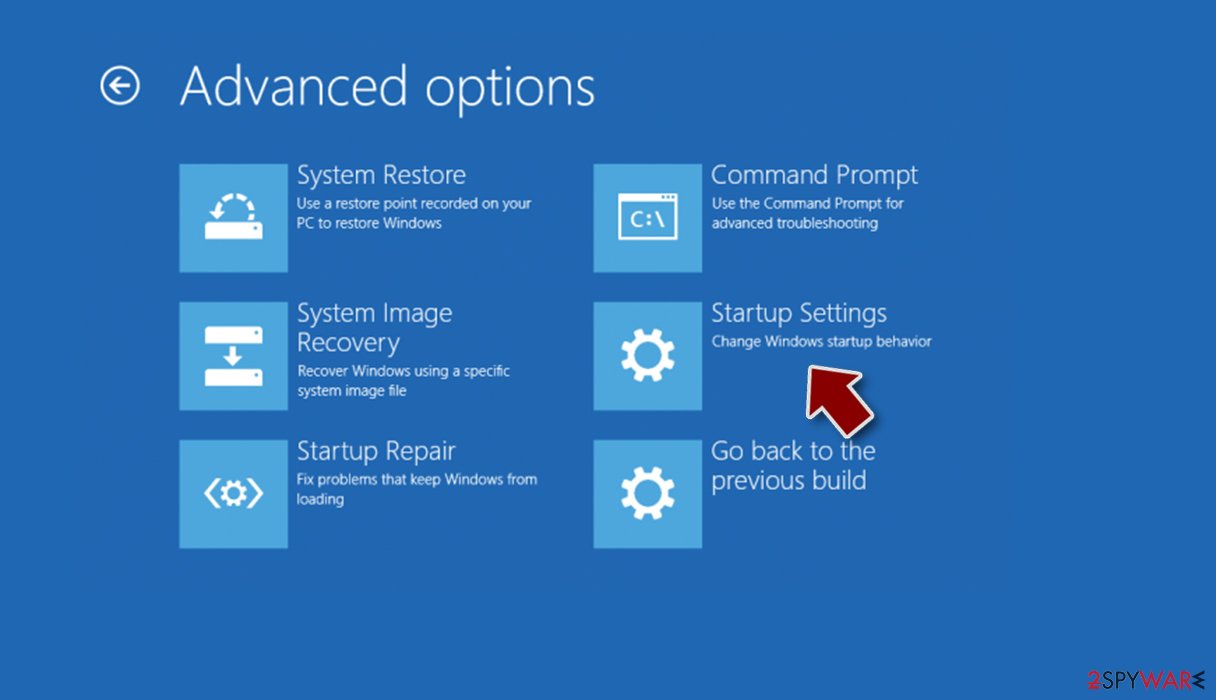
- Select Startup Settings.
- Press Restart.
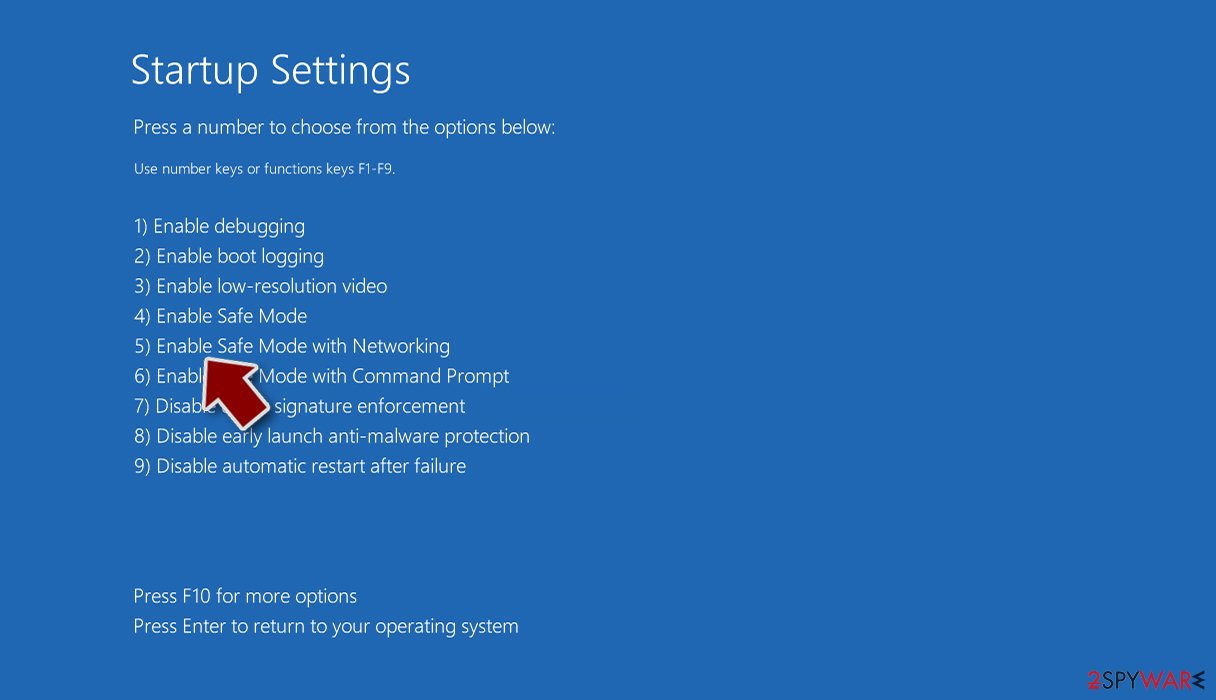
- Now press 5 or click 5) Enable Safe Mode with Networking.
Step 2. Shut down suspicious processes
Windows Task Manager is a useful tool that shows all the processes running in the background. If malware is running a process, you need to shut it down:
- Press Ctrl + Shift + Esc on your keyboard to open Windows Task Manager.
- Click on More details.
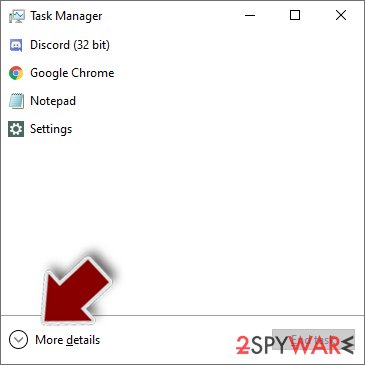
- Scroll down to Background processes section, and look for anything suspicious.
- Right-click and select Open file location.
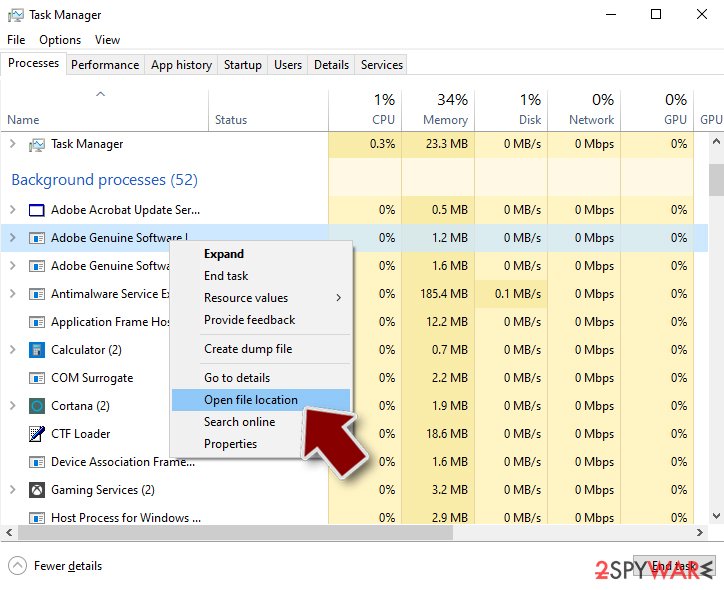
- Go back to the process, right-click and pick End Task.
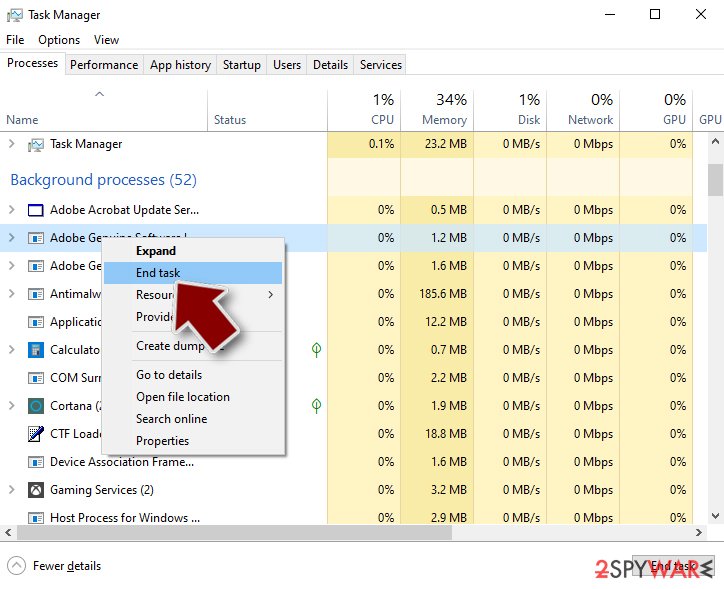
- Delete the contents of the malicious folder.
Step 3. Check program Startup
- Press Ctrl + Shift + Esc on your keyboard to open Windows Task Manager.
- Go to Startup tab.
- Right-click on the suspicious program and pick Disable.
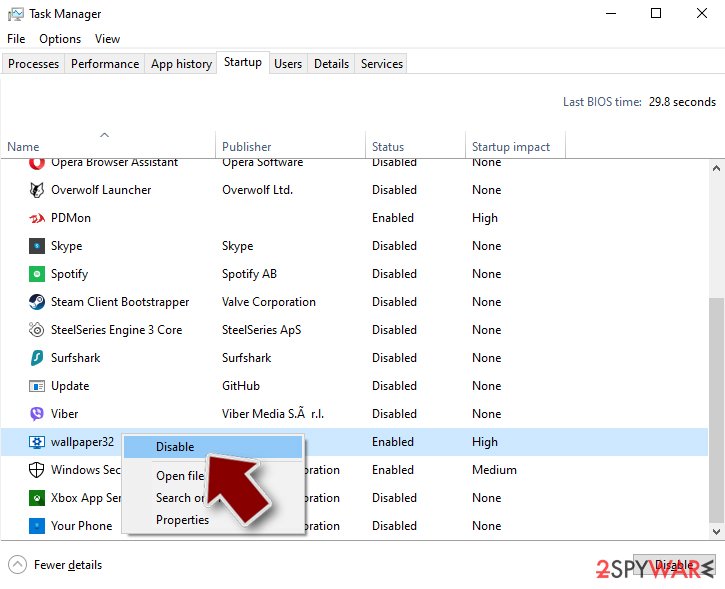
Step 4. Delete virus files
Malware-related files can be found in various places within your computer. Here are instructions that could help you find them:
- Type in Disk Cleanup in Windows search and press Enter.
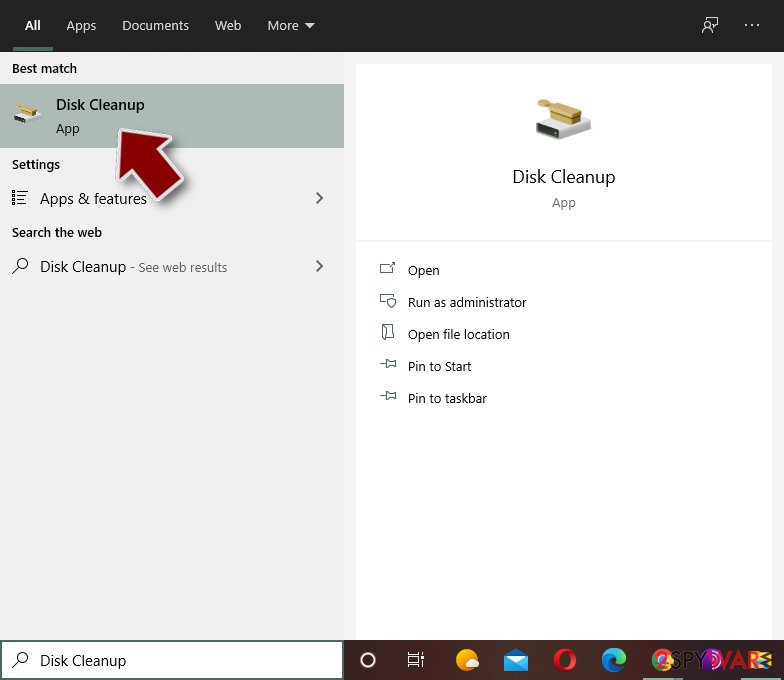
- Select the drive you want to clean (C: is your main drive by default and is likely to be the one that has malicious files in).
- Scroll through the Files to delete list and select the following:
Temporary Internet Files
Downloads
Recycle Bin
Temporary files - Pick Clean up system files.
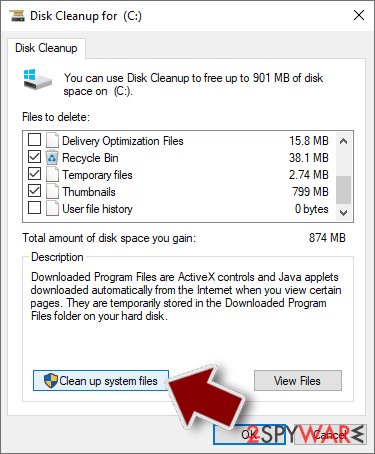
- You can also look for other malicious files hidden in the following folders (type these entries in Windows Search and press Enter):
%AppData%
%LocalAppData%
%ProgramData%
%WinDir%
After you are finished, reboot the PC in normal mode.
After removal: passwords, accounts and prevention
Your passwords after Mirai
Removing Mirai does not undo what it may already have sent out while the PC showed mirai in the list of installed apps.
Treat saved browser passwords and logged-in sessions on this PC as known to the attacker.
From another device, change the e-mail password first and end all its sessions. Then do the same for the bank, PayPal, Microsoft, Google and Apple accounts. Stolen session cookies keep working after a password change until you sign out everywhere.
Move crypto to a new wallet created on a clean device. A step-by-step order for every kind of account is in our guide to account security after an infection.
Choose a proper web browser and improve your safety with a VPN tool
Online spying has got momentum in recent years and people are getting more and more interested in how to protect their privacy online.
One of the basic means to add a layer of security - choose the most private and secure web browser. Although web browsers can't grant full privacy protection and security, some of them are much better at sandboxing, HTTPS upgrading, active content blocking, tracking blocking, phishing protection, and similar privacy-oriented features.
However, if you want true anonymity, we suggest you employ a powerful VPN - it can encrypt all the traffic that comes and goes out of your computer, preventing tracking completely.
Lost your files? Use data recovery software
While some files located on any computer are replaceable or useless, others can be extremely valuable.
Family photos, work documents, school projects - these are types of files that we don't want to lose. Unfortunately, there are many ways how unexpected data loss can occur:
- power cuts
- Blue Screen of Death errors
- hardware failures
- crypto-malware attack
- even accidental deletion
To ensure that all the files remain intact, you should prepare regular data backups. You can choose cloud-based or physical copies you could restore from later in case of a disaster. If your backups were lost as well or you never bothered to prepare any, can be your only hope to retrieve your invaluable files.
Questions about Mirai
Can I safely uninstall Mirai?
If you did not install Mirai yourself and it is not part of your hardware or a program you rely on, yes. Uninstalling an unwanted program does not harm Windows. Before you do, search the exact name and publisher to be sure it is not a driver tool, a printer utility or a game launcher with an odd name.
Then remove it from Settings, Apps, Installed apps. Ignore any offers or warnings in its uninstaller about losing protection or performance. Afterwards check Startup apps and your browsers for leftovers, and restart once to confirm that it does not reinstall itself.
Mirai came back after I uninstalled it. Why?
Something else is reinstalling it. Common causes are a second program from the same publisher, a scheduled task that downloads it again, or a browser extension that keeps prompting for it. Sort Installed apps by install date and uninstall each entry from the same day that you did not choose.
Then open Task Scheduler and look in the Task Scheduler Library for tasks with updater-style names that you do not recognise. Check Startup apps in Task Manager too. If Mirai still returns, start Windows in Safe Mode, uninstall it there and run a Microsoft Defender offline scan, which looks for loaders that ordinary scans can miss.
How dangerous is Mirai?
Treat it as serious until proven otherwise. The visible sign is mirai in the list of installed apps, and programs that behave this way often have more abilities than they show:
- copying passwords
- downloading other malware
- giving remote access
Its family is not known yet, so nobody can say which of these it uses. The good news is that the response is the same in every case and takes about an hour:
- cut the network
- remove the startup entry
- run an offline scan
- change passwords from a clean device
If someone had remote control, a full reset is safer.
Is Mirai a known trojan?
Not as a documented family, at least not yet. What is known is the visible sign, mirai in the list of installed apps, which matches a hidden program working for someone else.
New threats are often seen by victims weeks before researchers publish anything about them. Treat Mirai as you would any trojan:
- remove what starts it
- run an offline scan
- change passwords from another device
If a scan reports a detection name, keep it; it usually reveals the family and whether it is known to download other malware. We update this guide when an analysis appears.
Should I reset my PC because of Mirai?
Only if the signs point to deeper access. Reset when you see mirai in the list of installed apps again after removal, when Windows Security cannot start or update, when remote access tools you did not install keep appearing, or when you simply cannot trust the PC any more.
Otherwise, the plan in this guide plus an offline scan is enough. If you do reset, choose Remove everything and Cloud download for a fresh copy of Windows, restore only documents and photos, and reinstall programs from their official sites. Change important passwords from the clean system afterwards.
Can Mirai spread to other devices on my network?
Most trojans aimed at home users stay on the PC they infected, but an attacker with remote access can look at the network, open shared folders and try passwords on other devices. Loaders sometimes deliver worms or ransomware that do spread.
Disconnect the PC while cleaning, run a full scan on other Windows PCs, change the router's admin password and the Wi-Fi password if they were saved on the infected PC, and update the router's firmware. If other PCs show the same detection, treat them as infected too.
Can a normal remote support program be a backdoor?
Yes. Tools such as AnyDesk, TeamViewer and ScreenConnect are legitimate, but whoever controls the account behind them controls the PC. Scammers install them during fake support calls, and some trojan campaigns install them silently because antivirus programs do not flag a genuine, signed product.
If you find one you did not set up, uninstall it, check Startup apps for related entries and change passwords from another device. If money or accounts were involved, call your bank and report the incident.
Is a trojan infection worth reporting to the police?
If there was harm, yes. Unauthorised payments, accounts used for fraud, blackmail or a remote session during a scam call all belong in a report, and banks often ask for its reference number before they refund anything.
If antivirus caught Mirai before it ran and nothing was misused, there is nothing to report. Keep the evidence anyway:
- protection history
- the original download
- the dates
Businesses may also have to notify a data protection authority if personal data could have been accessed.
What are the signs of a trojan infection?
Most trojans try to leave no visible signs, so look for side effects. Common ones:
- Windows Security turned off or unable to update
- new entries in Startup apps or Task Scheduler
- programs in Installed apps you did not install
- browser settings that changed by themselves
- unusual network activity while the PC is idle
- password-reset or login-alert e-mails you did not trigger
None of these proves an infection on its own. Together with an antivirus alert naming Mirai, they are a strong reason to follow the full plan.
Will Fortect remove Mirai?
Fortect scans Windows for malware and unwanted programs and repairs the system files and settings they change, and its free scan shows what it finds on your PC before you decide anything.
For Mirai, follow the plan above as well: the browser steps take back permissions and settings that no scanner treats as a threat, and uninstalling the program that brought it removes the source.
Run Microsoft Defender's full scan and, if anything was found, its offline scan as a second opinion. If the symptoms are gone after the plan and both scans are clean, there is nothing more to do.
Sources
- Cnet: Three plead guilty to creating Mirai botnet used to crash web (read October 7, 2026)
- Wikipedia: Mirai (malware) (read October 7, 2026)
- Sputnik International: Security of Internet of Things Devices to Be Rated for First Time (read October 7, 2026)
- Krebs on Security: Who is Anna-Senpai, the Mirai Worm Author? (read October 7, 2026)
- The Hacker News: Friday's Massive DDoS Attack Came from Just 100,000 Hacked IoT Devices (read October 7, 2026)
- The Hacker News: New Mirai Okiru Botnet targets devices running widely-used ARC Processors (read October 7, 2026)
- Fortinet: OMG: Mirai-based Bot Turns IoT Devices into Proxy Servers (read October 7, 2026)