
Uazq ransomware: what it is and whether .uazq files can be restored
Uazq ransomware is a STOP/Djvu variant that encrypts your files, adds .uazq to their names and leaves _README.txt asking $999. Remove it first, then try Emsisoft's free decryptor on copies, because it only works if your files used an offline key.
Facts checked October 6, 2026. Removal steps tested on Windows 11 (26H2) and checked against Microsoft's and the browser makers' current documentation.
Automatic
Get a free scan and check if your PC is infected.
Fortect finds malware, unwanted programs and the Windows damage they leave behind, and repairs it in one pass.
A free scan checks for the encryptor still on the PC; it does not decrypt .uazq files.
Do it yourself · free Remove Uazq ransomware yourself 6 steps, about 18 minutes, no software needed.
Start the steps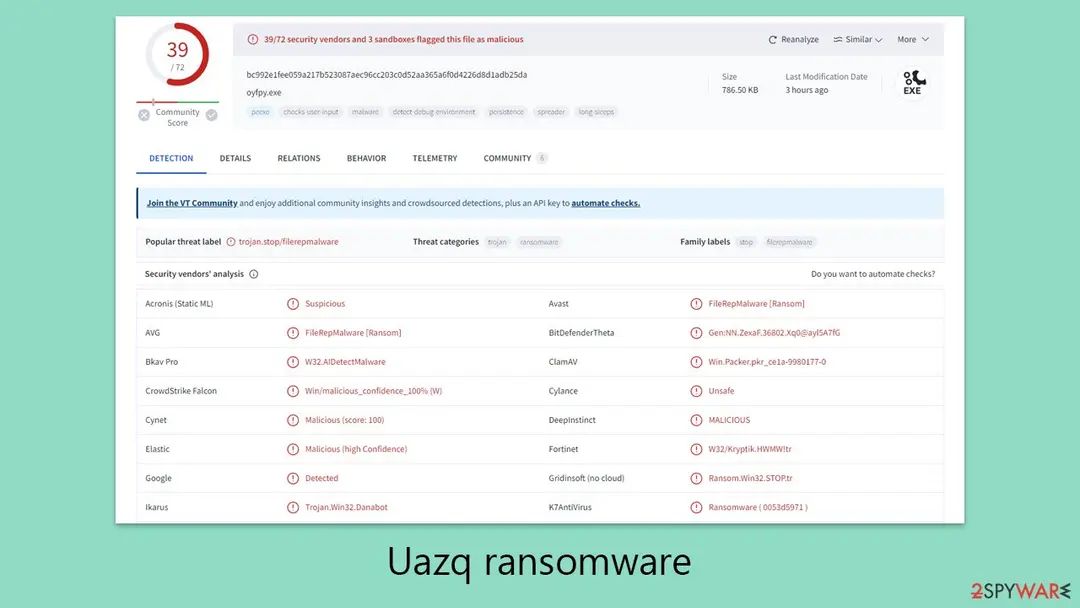
Uazq ransomware: summary
| Name | Uazq ransomware (STOP/Djvu family) |
|---|---|
| Type | File-encrypting ransomware: locks the start of each file and adds .uazq |
| Risk | High: files are usually locked with a key only the attackers hold; password stealers may come with it |
| Symptoms | Files end in .uazq, _README.txt in folders, files that will not open, a slow PC |
| How to get rid of it | Scan with Microsoft Defender offline, then try Emsisoft's decryptor on copies, then backups; see the plan |
| Our check | Source check on 6 October 2026 (PCrisk, Emsisoft, Microsoft Learn); we did not run the malware |
| Removal | Scan the PC with security software to find and remove the malware and anything installed with it. Fortect scans Windows for malware and repairs the system files and settings it damaged. Remove it nowTo use the full-featured product, you have to purchase a license for Fortect. The scan is free. |
Show 14 more facts
| First seen | 3 April 2024; the STOP/Djvu family is older |
|---|---|
| Encrypted file extension | .uazq |
| Ransom note | _README.txt: $999, or $499 within 72 hours |
| Decryptor | Emsisoft's STOP Djvu decryptor, only for files encrypted with an offline key; not confirmed for .uazq |
| Contact | support@freshingmail.top; datarestorehelpyou@airmail.cc |
| Detection names | Microsoft: Trojan:Win32/Znyonm; Avast: FileRepMalware [Inf]; Bkav Pro: W32.AIDetectMalware; Fortinet: W32/Kryptik.HWMW!tr; Kaspersky: UDS:Trojan-Ransom.Win32.Stop.gen |
| Distribution | Cracks and key generators, fake video-download sites, e-mail attachments, malicious ads, fake updaters |
| Damage | Files encrypted at the start; stealers such as Vidar and RedLine may be added |
| Evidence | 0 write-ups by security sites; no sample analysed yet |
| Encrypted files | .uazq |
| Attacker contacts | support@freshingmail.top |
| Free decryptor | No free decryptor is known (checked 6 October 2026) |
| Microsoft Defender name | Trojan:Win32/Znyonm |
| Facts checked | 6 October 2026 |
Facts checked on 6 October 2026 against PCrisk's Uazq page, Emsisoft's STOP Djvu page, Microsoft Learn and our own 2024 screenshots. We did not run the malware.
What Uazq ransomware is
Uazq is a member of the STOP/Djvu ransomware family: it encrypts personal files, adds .uazq to each name and leaves a note called _README.txt that asks $999. For most victims the key is held only by the attackers, which is why recovery is hard.
Our 2024 report did not name a currency for the $999 demand, and neither does the note; the decryptor claim is made exact in the decryption chapter.
- Family
- STOP/Djvu, placed there by PCrisk after it analysed samples on VirusTotal
- Extension
.uazqadded at the end:1.jpgbecomes1.jpg.uazq- Note
_README.txt, in the folders that hold encrypted files- Price in the note
- $999, or $499 if you write within 72 hours
- Sample we looked at
oyfpy.exe, 786.50 KB, flagged by 39 of 72 engines on VirusTotal in our screenshot- SHA-256 of that sample
bc992e1fee059a217b523087aec96cc203c0d52aa365a6f0d4226d8d1adb25da- First reported
- 3 April 2024
How the Uazq story went
Before August 2019
Old Djvu
PCrisk and Emsisoft describe an older version that used a built-in offline key when the PC could not reach the attackers' server.
August 2019
New Djvu
Emsisoft says its file-pair method does not apply to the version released after August 2019.
18 October 2019
Emsisoft decryptor 1.0.0.5
Emsisoft's STOP Djvu page is dated this day and still tells victims the decryptor needs an offline key that Emsisoft has.
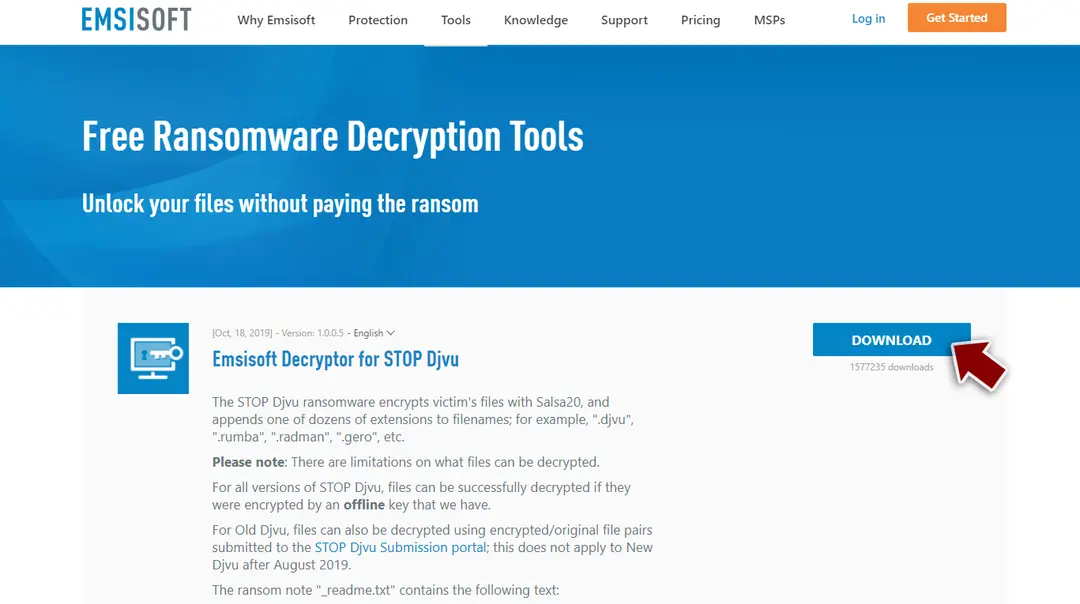
Emsisoft's STOP Djvu decryptor page: version 1.0.0.5, 18 October 2019, and its rule that files must have been encrypted with an offline key. 3 April 2024
Uazq reported
We and PCrisk wrote up
.uazq,_README.txtand the $999 demand on the same day. Our guide also pointed readers to the No More Ransom project.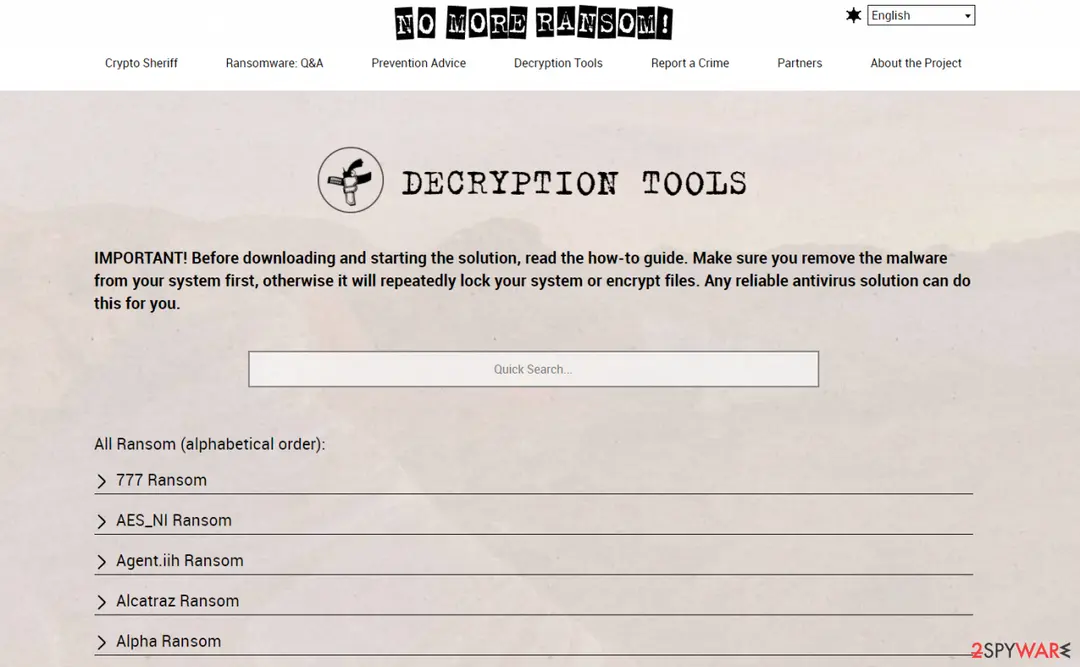
The No More Ransom decryption tools list, as shown in our 2024 guide: a search box and an alphabetical list of ransomware families. 6 October 2026
Our recheck
We reread PCrisk's page, Emsisoft's decryptor page and the Microsoft commands used here, and rebuilt the guide.
What we checked and what we did not
We did not run Uazq and no website is involved, so there is no site test: this is a check of sources and of our 2024 screenshots.
Uazq ransomware · source check · 6 October 2026
- Ransom note textOur 2024 screenshot matches the text PCrisk prints.
- Extension and note nameBoth are on PCrisk's page; the old guide wrote the note name in lower case, which Windows treats the same.
- Sample detections39 of 72 engines flag
oyfpy.exein our screenshot. - Offline or online key for .uazqNot confirmed: no source says which key type .uazq uses.
- Shadow copies, registry, security-software shutdownNot confirmed: no source lists them for Uazq.
- The steps on this pageNot tested on an infected PC; paths follow Microsoft's and Emsisoft's pages.
Probably not decryptable for free Most Djvu victims have a unique online key, so assume the files stay locked until the Emsisoft tool says otherwise or a backup exists.
Uazq ransomware detection names
If Windows Security shows Trojan:Win32/Znyonm, it has found Uazq ransomware or a file that belongs to it.
Write the name down before you click Remove: it is the most useful search term later, and you will need it if you report the incident.
A family name in the label is more informative than a heuristic one. Our page on why one threat has many antivirus names lists the common formats and what each part means.
- File extension:
.uazq - Note file:
_README.txt - Contact:
support@freshingmail.top
How Uazq ransomware behaves
What it does on the PC, step by step
The order below combines PCrisk's analysis of this sample with what is known about the wider family. We did not run Uazq ourselves, so treat it as a description, not a recording.
- 1
A downloaded program is started
A person runs a cracked installer or fake setup file. The old guide calls this bundling: the ransomware hides inside an installer for paid software.
- 2
Shellcode in several stages
PCrisk reports multi-stage shellcode that loads a library called
msim32.dll, purpose unknown, before the final stage with the encryption code. - 3
It waits and hides
PCrisk says the code loops to stretch its running time and resolves Windows functions as it goes, to slip past scanners. Our VirusTotal screenshot also tags
long sleeps,persistenceandspreader. - 4
It copies itself under another process
Process hollowing: it starts a harmless-looking process and runs the real code inside it.
- 5
Files are encrypted
Documents, pictures, databases and videos get
.uazqon their names. PCrisk says Djvu locks only the start of a file, enough to make it unusable. - 6
The note is dropped
_README.txtappears in each folder with encrypted files, with two e-mail addresses and a personal ID. - 7
Other malware may follow
PCrisk says Djvu operators often add stealers such as Vidar and RedLine, so saved passwords are at risk.
File types the old guide says are targeted
- Documents
- Pictures
- Videos
- Databases
- Other valuable files
What the note demands
The note sells a decrypt tool and a private key for $999, halves it to $499 for anyone who writes within 72 hours, and offers one file as a free test.
| Item | What the note says | What it means |
|---|---|---|
| Price | $999 for the private key and decrypt software | No currency is named; PCrisk says ransoms are usually asked in bitcoin. |
| Discount | 50 percent ($499) if you write in the first 72 hours | A clock to rush you; nothing about the files changes after three days. |
| Free test | One encrypted file decrypted, with no valuable content | Proves at most that a key exists, not that it will be sold to you. |
| Warning | Do not ask YouTube helpers or recovery sites; they may use up the free quota and scam you | The attackers want to be your only contact. |
| Threat | "You'll never restore your data without payment" | Not true for every file: backups and some offline-key cases exist. |
How it reaches PCs
No source names how this particular copy of Uazq got onto the first victims.
PCrisk and the old guide describe the family's usual routes.
- High
Cracks, keygens and activators
The old guide's main route is bundling: a crack or unofficial installer hides the ransomware and starts it silently during setup. PCrisk lists pirated software, cracking tools and key generators first.
- Medium
Fake video-download sites
PCrisk lists sites that promise YouTube video downloads and trick people into starting the program.
- Medium
Malicious e-mail, ads and updaters
PCrisk names e-mail attachments, malicious ads, drive-by downloads, fake updates, peer-to-peer networks and infected USB drives.
What to do in the first hour
Stop it spreading, keep what is left, then clean the PC before any recovery.
- 1
Cut the PC off the network
Unplug the cable and turn Wi-Fi off, so it cannot reach its server or shared folders.
- 2
Pull out external drives and sign out of cloud sync
A plugged-in backup can be encrypted too. Eject USB drives and pause cloud syncing.
- 3
Save the note and one encrypted file
Copy
_README.txtand one small.uazqfile to a USB stick for the decryptor and any police report. - 4
Do not pay and do not contact the e-mail addresses
Writing to them only starts the 72-hour clock.
- 5
Scan from outside Windows
Open Windows Security > Virus & threat protection > Scan options, choose Microsoft Defender Antivirus (offline scan) and press Scan now. The PC restarts and scans before Windows loads.
System damage and stolen passwords
The old guide warned of crashes after installation. We found no source for system damage beyond the encryption itself; what is documented is the extra password stealers, so treat your logins as exposed.
- 1
Change your passwords from a clean device
Start with e-mail, banking and cloud accounts, then turn on two-step sign-in. PCrisk warns that Vidar and RedLine, which Djvu operators often add, take saved passwords.
- 2
Look at the hosts file
Open Notepad as administrator, open
C:\Windows\System32\drivers\etc\hostsand set the file type to All files. Delete lines that are not comments (#) and point security sites to another address, then save. No source we read says Uazq edits it, so this is a check, not a finding. - 3
Check protected system files
Open Command Prompt as administrator and run
sfc /scannow. Microsoft documents it as the command that scans protected system files and repairs files with problems when possible.
| Old claim | Status | Our reading |
|---|---|---|
| Installation causes crashes and errors | Not confirmed | No source describes crashes for Uazq |
| A PC repair program fixes the damage | Dropped | A promotion; sfc /scannow is the documented check |
| Antivirus alone cannot decrypt | Correct | A scan removes the program, not the lock on your files |
The Uazq ransomware note
ATTENTION!
Don't worry, you can return all your files!
All your files like pictures, databases, documents and other important are encrypted with strongest encryption and unique key.
The only method of recovering files is to purchase decrypt tool and unique key for you. This software will decrypt all your encrypted files.
What guarantees you have? You can send one of your encrypted file from your PC and we decrypt it for free. But we can decrypt only 1 file for free. File must not contain valuable information.
Do not ask assistants from youtube and recovery data sites for help in recovering your data. They can use your free decryption quota and scam you.
Our contact is emails in this text document only.
You can get and look video overview decrypt tool: [link omitted]
Price of private key and decrypt software is $999.
Discount 50% available if you contact us first 72 hours, that's price for you is $499.
Please note that you'll never restore your data without payment.
Check your e-mail "Spam" or "Junk" folder if you don't get answer more than 6 hours.
To get this software you need write on our e-mail: support@freshingmail.top
Reserve e-mail address to contact us: datarestorehelpyou@airmail.cc
Your personal ID: [the ID is cut off in our screenshot, not reproduced here]
Can Uazq ransomware files be decrypted?
Can .uazq files be decrypted?
Sometimes, but not for most victims. Emsisoft's STOP Djvu decryptor works only if your files were locked with an offline key that Emsisoft has; PCrisk says that in most cases Djvu uses an online key, and then there is no free way back.
The old guide called the tool useful for "a limited number of victims"; the key rule above is the exact version. It also said keys sometimes appear after police action, which we could not source for this family, so it stays only as a reason to keep your encrypted copies.
| What the decryptor shows | What it means | Next step |
|---|---|---|
| Files are listed as decrypted | An offline key that Emsisoft has | Copy them to another drive and open a few |
| Error: Unable to decrypt file with ID | An offline key that Emsisoft does not have yet | Keep the encrypted copies and try again later |
| This ID appears to be an online ID, decryption is impossible | A unique key that only the attackers hold | Move to backups and the recovery steps below |
- 1
Finish the clean-up first
A program still on the PC can lock the files again.
- 2
Work on copies
Copy the
.uazqfiles to another drive; a failed run can damage a file. - 3
Download the tool from Emsisoft only
Use emsisoft.com/en/ransomware-decryption/stop-djvu. After the download starts, open
decrypt_STOPDjvu.exe; choose Yes when User Account Control asks. - 4
Accept the licence terms and the disclaimer
Press Yes for the licence and OK for the disclaimer.
- 5
Choose the folders
The tool lists the drives it found. Tick the folders that hold
.uazqfiles, use Add folder for more, and press Decrypt.
Do
- Download the decryptor from Emsisoft's own site
- Keep the encrypted files until the decrypted ones open
Don't
- Do not pay anyone who sells a "Uazq unlocker"
- Do not rename .uazq files by hand
Should you pay the ransom?
No. The note asks $999, and nothing obliges the attackers to send a key, to send one that works, or to answer a second message.
- High
You can pay and get nothing
Many victims report further demands, promises that were not kept, or files that stayed locked. The free test file shows only that a key exists.
- High
Your payment pays for the next version
Money goes to the people who release new Djvu variants, so paying keeps the cycle going.
- Medium
The discount is a timer
The $499 price in the first 72 hours is built to rush you. Try backups and the free tools first.
How to remove Uazq ransomware
Tools you'll need
All of these are free except where noted. Download them on a clean device if the infected PC is offline.
- A USB stick: to keep the ransom note, two or three encrypted files and screenshots off the infected PC.
- Microsoft Defender Offline: built into Windows 11 and Windows 10; scans before Windows starts, so running malware cannot hide.
- Microsoft Safety Scanner: a second, portable scanner with current signatures; each download works for 10 days.
- ID Ransomware: identifies the family from the note and one encrypted file and says whether a decryptor exists.
- No More Ransom: the free decryptors from police and security companies; check it again every few months.
- Fortect (optional): scans Windows for malware and repairs the system files and settings it damaged. The free scan is in the box above.
How to remove Uazq ransomware and get your files back
Work in this order.
Disconnecting comes first, removal comes before any restore, and nothing here asks you to contact the attackers.
Step 1: Disconnect the PC and unplug backup drives
Uazq ransomware encrypts everything it can reach, including drives and shares you connect later. Cut the network first: cable out, or Wi-Fi off from the taskbar.
Then unplug every USB stick and backup disk and pause cloud sync, so the encrypted versions do not replace your online copies. Do not reconnect any of them until the ransomware is removed from the Windows 11 or Windows 10 PC.
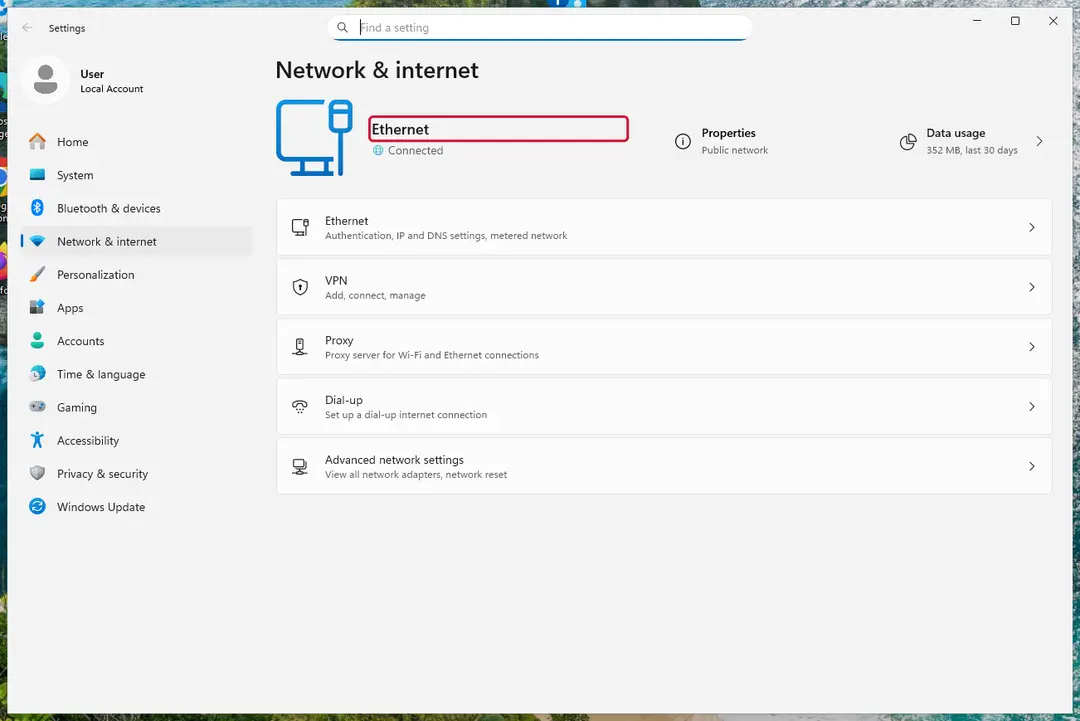
Windows 11: turn off Wi-Fi to take the PC offline. Full procedure with screenshots: Ransomware: first steps, finding a decryptor and recovering files
Step 2: Save the ransom note and confirm the family
Copy
_README.txtand one or two files ending in.uazqto a USB stick, and leave the originals where they are.From another device, upload the note and a sample file to ID Ransomware or No More Ransom's Crypto Sheriff, which name the family from the note, the extension and the file structure.
Write down the contact address and your personal ID from the note, because a decryptor or the police may ask for them.
Warning: Never contact the attackers from the infected Windows 11 or Windows 10 PC.
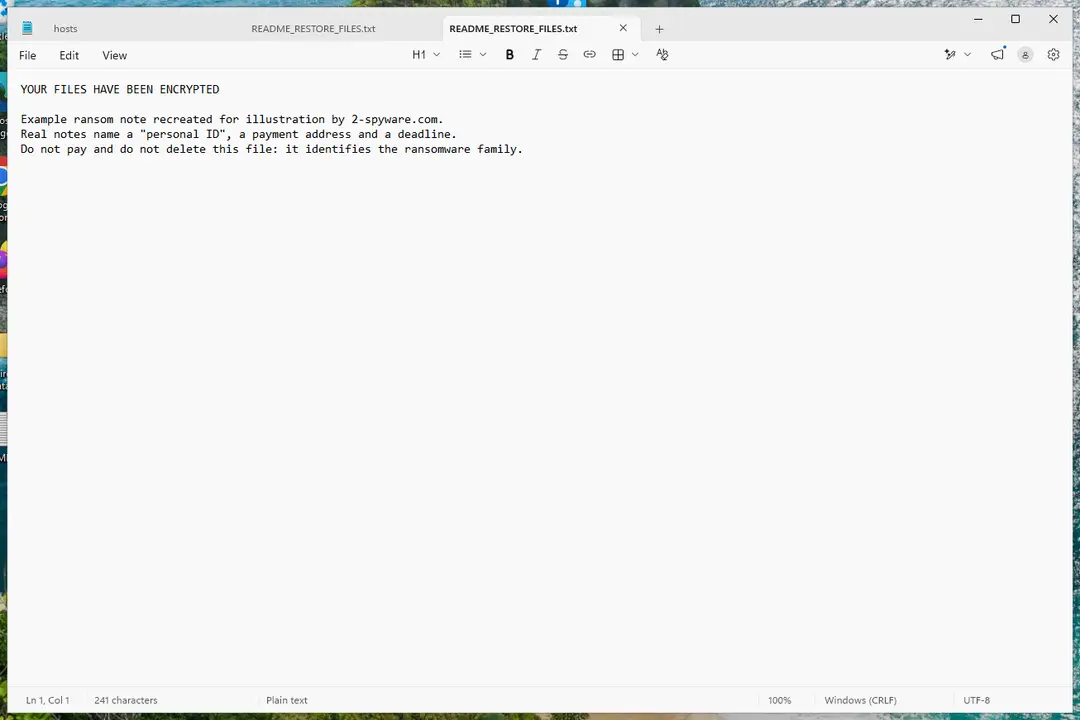
Windows 11: the ransom note and encrypted files to copy for identification. Full procedure with screenshots: Ransomware: first steps, finding a decryptor and recovering files
Step 3: Check for a free decryptor
For Uazq ransomware, no free decryptor is known (checked 6 October 2026). Search the family name in the No More Ransom decryption tools list and in the free decryptors of Emsisoft, Avast and Kaspersky, because new tools appear years after an attack.
Important: Keep the encrypted files even if nothing works today, and do not pay before every free option is ruled out: payment does not guarantee a working key.
Decryptors run on Windows 11 and Windows 10, but only after the ransomware itself is removed.
Full procedure with screenshots: Ransomware: first steps, finding a decryptor and recovering files
Step 4: Remove the ransomware before you restore or decrypt
Restoring or decrypting files while Uazq ransomware still runs lets it encrypt them again. Run a Full scan in Windows Security > Virus & threat protection > Scan options, then the Microsoft Defender Antivirus (offline scan).
If the ransomware blocks Windows Security, start Safe Mode with Networking and scan from there. Some families install a password stealer as well, so let both scans finish on Windows 11 or Windows 10.

Windows 11: Windows Security > Virus & threat protection > Scan options. Full procedure with screenshots: Run a Microsoft Defender Offline scan
Step 5: Look for shadow copies of the files
Open Command Prompt as administrator and run
vssadmin list shadows. If it lists copies dated before the attack, right-click a folder with encrypted files in File Explorer, choose Properties > Previous Versions, and open or restore a version from before that date.ShadowExplorer, a free tool, shows the same copies when the tab is empty or hidden. Most current families delete shadow copies, so an empty list is normal, but the check takes two minutes on Windows 11 or Windows 10.
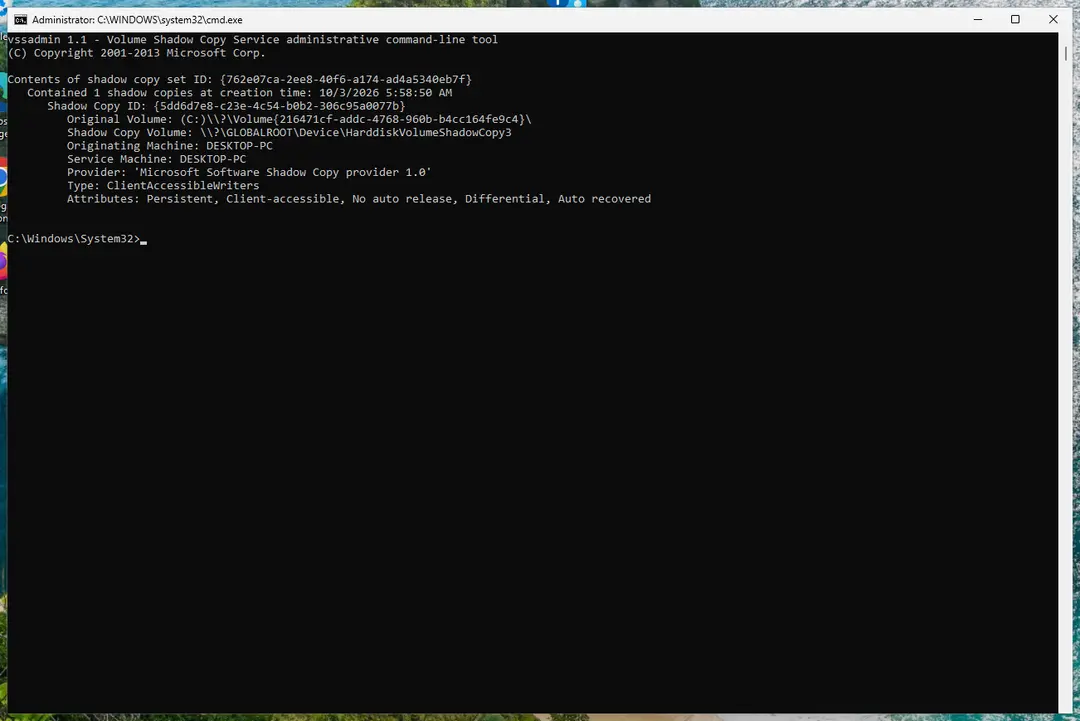
Windows 11: vssadmin list shadows shows whether shadow copies exist. Full procedure with screenshots: Ransomware: first steps, finding a decryptor and recovering files
Step 6: Restore the files from a backup or recover deleted originals
Restore from an external backup, File History or OneDrive's version history, choosing a date before the attack. Connect the backup drive only after the scans are clean, or the ransomware encrypts it too.
If there is no backup, file recovery software can sometimes find the deleted originals, because some ransomware writes an encrypted copy and deletes the original file.
Stop writing to the drive and try recovery on Windows 11 or Windows 10 before new files overwrite the space.
Full procedure with screenshots: Recover deleted files (Recycle Bin, backups, OneDrive) On uGetFix
Report it and recover your files
Report it
Report the attack even if you do not expect the files back: insurers and banks ask for the report number, and police use the contacts in the note to link cases.
- United States
- FBI IC3 · FTC ReportFraud
- United Kingdom
- Report Fraud (formerly Action Fraud) · NCSC
- Australia
- ReportCyber (ASD)
- EU countries
- Europol: national reporting sites
Give the victim ID, the note and the date the files were encrypted. A business that holds personal data may also have to notify its data protection authority, in the EU within 72 hours.
If decryption does not work: other ways to get files back
The old guide named backups, recovery software and decryption tools.
This is the order we would try them in, after the clean-up.
- 1
Your own backups
An external drive, NAS or cloud copy that was not connected during the attack. Test a few files before you delete the encrypted ones.
- 2
Version history in the cloud
OneDrive, Dropbox and Google Drive keep earlier versions. Restore a version dated before the infection from the service's website.
- 3
Previous Versions and shadow copies
Right-click the folder and choose Properties > Previous Versions (on Windows 11 choose Show more options first). As administrator run
vssadmin list shadows; Microsoft documents it as the command that lists existing shadow copies. - 4
PhotoRec for deleted originals
PCrisk says some victims restored part of their data with CGSecurity's free PhotoRec. Work from another drive and expect only part of the files.
- 5
Media_Repair for audio and video
Because only the start of a Djvu file is locked, PCrisk points to DiskTuna's Media_Repair: the start is lost but much of the rest can play.
- 6
Keep the encrypted files
Free decryptors sometimes appear later. The No More Ransom project lists them by family, and Emsisoft and Kaspersky publish free decryptors; check again every few months.
- 7
Report it
PCrisk lists ic3.gov and stopransomware.gov for the United States, and your national police or CERT elsewhere. Keep
_README.txtfor the report.
Back up with the 3-2-1 rule
Backups do not stop an infection, but they decide how much it costs.
The 3-2-1 rule that CISA's ransomware guidance recommends turns the old advice into a plan.
Do
- Keep 3 copies, on 2 kinds of storage, with 1 kept away from the PC
- Unplug a USB backup drive after each backup
- Restore one file from each backup now and then to prove it works
Don't
- Do not leave the only backup plugged in all the time
- Do not keep the backup in a folder that cloud sync mirrors without version history
How to prevent Uazq ransomware and the next attack
The family spreads through things people choose to run, so the habits below match what PCrisk and the old guide describe.
Do
- Download software from its maker's website or an official store
- Keep Windows, your browser and Microsoft Defender updated, with automatic updates on
- Treat an e-mail attachment you did not expect as unsafe
- Optional: G DATA's STOP/Djvu vaccine, which PCrisk says stops the encryption (we have not tested it)
Don't
- Do not install cracks, keygens or "free" copies of paid programs
- Do not use video-download sites that ask you to install a program
- Do not use P2P or torrent sites for software
- Do not click ads or fake update prompts
Questions about Uazq ransomware
How do I open .uazq files?
You cannot open them: the start of each file is encrypted and renaming it does nothing. Copy the files, remove the program, and try Emsisoft's STOP Djvu decryptor on the copies. If it says the ID is an online ID, restore from a backup, cloud version history or Previous Versions instead.
Some audio and video files play again after a repair tool such as Media_Repair, because only their start is lost. Do not change the extension by hand; that only makes the file harder to tell apart.
Is there a free decryptor for Uazq ransomware?
Maybe, but probably not for your files. Emsisoft's STOP Djvu tool works only when the files were locked with an offline key that Emsisoft has, and PCrisk says most Djvu victims have an online key. We found no source saying which type .uazq uses, so run the tool on a copy and read the answer:
- decrypted files
- an error asking you to try later
- an online ID
Download it only from Emsisoft. Emsisoft says its tool comes with no warranty and may not cover newer versions.
Should I pay the Uazq ransom?
No. The note asks $999, or $499 within 72 hours, and offers one free file as proof. Paying does not oblige the attackers to send a working key, and the discount exists to rush you.
Remove the malware first, try the Emsisoft tool, then backups, cloud versions and Previous Versions. If nothing works, keep the encrypted copies: a decryptor for a variant sometimes appears later, and the saved files can be tried then. A payment also marks you as someone who pays.
What does the _README.txt note say?
It is an English text that says your files are encrypted with the strongest encryption and a unique key, and that the only way back is to buy a decrypt tool and key.
It offers one free decryption, asks $999 ($499 within 72 hours), gives two e-mail addresses and asks you to quote your personal ID. It warns you not to ask YouTube helpers or recovery sites for help and ends with a line that you will never restore your data without payment.
How did Uazq get on my PC?
Probably through something you ran yourself. The old guide says the family spreads by bundling: a crack or unofficial installer for a paid program that hides the ransomware. PCrisk adds fake video-download sites, e-mail attachments, malicious ads, fake updates and peer-to-peer downloads.
No source names the exact route for Uazq, so think about what you installed or opened just before the files changed. That is also where a backup of the installer may help. Keep the installer file if it is still there, because it helps a security researcher or the police.
Was my data or my passwords stolen?
Nothing we read says files were copied out, and the note names no leak site. Passwords are a different matter: PCrisk says the Djvu operators often install data stealers such as Vidar and RedLine next to the ransomware.
Change your e-mail, bank and cloud passwords from a clean device after the scan, and turn on two-step sign-in. If the same password was used elsewhere, change those accounts as well. Check your bank and e-mail sign-in history for logins you do not recognise.
Do paid decryption or data recovery services work?
Not on files with an online key, because that key is not on your disk. A recovery service can help with deleted files and failing drives, which is a different problem.
Be careful with anyone who promises to unlock .uazq files for a fee: they often just pay the attackers or run the free Emsisoft tool for you. Ask exactly what they will do and what you pay if it fails. Reinstalling Windows removes the program but unlocks nothing, so copy the encrypted files first.
Will an antivirus remove Uazq and get my files back?
It will remove the program, but it will not decrypt the files. PCrisk states that security tools can remove ransomware yet cannot decrypt files. Removal still matters, because a program left on the PC can lock files you restore later.
Use Microsoft Defender's offline scan, then deal with recovery. A product that promises to unlock .uazq files for a fee should be treated with the same caution as the attackers. Run a second scan with another reputable scanner if you want a second opinion.
How is Uazq different from other Djvu ransomware?
It is the same program as the many other STOP/Djvu variants and differs mainly in the extension and the e-mail addresses in the note. Emsisoft lists .djvu, .rumba, .radman and .gero as examples. What matters is the key type.
A decryptor for a different family will not work on .uazq files, and a Djvu tool needs the right variant, so check the extension and the note name before downloading anything. Other write-ups may use a different name for the same family, such as STOP or STOPCrypt.
Will Fortect remove Uazq ransomware?
Fortect scans Windows for malware and unwanted programs and repairs the system files and settings they change, and its free scan shows what it finds on your PC before you decide anything.
For Uazq ransomware, follow the plan above as well: the browser steps take back permissions and settings that no scanner treats as a threat, and uninstalling the program that brought it removes the source.
Run Microsoft Defender's full scan and, if anything was found, its offline scan as a second opinion. If the symptoms are gone after the plan and both scans are clean, there is nothing more to do.
Sources
- PCrisk: Uazq ransomware (read October 6, 2026)
- Emsisoft: STOP Djvu decryptor (read October 6, 2026)
- Microsoft Learn: sfc (read October 6, 2026)
- Microsoft Learn: vssadmin list shadows (read October 6, 2026)
- No More Ransom Project: decryption tools (read October 6, 2026)