
"Oops, your files have been encrypted" (WannaCry): what it is and what to do
The "Oops, your files have been encrypted" window is WannaCry (WCry) ransomware:
- it encrypts your files with RSA and AES
- renames them
.WNCRY - asks for about $300 in Bitcoin
Do not pay and do not restart yet: on Windows XP and 7 the key may still be in memory, and everywhere else backups are the way back.
Facts checked October 5, 2026. Removal steps tested on Windows 11 (26H2) and checked against Microsoft's and the browser makers' current documentation.
Automatic
Get a free scan and check if your PC is infected.
Fortect finds malware, unwanted programs and the Windows damage they leave behind, and repairs it in one pass.
Before you restore backups, a full scan can confirm the program that added .WNCRY is gone.
Do it yourself · free Remove WannaCry ransomware yourself 6 steps, about 18 minutes, no software needed.
Start the steps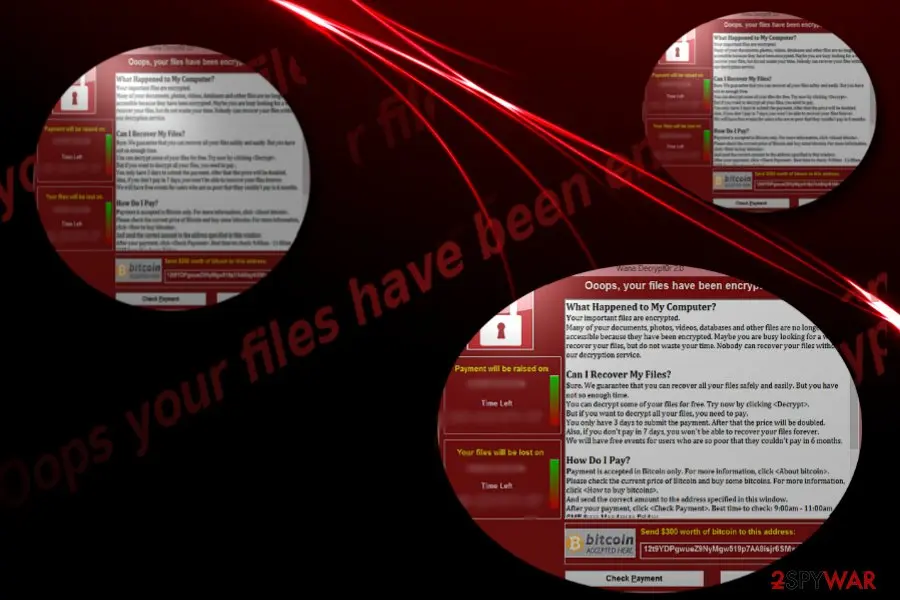
WannaCry ransomware: summary
| Type | Ransomware worm: encrypts files with RSA and AES, spreads over SMBv1 |
|---|---|
| Risk | High: files stay locked without the key; other PCs on the network can be infected |
| Symptoms | A red "Wana Decrypt0r 2.0" window headed "Ooops, your files have been encrypted!", files renamed .WNCRY, @Please_Read_Me@.txt in folders, a new wallpaper |
| How to get rid of it | Disconnect, try wanakiwi before any restart (XP and 7 only), scan with Microsoft Defender, rebuild if needed, restore from backup; see the plan |
| Our check | Source check on 5 October 2026 (Microsoft, SecureWorks, Mandiant, CISA, NHS Digital); we did not run the malware |
| First seen | 12 May 2017; our first guide 10 September 2018 |
| Removal | Scan the PC with security software to find and remove the malware and anything installed with it. Fortect scans Windows for malware and repairs the system files and settings it damaged. Remove it nowTo use the full-featured product, you have to purchase a license for Fortect. The scan is free. |
Show 13 more facts
| Name | WannaCry (also WCry, WannaCrypt) |
|---|---|
| Encrypted file extension | .WNCRY |
| Ransom note | @Please_Read_Me@.txt and the Wana Decrypt0r window, quoted below |
| Contact | A Contact Us button in the window; no e-mail address in the note (Mandiant) |
| Decryptor | None for restarted PCs; wanakiwi works on x86 XP, 2003 and 7 if not restarted |
| Detection names | Microsoft: Ransom:Win32/WannaCrypt; BitDefender: Trojan.Ransom.WannaCryptor; Symantec: Ransom.Wannacry |
| Distribution | EternalBlue over SMB port 445 on unpatched Windows; phishing possible but not the main route |
| Damage | Files encrypted, shadow copies deleted, wallpaper changed |
| Evidence | 0 write-ups by security sites; no sample analysed yet |
| Encrypted files | .WNCRY |
| Free decryptor | No free decryptor is known (checked 5 October 2026) |
| Microsoft Defender name | Ransom:Win32/WannaCrypt |
| Facts checked | 5 October 2026 |
Facts checked on 5 October 2026 against Microsoft, SecureWorks, Mandiant, CISA, NHS Digital and Cloudflare, the wanakiwi project and our own 2018 screenshots of the window. We did not run the malware.
What the "Oops, your files have been encrypted" window is
The window titled "Wana Decrypt0r 2.0" with the headline "Ooops, your files have been encrypted!" belongs to WannaCry (also WannaCrypt, WCry): ransomware that encrypts files with RSA and AES, adds .WNCRY to their names and asks for $300 in Bitcoin.
Our 2018 guide mixed this one family with other ransomware that borrowed the wording. This version keeps only what the sources we read confirm.
- Also called
- WannaCry, WannaCrypt, WCry, Wana Decrypt0r 2.0
- File extension
.WNCRY(temporary files.WNCRYT)- Note files
@Please_Read_Me@.txt,@WanaDecryptor@.exe, wallpaper@WanaDecryptor@.bmp- Ransom
- $300 in Bitcoin, doubling after 3 days according to the window
- Spread
- A worm using the SMBv1 hole fixed in bulletin MS17-010
- Outbreak
- 12 May 2017, 200,000 to 300,000 computers in over 150 countries
How the WannaCry story went
14 March 2017
Microsoft fixes the hole
Bulletin MS17-010 patches the SMBv1 flaw for supported Windows, including Vista, 7, 8.1 and 10 (Wikipedia).
14 April 2017
The exploit leaks
The Shadow Brokers publish EternalBlue, an exploit developed by the US National Security Agency (Mandiant).
12 May 2017
The outbreak
The attack begins at 07:45 UTC. NHS hospitals in England divert ambulances (Cloudflare); FedEx, Honda and Nissan are hit.
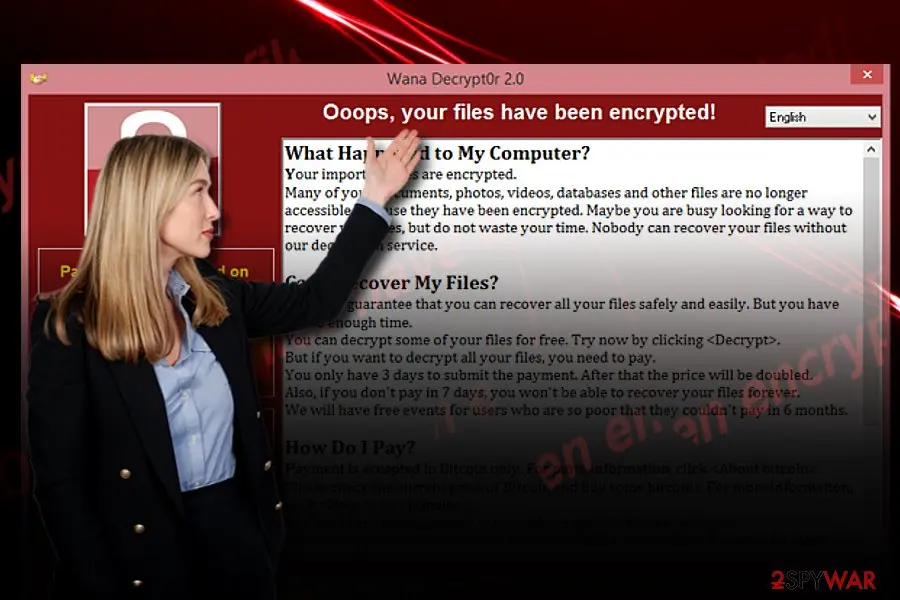
The ransom window as our 2018 guide showed it, with the English text readable (the woman is stock artwork added to the report picture). 12 May 2017, 15:03 UTC
A domain stops it
Marcus Hutchins registers the unregistered domain the malware queries; copies that reach it stop running (Wikipedia). Behind a proxy the check fails and the payload runs (NHS Digital).
19 May 2017
A recovery tool appears
Comae demonstrates
wanakiwi, built onwannakey, which recovers the key from memory on Windows XP and 7 if the PC was not restarted.December 2017
Attribution
The United States and United Kingdom blame North Korea; North Korea denies it and some researchers dispute it (Cloudflare).
5 October 2026
Our recheck
We read the Microsoft, SecureWorks, Mandiant, CISA, NHS Digital and Cloudflare pages again and rewrote the guide around them.
What we checked and what we did not
WannaCry · source check · 5 October 2026
- Window textRead from our own screenshot of the Wana Decrypt0r 2.0 window; it matches the demands Microsoft describes.
- BehaviourMatches Microsoft's write-up and SecureWorks' analysis:
.WNCRY, shadow copy deletion, wallpaper, ransom window. - Removal stepsThe plan uses standard Windows steps; we did not run them against a live WannaCry sample.
- Decryptor listsWe did not confirm whether No More Ransom lists a WannaCry tool. Not confirmed.
- "Website encrypted" variantThe 2018 guide described a note saying "Ooops, your website have been encrypted!". No source we read mentions it. Not confirmed.
Locked without the key After a restart, or on 64-bit Windows 10 or 11, there is no free way to unlock the files we can confirm. Backups are the way back.
Which name will your scanner show?
Microsoft's name for "Oops, your files have been encrypted" ransomware is Ransom:Win32/WannaCrypt.
Defender sorts threats by category first, so the word before the colon tells you what kind of program was found, even if the family name means nothing to you.
Do not search for a removal tool by the detection name alone; fake "removal tools" use the same keywords. How the naming works is explained in our guide to antivirus detection names.
- File extension:
.WNCRY - Note file:
@Please_Read_Me@.txt
How WannaCry ransomware behaves
What WannaCry does on a PC, step by step
- 1
The worm gets in over SMB
A dropper first tries a hard-coded web address; if it answers, the program stops (the kill switch). Otherwise it scans for open SMB ports (TCP 445 and 139) and attacks unpatched Windows with the EternalBlue exploit.
- 2
It installs itself
The worm copies itself to
C:\Windows\mssecsvc.exeand unpacks the ransomware astasksche.exe. Microsoft lists a Run key and the valueHKLM\SOFTWARE\WanaCrypt0r\wdthat point to its working folder. - 3
It encrypts local, removable and mapped drives
Each infected PC gets an RSA-2048 key pair and each file its own AES-128 key. SecureWorks found no flaw in the cryptography. Files are renamed, for example
picture.jpg.WNCRY. Mandiant's strings also showtaskkillfor database and Exchange processes, so their files are encrypted too. - 4
It deletes the Windows backups
A
vssadmin delete shadows /all /quietcommand withwmic shadowcopy delete,bcdeditandwbadmin delete catalogremoves shadow copies and turns off recovery. - 5
It shows the window and the wallpaper
@WanaDecryptor@.exeopens the ransom window with a timer, the wallpaper is replaced, and@Please_Read_Me@.txtis copied to every affected folder. The window reopens if closed (SecureWorks).
What the ransom window demands
| Item | What the window says | What it means |
|---|---|---|
| Price | Payment in Bitcoin only, $300 | Microsoft and CISA report $300 (0.1781 BTC in CISA's alert). The wallet address is not printed here. |
| First deadline | 3 days, then the price doubles | A countdown timer in the window; a pressure device. |
| Second deadline | After 7 days no recovery | We found no analysis showing files deleted on day 7. Not confirmed. |
| Free sample | "Try now by clicking Decrypt" | Real: WannaCry keeps a few randomly chosen files (f.wnry) it can decrypt to prove the code works (Microsoft, SecureWorks). |
How it reaches PCs
- High
Unpatched SMBv1 on the network
The worm needs TCP port 445 reachable and Windows without MS17-010. It scans its own subnet and random outside addresses (SecureWorks).
- High
Unsupported Windows
Microsoft issued an emergency patch for Windows XP, Windows 8 and Server 2003 (NHS Digital).
- Low
E-mail phishing
CISA calls phishing one possible route; SecureWorks says the delivery of the first worm is unclear.
Look-alike names and variants
| Name | How it relates | What to do |
|---|---|---|
| Petya (June 2017) | BleepingComputer shows its note beginning "Ooops, your important files are encrypted"; no .WNCRY extension | Identify by extension and note name; the old guide's EternalBlue link is not confirmed by us |
| Uiwix | Used the same SMB hole; NHS Digital lists a kill-switch domain for it | Files end .uiwix; not covered by wanakiwi |
| Adylkuzz | A Monero miner using EternalBlue weeks before WannaCry (Proofpoint) | No ransom window; slow PC |
| "Website encrypted" notice | Mentioned by the 2018 guide | Not confirmed |
The WannaCry ransomware note
Ooops, your files have been encrypted!
What Happened to My Computer?
Your important files are encrypted.
Many of your documents, photos, videos, databases and other files are no longer accessible because they have been encrypted. Maybe you are busy looking for a way to recover your files, but do not waste your time. Nobody can recover your files without our decryption service.
Can I Recover My Files?
Sure. We guarantee that you can recover all your files safely and easily. But you have not so enough time.
You can decrypt some of your files for free. Try now by clicking <Decrypt>.
But if you want to decrypt all your files, you need to pay.
You only have 3 days to submit the payment. After that the price will be doubled.
Also, if you don't pay in 7 days, you won't be able to recover your files forever.
We will have free events for users who are so poor that they couldn't pay in 6 months.
How Do I Pay?
Payment is accepted in Bitcoin only. For more information, click <About bitcoin>.
Please check the current price of Bitcoin and buy some bitcoins. For more information, click <How to buy bitcoins>.
And send the correct amount to the address specified in this window.
After your payment, click <Check Payment>. Best time to check: 9:00am - 11:00am GMT from Monday to Friday.
Can WannaCry ransomware files be decrypted?
Can .WNCRY files be decrypted?
Usually not, but one narrow case exists, and it is the first thing to try if the PC was never restarted.
SecureWorks found no flaw in the encryption, but the key's prime numbers can stay in the memory of the encrypting process.
| Your situation | What it means | What to try |
|---|---|---|
| Not restarted, 32-bit Windows XP, Server 2003 or 7 | The key's prime numbers may still be in memory | wanakiwi, then copy results to a second disk |
| Restarted, or 64-bit, or Windows 10/11 | Process memory is gone; the tool is confirmed only on x86 XP, 2003 and 7 | No free decryptor we can confirm; use backups |
- 1
Do not restart or shut down
A restart ends the process that holds the numbers; the project warns they can also be overwritten with time.
- 2
Disconnect the network
Unplug the cable or switch off Wi-Fi so the worm cannot move on.
- 3
Run wanakiwi from a USB drive
Download it on a clean PC and run
wanakiwi.exeon the infected one; by default it looks forwnry.exe,wcry.exeortasksche.exe. Decrypted files are written next to the untouched.WNCRYfiles.
Do
- Copy the
.WNCRYfiles to an external drive first - Use the project's GitHub page for the tool
Don't
- Do not buy a "WannaCry decryptor" from a site or torrent
- Do not restart before you have tried
No. NHS Digital's alert says paying is not recommended: it gives no guarantee of unlocked files and can make you a target again.
The window's free test decryption only proves the code works.
How to remove WannaCry ransomware
Tools you'll need
All of these are free except where noted. Download them on a clean device if the infected PC is offline.
- A USB stick: to keep the ransom note, two or three encrypted files and screenshots off the infected PC.
- Microsoft Defender Offline: built into Windows 11 and Windows 10; scans before Windows starts, so running malware cannot hide.
- Microsoft Safety Scanner: a second, portable scanner with current signatures; each download works for 10 days.
- ID Ransomware: identifies the family from the note and one encrypted file and says whether a decryptor exists.
- No More Ransom: the free decryptors from police and security companies; check it again every few months.
- Fortect (optional): scans Windows for malware and repairs the system files and settings it damaged. The free scan is in the box above.
How to remove "Oops, your files have been encrypted" ransomware and get your files back
Work in this order.
Disconnecting comes first, removal comes before any restore, and nothing here asks you to contact the attackers.
Step 1: Disconnect the PC and unplug backup drives
Unplug the network cable or turn off Wi-Fi, and disconnect USB drives, external disks and network shares, so "Oops, your files have been encrypted" ransomware cannot reach more files.
Pause OneDrive, Google Drive or Dropbox sync, because synced folders upload the encrypted copies over the good ones.
Leave the PC on but offline while you read the next steps, since a restart can let the ransomware run again. This applies to Windows 11 and Windows 10 alike.
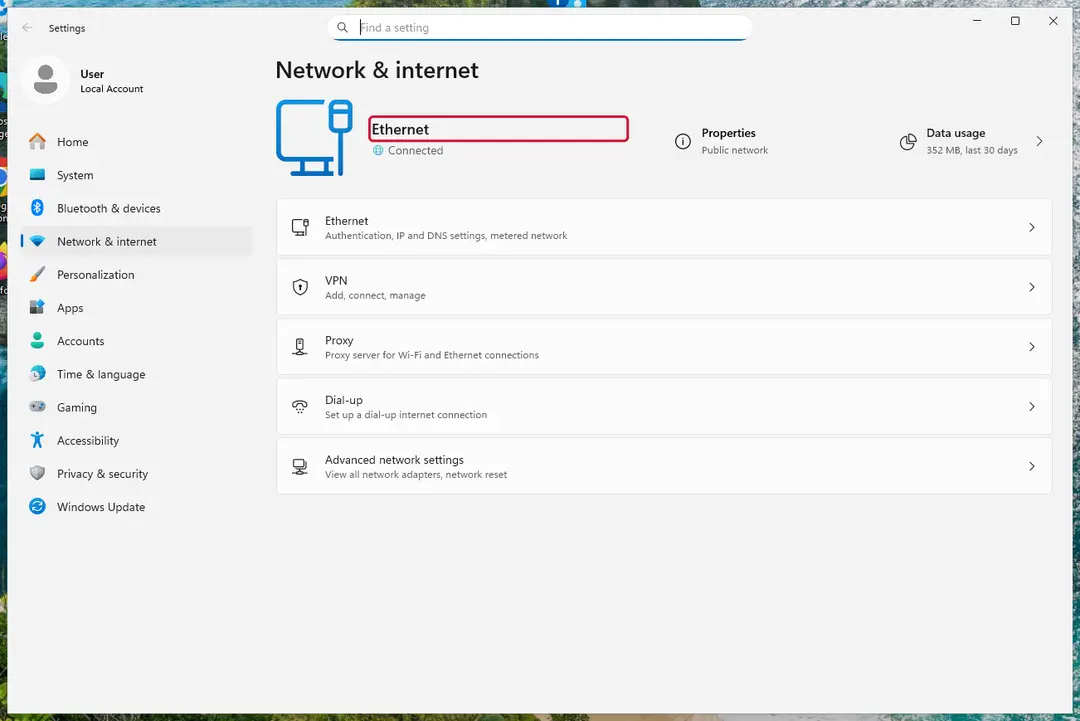
Windows 11: turn off Wi-Fi to take the PC offline. Full procedure with screenshots: Ransomware: first steps, finding a decryptor and recovering files
Step 2: Save the ransom note and confirm the family
Your files now end in
.WNCRYand the instructions are in@Please_Read_Me@.txt. Save both to a USB stick, a copy of the note and two small encrypted files, before anything else.On another device, check them with ID Ransomware or Crypto Sheriff: the family name decides which decryptor, if any, can help. Keep the note's ID and contact line for your report.
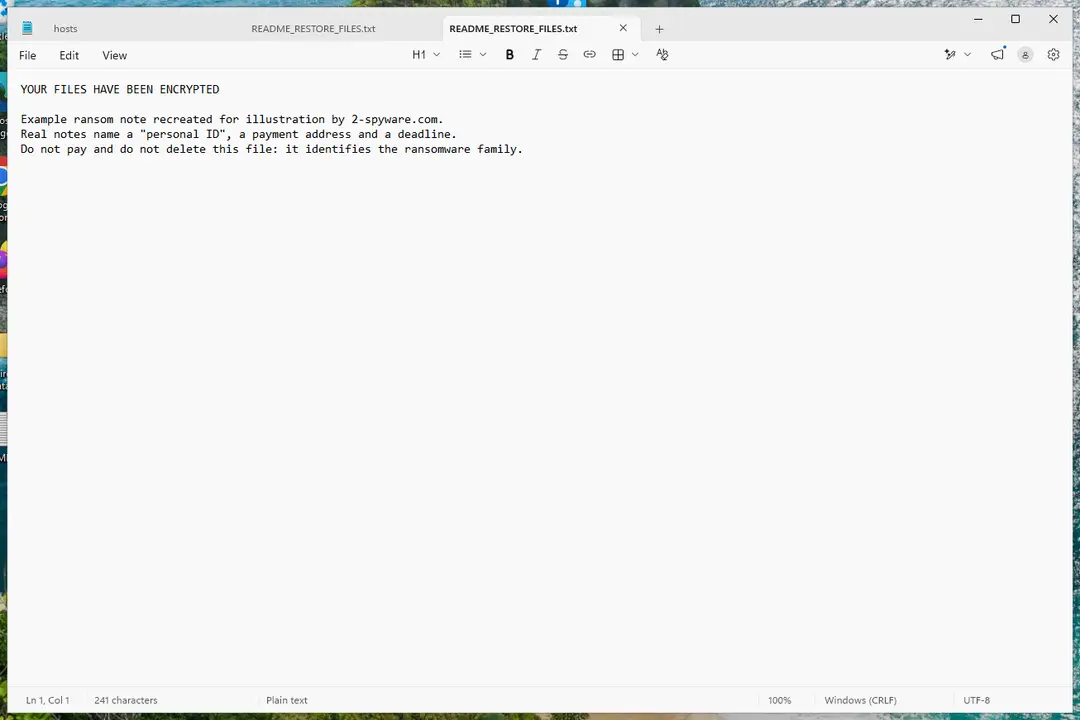
Windows 11: the ransom note and encrypted files to copy for identification. Full procedure with screenshots: Ransomware: first steps, finding a decryptor and recovering files
Step 3: Check for a free decryptor
Our last check found that for "Oops, your files have been encrypted" ransomware, no free decryptor is known (checked 5 October 2026).
Look again yourself in the No More Ransom list and the free decryptor pages of Emsisoft, Avast and Kaspersky, which add new families every year.
A decryptor needs the ransomware gone first, or it encrypts the files again. Keep at least one copy of the encrypted files on an external drive, even if no tool works yet.
Full procedure with screenshots: Ransomware: first steps, finding a decryptor and recovering files
Step 4: Remove the ransomware before you restore or decrypt
Removing "Oops, your files have been encrypted" ransomware does not bring the files back, but it has to come first. Start with Defender's Full scan, then the offline scan from the same Scan options page, which checks the disk before Windows loads.
If the scan cannot start, use Safe Mode with Networking. Delete the ransom notes only after you have saved a copy, because removal tools sometimes leave them behind on Windows 11 and Windows 10.

Windows 11: Windows Security > Virus & threat protection > Scan options. Full procedure with screenshots: Run a Microsoft Defender Offline scan
Step 5: Look for shadow copies of the files
Windows keeps shadow copies for restore points and backups, and some ransomware fails to delete them.
vssadmin list shadowsin an administrator Command Prompt tells you at once whether any exist.If they do, right-click the folder that held your files, open Properties > Previous Versions, select a version from before the attack, and click Open to check it before you Restore or copy the files out. Windows 11 and Windows 10 both have the tab.
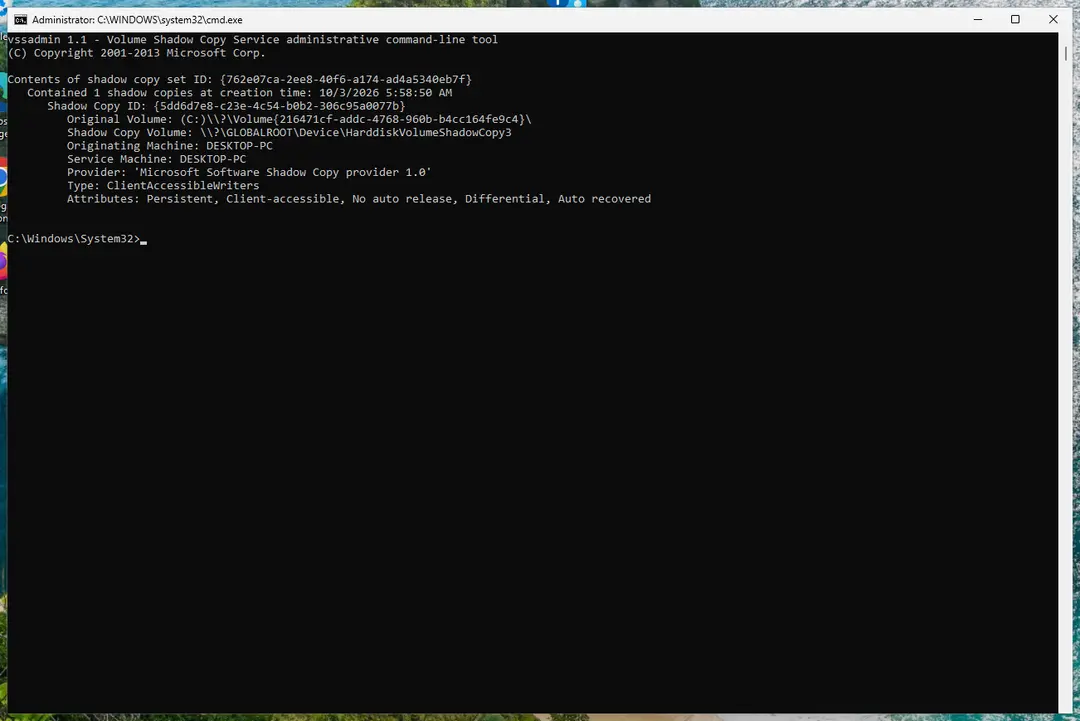
Windows 11: vssadmin list shadows shows whether shadow copies exist. Full procedure with screenshots: Ransomware: first steps, finding a decryptor and recovering files
Step 6: Restore the files from a backup or recover deleted originals
A backup made before the attack is the surest way back. Connect it only once the PC is clean, then restore from File History, Windows Backup, OneDrive's Restore your OneDrive or your own external copies.
Without a backup, try file recovery: the originals that "Oops, your files have been encrypted" ransomware deleted may still be on the disk until something overwrites them.
Install nothing new on the drive you want to recover from on the Windows 11 or Windows 10 PC.
Full procedure with screenshots: Recover deleted files (Recycle Bin, backups, OneDrive) On uGetFix
Report it and recover your files
Report it
Report the attack even if you do not expect the files back: insurers and banks ask for the report number, and police use the contacts in the note to link cases.
- United States
- FBI IC3 · FTC ReportFraud
- United Kingdom
- Report Fraud (formerly Action Fraud) · NCSC
- Australia
- ReportCyber (ASD)
- EU countries
- Europol: national reporting sites
Give the victim ID, the note and the date the files were encrypted. A business that holds personal data may also have to notify its data protection authority, in the EU within 72 hours.
Other ways to get your files back
- 1
Your own backups
A copy on an external drive, NAS or cloud storage is the most reliable source. Reconnect it only after the PC is clean.
- 2
Previous Versions
Right-click the folder, choose Properties > Previous Versions. WannaCry deletes shadow copies, so the list is usually empty.
- 3
Cloud version history
OneDrive, Dropbox and Google Drive keep older file versions for a while; check their web page, not the synced folder.
- 4
Keep the encrypted copies
Our sources do not promise a new key, but nothing is lost by keeping
.WNCRYfiles.
Back up with the 3-2-1 rule
| Number | Rule | Example |
|---|---|---|
| 3 | Three copies of every important file | The working file plus two backups |
| 2 | Two different kinds of storage | Your disk and a USB drive |
| 1 | One copy away from the PC | An unplugged drive, or cloud storage with version history |
Do
- Unplug the backup drive after each backup: WannaCry encrypts removable and mapped drives too
- Test that a file from the backup opens
Don't
- Do not leave the only backup connected all the time
How to prevent WannaCry ransomware and the next attack
Do
- Install Windows updates; MS17-010 has been available since 14 March 2017
- Block TCP 445 and 139 and UDP 137 and 138 from the internet at the router (NHS Digital advice)
- Retire Windows XP and other unsupported systems
- Do not open unexpected e-mail attachments
Don't
- Do not rely on antivirus alone: NHS Digital says infected machines must be rebuilt
- Do not block the kill-switch domain on a company network (CISA, NHS Digital)
Questions about WannaCry ransomware
How do I open .WNCRY files?
You cannot open .WNCRY files directly, because each one is encrypted with its own AES key, and that key is locked with an RSA key the attacker holds. Renaming the extension does nothing.
Copy the files to an external drive, then try wanakiwi if the PC was never restarted and runs Windows XP, Server 2003 or 7. Otherwise restore the files from a backup after the PC is clean.
Is there a WannaCry decryptor?
Only a partial one. The wanakiwi tool scans the memory of the encrypting process for the key's prime numbers, and the project confirms it on 32-bit Windows XP, Server 2003 and 7 only, and only if the PC was not restarted.
After a restart, or on Windows 10 or 11, we know of no free tool. Do not trust sites that sell a "WannaCry decryptor".
Should I pay the WannaCry ransom?
No. NHS Digital's alert says paying is not recommended because it gives no guarantee that the files will be unlocked, and it may make you a target for later attacks. The window offers a free test decryption of a few files, but that only shows that the code works, not that anyone will answer after payment.
Do paid decryption services or data recovery companies work on WannaCry?
Not for files encrypted properly. SecureWorks found no flaw in the encryption, so a company that claims to unlock .WNCRY files without the key is either using the memory trick above, which is free, or paying the attackers on your behalf.
Ask any firm for a written statement of how it decrypts, and pay nothing before a successful test on your own files.
How did WannaCry get onto my PC?
Most likely over the network, through the SMBv1 hole fixed in MS17-010. The worm scans for open TCP port 445 and attacks Windows that is unpatched, including out-of-support XP.
CISA names phishing as one possible route, but SecureWorks says the delivery of the first worm is unclear. Check whether another PC on your network was infected first.
Was my data stolen by WannaCry?
Probably not. None of the Microsoft, SecureWorks, Mandiant or CISA pages we read lists password theft or a leak site for WannaCry. The worm did install the DoublePulsar backdoor, and Proofpoint saw another group use the same door to install a miner, so run a full Microsoft Defender scan and change passwords from a clean device.
Is this the same as Petya or other ransomware with a similar window?
No, the families differ. WannaCry adds .WNCRY, writes @Please_Read_Me@.txt and shows the Wana Decrypt0r 2.0 window. The Petya outbreak of June 2017 showed a text beginning "Ooops, your important files are encrypted", according to BleepingComputer, and does not rename files.
Check the extension and the note file name before choosing a tool, because a tool for one family does nothing for another.
Should I restart the PC after seeing the message?
Not before you have tried wanakiwi, if your Windows is XP, 2003 or 7. A restart ends the process that holds the key's prime numbers in memory. Disconnect the network first, then run the tool from a USB drive.
On Windows 10 or 11, or if the tool fails, restarting is fine and you can follow the removal plan with Safe Mode and a full Microsoft Defender scan.
Will Fortect remove "Oops, your files have been encrypted" ransomware?
Fortect scans Windows for malware and unwanted programs and repairs the system files and settings they change, and its free scan shows what it finds on your PC before you decide anything.
For "Oops, your files have been encrypted" ransomware, follow the plan above as well: the browser steps take back permissions and settings that no scanner treats as a threat, and uninstalling the program that brought it removes the source.
Run Microsoft Defender's full scan and, if anything was found, its offline scan as a second opinion. If the symptoms are gone after the plan and both scans are clean, there is nothing more to do.
Sources
- Microsoft: WannaCrypt ransomware worm targets out-of-date systems (read October 5, 2026)
- SecureWorks (Sophos): WCry Ransomware Analysis (read October 5, 2026)
- Mandiant (Google Cloud): WannaCry Malware Profile (read October 5, 2026)
- CISA: Indicators Associated With WannaCry Ransomware (read October 5, 2026)
- NHS Digital: WannaCry Ransomware Using SMB Vulnerability (read October 5, 2026)
- Cloudflare: What was the WannaCry ransomware attack? (read October 5, 2026)
- Wikipedia: WannaCry ransomware attack (read October 5, 2026)
- wanakiwi (GitHub, Benjamin Delpy) (read October 5, 2026)
- Comae: WannaCry, decrypting files with WanaKiwi (read October 5, 2026)
- Proofpoint: Adylkuzz cryptocurrency mining malware (read October 5, 2026)
- BleepingComputer: Petya ransomware outbreak (read October 5, 2026)
- Adaptive Security: WannaCry ransomware explained (read October 5, 2026)