

WannaDie pretends to be a Russian version of WannaCry ransomware
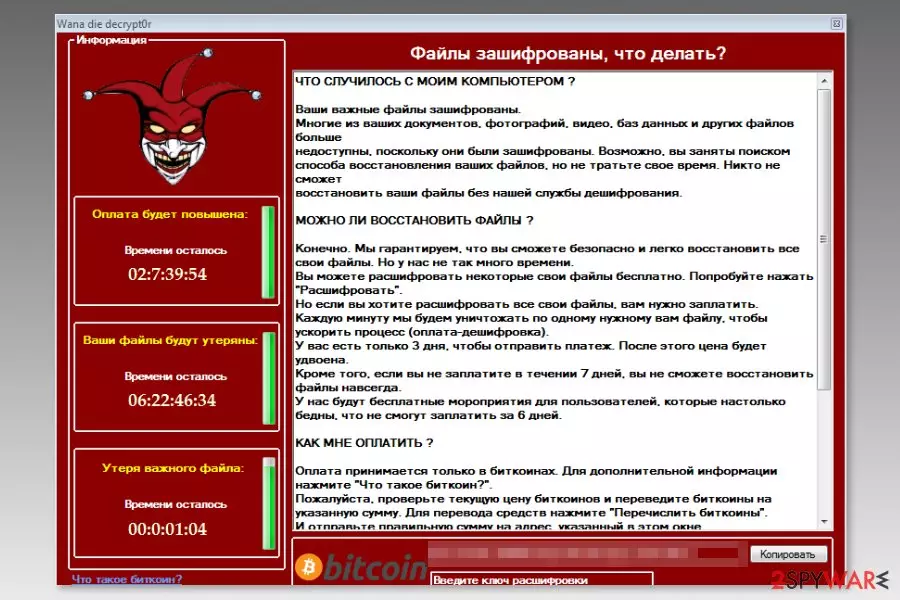
WannaDie (also known as WanaDie) is a Russian WannaCry imposter that imitates the infamous ransomware.[1] Malware mostly spreads via malicious spam emails that include obfuscated wndi.exe file. Once the payload is dropped on the system, the virus starts data encryption procedure and locks files with the .wndie file extension.
Once WannaDie virus enters the system, malware makes important system modifications to run with system startup and downloads some files which are placed on computer’s desktop and folders that include encrypted data. These files contain information about ransomware attack and provide data recovery instructions:
- ReadMe.txt,
- Wana_Decrypt0r.exe,
- @WannaDecrypt0r.exe,
- @WannaDecrypt0r.png.
WannaDie virus uses a combination of AES and SHA-256 to corrupt documents, images, multimedia, databases and other files on the targeted device. Following this process, it changes computer’s desktop picture with a short, threatening message which translated from the Russian language says:
Uuups, your important files are encrypted.
If you are reading this text, but do not see the box “Wanna die decrypt0r”, then your antivirus deleted decoder. Turn off the antivirus software or remove it from your computer.
***
Additionally, WannaDie ransomware opens a ransom note called Wanna die decrypt0r in the program Window. Criminals continue speaking with crooks in Russian[2] language and try to threaten into paying the ransom. However, to give a guarantee that the decryptor is actually working, attackers allow decrypting a few files for free.
The ransom note tells that victims have 3 days to make the payment; otherwise the size of the ransom will double. However, after 7 days, the decryption key will be destroyed. Besides, just like original WannaCry, the imposter also offers “exclusive conditions” for poor victims.
Paying the ransom is never an option. Besides, malware researchers say that transferring Bitcoins might not be needed as well. It seems that Wanna_die_decrypt0r ransomware might be poorly written or still in development. Thus, corrupted files might be restores.
However, before trying third-party decryptors, you have to remove WannaDie from the computer. It shouldn’t be hard to uninstall this malicious program using reputable anti-virus or anti-malware software. Thus, install FortectIntego or your preferred tool and run a full system scan.
If you face some difficulties with WannaDie removal, for instance, you cannot install security software, you should reboot the computer to Safe Mode with Networking and try again. Detailed explanation how to deal with obstacles and remove ransomware are presented at the end of the article.

Distribution methods of the ransomware virus
The WannaCry Imposter ransomware might be distributed using several methods, such as:
- malicious spam emails,
- unprotected RDP configurations,
- bogus software downloads or updates;
- malvertising.
However, malicious spam emails remain the main way how ransomware spreads. WanaDie ransomware payload might be attached to legit-looking email as an invoice,[3] statement or another important document. Thus, users should be careful with emails and always double-check information before opening attachments.
Security experts remind about the importance of creating or updating backups as well. If you have all the important files stored on the PC, you won’t let criminals scare or blackmail you. Thus, they won’t cause you data or money loss.
Automatic WanaDie ransomware removal
We want to discourage you from trying to remove WannaDie manually because it’s a complicated cyber threat. The malicious program can affect legit system processes, modify Windows Registry and install numerous harmful components that might be nearly impossible to delete without damaging the system.
For this reason, we highly recommend opting for automatic WannaDie removal. Install FortectIntego, MalwarebytesMalwarebytes or your preferred security software and run a full system scan. Do not forget to update the program first! However, if you have some difficulties, please check the instructions below.
Did this guide help?
Be the first to comment