

Crysis adds another member to its ransomware family: Bitcoinpay@india.com virus
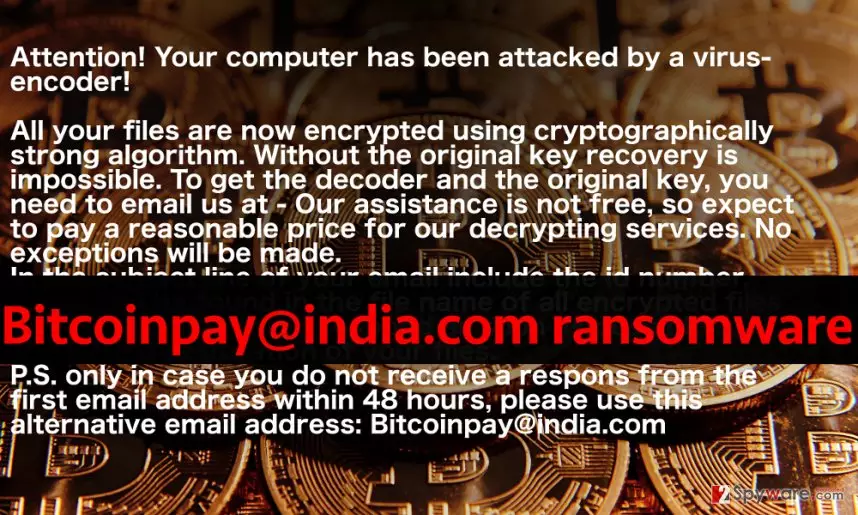
Bitcoinpay@india.com virus is an addition to Crysis network as it appears to be one of those malicious data-encrypting viruses that add victim’s ID, contact email address and .xtbl file extension to encrypted files. Bitcoinpay@india.com ransomware employs a combination of RSA and AES encryption algorithms, which convert personal files into useless records that cannot be opened, edited, or manipulated in any way. Just like other ransomware viruses, Bitcoinpay@india.com malware leaves ransom notes in two different formats on victim’s PC. These files are typically called How to decrypt your files.txt (and also identically named file in .html format). The ransomware simply changes the desktop wallpaper with a picture that contains some text. It confirms that files have been strongly encrypted, and says that data recovery without the original decryption key is impossible. According to the ransom note, the decoder and the original key can be purchased from culprits, but in order to find out how much these data recovery tools cost, the victim needs to write to Bitcoinpay@india.com email.
XTBL viruses are known to be very greedy, so don’t get shocked when you find out how much dollars they want. Some Crysis variants ask more than 10 Bitcoins in exchange for data recovery kit, and this sum of money equals to 7418 US dollars. You should not even consider paying the ransom. Although losing valuable data is a devastating experience, paying the ransom can simply worsen the situation. Don’t try to negotiate with criminals, because recently they started to negotiate in a dirty way. Don’t get too excited if they agree to lower the ransom price – it means that they are going to ask for the rest of the sum once you transfer the smaller ransom that you and criminals have agreed on. Besides, there were many cases when victims never got response from criminals after paying the ransom. Besides, Crysis decryption tool is likely to help you with data recovery, so just remove Bitcoinpay@india.com virus quickly and start recovering your files. If you have a backup, you can use it, but only after completing Bitcoinpay@india.com removal procedure. If you do not know where to start, read tips provided at the end of this post.
Dissemination of malware
Bitcoinpay@india.com ransom-demanding Trojan is distributed with a help of exploit kits, malvertising, email spam, and other distribution techniques. In general, you should rely on common sense to protect your device from its infiltration. For example, if you receive an email from a suspicious company or individual that fails to write faultlessly, you should ask yourself whether it’s worth opening such electronic letter or files attached to it. If you didn’t know this yet, even safe-looking text files (for instance, Word) can contain malicious payload. Nowadays, criminals do not need to send .exe files to affect target computers. Since criminals enhance their trickeries, awareness of trending malware distribution techniques can save your device from ransomware attack. Don’t click on too good to be true ads, don’t install suspicious software (including legitimate software from dubious web sources), and don’t open vague emails. Finally, protect your system with anti-malware software and have a data backup.
Remove Bitcoinpay@india.com virus
Install, update and run anti-malware software to detect and remove Bitcoinpay@india.com virus. XTBL ransomware viruses are extremely dangerous and they severely contaminate the system, so it is not recommended to experiment and try to remove it manually. To start the Bitcoinpay@india.com removal procedure, reboot your PC into Safe Mode w/ Networking using instructions presented below.
Did this guide help?
4 comments
skillz
Aint gonna pay to bitcoinpay, no way. You shouldnt do that, too, in case you got pwned by this ransomware..
Lucy
DECRYPTED, THANKS
LUCY
Nymos
Recovered every single. I have tears in my eyes. Thank you so so so much!
Rodqilla
I was this close to losing hope to recover my files and then I came across this. Life-saver! Thank you for sharing great tips and most importantly - decryption tools!