

BTC ransomware is a cryptovirus that encrypts files and marks them with .BTC appendix
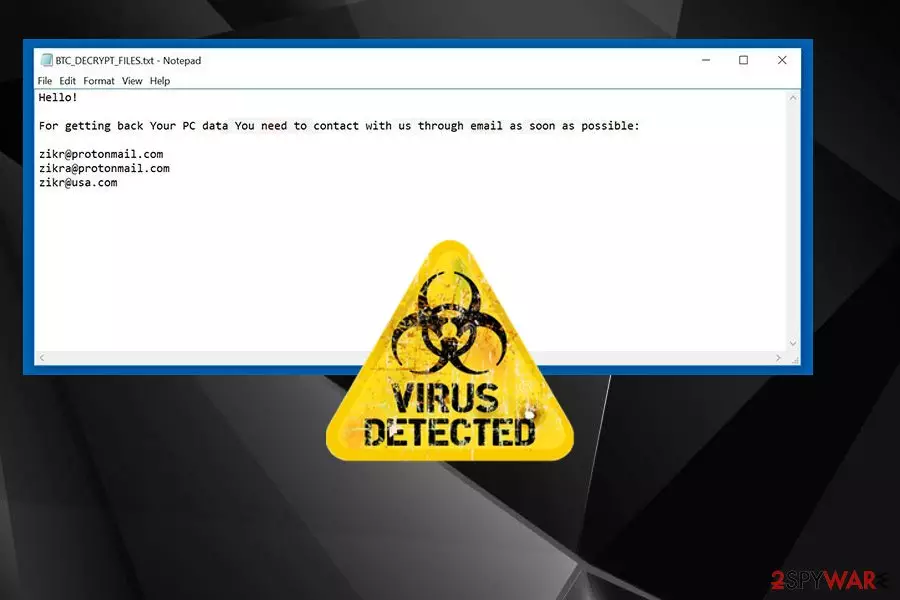
BTC ransomware virus is a cyber threat that locks users' data with the goal of extorting money. This virus first was spotted at the end of 2016. It is also known as BTCLocker ransomware and hails from the same family as an old Radamant ransomware. However, there are a lof other associations since the name matches with the one used by Dharma ransomware is known for having various similar versions with BTC in the file extension. In this case, cryptovirus appends .id-[victim's_ID].[btc@fros.cc].btc file extension. After getting on the computer, each of these ransomware viruses starts encrypting[1] files and makes them useless, then marks each encoded file by appending .BTC file extension. As soon as they finish this job, they deliver a ransom note called either BTC_DECRYPT_FILES.txt or IDR__BTC_DECRYPT_FILES.txt. These files are used to inform victims about the state of their computer and ask them the money.
| Name | BTC ransomware |
|---|---|
| Type | Cryptovirus |
| File extension | .BTC |
| Ransom note | BTC_DECRYPT_FILES.txt or IDR__BTC_DECRYPT_FILES.txt |
| Ransom amount | 0.5 – 1.5 BTC |
| Email address used to contact cybercriminals | btc@fros.cc; zikr@protonmail.com; zikra@protonmail.com; zikr@usa.com |
| Distribution | Spam email attachments |
| Elimination | Use FortectIntego to fix virus damage |
The creators of BTC ransomware virus provide three different emails for communication: btc@fros.cc, zikr@protonmail.com, zikra@protonmail.com, and zikr@usa.com. However, you should not consider writing and sending an email to them. They have prepared many blackmailing and psychological terror techniques to encourage victims to make the payment.
Unfortunately, there’s no guarantee that they will provide the necessary software for file decryption or it will work properly. Instead of thinking about this data recovery option, remove BTC ransomware from the computer. Then you will be able to recover your files from backups or using additional data recovery options presented at the end of the article.
The creators of BTC ransomware have been demanding from 0.5 to 1.5 Bitcoins[2] from their victims in exchange for their decryption tool. They will do their best to scare you once you contact them. For example, you can be informed on the ransom note, in particular, that a decryption key is the only way to recover your data. Then, you can learn that you will receive the key right after making a payment to them. However, you can hear nothing after paying because you are dealing with hackers.
Unfortunately, not many cybersecurity programs detect the main executable of this virus as malicious. It is possible that you need to enter the Safe Mode with Networking to scan your device using your chosen anti-malware. You can follow other instructions below to try other methods of virus removal.
BTC ransomware file can be falsely detected as safe by various AVs. However, these are the names this malware appears on some of the scan results:
- malicious_confidence_99% (D);
- ML.Attribute.HighConfidence;
- HEUR/QVM10.1.0000.Malware.Gen;
- Ransom.BTCLocker;
- virus.win32.sality.at.
Some ransomware viruses are capable of deleting corrupted files; that’s why it’s crucial to get rid of any malware as soon as it announces about its appearance. This will not recover encrypted files, but protect your PC from other problems and infections. Therefore, researchers[3] recommend initiating BTC ransomware removal immediately with the help of professional malware removal tools. We recommend using your antivirus and then additionally scanning the system with FortectIntego or SpyHunterCombo Cleaner.

Malware spreading techniques include spam emails
Ransomware is not distributed using some unique proliferation techniques. Mostly, it has been delivered via malicious emails.[4] It means that you should be extremely careful when opening emails, especially when dealing with emails from unknown people. Please, do not trust those messages claiming that you need to verify the invoice or similar document and stay away from the files attached to them.
Keep in mind that cybercriminals have been using various techniques to make these messages appear trustworthy and related to well-known companies. They can not only insert legitimate-looking logos[5] and signatures to the message to make it look credible.
They can also create long stories why should the victim open the message and look at the contents of the attached file. If the user falls for such trickery and opens a malicious attachment, ransomware can easily enter the system and encrypt valuable files. To sum up, you need to be extremely careful with what you click on and think twice before opening email letters that come from people or organizations that you have no business with.
Proceed with BTC ransomware removal now
BTC virus should be eliminated without a doubt as soon as possible. It is an extremely dangerous piece of software that corrupts important files and wants your money, besides, it can install additional malware on the computer, so it goes without saying that the sooner you remove it, the better.
To remove BTC ransomware, use anti-malware software that you already trust or choose an alternative tool. We recommend using one of these programs: FortectIntego, SpyHunterCombo Cleaner or MalwarebytesMalwarebytes. A program designed to fight malware can eliminate virus effectively.
Keep in mind that malware might block access to the antivirus program, in this case, you will have to reboot your PC to the Safe Mode with Networking to successfully perform BTC ransomware removal. You can find detailed virus termination instructions down below.
Did this guide help?
4 comments
Rebecca
why, why no one can decrypt my files??? just why...
Maddie
I am not going to pay. I dont care about my files. I am not supporting cyber criminals. i aint afraid of them!
Hood
what if I reinstall windows
sueddeee
Not gonna help.