
Police Central e-crime Unit virus: what it is and how to remove it
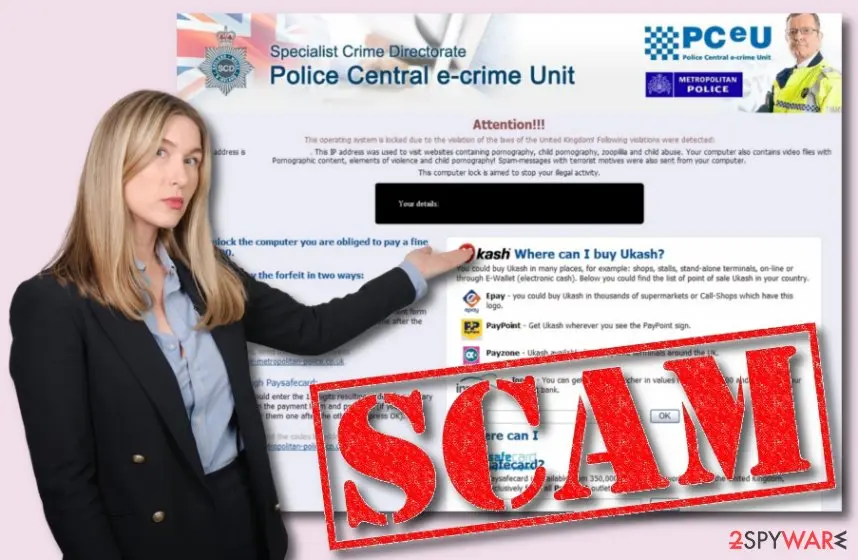
Police Central e-crime Unit virus (also called United Kingdom Police virus and PCeU virus) is a malicious scam that blocks the computer screen and demands payments in Ukash or PaySafeCard. The fake message claims that the user has violated some Copyright and Related Rights Laws and now a 100-pound fee needs to be transferred, according to the Criminal Code.
Facts checked October 7, 2026. Removal steps tested on Windows 11 (26H2) and checked against Microsoft's and the browser makers' current documentation. Sections marked as our earlier report are the original text: they describe the threat as it was then and have not been reviewed since. The 2026 status, the removal steps and the questions are current.
Automatic
Get a free scan and check if your PC is infected.
Fortect finds malware, unwanted programs and the Windows damage they leave behind, and repairs it in one pass.
If Police Central e-crime Unit virus keeps coming back after uninstalling, a scan can find what reinstalls it.
Do it yourself · free Remove Police Central e-crime Unit virus yourself 5 steps, about 15 minutes, no software needed.
Start the steps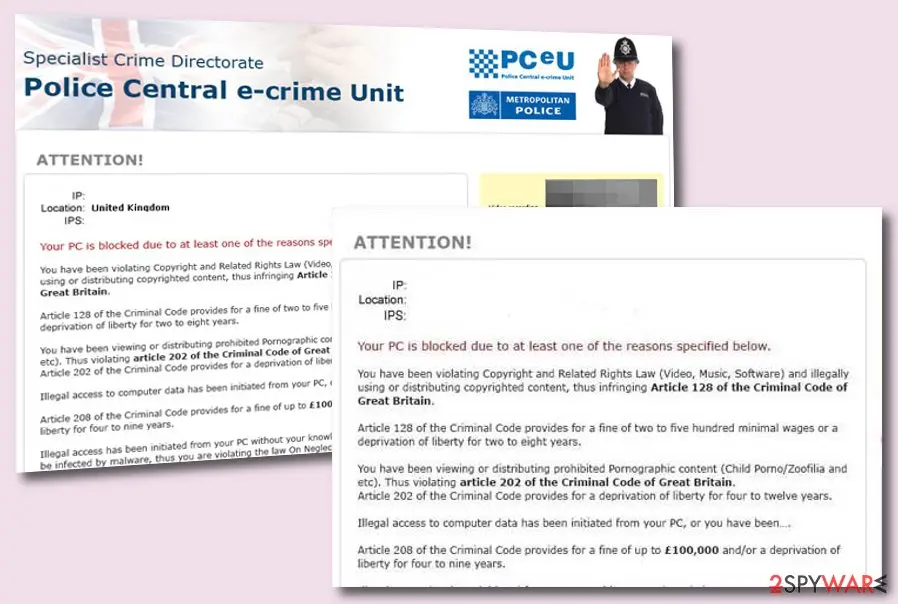
Police Central e-crime Unit virus: summary
| Name | Police Central e-crime Unit virus |
|---|---|
| Type | Scam/malware |
| Goal | To collect income from gullible users that agree to pay 100-pound, 250-pound, 2,000-pound, etc. fees via Ukash or PaySafeCard. The malware accuses people of violating some copyright laws and distributing pornographic content |
| Features | Comes with the emblem of the country, provides the user's IP, location, and OS type, includes a police officer at the top right of the message, records a video of what the victim is doing at the moment because the malware has access to the computer's camera |
| Appearance | You can download such type of virus by visiting unsecured sources such as torrenting websites. Additionally, the scam can be provoked by a trojan infection that is hiding in your computer system |
| Danger | You can end up paying huge fees for random people that will just take your money and runoff, the malware can compromise your system settings, install malicious processes, and create machine slowdowns |
| Removal | Scan the PC with security software to find and remove the malware and anything installed with it. Fortect scans Windows for malware and repairs the system files and settings it damaged. Remove it nowTo use the full-featured product, you have to purchase a license for Fortect. The scan is free. |
Show 7 more facts
| Detection names | No Microsoft detection name is known |
|---|---|
| Distribution | Not recorded in the old report |
| Damage | Not recorded in the old report |
| Symptoms | An unknown program in Installed apps |
| Evidence | 5 write-ups by security sites; details still limited |
| First seen | 21 February 2020 |
| Facts checked | 7 October 2026 |
What Police Central e-crime Unit virus does on an infected PC
From our report of Feb 2020 · not reviewed since
Police Central e-crime Unit virus - a false message targeting users from the UK and seeking to collect 100-pound fines
Police Central e-crime Unit virus (also called United Kingdom Police virus and PCeU virus) is a malicious scam that blocks the computer screen and demands payments in Ukash or PaySafeCard.
The fake message claims that the user has violated some Copyright and Related Rights Laws and now a 100-pound fee needs to be transferred, according to the Criminal Code. Nevertheless, Police Central e-crime Unit virus threatens users that they might get imprisoned from four to nine years for violating the laws.
The scam continues to urge for even bigger prices that start from 250 and end up with 8,000 pounds.
Police Central e-crime Unit virus claims that the user has violated laws related to the distribution of copyrighted content, viewing or spreading pornographic material, etc. Hackers give 3 days to make the payment, otherwise, a criminal case will be opened against the user. Do not get frightened, it is just total nonsense.
There are multiple but very similar versions of Police Central e-crime Unit virus. All of them accuse users of violating some types of laws and demand to transfer fees to repay the guilt.
Some of the malware even has access to the user's computer camera and shows a video recording the surroundings that are being filmed to plant even more fear. However, you should keep in mind that no type of law agency would urge for fees through such types of messages.
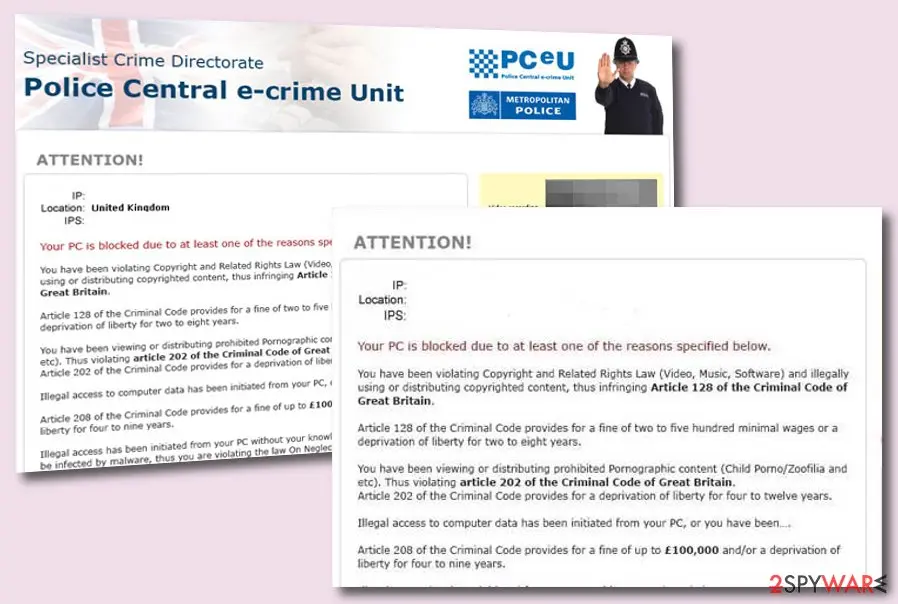
Police Central e-crime Unit virus, detected as Trojan:W32/Reveton, includes logos of Metropolitan police and the PCeU to give the scam message a look of legitimacy. In most cases, you will see a police officer on the upper right corner of the notification.
Below you might encounter a video of you at your current position but do not rush to make the payment as this is just the malware developers trying to frighten you.
Even though Police Central e-crime Unit virus might really have access to your camera, this still does not mean that the provided message is true and you have to follow the demands. Nevertheless, criminals ask for Ukash and PaySafeCard payments that should ring a bell for you. People who want to use these types of payment methods are usually orientated in total transfer anonymity.
Police Central e-crime Unit virus can also provide your IP address, location (that will likely be Great Britain as hackers are targetting people from the UK), your operating system type, etc. Below, you will see the attention note claiming that your computer has been blocked due to some laws that you have violated and malicious activity that was found on your device.
Depending on the message, Police Central e-crime Unit virus might ask for different payments starting from 100 and ending up with 8,000 pounds that have to be transferred in 72 hours, 48 hours, or a similar time limit. Most of the time, hackers falsely accuse victims of distributing and watching pornographic content that is related to children pornography and zoophilia, illegally managing copyrighted material:
Nevertheless, Police Central e-crime Unit virus falsely claims that there has been illegal access to the information that is stored on your computer, some type of malware has been installed on the device, and spamming, illegal advertising activities were also tracked on your machine that might be a sign of a virus infection. Be sure that this is just another false claim.
The main target of Police Central e-crime Unit virus are people living in Great Britain, however, if the malware has landed on a computer or laptop that is located in the United States, the scam will adapt to the new country, change some of its writings, claim to come from America, and start demanding fines that are converted to dollars.
Police Central e-crime Unit virus is a form of malware that can be downloaded from various third-party websites, including torrenting networks. Also, you might start seeing this scam if some type of dangerous infection such as a Trojan virus has been included in your computer system.
If this is the case, you can start experiencing additional activities such as frequent computer slowdowns, software crashes, high CPU usage, installation of unknown processes, etc.
However, you should know that Police Central e-crime Unit virus is just a scam and there have not been any laws violated and you do not need to pay the required fine.
You should keep in mind that police departments or law agencies will not approach you in such a manner and try to get money from you in all ways possible. If you ever truly make a cybercrime, you will be contacted directly but definitely not through such types of messages.
If you have been dealing with this scam, do not complete any payments as the hacker will just run off with your money. Besides, you need to remove Police Central e-crime Unit virus from your infected computer system as soon as possible as the message might be a sign of a trojan infection.
To get rid of the malware, employ only reliable antimalware software. If you need to diminish the lock screen, try booting your device in Safe Mode with Networking.
Police Central e-crime Unit virus removal might require more than just deleting one component from the machine as the malware might have placed additional payload (various processes, files, and keys) that also need to be terminated.
From our report of Feb 2020 · not reviewed since
More from our earlier report on Police Central e-crime Unit virus
- If you have been dealing with this malware lately, you should get rid of it right away.
- For this task, employ only reliable antimalware software
- If you have discovered any compromised areas on your computer system, try repairing them with
- Police Central e-Crime Unit Your computer has been blocked!
- Copyright and Related Rights Law.
- (Video, Music, Software) and illegally using or distributing copyrighted content, thus infringing Article 128 of the Criminal Code of Great Britain.
- Article 128 of the Criminal Code provides for a fine of 200 to 500 minimal wages or a deprivation of liberty for 2 to 8 years.
- You have been viewing or distributing prohibited Pornographic content (Child Porn/Zoophilia and etc).
- Thus violating article 202 of the Criminal Code of Great Britain.
- Article 202 of the Criminal Code provides for a deprivation of liberty for 4 to 12 years.
- Illegal access to computer data has been initiated from your PC, or you have been… Article 208 of the Criminal Code provides for a fine of up to £100,000 and/or a deprivation of liberty for 4 to 9 years.
- Illegal access has been initiated from your PC without your knowledge or consent, your PC may be infected by malware, thus you are violating the law On Neglectful Use of Personal Computer.
- Article 210 of the Criminal Code provides for a fine of £2,000 to £8,000.
- Spam distribution or other unlawful advertising has been effected from your PC as a profit.
- seeking activity or without your knowledge, your PC may be infected by malware.
- Article 212 of the Criminal Code provides for a fine of up to £250,000 and a deprivation of liberty of up to 6 years.
- In case this activity has been effected without your knowledge, you fall under the above mentioned article 210 of the Criminal Code of Great Britain.
- Your personality and address are currently being identified, a criminal case is going to be initiated against you under one or more articles specified above within the next 72 hours.
- Pursuant to the amendment to the Criminal Code of Great Britain of February 04, 2013, this law infringement (if it is not repeated – first time) may be considered as conditional in case you pay the fine to the State.
- Fines may only be paid within 72 hours after the infringement.
- As soon as 72 hours elapse, the possibility to pay the fine expires, and a criminal case is initiated against you automatically within the next 72 hours!
- The amount of fine is £100.
- You can pay a fine Ukash or PaySafeCard.
- When you pay the fine, your PC will get unlocked in Ito 72 hours after the money is put into the State's account.
- Since your PC is unlocked, you will be given 7 days to correct all violations.
- In case all violations are not corrected after 7 working days, your PC will be blocked again, and a criminal case will be initiated against you automatically under one or more articles specified above.
How to remove Police Central e-crime Unit virus
A loader's job is to install other malware, so treat the PC as infected with more than one program until the scans are clean.
Step 1: Delete scheduled tasks that bring it back
Open Task Scheduler from the Start menu and click Task Scheduler Library.
Select each task you do not recognise and read the Actions tab: a task that starts a file in
%AppData%or%Temp%, runs powershell with a long encoded line, or opens a web address belongs to Police Central e-crime Unit virus or a similar program.Right-click such a task and choose Delete, and check the subfolders too. Leave tasks from Microsoft, your PC's maker and programs you use. Task Scheduler is the same in Windows 11 and Windows 10.

Windows 11: Task Scheduler Library, the task selected, the Actions tab shows the file it runs. Full procedure with screenshots: Remove what malware leaves behind in Windows
Step 2: Remove it from startup
Whatever Police Central e-crime Unit virus installed usually starts with Windows.
Open Task Manager with Ctrl + Shift + Esc, go to Startup apps in Windows 11 or the Startup tab in Windows 10, and disable what you do not know, starting with entries that have an empty Publisher column.
Open file location on the right-click menu shows the file, which helps you decide and tells you what to delete later. Disabling is safe: if something you need stops working, switch it back on.
Full procedure with screenshots: Stop apps from opening at startup On uGetFix
Step 3: Delete the folders left behind
What the uninstaller leaves behind is usually in the user folders. Open File Explorer, switch on View > Show > Hidden items (in Windows 10 View > Hidden items), and go through
%LocalAppData%,%AppData%, %ProgramData% and the two Program Files folders.Sort by Date modified and delete folders that appeared together with the problem and belong to no program you use. Folders with random names that hold
.exe,.dll, .js or .ps1 files are the strongest sign.Full procedure with screenshots: Remove what malware leaves behind in Windows
Step 4: Scan the PC, then run the offline scan
Open Windows Security > Virus & threat protection > Scan options, run a Full scan and remove everything it finds. Then select Microsoft Defender Antivirus (offline scan) and click Scan now: the PC restarts and scans before Windows loads, which finds files that hide while Windows runs.
Save your work first, because the offline scan takes about 15 minutes. Both scans are built into Windows 11 and Windows 10, and a second scanner from another vendor is a useful extra opinion.

Windows 11: Windows Security > Virus & threat protection > Scan options. Full procedure with screenshots: Run a Microsoft Defender Offline scan
Step 5: Change passwords from another device and sign out other sessions
Assume that the passwords saved in this PC's browsers, and the accounts that were open in them, are known to the attacker. From a phone or a clean computer, change the e-mail password first, then banking, shopping, social and gaming accounts.
Use each service's option to sign out of all other sessions, because stolen cookies keep a session open even after a password change. Turn on two-step verification on each account. Wait with the infected Windows 11 or Windows 10 PC until the scans are clean.
Full procedure with screenshots: Turn on two-step verification / secure a hacked account
Instructions for each browser and system
The detailed steps for every browser and system this guide covers. Open the one you use.
Manual removal using Safe Mode
Important! →
Manual removal guide might be too complicated for regular computer users. It requires advanced IT knowledge to be performed correctly (if vital system files are removed or damaged, it might result in full Windows compromise), and it also might take hours to complete. Therefore, we highly advise using the automatic method provided above instead.
Step 1. Access Safe Mode with Networking
Manual malware removal should be best performed in the Safe Mode environment.
Windows 7 / Vista / XP
- Click Start > Shutdown > Restart > OK.
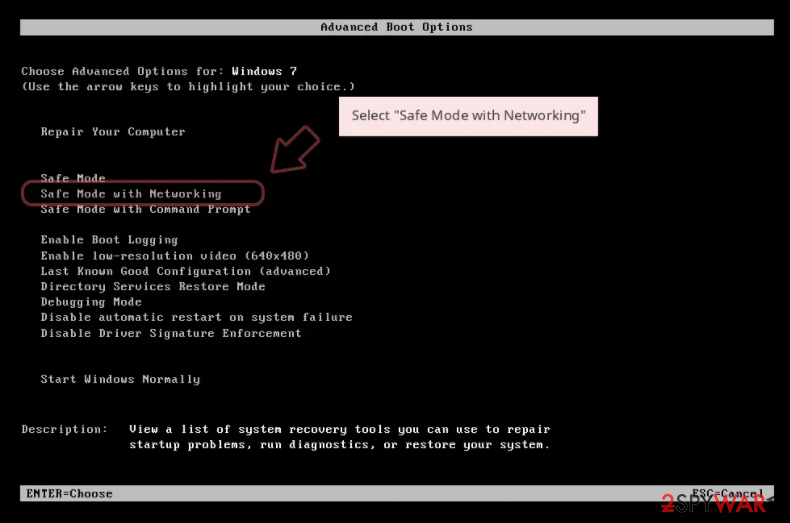
- When your computer becomes active, start pressing F8 button (if that does not work, try F2, F12, Del, etc. - it all depends on your motherboard model) multiple times until you see the Advanced Boot Options window.
- Select Safe Mode with Networking from the list.
Windows 10 / Windows 8
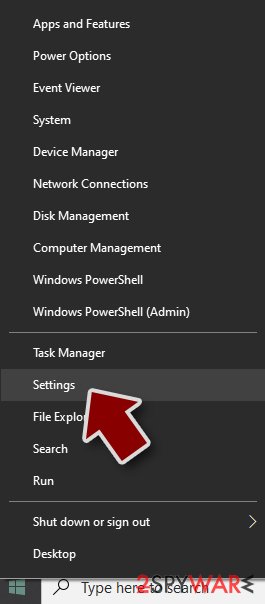
- Right-click on Start button and select Settings.
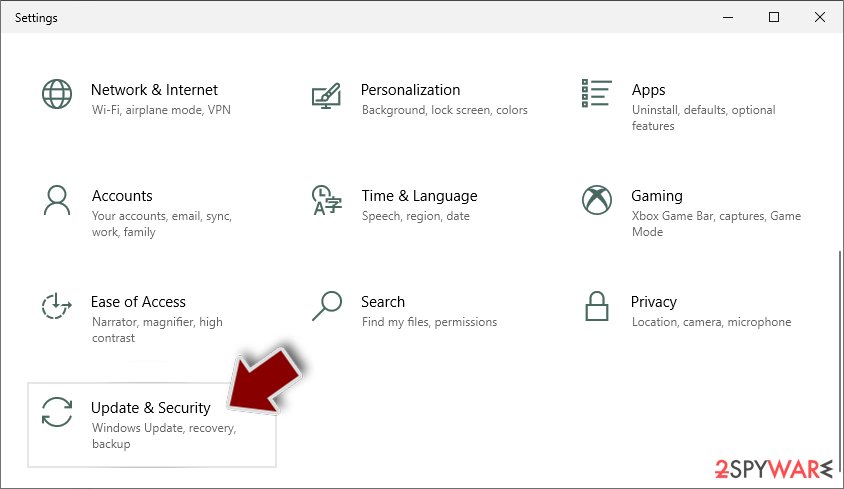
- Scroll down to pick Update & Security.
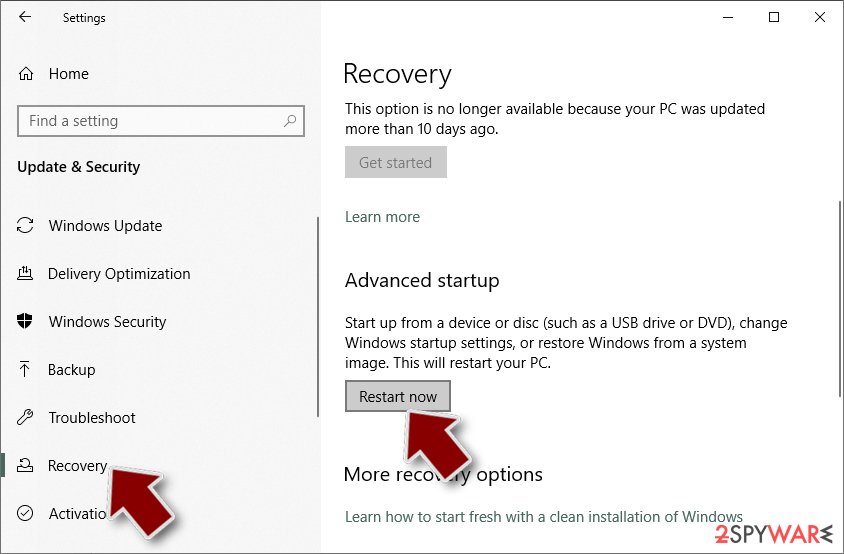
- On the left side of the window, pick Recovery.
- Now scroll down to find Advanced Startup section.
- Click Restart now.
- Select Troubleshoot.
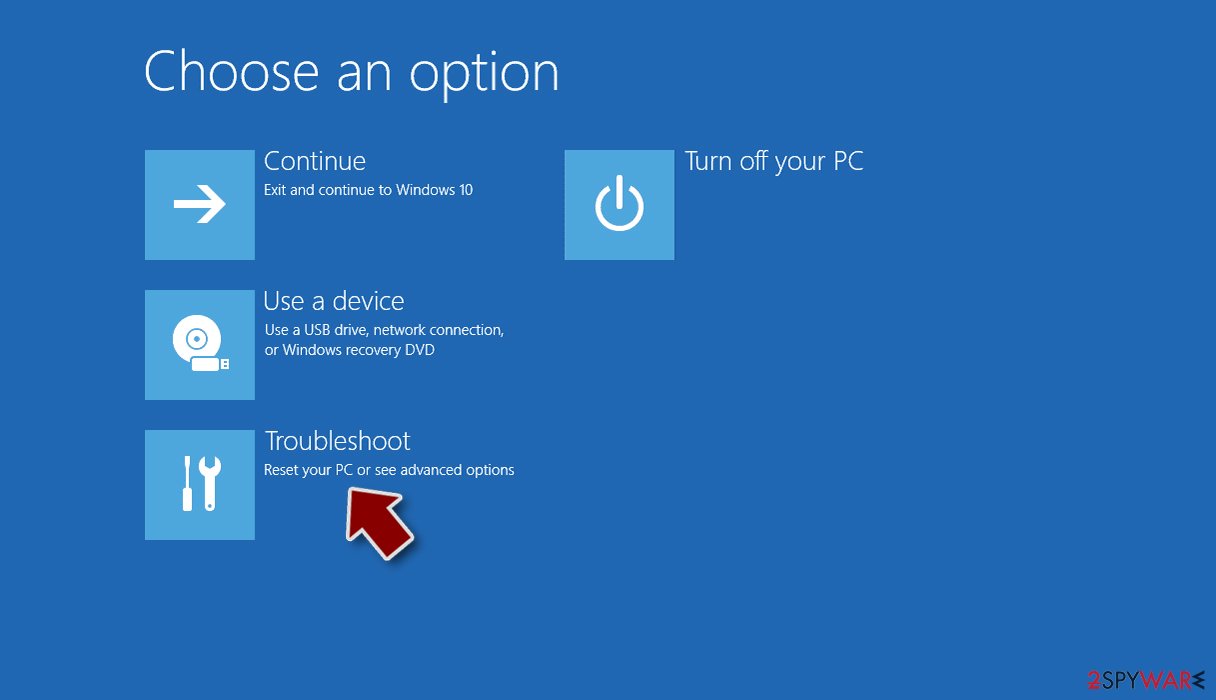
- Go to Advanced options.
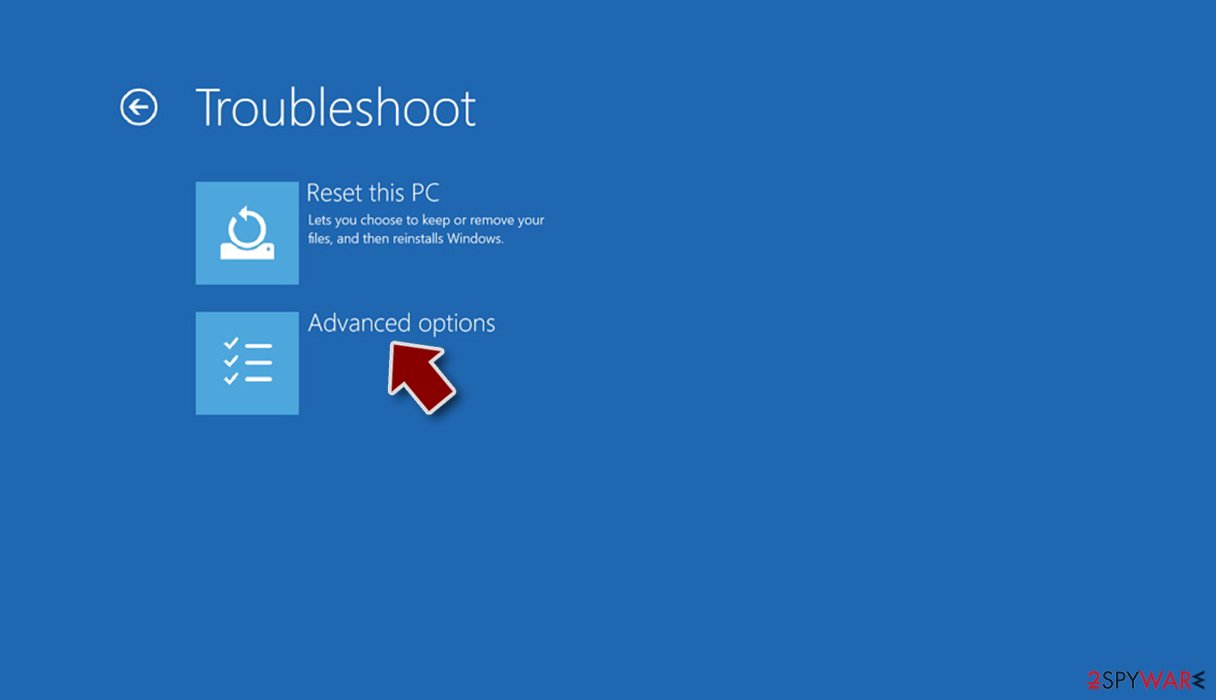
- Select Startup Settings.
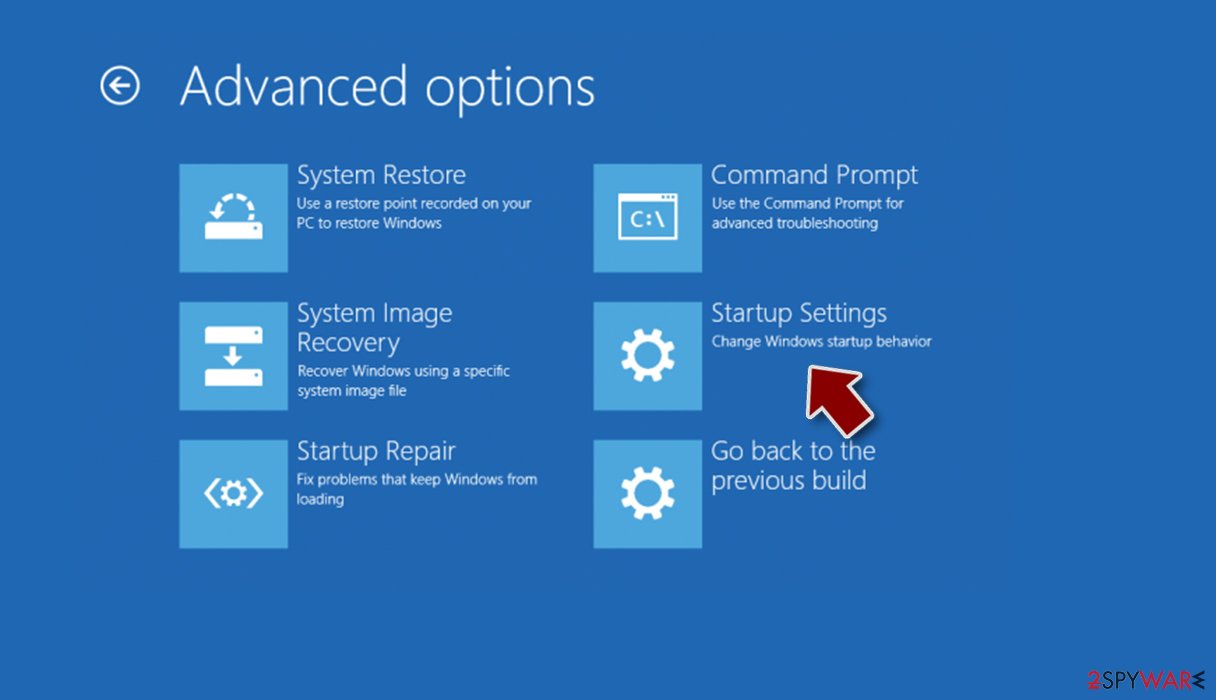
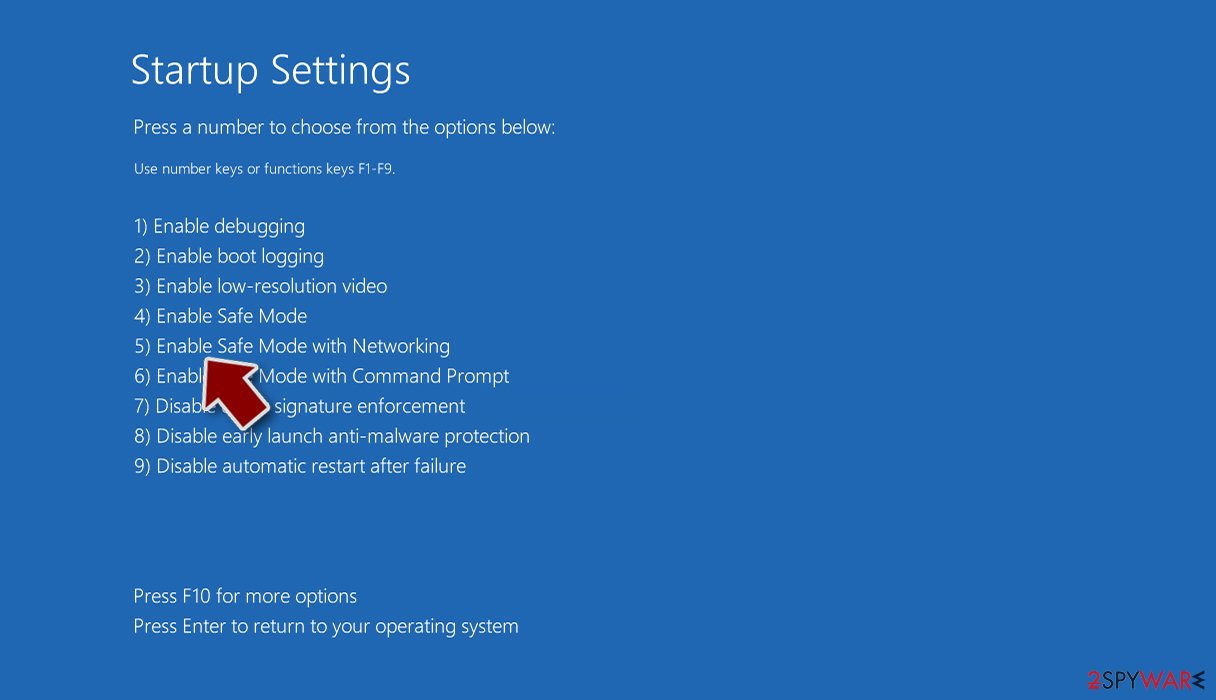
- Press Restart.
- Now press 5 or click 5) Enable Safe Mode with Networking.
Step 2. Shut down suspicious processes
Windows Task Manager is a useful tool that shows all the processes running in the background. If malware is running a process, you need to shut it down:
- Press Ctrl + Shift + Esc on your keyboard to open Windows Task Manager.
- Click on More details.
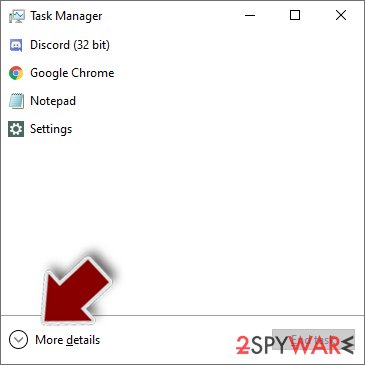
- Scroll down to Background processes section, and look for anything suspicious.
- Right-click and select Open file location.
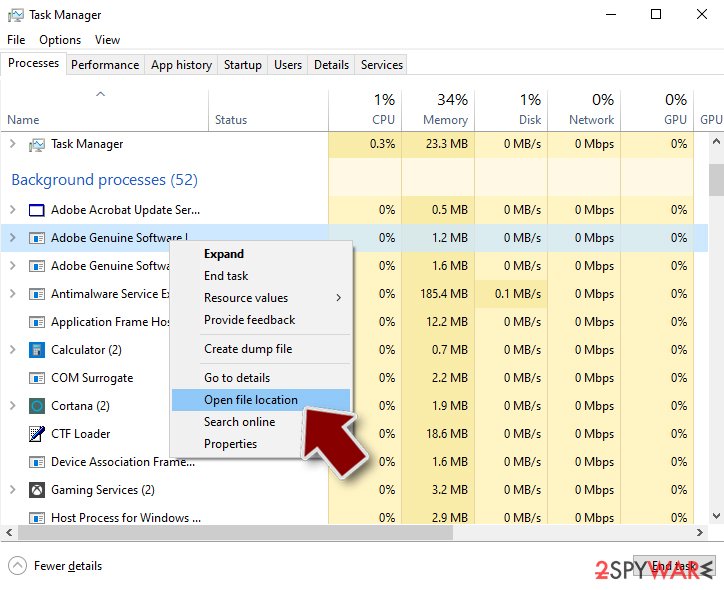
- Go back to the process, right-click and pick End Task.
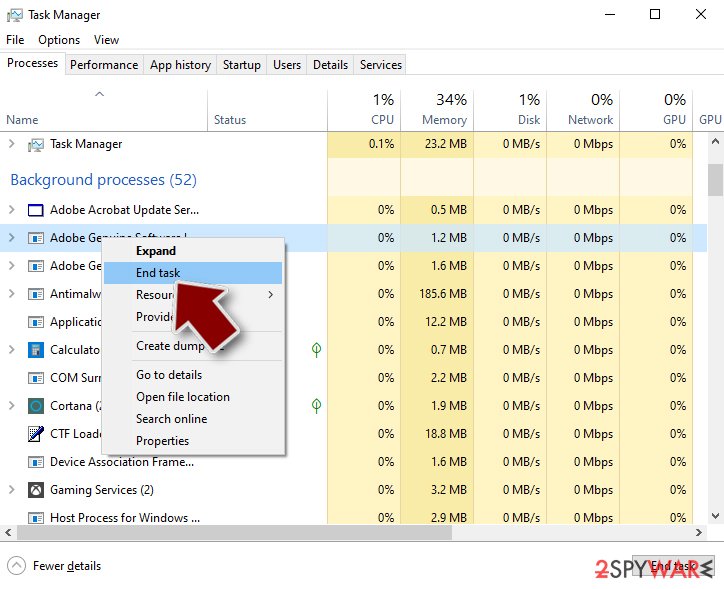
- Delete the contents of the malicious folder.
Step 3. Check program Startup
- Press Ctrl + Shift + Esc on your keyboard to open Windows Task Manager.
- Go to Startup tab.
- Right-click on the suspicious program and pick Disable.
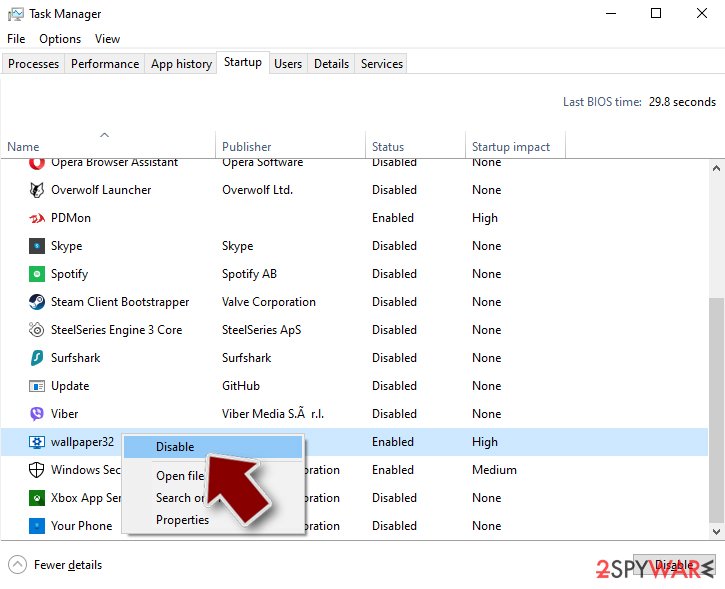
Step 4. Delete virus files
Malware-related files can be found in various places within your computer. Here are instructions that could help you find them:
- Type in Disk Cleanup in Windows search and press Enter.
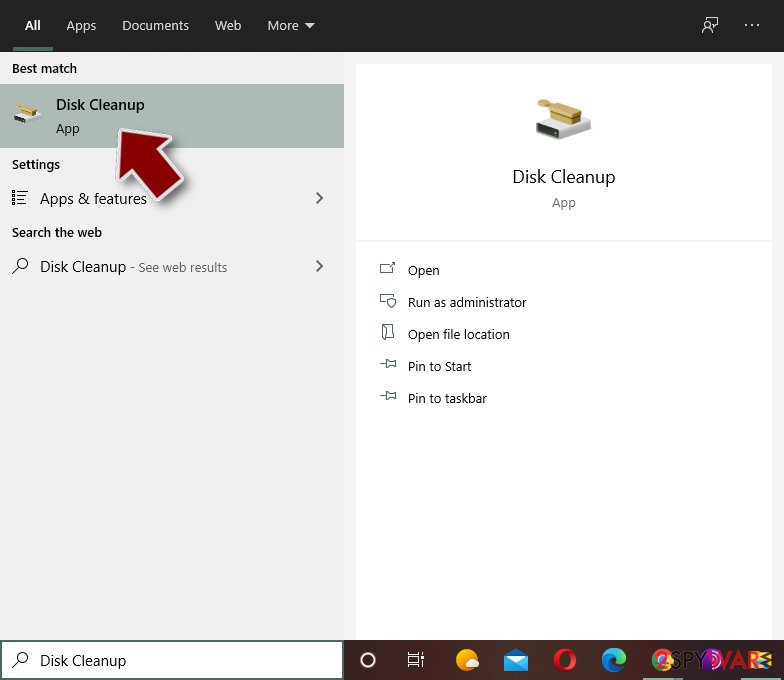
- Select the drive you want to clean (C: is your main drive by default and is likely to be the one that has malicious files in).
- Scroll through the Files to delete list and select the following:
Temporary Internet Files
Downloads
Recycle Bin
Temporary files - Pick Clean up system files.
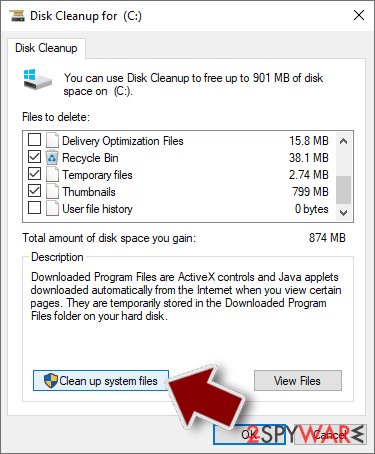
- You can also look for other malicious files hidden in the following folders (type these entries in Windows Search and press Enter):
%AppData%
%LocalAppData%
%ProgramData%
%WinDir%
After you are finished, reboot the PC in normal mode.
From our report of Feb 2020 · not reviewed since
Malware invasion techniques and prevention tips
Virus experts from NoVirus.uk state that malware finds its way to the targeted devices by manipulating those locations that have the weakest security level and are easy to hack.
For example, virus developers like to plant malicious payload on third-party downloading networks such as torrenting websites that are filled with game cracks, key generators, fake setups, movies, videos, updates, and other material that can help to pass the malware.
The best way to avoid receiving malware from torrenting websites is to just stop using them for your downloads. If you want to get some type of product or service, you should better apply for the downloading process on official websites. Furthermore, malware can get installed from infectious hyperlinks and advertisements that appear on unsecured secondary websites.
What you should do is be aware if your browser alerts that there is a deceptive website waiting ahead of you. Also, avoid stepping on every hyperlink and advert that you see, install AdBlock to decrease the load of advertising that you receive daily. Furthermore, make sure that you have a reliable antivirus program operating on your computer system and make sure to update the antimalware regularly.
From our report of Feb 2020 · not reviewed since
Removal techniques for Police Central e-crime Unit virus
Police Central e-crime Unit virus removal should be performed as soon as you encounter the malware on your computer system.
For this process, you will need to employ reliable automatical software, otherwise, it might be too difficult to complete on your own. If the virus has been blocking your computer screen, you can try diminishing these malicious changes with the help of Safe Mode with Networking function that is described below.
When you remove Police Central e-crime Unit virus from your Windows device, keep in mind that the malware might have brought some system compromisation. Check this speculation by downloading or and running a full computer checkup process. If the results reveal any altered areas, you can try fixing things by employing a trustworthy repair program such as .
[GI=method-1]To diminish the lock screen and other malicious changes that were applied by the malware, you should reboot your Windows computer in Safe Mode with Networking as shown in the below-provided instructions
[GI=method-2]To deactivate the parasite and disable its activities, you should try opting for System Restore. For completing this task, check out the instructing steps that are provided below
After removal: passwords, accounts and prevention
Your passwords after Police Central e-crime Unit virus
Removing Police Central e-crime Unit virus does not undo what it may already have sent out while the PC showed police Central e-crime Unit virus in the list of installed apps. Treat saved browser passwords and logged-in sessions on this PC as known to the attacker.
From another device, change the e-mail password first and end all its sessions. Then do the same for the bank, PayPal, Microsoft, Google and Apple accounts. Stolen session cookies keep working after a password change until you sign out everywhere.
Move crypto to a new wallet created on a clean device. A step-by-step order for every kind of account is in our guide to account security after an infection.
Protect your privacy - employ a VPN
There are several ways how to make your online time more private - you can access an incognito tab.
However, there is no secret that even in this mode, you are tracked for advertising purposes. There is a way to add an extra layer of protection and create a completely anonymous web browsing practice with the help of VPN. This software reroutes traffic through different servers, thus leaving your IP address and geolocation in disguise.
Besides, it is based on a strict no-log policy, meaning that no data will be recorded, leaked, and available for both first and third parties. The combination of a secure web browser and VPN will let you browse the Internet without a feeling of being spied or targeted by criminals.
No backups? No problem. Use a data recovery tool
If you wonder how data loss can occur, you should not look any further for answers - human errors, malware attacks, hardware failures, power cuts, natural disasters, or even simple negligence.
In some cases, lost files are extremely important, and many straight out panic when such an unfortunate course of events happen. Due to this, you should always ensure that you prepare proper data backups on a regular basis.
If you were caught by surprise and did not have any backups to restore your files from, not everything is lost. is one of the leading file recovery solutions you can find on the market - it is likely to restore even lost emails or data located on an external device.
Questions about Police Central e-crime Unit virus
Can I safely uninstall Police Central e-crime Unit virus?
If you did not install Police Central e-crime Unit virus yourself and it is not part of your hardware or a program you rely on, yes. Uninstalling an unwanted program does not harm Windows.
Before you do, search the exact name and publisher to be sure it is not a driver tool, a printer utility or a game launcher with an odd name. Then remove it from Settings, Apps, Installed apps.
Ignore any offers or warnings in its uninstaller about losing protection or performance. Afterwards check Startup apps and your browsers for leftovers, and restart once to confirm that it does not reinstall itself.
Police Central e-crime Unit virus will not uninstall. What can I do?
First restart the PC and try again, because the program may have been running and locked its own files. If the uninstaller is missing or fails, start Windows in Safe Mode, where most third-party programs do not start, and remove Police Central e-crime Unit virus from Installed apps there.
If it still refuses, delete its startup entry and its scheduled task, restart, and try once more. A program that actively prevents removal is behaving like malware, so finish with a Microsoft Defender offline scan. Avoid third-party uninstallers offered on search ads; several of them are unwanted programs themselves.
Why didn't my antivirus stop Police Central e-crime Unit virus?
New trojan builds are packed and changed often so that signatures do not match, and some are signed with stolen or bought certificates. Many arrive inside password-protected archives, which scanners cannot open until you extract them.
Some downloads also tell the user to turn off the antivirus "because it gives false alarms", a common line in cracked software instructions. Keep real-time protection on, never disable it for an installer, and run the offline scan whenever you suspect something slipped through.
Is Police Central e-crime Unit virus a known trojan?
Not as a documented family, at least not yet. What is known is the visible sign, police Central e-crime Unit virus in the list of installed apps, which matches a hidden program working for someone else.
New threats are often seen by victims weeks before researchers publish anything about them. Treat Police Central e-crime Unit virus as you would any trojan:
- remove what starts it
- run an offline scan
- change passwords from another device
If a scan reports a detection name, keep it; it usually reveals the family and whether it is known to download other malware. We update this guide when an analysis appears.
What are the signs of a trojan infection?
Most trojans try to leave no visible signs, so look for side effects. Common ones:
- Windows Security turned off or unable to update
- new entries in Startup apps or Task Scheduler
- programs in Installed apps you did not install
- browser settings that changed by themselves
- unusual network activity while the PC is idle
- password-reset or login-alert e-mails you did not trigger
None of these proves an infection on its own. Together with an antivirus alert naming Police Central e-crime Unit virus, they are a strong reason to follow the full plan.
How dangerous is Police Central e-crime Unit virus?
Treat it as serious until proven otherwise. The visible sign is police Central e-crime Unit virus in the list of installed apps, and programs that behave this way often have more abilities than they show:
- copying passwords
- downloading other malware
- giving remote access
Its family is not known yet, so nobody can say which of these it uses. The good news is that the response is the same in every case and takes about an hour:
- cut the network
- remove the startup entry
- run an offline scan
- change passwords from a clean device
If someone had remote control, a full reset is safer.
Should I reset my PC because of Police Central e-crime Unit virus?
Only if the signs point to deeper access. Reset when you see police Central e-crime Unit virus in the list of installed apps again after removal, when Windows Security cannot start or update, when remote access tools you did not install keep appearing, or when you simply cannot trust the PC any more.
Otherwise, the plan in this guide plus an offline scan is enough. If you do reset, choose Remove everything and Cloud download for a fresh copy of Windows, restore only documents and photos, and reinstall programs from their official sites. Change important passwords from the clean system afterwards.
Is a trojan infection worth reporting to the police?
If there was harm, yes. Unauthorised payments, accounts used for fraud, blackmail or a remote session during a scam call all belong in a report, and banks often ask for its reference number before they refund anything.
If antivirus caught Police Central e-crime Unit virus before it ran and nothing was misused, there is nothing to report. Keep the evidence anyway:
- protection history
- the original download
- the dates
Businesses may also have to notify a data protection authority if personal data could have been accessed.
Can Police Central e-crime Unit virus spread to other devices on my network?
Most trojans aimed at home users stay on the PC they infected, but an attacker with remote access can look at the network, open shared folders and try passwords on other devices. Loaders sometimes deliver worms or ransomware that do spread.
Disconnect the PC while cleaning, run a full scan on other Windows PCs, change the router's admin password and the Wi-Fi password if they were saved on the infected PC, and update the router's firmware. If other PCs show the same detection, treat them as infected too.
Will Fortect remove Police Central e-crime Unit virus?
Fortect scans Windows for malware and unwanted programs and repairs the system files and settings they change, and its free scan shows what it finds on your PC before you decide anything.
For Police Central e-crime Unit virus, follow the plan above as well: the browser steps take back permissions and settings that no scanner treats as a threat, and uninstalling the program that brought it removes the source.
Run Microsoft Defender's full scan and, if anything was found, its offline scan as a second opinion. If the symptoms are gone after the plan and both scans are clean, there is nothing more to do.
Sources
- Norton: What is a Trojan? Is it a virus or is it malware? (read October 7, 2026)
- FTC: How to recognize, remove and avoid malware (read October 7, 2026)
- Microsoft Learn: Microsoft Defender Offline (read October 7, 2026)
- Microsoft Learn: How Microsoft names malware (read October 7, 2026)