
RedCross email scam: how to spot it and what to do
The RedCross email scam impersonates the International Committee of the Red Cross to solicit Bitcoin donations for COVID-19 relief. The real Red Cross never sends unsolicited emails or requests cryptocurrency payments.
Facts checked October 5, 2026. Removal steps tested on Windows 11 (26H2) and checked against Microsoft's and the browser makers' current documentation. Sections marked as our earlier report are the original text: they describe the threat as it was then and have not been reviewed since. The 2026 status, the removal steps and the questions are current.
Automatic
Get a free scan and check if your PC is infected.
Fortect finds malware, unwanted programs and the Windows damage they leave behind, and repairs it in one pass.
Do it yourself · free Remove RedCross email scam yourself 4 steps, about 12 minutes, no software needed.
Start the steps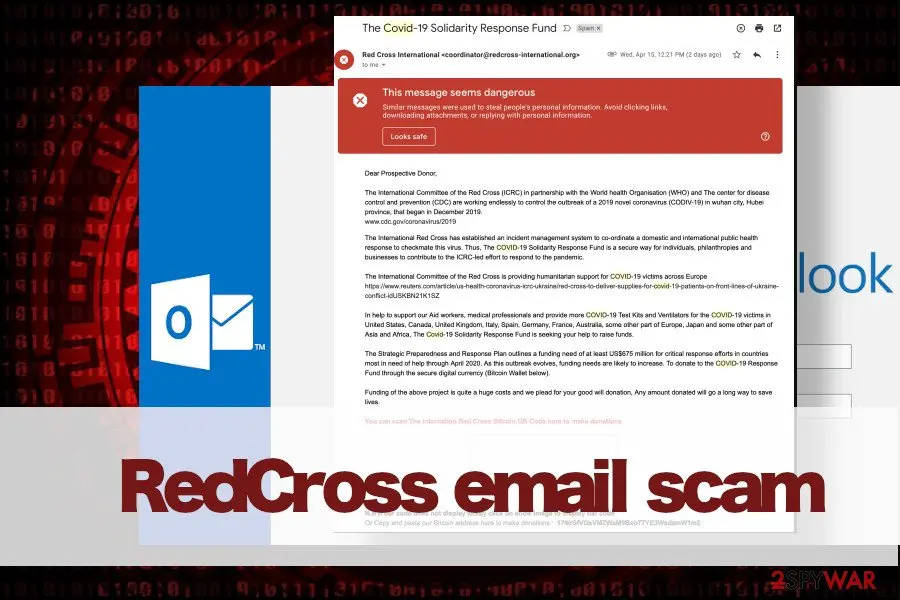
RedCross email scam: summary
| Name | RedCross email scam |
|---|---|
| Type | Scam tools |
| Related to | COVID-19 scam |
| Sender | Scammers impersonate Paul Handerson – a Co-ordinator ICRC Solidarity Response Fund. |
| Organization | Spam misuses the name of Red Cross |
| Sender's email | coordinator@redcross-international.org, though may vary |
| Removal | Scan the PC with security software to find and remove the malware and anything installed with it. Fortect scans Windows for malware and repairs the system files and settings it damaged. Remove it nowTo use the full-featured product, you have to purchase a license for Fortect. The scan is free. |
Show 12 more facts
| The goal | Criminals are trying to swindle people's money by impersonating Red Cross, which is supposedly asking for a donation to support coronavirus victims and medical personal that works with them |
|---|---|
| The risk | This fake email message contains several links, which from the initial inspection seem legitimate. Nevertheless, these URLs can be injected with malicious codes and expose you to phishing websites or trick into downloading malicious programs |
| Symptoms | A phishing e-mail asking you to sign in and a support phone number shown on screen |
| Evidence | 5 write-ups by security sites; no sample analysed yet |
| Arrives as | |
| Pretends to be | A well-known company |
| Claim | Your account needs urgent attention |
| Sender domain | coordinator@redcross-international.org |
| Asks for | Your password |
| Phone number | (866) 720-5721 |
| First seen | 17 April 2020 |
| Facts checked | 5 October 2026 |
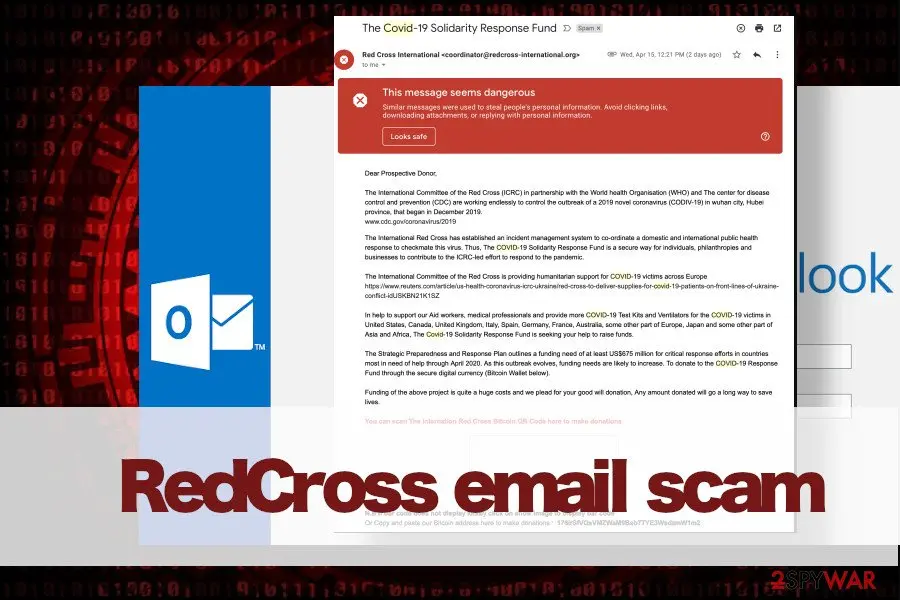
What the RedCross email scam e-mail looks like
Text of a phishing e-mail asking you to sign in, as people saw it
If You Suspect a Disaster-Related Scam
If you see or hear about any instances of people misusing the Red Cross name or logo to collect funds on behalf of Hurricane Sandy victims, or any other types of disaster-related fraud, please call the National Center for Disaster Fraud (a program under the U.S. Department of Justice), toll-free, at (866) 720-5721, or email the NCDF at disaster@leo.gov. All calls and emails will be treated as confidential.
From our report of Apr 2020 · not reviewed since
Botnets distribute spam emails widely
The forces behind fake RedCross email messages are botnets - a network of controlled computers that are manipulated bu bad actors and used to initiate massive spam attacks.
However, for a botnet to get a command, spammers have to fill the database of victims' emails. There are several ways for scammers to gain access to people's emails:
While the responsibility to prevent massive data leaks falls on companies and organizations that possess an email database, you should also take measures to protect yourself from spam attacks. First of all, do not place your email address publicly if it's not necessary. Besides, avoid participating in online surveys, prize giveaways, or subscriptions on questionable websites because it may a phishing scam.
- Fake online surveys
- Fake service subscriptions
- Data breach
- Direct placement of email address on advertisement websites.
How to tell the RedCross email scam e-mail is fake
- Sender:
coordinator@redcross-international.org - Phone number:
(866) 720-5721
From our report of Apr 2020 · not reviewed since
More from our earlier report on RedCross email scam
- If you clicked on links available on spam email messages and have problems with a virus, make sure to scan the system with a professional AV engine.
- After that, repair virus damage with
- Subject: The Covid-19 Solidarity Response Fund Dear Prospective Donor, The International Committee of the Red Cross (ICRC) in partnership with the World health Organisation (WHO) and The center for disease control and prevention (CDC) are working endlessly to control the outbreak of a 2019 novel coronavirus (COVID-19) in Wuhan city, Hubei province, that began in December 2019.
- The International Red Cross has established an incident management system to co-ordinate a domestic and international public health response to checkmate this virus.
- Thus, The COVID-19 Solidarity Response Fund is a secure way for individuals, philanthropies and businesses to contribute to the ICRC-led effort to respond to the pandemic.
- The International Committee of the Red Cross is providing humanitarian support for COVID-19 victims across Europe In help to support our Aid workers, medical professionals and provide more COVID-19 Test Kits and Ventilators for the COVID-19 victims in United States, Canada, United Kingdom, Italy, Spain, Germany, France, Australia, some other part of Europe, Japan and some other part of Asia and Africa, The Covid-19 Solidarity Response Fund is seeking your help to raise funds.
- The Strategic Preparedness and Response Plan outlines a funding need of at least US$675 million for critical response efforts in countries most in need of help through April 2020.
- As this outbreak evolves, funding needs are likely to increase.
- Funding of the above project is quite a huge costs and we plead for your good will donation, Any amount donated will go a long way to save lives.
- Please help us share this message to reach many as possible to help Support for all the urgent humanitarian needs of the International Red Cross.
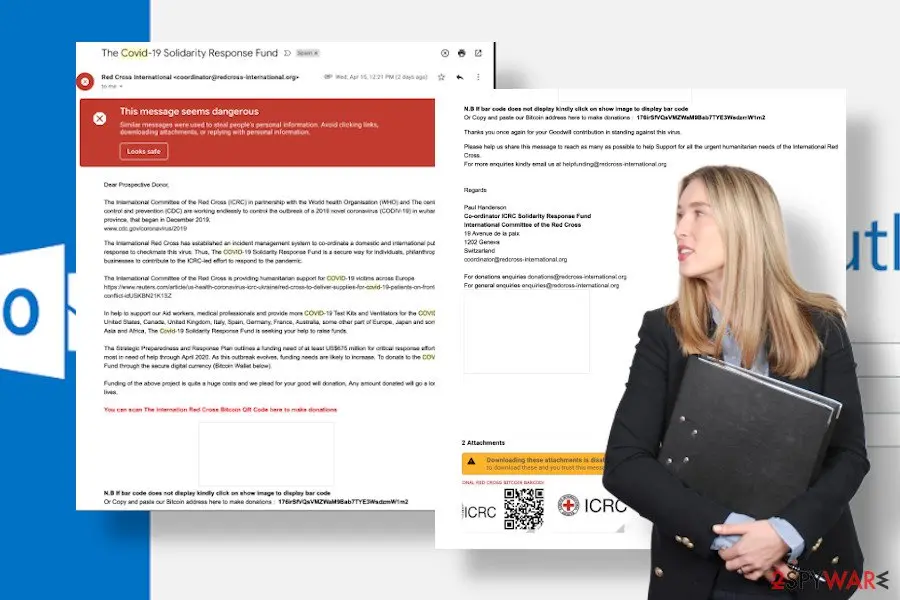
- For more enquiries kindly email us at helpfunding@redcross-international.org Regards Paul Handerson Co-ordinator ICRC Solidarity Response Fund International Committee of the Red Cross 19 Avenue de la paix 1202 Geneva Switzerland coordinator@redcross-international.org
Is RedCross email scam dangerous? What the senders want
From our report of Apr 2020 · outdated details corrected in October 2026
RedCross email scam is one of the COVID-19 scams, which supposedly raises funds to support aid workers and other medical personnel
RedCross email scam is yet another scam type, which leverages the COVID-19 outbreak to swindle peoples' money.
The email message involves criminals asking for a donation to help Aid workers, medical professionals and provide more COVID-19 Test Kits and Ventilators for the COVID-19 victims across the globe.
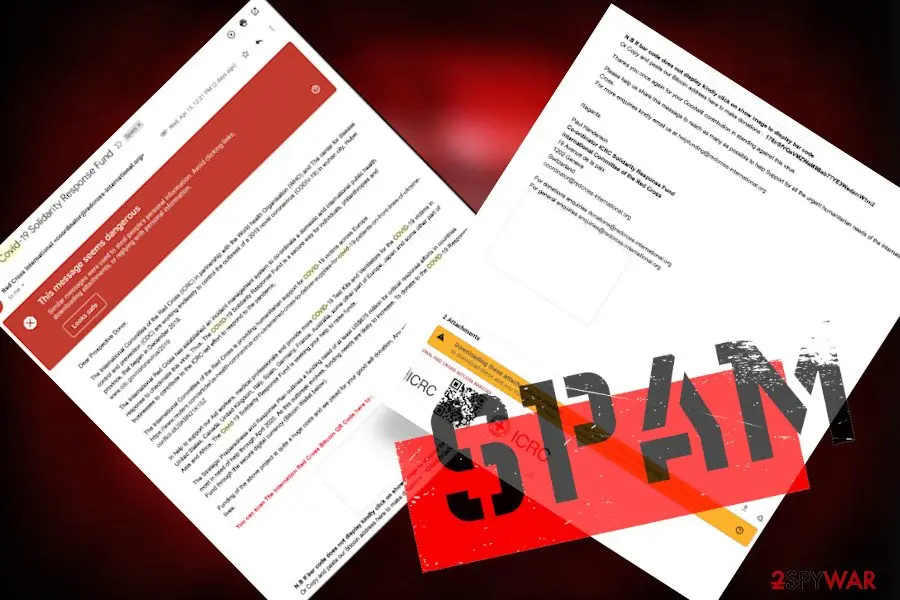
The email typically comes from coordinator@redcross-international.org and is signed by Paul Handerson - a Co-ordinator ICRC Solidarity Response Fund. Scammers claim that the funding is expected to reach at least $675 million and plan to collect the donations in bitcoin cryptocurrency via the 76irSfVQsVMZWaM9Bab7TYE3WsdzmW1m2 Bitcoin wallet.
According to virus researches, in 2020 there were more than 500 COVID-19 related scams and over 2,000 phishing attempts. There are hundreds of well-known names and organizations that have been misused by scammers to trick people into scams. Red Cross is the organization that initiates various fundraising in really that is why it's easy to fall for this scam.
However, please note that this particular organization does not send email messages to or, even more, does not ask for donations in Bitcoins. There is an official request on ICRC for people who think that Red Crosse's names been misused to inform the organization about that immediately.
Since people all over the world wait for the news about coronavirus pandemic and many of them really want to support organizations, scammers take advantage of such a time and spread fictitious messages like RedCross email scam. If such an email came to your inbox, all you have to do is to report it as spam. Do not allow scammers to get rich on behalf of people's misfortune.
To raise credibility, scammers include links to CDC (Center for Disease and Prevention) and Reuters websites. However, that's just a trick that the Red Cross email virus uses to swindle as much money as possible.
In reality, these links may expose you to phishing websites or lure into downloading malicious software, such as Trojan, keylogger or ransomware. Some spam emails contain attachments that carry malicious viruses, while the others feature links. Both methods are equally dangerous.
Another trickery on the RedCross email scam is the way scammers offer to donate. The email contains a place where the QR Code that supposedly belongs to the International Red Cross organization should be positioned. However, the QR Code does not work. An alternative - send money to the give Bitcoin Wallet, which belongs to scammers.
Those who receive RedCross email scams or other COVID-19 email scams should be concerned about the safety of the system and data stored on it. Scam email messages usually flood inbox after an email address gets exposed somewhere and becomes reachable to cybercriminals.
In many cases, emails leaks to criminals after potential victims enter personal information on bogus surveys. However, thousands or even millions of email addresses and other personal information get reachable to criminals after data breaches, such as Equifax, EDP, and others.
What to do after the RedCross email scam e-mail
If you only received the message and clicked nothing, step 3 is all you need.
If you clicked the link or typed anything on the page it opened, do every step, starting with the password.
Step 1: Change the password you typed on the fake page
If you entered a password after clicking the link in the RedCross email scam message, treat that account as known to the sender.
Open the provider's real site by typing its address yourself, not through any link in the e-mail, and change the password there. Choose a new one you have never used before, and change it on every other account that shared the old one.
Then use the option to sign out of all other sessions or devices, if the provider has one. This works the same in any browser on Windows 11 and Windows 10.
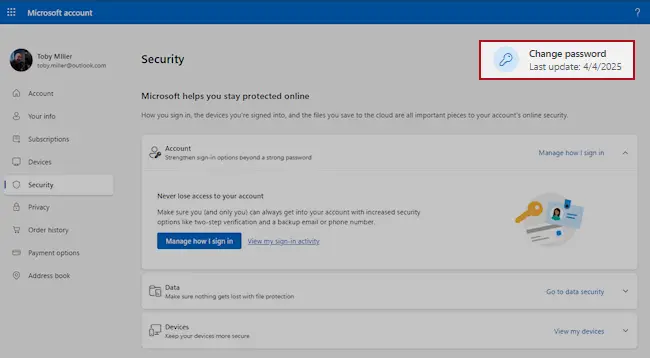
Microsoft account, Security page (account.microsoft.com/security): Change password. Full procedure with screenshots: Turn on two-step verification / secure a hacked account
Step 2: Turn on two-step verification
Two-step verification asks for a code from your phone or an authenticator app whenever someone signs in from a new device. A stolen password alone is then not enough to open the mailbox.
Turn it on in the security settings of the e-mail account first, then for the bank, shop and social accounts that send their reset links to that address.
While you are there, check the recovery e-mail and phone number and the forwarding rules, which attackers sometimes change to keep access. The settings pages look the same on Windows 11 and Windows 10.
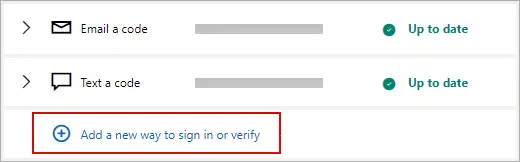
Microsoft account: Manage how I sign in, where two-step verification and the sign-in methods are. Full procedure with screenshots: Turn on two-step verification / secure a hacked account
Step 3: Report the e-mail and delete it
Report the message instead of only deleting it. In Outlook choose Report > Report phishing, in Gmail the three-dot menu > Report phishing; the provider then blocks the same message for other people.
Do not reply and do not click anything else in it. On a work account, forward it to your IT team as an attachment first. Web mail and the mail apps on Windows 11 and Windows 10 offer the same options.
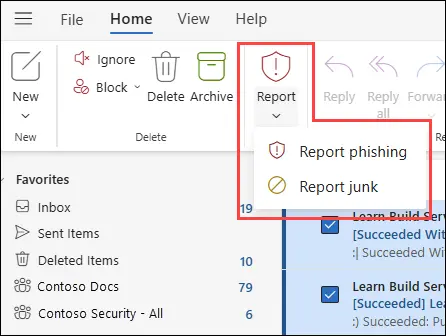
New Outlook for Windows and Outlook on the web: Report > Report phishing. Full procedure with screenshots: Report a phishing e-mail
Step 4: Scan the PC if you opened a file from the message
A page that only asked for a password installs nothing, so most readers can skip this step.
If the RedCross email scam e-mail or the page it opened made you download or open a file, delete it and run a full scan, then a Microsoft Defender Offline scan.
In Windows 11 and Windows 10 open Windows Security > Virus & threat protection > Scan options, select Microsoft Defender Antivirus (offline scan) and click Scan now. The PC restarts and the scan takes about 15 minutes, so save your work first.

Windows 11: Windows Security > Virus & threat protection > Scan options. Full procedure with screenshots: Run a Microsoft Defender Offline scan
Stream videos without limitations, no matter where you are
There are multiple parties that could find out almost anything about you by checking your online activity.
While this is highly unlikely, advertisers and tech companies are constantly tracking you online. The first step to privacy should be a secure browser that focuses on tracker reduction to a minimum.
Even if you employ a secure browser, you will not be able to access websites that are restricted due to local government laws or other reasons. In other words, you may not be able to stream Disney+ or US-based Netflix in some countries. To bypass these restrictions, you can employ a powerful VPN, which provides dedicated servers for torrenting and streaming, not slowing you down in the process.
Data backups are important - recover your lost files
Ransomware is one of the biggest threats to personal data.
Once it is executed on a machine, it launches a sophisticated encryption algorithm that locks all your files, although it does not destroy them. The most common misconception is that anti-malware software can return files to their previous states. This is not true, however, and data remains locked after the malicious payload is deleted.
While regular data backups are the only secure method to recover your files after a ransomware attack, tools such as can also be effective and restore at least some of your lost data.
From our report of Apr 2020 · not reviewed since
RedCross email scam removal possibilities
If you keep receiving RedCross email scam messages, all you can do is to report the message as a scam and delete it from your inbox.
However, the misleading messages on email may cause many problems for those people who click on links or attachments provided on them. In case you did so, we strongly recommend you to run a full system scan with a professional anti-virus program to ensure that your PC is free of ransomware, spyware, Trojan or another cyber infection.
RedCross email scam removal is not the last thing that you can do to protect yourself. In case your personal email address is continuously flooded with spam, most probably it has been leaked. Therefore, we would recommend you to create a new email, invent a strong password for it and keep it privately.
Questions about RedCross email scam
What is the RedCross email scam?
The RedCross email scam is a fraudulent COVID-19 related scheme that impersonates the International Committee of the Red Cross (ICRC). Scammers send emails claiming to be from the ICRC Solidarity Response Fund, supposedly raising funds for coronavirus victims and medical personnel.
The email comes from coordinator@redcross-international.org and is signed by Paul Handerson, identified as a Co-ordinator ICRC Solidarity Response Fund. Criminals claim funding needs reach at least $675 million and request donations in Bitcoin cryptocurrency via the wallet 76irSfVQsVMZWaM9Bab7TYE3WsdzmW1m2. The real Red Cross does not send unsolicited emails or request Bitcoin donations.
Is this really from the Red Cross?
No. This scam impersonates the genuine Red Cross organization, which does not send emails requesting Bitcoin donations. The real Red Cross initiates legitimate fundraising through official channels but never asks for cryptocurrency payments. The fraudulent email is designed to exploit people's desire to help during the pandemic.
More than 500 COVID-19 related scams and over 2,000 phishing attempts were active during this period. The International Committee of the Red Cross has requested that victims report misuse of their name to them immediately upon suspicion.
What happens if I click the links?
Clicking links in the RedCross scam email may expose you to phishing websites or malicious code designed to steal your information. Some emails contain attachments carrying malware like Trojans, keyloggers, or ransomware.
The links are injection with malicious code even though they may appear to be legitimate CDC or Reuters URLs. If you clicked on suspicious content, run a full system scan with professional antivirus software immediately. Avoid entering any personal or financial information on pages you reach through these links.
What about the QR code in the email?
The RedCross scam includes a QR code supposedly belonging to the International Red Cross, but it does not work. This non-functioning QR code is part of the scam's deceptive tactics. Instead of scanning the QR code, the email directs victims to send money to the Bitcoin wallet address 76irSfVQsVMZWaM9Bab7TYE3WsdzmW1m2.
The fake QR code is included only to create an appearance of legitimacy and trick unsuspecting victims into believing the email is genuine. Do not scan any QR codes from suspicious emails.
Should I donate to help with COVID-19?
Yes, you should support genuine COVID-19 relief efforts, but do so through official and verified channels only. Contact legitimate organizations directly through their official websites rather than clicking links in unsolicited emails.
Verify charity legitimacy before sending any money by checking official websites and contacting organizations directly via phone. The real International Red Cross has legitimate donation processes that never involve cryptocurrency or unsolicited email solicitation. Be especially skeptical of emails requesting urgent action or creating panic about funding needs.
How did I get this email?
Your email address likely appeared in a data breach or was exposed on advertisement websites, making it reachable to cybercriminals. Spam emails often flood inboxes after email addresses become known to attackers.
Thousands or millions of email addresses get exposed after data breaches at companies like Equifax, EDP, and others. Botnets distribute these scam messages widely using controlled computers manipulated by bad actors. Some victims entered personal information on bogus surveys, which exposed their email addresses to criminals.
Is my personal information at risk?
If you received this scam email, your email address is at risk of being targeted by additional scams and malware campaigns. If you clicked links or entered personal information, your data could be compromised further. Email leaks to criminals often result in multiple targeting campaigns from the same source.
However, simply receiving the email does not mean your computer is infected. If you did not click suspicious links or download attachments, your system is likely safe. Report the email as spam and delete it from your inbox.
How can I protect myself?
Do not place your email address publicly if unnecessary, and avoid participating in online surveys or prize giveaways on questionable websites as these are common phishing scams. When you receive suspicious emails requesting donations or personal information, report them as spam immediately.
Double-check charity legitimacy before donating by visiting official websites directly instead of clicking email links. Keep your security software updated and let it protect your system in real-time. If you already received this email, monitor your account for suspicious activity and consider changing passwords.
What should I do if I clicked a link?
If you clicked links from the RedCross scam email, run a full system scan immediately with professional antivirus software to ensure your PC is free of malware. Scan for ransomware, spyware, Trojans, and other cyber infections.
If you entered any personal or financial information on phishing websites, change your passwords immediately and monitor your accounts for suspicious activity. Consider placing a fraud alert with credit bureaus if you provided financial details. Report the incident to the legitimate Red Cross through their official website to help them combat this impersonation.
Will Fortect remove RedCross email scam?
Fortect scans Windows for malware and unwanted programs and repairs the system files and settings they change, and its free scan shows what it finds on your PC before you decide anything.
For RedCross email scam, follow the plan above as well: the browser steps take back permissions and settings that no scanner treats as a threat, and uninstalling the program that brought it removes the source.
Run Microsoft Defender's full scan and, if anything was found, its offline scan as a second opinion. If the symptoms are gone after the plan and both scans are clean, there is nothing more to do.
Sources
- USA Today: Coronavirus pandemic generates new fraud strains: COVID-19 scams on computers, smartphones (read October 5, 2026)
- The Guardian: Fraudsters exploiting Covid-19 fears have scammed £1.6m (read October 5, 2026)
- Norton: What is a botnet? (read October 5, 2026)
- FTC: How to recognize and avoid phishing scams (read October 5, 2026)
- CISA: Recognize and report phishing (read October 5, 2026)