
TopArcade Hits virus: what it is and how to remove it
TopArcade Hits virus (also known as Top Arcade Hits virus or ToparcadeHits virus) is a malicious program, which hails from the same family as Searchnu. This program infiltrates computers in a bundle with other, third-party software, and then modifies some of their settings in order to start its job.
Facts checked October 6, 2026. Removal steps tested on Windows 11 (26H2) and checked against Microsoft's and the browser makers' current documentation. Sections marked as our earlier report are the original text: they describe the threat as it was then and have not been reviewed since. The 2026 status, the removal steps and the questions are current.
Automatic
Get a free scan and check if your PC is infected.
Fortect finds malware, unwanted programs and the Windows damage they leave behind, and repairs it in one pass.
A scan of the PC is a quick way to confirm that nothing installed is behind the download.com redirects.
Do it yourself · free Remove TopArcade Hits virus yourself 4 steps, about 12 minutes, no software needed.
Start the steps
TopArcade Hits virus: summary
| Detection names | No Microsoft detection name is known |
|---|---|
| Distribution | Not recorded in the old report |
| Damage | Not recorded in the old report |
| Name | TopArcade Hits virus |
| Type | Adware extension |
| Symptoms | Redirects to an unknown domain |
| Removal | Scan the PC with security software to find and remove the malware and anything installed with it. Fortect scans Windows for malware and repairs the system files and settings it damaged. Remove it nowTo use the full-featured product, you have to purchase a license for Fortect. The scan is free. |
Show 6 more facts
| Evidence | One write-up by a security site; details still limited |
|---|---|
| Domains | download.com |
| Ads shown as | Redirects through ad pages |
| Browsers | Chrome, Edge and Firefox |
| First seen | 26 April 2021 |
| Facts checked | 6 October 2026 |
From our report of Apr 2021 · not reviewed since
What TopArcade Hits virus is
TopArcade Hits virus (also known as Top Arcade Hits virus or ToparcadeHits virus) is a malicious program, which hails from the same family as Searchnu.
This program infiltrates computers in a bundle with other, third-party software, and then modifies some of their settings in order to start its job. As soon as it prepares the system for work, TopArcade Hits virus starts interrupting the victim during his/hers search sessions with its continuous pop-up ads.
In most of the cases, these ads compare prices and show 'better' solutions or deals. However, they are filled with various links, so you can't be sure that you won't be rerouted to malicious website, which spreads malware. If you want to feel safe when browsing on the Internet, you should remove TopArcade Hits virus from your machine.
How TopArcade Hits virus got into your browser
From our report of Apr 2021 · not reviewed since
TopArcade Hits can be downloaded manually from download.com, toparcadehits.com or other website, which is used for promoting it.
However, it can also infiltrate computers just like any other adware - without the knowledge of the user. Typically, it gets inside the system in a bundle with other software, such as freeware and shareware. Such programs include adwares for the only aim – monetization, so you should always pay attention to 'components list' when downloading freeware on your computer.
If it gets inside the system, adware starts initiating havoc on victim's machine by popping up with its continuous alerts and notifications. Besides, it starts rerouting its victims to unwanted websites when they browse on the Internet. If you haven't installed this program on your PC manually and you really want to remove TopArcade Hits virus from your computer, follow this guide:
Check your browser and PC
- Address:
download.com
How to remove TopArcade Hits virus
How to remove the TopArcade Hits virus extension
Do the browser steps in every browser and profile on the PC, then check Windows for the program that installed the extension.
Step 1: Remove extensions you did not add
TopArcade Hits virus often works through an extension, so go through the extension list of each browser:
chrome://extensionsedge://extensions- Extensions and themes in Firefox
Switch suspicious extensions off one at a time and reload the page where the problem shows, then remove the one that stops it, and any other you did not add.
Remember the other browsers and profiles on the PC. If Remove is missing or greyed out, a policy forces the extension, which the policy step deals with. Windows 11 and Windows 10 show the same pages.
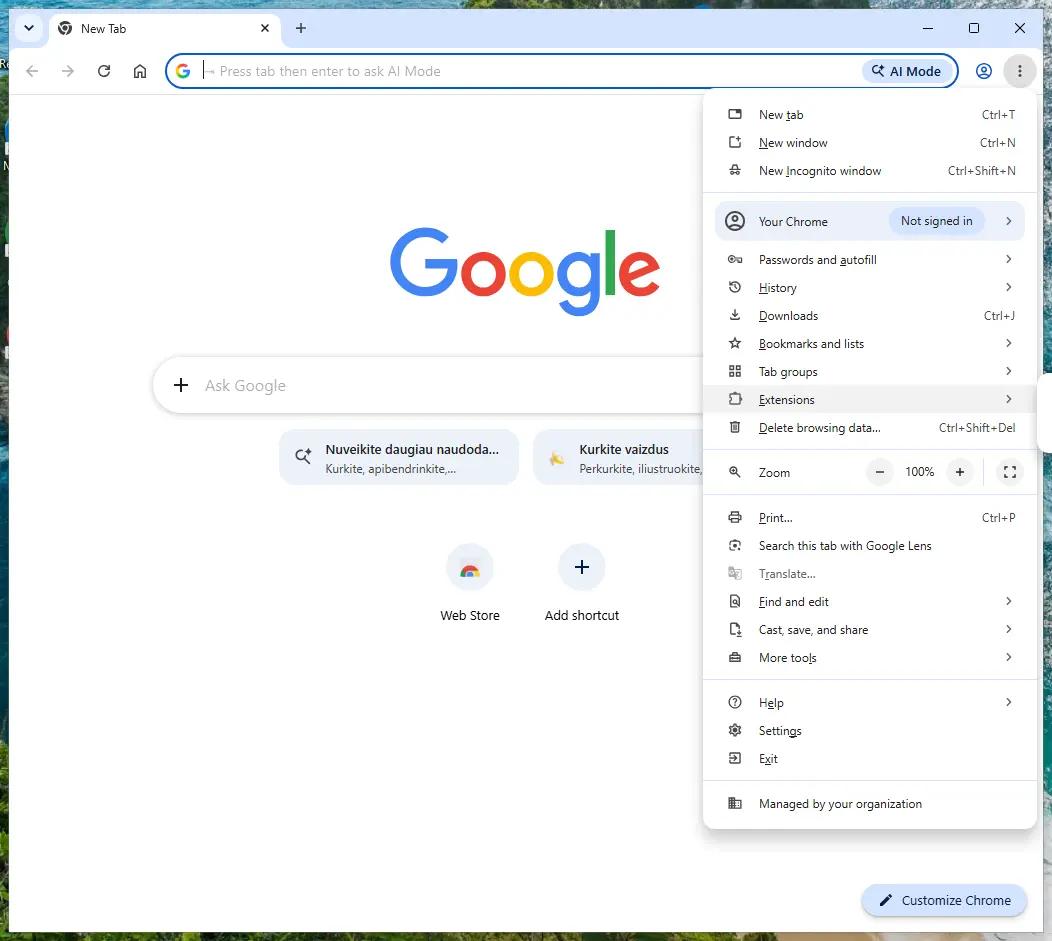
Chrome on Windows 11: More > Extensions > Manage extensions. Full procedure with screenshots: Remove a browser extension
Step 2: Uninstall programs you did not mean to install
Open Settings > Apps > Installed apps in Windows 11, or Settings > Apps > Apps & features in Windows 10, and sort the list by install date. Look at what appeared around the day the problem started and uninstall every program you do not recognise or did not choose.
Free converters, PDF and video tools, "system optimizers" and unknown browsers are the usual carriers of TopArcade Hits virus. If a name is unclear, search for it before you remove it, so you do not uninstall a driver or a Windows component.
Full procedure with screenshots: Uninstall a program or app in Windows On uGetFix
Step 3: Reset the browser
Finish the browser part with a reset, which puts the search engine, start page, new tab page and site permissions back to their defaults and switches extensions off. Chrome: Settings > Reset settings > Restore settings to their original defaults.
Edge: Settings > Reset settings. Firefox: Help > More troubleshooting information > Refresh Firefox, which also removes its extensions. Your bookmarks and saved passwords are kept, and the menus are the same on Windows 11 and Windows 10.
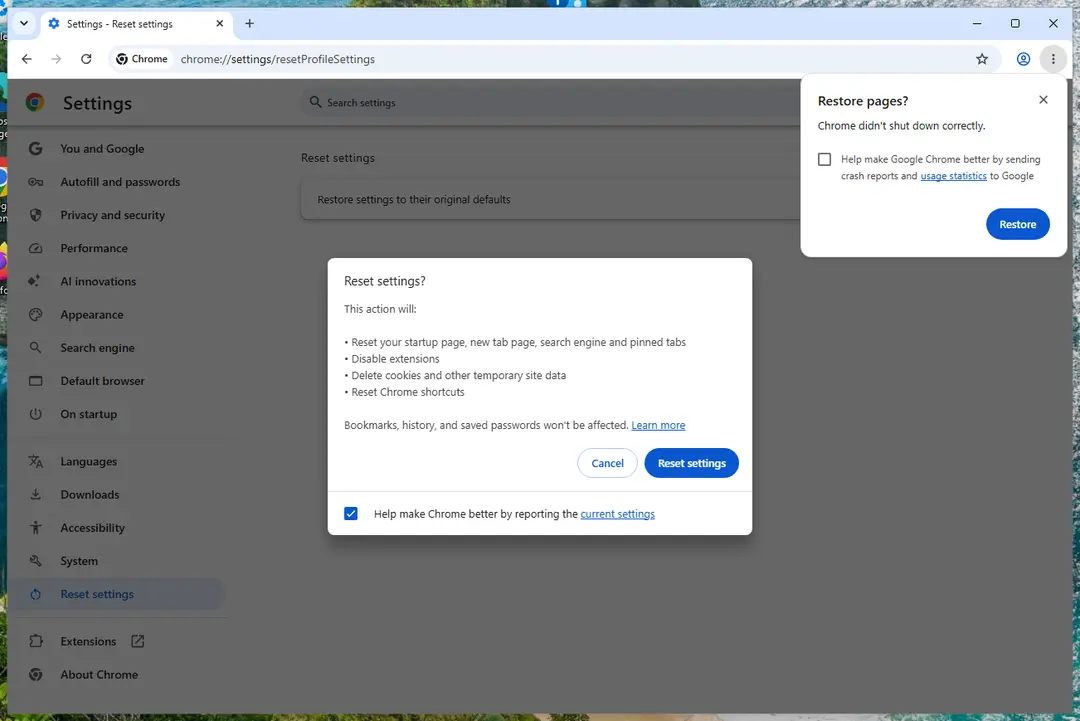
Chrome on Windows 11: Settings > Reset settings. Full procedure with screenshots: Reset a browser and fix a hijacked search engine
Step 4: Scan the PC, then run the offline scan
Open Windows Security > Virus & threat protection > Scan options, run a Full scan and remove everything it finds. Then select Microsoft Defender Antivirus (offline scan) and click Scan now: the PC restarts and scans before Windows loads, which finds files that hide while Windows runs.
Save your work first, because the offline scan takes about 15 minutes. Both scans are built into Windows 11 and Windows 10, and a second scanner from another vendor is a useful extra opinion.

Windows 11: Windows Security > Virus & threat protection > Scan options. Full procedure with screenshots: Run a Microsoft Defender Offline scan
Choose a proper web browser and improve your safety with a VPN tool
Online spying has got momentum in recent years and people are getting more and more interested in how to protect their privacy online.
One of the basic means to add a layer of security - choose the most private and secure web browser. Although web browsers can't grant full privacy protection and security, some of them are much better at sandboxing, HTTPS upgrading, active content blocking, tracking blocking, phishing protection, and similar privacy-oriented features.
However, if you want true anonymity, we suggest you employ a powerful VPN - it can encrypt all the traffic that comes and goes out of your computer, preventing tracking completely.
Lost your files? Use data recovery software
While some files located on any computer are replaceable or useless, others can be extremely valuable.
Family photos, work documents, school projects - these are types of files that we don't want to lose. Unfortunately, there are many ways how unexpected data loss can occur:
- power cuts
- Blue Screen of Death errors
- hardware failures
- crypto-malware attack
- even accidental deletion
To ensure that all the files remain intact, you should prepare regular data backups. You can choose cloud-based or physical copies you could restore from later in case of a disaster. If your backups were lost as well or you never bothered to prepare any, can be your only hope to retrieve your invaluable files.
From our report of Apr 2021 · not reviewed since
HOW TO REMOVE TOPARCADE HITS VIRUS?
In order to get remove TopArcade Hits virus, you should run a full system scan with updated anti-spyware.
In addition, follow these steps to get rid of TopArcade Hits virus for good:
Click Start -> Settings -> Control Panel -> Add/Remove Programs. Additionally, look for TopArcade Hits or anything what could be related to this virus and uninstall it.
Now fix your browsers:
Open Internet Explorer, go 'Tools' -> "Manage Add-ons' -> 'Toolbars and Extensions'. Here, look for TopArcade Hits or anything what could be related to this virus and click 'uninstall'. Now open IE -> Tools -> Internet Option -> General tab. Enter Google or other address to make it the default start page.
Open Mozilla Firefox, go 'Tools' -> 'Add-ons' -> 'Extensions'. Find TopArcade Hits or anything what could be related to this virus and click 'Uninstall'. Now go to Tools -> Options -> General -> Startup. Now select 'Show a blank page' when Firefox Starts or set a certain website, like Google or similar..
Click the Chrome menu button on the Google Chrome browser, select Tools -> Extensions. Here, look for TopArcade Hits or anything what could be related to this virus and get rid of it by clicking on the Recycle Bin.
Additionally, click on wench icon, go to settings and choose 'Manage search engines'. Change search engine to google or other and then Go to section "On start" and make sure you get blank page while creating new tab.
Questions about TopArcade Hits virus
download.com opens when I click links. What causes it?
When every click leads to download.com first, an extension or a script on the page is rewriting the links. If it happens only on one site, that site uses aggressive ads; close it and use another source. If it happens everywhere, open the browser in a private window, where extensions are normally off, and try again.
No redirect in the private window means one of your extensions is responsible: remove the ones you do not know. A redirect in the private window too means the cause is outside the extensions, such as a notification permission, a changed search setting or a program installed on the PC. The removal steps in this guide cover each of those.
Did download.com install a virus on my PC?
Very unlikely, unless you downloaded and opened something from the pages it led to. Redirect domains such as download.com sell your visit to advertisers; they do not need to install anything to make money.
What can be installed is the thing that causes the redirects in the first place, such as an extension or an ad-supported program that came with free software. That is why the checks in this guide look at extensions, notification permissions and Installed apps.
A full scan with Microsoft Defender afterwards gives you a clear answer about the rest of the PC. If the scan is clean and the redirects stop after removing the cause, you are done.
What is TopArcade Hits virus?
TopArcade Hits virus is an adware extension, a kind of adware. It earns money by showing redirects through ad pages, and each view, click or redirect pays whoever runs it. It is not something people usually choose; it arrives through a free download, a fake button or a misleading prompt.
TopArcade Hits virus does not encrypt files or take control of Windows, but its ads are sold to anyone, including scam operators, so they can lead to fake virus warnings and unwanted downloads. The steps in this guide remove it from Windows and from each browser.
Which browsers does TopArcade Hits virus affect?
In the cases we checked, TopArcade Hits virus showed up in Chrome, Edge and Firefox. That does not rule out others on your PC, since adware installers often target every browser they find, and permissions and extensions sync across computers signed in to the same browser account.
Open each browser you have, go to its extensions page and its notification settings, and remove anything you do not recognise. Profiles count separately: Chrome and Edge can each hold several, and each one needs checking on its own.
Are the pop-ups I see really from TopArcade Hits virus?
Compare them with the details in the table above. TopArcade Hits virus produces redirects through ad pages, and the clearest sign of it is redirects to download.com. Other adware looks similar, so check the name of the sending site at the bottom of a notification, the address in the tab that opened, or the newest entries on the extensions page.
If those match, this guide fits. If you see a different name, the same kind of steps apply, but remove the item you actually find rather than guessing.
Did TopArcade Hits virus collect my data?
Adware typically collects what it needs to choose ads:
- the sites you visit
- search terms
- approximate location
- browser and system details
Extensions with permission to read and change data on all websites can technically see everything on those pages, including forms. That is a privacy problem rather than proof of theft.
If you typed card details or passwords while it was active, changing the most important passwords is a reasonable precaution. Clearing cookies after removal ends the tracking sessions it may have started.
Can an adware pop-up infect my PC just by appearing?
No. A pop-up, a notification or a new tab is only a web page or a message. It cannot run programs on Windows by itself, provided the browser and Windows are up to date. Infection needs a step from you:
- running a downloaded file
- installing an extension
- giving a stranger remote access
That is why scam pages work so hard to make you click. Close such pages with the tab's X or by closing the browser, not with buttons inside the page, which may start a download.
I let a "support technician" from an ad connect to my PC. What should I do?
Act quickly but calmly. Disconnect the PC from the internet first, so the connection ends. Uninstall the remote access tool they asked you to install and check Installed apps for anything else added during the call.
Run a Microsoft Defender full scan and offline scan. From another device, change your e-mail and banking passwords and sign out of all sessions.
If you paid by card, bank transfer or gift card, contact your bank or the card issuer immediately, and report the scam to the police. Do not answer if they call back.
Why is my browser so slow since the ads started?
Each page now does extra work. An adware extension reads the page, decides where to put ads, loads them from ad servers and reports your visit, and that happens on every tab. Ad-supported programs add their own background activity.
Removing the extension or program usually makes the browser fast again at once. If it stays slow, open the browser's own task manager with Shift+Esc in Chrome or Edge and look for extensions using a lot of memory or processor time.
Will Fortect remove TopArcade Hits virus?
Fortect scans Windows for malware and unwanted programs and repairs the system files and settings they change, and its free scan shows what it finds on your PC before you decide anything.
For TopArcade Hits virus, follow the plan above as well: the browser steps take back permissions and settings that no scanner treats as a threat, and uninstalling the program that brought it removes the source.
Run Microsoft Defender's full scan and, if anything was found, its offline scan as a second opinion. If the symptoms are gone after the plan and both scans are clean, there is nothing more to do.
Sources
- Google Chrome Help: Use notifications to get alerts (no longer online) (read October 6, 2026)
- FTC: How to recognize, remove and avoid malware (read October 6, 2026)
- Microsoft Learn: Microsoft Defender Offline (read October 6, 2026)
- Microsoft Learn: How Microsoft names malware (read October 6, 2026)