

Lukitus ransomware is the version of a known threat focused on the dangerous money extortion technique
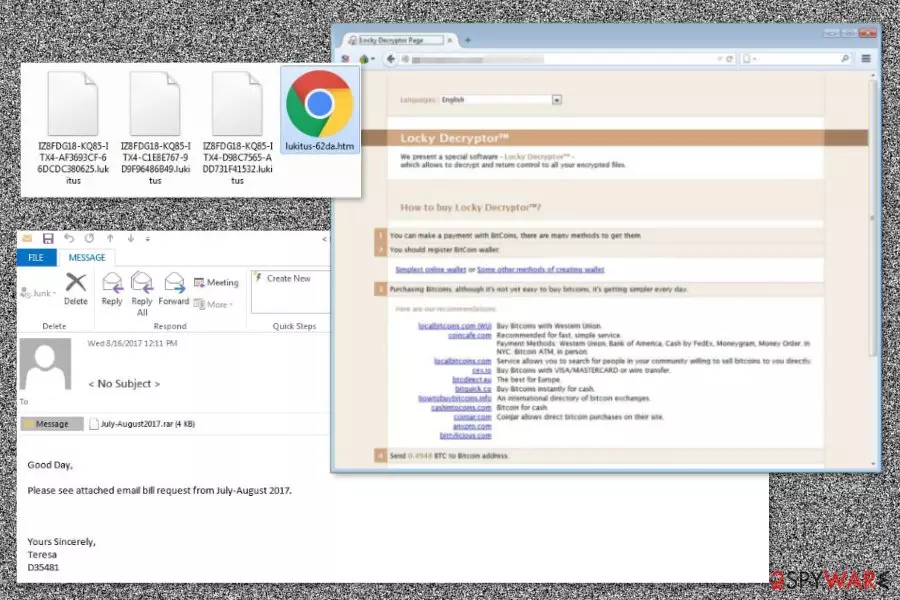
Lukitus is a new variant of the Locky virus that has been spotted spreading via malicious spam emails in August 2017. This ransomware-type program uses RSA-2048 and AES-128 ciphers to encrypt files and mark them with .lukitus file extension. Then it installs two new files – lukitus.bmp and lukitus.htm that inform about the only expensive data recovery option – the necessity to purchase Locky decryptor.
The virus not only encrypts files but renames them, as well. Just like a few weeks ago emerged Diablo6 version,[1] the recent cyber threat follows the same scheme to change filenames. The name of the corrupted file includes numbers of the victim’s ID and random characters:
[first 8 characters of ID]-[next 4 characters of ID]-[next 4 characters of ID]-[4 characters]-[12 characters].lukitus
When targeted data is locked with a strong cipher, the ransomware replaces the computer’s desktop picture with lukitus.bmp file. The new wallpaper includes a short but threatening message from the cybercriminals. They learn about data encryption and are urged to check the ransom note for more information about data recovery.
| Name | Lukitus ransomware |
|---|---|
| Type | Cryptovirus, file-locker |
| File marker | It includes a long victim identification number and ends with .lukitus appendix. The line comes after the original name of the encoded piece |
| Related | Locky virus version |
| Distribution | Malicious files can be added to emails or included on pirated software packages |
| Removal | The best tool for malware is the antivirus tool. This application checks the computer and terminates any detected pieces |
| Recovery | The virus damage that ransomware leaves behind can be fixed using FortectIntego |
The HTM file includes the victim’s ID number and notes that the only way to decrypt files – to purchase Locky Decryptor for 0.49 Bitcoins. However, it’s a huge sum of money that equals about $2.000. We do not recommend paying it because it may lead to money loss only.
Just like other Locky variants, Lukitus uses the same ransom note template and payment website. That proves that cybercriminals standing behind this malicious program are consistent with their work.
Unfortunately, malware removal won’t help to recover corrupted files. Neither Locky nor its variants are decryptable. However, the elimination of crypto-malware is necessary because this malicious program makes critical system changes and might put your data or privacy at risk. Therefore, as soon as you learn about the attack, you have to obtain reputable security software and remove Lukitus from the PC. For this task, we suggest using MalwarebytesMalwarebytes or SpyHunterCombo Cleaner.

Malicious spam campaign hits victims with a new ransomware variant
According to the malware researcher Rommel Joven, developers of the Locky virus remain faithful to the traditional ransomware distribution method – malicious spam emails. Malspam campaign that spreads Lukitus includes ZIP or RAR attachments with JS files. As soon as a user opens such a dangerous archive, malware executable is dropped to the system.
Emails that bring this crypto-malware have two subject lines:
- < No Subject >
- Emailing – CSI-034183_MB_S_7727518b6bab2
The content of the message politely asks to open the attached document due to a particular date. However, we want to point out that if you do not expect to receive any files or documents, you should never open unknown emails.
The name “Lukitus” means “Locky” in Finnish. However, it does not say that this variant aims at computer users in Finland[2] only. The malicious emails are written in English and can be delivered to any inbox all over the world.
Before opening any received files or the links in the email, you should:
- double-check the information about the sender;
- scan attachments with security tools in order to make sure that they are not infected;
- lookup for grammar or spelling mistakes that might reveal cybercriminals.
For ransomware protection,[3] you should also keep all the programs installed on your PC updated, avoid clicking suspicious content or visit high-risk sites and install professional antivirus. Of course, data backups are a must!
September 2017 update: the ransomware uses a set of different themes for spam emails
Locky's authors are now using the old Dropbox-themed phishing emails to deliver the latest Lukitus ransomware variant. Security experts have discovered a brand new spam campaign that rapidly distributed deceptive messages to over 23 million potential victims in just 24 hours. It is believed to be one of the largest malicious spam campaigns seen in the second half of 2017.
Facts about the latest Lukitus distribution campaigns:
- Criminals are rapidly distributing the latest Locky variant to victims via email. Typically, they are Dropbox-themed and suggest verifying email via a provided phishing link.
- Clicking the provided link redirects the victim to legitimate web pages or hosting accounts that have been compromised by criminals. Usually, the link will contain a dropbox.html at the end of it.
- The dropbox.html file opens a phishing website that looks like a legitimate DropBox page. However, at the same time a VBS file downloads and launches the virus on the victim's system.
- At the same time, criminals are also using a quite simple malspam technique and sending double-zipped VBS files or JS files. Once launched, these files download Lukitus from particular domains.
- Virus' authors are using the following subject lines in this malspam campaign: “Please print,” “pictures,” “images,” “scans,” “documents” or “photos.” The message body contains a basic message inviting you to view the content of the attached file – “Download it here.”
- Criminals are also using FreeFax-themed spam as well as deceptive voice messages to lure unsuspecting victims into compromised websites ending with .fax.html. These emails usually contain “FreeFax From:[random digits]” or “Voice Message from [random digits] in the subject line and suggest clicking a provided link to download the fax or listen to the voice message.
- Once redirected to a compromised website, the user receives a suggestion to open a .js file which might be named in such format: Fax_Message_[random digits].js or similar. Opening the file instantly installs Lukitus on the system.
- The latest spam campaign distributes Micorosft Store-themed spam. Fraudsters are using “Microsoft Store E-invoice for your order #[random digits]” in the subject line and suggest downloading the Invoice by clicking on an attached link. Just like we previously explained, the link leads to a compromised site containing a malicious MS_INV_[random digits].7z file which was previously uploaded by virus' developers.
It is clear that Locky virus' developers are working hard to distribute the Lukitus ransomware version as widely as possible. Therefore, you have to stay vigilant and not allow this ransomware to outwit you.
Remove Lukitus file virus and recover your files
The proper ransomware removal must be performed using reputable security software. Automatic elimination assures that all malicious files and processes are stopped and deleted without damaging the system. Ransomware viruses are complicated, so attempts to uninstall malicious components manually may end up with irreparable system damage.
If you are looking for a tool to remove Lukitus from the PC, we suggest choosing one of these programs: SpyHunterCombo Cleaner, or MalwarebytesMalwarebytes. However, malware might prevent installing or accessing security tools. So, you may need to reboot the computer to Safe Mode with Networking as shown below. You can also benefit from the scan with a tool like FortectIntego that helps with virus damage and affected system parts.
Did this guide help?
Be the first to comment