
Axisearch.com: what it is and how to remove it
Axisearch.com is a misleading search engine, which is closely related to FbDownloader program and search.fbdownloader.com. This search site can appear on your computer out of nowhere, after installing other applications on it.
Facts checked October 7, 2026. Removal steps tested on Windows 11 (26H2) and checked against Microsoft's and the browser makers' current documentation. Sections marked as our earlier report are the original text: they describe the threat as it was then and have not been reviewed since. The 2026 status, the removal steps and the questions are current.
Automatic
Get a free scan and check if your PC is infected.
Fortect finds malware, unwanted programs and the Windows damage they leave behind, and repairs it in one pass.
If axisearch.com returns after you change the search engine back, a free scan can find the program that keeps setting it.
Do it yourself · free Remove Axisearch.com yourself 5 steps, about 15 minutes, no software needed.
Start the steps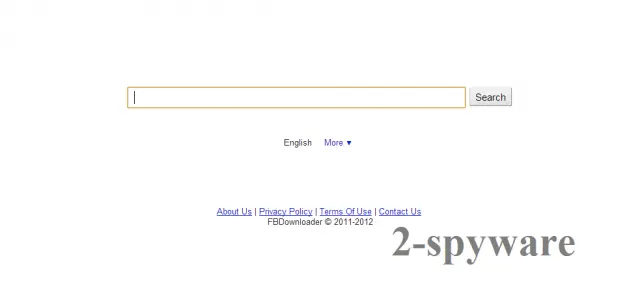
Axisearch.com: summary
| Detection names | No Microsoft detection name is known |
|---|---|
| Distribution | Not recorded in the old report |
| Damage | Not recorded in the old report |
| Name | Axisearch.com |
| Type | Fake search engine |
| Symptoms | A changed search engine |
| Removal | Scan the PC with security software to find and remove the malware and anything installed with it. Fortect scans Windows for malware and repairs the system files and settings it damaged. Remove it nowTo use the full-featured product, you have to purchase a license for Fortect. The scan is free. |
Show 5 more facts
| Evidence | One write-up by a security site; details still limited |
|---|---|
| Search page | axisearch.com |
| Browsers | Chrome, Edge and Firefox |
| First seen | 7 November 2013 |
| Facts checked | 7 October 2026 |
From our report of Nov 2013 · not reviewed since
What Axisearch.com is
Axisearch.com is a misleading search engine, which is closely related to FbDownloader program and search.fbdownloader.com.
This search site can appear on your computer out of nowhere, after installing other applications on it. The main thing, which must be realized when talking about axisearch.com, is that this program should never be called 'virus' or 'malware'. However, we don't recommend using it for web searching if you want to receive genuine search results.
According to experts, axisearch.com mostly returns altered search results that may force you to visit unknown or insecure websites. Besides, you may start receiving continuous pop-up notifications and notice system slow downs when axisearch.com is inside your computer. In order to avoid them, you should rely on more reputable search engines, like Google and Yahoo.
Is Axisearch.com dangerous? What it collects
From our report of Nov 2013 · not reviewed since
HOW CAN Axisearch.com INFILTRATE COMPUTER?
Axisearch.com belongs to the category of 'potentially unwanted programs' that are mostly spread in a bundle with freeware and shareware.
If you want to prevent infiltration of such programs, try to pay more attention to their installation process and eliminate all checkmarks that agree to download additional programs, suggest changing home page and default search engine.
If you missed this check mark, soon you may notice that axisearch.com replaced your start page and default search engine. Fix these settings if you want to get rid of this search engine. You can remove Axisearch.com by following this guide:
Check your browser and PC
- Address:
axisearch.com
How to remove Axisearch.com
How to stop Axisearch.com from opening
The search page is only the end point.
These steps remove what sends the browser there, then put the search engine back.
Step 1: Put the search engine back and delete axisearch.com
Searches that pass through
axisearch.commean the browser's default search engine was replaced. Chrome: Settings > Search engine > Manage search engines and site search, then Make default on Google, Bing or another engine you chose, and Delete on axisearch.com.Edge has the same list under Manage search engines (search the Settings page for it), and Firefox under Settings > Search.
Look at On startup and the homepage settings too and remove the hijacker's address there. Nothing in this step differs between Windows 11 and Windows 10.
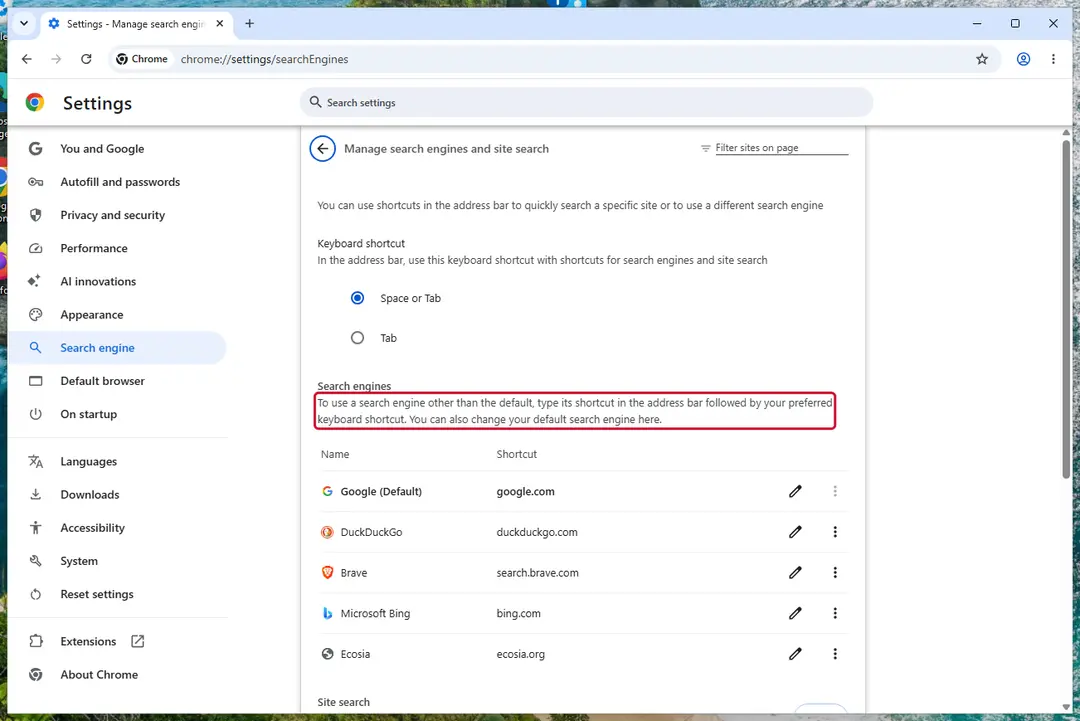
Chrome on Windows 11: check Search engine and On startup. Full procedure with screenshots: Reset a browser and fix a hijacked search engine
Step 2: Remove extensions you did not add
Axisearch.com often works through an extension, so go through the extension list of each browser:
chrome://extensionsedge://extensions- Extensions and themes in Firefox
Switch suspicious extensions off one at a time and reload the page where the problem shows, then remove the one that stops it, and any other you did not add.
Remember the other browsers and profiles on the PC. If Remove is missing or greyed out, a policy forces the extension, which the policy step deals with. Windows 11 and Windows 10 show the same pages.
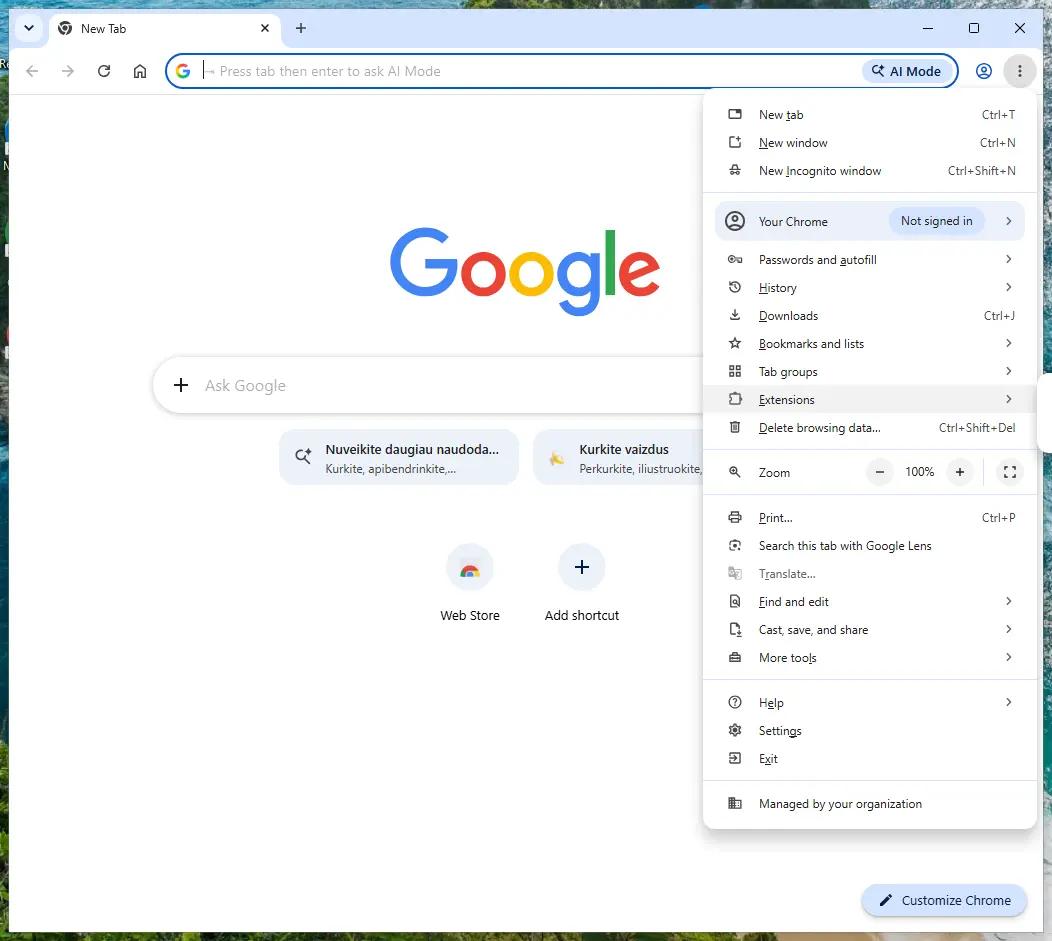
Chrome on Windows 11: More > Extensions > Manage extensions. Full procedure with screenshots: Remove a browser extension
Step 3: Uninstall programs you did not mean to install
Open Settings > Apps > Installed apps in Windows 11, or Settings > Apps > Apps & features in Windows 10, and sort the list by install date. Look at what appeared around the day the problem started and uninstall every program you do not recognise or did not choose.
Free converters, PDF and video tools, "system optimizers" and unknown browsers are the usual carriers of Axisearch.com. If a name is unclear, search for it before you remove it, so you do not uninstall a driver or a Windows component.
Full procedure with screenshots: Uninstall a program or app in Windows On uGetFix
Step 4: Reset the browser
Finish the browser part with a reset, which puts the search engine, start page, new tab page and site permissions back to their defaults and switches extensions off. Chrome: Settings > Reset settings > Restore settings to their original defaults.
Edge: Settings > Reset settings. Firefox: Help > More troubleshooting information > Refresh Firefox, which also removes its extensions. Your bookmarks and saved passwords are kept, and the menus are the same on Windows 11 and Windows 10.
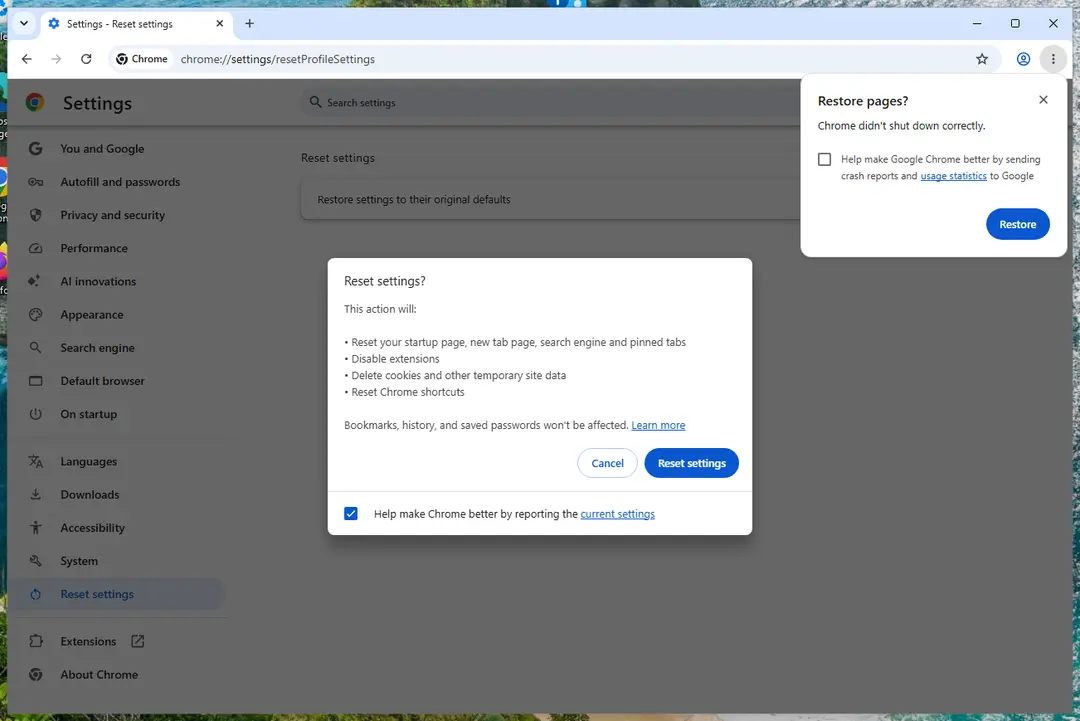
Chrome on Windows 11: Settings > Reset settings. Full procedure with screenshots: Reset a browser and fix a hijacked search engine
Step 5: Scan the PC, then run the offline scan
Open Windows Security > Virus & threat protection > Scan options, run a Full scan and remove everything it finds. Then select Microsoft Defender Antivirus (offline scan) and click Scan now: the PC restarts and scans before Windows loads, which finds files that hide while Windows runs.
Save your work first, because the offline scan takes about 15 minutes. Both scans are built into Windows 11 and Windows 10, and a second scanner from another vendor is a useful extra opinion.

Windows 11: Windows Security > Virus & threat protection > Scan options. Full procedure with screenshots: Run a Microsoft Defender Offline scan
Stream videos without limitations, no matter where you are
There are multiple parties that could find out almost anything about you by checking your online activity.
While this is highly unlikely, advertisers and tech companies are constantly tracking you online. The first step to privacy should be a secure browser that focuses on tracker reduction to a minimum.
Even if you employ a secure browser, you will not be able to access websites that are restricted due to local government laws or other reasons. In other words, you may not be able to stream Disney+ or US-based Netflix in some countries. To bypass these restrictions, you can employ a powerful VPN, which provides dedicated servers for torrenting and streaming, not slowing you down in the process.
Data backups are important - recover your lost files
Ransomware is one of the biggest threats to personal data.
Once it is executed on a machine, it launches a sophisticated encryption algorithm that locks all your files, although it does not destroy them. The most common misconception is that anti-malware software can return files to their previous states. This is not true, however, and data remains locked after the malicious payload is deleted.
While regular data backups are the only secure method to recover your files after a ransomware attack, tools such as can also be effective and restore at least some of your lost data.
From our report of Nov 2013 · not reviewed since
HOW TO REMOVE Axisearch.com?
In order to remove axisearch.com, follow the guide which is given below.
Besides, run a full system scan with anti-spyware. Try using or that have been effectively working with similar parasites and infections.
When trying to get rid of axisearch.com redirects, firstly you have to eliminate FbDownloader via Add/Remove Programs list:
Additionally, remove axisearch.com from each of your browsers (Google Chrome, Mozilla Firefox and Internet Explorer):
- Click Start -> Control Panel -> Programs (or Add/Remove Programs) -> Uninstall a Program.
- Here, look for axisearch and other unknown entries, and select 'Uninstall/Change'.
- Click OK to save the changes.
- Open Internet Explorer, go 'Tools' -> "Manage Add-ons' -> 'Toolbars and Extensions'.
- Here, look for axisearch.com and similar entries, and click 'uninstall'.
- After that, change the start page.
- Open Mozilla Firefox, go 'Tools' -> 'Add-ons' -> 'Extensions'.
- Find axisearch.com and similar entries, and click 'Uninstall'.
- Once you do that, don't forget to change the start page.
- Click the Chrome menu button on the Google Chrome browser, select Tools -> Extensions.
- Here, look for axisearch.com and other unknown extensions and get rid of them by clicking on the Recycle Bin.
- After that, change the settings of your start page.
Questions about Axisearch.com
Why does my search engine keep changing to axisearch.com?
Because something keeps setting it. An extension can change the search engine every time the browser starts, and an ad-supported program in Windows can do it for every browser and re-add the extension after you remove it. Some hijackers also add a policy that locks the setting.
Changing the search engine back only works once the source is gone. Remove extensions you do not recognise, uninstall programs installed around the time axisearch.com first appeared, and then set the search engine again. If it still returns, check the browser for the Managed by your organization message and follow the policy steps in this guide.
Is axisearch.com a virus?
It is a browser hijacker, not a virus in the classic sense. axisearch.com is a search page that an extension or program set as your default without a clear choice from you.
It does not destroy files or spread to other PCs, but it takes control of your searches, collects them and shows ads, and the software behind it is often bundled with other unwanted programs.
Many antivirus products flag such software as potentially unwanted. Removing the extension or program and resetting the search engine is enough in most cases. A full scan afterwards checks for anything else that came with it.
Why do my searches go to axisearch.com?
Because the browser's default search engine was changed to it. Axisearch.com did that through an extension, a program or a browser policy, and as long as that source remains, the setting points to axisearch.com.
The page then passes your query to a real search provider, so the results look almost normal, with extra sponsored links on top. Changing the search engine back on its own does not last, because the source resets it. Remove the extension or program first, then the policies if any, then set your own search engine.
Is it safe to keep searching with axisearch.com?
We would not. Every query you type is logged by its operators and shared with their advertising partners, and the sponsored links at the top are chosen for payment, not relevance. Results that look like a download page or a support site may lead to scams.
The page will not damage Windows by itself, but there is no benefit in keeping it: the results come from another search engine anyway. Remove Axisearch.com and use that search engine directly, by typing its address or choosing it in the browser settings.
Which browsers does Axisearch.com affect?
We saw it in Chrome, Edge and Firefox. That does not mean the other browsers on your PC are safe: hijacker installers usually change every browser they find, and browser sync can carry an extension to other computers signed in to the same account.
Check the search engine, home page, new tab, extensions and policies in each browser you have, including ones you rarely open. Chrome and Edge profiles count separately, so switch to each profile and check it as well before you call the job done.
What does axisearch.com know about me?
It knows what you searched for while it was your search engine, when, from which IP address and with which browser, and usually which results you opened. Tracking cookies let it connect those searches into a profile. It does not see your saved passwords or files.
After removing Axisearch.com, delete the cookies and site data for axisearch.com so the profile cannot be continued, and remove it from the browser's list of saved search engines. Signing out of important sites and back in also replaces session cookies.
Will resetting the browser remove Axisearch.com?
A reset disables extensions, restores the default search engine, start page and new tab, and clears temporary data and cookies. It keeps bookmarks, history and saved passwords. For many hijackers that is enough.
It does not remove a program installed in Windows, policies in the registry, changes to the hosts file or DNS, or edited shortcuts, so Axisearch.com can come back after a reset if one of those remains. Do the reset after removing the program and policies, not instead of it.
I changed the search engine, but it switched back. Why?
The hijacker is still installed, and it rewrites the setting whenever the browser starts or the extension updates. Changing the setting is the last step, not the first. Find what controls it: the search settings page usually names the extension, and a greyed-out field means a policy.
Remove that source, restart the browser, then pick your search engine and delete the hijacker's entry from the list of saved search engines so it cannot be chosen by accident. Check again after a day, when extensions have had a chance to update.
The results look like Google or Bing. Is that real?
Partly. Many hijacker search pages pass your query to a real search engine and show its results, so the list looks familiar. What changes is the frame around it:
- extra sponsored links at the top
- the hijacker's own tracking
- sometimes a design that copies a known search engine
You can tell by the address bar. If it shows axisearch.com or another unfamiliar domain instead of the search engine you know, the results come through a middleman. Remove Axisearch.com and search directly.
Will Fortect remove Axisearch.com?
Fortect scans Windows for malware and unwanted programs and repairs the system files and settings they change, and its free scan shows what it finds on your PC before you decide anything.
For Axisearch.com, follow the plan above as well: the browser steps take back permissions and settings that no scanner treats as a threat, and uninstalling the program that brought it removes the source.
Run Microsoft Defender's full scan and, if anything was found, its offline scan as a second opinion. If the symptoms are gone after the plan and both scans are clean, there is nothing more to do.
Sources
- FTC: How to recognize, remove and avoid malware (read October 7, 2026)
- Microsoft Learn: Microsoft Defender Offline (read October 7, 2026)
- Microsoft Learn: How Microsoft names malware (read October 7, 2026)