
Cusj.xyz e-mail scam: how to spot it and what to do
Entering and URL into the Omnibox on the browser would direct you to the destination you have expected. However, when it comes to links encountered on various websites, the result can be quite a bit different - and that's precisely how most people end up entering Cusj.xyz.
Facts checked October 6, 2026. Removal steps tested on Windows 11 (26H2) and checked against Microsoft's and the browser makers' current documentation. Sections marked as our earlier report are the original text: they describe the threat as it was then and have not been reviewed since. The 2026 status, the removal steps and the questions are current.
Automatic
Get a free scan and check if your PC is infected.
Fortect finds malware, unwanted programs and the Windows damage they leave behind, and repairs it in one pass.
Do it yourself · free Remove Cusj.xyz e-mail scam yourself 4 steps, about 12 minutes, no software needed.
Start the steps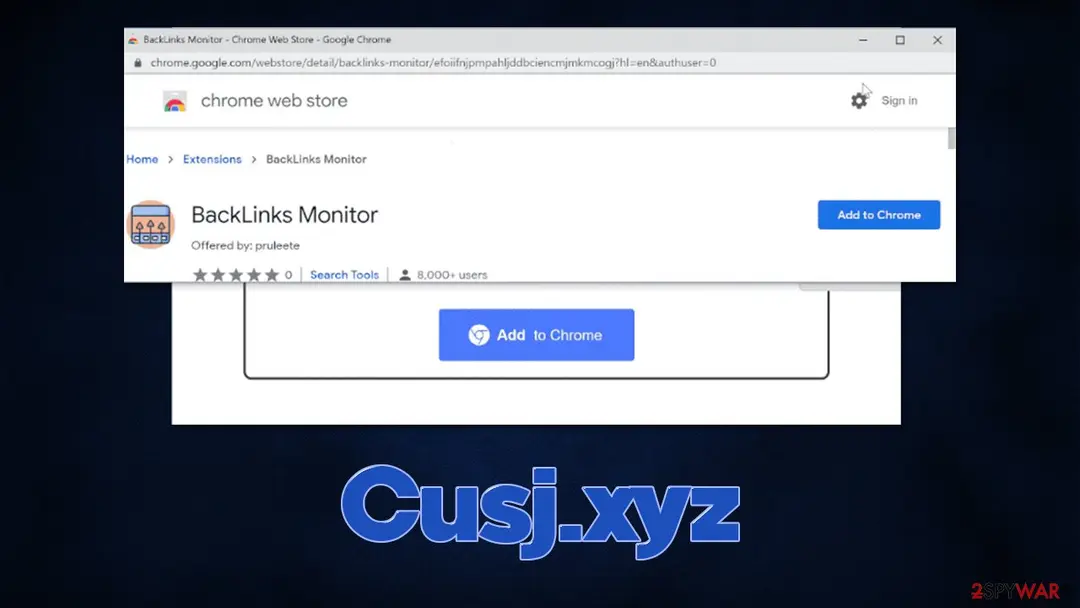
Cusj.xyz e-mail scam: summary
| Distribution | Software bundles, third-party websites, redirects |
|---|---|
| Damage | Installation of other potentially unwanted software or malware, personal information disclosure to cybercriminals, financial losses due to scams, etc. |
| Name | Cusj.xyz |
| Type | Redirect, scam, phishing, adware |
| Symptoms | Redirects to suspicious websites that hold plenty of commercial or scam content; fake messages offer to download malicious software; ads plague every visited website; unknown extension or program installed on the system |
| Evidence | 4 write-ups by security sites; details still limited |
| Removal | Scan the PC with security software to find and remove the malware and anything installed with it. Fortect scans Windows for malware and repairs the system files and settings it damaged. Remove it nowTo use the full-featured product, you have to purchase a license for Fortect. The scan is free. |
Show 6 more facts
| Arrives as | |
|---|---|
| Pretends to be | |
| Claim | Your account needs urgent attention |
| Asks for | Your password |
| First seen | 8 March 2022 |
| Facts checked | 6 October 2026 |
What the Cusj.xyz e-mail scam e-mail looks like
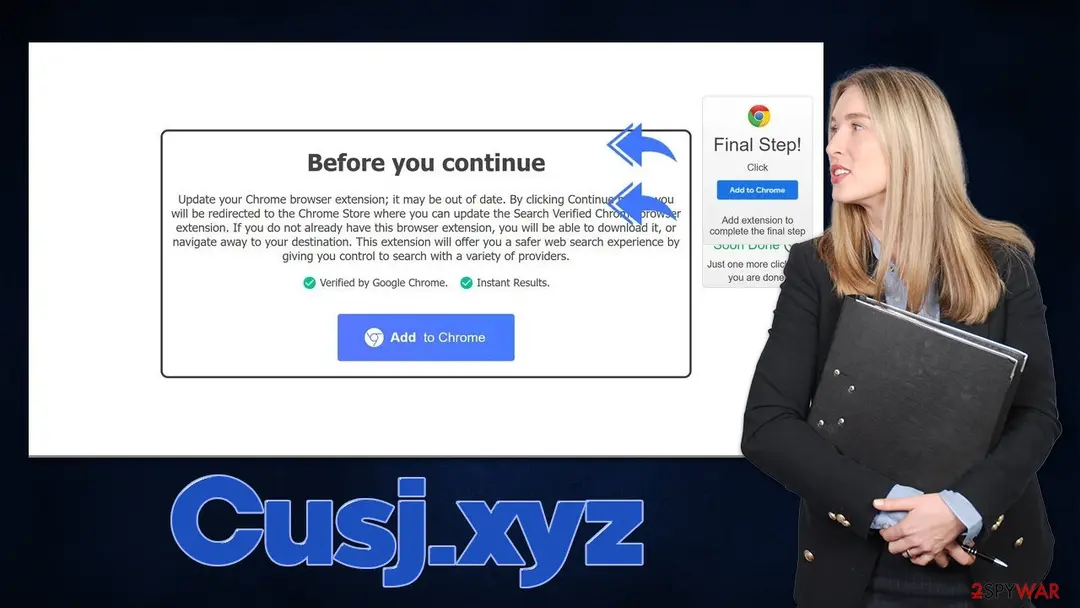
Before you continue
Update your Chrome browser extension; it may be out of date. By clicking Continue below, you will be redirected to the Chrome Store where you can update the Search Verified Chrome browser extension. If you do not already have this browser extension, you will be able to download it, or navigate away to your destination. This extension will offer you a safer web search experience by giving you control to search with a variety of providers.
Verified by Google Chrome.
Instant Results.
How to tell the Cusj.xyz e-mail scam e-mail is fake
From our report of Mar 2022 · not reviewed since
- You should not interact with the contents shown by a scam website and instead, check your system for adware or malware infections with security software
- Cleaning web browsers is one of the secondary things you should do after PUP/malware removal to secure your privacy.
Is Cusj.xyz e-mail scam dangerous? What the senders want
From our report of Mar 2022 · not reviewed since
Cusj.xyz shows misleading information in order to make users download extensions for Chrome
Entering and URL into the Omnibox on the browser would direct you to the destination you have expected.
However, when it comes to links encountered on various websites, the result can be quite a bit different - and that's precisely how most people end up entering Cusj.xyz. Usually, unexpected redirects to phishing and similar malicious websites can be encountered in high-risk places, where booby-trapped links or invisible scripts are present.
As soon as users access the site, they are shown a misleading message that allegedly, an extension called Search Verified installed on the browser is out of date.
This notification shows up regardless of whether or not the app is actually installed, which might confuse some users and proceed with the instructions provided. Fake statements like that are misleading at best and malicious at worst, so we strongly discourage you from proceeding with the installation.
After Cusj.xyz-promoted browser extension is installed, users would soon notice that their browsers have significantly changed, although modifications are not only visual. In reality, the extension would hijack the web browser (primarily Google Chrome, although this can happen on all compatible browsers such as MS Edge). Note that the name of the extension does not necessarily match, and you might be prompted to download various unknown apps.
If you have already installed something, we provide detailed instructions on how to get rid of it below. Even if you did not interact with the scam, you should still check your device for adware and other possible infections just to be safe.
From our report of Mar 2022 · not reviewed since
How scammers trick users into downloading software
The element of surprise is very powerful in all life situations, and scammers are well aware of that.
For example, messages that claim that a deadly virus has been detected on the computer and that personal information has been stolen would frighten some people to take action immediately and follow the instructions provided on the said message. This would later result in them spending money on fake security software paying for fake tech support services to scammers (millions of users are scammed every year this way).
Other types of scams, such as Cusj.xyz is promoting, are relatively less aggressive or damaging in the grand scheme of things. However, it is important to note that software promoted in deceptive ways should never be trusted, as anything could be hiding behind a seemingly useful request to install a new app or extension.
Here's the whole message that people are shown as soon as they are redirected to the site:
As mentioned before, the offering to install an extension is not the problem; the issue is when deliberate statements are made in order to mislead users and make them confused. This way, more people would install the promoted extension, which would result in larger payouts thanks to schemes such as pay-per-install.
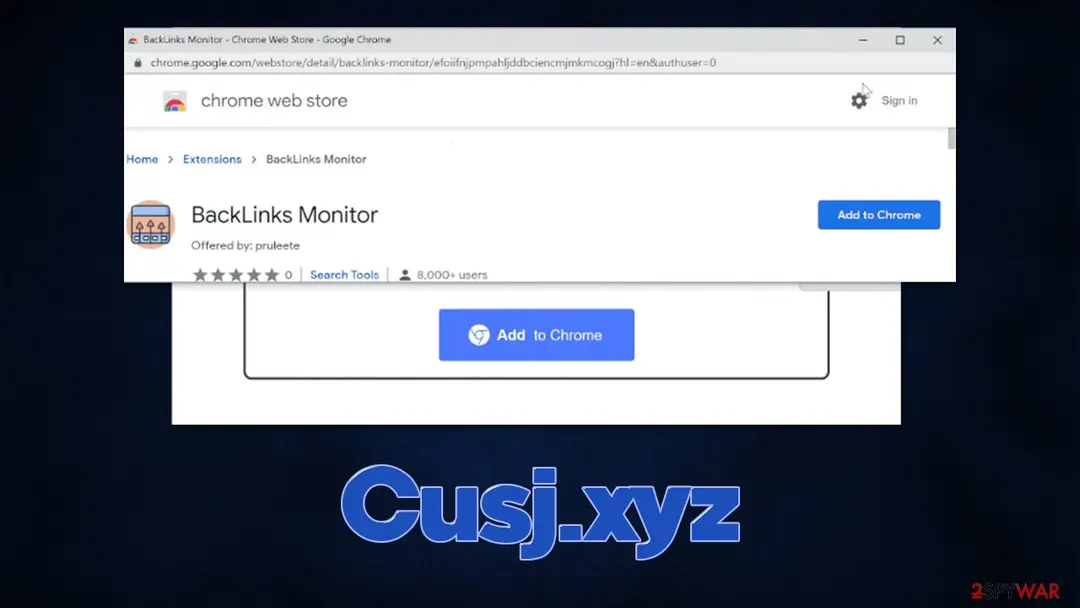
Note that the promoted extension might vary. For example, you might be asked to install BackLinks Monitor, which is considered to be a browser hijacker. It would change your browser settings, including a new tab and homepage address, swap to an alternative provider, and insert ads into search results. PUPs are also known for their data tracking capabilities.
What to do after the Cusj.xyz e-mail
If you only received the message and clicked nothing, step 3 is all you need.
If you clicked the link or typed anything on the page it opened, do every step, starting with the password.
Step 1: Change the password you typed on the fake page
If you typed a password on the page the Cusj.xyz message opened, assume the sender has it. Go to the real site by typing its address yourself and change the password there, choosing one you have never used.
Change it anywhere else the same password was used, and sign out all other sessions if the service offers it. Any browser on Windows 11 or Windows 10 will do, as long as you do not follow the e-mail's link.
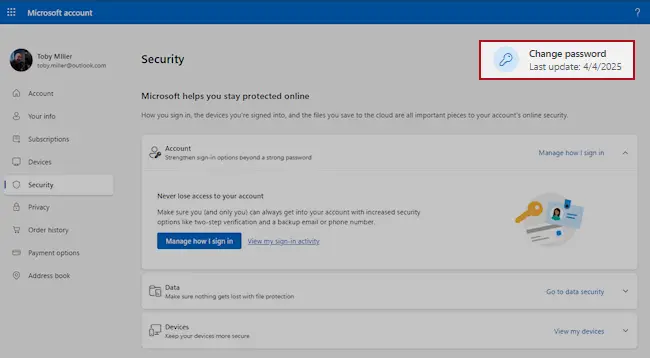
Microsoft account, Security page (account.microsoft.com/security): Change password. Full procedure with screenshots: Turn on two-step verification / secure a hacked account
Step 2: Turn on two-step verification
With two-step verification on, a stolen password alone no longer opens the account, because a sign-in from a new device also needs a code from your phone.
Switch it on for the e-mail account first, then for banking, shopping and social accounts that use that address.
Check the recovery phone, the recovery e-mail and any forwarding rules while you are in the settings, since attackers change them to come back. The pages are the same on Windows 11 and Windows 10.
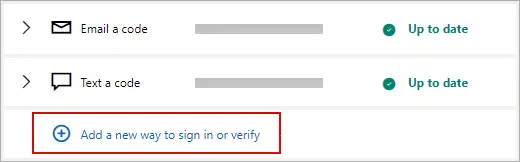
Microsoft account: Manage how I sign in, where two-step verification and the sign-in methods are. Full procedure with screenshots: Turn on two-step verification / secure a hacked account
Step 3: Report the e-mail and delete it
Do not reply and do not click anything else in the message. In Outlook select the e-mail and choose Report > Report phishing; in Gmail open the three-dot menu next to Reply and pick Report phishing.
That trains the filter for everyone on the service, and the message goes to the junk folder. If the e-mail came to a work address, forward it to your IT team as an attachment first.
The steps are the same in the web mail and the mail apps on Windows 11 and Windows 10.
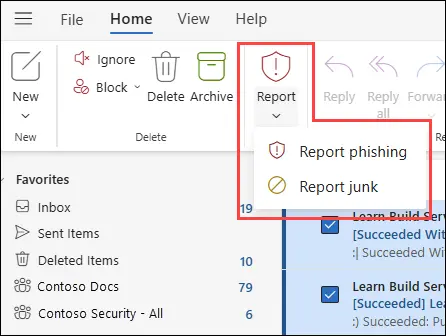
New Outlook for Windows and Outlook on the web: Report > Report phishing. Full procedure with screenshots: Report a phishing e-mail
Step 4: Scan the PC if you opened a file from the message
A fake sign-in page only steals what you type, so most readers can skip this step. If the Cusj.xyz e-mail made you download or open a file, delete it and scan the PC.
In Windows Security > Virus & threat protection > Scan options, run a Full scan and then Microsoft Defender Antivirus (offline scan) > Scan now. The offline scan restarts Windows 11 or Windows 10 and takes about 15 minutes.

Windows 11: Windows Security > Virus & threat protection > Scan options. Full procedure with screenshots: Run a Microsoft Defender Offline scan
Access your website securely from any location
When you work on the domain, site, blog, or different project that requires constant management, content creation, or coding, you may need to connect to the server and content management service more often. The best solution for creating a tighter network could be a dedicated/fixed IP address.
If you make your IP address static and set to your device, you can connect to the CMS from any location and do not create any additional issues for the server or network manager that needs to monitor connections and activities. VPN software providers like can help you with such settings and offer the option to control the online reputation and manage projects easily from any part of the world.
Recover files after data-affecting malware attacks
While much of the data can be accidentally deleted due to various reasons, malware is one of the main culprits that can cause loss of pictures, documents, videos, and other important files.
More serious malware infections lead to significant data loss when your documents, system files, and images get encrypted. In particular, ransomware is is a type of malware that focuses on such functions, so your files become useless without an ability to access them.
Even though there is little to no possibility to recover after file-locking threats, some applications have features for data recovery in the system. In some cases, can also help to recover at least some portion of your data after data-locking virus infection or general cyber infection.
From our report of Mar 2022 · not reviewed since
What to do after encountering Cusj.xyz or a similar site?
Simply because you have encountered a scam website such as Cusj.xyz, it doesn't mean that your system is automatically infected.
If you don't click anything and don't install anything, you should be safe. Nonetheless, redirects to suspicious websites might be caused by adware that is already running in the background, so regardless if you have been tricked by the fake message or not, you should check your system as explained below.
1. Uninstall unwanted apps
Usually, you can remove add-ons easily by clicking the "Extensions" button available on almost any other browser, this might not always be possible. In that case, you should check the installed application list within browser settings. Keep in mind that there could also be additional apps that could cause your browser to display ads and direct you to scam sites, so make sure you check this section carefully.
MS Edge (Chromium)
If you have not found anything suspicious in the extensions department, you might want to check applications installed on the system level. On Windows, you should access the Control Panel and then reach Programs & Features section, and then remove everything suspicious:
Note: skip this step if you aren't sure
If you are using a Mac, removal of applications might seem very easy, as most of them can be uninstalled by moving them to Trash. However, when it comes to adware, it might insert additional items, files, settings, and other components in order to increase persistence.
To fully remove an unwanted app, you need to access Application Support, LaunchAgents, and LaunchDaemons folders and delete relevant files:
2. Perform other checks
After you find unwanted programs installed on your browser or system and remove them, you should also ensure that more stealthy malware is also removed. Cybercriminals use all sorts of obfuscation techniques in order to increase the persistence of malicious programs. If not eliminated in time, other malware could be downloaded and installed on the system without you noticing or your personal data stolen.
Therefore, we strongly advise you to perform a full system scan with , , or another powerful security software. Anti-malware tools can also be a great help when facing malicious content online, as they would warn users about imminent danger. What is crucial is that the warnings should never be ignored, especially if they show up when trying to download repacked or cracked software.
Finally, you should clean your browsers from cookies and other web data to ensure no data tracking by third parties is performed.
MS Edge (Chromium)
- Open Google Chrome, click on the Menu (three vertical dots at the top-right corner) and select More tools > Extensions.
- In the newly opened window, you will see all the installed extensions. Uninstall all the suspicious plugins that might be related to the unwanted program by clicking Remove.
- Open Mozilla Firefox browser and click on the Menu (three horizontal lines at the window's top-right).
- Select Add-ons.
- In here, select the unwanted plugin and click Remove.
- Open Edge and click select Settings > Extensions.
- Delete unwanted extensions by clicking Remove.
- Click Safari > Preferences...
- In the new window, pick Extensions.
- Select the unwanted extension and select Uninstall.
- Enter Control Panel into Windows search box and hit Enter or click on the search result.
- Under Programs, select Uninstall a program.
- From the list, find the entry of the suspicious program.
- Right-click on the application and select Uninstall.
- If User Account Control shows up, click Yes.
- Wait till the uninstallation process is complete and click OK.
- From the menu bar, select Go > Applications.
- In the Applications folder, look for all related entries.
- Click on the app and drag it to Trash (or right-click and pick Move to Trash)
- Select Go > Go to Folder.
- Enter /Library/Application Support and click Go or press Enter.
- In the Application Support folder, look for any dubious entries and then delete them.
- Now enter /Library/LaunchAgents and /Library/LaunchDaemons folders the same way and terminate all the related .plist files.
- Click the Menu and pick Settings.
- Under Privacy and security, select Clear browsing data.
- Select Browsing history, Cookies and other site data, as well as Cached images and files.
- Click Clear data.
- Click Menu and pick Options.
- Go to Privacy & Security section.
- Click on Clear Data...
- Select Cookies and Site Data, as well as Cached Web Content and press Clear.
- Click on Menu and go to Settings.
- Select Privacy and services.
- Under Clear browsing data, pick Choose what to clear.
- Under Time range, pick All time.
- Select Clear now.
- Click Safari > Clear History...
- From the drop-down menu under Clear, pick all history.
- Confirm with Clear History.
Questions about Cusj.xyz e-mail scam
Does getting "Update your Chrome browser extension; it may be out of date." mean my account was compromised?
Not by itself. Phishing waves are sent to long lists of addresses collected from old breaches, websites and guessing, and the sender does not know whether you even have the account the message mentions. Getting "Update your Chrome browser extension; it may be out of date." only means your address is on such a list.
It becomes a problem if you sign in through the link. To be sure, open the real service from a bookmark and check recent activity and security alerts. If you see nothing unusual and you did not type your password into the fake page, your account is fine.
How fast do I need to react after signing in on the "Update your Chrome browser extension; it may be out of date." page?
As fast as you can. Stolen passwords are often tried within minutes, and the first thing an attacker usually changes is the recovery e-mail or phone, which locks you out. Change the password from a clean device first, then sign out everywhere and review the recovery settings.
If you are already locked out, use the provider's account recovery form straight away and mention that the page behind "Update your Chrome browser extension; it may be out of date." took your password. Warn your contacts, since a taken-over mailbox is often used to send the same phishing to them.
Could Cusj.xyz be a genuine message?
We checked it, and it is not. Google is only the costume. The message exists to get your password, and real companies handle that inside your account, after you sign in normally, not through links, attachments or phone numbers in a message you did not expect.
Scammers copy logos and footers perfectly, so the design proves nothing. The sender address, the link target and the request are the reliable signs, and all three point to a scam here. Delete it, and if you are worried, check your account directly.
Why does Cusj.xyz say that your account needs urgent attention?
Because that story works. A problem that needs fixing, a deadline and a simple solution make people act before they check.
The claim that your account needs urgent attention is the same for everyone who received Cusj.xyz; it was written once and sent in bulk. Nothing about your own situation triggered it.
If you are unsure, look at the real account or service the normal way, without using the message. The claim will not be there, which settles the question. Then report the message.
What does Cusj.xyz want from me?
In the end, your password. Everything else in Cusj.xyz, from the logo to the deadline, is there to get you to that point without stopping to think. Knowing the goal helps you judge your risk.
If you did not give it, you lost nothing and can delete the message. If you did, the steps in this guide are ordered by what you handed over:
- passwords first
- then card and bank details
- then documents and anything you installed
- ran
Act on the highest item on that list first.
How do I contact the real Google?
Not through anything in Cusj.xyz. Type the official website address into the browser yourself, use the app you already have, or use the phone number printed on your card, contract or a previous genuine invoice.
Search results can be risky too, because scammers buy ads for support numbers. Once you reach the real Google, you can ask whether there is any problem with your account and report the scam message; many companies have a dedicated address for phishing reports on their security page.
What should I do first after Cusj.xyz?
Secure the account involved. From a device you trust, open the official app or website directly, change the password and sign out of all sessions. Turn on two-step verification with an app or a passkey rather than text messages if the service allows it.
Then check recent activity, linked e-mail addresses and recovery phone numbers for changes you did not make. If an e-mail with the subject "Update your Chrome browser extension; it may be out of date." involved money, call your bank using the number on the back of your card. Only after that look into how it happened.
What is the single best habit against scams like this?
Never act on a message through the message itself. If something claims to be from Google and asks you to sign in, pay, call or open a file, close it and go to the service the way you always do:
- a bookmark
- the app
- the number on your card
Real problems will be visible there. This one habit defeats almost every phishing, invoice, delivery and account-suspension scam, regardless of how convincing the design is, because the scammers can copy the look but not the real account.
Can I trick the scammers or waste their time?
Better not. Replying to Cusj.xyz confirms that your address or number is live and puts it on lists that sell for more. Scammers who are teased sometimes switch to harassment or try to use any detail you reveal, such as your name, employer or location.
Playing along also risks a slip, like opening a link or a file they send. Report the message, block the sender and delete it. Your report does more damage to the operation than a conversation would.
Will Fortect remove Cusj.xyz?
Fortect scans Windows for malware and unwanted programs and repairs the system files and settings they change, and its free scan shows what it finds on your PC before you decide anything.
For Cusj.xyz, follow the plan above as well: the browser steps take back permissions and settings that no scanner treats as a threat, and uninstalling the program that brought it removes the source.
Run Microsoft Defender's full scan and, if anything was found, its offline scan as a second opinion. If the symptoms are gone after the plan and both scans are clean, there is nothing more to do.
Sources
- Imperva: Phishing attacks (read October 6, 2026)
- Wikipedia: Adware (read October 6, 2026)
- FTC: How to recognize and avoid phishing scams (read October 6, 2026)
- CISA: Recognize and report phishing (read October 6, 2026)
- Microsoft Support: Protect yourself from phishing (read October 6, 2026)