
Earth Antivirus: what it is and how to remove it
Earth Antivirus is a rogue anti-spyware program from the same family as Green AV and Eco Antivirus. The rogue program uses false scan results and misleading alerts to scare users into thinking that their computers are infected.
Facts checked October 7, 2026. Removal steps tested on Windows 11 (26H2) and checked against Microsoft's and the browser makers' current documentation. Sections marked as our earlier report are the original text: they describe the threat as it was then and have not been reviewed since. The 2026 status, the removal steps and the questions are current.
Automatic
Get a free scan and check if your PC is infected.
Fortect finds malware, unwanted programs and the Windows damage they leave behind, and repairs it in one pass.
If Earth Antivirus keeps coming back after uninstalling, a scan can find what reinstalls it.
Do it yourself · free Remove Earth Antivirus yourself 5 steps, about 15 minutes, no software needed.
Start the steps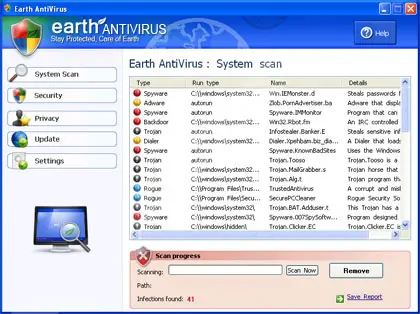
Earth Antivirus: summary
| Detection names | No Microsoft detection name is known |
|---|---|
| Distribution | Not recorded in the old report |
| Damage | Not recorded in the old report |
| Name | Earth Antivirus |
| Type | Rogue antivirus |
| Symptoms | An unknown program in Installed apps |
| Removal | Scan the PC with security software to find and remove the malware and anything installed with it. Fortect scans Windows for malware and repairs the system files and settings it damaged. Remove it nowTo use the full-featured product, you have to purchase a license for Fortect. The scan is free. |
Show 4 more facts
| Evidence | One write-up by a security site; details still limited |
|---|---|
| Program | Earth Antivirus |
| First seen | 26 April 2021 |
| Facts checked | 7 October 2026 |
From our report of Apr 2021 · not reviewed since
What Earth Antivirus is
Earth Antivirus is a rogue anti-spyware program from the same family as Green AV and Eco Antivirus.
The rogue program uses false scan results and misleading alerts to scare users into thinking that their computers are infected. Earth Antivirus is typically promoted through the use of Trojans, fake online scanners and other websites that display pop ups stating that your computer is infected and that you should download and run Earth AV in order to clean your computer.
It goes without saying, that you shouldn't trust it. And most importantly, don't purchase this bogus program. Instead, you should remove Earth Antivirus from your computer as soon as possible. The scan results are false and are only being shown to scare you into thinking you are infected.
As a typical rogue security program, Earth Antivirus will display many fake security alerts and pop-ups from Windows Taskbar. Those alerts will claim that your computer is infected with spyware, adware and other types of malware. Please ignore those fake alerts. As you can see, Earth Antivirus has only one goal, which is to scare you into purchasing the program.
However, it's a virus itself and should be removed from the system upon detection. Also note, that of you have already purchased this bogus program then you should contact your credit card company and dispute the charges. The homepage of this rogue program is earth-av.com.
How to remove Earth Antivirus
Nothing it reports is real.
These steps remove it and undo a payment if you made one.
Step 1: Do not pay, and undo a payment if you made one
Earth Antivirus reports problems to sell a licence: the "threats" or "errors" it lists are invented or harmless leftovers. If you already paid, ask your card issuer to dispute the charge and cancel the subscription both in the seller's account and through your bank.
If you called a phone number it showed and let someone connect, treat the PC as remotely accessed and remove the remote tool. Uninstalling it from Windows 11 or Windows 10 does not cancel a subscription by itself.
Full procedure with screenshots: What to do after paying a scammer
Step 2: Uninstall Earth Antivirus
Open Settings > Apps > Installed apps in Windows 11, or Settings > Apps > Apps & features in Windows 10. Sort the list by install date and find Earth Antivirus, then choose Uninstall from the three-dot menu next to it (in Windows 10, click the entry and then Uninstall).
Remove anything else installed on the same day that you do not recognise, because such programs usually arrive together in one installer. If the uninstaller opens a browser page with an offer or a survey, close it: the program is removed either way.
Full procedure with screenshots: Uninstall a program or app in Windows On uGetFix
Step 3: Remove it from startup
Whatever Earth Antivirus installed usually starts with Windows. Open Task Manager with Ctrl + Shift + Esc, go to Startup apps in Windows 11 or the Startup tab in Windows 10, and disable what you do not know, starting with entries that have an empty Publisher column.
Open file location on the right-click menu shows the file, which helps you decide and tells you what to delete later. Disabling is safe: if something you need stops working, switch it back on.
Full procedure with screenshots: Stop apps from opening at startup On uGetFix
Step 4: Delete the folders left behind
What the uninstaller leaves behind is usually in the user folders. Open File Explorer, switch on View > Show > Hidden items (in Windows 10 View > Hidden items), and go through
%LocalAppData%,%AppData%, %ProgramData% and the two Program Files folders.Sort by Date modified and delete folders that appeared together with the problem and belong to no program you use. Folders with random names that hold
.exe,.dll, .js or .ps1 files are the strongest sign.Full procedure with screenshots: Remove what malware leaves behind in Windows
Step 5: Scan the PC, then run the offline scan
Open Windows Security > Virus & threat protection > Scan options, run a Full scan and remove everything it finds. Then select Microsoft Defender Antivirus (offline scan) and click Scan now: the PC restarts and scans before Windows loads, which finds files that hide while Windows runs.
Save your work first, because the offline scan takes about 15 minutes. Both scans are built into Windows 11 and Windows 10, and a second scanner from another vendor is a useful extra opinion.

Windows 11: Windows Security > Virus & threat protection > Scan options. Full procedure with screenshots: Run a Microsoft Defender Offline scan
Access your website securely from any location
When you work on the domain, site, blog, or different project that requires constant management, content creation, or coding, you may need to connect to the server and content management service more often. The best solution for creating a tighter network could be a dedicated/fixed IP address.
If you make your IP address static and set to your device, you can connect to the CMS from any location and do not create any additional issues for the server or network manager that needs to monitor connections and activities. VPN software providers like can help you with such settings and offer the option to control the online reputation and manage projects easily from any part of the world.
Recover files after data-affecting malware attacks
While much of the data can be accidentally deleted due to various reasons, malware is one of the main culprits that can cause loss of pictures, documents, videos, and other important files.
More serious malware infections lead to significant data loss when your documents, system files, and images get encrypted. In particular, ransomware is is a type of malware that focuses on such functions, so your files become useless without an ability to access them.
Even though there is little to no possibility to recover after file-locking threats, some applications have features for data recovery in the system. In some cases, can also help to recover at least some portion of your data after data-locking virus infection or general cyber infection.
Questions about Earth Antivirus
Is Earth Antivirus a virus?
Most programs that appear the way Earth Antivirus did are not viruses in the strict sense. They are potentially unwanted programs:
- real software that arrives bundled with other downloads and then shows offers
- changes browser settings
- starts with Windows
Some are harmless, some are annoying and a few carry adware. What makes it worth removing is that you did not choose it.
Uninstall it from Installed apps and check the startup list and the browsers for anything added the same day. If it refuses to uninstall or returns after a restart, treat it as more serious and run a Microsoft Defender offline scan.
Earth Antivirus will not uninstall. What can I do?
First restart the PC and try again, because the program may have been running and locked its own files. If the uninstaller is missing or fails, start Windows in Safe Mode, where most third-party programs do not start, and remove Earth Antivirus from Installed apps there.
If it still refuses, delete its startup entry and its scheduled task, restart, and try once more. A program that actively prevents removal is behaving like malware, so finish with a Microsoft Defender offline scan. Avoid third-party uninstallers offered on search ads; several of them are unwanted programs themselves.
How do I know Earth Antivirus is fake?
Three things give it away. It appears as earth Antivirus in the list of installed apps, a window from a program rather than from Windows Security. It pushes you to act quickly by calling, paying or downloading.
And the threats it reports never show up when you run a scan in the real Windows Security app. Microsoft does not put phone numbers in warnings or charge for removing threats through pop-ups. Close the window, do not call, and follow the steps to find and uninstall the program behind it.
Will the seller of Earth Antivirus refund me if I ask?
Sometimes, but do not depend on it and do not let them steer the process. If you contact the seller, do it in writing and keep the replies. Never install software, share your screen or give banking details to get a refund.
The more reliable route is your card issuer or PayPal: a chargeback or dispute for a product sold with false claims. If the seller or anyone claiming to represent them calls you first about a refund, treat it as a scam and hang up.
Should I reset my PC because of Earth Antivirus?
Only if the signs point to deeper access. Reset when you see earth Antivirus in the list of installed apps again after removal, when Windows Security cannot start or update, when remote access tools you did not install keep appearing, or when you simply cannot trust the PC any more.
Otherwise, the plan in this guide plus an offline scan is enough. If you do reset, choose Remove everything and Cloud download for a fresh copy of Windows, restore only documents and photos, and reinstall programs from their official sites. Change important passwords from the clean system afterwards.
Do I need to buy antivirus after removing Earth Antivirus?
No. Windows 11 and Windows 10 include Microsoft Defender in Windows Security, which provides real-time protection, scheduled scans, the offline scan and protection against unwanted apps at no cost. Keep it switched on and updated, and turn on Reputation-based protection under App & browser control.
If you prefer a third-party product, buy it from the vendor's own site after reading independent test results, never from a pop-up or a phone call. The lesson of Earth Antivirus is that security offers which arrive unasked are the ones to avoid.
Earth Antivirus has no uninstaller. How do I get rid of it?
Some scareware does not register an uninstaller, or its uninstaller only opens another sales page. In that case, end the program in Task Manager, then go to Task Manager > Startup apps, right-click its entry and choose Open file location to find its folder. Disable the startup entry, restart in Safe Mode and delete the folder.
Check Task Scheduler for tasks with the same name. Finally, run the Microsoft Defender offline scan, which removes remaining files that Microsoft knows about. Restart afterwards and check that nothing named after Earth Antivirus starts again.
What is Earth Antivirus?
Earth Antivirus is fake security software, sometimes called a rogue antivirus or scareware. The program, Earth Antivirus, shows invented or exaggerated problems to make you pay for a licence, and some versions send you to phone "support".
It does not protect the PC, and the threats it lists are not a reason to pay. Fake security programs usually arrive through fake virus warnings on websites, extra offers in free installers or ads for faster PCs. Uninstall it and use the free protection built into Windows instead.
Did Earth Antivirus steal my information?
Not by itself, as far as reports show. Programs that display earth Antivirus in the list of installed apps are built to scare people into paying or calling; they rarely take data on their own.
The risk comes from what you did in response: typing card details into the program, or letting a caller connect to your PC. If you did neither, uninstalling the program is enough. If you did either, treat that information as exposed:
- block the card
- change passwords from another device
- remove any remote-access tool that was installed
Will Fortect remove Earth Antivirus?
Fortect scans Windows for malware and unwanted programs and repairs the system files and settings they change, and its free scan shows what it finds on your PC before you decide anything.
For Earth Antivirus, follow the plan above as well: the browser steps take back permissions and settings that no scanner treats as a threat, and uninstalling the program that brought it removes the source.
Run Microsoft Defender's full scan and, if anything was found, its offline scan as a second opinion. If the symptoms are gone after the plan and both scans are clean, there is nothing more to do.
Sources
- FTC: How to recognize, remove and avoid malware (read October 7, 2026)
- Microsoft Learn: Microsoft Defender Offline (read October 7, 2026)
- Microsoft Learn: How Microsoft names malware (read October 7, 2026)