

InVincible ransomware pretends to encrypt files and wants you to pay for their decryption
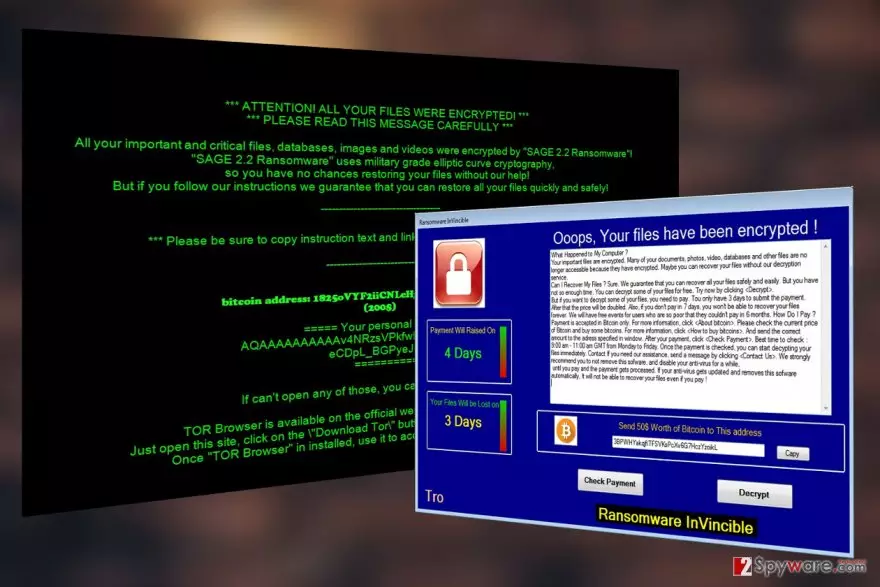
InVincible virus is another ransomware wannabe [1] which looks like a dangerous file-encrypting malware does not actually encrypt files. The program merely displays a lockscreen which prevents users from accessing their desktop or any programs (including the security software).
At the same time, users can’t see that their files are not actually encrypted like the hackers want them to believe and are more likely to pay up for the supposed data recovery. If you want to learn how to recognize this threat and remove InVincible virus from your PC before it inflicts further damage to the system, please read on.
So far, the experts have detected two files — WindowsApplication1.exe and %24RMJD6YY.SCR which are directly associated with the InVincible malware. These files are typically delivered on the victim’s computer disguised as Windows theme, and it is the first time such technique is reported in the context of ransomware distribution.
When it comes to the ransomware operation, we do know that once activated, the parasite will immediately move towards changing the Master Boot Record [2], ensuring that the victim will be greeted by a ransom demanding lockscreen whenever he or she initiates or reboots the system.

In the ransom note, the criminals take their opportunity put forward their demands. The perpetrators want the victims to send 50 dollar worth of Bitcoins to the indicated accounts within 3 days after the ransom note is received.
If the victim refuses to fails to pay the required sum in time, criminals threaten to block the access to them completely.
But that is not necessary. Since the virus only imitates the encryption, you can perform InVincible removal and reset access to the files without special software. Of course, we highly recommend using FortectIntego, SpyHunterCombo Cleaner or other specialized software if you want to ensure impeccable system cleanup.
Deceptive distribution is a driving force of the ransomware
InVincible virus does not seem to be using especially advanced distribution techniques for spreading around and infecting computers. They merely rely on pure deception and try to convince victims that the malware executable they are downloading is nothing other than a simple Windows OS theme.
Such software can typically be found on sites offering different freeware and shareware software, peer-to-peer networks or be hosted on insecure websites as pop-ups or download buttons.
InVincible removal steps:
When it comes to InVincible removal, you have to remember a few things:
- Do not try to dispose of the ransomware manually. Even virus lookalikes can be dangerous, especially when they are poorly programmed. Therefore, it is best to allow reliable software to perform the procedure for you.
- Use reliable, legal and updated antivirus software to perform the malware elimination.
- Help your antivirus to remove InVincible easier by running your PC in Safe Mode first (see instructions below).
- Restore your system, clean up corrupt registry entries with FortectIntego.
Did this guide help?
Be the first to comment