

Mail Quota email scam is a phishing message that attempts to steal users' Outlook credentials
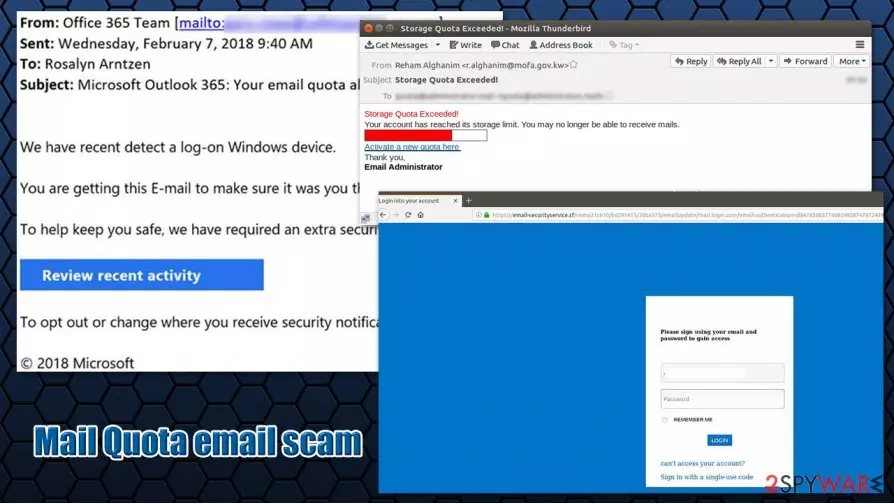
Mail Quota email is a scam crafted by cybercriminals who seek to gather sensitive details from users. In the message, it is claimed that the mail quota of the account is 99% full and that the mailbox is reaching its capacity. Users are then asked to click on an “Update Email Quota” button and delete some of the messages in order to avoid filling the mailbox to full.
Users are then redirected to what seems to look like an Outlook login portal, where they are asked to enter their email address, as well as the password. This information is not entered into Microsoft's database, however, but rather a spoofing[1] website that allows cybercriminals to steal users' credentials. These details can later be sold on the underground hacking forums for profits or used to hijack other user accounts.
Without a doubt, people who encounter Mail Quota email scam should never click on a provided link or enter their credentials, as they can suffer from serious privacy risks, financial losses, or even identity theft.
| Name | Mail Quota email scam |
| Type | Phishing, email scam |
| Goal | Malicious actors created a spoofing site that seems to be a login page for Outlook accounts, and attempt to make users enter their credentials, stealing their email login data in the process |
| Claim | The message author claims that inbox is reaching its full capacity and that the recipient should log in to his/her account and delete some emails in order to avoid a full blockage |
| Distribution | Phishing email can show up in an inbox of any email account |
| Prevention | Never click on the provided link, open attachments, or provide your personal/sensitive information |
| Risks | Those who enter their personal information might suffer from a negative impact on their online security, for example, financial losses, another account compromise, or even identity theft |
| Removal | If you simply opened the email and did not click on attachments or links, your account, and other information should be secure. However, if you interacted with the Mail quota scam email in any way, you should scan your machine for malware with SpyHunterCombo Cleaner or MalwarebytesMalwarebytes and change your password |
| Additional checks | If your security software found malware on the system, you should also fix your computer after the infection with a repair tool FortectIntego |
Mail Quota email scam is another phishing campaign that is designed by cybercriminals in order to harvest their information. In this particular case, the recipients are informed that their email capacity is reaching its limit and that they need to perform certain actions to eliminate this issue. This is a typical fraud tactic, when threat actors pretend to be representatives of a well-known company, in this case, Microsoft.
There are several versions of this scam, and they can be presented with various details that seemingly include information about their email accounts. One of the most common versions of Mail Quota email scam claims:
Subject: PENDING UNREAD MESSAGES
Mail Quota: (99% Full)
Attention: [email]Your mailbox size has reached 1990.08MB, which is over 90% of your 2058.00MB quota.Please login through webapp to delete some messages to avoid exceeding your quota
NOTE: FAILURE TO UPDATE EMAIL QUOTA YOU WILL NOT BE ABLE TO SEND / RECEIVE EMAILSUpdate Email Quota
Source: Mail Admin For
Users can receive Mail Quota email scam in their inboxes, regardless of which client they are using – and this is the first inconsistency that should help to determine that the message is fake. Thus, if you received an email into your Gmail account asking you to enter Outlook credentials – there is obviously something (p)fishy going on.
Those who miss this sign and click on the button provided inside the Mail Quota email will be redirected to a random URL, e.g., larkspurandtea.com. Nonetheless, the website looks somewhat identical to the Outlook login screen, and less observant users would not notice the difference between the spoofing and the fake site. Of course, it would be the best to remove Mail Quota email scam altogether, and never interact with in the first place, although some people simply get tricked by these phishing techniques.
In case Outlook credentials are indeed entered, they will be immediately stolen by cybercriminals, and users will soon realize that they have been tricked – they will not log in to their email accounts. This information can be used not only for profits after selling it on underground forums (which can already lead to all types of issues) but also to access various Microsoft services, such as Skype, OneDrive, etc.

There are thousands of phishing emails like Mail Quota email scam around (another similar one showed up just recently – fake Roundcube message was written similarly), some of which might also ask users to open attachments or download malicious programs. This should be avoided at all costs, as scam messages always carry malware payloads. If you happen to open one of such attachments, you should immediately scan the machine with SpyHunterCombo Cleaner or another anti-malware, and then fix virus damage with FortectIntego.
If you provided your outlook credentials, you should immediately report the email to the local authorities who deal with fraud, change your Microsoft password (this applies to all the accounts that use the same password, if any), and perform Mail Quota email scam removal from the inbox.
Phishing emails are one of the most common fraud types on the web: learn to recognize deception
Phishing emails are relatively primitive methods for malware delivery and personal information theft. In most cases, malicious actors compile lists of email accounts that were previously breached somewhere (data breaches are extremely common, and the frequency of customer data compromise is increasing on a year-to-year basis)[2] and use bots to send out them thousands or even millions of users worldwide.[3] Alternatively, for companies, criminals use targeted emails directed to a particular person.
Most of these phishing emails are relatively poorly engineered, in most cases. Here are some main signs to look out for:
- Grammar and spelling mistakes;
- Public email address is used (although this can be easily forged);
- Message creates a sense of urgency;
- Threats of account closure, suspension, fines, and similar;
- Links to unofficial domains (hover the mouse pointer to see the real destination).
It is equally as important not to open any suspicious attachments, especially those that ask you to enable macros by pressing “Allow Content.” Additionally, you should also equip your computer with up-to-date security software, as it could prevent most phishing attacks.

Steps to take after receiving Mail Quota scam email
In case you opened the email but did not engage with its contents (clicked on links, downloaded attachments, installed programs, etc.), you can simply proceed with Mail Quota email scam removal without putting much thought into it. Nonetheless, it would be beneficial to report the message to your local authorities, as it might help to implement prevention techniques in the future.
However, if you entered your login credentials into a spoofed website, you should immediately change your Outlook password. If you are using these passwords for other accounts (which you should never do, by the way), you should also replace passwords for those accounts. In any case, you should remove Mail Quota email scam from your inbox regardless if you interacted with it or not.
Did this guide help?
Be the first to comment