

Things to know about VMola ransomware, a virus used by cyber extortionists
VMola virus is yet another ransomware virus that cyber criminals employ to extort users of unprotected computers. The ransomware enters the system as a Trojan and then scans all folders to find target files. Once it finds some files that have certain file extensions, it encrypts them with AES algorithm[1]. Without having the decryption key, the victim has no chances to recover files unless he has a data backup. The attackers also suggest a solution in Ransom.rtf file, which they save on the desktop – they promise to provide the victim with data recovery key if the victim transfers 0.1 BTC to a provided Bitcoin wallet address. The virus appends (Encrypted_By_VMola.com) extension to every filename as soon as it corrupts the file itself. Vmola(.)com site advertises itself as a “ciphered community” that provides free online file encryption service. The virus might be using this service to encrypt files; however, it seems that the developers of ransomware do not control that website themselves. The ransomware is very new, and yet there is not enough information about it. However, if you were infected with this particular ransomware variant, we suggest you remove VMola virus and remain patient. Cyber security experts need to analyze the ransomware to find flaws in its code; these flaws might allow free data decryption, so do not rush to pay the ransom.
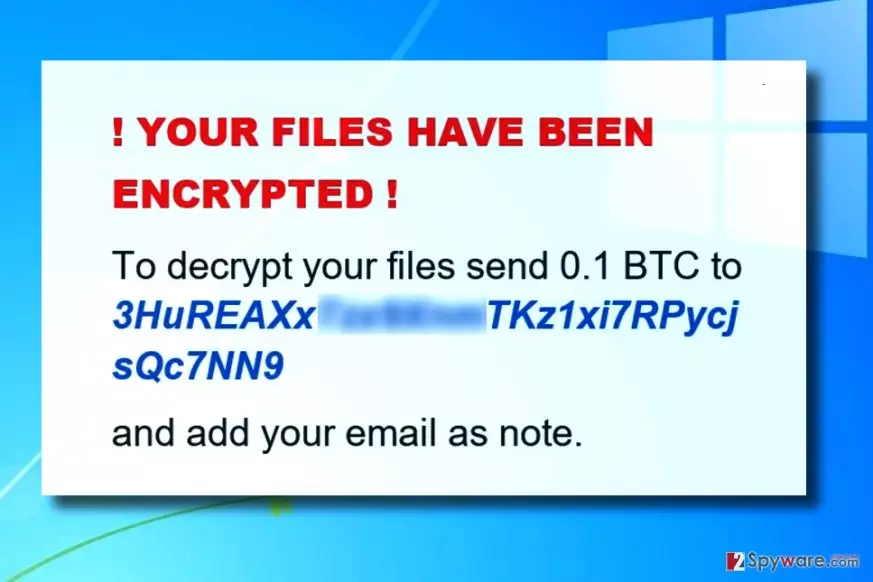
The ransomware, unlike the majority of viruses, does not leave a fancy HTML ransom note and does not provide personal Tor websites for each victim. Instead, it drops a Rich Text Format file as a ransom note, which contains only a few lines of text. The ransomware doesn’t even leave an identification number for the victim; however, cyber criminals ask the victim to provide the email address when paying the ransom. This gives us an idea that the ransomware encrypts all files using only one key, and all damage done on numerous computers can be reversed with a help with just a single decryption key. If this is true, it will be more than easy to create a free decryption tool for all of the victims. Therefore, make VMola removal the top priority task and install a decent anti-spyware or anti-malware software to complete it. We highly recommend using FortectIntego or SpyHunterCombo Cleaner software.

The main attack vector
Vmola ransomware is mainly distributed via email spam, concealed in the form of malicious attachment that is likely to be named as invoice, subpoena, resume or another document that seems to be too important to be ignored. We advise victims to be very careful when opening emails and especially those that contain some files or suspicious URLs. The fact that the email seems to be sent by a legitimate company and includes all of its official logos does not necessarily mean that the email is trustworthy and that you can interact with attached files or URLs straight away. If you do not want to accidentally infect your computer by opening emails, inspect the sender’s email address and, if needed, look for information about it online. When in doubt, you can even contact the company that the sender claims to be working for. Although curiosity is what tricks people into installing malicious software on their computers, do not let it destroy your files for good. Be attentive and never rush to click on content that you can not entirely trust. Other, more sophisticated ransomware distribution methods are related to malvertising[2], exploit kits, and RDP attacks.
Remove VMola ransomware virus right away
Now that you already know everything about this ransomware, we suggest you remove Vmola virus right away. The virus we described today is likely to be analyzed soon, and we hope that a free decryption tool will be discovered as well, so get rid of the malicious executive files along with helper components and eliminate them all at once. For this task, we recommend using anti-malware software. This way, you will complete VMola removal professionally and erase all other dangerous files and registry keys from the system. Before you begin, please read the provided ransomware removal tutorial carefully.
Did this guide help?
Be the first to comment