
EyLamo ransomware virus: what it is and how to remove it
EyLamo is a recently discovered ransomware which is based on the HiddenTear open source project. It appends .lamo file extension to each of the targeted files with the help of AES encryptions algorithm.
Facts checked October 7, 2026. Removal steps tested on Windows 11 (26H2) and checked against Microsoft's and the browser makers' current documentation. Sections marked as our earlier report are the original text: they describe the threat as it was then and have not been reviewed since. The 2026 status, the removal steps and the questions are current.
Automatic
Get a free scan and check if your PC is infected.
Fortect finds malware, unwanted programs and the Windows damage they leave behind, and repairs it in one pass.
A free scan checks for the encryptor still on the PC; it does not decrypt .lamo files.
Do it yourself · free Remove EyLamo ransomware virus yourself 6 steps, about 18 minutes, no software needed.
Start the steps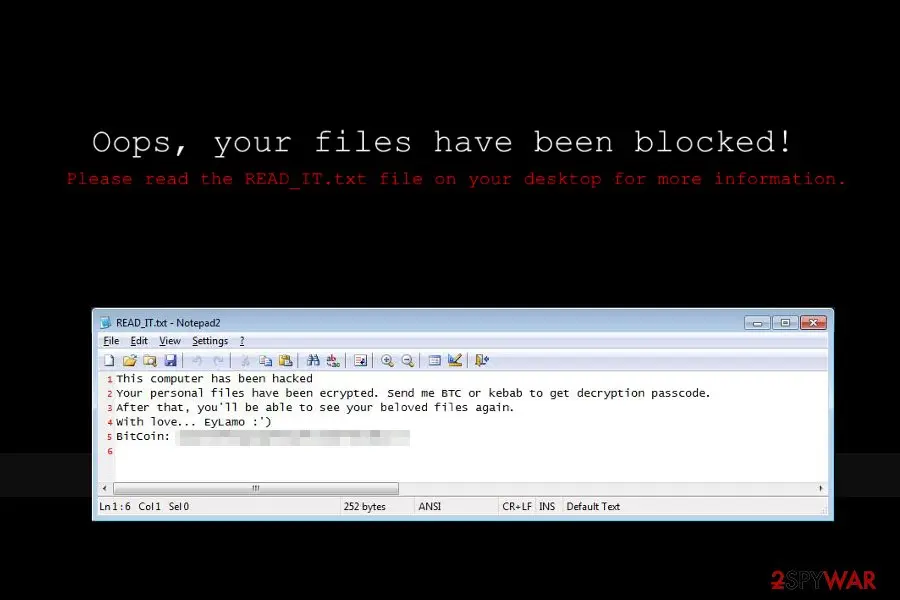
EyLamo ransomware virus: summary
| Detection names | No Microsoft detection name is known |
|---|---|
| Ransom note | READ_IT.txt; the text of the note is not in our records |
| Contact | Not recorded in our earlier report |
| Encrypted file extension | .lamo |
| Decryptor | No free decryptor is known for this variant; check No More Ransom (nomoreransom.org) for updates |
| Distribution | Not recorded in the old report |
| Removal | Scan the PC with security software to find and remove the malware and anything installed with it. Fortect scans Windows for malware and repairs the system files and settings it damaged. Remove it nowTo use the full-featured product, you have to purchase a license for Fortect. The scan is free. |
Show 9 more facts
| Damage | Not recorded in the old report |
|---|---|
| Name | EyLamo ransomware virus |
| Type | File-encrypting ransomware |
| Symptoms | Files renamed with a new extension and a ransom note left in folders |
| Evidence | 4 write-ups by security sites; no sample analysed yet |
| Encrypted files | .lamo |
| Free decryptor | No free decryptor is known (checked 7 October 2026) |
| First seen | 26 June 2017 |
| Facts checked | 7 October 2026 |
- File extension:
.lamo - Note file:
READ_IT.txt
From our report of Jun 2017 · not reviewed since
More from our earlier report on EyLamo ransomware virus
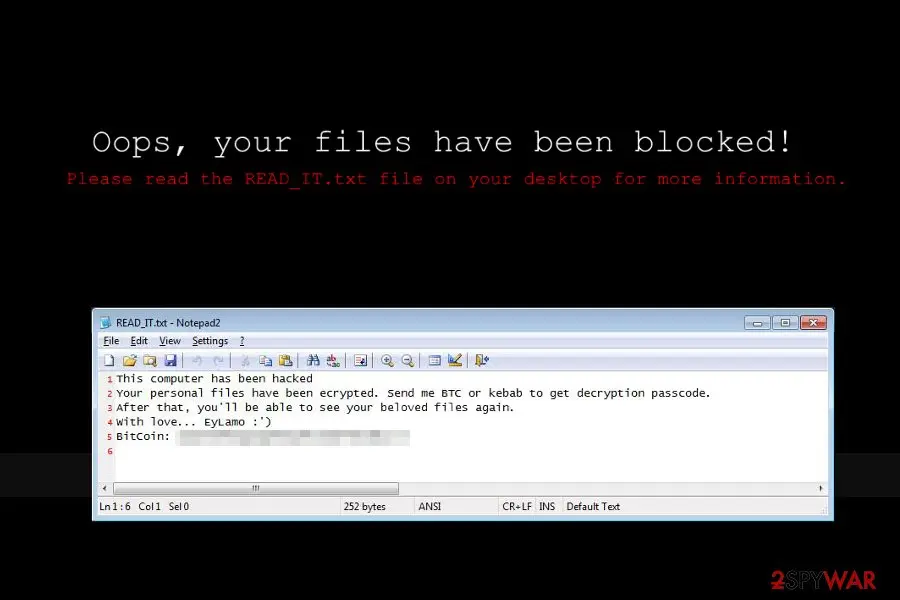
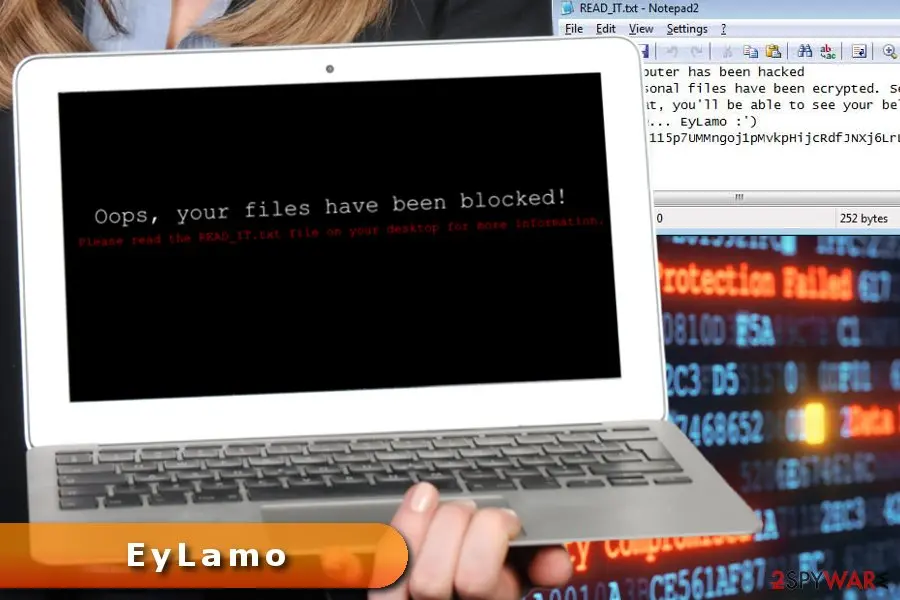
- Oops, your files have been blocked.
- Please read the READ_IT.txt file on your desktop for more information.
How EyLamo ransomware virus behaves
From our report of Jun 2017 · not reviewed since
EyLamo - another file-encrypting virus inspired by HiddenTear
EyLamo is a recently discovered ransomware which is based on the HiddenTear open source project.
It appends .lamo file extension to each of the targeted files with the help of AES encryptions algorithm.
Malware might enter the system as an obfuscated email attachment, fake program or using similar tricks. On the affected device is installed two executable files that start its malicious tasks immediately - hidden-tear.exe and EyLamo.exe.
Before starting the most important task - data encryption, this crypto-malware makes modifications on Windows. It might make entries in the Registry, install unknown files or inject malicious codes into legitimate system processes.
All these changes are necessary to run EyLamo virus with system startup and make its removal complicated. Once malware strengthens its presence on the PC, it starts scanning the system looking for targeted files.
Malware aims at the most popular Microsoft Office, OpenOffice, various multimedia files, databases, archives, etc. The file-encrypting virus is suspected of using the same AES cryptography as other variants of Hidden Tear.
Following data encryption, it might change computer's desktop with a black image saying:
Judging from the content of READ_IT.txt, we can tell that authors of the EyLamo do not act like professional cyber criminals. In the ransom note, they ask to send bitcoins or kebab to get decryption key. However, neither the sum of the ransom nor address where to send a kebab are not provided.
Thus, trying to guess how much money cyber criminals want is not recommended. Probably, such activity will end up with a waste of money. There are numerous cases when victims haven't received decryption key after paying the ransom.
However, the most important fact about data recovery is that files might be restored with Hidden Tear decrypters. However, before giving them a try, you should perform EyLamo removal.
To eliminate ransomware along with all its components, you have to employ a professional security software. We suggest employing or . However, the extortionist might be resistant and prevent you from installing malware removal tools. In this case, you will find our removal instructions handy.
Once you remove EyLamo automatically, you could safely plug in USB or hard drive with data backups and copy necessary entries. Or you can use decryption software or try alternative recovery tools presented at the end of the article.
From our report of Jun 2017 · not reviewed since
Terminate EyLamo virus with the help of reputable security software
In order to remove EyLamo from the computer safely and quickly, you have to employ professional software.
Trying to locate ransomware-related entries might lead to irreversible damage to the system.
To avoid posing a threat to your computer, you should install malware removal program. We suggest dedicating this task to , or . These tools are capable of detecting and eliminating all malicious entries. However, don't forget to update them first!
It will help you to deal with obstacles and reveals data recovery options.
[GI=method-1]If you cannot perform automatic EyLamo removal, you should reboot the computer to Safe Mode with Networking and try again.
[GI=method-2]System Restore method also helps to disable the virus when it prevents from installing or running security software.
This professional tool has already helped numerous victims of ransomware to recover the majority of corrupted files. Thus, it may help you too.
Windows Previous Versions feature helps to copy individual files
This Windows feature allows accessing previously saved versions of the encrypted files. Thus, if System Restore function has been activated before ransomware attack, you should follow these steps.
Try ShadowExplorer to restore files encrypted by EyLamo ransomware
The virus should not delete Shadow Volume Copies that ar necessary in order to use ShadowExplorer. Thus, follow the steps below to use this tool:
HiddenTear decrypters might help as well
EyLamo ransomware virus is based on this open-source ransomware project. Thus, HiddenTear decryptors might help to recover files encrypted by this new version of the malware. You can download them from here and here.
From our report of Jun 2017 · not reviewed since
Strategies used in crypto-malware distribution
Developers of the ransomware usually rely on traditional malware distribution methods, such as:
Authors of EyLamo are suspected of using the same strategies too. Thus, if you have suffered from the ransomware, the attack might have occurred when you opened a malicious email attachment, installed bogus program or update, clicked on a malware-laden ad or forgot to update operating system or software for a long time.
No matter where you live - America, France or Japan - this cyber infection might reach you if you don't follow these security tips:
- malspam;
- fake software downloads;
- malvertising;
- exploit kits.
- Do not open spam emails and links or attachments included there.
- Before opening email attachment make sure that it's actually was sent from the company or organization.
- Install new programs from the credible and secure online sources. Keep in mind that using torrents might be dangerous.
- Do not trick on ads that ask to update software, suggest installing unknown tools and offers too good to be true shopping offers.
- Do not visit high-risk websites.
- Keep all software up-to-date.
The EyLamo ransomware virus ransom note
The note is called READ_IT.txt.
We did not record the full text of the ransom note in our report.
How to remove EyLamo ransomware virus
Tools you'll need
All of these are free except where noted. Download them on a clean device if the infected PC is offline.
- A USB stick: to keep the ransom note, two or three encrypted files and screenshots off the infected PC.
- Microsoft Defender Offline: built into Windows 11 and Windows 10; scans before Windows starts, so running malware cannot hide.
- Microsoft Safety Scanner: a second, portable scanner with current signatures; each download works for 10 days.
- ID Ransomware: identifies the family from the note and one encrypted file and says whether a decryptor exists.
- No More Ransom: the free decryptors from police and security companies; check it again every few months.
- Fortect (optional): scans Windows for malware and repairs the system files and settings it damaged. The free scan is in the box above.
How to remove EyLamo ransomware virus and get your files back
Work in this order.
Disconnecting comes first, removal comes before any restore, and nothing here asks you to contact the attackers.
Step 1: Disconnect the PC and unplug backup drives
EyLamo ransomware virus encrypts everything it can reach, including drives and shares you connect later. Cut the network first: cable out, or Wi-Fi off from the taskbar.
Then unplug every USB stick and backup disk and pause cloud sync, so the encrypted versions do not replace your online copies. Do not reconnect any of them until the ransomware is removed from the Windows 11 or Windows 10 PC.
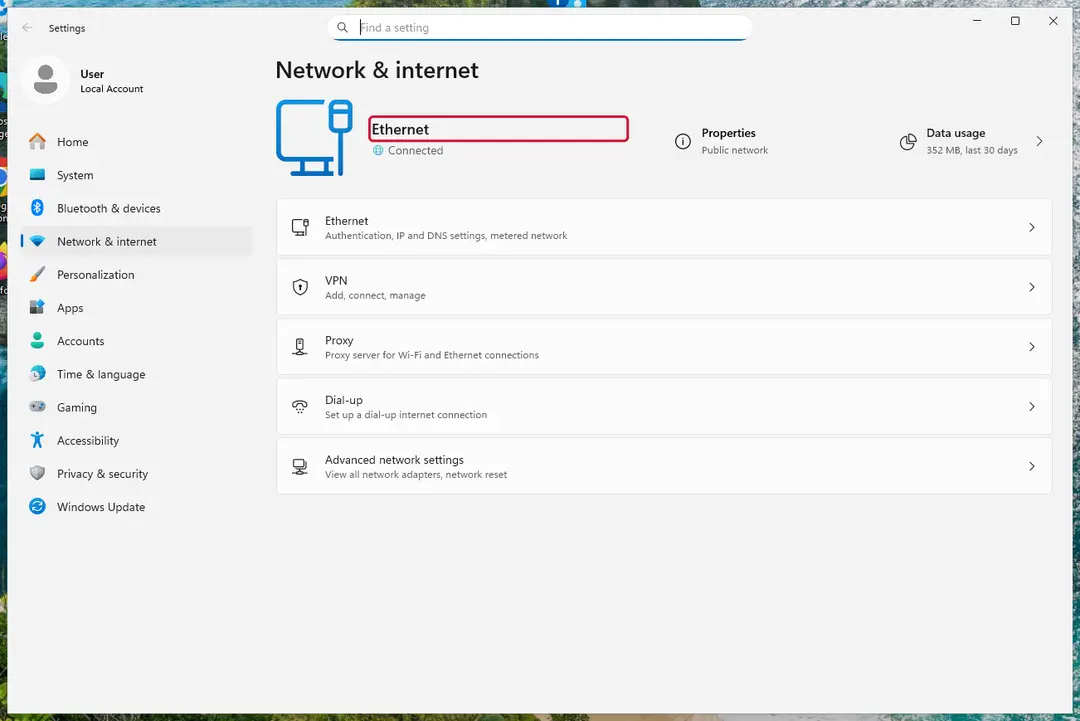
Windows 11: turn off Wi-Fi to take the PC offline. Full procedure with screenshots: Ransomware: first steps, finding a decryptor and recovering files
Step 2: Save the ransom note and confirm the family
Copy
READ_IT.txtand one or two files ending in.lamoto a USB stick, and leave the originals where they are.From another device, upload the note and a sample file to ID Ransomware or No More Ransom's Crypto Sheriff, which name the family from the note, the extension and the file structure.
Write down the contact address and your personal ID from the note, because a decryptor or the police may ask for them.
Warning: Never contact the attackers from the infected Windows 11 or Windows 10 PC.
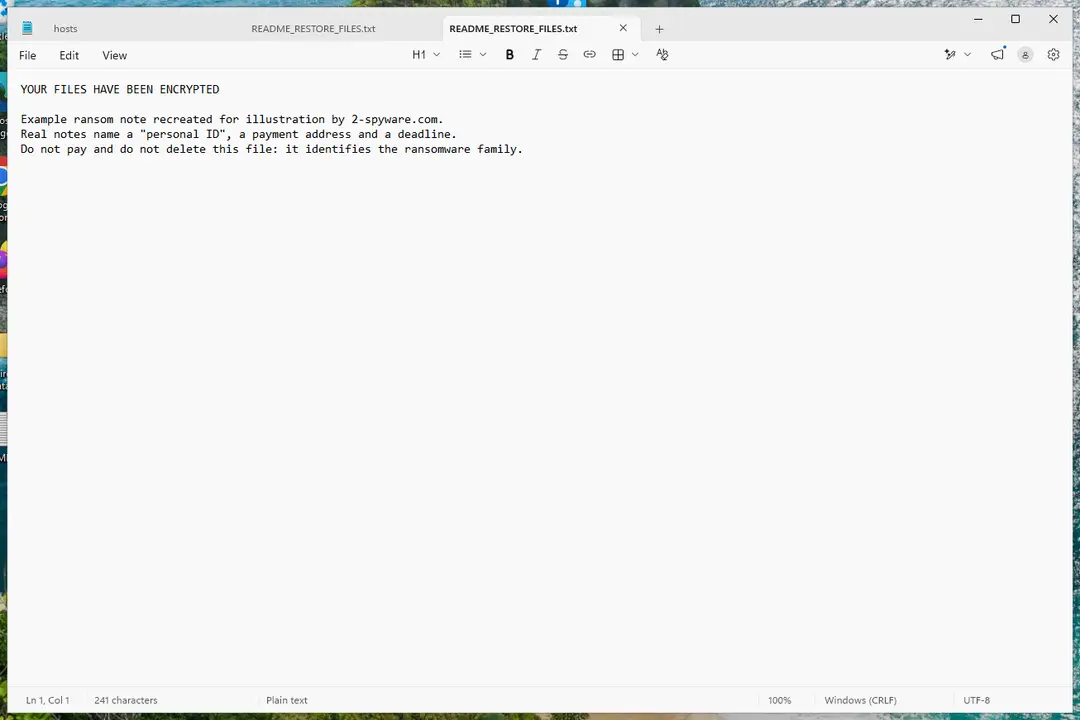
Windows 11: the ransom note and encrypted files to copy for identification. Full procedure with screenshots: Ransomware: first steps, finding a decryptor and recovering files
Step 3: Check for a free decryptor
For EyLamo ransomware virus, no free decryptor is known (checked 7 October 2026). Search the family name in the No More Ransom decryption tools list and in the free decryptors of Emsisoft, Avast and Kaspersky, because new tools appear years after an attack.
Important: Keep the encrypted files even if nothing works today, and do not pay before every free option is ruled out: payment does not guarantee a working key.
Decryptors run on Windows 11 and Windows 10, but only after the ransomware itself is removed.
Full procedure with screenshots: Ransomware: first steps, finding a decryptor and recovering files
Step 4: Remove the ransomware before you restore or decrypt
Restoring or decrypting files while EyLamo ransomware virus still runs lets it encrypt them again. Run a Full scan in Windows Security > Virus & threat protection > Scan options, then the Microsoft Defender Antivirus (offline scan).
If the ransomware blocks Windows Security, start Safe Mode with Networking and scan from there. Some families install a password stealer as well, so let both scans finish on Windows 11 or Windows 10.

Windows 11: Windows Security > Virus & threat protection > Scan options. Full procedure with screenshots: Run a Microsoft Defender Offline scan
Step 5: Look for shadow copies of the files
Open Command Prompt as administrator and run
vssadmin list shadows. If it lists copies dated before the attack, right-click a folder with encrypted files in File Explorer, choose Properties > Previous Versions, and open or restore a version from before that date.ShadowExplorer, a free tool, shows the same copies when the tab is empty or hidden. Most current families delete shadow copies, so an empty list is normal, but the check takes two minutes on Windows 11 or Windows 10.
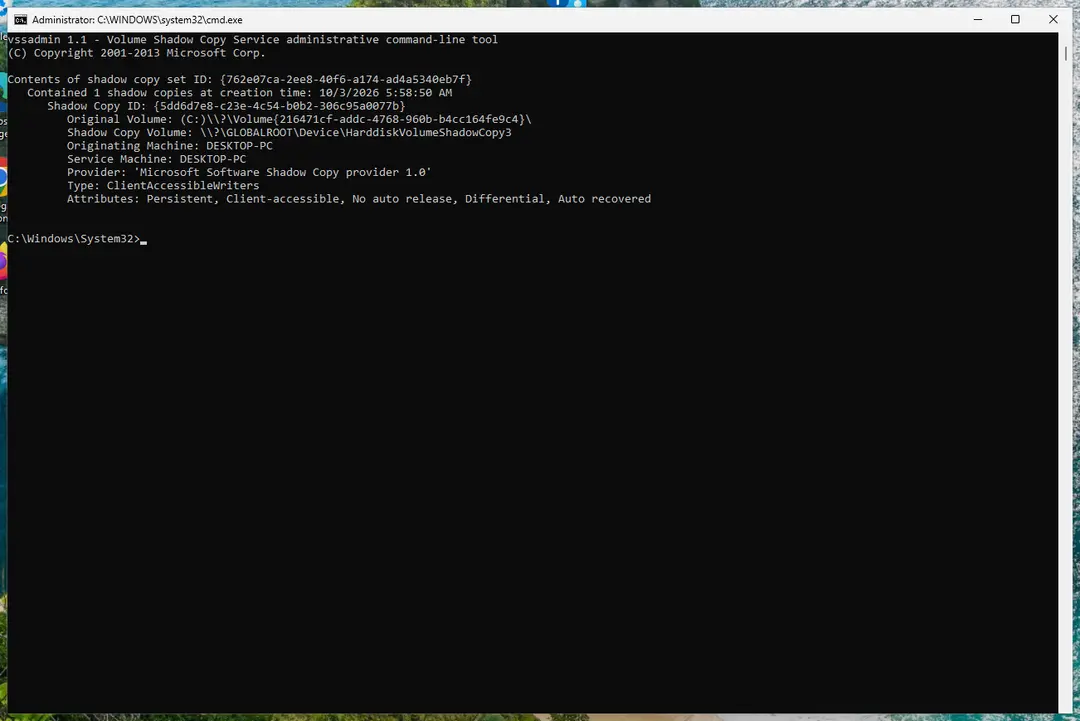
Windows 11: vssadmin list shadows shows whether shadow copies exist. Full procedure with screenshots: Ransomware: first steps, finding a decryptor and recovering files
Step 6: Restore the files from a backup or recover deleted originals
Restore from an external backup, File History or OneDrive's version history, choosing a date before the attack. Connect the backup drive only after the scans are clean, or the ransomware encrypts it too.
If there is no backup, file recovery software can sometimes find the deleted originals, because some ransomware writes an encrypted copy and deletes the original file.
Stop writing to the drive and try recovery on Windows 11 or Windows 10 before new files overwrite the space.
Full procedure with screenshots: Recover deleted files (Recycle Bin, backups, OneDrive) On uGetFix
Instructions for each browser and system
The detailed steps for every browser and system this guide covers. Open the one you use.
Manual removal using Safe Mode
Important! →
Manual removal guide might be too complicated for regular computer users. It requires advanced IT knowledge to be performed correctly (if vital system files are removed or damaged, it might result in full Windows compromise), and it also might take hours to complete. Therefore, we highly advise using the automatic method provided above instead.
Step 1. Access Safe Mode with Networking
Manual malware removal should be best performed in the Safe Mode environment.
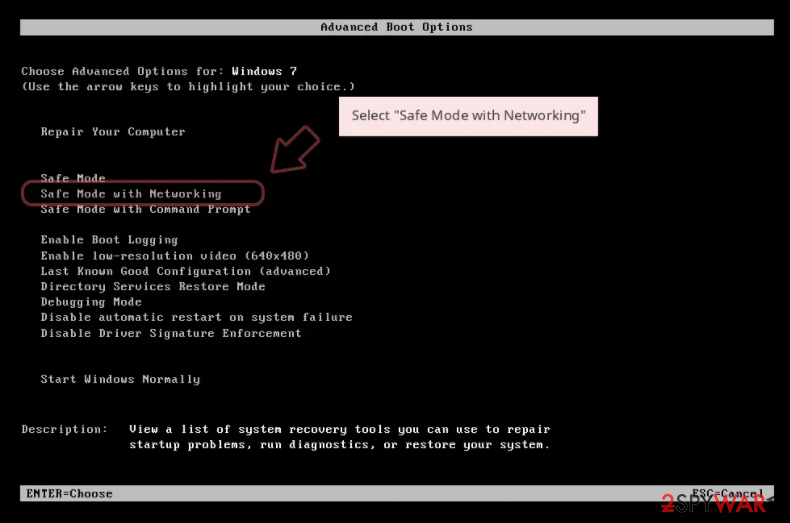
Windows 7 / Vista / XP
- Click Start > Shutdown > Restart > OK.
- When your computer becomes active, start pressing F8 button (if that does not work, try F2, F12, Del, etc. - it all depends on your motherboard model) multiple times until you see the Advanced Boot Options window.
- Select Safe Mode with Networking from the list.
Windows 10 / Windows 8
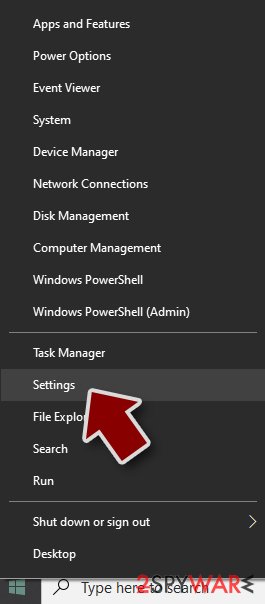
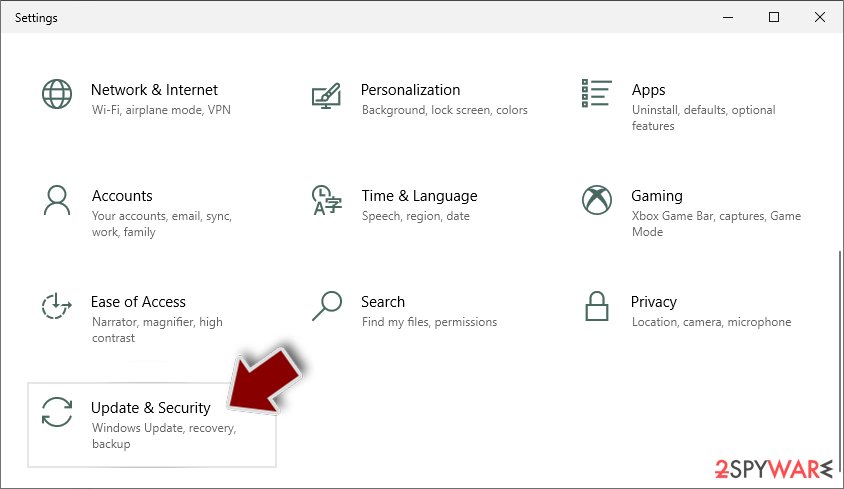
- Right-click on Start button and select Settings.
- Scroll down to pick Update & Security.
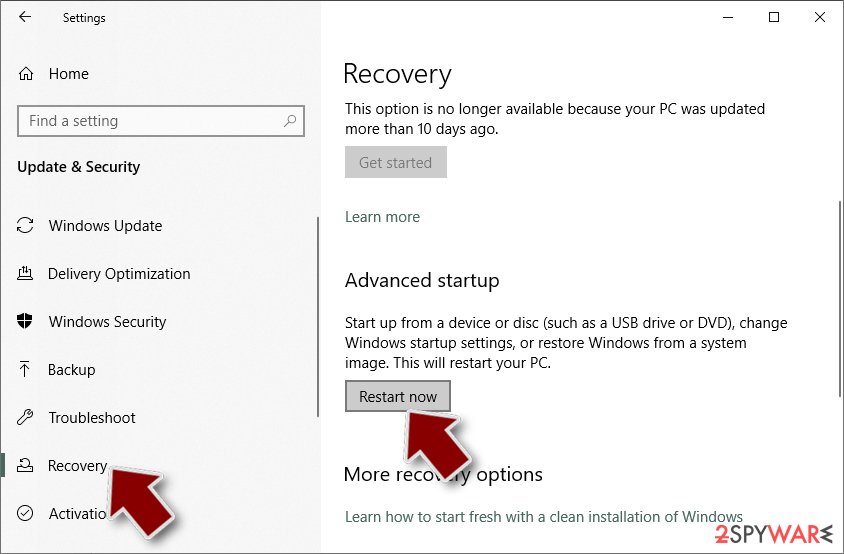
- On the left side of the window, pick Recovery.
- Now scroll down to find Advanced Startup section.
- Click Restart now.
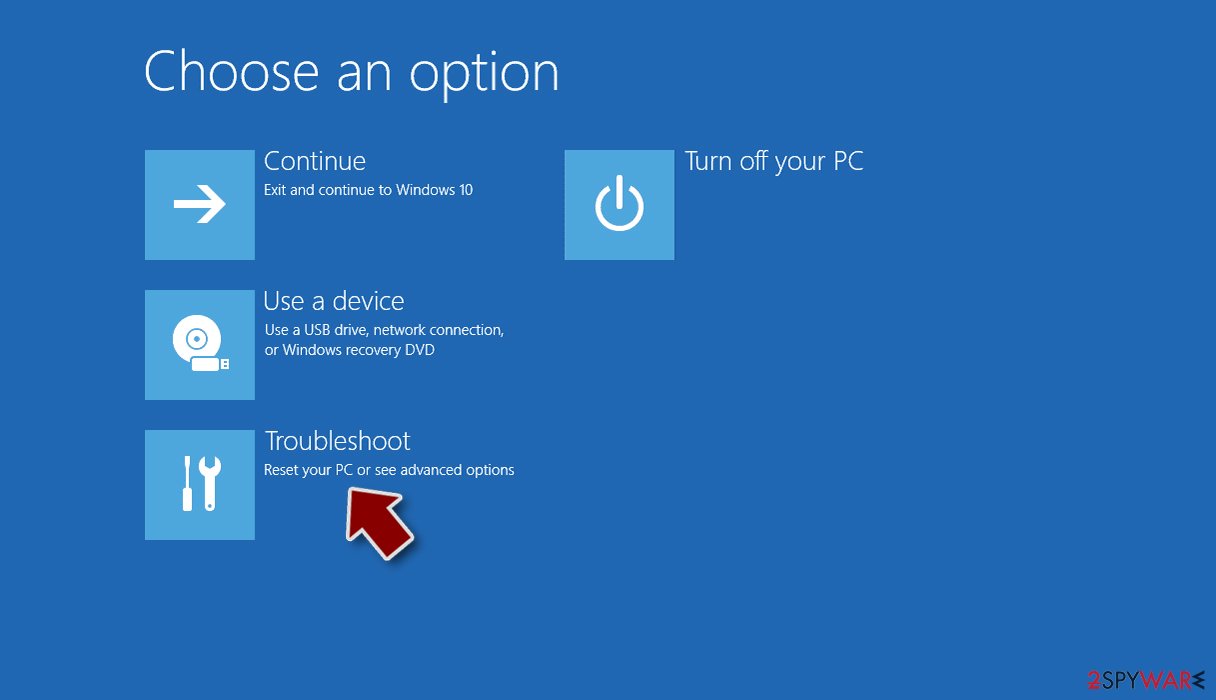
- Select Troubleshoot.
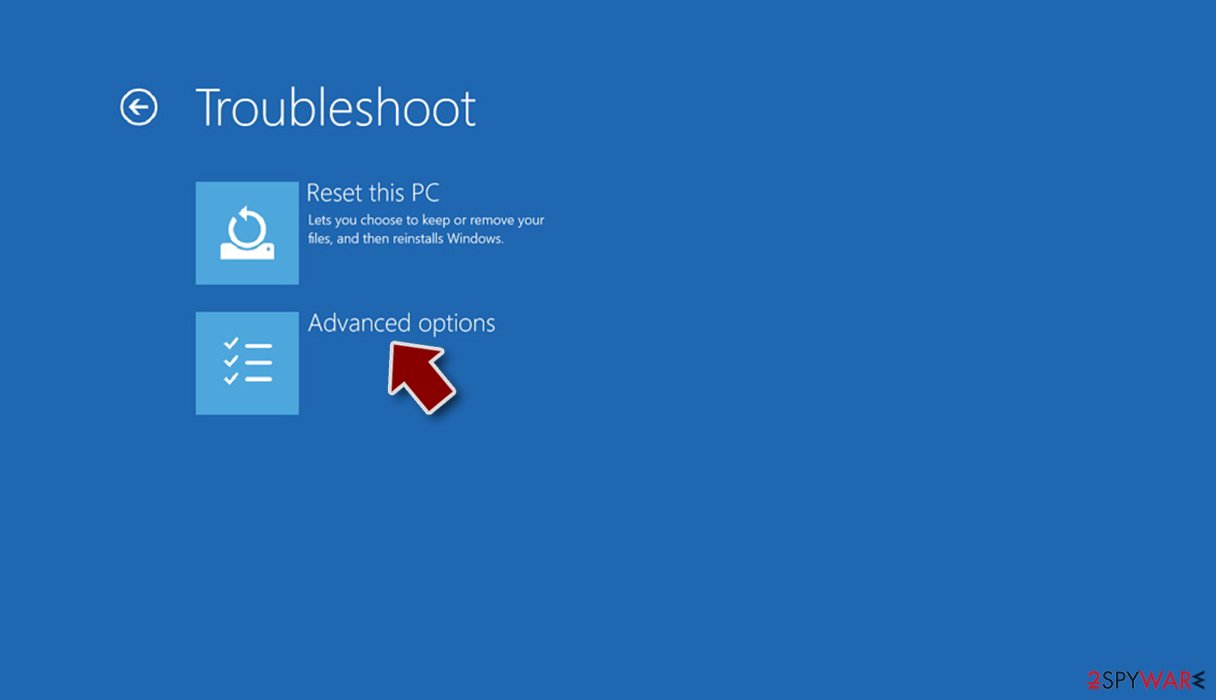
- Go to Advanced options.
- Select Startup Settings.
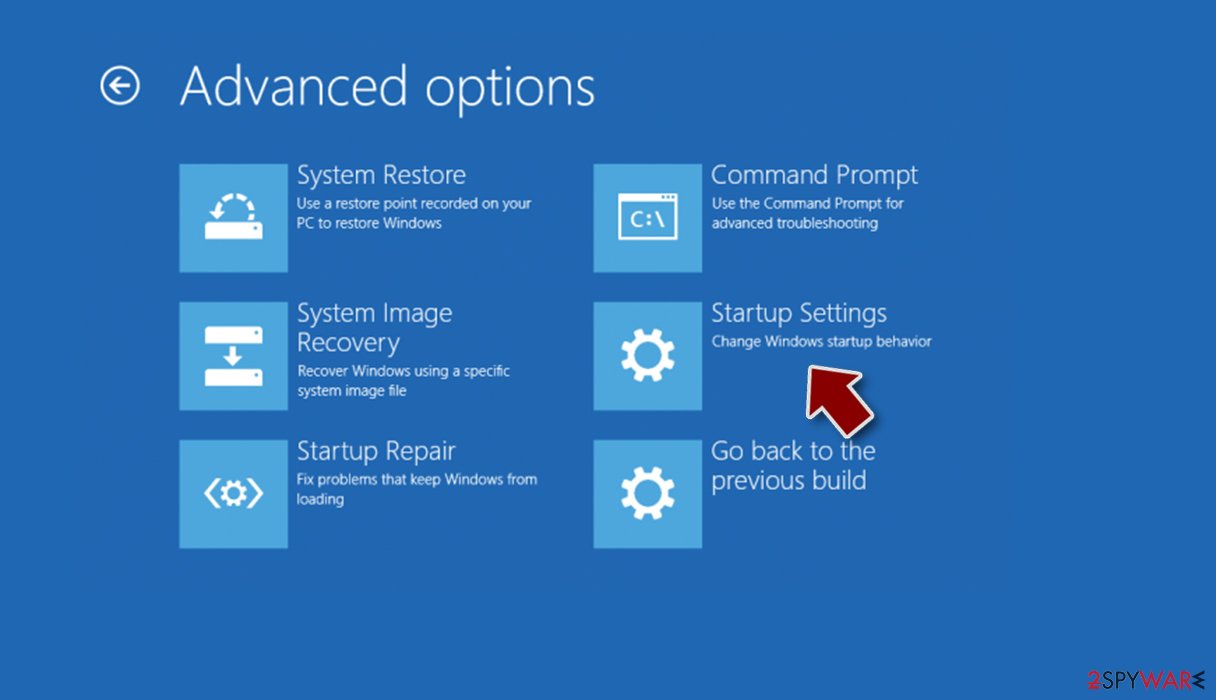
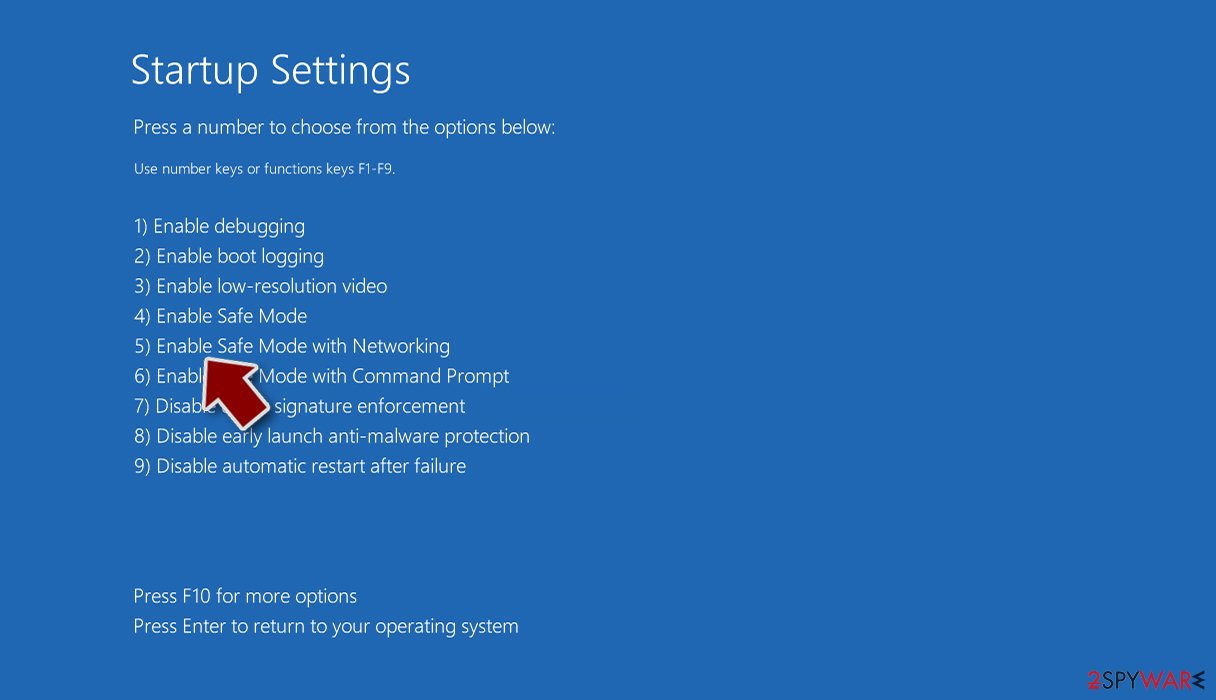
- Press Restart.
- Now press 5 or click 5) Enable Safe Mode with Networking.
Step 2. Shut down suspicious processes
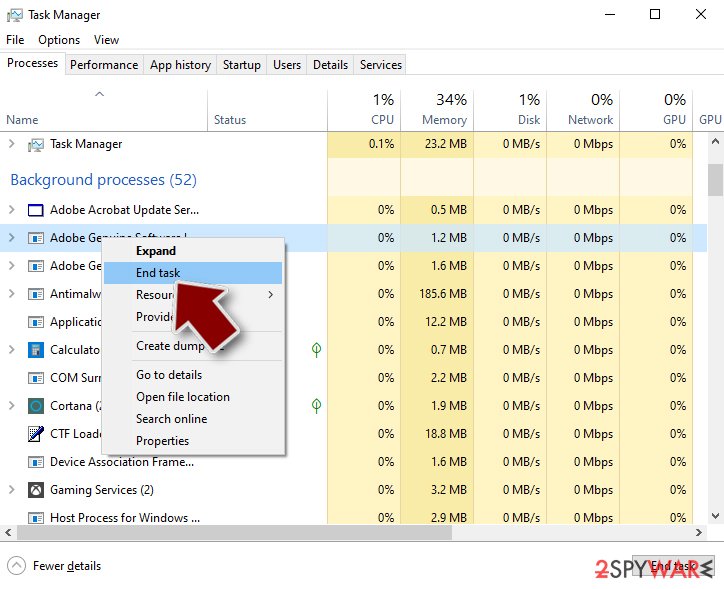
Windows Task Manager is a useful tool that shows all the processes running in the background. If malware is running a process, you need to shut it down:
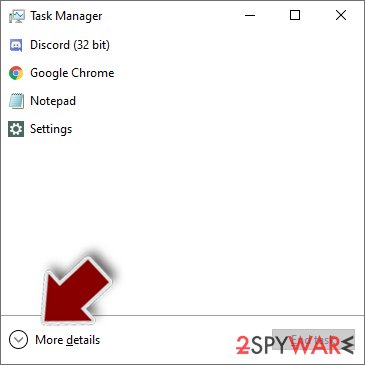
- Press Ctrl + Shift + Esc on your keyboard to open Windows Task Manager.
- Click on More details.
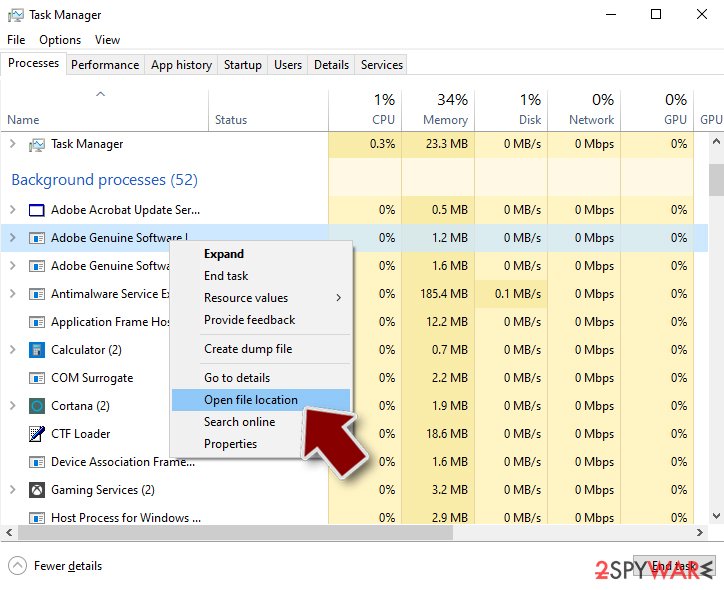
- Scroll down to Background processes section, and look for anything suspicious.
- Right-click and select Open file location.
- Go back to the process, right-click and pick End Task.
- Delete the contents of the malicious folder.
Step 3. Check program Startup
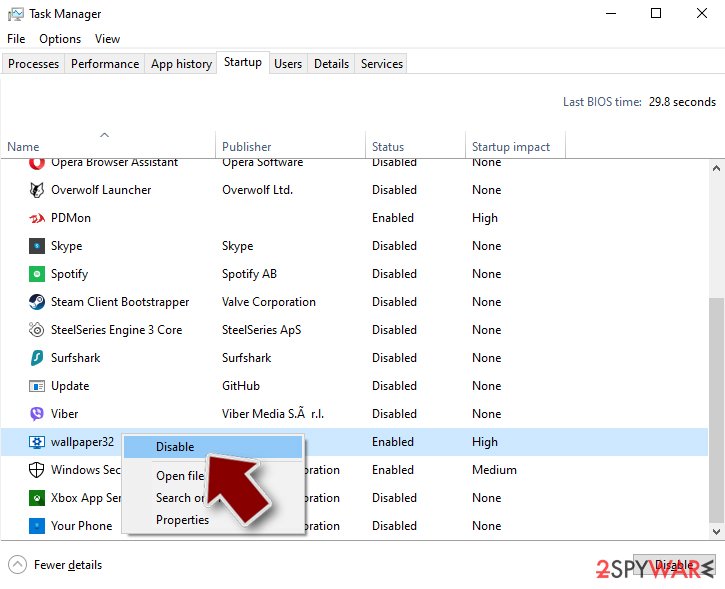
- Press Ctrl + Shift + Esc on your keyboard to open Windows Task Manager.
- Go to Startup tab.
- Right-click on the suspicious program and pick Disable.
Step 4. Delete virus files
Malware-related files can be found in various places within your computer. Here are instructions that could help you find them:
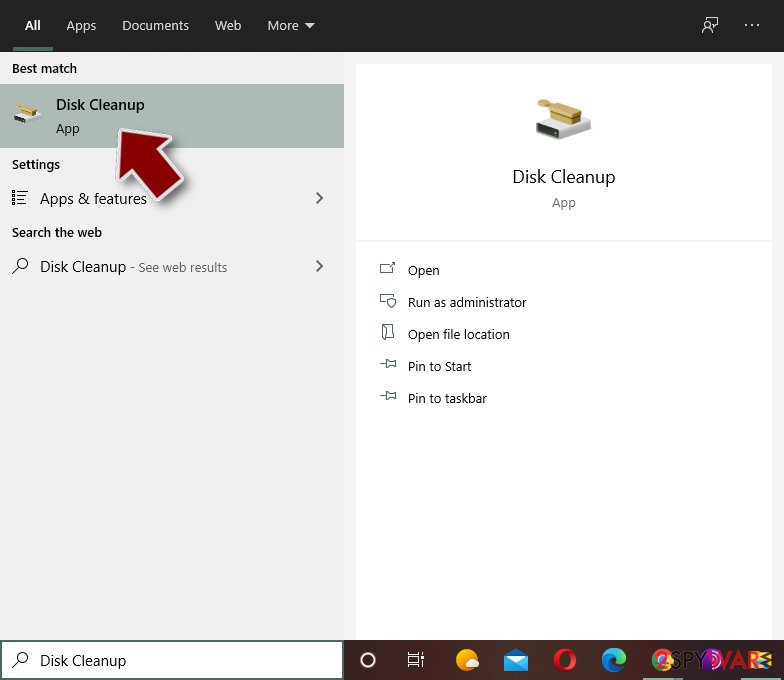
- Type in Disk Cleanup in Windows search and press Enter.
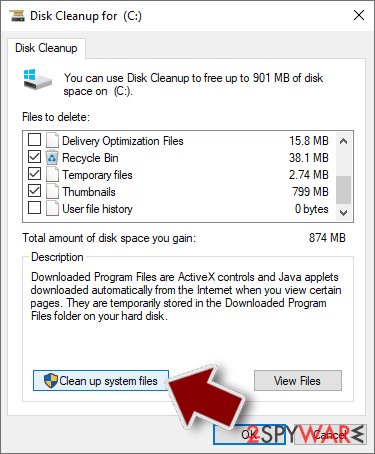
- Select the drive you want to clean (C: is your main drive by default and is likely to be the one that has malicious files in).
- Scroll through the Files to delete list and select the following:
Temporary Internet Files
Downloads
Recycle Bin
Temporary files - Pick Clean up system files.
- You can also look for other malicious files hidden in the following folders (type these entries in Windows Search and press Enter):
%AppData%
%LocalAppData%
%ProgramData%
%WinDir%
After you are finished, reboot the PC in normal mode.
Report it and recover your files
Report it
Report the attack even if you do not expect the files back: insurers and banks ask for the report number, and police use the contacts in the note to link cases.
- United States
- FBI IC3 · FTC ReportFraud
- United Kingdom
- Report Fraud (formerly Action Fraud) · NCSC
- Australia
- ReportCyber (ASD)
- EU countries
- Europol: national reporting sites
Give the victim ID, the note and the date the files were encrypted. A business that holds personal data may also have to notify its data protection authority, in the EU within 72 hours.
Protect the files you restore
Restore only after the scans are clean and the PC no longer shows files that end in .lamo and no longer open; otherwise the restored copies can be damaged again.
Then build a backup that survives the next infection:
- one copy in the cloud with version history
- one on an external drive that is disconnected between backups
- the working copy on the PC
Version history matters because a backup that syncs damaged files overwrites the good ones.
How to do this with the tools built into Windows: the 3-2-1 backup rule on Windows.
Do not let government spy on you
The government has many issues in regards to tracking users' data and spying on citizens, so you should take this into consideration and learn more about shady information gathering practices.
Avoid any unwanted government tracking or spying by going totally anonymous on the internet.
You can choose a different location when you go online and access any material you want without particular content restrictions. You can easily enjoy internet connection without any risks of being hacked by using VPN.
Control the information that can be accessed by government any other unwanted party and surf online without being spied on. Even if you are not involved in illegal activities or trust your selection of services, platforms, be suspicious for your own security and take precautionary measures by using the VPN service.
Backup files for the later use, in case of the malware attack
Computer users can suffer from data losses due to cyber infections or their own faulty doings.
Ransomware can encrypt and hold files hostage, while unforeseen power cuts might cause a loss of important documents. If you have proper up-to-date backups, you can easily recover after such an incident and get back to work. It is also equally important to update backups on a regular basis so that the newest information remains intact - you can set this process to be performed automatically.
When you have the previous version of every important document or project you can avoid frustration and breakdowns. It comes in handy when malware strikes out of nowhere. Use for the data restoration process.
Questions about EyLamo ransomware virus
How do I open .lamo files?
You cannot open them by renaming or by choosing another program. The .lamo ending shows that EyLamo ransomware virus encrypted the content, and only the matching key can reverse it. Renaming a file back to .docx or .jpg changes nothing except the icon, and it can confuse a future decryptor, so leave the names as they are.
To get the content back, use a backup, an unencrypted copy elsewhere, or a decryptor listed on No More Ransom if one exists for EyLamo ransomware virus. Store the encrypted files on an external disk until then.
Can a data-recovery company decrypt my files for a fee?
Only if a decryptor already exists or the company pays the attackers for you. Some "ransomware recovery" services advertise that they can decrypt families with no known flaw; in practice they negotiate with the attackers and add their own fee. Others use the same free tools listed on No More Ransom.
Before you hire anyone, ask in writing how they will recover the files, whether they will contact the attackers and what happens if they fail. A legitimate service answers clearly. If a free decryptor exists for your family, you can run it yourself.
Is there a free EyLamo ransomware virus decryptor?
We last checked on 7 October 2026, and for EyLamo ransomware virus no free decryptor is known. We check No More Ransom, which collects free tools from police and security companies, and the decryptor pages of the major antivirus vendors. A working decryptor exists only when the encryption has a flaw or the keys were leaked or seized.
Ignore sites and videos that offer a "EyLamo ransomware virus decryptor" for download or for a fee: these are usually scams or malware. Real decryptors are free and come from known security companies or law enforcement. Keep the encrypted files in case a tool appears later.
Should I pay the ransom?
We advise against it, and so do the FBI, Europol and national cyber agencies. Payment does not guarantee a working tool: some attackers never reply, some tools damage files, and some variants have no decryptor at all. Paying also funds further attacks and can make you a target again.
Before considering payment, try every recovery option in this guide and report the attack. Companies must involve their legal adviser and insurer, because payments to sanctioned groups can be illegal. If files are truly irreplaceable, store the encrypted copies and wait; decryptors sometimes appear later.
How did EyLamo ransomware virus get on my computer?
The way EyLamo ransomware virus spreads has not been documented yet, so look at your own recent activity. On home PCs, ransomware most often comes with cracked programs, game cheats, key generators and fake updates, or with an e-mail attachment that was opened. On business networks, attackers usually log in through Remote Desktop with a stolen or guessed password.
Think back to what was downloaded or installed in the days before files that end in .lamo and no longer open, and check the Downloads folder and Installed apps sorted by date. Keep anything suspicious for your report, but do not run it again.
Did EyLamo ransomware virus steal my files or passwords?
We do not know yet. Nothing published so far shows data theft by EyLamo ransomware virus, but the only confirmed sign is files that end in .lamo and no longer open, which says nothing about what happened before. Many current ransomware attacks copy files or run a password stealer first, so it is wise to act as if they did.
From a clean device, change the passwords that were saved in the browsers on this PC, starting with e-mail and banking, sign out of all sessions and turn on two-step verification. Watch bank statements and account activity for the next few weeks.
Is EyLamo ransomware virus the same as other ransomware with a similar name?
Not necessarily. Ransomware names come from the file extension, the note or a word in the code, so unrelated families often end up with similar names, and one family can appear under several names. The difference matters: a decryptor or advice for one family does not fit another and can damage files.
Compare the ending added to your files and the exact name of the note with the summary table at the top of this guide, then upload the note and one encrypted file to ID Ransomware from a clean device. If the result names another family, follow the guide for that family instead.
Can I just remove .lamo from the file names?
You can try it on a copy, but for real ransomware it will not help. The .lamo extension is only a label; the file content has been scrambled with a key the attackers hold.
If a renamed copy opens normally, the malware only renamed files, which happens with some fake ransomware, and you can rename the rest back. If it does not open, leave the files as they are. Renaming encrypted files can confuse a decryptor later, so always work on copies.
Should I open READ_IT.txt?
Reading it is fine if you open it in Notepad. A plain text READ_IT.txt cannot harm the PC. Be careful with notes in HTA or HTML format: double-clicking those runs them in a window that can contain scripts, so right-click and choose Open with > Notepad instead.
The note tells you the contact addresses, the claimed amount and the deadline. Do not visit links or write to the addresses from this PC. Use the note to identify the family and check for a free decryptor first.
Will Fortect remove EyLamo ransomware virus?
Fortect scans Windows for malware and unwanted programs and repairs the system files and settings they change, and its free scan shows what it finds on your PC before you decide anything.
For EyLamo ransomware virus, follow the plan above as well: the browser steps take back permissions and settings that no scanner treats as a threat, and uninstalling the program that brought it removes the source.
Run Microsoft Defender's full scan and, if anything was found, its offline scan as a second opinion. If the symptoms are gone after the plan and both scans are clean, there is nothing more to do.
Sources
- CISA: StopRansomware (read October 7, 2026)
- No More Ransom (read October 7, 2026)
- FTC: How to recognize, remove and avoid malware (read October 7, 2026)
- Microsoft Learn: Microsoft Defender Offline (read October 7, 2026)
- Microsoft Learn: How Microsoft names malware (read October 7, 2026)