
The short answer
Do not pay as a first reaction, and in most home cases do not pay at all. Our ransomware guide explains what ransomware is and how to remove it. This page answers one narrower question: whether paying the ransom is ever worth it, and what to do so that you never have to decide.
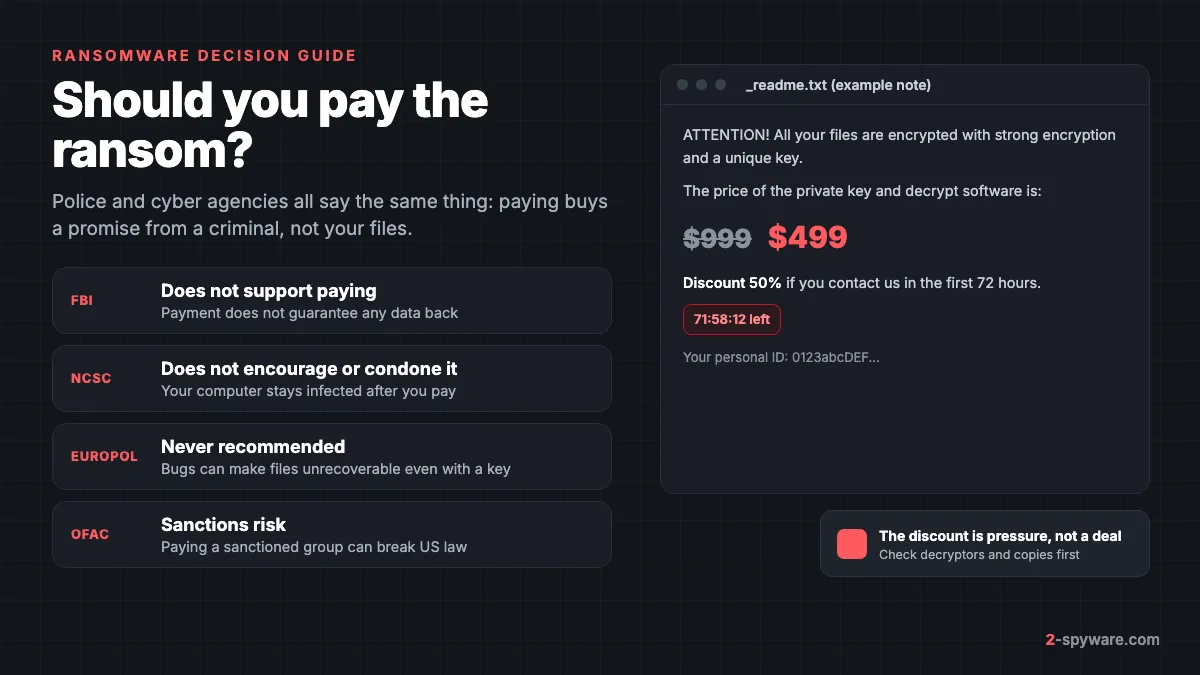
Paying is not a reliable way back. You send money to someone with no reason to keep their word, for a tool written by the people who broke your PC. This page never recommends payment. If your data is irreplaceable and every option below fails, the decision is yours, and in a company it belongs with management, lawyers and the insurer.
What the FBI, NCSC, Europol and CISA say
The agencies that investigate ransomware agree. Their reasons cover what happens to your files and what your money does next.
| Agency | Position | Main reasons given |
|---|---|---|
| FBI (United States) | Does not support paying a ransom [1] | No assurance you get any data back; payment encourages attacks on more victims and draws others into the crime [1] |
| NCSC and UK law enforcement | Do not encourage, endorse or condone paying [2] | No assurance of access, the computer stays infected, you fund criminals and become more likely to be targeted again [2] |
| Europol and No More Ransom | Paying is never recommended [3] | Bugs in the malware can make data unrecoverable even with the right key; payment proves ransomware works [3] |
| CISA (United States) | Advises against paying, together with the FBI | Same reasons; asks every victim to report the attack whether or not they pay |
The NCSC list is worth reading twice. Paying does not clean anything: the ransomware, any password stealer installed with it, and the way in are all still there after the key arrives [2]. That is why the agencies put an offline backup at the centre of their advice, not a payment plan [2].
All of them also ask you to report the attack. The FBI takes reports through a local field office or ic3.gov [1]. Reports in other countries go to national police or cyber centres, listed in our page on where to report cybercrime by country. A report costs nothing and gives you a reference number that banks, insurers and employers may ask for.
Does paying ransomware work? What the data says
The best large data set comes from the Sophos State of Ransomware survey. The 2025 edition asked 3,400 IT and security leaders in 17 countries whose organisations were hit in the previous year [4]. The figures below come from that survey.
| Finding | Figure |
|---|---|
| Recovered their encrypted data in some way | 97% [4] |
| Paid the ransom and got data back | 49%, down from 56% a year earlier [4] |
| Used backups to restore data | 54%, the lowest rate in six years [5] |
| Share of the first demand that payers handed over, on average | 85% [4] |
| Paid more than the first demand | 18% of payers [4] |
| Median ransom payment | 1 million US dollars [5] |
| Mean recovery cost, not counting any ransom | 1.53 million US dollars [4] |
Read these numbers with care. The survey covers organisations with 100 to 5,000 employees [5], most with incident response firms and negotiators on their side. A home user writing to an e-mail address from a ransom note is in a very different position.
Getting data back also does not mean getting all of it, intact and quickly. The 2026 edition puts the median payment at 769,000 US dollars and the average recovery cost at 1.7 million [6]. Paying did not make those costs disappear.
Why paying fails even when the attackers reply
- **The decryptor is broken or slow.** Bugs in the malware can make data unrecoverable even with the correct key [3]. Attacker tools often crash on large files or skip files that were encrypted twice.
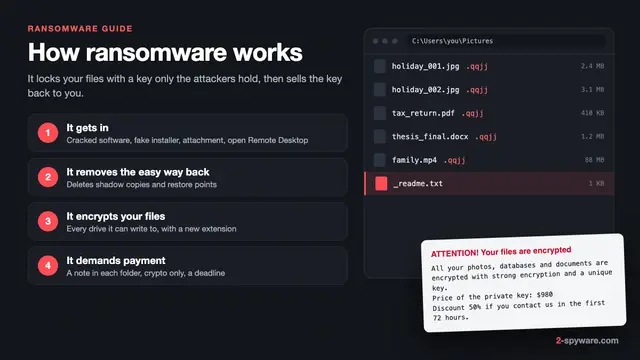
- **There never was a key.** Some cheap variants are built from leaked builders, and a few simply overwrite files. Our page on how ransomware works explains which kinds have no way back.
- **The price goes up.** Almost one in five paying organisations paid more than the first demand [4]. Attackers can ask again for a second key, a second PC or deletion of stolen data.
- **The contact disappears.** Note e-mail accounts get closed and chat sites go offline after police action.
- **You get attacked again.** The NCSC warns that payers are more likely to be targeted in future [2], and the infection is still on the PC [2].
STOP/Djvu and the 50% discount: a note for home users
If your files end in a short random extension such as .djvu, .rumba or .gero [7] and a file called _readme.txt sits in every folder, you most likely have STOP/Djvu. It is the family home users meet most, and it usually arrives with cracked software, keygens and fake game cheats. See our _readme.txt ransom note page for the full note.
The note offers a 50% discount if you write within 72 hours. That offer is pressure, meant to make you pay before you find the free options. Nothing in the note proves that a working key exists for your PC.
Why the online or offline ID matters
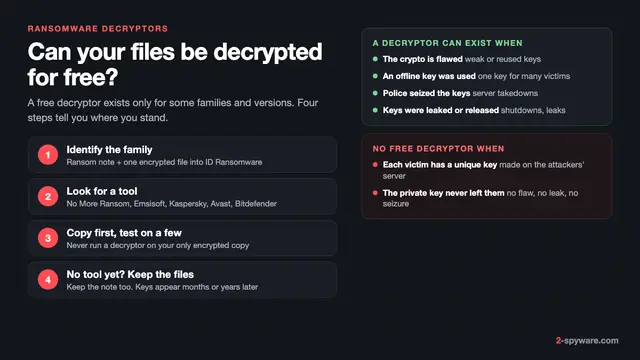
The last line of _readme.txt shows your personal ID, and that ID tells you which kind of key encrypted your files. Emsisoft, which maintains the free STOP Djvu decryptor, states that files can be decrypted for every version if they were encrypted by an offline key it holds [7].
- **Offline ID.** The ransomware could not reach its server, so it used a key built into the program. That key is shared by many victims, so once researchers obtain it the decryptor can add it. Offline IDs usually end in t1.
- **Online ID.** The ransomware reached its server, which created a unique key for your PC and kept it. No public decryptor can rebuild that key.
- **Old Djvu versions.** For versions from before August 2019, files can also be decrypted by submitting an encrypted file and its original to Emsisoft [7]. This does not work for the newer versions [7].
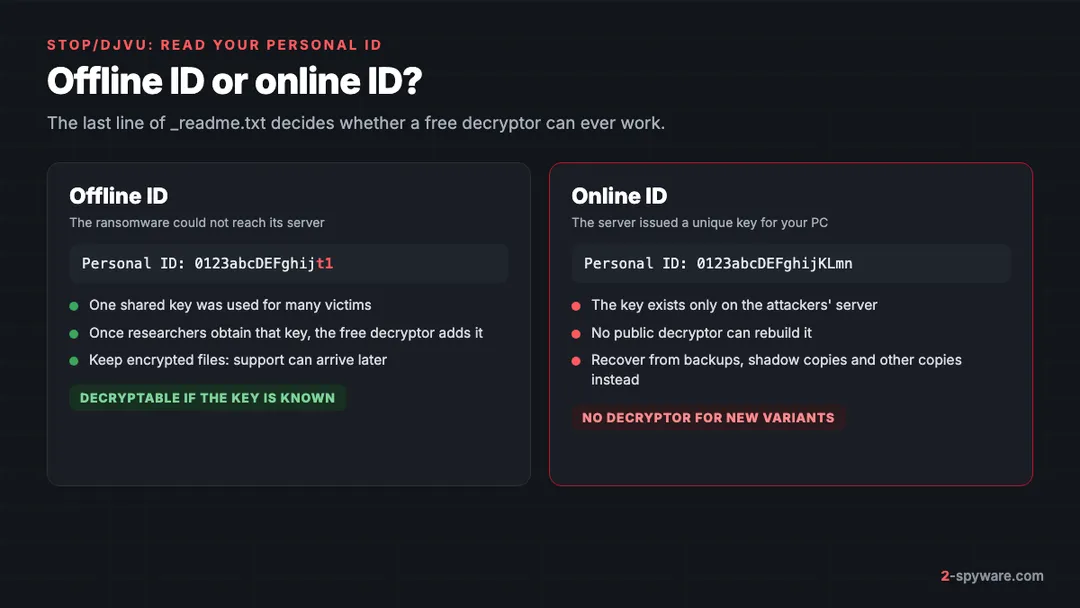
So for most current STOP/Djvu victims with an online ID, a free decryptor is not coming. That still does not make paying a good idea: you would pay an anonymous group with no track record, for a tool that may not work. Your real options are other copies and Previous Versions, covered next. With an unsupported offline ID, keep the encrypted files and check again later. Our review of the Emsisoft STOP Djvu decryptor shows how to run it.
The checklist before you even consider paying
Work through these in order. Most take less than an hour and none costs money. Each one can make the ransom note irrelevant.
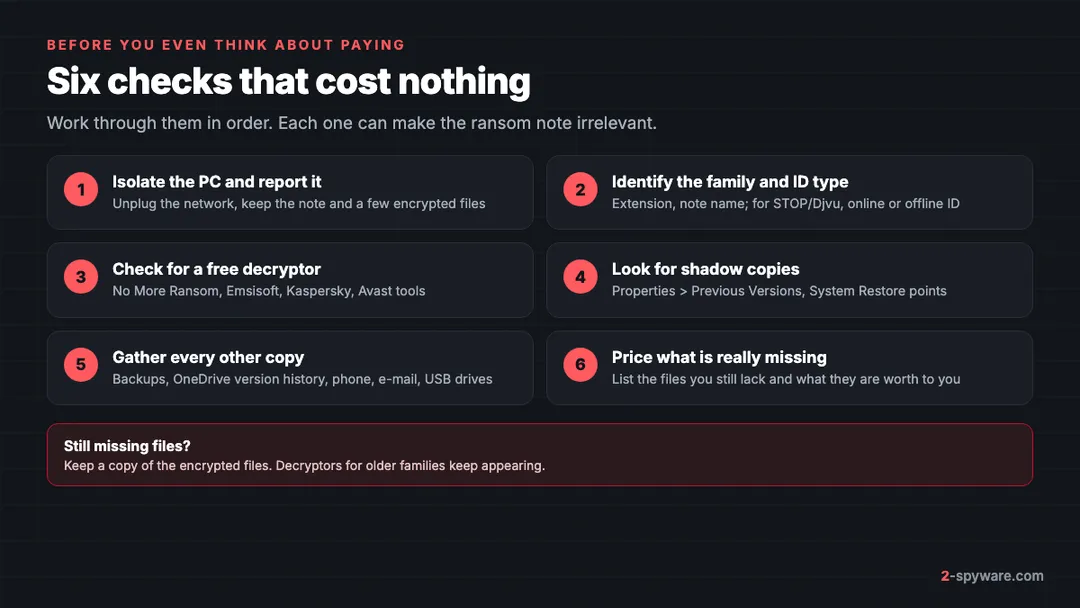
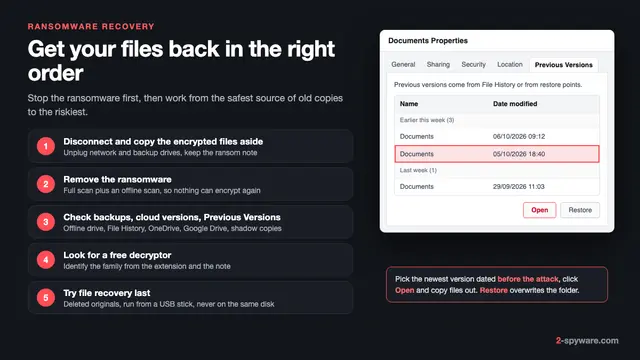
- **Isolate the PC and keep evidence.** Unplug the network cable and turn off Wi-Fi. Copy the note and a few encrypted files to a USB drive. Our ransomware recovery steps cover this in detail.
- **Identify the family.** Note the file extension, the name of the ransom note and any e-mail address in it. For STOP/Djvu, read the personal ID as shown above.
- **Check for a free decryptor.** Our list of free ransomware decryptors groups the tools from No More Ransom, Emsisoft, Kaspersky and other vendors by family.
- **Look for shadow copies.** Some attacks fail to delete them. Right-click a folder, open Properties and then the Previous Versions tab. The full method is in our guide to shadow copies and Previous Versions.
- **Gather every other copy.** Check external drives, OneDrive or Google Drive version history, photos on your phone, files you sent by e-mail and old laptops. Cloud services often keep 30 days of versions.
- **Price what is really missing.** Make a list of the files you still do not have after steps 3 to 5. For many people it shrinks to a few folders. Ask what those files are worth to you, and what it would cost to recreate them.
Keep the encrypted files even when all six checks fail. Decryptors for older families keep appearing, so copy them to an external drive before you reinstall Windows.
The legal side: sanctions and reporting duties
Rules differ by country and change often. This section lists the main ones. It is not legal advice, and a business should always speak to a lawyer before any contact with attackers.
United States: the OFAC sanctions advisory
The Treasury Department's Office of Foreign Assets Control (OFAC) warns that paying a ransom to a sanctioned person or group, or to anyone in a sanctioned country, can violate US sanctions law. Liability is strict, so a payer can face civil penalties even without knowing the recipient was sanctioned. The advisory also covers companies that pay for a victim, such as insurers, incident response firms and banks. OFAC says it treats a prompt, complete report to law enforcement and full cooperation as significant mitigating factors.
United Kingdom, Australia and the European Union
- **United Kingdom.** Sanctions law applies to ransom payments in the same way. The government has announced plans to ban payments by public sector bodies and critical national infrastructure, and to require other victims to report an intention to pay. Check GOV.UK for the current status.
- **Australia.** Businesses with an annual turnover of 3 million Australian dollars or more must report a ransomware payment to the Australian Signals Directorate within 72 hours.
- **European Union.** There is no general ban on paying, but EU sanctions apply. Organisations must still report personal data breaches within 72 hours under the GDPR, whether or not they pay.
For a private person, paying is not generally illegal unless the money reaches a sanctioned party, but you cannot check who controls a wallet address. Deadlines for each country are in our page on reporting cybercrime by country.
Scams that target victims who want to pay
People searching for a way out are attacked a second time. Watch for these:
- **Fake negotiators.** Someone contacts you after the attack claiming they can get a lower price or a key. Never deal with anyone who reaches out to you first.
- **Recovery firms that secretly pay.** Some firms that promise to decrypt any family simply pay the attackers and add a large fee. Ask in writing how they will recover the files and whether they will contact the attackers.
- **Fake decryptors.** Tools for STOP/Djvu online IDs on download sites and in videos. Real decryptors are free and come from vendors or police.
- **Fake police or agencies.** Messages that ask for a fee to release keys or recover lost money are scams. Agencies never charge victims.
- **Second demands.** People who say they bought your stolen data and will delete it for payment. You cannot verify deletion.
These use the same tricks as tech support scams: urgency and authority. If you already sent money, see what to do after paying a scammer and report it.
What to do instead of paying
Clean the PC before you restore anything, or the ransomware can encrypt your restored files again.
- **Remove the ransomware.** Run a Microsoft Defender Offline scan, which starts before Windows loads. If the system stays unstable, clean or reset Windows after you have copied the encrypted files out.
- **Repair what the malware broke.** After removal, a Windows repair tool such as Fortect can fix damaged system files and malware leftovers. It does not decrypt files: only a correct key or a clean copy brings them back.
- **Secure your accounts.** Home ransomware often arrives with a password stealer. From a clean device, change passwords for e-mail and banking first, as described in securing your accounts after malware.
- **Restore from your copies.** Start with the newest clean backup, then cloud version history, then Previous Versions.
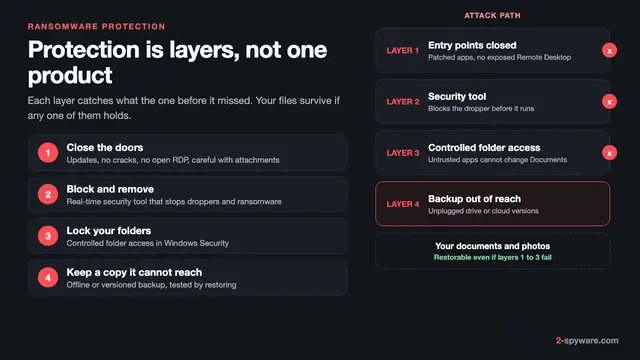
- **Set up backups that survive the next attack.** Follow the 3-2-1 backup plan for Windows: three copies, two kinds of storage, one kept offline. An offline copy cannot be encrypted from your PC.
The NCSC sums up its own advice in one line: keep a recent offline backup of your most important files [2]. With that copy in place, a ransom note becomes an afternoon of cleanup, not a decision about paying criminals.
Frequently asked questions
Should I pay the ransomware ransom?
Police and cyber agencies advise against it. The FBI does not support paying, the NCSC does not encourage or condone it, and Europol's No More Ransom project says paying is never recommended. Paying gives no assurance that you get files back, leaves the infection on your PC and funds the next attack. First check free decryptors, Previous Versions, cloud version history and backups.
Does paying ransomware actually work?
Sometimes, but not reliably. In the Sophos 2025 survey of organisations, 49% paid and got data back, but those were companies with professional help, and recovery was often partial. Attacker tools can be buggy, contacts disappear, prices rise and some variants never had a working key. A home user is in a much weaker position than a company.
Should I pay the STOP/Djvu ransom to get the 50% discount?
No. The discount is there to make you pay within 72 hours, before you check free options. Read the personal ID in _readme.txt first. Offline IDs, which usually end in t1, can often be decrypted with the free Emsisoft tool once the key is known. With an online ID, look for copies in backups, cloud version history and Previous Versions.
Why is there no decryptor for my STOP/Djvu online ID?
With an online ID, the attackers' server created a unique key for your PC and kept it. Researchers cannot rebuild that key from your files, and newer versions also cannot be decrypted from pairs of encrypted and original files. Only offline keys that researchers obtain can be added to the free decryptor.
Is it illegal to pay a ransomware ransom?
For a private person it is not generally illegal in the US, UK, EU or Australia. It becomes illegal when the money reaches a sanctioned person, group or country, and the US Treasury's OFAC applies strict liability to such payments. Some countries add reporting duties for businesses, such as Australia's 72-hour rule. Companies should take legal advice before any contact.
Can a ransomware recovery company decrypt my files without paying?
Only if a decryptor exists or the family has a known weakness, and then you can usually run the free tool yourself. Firms that promise to decrypt families with no known weakness often pay the attackers and add a fee. Ask in writing how they will recover the files, whether they contact the attackers and what happens if they fail.
Can an antivirus or repair tool restore my encrypted files?
No. Antivirus and repair tools remove the ransomware and fix damaged Windows files, which you should do before restoring anything. They cannot decrypt files. Only the correct key, a free decryptor for your family, or a clean copy from a backup, cloud history or shadow copy brings encrypted files back.
Should I report the attack even if I decide to pay?
Yes. Every agency asks for reports whether or not you pay. Reports help police link cases and sometimes recover keys, and a reference number helps with banks and insurers. For businesses in some countries, reporting is a legal duty, and US sanctions authorities treat a prompt report as a mitigating factor.
Sources
- FBI: Ransomware read 2026-10-08
- NCSC: What you need to know about ransomware read 2026-10-08
- No More Ransom (Europol): Ransomware Q&A read 2026-10-08
- Sophos: The State of Ransomware 2025 read 2026-10-08
- Sophos: Nearly Half of Companies Opt to Pay the Ransom, Sophos Report Finds read 2026-10-08
- Sophos: The State of Ransomware 2026 read 2026-10-08
- Emsisoft: STOP Djvu decryptor read 2026-10-08
- OFAC: Updated Advisory on Potential Sanctions Risks for Facilitating Ransomware Payments read 2026-10-08
 What is ransomware and how to remove it
 Best ransomware protection in 2026
 Free ransomware decryptors: when they work and how to use one safely
 Ransomware recovery: how to restore your files on Windows