
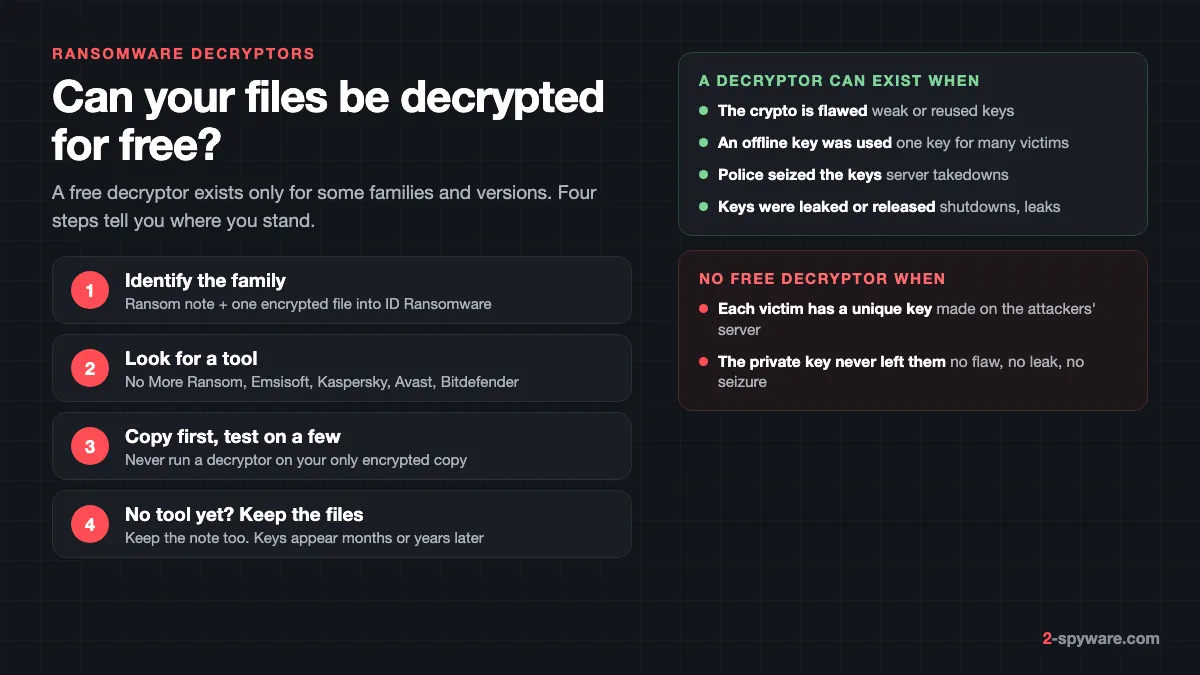
When a ransomware decryptor can exist
A decryptor turns files encrypted by one ransomware family back into the originals. Our ransomware guide covers removal and recovery in general. This page answers a narrower question: can your files be decrypted for free, and how do you find and run the right tool safely?
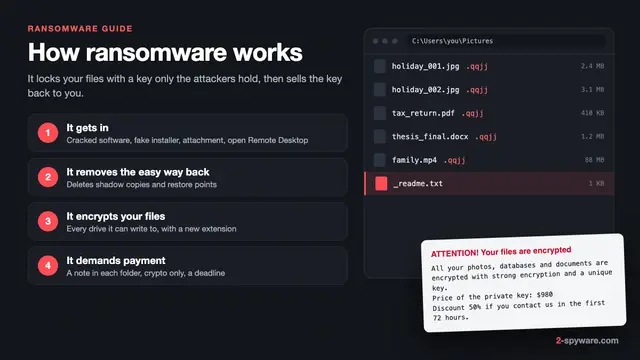
Well-built ransomware encrypts each file with a fast symmetric key, then locks that key with the attackers' public key, as explained in how ransomware works. The matching private key stays with the criminals. A free decryptor is therefore possible only when one of these things happened:
- **The encryption has a flaw.** Some families use a key that stays the same for every file on a PC. Avast describes EncrypTile, for example, as using a key that is constant for a given PC and user [6]. Weak random numbers or a key left on disk help researchers too.
- **An offline key was used.** When ransomware cannot reach its server, some families fall back to a key built into the program. Avast's CryptoMix tool, for instance, supports only files encrypted with such an offline key [6].
- **Police seized the keys.** Takedowns of criminal servers can recover keys. The No More Ransom list carries tools from the Japanese police for Phobos and 8Base and from Korea's KISA for Hive versions 1 to 4 [1].
- **The authors released or leaked keys.** The Shade (Troldesh) authors shut down at the end of April 2020 and published their keys, and Babuk's source code leaked in September 2021 together with some decryption keys [6].
If none of these apply to your family, no honest tool can decrypt your files today. A scanner removes the program but does not hold the attackers' key, so no antivirus or repair tool decrypts files.
Identify the family before you download anything
A decryptor is written for one family, often for certain versions only, and the wrong one can damage files. Families copy each other's extensions and note names, so the extension alone is not enough.
What to collect from the infected PC
- **The ransom note.** Its file name matters as much as its text. STOP/Djvu always leaves _readme.txt, Dharma and Phobos usually leave an info.hta window plus a text note.
- **One or two encrypted files** that hold nothing private, such as a stock photo or a program manual.
- **The extension and the contacts in the note**: e-mail, Telegram account, victim ID or Bitcoin address.
ID Ransomware
ID Ransomware, run by the MalwareHunterTeam researchers, takes a ransom note, a sample encrypted file, or just the contact addresses [3]. On 8 October 2026 it said it detected 1,188 different ransomware families [3]. It does not decrypt anything. It names the likely family and tells you whether a known way to decrypt it exists [3].
When several families share a signature, the site lists more than one result, ordered by how many matches support each [3]. Files with no match may be shared with trusted malware analysts, and e-mail and Bitcoin addresses may be passed to law enforcement [3]. Upload only samples with nothing sensitive in them.
If the result is unclear
Compare the extension, note name and contact address with our guides to STOP/Djvu, Phobos or Dharma, or browse the encrypted files and decryptors topic. A variant from last week may not be in any database yet, so "not found" means "not known yet".
Where to get a real decryptor
Legitimate decryptors are free. Type these sites into the address bar instead of following an ad or a video description.
- **No More Ransom** (nomoreransom.org) was started by the Dutch police's National High Tech Crime Unit, Europol's European Cybercrime Centre, Kaspersky and McAfee, to help victims get files back without paying [2]. On 8 October 2026 its Decryption Tools page covered 184 ransomware names [1]. Each entry links the maker's how-to guide and download.
- **Emsisoft** made more of the tools on No More Ransom than anyone else: 68 entries name it as the maker [1]. Its own page warns that the tools are provided as-is, may not work with versions released after the tool was made, and come with support only for paying customers [4].
- **Kaspersky No Ransom** (noransom.kaspersky.com) hosts Rakhni Decryptor, Rannoh Decryptor, Shade Decryptor and others [5]. Rakhni alone covers Dharma, Crysis versions 2 and 3, TeslaCrypt 3 and 4, Maze, Sekhmet, Egregor and Conti, among others [5].
- **Avast** keeps a page of tools for families such as Babuk, GandCrab, HiddenTear, Jigsaw, TargetCompany and Troldesh [6]. On No More Ransom, Avast also made the Akira and BianLian tools [1].
- **Bitdefender** made the tools listed for GandCrab, REvil/Sodinokibi, DarkSide, MegaCortex and Avaddon [1]. Trend Micro, Check Point, ESET, CERT-PL and others contribute smaller numbers [1].
Most vendor tools are also on No More Ransom, so start there.
Well-known families with a free decryptor
Each family below has a tool on No More Ransom or a vendor's page. Tools usually cover certain versions only, so read the guide first.
| Family | Tool and maker | Main limit |
|---|---|---|
| STOP/Djvu | STOP Djvu decryptor, Emsisoft [4] | Offline keys Emsisoft holds; file pairs only for Old Djvu [4] |
| GandCrab | BDGandCrabDecryptTool, Bitdefender [1] | Versions 1, 4 and 5 up to 5.2 [1] |
| REvil/Sodinokibi | REvil/Sodinokibi Decryptor, Bitdefender [1] | Read the maker's guide for supported attacks [1] |
| Shade (Troldesh) | Shade Decryptor, Kaspersky [5] | All versions, after the authors released keys [5][6] |
| Babuk | Babuk decryptor, Avast [6] | Built on keys leaked with the source code [6] |
| Phobos and 8Base | Phobos Decryptor, Japanese police [1] | Follow the police guide for supported files [1] |
| Hive | Hive decryptor, KISA [1] | Versions 1 to 4 [1] |
| Akira | Akira Decryptor, Avast [1] | Read the user manual for supported builds [1] |
| Dharma and Crysis | Rakhni Decryptor, Kaspersky [5] | Only for keys Kaspersky holds; Crysis versions 2 and 3 [5] |
| Maze, Sekhmet, Egregor | Rakhni Decryptor, Kaspersky [5] | Read Kaspersky's guide for supported files [5] |
| Jigsaw | Jigsaw decryptor, Check Point and Emsisoft [1] | Remove Jigsaw first, it deletes files on a timer |
| LockBit 3.0 | Decryption checker, Japanese police [1] | Checks whether a seized key exists for your ID [1] |
The LockBit row is a checker, not a general decryptor: its guide and download are named as a tool to check your decryption ID [1]. Removal steps for these families are in our guides to Phobos and LockBit 3.0.
How to run a decryptor without damaging your files
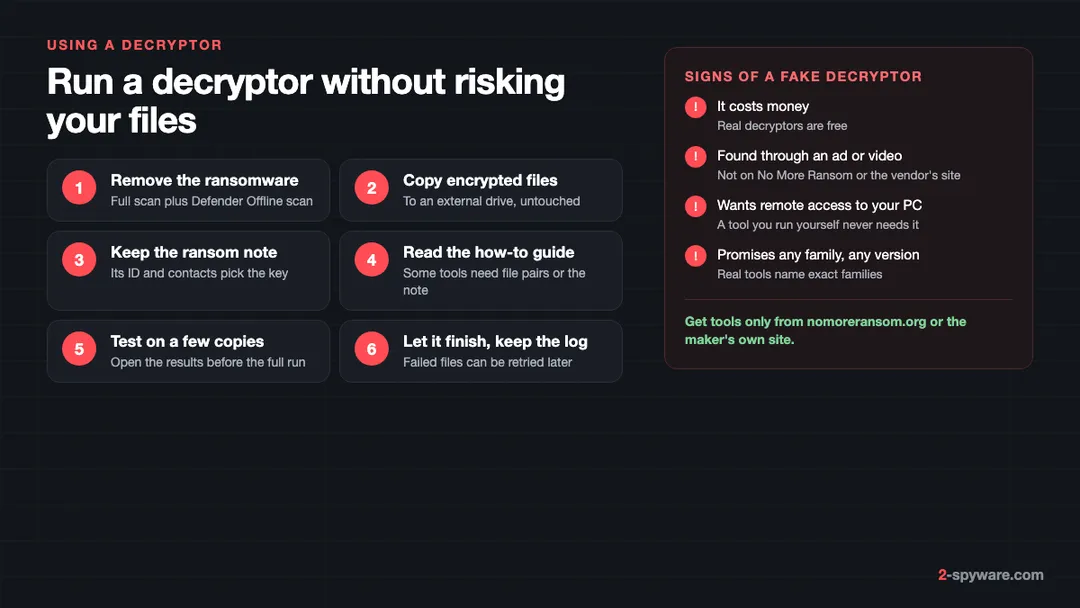
- **Remove the ransomware first.** No More Ransom and Kaspersky both tell you to do this, because ransomware still running will lock files again [1][5]. Run a full scan and a Microsoft Defender Offline scan, then remove whatever brought it in, such as a crack or a fake installer.
- **Copy the encrypted files** to an external drive, untouched and with their new names. If a run fails halfway, you still have the originals for a newer tool.
- **Keep the ransom note** in place and in your copy. Some decryptors read the victim ID from it to pick the right key.
- **Read the tool's how-to guide.** No More Ransom asks you to read it before you start [1]. Some tools need a pair of the same file in original and encrypted form, such as a photo that still exists on your phone or in an e-mail.
- **Test on a small folder of copies.** Open the results. A file that opens and looks right is the only proof the key matches.
- **Run the full job and keep the log.** Most tools list the files they could not decrypt. Those can be tried again when the maker adds keys.
Your antivirus may warn about a decryptor, because it rewrites many files. Before you allow it, right-click the file, choose **Properties** and check the publisher on the **Digital Signatures** tab. If it came from anywhere other than the maker's site or No More Ransom, delete it.
STOP/Djvu: online ID versus offline ID
STOP/Djvu is the family most home users meet, mostly through cracks, keygens and torrents. It encrypts files with Salsa20 and appends a four-letter extension such as .djvu, .rumba, .radman or .gero [4]. The note, _readme.txt, asks for $980 and offers 50% off if you write within 72 hours [4].
Why the ID matters
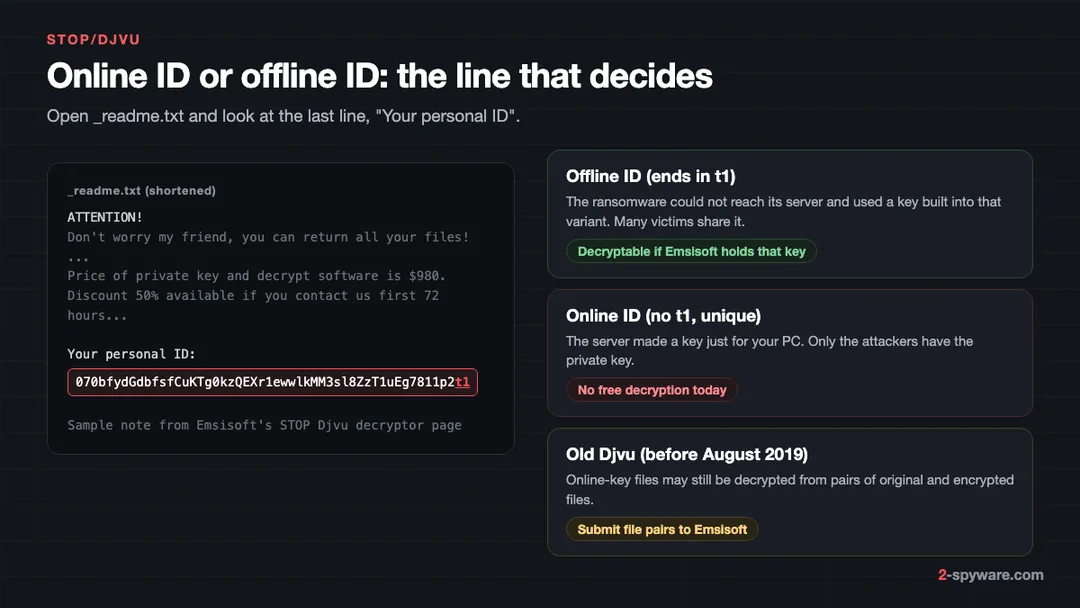
Emsisoft's decryptor can decrypt files from every STOP/Djvu version, but only when they were encrypted with an **offline** key that Emsisoft has [4]. When the ransomware reaches its server, the server creates a key just for your PC. That is an **online** key, and only the attackers hold its private half.
When the server cannot be reached, the variant uses a key built into it. Everyone hit by that variant while offline shares that key, so once researchers obtain it, all of them can be helped, sometimes months later.
How to read your ID
- Open _readme.txt from any folder with encrypted files. Do not delete it.
- Find the last line, **Your personal ID**. The same ID is usually stored in **C:\SystemID\PersonalID.txt**.
- If the ID ends in **t1**, it is an offline ID. The sample note on Emsisoft's page shows one [4].
- If it does not end in t1, your files most likely used an online key.
Run the Emsisoft tool on a copy either way. It reports whether it has a key for your ID. No key for an offline ID may change later; an online ID it cannot help with.
Old Djvu and file pairs
For Old Djvu, the variants before August 2019, files can also be decrypted from encrypted and original file pairs sent to Emsisoft's STOP Djvu submission portal [4]. This does not apply to New Djvu after August 2019 [4]. Our 2026 check of the STOP Djvu decryptor goes through which case applies to which extension, and our STOP removal guide covers cleaning the PC.
STOP/Djvu installs often bring a password stealer too, so change your saved passwords after cleaning: see securing your accounts after malware.
Fake decryptors and recovery companies that pay the criminals
- **Fake tools.** Pages copy the Emsisoft or Kaspersky name but serve a different file, often a password stealer or remote access program. Real tools are linked from No More Ransom and the makers' own pages [1][4].
- **Paid decryptors.** No legitimate decryptor costs money. A price tag means it is fake or a resale of a free tool.
- **Recovery companies that pay the attackers.** Some firms advertise their own decryption for families with no known flaw. Some of them quietly pay the ransom and add a fee, and you carry the risk of an unpaid key.
- **The attackers' own "test".** STOP/Djvu offers to decrypt one file for free [4]. That proves they hold the key, not that paying is safe.
If you are weighing a payment, read should you pay a ransomware ransom? first.
If no decryptor exists yet
For most active families, nothing free exists today. What you do now still decides what you can recover later.
- **Keep the encrypted files and the note** on an external drive, unchanged. Do not rename files back or open and save them in another program, because tools match on the encrypted format.
- **Write down** the family, extension, victim ID, contact addresses and the date of the attack.
- **Try built-in copies.** Most families try to delete shadow copies, but some fail. Check shadow copies and Previous Versions, then OneDrive or Google Drive version history.
- **Restore from backups** that were not connected during the attack. The 3-2-1 backup rule on Windows shows how to set one up for next time.
- **Report the attack.** Police reports feed the investigations that later seize keys. Our cybercrime reporting guide by country lists where to file.
- **Check No More Ransom again** every few months. Keys for Shade, GandCrab and Babuk appeared long after the attacks [6].
Our ransomware recovery checklist puts these steps in order.
Repairing Windows after the attack
Fortect, the Windows tool we offer on this page, does not decrypt files, and no scanner does. As our Fortect review explains, it scans the PC for free, then fixes damaged system files, broken registry entries and malware leftovers, and its Windows plans add real-time antivirus monitoring. That is useful once the ransomware is gone and you want Windows working normally again. We earn a commission if you buy it through our links.
Frequently asked questions
Is there a free decryptor for my ransomware?
Only if your family has a known flaw, used an offline key that researchers collected, or had its keys seized or released. Upload the ransom note and an encrypted file to ID Ransomware, which names the family and says whether a known way to decrypt it exists. Then search for that family on the No More Ransom Decryption Tools page. If nothing is listed, keep the encrypted files and the note and check again every few months.
Can antivirus or a scanner decrypt my files?
No. An antivirus or repair tool can remove the ransomware program and fix Windows, but it does not hold the attackers' key, so it cannot turn encrypted files back into originals. Only a decryptor made for your family, with the right key, can do that. Remove the ransomware first anyway, because it may encrypt new or decrypted files again.
Is No More Ransom safe and legitimate?
Yes. It was started by the Dutch police's National High Tech Crime Unit, Europol's European Cybercrime Centre, Kaspersky and McAfee. Every tool is free and links to its maker's guide. Type nomoreransom.org into the address bar rather than following links in messages or ads.
How do I know if my STOP/Djvu ID is online or offline?
Open _readme.txt and look at the last line, Your personal ID. An ID that ends in t1 is an offline ID, which Emsisoft's decryptor can handle if it holds the key for that variant. An ID without t1 is normally an online ID, made by the attackers' server for your PC, and it cannot be decrypted for free today.
Why does the Emsisoft decryptor say no key for my ID?
Either your files used an online key, which only the attackers hold, or they used an offline key that Emsisoft has not collected yet. In the offline case decryption may become possible later, so keep the encrypted files. In the online case, recover what you can from backups, shadow copies, cloud version history and copies on other devices.
Can a decryptor damage my files?
It can, if it is the wrong tool for the family or version, if the files were changed after encryption, or if the run is interrupted. Copy the encrypted files to an external drive first and test on a few copies, so a failed run never costs you the originals.
Are paid ransomware decryption services worth it?
Be careful. Legitimate decryptors are free. A company that claims to decrypt a family with no known flaw either has no real method or pays the criminals and adds its own fee. Ask in writing whether it will contact the attackers, and read about the risks of paying before you agree to anything.
Should I rename my encrypted files back to the old extension?
No. Renaming does not decrypt anything, and some decryptors look for the ransomware's extension to find the files they can handle. Leave the encrypted files exactly as they are, keep the ransom note, and work only on copies.
Sources
- No More Ransom: Decryption Tools read 2026-10-08
- No More Ransom: About the Project read 2026-10-08
- ID Ransomware (MalwareHunterTeam) read 2026-10-08
- Emsisoft: STOP Djvu decryptor read 2026-10-08
- Kaspersky No Ransom: Free ransomware decryptors read 2026-10-08
- Avast: Free ransomware decryption tools read 2026-10-08
 What is ransomware and how to remove it
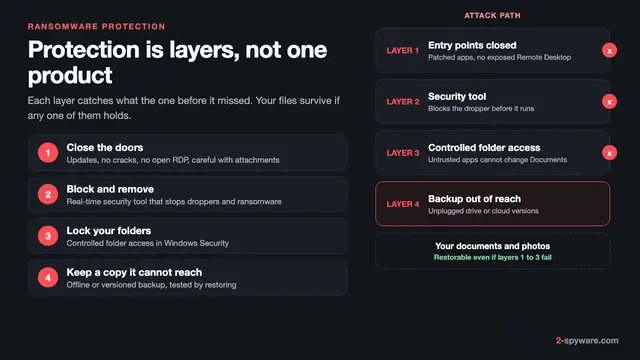 Best ransomware protection in 2026
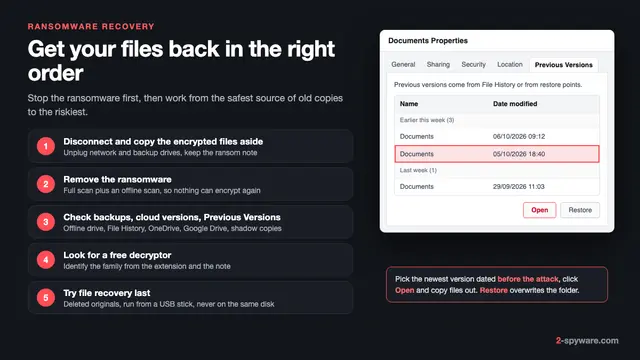 Ransomware recovery: how to restore your files on Windows
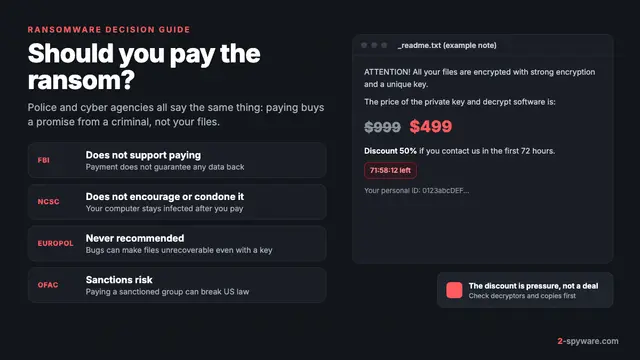 Should you pay the ransomware ransom?