
Disclosure: 2-spyware.com earns a commission if you buy Fortect through links on this page. Other products named here do not pay us. Every product fact and score below comes from our own published reviews, linked in each section.
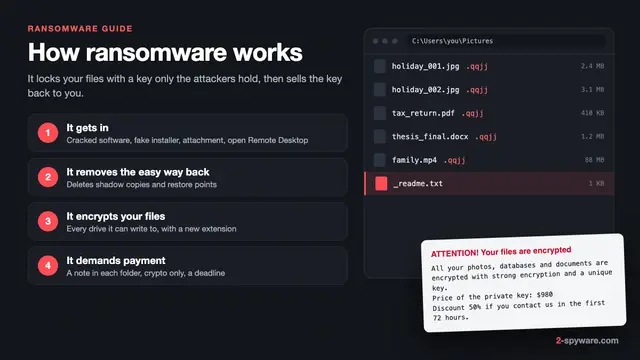
This page is about stopping ransomware before it locks your files. If it has already happened, go to our ransomware recovery guide instead. For what ransomware is, how families like STOP/Djvu spread and what the ransom note means, start with our ransomware guide.
Why no single product is ransomware protection
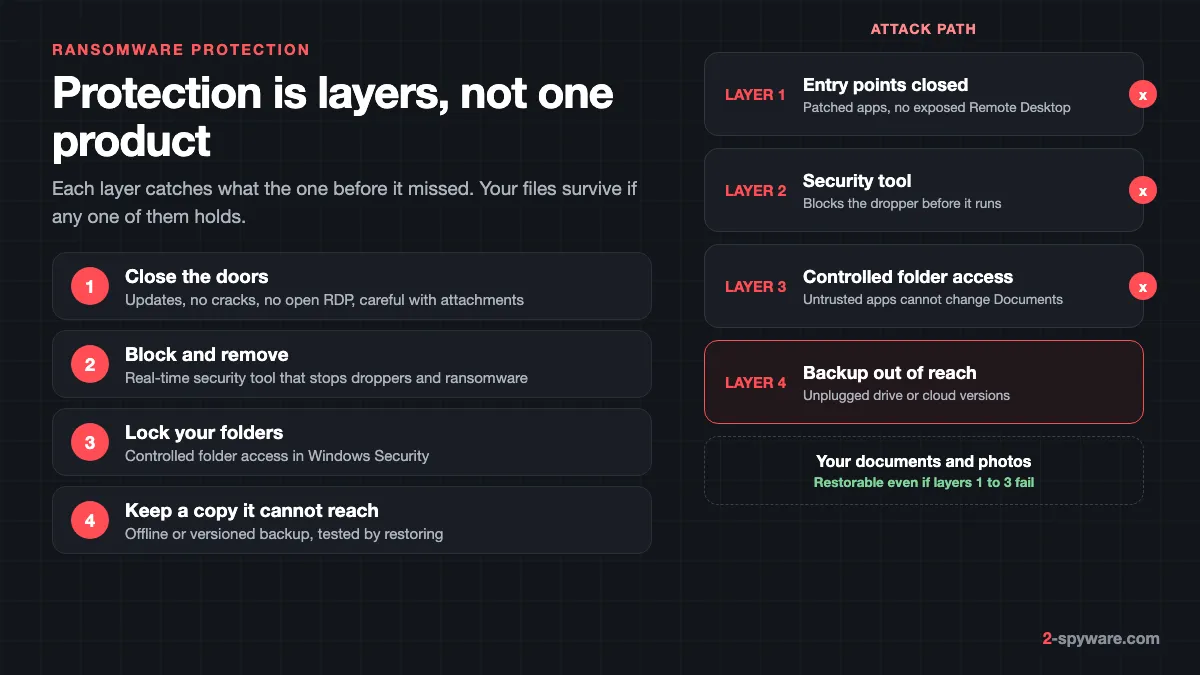
Ransomware protection is a set of layers, and each one covers a gap in the others. A security tool can miss a brand new variant. A folder lock can be bypassed by an app that Windows already trusts. A backup can be encrypted if it stays plugged in. Patching cannot stop you from running a file you chose to open.
Put together, these layers make an attack either fail or not matter. CISA, the US cyber agency, lists offline encrypted backups, timely patching, antivirus that detects both ransomware and its "precursor" malware, and email filtering in the same guide [12]. The UK NCSC calls up-to-date backups the most effective way to recover from a ransomware attack [13].
The four layers in the order an attack meets them:
- Entry points: patched software, no cracked programs, Remote Desktop off unless you need it, and care with attachments and links.
- A security tool with real-time protection that blocks the dropper, the small program that downloads the ransomware, before it runs.
- Windows features that limit damage, mainly Controlled folder access, which stops untrusted apps from changing your files.
- A backup the ransomware cannot reach: offline, versioned, or both, and tested by actually restoring a file.
Ransomware protection tools compared
The table shows the tools from our reviews that fit this job, in the order we recommend them. All of them work on the first two layers. None of them replaces the backup, and no tool can promise to stop every ransomware strain.
| Tool | Platforms | Real-time blocking | After an attack | Price from | Our score |
|---|---|---|---|---|---|
| Fortect | Windows 10 and later | Yes, downloads, installs and files | Removes malware, repairs damaged Windows files | 30.95 euros first year, 1 PC | 9.2 |
| SpyHunter 5 | Windows 7 to 11; Mac sold separately | Yes, System Guards (paid) | Removal plus HelpDesk custom fixes | $29.70 per 6 months | 8.6 |
| Intego | macOS 12.4 or later | Yes, real-time antivirus and firewall | Removes Mac malware | $29.99 first year | 8.4 |
| Microsoft Defender | Built into Windows 11 and 10 | Yes, plus Controlled folder access | Scans and quarantines | Free | Built in |
| Microsoft Safety Scanner | Windows 7 to 11 | No, on demand only | One-off second opinion | Free | 7.8 |
Fortect: our pick for Windows
Fortect scores 9.2 in our review, the highest of the tools here. It covers two of the four layers in one licence: it blocks threats as they arrive, and it repairs the damage that malware leaves in Windows. That second part is what most antivirus products skip.
Fortect's Windows plans include an antivirus module that monitors new downloads, installs and files in real time [1][2]. Fortect lists ransomware protection, safe browsing and cloud-based threat detection among its features, with quick, full and custom scans [1]. Real-time checks on downloads matter here, because most home ransomware arrives as a download you started.
The scan's Malware and PUA stage looks for threats and for the system changes they leave, such as modified settings and damaged system files. Fortect then replaces damaged or missing Windows files with healthy copies and repairs broken registry entries. After a ransomware incident, that helps Windows run properly again once the malware is gone.
Be clear about one limit, which applies to every security tool. Repair restores Windows files, not your encrypted documents. Getting those back depends on a backup or on a free decryptor for the family that hit you.
- Free part: the full diagnostic scan, plus repair of items one by one, so you see results on your own PC first.
- Paid plans: Essential covers 1 PC for 30.95 euros in the first year, Multi-Device covers 3 PCs for 37.95 euros, and Ultimate covers 5 PCs for 53.95 euros [2].
- Every plan includes the antivirus, malware removal, automated repair, driver updates and restore points [2].
- Refunds: a 60-day refund window on the first purchase [2].
- Extra layer: a Chrome extension that blocks malicious websites [1].
Use Fortect as the always-on security tool on a Windows PC, next to Controlled folder access and a backup.
SpyHunter 5: removal with personal help
SpyHunter 5 scores 8.6. EnigmaSoft lists ransomware, trojans, worms and rootkits among the threats it removes [3]. Its paid System Guards run in the background and block malware before it downloads or starts [3].
In AV-TEST's March and April 2024 test, SpyHunter 5.16 detected every widespread malware sample and earned the certificate with 15 of 18 points [4]. Against 0-day attacks it scored 97.8 and 96.3 percent, below the 99.5 percent industry average [4]. That is a good reason to run it with the Windows layers below, not alone.
- Compact OS boots a small system beneath Windows to remove files that running malware locks.
- The HelpDesk builds a custom fix for your PC from a diagnostic report, at no extra cost [3].
- Price: removal starts at $29.70 per six months for Basic. The scan is free, and the trial needs a card [3].
- No backup or folder lock: SpyHunter has no backup tool, so pair it with the steps below.
Intego: real-time protection on a Mac
Ransomware for macOS is rare compared with Windows, but Macs still store files that matter. Intego scores 8.4 and is the Mac tool we recommend for ongoing protection. It combines real-time antivirus with a per-app firewall, and it also detects Windows malware so you do not pass it on.
Intego scored the full 6 points for protection in AV-TEST's March 2026 macOS round [6]. AV-Comparatives measured 96.7 percent on Mac malware in its 2026 test and gave it an Approved award [14]. Plans for one Mac start at $29.99 for the first year and renew at $39.99 [5]. For Mac threats beyond ransomware, see our Mac viruses guide.
Microsoft Defender and Safety Scanner: the free baseline
Microsoft Defender Antivirus is built into Windows 11 and 10 and runs all the time. Microsoft tells you to keep Windows Security turned on and to use it for a full scan if you suspect an infection [10]. Keep it on even if you add another tool. It also powers Controlled folder access, covered in the next section.
Microsoft Safety Scanner scores 7.8. It is a free, portable scanner with the same detection data as Defender, but it has no real-time protection and each copy expires 10 days after download [7]. Use it as a second opinion. If something hides while Windows runs, use a Defender Offline scan instead.
Turn on Controlled folder access in Windows 11 and 10
Controlled folder access is Windows' own ransomware lock. It lets only trusted apps change files in protected folders. When an untrusted app tries, Windows blocks it and shows a notification [9]. Defender judges most apps by reputation and trusts common ones on its own [9].
It is off by default [9]. It is available on every Windows edition with Microsoft Defender Antivirus, including Windows 11 Home, and it needs Defender's real-time protection to be on [9]. If you use another antivirus that turns Defender off, check whether that product offers its own folder protection.
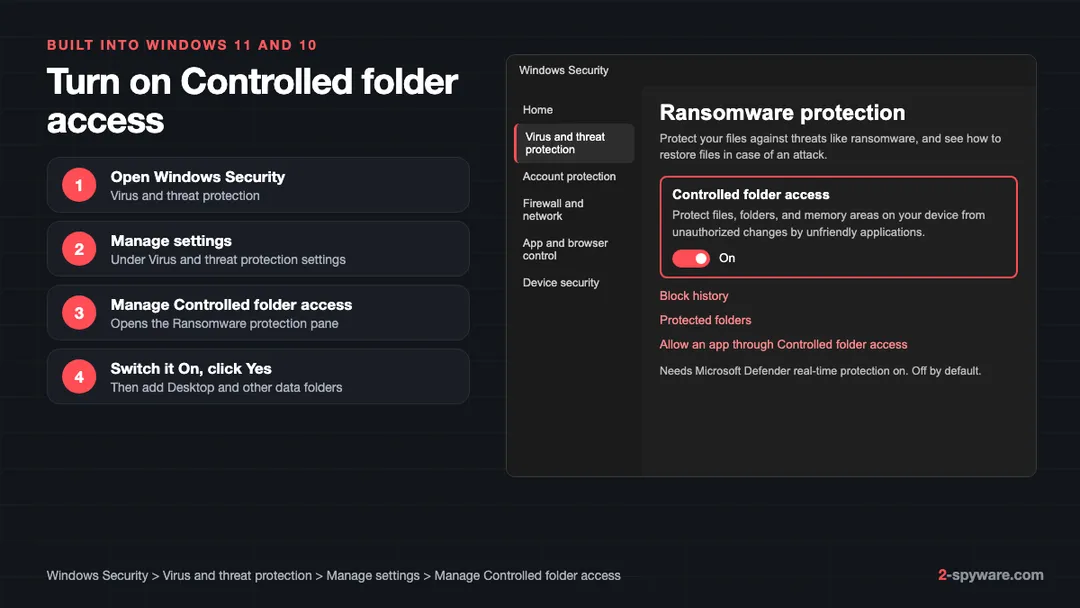
- Open Windows Security from the Start menu and select Virus and threat protection.
- Under Virus and threat protection settings, select Manage settings.
- Scroll to Controlled folder access and select Manage controlled folder access. The Ransomware protection pane opens [8].
- Slide the Controlled folder access switch to On and select Yes in the User Account Control prompt [8].
- Select Protected folders, select Yes again, then use Add a protected folder for each folder you care about [8].
- If Windows blocks a program you trust, select Allow an app through Controlled folder access, then Add an allowed app and pick it from Recently blocked apps [8].
Know what is covered. The default list includes Documents, Pictures, Videos, Music and Favorites for each user, the Public versions of those folders, and the disk's boot sectors [9]. Desktop and Downloads are not on that list, and neither is a second data drive. Add them yourself in step 5.
If a folder is redirected, for example to OneDrive, the protection follows it to the new place [9]. On Windows Pro, you can also set it through Group Policy under Microsoft Defender Exploit Guard, or in PowerShell with Set-MpPreference -EnableControlledFolderAccess Enabled [8].
Expect a few blocked apps at first, usually older games or editors saving into Documents. Allow only programs you installed yourself, never one a pop-up told you to allow.
Backups that ransomware cannot reach
A backup is the only layer that returns your files after encryption. It only works if the ransomware cannot touch it. CISA warns that many ransomware variants look for reachable backups and delete or encrypt them [12]. A drive that stays plugged in, or a mapped network folder, can be encrypted along with everything else.
The 3-2-1 rule is the simplest way to plan it: three copies of your data, on two kinds of storage, with one copy kept off site. Our 3-2-1 backup guide for Windows walks through the setup with the tools built into Windows 11 and 10. The parts that make it ransomware-proof are below.
- Offline: unplug the external drive after each backup. The NCSC also says not to rely on two copies on one removable drive, or on several copies in one cloud service [13].
- Versioned: keep older versions, not just the latest. Sync copies an encrypted file over the good one within minutes, so you need a way back to yesterday.
- Tested: restore one real file every month. The NCSC advises checking that you know how to restore and that it works [13].
- Clean before you restore: the NCSC suggests scanning backups for malware and connecting them only to clean devices [13].
OneDrive version history and its limits
Microsoft suggests storing important files in OneDrive because it keeps file versions and includes ransomware detection and recovery [10]. With a Microsoft 365 subscription, Restore your OneDrive can undo all activity on your files over the last 30 days [11]. You find it on onedrive.com under Settings, then Options, then Restore your OneDrive [11].
There are limits you should plan for. The full restore needs Microsoft 365 [11]. The window is 30 days, so an attack you notice later is outside it. A file permanently deleted from the OneDrive recycle bin cannot be recovered [11]. And OneDrive is one cloud service, so it counts as one of your three copies, not all of them.
Windows' own shadow copies are not a backup either. Ransomware commonly deletes them as one of its first steps. Our guide to shadow copies and Previous Versions explains when they survive and how to check.
Close the doors: patching and entry points
Most home ransomware does not break in. It is invited in through a download, an attachment or an old program. Microsoft lists unsafe or fake websites, unexpected attachments and malicious links in email, social media and chats as common ways in [10].
- Cracked software: keygens, activators and "free" copies of paid programs are the main way STOP/Djvu reaches home PCs. Read what cracks really install before you run one.
- Phishing and attachments: be wary of invoices, delivery notices and archives you did not expect. Our page on phishing emails shows the common patterns. CISA also advises disabling Office macros in files that arrive by email [12].
- Unpatched software: keep Windows Update on and update your browser, PDF reader and Office. Microsoft advises restarting at least once a week so updates finish installing [10]. CISA puts patching of web browsers, plugins and document readers high on its list [12].
- Remote Desktop: the NCSC says ransomware is increasingly deployed through exposed services such as RDP, and advises turning RDP off if you do not need it [13]. If you do, put it behind a VPN and use multi-factor authentication [13].
- Admin rights: use a standard account for daily work. The NCSC advises admins not to use their privileged accounts for email and browsing [13].
Protect the accounts that hold your backups too. Turn on two-step verification for your Microsoft account and any cloud backup service. If an attacker takes over the account, they can delete the cloud copy as well.
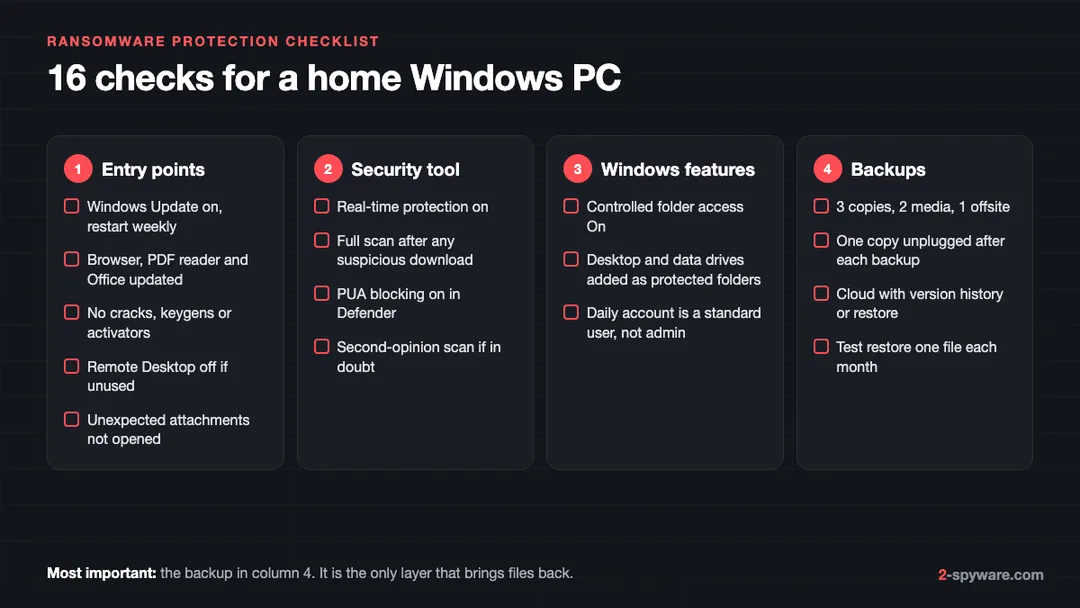
Your ransomware protection checklist
Work through these checks once, then repeat the backup test monthly. Most of them take a few minutes.
If you run a small business, add the steps in the ransomware guide on double extortion, because stolen data is a separate problem from encrypted data. A backup restores files, but it cannot take back a copy an attacker has already uploaded.
Frequently asked questions
What is the best ransomware protection?
A combination, not one product. On Windows, use a real-time security tool such as Fortect, our top-scored pick at 9.2, turn on Controlled folder access, and keep an offline or versioned backup you have tested. On a Mac, Intego scored 8.4 in our review.
Is Windows Defender enough to protect against ransomware?
It is a good baseline, especially with Controlled folder access turned on. Defender alone does not back up your files, and no antivirus catches every new variant. Add an offline or versioned backup and keep your software updated.
Does Controlled folder access slow down my PC?
In normal use you should not notice it. The main side effect is that it may block an older program you trust from saving into Documents or Pictures. You can allow that program in the Ransomware protection pane.
Can anti-ransomware software decrypt my files?
No. Protection tools block and remove ransomware, and tools like Fortect repair damaged Windows files, but none of them decrypt your documents. Decryption needs a free decryptor for that specific family, if one exists, or a backup.
Does OneDrive protect against ransomware?
Partly. OneDrive keeps file versions, and Microsoft 365 subscribers can restore their whole OneDrive to any point in the last 30 days. It does not help with files outside OneDrive or with an attack noticed after 30 days, so keep another copy too.
Is an external hard drive a safe backup against ransomware?
Only if it is unplugged when you are not backing up. A drive that stays connected shows up as another drive letter, and ransomware can encrypt it along with your other files.
How does ransomware usually get onto a home PC?
Most often through cracked software and fake activators, malicious email attachments, fake updates and links. On business networks, exposed Remote Desktop and unpatched remote access devices are also common entry points.
Do Macs need ransomware protection?
Mac ransomware is much rarer than Windows ransomware, but your files are just as hard to replace. Keep macOS updated, use a Time Machine drive that you unplug after each backup, and consider a real-time tool such as Intego.
Is paying the ransom a form of protection?
No. Microsoft advises against paying, because payment does not ensure you get your files back. Prevention and backups are the only reliable way to avoid that choice.
Sources
- Fortect homepage: All-in-One Security, Privacy and OS Health Suite (antivirus features, ransomware protection, Chrome extension) read 2026-10-08
- Fortect pricing and checkout page (plans, included features, money-back terms) read 2026-10-08
- EnigmaSoft: SpyHunter product page (threats removed, System Guards, HelpDesk, prices) read 2026-10-08
- AV-TEST: Product Review and Certification Report, EnigmaSoft SpyHunter 5.16, Windows 11, March and April 2024 read 2026-10-08
- Intego pricing page: Intego ONE plans, renewal prices and system requirements read 2026-10-08
- AV-TEST: Test antivirus software for MacOS Tahoe, March 2026 read 2026-10-08
- Microsoft Learn: Microsoft Safety Scanner Download (how it works, 10-day expiry) read 2026-10-08
- Microsoft Learn: Configure controlled folder access (Windows Security app steps, Group Policy, PowerShell) read 2026-10-08
- Microsoft Learn: Protect folders from ransomware with controlled folder access (default folders, modes, requirements) read 2026-10-08
- Microsoft Support: Protect your PC from ransomware read 2026-10-08
- Microsoft Support: Restore your OneDrive read 2026-10-08
- CISA: #StopRansomware Guide read 2026-10-08
- NCSC: Mitigating malware and ransomware attacks read 2026-10-08
- AV-Comparatives: Mac Security Test and Review 2026 read 2026-10-08
 What is ransomware and how to remove it
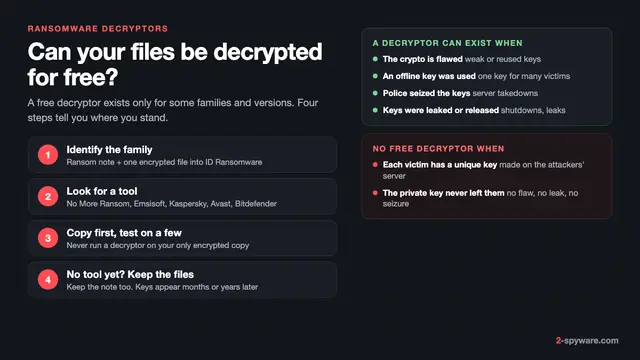 Free ransomware decryptors: when they work and how to use one safely
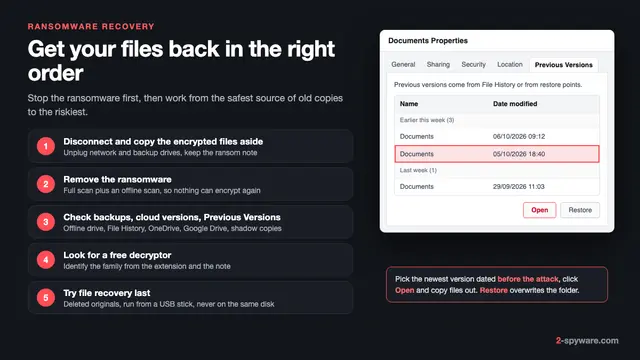 Ransomware recovery: how to restore your files on Windows
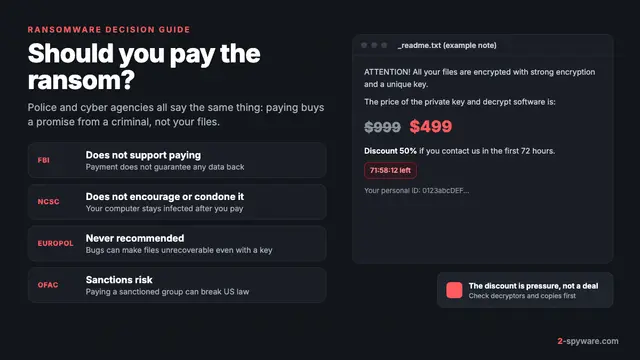 Should you pay the ransomware ransom?