

Delta-homes.com is the hijacker that controls online search functions on the infected machine
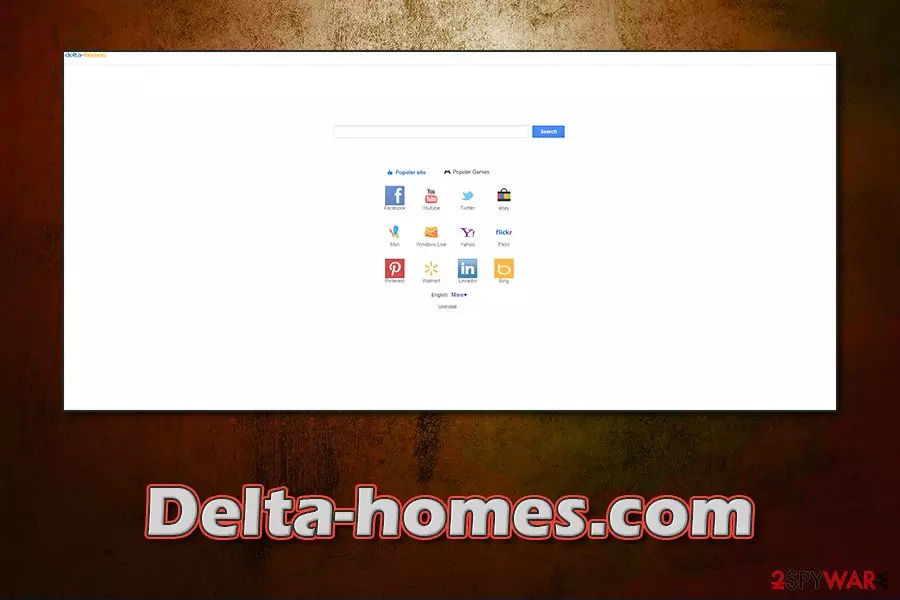
Delta-Homes.com is a browser hijacker[1] that is capable of infecting Windows operating systems[2]. It compromises shortcuts of Google Chrome, Mozilla Firefox, Internet Explorer or other browsers and adds other components to change users' settings. Once established, the unwanted app forces them to use the Delta Homes search engine and serves ads on most visited websites, such as pop-ups, deals, offers, banners, in-text links, etc.
The suspicious activity of the intrusive program does not end there: the app is often spread with the help of software bundling, which results in users installing it without permission. Additionally, the potentially unwanted program is set to collect information about users' web browsing activities, as well as prevent them from removing Delta-Homes.com using various persistence techniques. Indeed, this browser hijacker should not be welcomed on any users' browser, so check out full elimination instructions and FAQ below.
| Name | Delta-Homes.com |
|---|---|
| Type | Browser hijacker, potentially unwanted program |
| Infiltration | In most cases, users install browser hijackers and other PUPs unintentionally – during the installation of freeware apps from third-party sources, or after being tricked by fake updates |
| Launch date | 2013 |
| Related extensions | PortaldoSites Toolbar, BrowserProtect, Yontoo, Proxy Tool, SearchProtect, etc. |
| Symptoms |
|
| Dangers | Malware infections, installation of other potentially unwanted programs, monetary loss due to encountered scams, the difficulty of finding relevant information, etc. |
| Termination | Depending on the version of the PUP you are infected with, its termination varies. For example, removing extensions might be enough, while in order cases, a full browser reset and scan with anti-malware are required. Check the instructions at the bottom section of the article for more details |
| Optimization | For best results, scan your device with optimization software FortectIntego |
Delta-Homes.com virus is a term that has been widespread among users since the early years of the app's existence in 2013, as the PUP used tactics that are not only considered unwanted but also malicious (e.g., changing users' shortcuts without permission). Nevertheless, the web page changed a lot over the years, it dropped the annoying hyperlinks and stopped looking like sweet-page.com, or similar site. Currently, it seems to be pretty plain, but a standard search engine that directs search results to Google.
However, since the Delta-Homes.com search engine is used, these results are not entirely organic – they are filled with ads clicks on which guarantee the developer's profits. Additionally, more savvy users will soon notice that the page is marked as “Not secure” by all modern web browsers since it does not use a secure HTTPS connection[3] (means it can be intercepted by cybercriminals).
The most important thing is that you can hardly know what kind of website it seeks to promote. It can be used for redirecting people to legitimate sites as well as tricking them into visiting really suspicious places that are used just for spreading malware.

We have already received hundreds of reports about Delta-Homes.com infections in the USA, Poland[4], UK, France, and other countries. It seems that the activity of this browser-hijacking program increased in summer 2017, especially in July. Nonetheless, users complain bout the search hijack even in 2020, as they find it on their browsers seemingly out of nowhere.
However, the most likely appearance of the virus is the extensions that may seem like they have nothing to do with it. Here are some of the add-ons that might be the cause of the hijack:
- PortaldoSites Toolbar
- BrowserProtect
- Yontoo
- Proxy Tool, etc.
It is highly advisable not to click on the “Gift Box” icon on the Delta-homes homepage, because it leads directly to affiliate websites that provide suspicious surveys and offers to install other potentially unwanted programs, such as HD Streaming Movies.
Such offers are frequently composed to look like grab-now-or-never deals. For example, when the user completes the survey, the affiliate website offers to install a program, which ostensibly costs over 60 Euros but for some reason is free for the user who has just filled the survey.
According to the delusive ad, there is only one free program left. If the user clicks on “Click Here to Claim Now” button, gets redirected to a suspicious website asking to sign up. Such websites are highly untrustworthy, and we recommend you to stay away from them!
When infected, the Delta page appears instead of your start page and the default search engine on each of your web browsers because it is compatible with Google Chrome, Mozilla Firefox, Internet Explorer and other ones. Reportedly, search results provided by this search tool can make you visit highly suspicious websites.
If you want to avoid browser redirects to vague or dangerous websites, you should remove the hijacker from your computer. Beware that removing this browser hijacker is not an easy task. One of the hijacker's associates is Search Protect application, which protects altered browser settings and prevents the PUP removal.
That's why most security experts recommend using the automatic removal method. Besides, the hijacker may alter your browser shortcuts to keep causing redirects to hxxp://delta-homes.com/.
If you have been suffering from redirects to this search page, it might be that there is one thing that you have missed. If you would try to check what is said in its Privacy Policy, you would see that it can be used for tracking PC users and collecting information about their browsing habits.

As the developers of this program claim, they are interested in people's personally non-identifiable information. However, you can never know what parties are capable of reaching it. If you don't want to let unknown parties know what your mostly visited websites are, what data you add when visiting them, what your PC's IP address is or what your email address is, you should stay away from Delta-homes.com virus.
As we have already mentioned, we think that automatic removal is the best way to get rid of this browser hijacker because it may reappear on your computer right after updating it. In this particular case, we recommend you to use SpyHunterCombo Cleaner or MalwarebytesMalwarebytes that will help you to get rid of this program and other suspicious components, such as Search Protect.
In case you still see side effects of the infection (like system slowdowns, crashes, or lag), we suggest you use repair software FortectIntego – it can fix virus damage along with other issues on the operating system.
Dangerous search engines related to Delta Homes
There are various versions of Delta-Homes that have different names but function in a very similar way. They all change browser's homepage, new tab, and default search preferences just to present a certain version of the bogus search engine. The search engine is created to serve numerous ads to the victim in the form of search results.
The developers of these fake search tools generate revenue while the victim has to experience redirects to vague third-party websites that might pose a threat to one's privacy and computer security. You can consider yourself a victim of a browser hijack if your browser opens one of the following domains automatically:
Search.Delta-Homes.com. This domain is known to be a version of the Delta Homes virus. It is responsible for serving modified search results to computer users. Users install it alongside freeware or shareware after choosing Default or Standard software installation settings. If you noticed this URL appearing in your browser, do not hesitate and perform a system check either manually or using an anti-malware program to detect the perpetrator that prevents you from changing the browser's settings.
Delta-Search.com
Delta-Search.com. It is one of the most common browser hijackers available today. To remove Delta-Search, users are advised to remove Delta Toolbar, Browser Protect, and Browser Defender programs via Control Panel. These programs are distributed via software bundling, and that is the reason why computer users install them unwillingly, yet frequently. After installing one of these programs, the victim's browser settings will be altered. Consequently, repetitious redirects to the Delta-Search site occur.
Search.delta-search.com
Search.delta-search.com. This search engine is closely associated with low reputation programs available to download online. You should be very careful when installing free programs such as video converters or media players because the majority of them suggest adding search.delta-search.com virus to the system to change your browser's settings.

Yhs.delta-search.com
Yhs.delta-search.com. If your browser causes repetitious redirects to this domain, you should check your system for suspicious programs you installed recently. It might be that free program that you recently downloaded. You must visit Control Panel > Programs and Features section to find programs installed on the same day and remove them ASAP. Such sneaky software often compromises browsers by adding optional browser extensions to them, so you need to get rid of those as well.
Mixidj.delta-search.com
Mixidj.delta-search.com. This search site might replace your browser's homepage after installing Mixi DJ Toolbar (also known as Mixi.DJ virus). The suspicious software is also blamed for the distribution of the Mixidj.claro-search.com hijacker. We suggest you avoid Mixi.DJ at all costs if you do not want to contaminate your computer with strange browser-hijacking programs.
Visualbee.delta-search.com
Visualbee.delta-search.com. This domain might emerge in your browser after the installation of VisualBee, a software that promises to automatically design your PowerPoint presentations. However, it also installs Delta Search hijacker, which forces the victim to use a bogus search engine that mainly presents paid search results supplied by untrustworthy third parties.
Distribution of potentially unwanted programs explained
Delta-homes is one of these potentially unwanted programs that are spread using bundling. This distribution technique has been discussed by various security researchers. However, it's still legitimate and allowed. If you want to avoid it, you need to be careful when installing freeware on your computer.
Make sure that you double-check the installation of Softonic, Babylon Toolbar, uTorrent, Any.Do, BeeLine Reader, Foxit Reader, and similar freeware. While people can set this page as their start page and/or the default search engine consciously, in most cases they are tricked into installing this program as an optional component of the freeware.
To avoid this and other unplanned downloads (Delta Toolbar, Conduit, www-searching.com, mystartsearch.com, v9.com, sweet-page.com, mystart, websearch.fixsearch.info, genieo.com, etc.), there is one thing that you should remember: you MUST choose the Custom/Advanced installation method when installing freeware from questionable developers.

In addition, check what additional components it offers and opt-out of unknown search engines, add-ons, extensions, toolbars, etc. If you are looking at a pre-checked sentence that says 'Make X my start page' or 'Make X my default search engine', you should uncheck it. Of course, having reputable anti-spyware that could warn you about the infiltration of such suspicious programs is also recommended.
Common questions about this browser hijacker
Question. I need assistance removing Delta-homes.com Search from my browser (I use Google Chrome). Could you help me?
Answer. You can get rid of Delta Homes using the automatic removal method or manual removal steps. Both of them are given below. Beware that the safest and the most effective way to do that is by running a full system scan with updated anti-spyware. This will help you to avoid the reappearance of this browser hijacker in the future.
Question. Help me! I think I am infected with www.delta-homes.com virus. It showed on my computer right after rebooting it…
Answer. No, delta-homes browser hijacker is only a potentially unwanted program, which seeks to hijack all web browsers that are installed on your computer. You most likely downloaded this PUP in a bundle with some free application from the Internet. If you want to delete the PUP from your computer completely, you should use the steps below.
Question: I am worried because all of my searches are interrupted by delta-homes.com redirection. This page has also appeared as my homepage and default search site. I thought that I fixed my computer because I tried to remove delta homes, delta search, conduit, and other extensions from my browsers. Unfortunately, they showed up again right after rebooting my PC… Could you help me?
Answer: The removal of this search page requires a lot of knowledge because it relies on the Search Protect feature. This feature protects hijacked system settings and prevents delta-homes elimination from computers. If you need a full removal of this browser hijacker, you should opt for the automatic removal method.
Of course, you can also rely on Manual removal steps that were designed by 2-spyware security experts. However, you should be really careful when performing each of these steps. Make sure you follow them attentively and perform them in the right order to prevent additional issues on your computer.
Question. Got infected with www.delta-homes.com search virus and now I am suffering from constant redirects and ads. They are telling me that I should fix my registry errors or repair windows errors. Should I trust them? Also, could you help me with virus removal? It seems it's very complicated..
Answer. First of all, you should stay away from these ads because they are misleading. After clicking them, you can easily infect your PC with additional threats, like adware, browser hijackers, suspicious PC optimizers, and similar applications.
In addition, when trying to remove the hijacker from the system, you should know that it travels around in a bundle with additional components that can hardly be detected if you are using the manual removal option. That's why you should think about updated anti-spyware. Please, check the guide below to get more information about that.
Question. How can I remove www.delta-homes.com completely? It seems that it keeps infecting my computer again and again and again.
Answer. If you want a full delta homes removal guide, you should scroll down and check the guide below. Make sure you are very careful when performing manual removal steps!
Remove Delta-Homes.com redirect virus for good
If you are affected by this potentially unwanted program and you want to get rid of Delta homes, you should rely on these steps that are given in the Automatic and Manual removal guides below. No matter that it may seem that both of these methods are equal, you should always keep in mind that you have to be very careful when using the manual removal method.
In fact, you should have some knowledge about computers and their architecture if you want to fix your computer and leave no files related to this browser hijacker. That's why we highly recommend using the automatic removal method of the hijacker that will help you to detect all hidden files in your computer.
Uninstall from Windows
Uninstall from Windows 10/8:
- Type Control Panel into the Windows search box and open the result.
- Under Programs, select Uninstall a program.


Uninstall from Windows 7/XP:
- Click on Windows Start > Control Panel (Windows XP users should click on Add/Remove Programs).
- In Control Panel, select Programs > Uninstall a program.


Remove the unwanted program:
- In the Programs and Features window, look for any recently installed suspicious entries, select them, and click Uninstall.
- If User Account Control appears, click Yes to confirm, then complete the removal.


Remove from Microsoft Edge
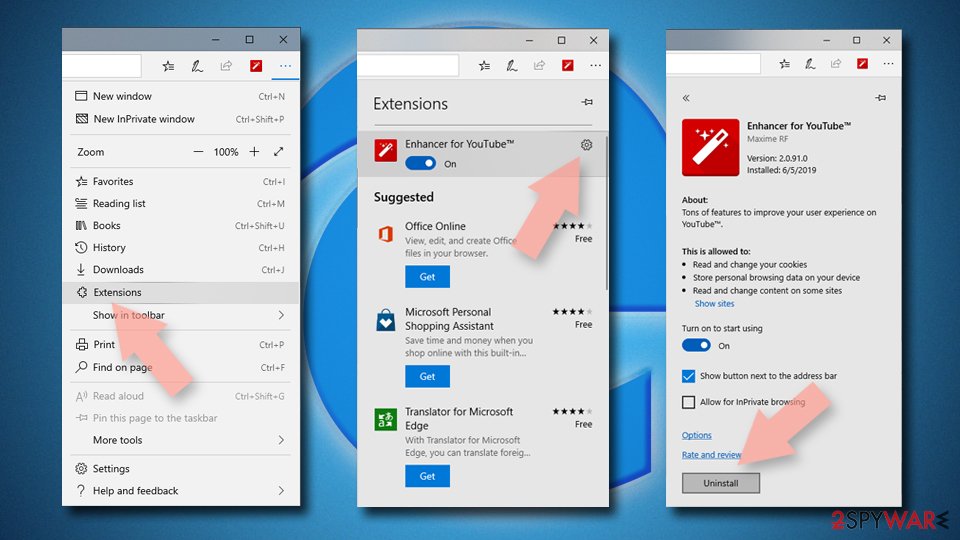
Delete unwanted extensions from MS Edge:
- Select Menu (three horizontal dots at the top-right of the browser window) and pick Extensions.
- From the list, pick the extension and click on the Gear icon.
- Click Remove.

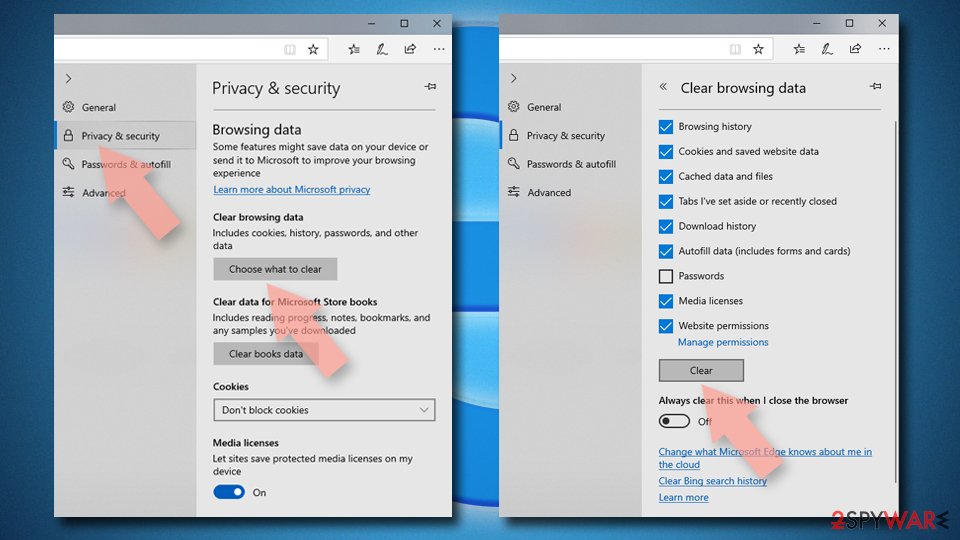
Clear cookies and other browser data:
- Click on the Menu (three horizontal dots at the top-right of the browser window) and select Settings > Privacy, search, and services..
- Under Clear browsing data, pick Choose what to clear.
- Select Cookies and other site data and Cached images and files. (apart from passwords, although you might want to include Media licenses as well, if applicable) and click on Clear.

Restore new tab and homepage settings:
- Click the menu icon and choose Settings.
- Then find On startup section.
- Click Remove next to any suspicious startup page.
Reset MS Edge if the above steps did not work:
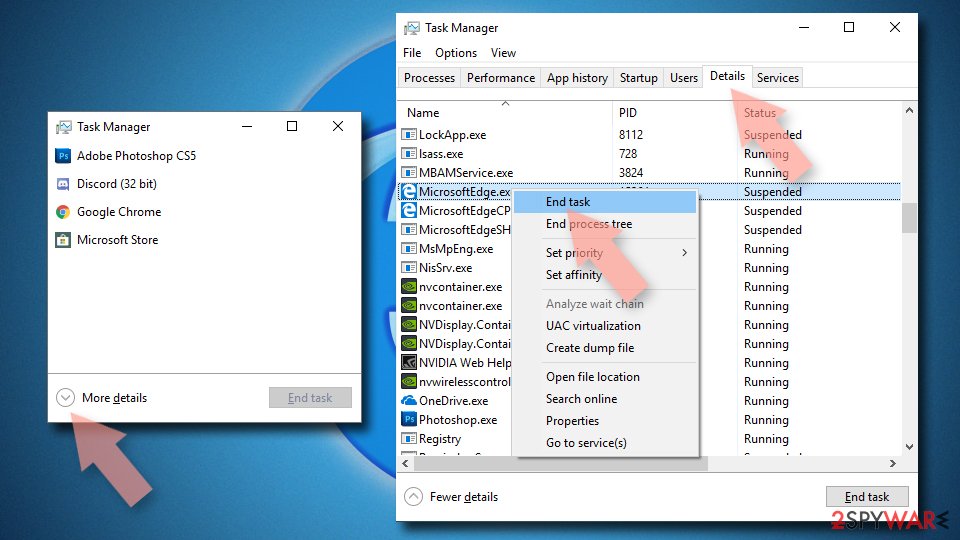
- Press on Ctrl + Shift + Esc to open Task Manager.
- Click on More details arrow at the bottom of the window.
- Select Details tab.
- Now scroll down and locate every entry with Microsoft Edge name in it. Right-click on each of them and select End Task to stop MS Edge from running.

Instructions for Chromium-based Edge
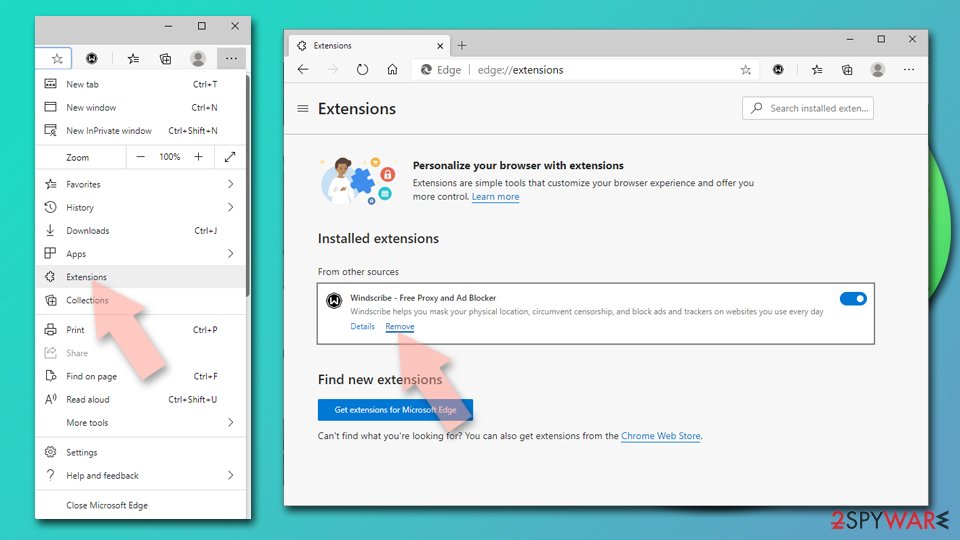
Delete extensions from MS Edge (Chromium):
- Open Edge and click select Settings > Extensions.
- Delete unwanted extensions by clicking Remove.

Clear cache and site data:
- Click on Menu and go to Settings.
- Select Privacy, search and services.
- Under Clear browsing data, pick Choose what to clear.
- Under Time range, pick All time.
- Select Clear now.


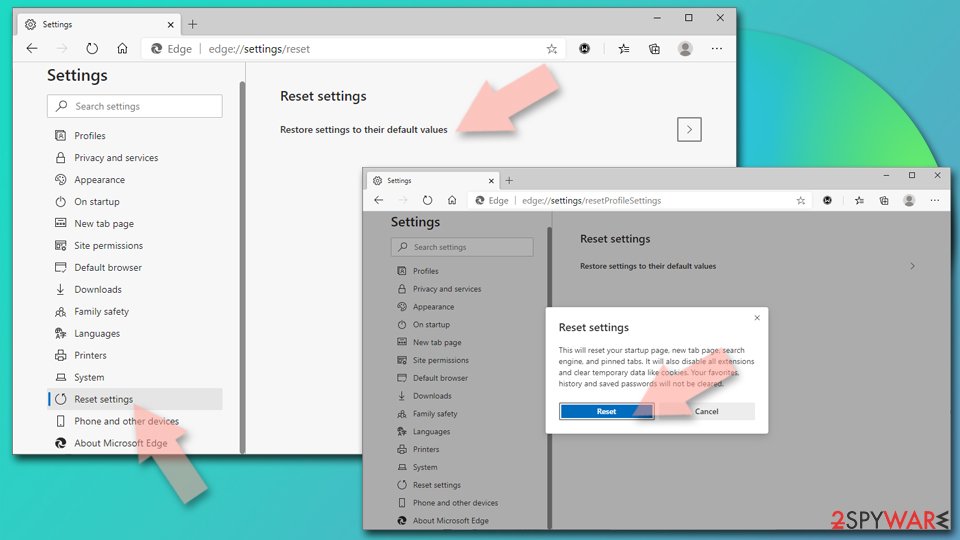
Reset Chromium-based MS Edge:
- Click on Menu and select Settings.
- On the left side, pick Reset settings.
- Select Restore settings to their default values.
- Confirm with Reset.
- This will disable extensions and reset startup pages but will not delete bookmarks, saved passwords, or browsing history.

Remove from Mozilla Firefox (FF)
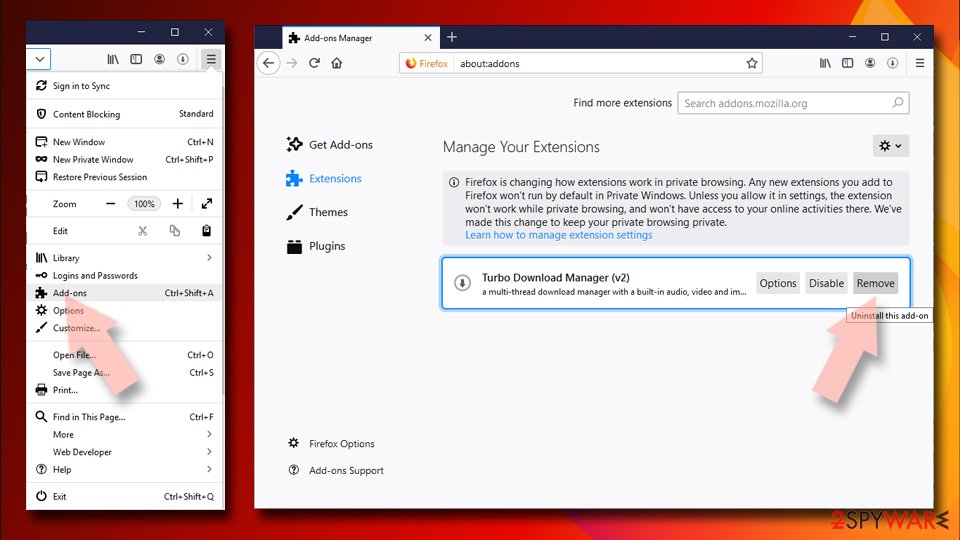
Remove dangerous extensions:
- Open Mozilla Firefox browser and click on the Menu (three horizontal lines at the top-right of the window).
- Select Add-ons.
- In here, select the unwanted extension and click Remove.

Reset the homepage:
- Click three horizontal lines at the top right corner to open the menu.
- Choose Settings.
- Under Home, set your preferred homepage and new tab settings.
Clear cookies and site data:
- Click Menu and pick Settings.
- Go to Privacy & Security section.
- Scroll down to locate Cookies and Site Data.
- Click on Clear Data...
- Select Cookies and Site Data and Temporary cached files and pages, then click Clear.


Reset Mozilla Firefox
If clearing the browser as explained above did not help, reset Mozilla Firefox:
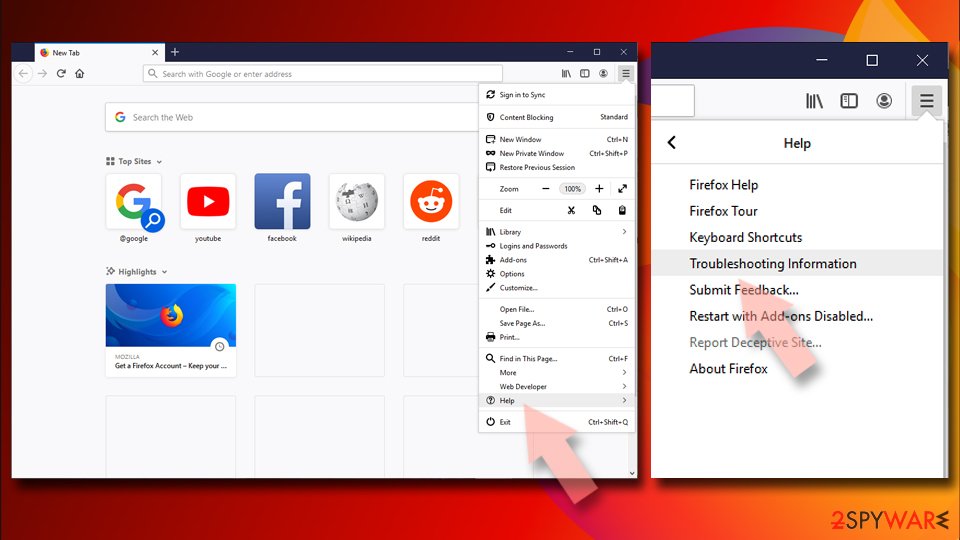
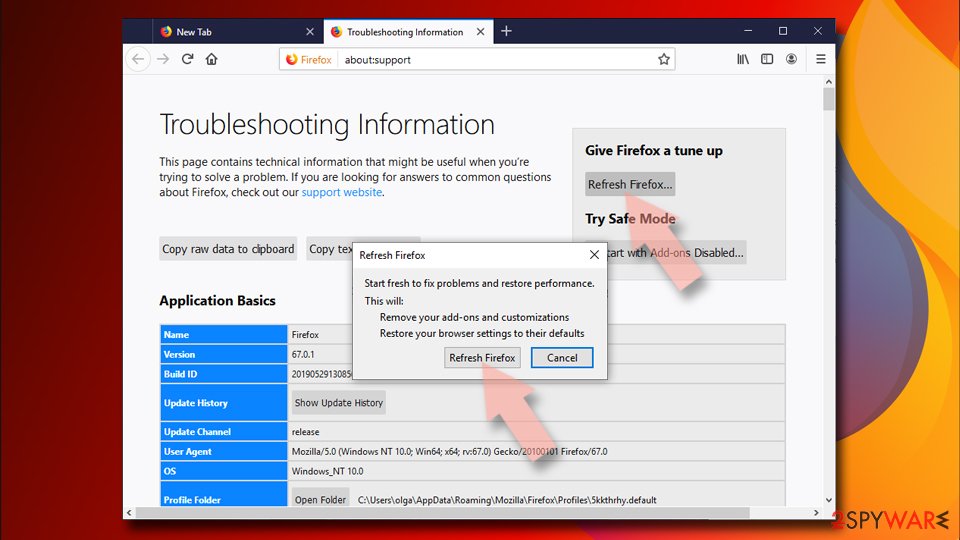
- Open Mozilla Firefox browser and click the Menu.
- Go to Help and then choose Troubleshooting Information.
- Under Give Firefox a tune up section, click on Refresh Firefox...
- Once the pop-up shows up, confirm the action by pressing on Refresh Firefox.


Remove from Google Chrome
Delete malicious extensions from Google Chrome:
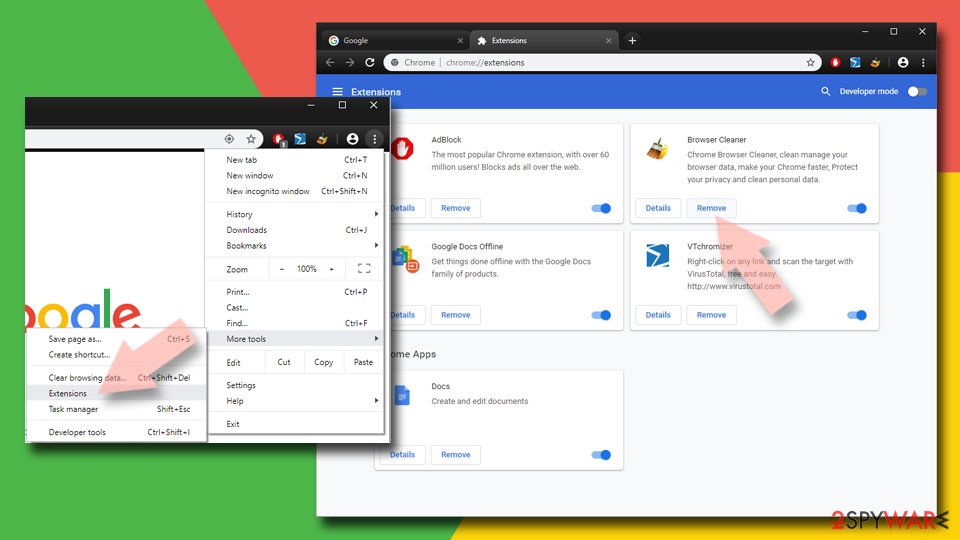
- Open Google Chrome, click on the Menu (three vertical dots at the top-right corner) and select More tools > Extensions.
- In the newly opened window, you will see all the installed extensions. Uninstall all suspicious extensions related to the unwanted program by clicking Remove.

Clear cache and web data from Chrome:
- Click on Menu and pick Settings.
- Under Privacy and security, select Clear browsing data.
- Select Browsing history, Cookies and other site data, as well as Cached images and files.
- Click Clear data.


Change your homepage:
- Click menu and choose Settings.
- Look for a suspicious site in the On startup section.
- Click on Open a specific or set of pages and click on three dots to find the Remove option.
Reset Google Chrome:
If the previous methods did not help you, reset Google Chrome to eliminate all the unwanted components:
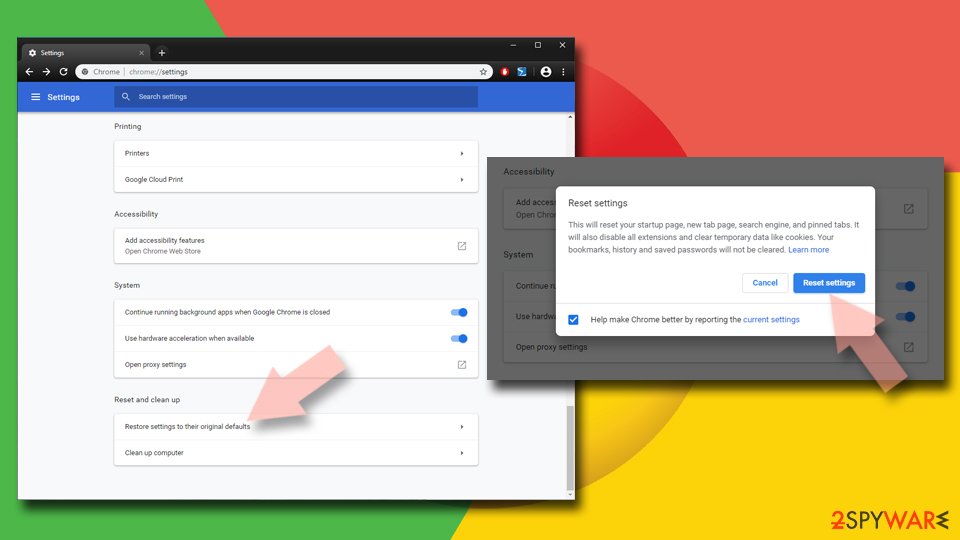
- Click on Menu and select Settings.
- In the Settings, scroll down and click Advanced.
- Scroll down and locate Reset and clean up section.
- Now click Restore settings to their original defaults.
- Confirm with Reset settings.

Delete from Safari
Remove dangerous extensions:
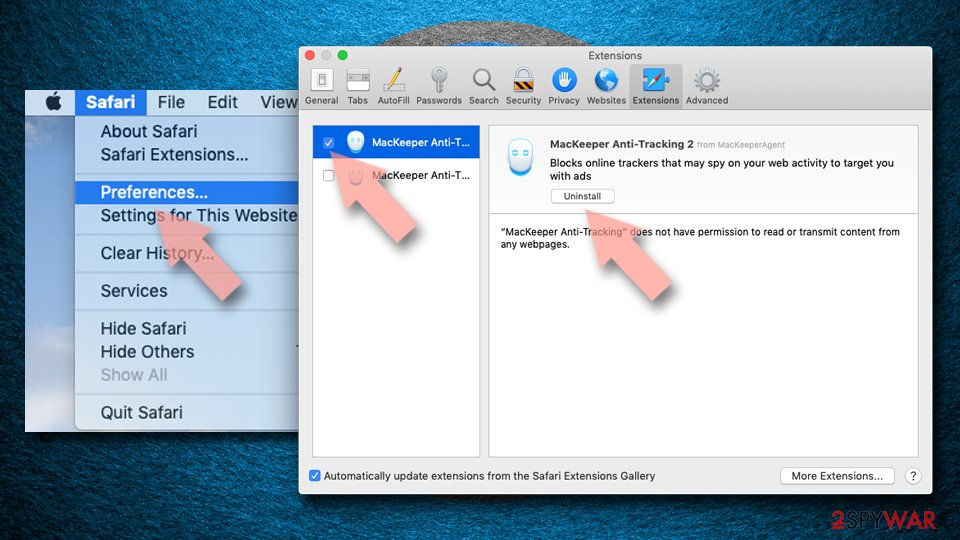
- Open Safari, click Safari in the menu at the top-left of the screen, and select Preferences.
- Go to the Extensions tab, look for any suspicious entries, and click Uninstall to remove them.

Clear history and website data:
- Click Safari in the menu and pick Clear History.
- Set Clear to all history and confirm with Clear History.


Reset Safari:
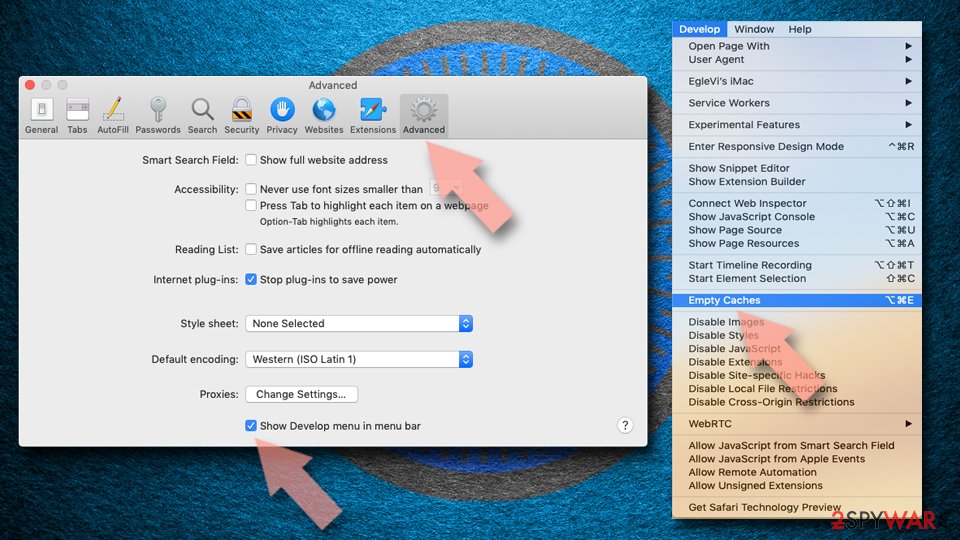
- Click Safari in the menu and select Preferences > Advanced.
- Enable Show Develop menu in menu bar.
- From the menu bar, click Develop and select Empty Caches.

Did this guide help?
6 comments
Nastya66
This browser hijacker caused many problems for me. I was unable to use my search online regularly! delta-homes.com displayed suspicious search results that used to redirect me to random websites that have nothing in common with my search terms. Also, I didnt know how to delete it until I found this article. Thank you for excellent instructions! I have removed this computer parasite with no effort.
AmmyB
I admit that I usually install new programs using the default settings. My mistake! From now on, I will never choose that option again.
brett
I installed several free programs a few days ago to my computer. I found them on the web, but I didnt expect that they will contain such unwanted programs like Delta-homes.com hijacker. I will definitely try to be more cautious since now. This report was really informative, thanks!
joshuafr
Surprising! I also used to think that default option is the safe one.
This unreliable search once redirected me to a website that automatically started a download of an unwanted program! However, I didnt open it. I deleted the file right away because I thought I dont need it. Now I see that it was a smart decision!
Jochem
I have tried several tools to delete delta-homes, but it keeps popping up.
So this what they are doing is legal?
I mean: delta-homes is directly referring to its home address. Why doesnt somebody just ring their doorbell and make sure these $#&$@ people are not able to use a keyboard e.a. anymore?
jochem
Haha... spywarehunter finds delta-homes... but you have to pay in order to remove it.
thankyou. not