
What a data breach notice means for you
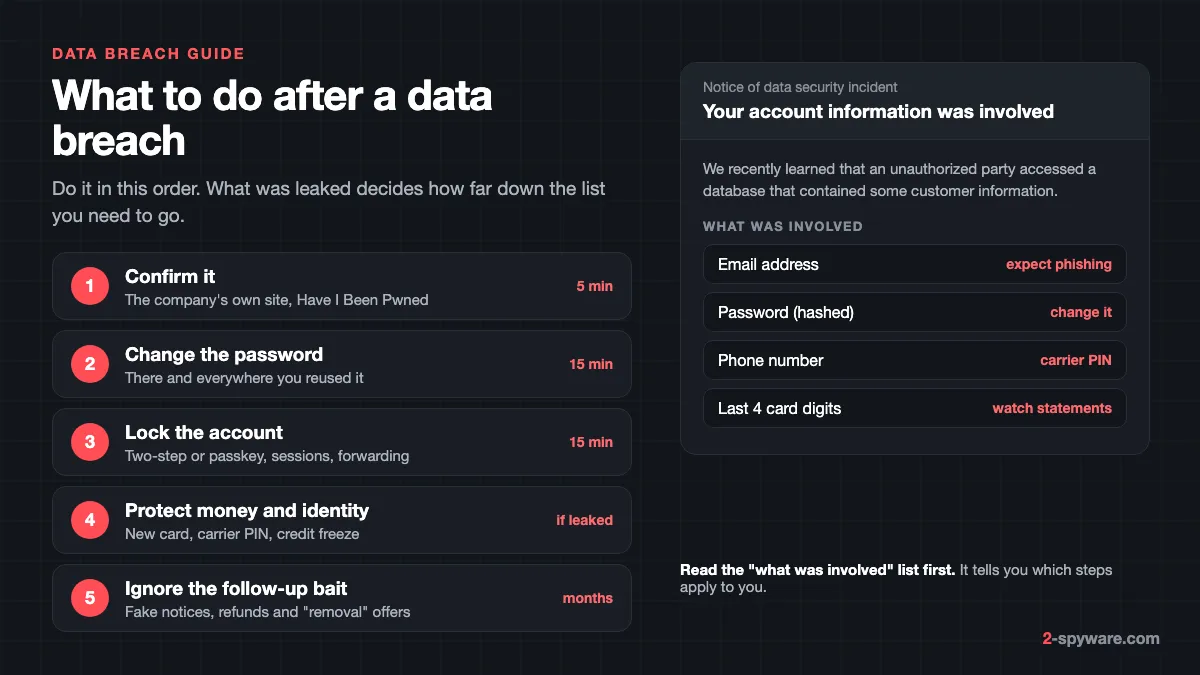
A data breach happens when information held by a company is stolen or accessed without permission [2]. Your device was not hacked. The company's servers were. Our spyware guide covers programs that steal data from your own computer or phone. This page covers the other case: your data leaked from somewhere else, and you need to limit what a criminal can do with it.
Every breach page in our data breach catalogue lists the types of data that leaked. Read that list, or the "what information was involved" part of the company's letter, before you do anything else. It tells you which of the steps below apply to you and which you can skip.
Why the type of data matters more than the size
The risk comes from what leaked, not from the size of the breach. Compare real breaches from our catalogue:
- LinkedIn, 2012: 164,611,595 accounts with email addresses and passwords. Anyone who still uses that password anywhere is exposed, 14 years later.
- Trello, 2024: 15,111,945 records with email addresses, names and usernames, but no passwords. The main risk is targeted phishing.
- Hot Topic, 2024: 56,904,909 records that include partial card data, phone numbers and home addresses. Watch statements and expect calls.
- National Public Data, 2024: 133,957,569 records with names, dates of birth, addresses and government issued IDs. This is the case for a credit freeze.
How to check if your email was in a data breach
1. The company's own notice
If you got a letter or email about a breach, confirm it on the company's official website or social media accounts, not through the links in the message [2]. The company can tell you whether the breach happened, how you are affected and what to do next [2]. During a large breach their phone lines may be overloaded, so check their site first [2].
2. Have I Been Pwned
Have I Been Pwned (haveibeenpwned.com) is a free service run by security researcher Troy Hunt. It collects breached data and lets you search one email address at a time to see which breaches it appears in [3]. The UK National Cyber Security Centre names it as one of the tools to check [2]. We link to it rather than copy it: go to haveibeenpwned.com, type your address, and read the list of breaches it returns.
- It does not show your leaked password. When it loads a breach, it stores email addresses without the passwords that came with them [3].
- A "not found" result does not prove you are safe. The service holds only a small part of all breached records, and many breaches are never made public [3].
- You may see sites you never joined. Your data could have been bought by another service, the site may have been renamed, or someone signed you up [3].
- Its separate Pwned Passwords search tells you if a password has appeared in any breach. A password found there should not be used again [3].
- You can sign up for alerts about future breaches, sent only to the address being monitored [3].
3. Your password manager's breach alerts
If your browser or phone saves your passwords, it can check them against known leaks for you. This is often more useful than an email search, because it checks the actual passwords you use.
- Google Password Checkup. In Chrome on a computer, open the three-dot menu, then Passwords and autofill, then Google Password Manager, and select Checkup on the left [4]. In another browser, go to passwords.google.com and select Go to Password Checkup, then Check passwords [4]. It lists passwords that are exposed, weak or reused [4]. Google can also alert you when it finds one of your saved passwords online, a setting called Password alerts [4].
- Apple Passwords. On iOS 18 and macOS Sequoia, open the Passwords app and go to Security. Your saved passwords are marked as reused, weak or compromised by a data leak [5]. The leak check comes from Apple's Password Monitoring feature [5]. You can change each flagged password from there [6].
- Standalone password managers have similar breach reports.
If a breach alert from Google arrives by email, go straight to Password Checkup yourself rather than clicking the message [4].
What to do after a data breach, by type of data
Work through the sections that match your breach. If the notice lists several data types, do the login steps first, because a taken-over email account lets a criminal reset everything else.
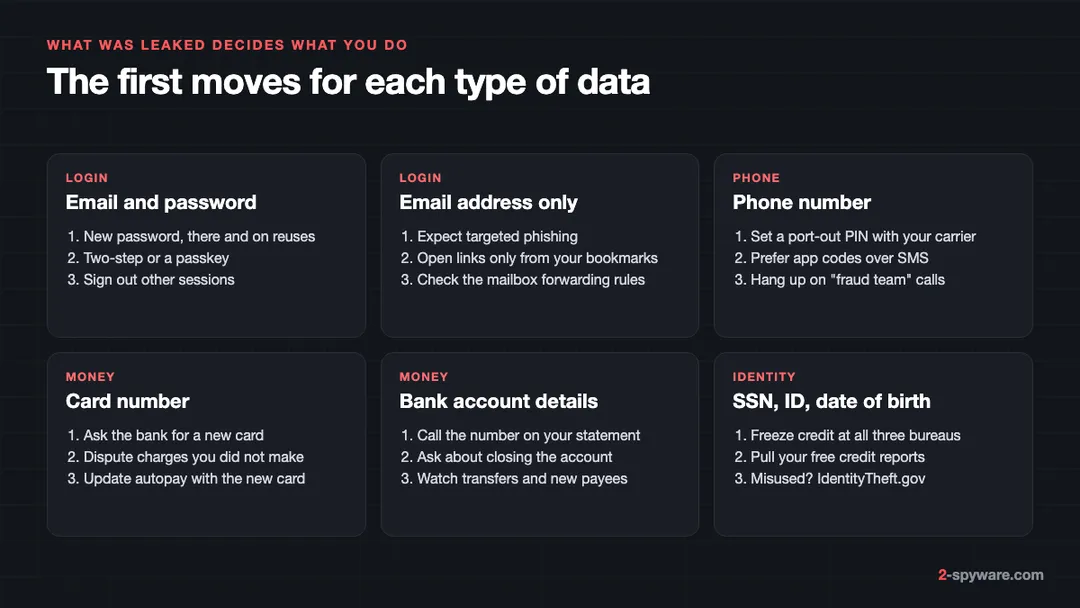
Email address and password
- Log in and change the password on the breached site. Make it long. If the site lets you, change the username too [1].
- Change the same password everywhere you reused it [1][2]. This matters more than the breached site itself.
- Turn on two-step verification, or use a passkey where the site offers one [1][2]. Our two-factor authentication guide shows where the setting is on the major services.
- Check the account for signs of use: a login you cannot explain, changed security settings, messages you did not send, or sign-ins from odd places or times [2].
- Sign out every other session. Most services list active devices in their security settings.
- In your email account, check the forwarding rules and filters. An attacker who got in once often adds a rule that copies your mail to them, which survives a password change.
- If the site stores your card, check for charges or account changes you do not recognize, such as a new delivery address [1].
If you cannot log in because someone changed the password, contact the company and ask how to recover or close the account [1]. The FTC keeps recovery steps for hacked email and social media accounts at ftc.gov/hackedaccount [1].
Email address only
Criminals use breach data to make messages sound personal, and they write to everyone who might be a customer of the breached company [2]. From now on, open that company's site from a bookmark or by typing the address. Treat every email about the breach as suspect until you have checked it on the official site.
Phone number
A leaked number brings scam calls and texts. The Facebook data of 2019 put phone numbers for 509,458,528 accounts into circulation, and they still feed scam calls. If a caller claims to be from your bank or the breached company and asks for passwords, codes or access to your computer, hang up [2]. Call back on the number printed on your card or statement.
The bigger risk is a SIM swap, where a criminal talks your carrier into moving your number to their SIM and then receives your login codes. Ask your carrier to set a port-out PIN or account PIN, and where you can, switch two-step verification from SMS codes to an authenticator app or a passkey.
Debit or credit card number
- Call your bank or card company and ask them to cancel the card and send a new one [1]. Use the number on the back of the card [1].
- Read your transactions. If you see charges you did not make, call the fraud department and ask them to remove them [1].
- Update any automatic payments with the new card number [1].
Bank or investment account details
Tell your bank what happened, using a phone number or website you know is real [1]. The FTC suggests closing the account and opening a new one [1]. Watch for withdrawals and new payees, and update automatic payments if the number changes [1].
Social Security number, ID or date of birth
This is the data that lets someone open accounts in your name. In the US, the FTC lists these steps [1]:
- Freeze your credit at all three bureaus: Equifax, Experian and TransUnion [1]. While a freeze is on, nobody can open new credit in your name, and placing or lifting it is free [1]. Our credit freeze guide walks through each bureau.
- Get your free credit reports at AnnualCreditReport.com and look for accounts or debts you do not recognize [1]. You can check online every week for free [1].
- Consider a free one-year fraud alert, which makes lenders verify your identity first [1].
- Accept free credit monitoring if the breached company offers it [1].
- Check your Social Security work history at socialsecurity.gov/myaccount, and consider locking your number for job checks through myE-Verify [1].
- File your taxes early, before someone else can file in your name [1].
If someone has already used your information, report it at IdentityTheft.gov to get a recovery plan [1]. For a leaked driver's license, contact your state's motor vehicle office, and for a passport, report it to the State Department [1]. Outside the US, ask your bank and your national fraud reporting centre; the UK uses Report Fraud [2].
Phishing that quotes the breach
The breach itself is often not the attack. The attack comes weeks or months later, in a message about the breach [2]. Criminals use well-known breaches while they are still in the news, even against people whose data was not taken [2].
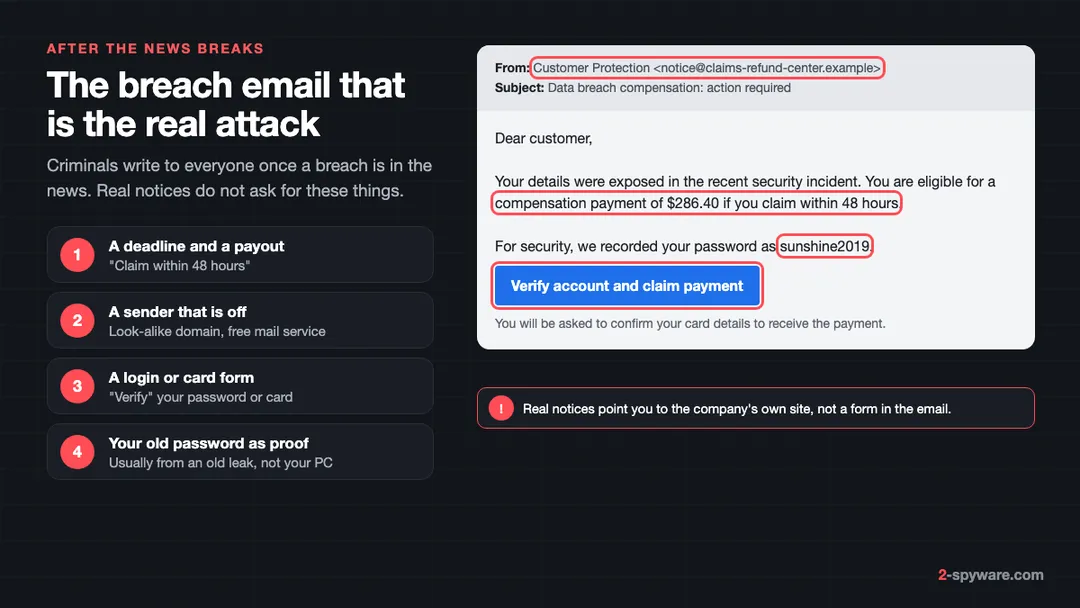
Watch for messages about resetting passwords, receiving compensation, scanning your device or missed deliveries [2]. Other signs are heavy technical language and pressure to act within a short time [2]. The links lead to pages that look real and record what you type, or that install malware [2]. Our phishing email guide shows more examples.
Some messages quote a password you really used. That proves only that the sender has an old breach list, not that they are in your computer. If you still use that password, change it, and change it on any other account that shares it [2]. The same trick drives most sextortion emails, which claim to have filmed you and demand payment.
What not to do after a data breach
- Do not pay a service that promises to delete your data from the dark web. Once a breach is copied and traded, nobody can pull it back. Even Have I Been Pwned only stops showing a breach, and it notes that being in one is a historic fact that cannot be changed [3].
- Do not click compensation or refund links in emails or texts. Real settlements are announced by the company or a court-appointed administrator, and you can find them yourself on the official site.
- Do not give a caller a one-time code, a password or remote access to your computer [2]. Banks and companies do not ask for these [2]. Callers who ask are often tech support scammers.
- Do not ignore an old breach because it is old. Leaked passwords stay in circulation for years and are combined into large lists.
If you already clicked, typed a password or paid, see what to do after paying a scammer. If you lost money, tell your bank and report the crime [2].
Company breaches, combo lists and stealer logs
| Source | Real example | What it means |
|---|---|---|
| Company breach | LinkedIn, Adobe | One service was hacked. Change that password and every reuse of it. |
| Combo list | Collection #1, 772,904,991 accounts | Old breaches mixed into one list for automated login attempts. Change any password that still matches. |
| Credential stuffing data | Synthient Credential Stuffing Threat Data, 1,957,476,021 accounts | Pairs collected from criminals who test them against many sites. Treat it like a combo list. |
| Stealer logs | ALIEN TXTBASE Stealer Logs, 284,132,969 accounts | Malware on a device copied the logins. The device that typed them may still be infected. |
Stealer logs come from malware running on an infected machine that records email addresses, passwords and the sites they were typed into [3]. If your address shows up in one, changing passwords is not enough. First clean the device, because a stealer on it can capture the new passwords too. Our info stealer guide shows how to check and clean Windows and Mac, and securing your accounts after malware gives the order for the password changes. Combo lists feed credential stuffing, the automated login attacks that make reused passwords dangerous.
Habits that make the next breach matter less
You cannot stop companies from being breached. You can make sure a leak from one of them opens nothing else.
- Use a different password on every account. A password manager makes this practical, and the ones built into Chrome and Apple devices also warn you about reuse and leaks [4][5].
- Switch to passkeys where they are offered. There is no password to leak, and they do not work on a fake site.
- Keep two-step verification on for email, banking and any account that can reset others.
- Keep the US credit freezes in place and lift them only when you apply for credit [1].
- Sign up for breach alerts on Have I Been Pwned for the addresses you use [3].
- Skip optional fields, and use a separate email address for shops.
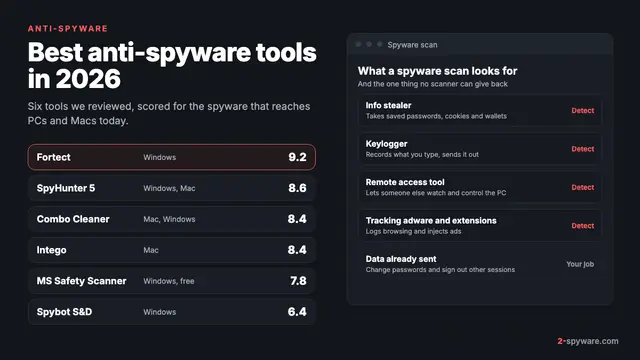
If the warnings point to your own device rather than a company, run a free scan with our link and file check and read the spyware guide before you change any more passwords.
Frequently asked questions
What should I do first after a data breach?
Read what data was involved. If a password leaked, change it on that site and on every other site where you used it, then turn on two-step verification. If ID numbers leaked, freeze your credit. If only an email address leaked, watch for phishing.
Is Have I Been Pwned safe to use?
Yes. It is a long-running free service that shows which known breaches contain an email address. It says searches are not logged, and it does not store or show the passwords from breaches. Type the address into haveibeenpwned.com directly rather than through a link in an email.
My email was not found on Have I Been Pwned. Am I safe?
Not necessarily. Use the password checks in Chrome or Apple Passwords too, and keep unique passwords so an unknown breach does no harm.
My password was leaked. Does that mean I was hacked?
Not by itself. It means the password is in a leaked list, so anyone could try it. Change it everywhere you used it and check your account activity. If the leak came from stealer logs, scan the device you use, because malware may still be on it.
Why is my email in a breach for a site I never used?
Your data may have been sold to or merged into another service, the site may have changed its name, someone may have signed you up with your address, or it was part of a combo list built from other leaks.
Can I get my data removed from the dark web?
No. Once breach data is copied and traded, nobody can delete it. Services that promise removal cannot deliver it. Spend the effort on changing passwords and freezing credit instead.
I got an email about breach compensation. Is it real?
Assume it is not until you check. Go to the company's website yourself and look for the notice there. Real settlements do not ask for your password or your card details to pay you.
Do I need a new phone number or new email address after a breach?
Usually not. Protect the phone number with a carrier PIN and move logins away from SMS codes. Keep the email address, but secure it with a unique password and two-step verification, and check its forwarding rules.
Sources
- Federal Trade Commission, IdentityTheft.gov: What to do if your information was lost or stolen, or part of a data breach read 2026-10-09
- National Cyber Security Centre (UK): Data breaches, guidance for individuals and families read 2026-10-09
- Have I Been Pwned: Frequently asked questions read 2026-10-09
- Google Account Help: Change compromised passwords in your Google Account read 2026-10-09
- Apple Platform Security: Password security recommendations read 2026-10-09
- Apple Support, iPhone User Guide: Change weak or compromised passwords on iPhone read 2026-10-09
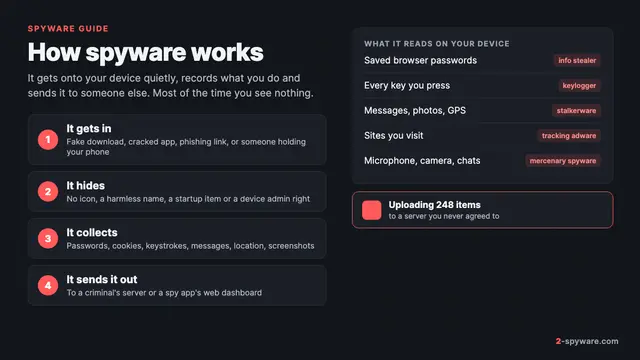 What is spyware and how to remove it
 Best anti-spyware tools in 2026
 How to check your phone for spyware