
What an info stealer is
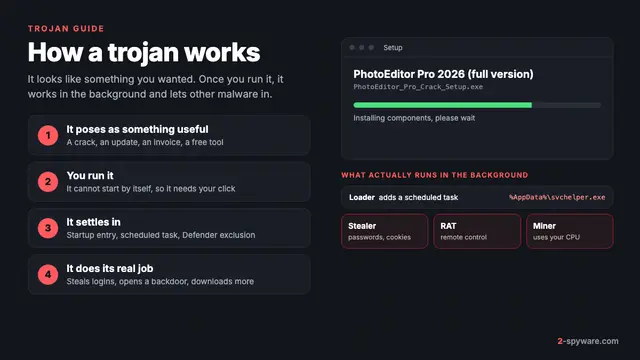
An information stealer, or infostealer, is a trojan with one short job: collect what your computer remembers about you and send it out. Our trojans guide covers trojans in general. This page goes deeper on stealers, the type behind most account takeovers, crypto thefts and many company breaches today.
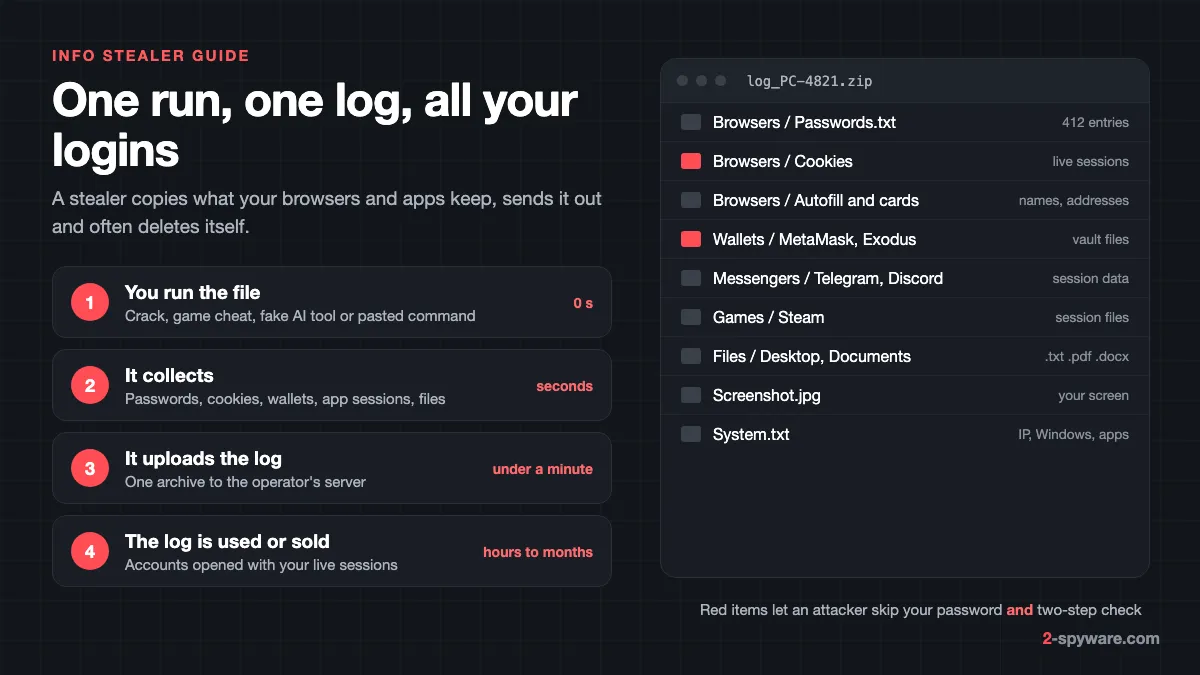
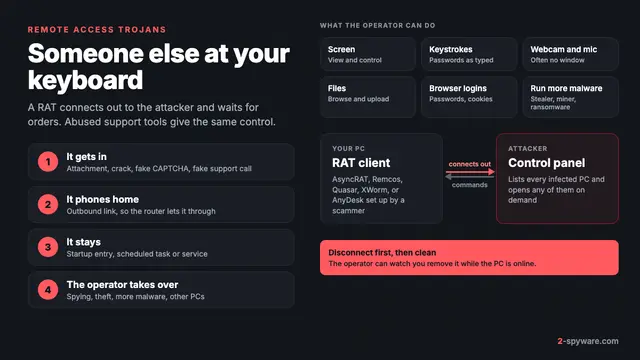
Unlike a remote access trojan, a stealer does not need to stay. It reads the browser databases, wallet folders and app session files, packs them into one archive called a log, uploads it and often exits. Lumma takes its target list from the attacker's server, so each buyer decides what it collects [1].
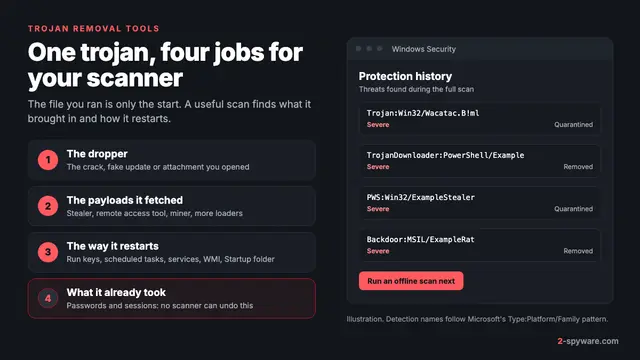
Microsoft Defender names stealers by family, such as Trojan:Win32/LummaStealer, or by type, such as PWS for password stealer [1][12]. Our page on antivirus detection names shows how to read them.
What a stealer takes, and where it finds it
Microsoft's analysis of Lumma lists saved passwords, session cookies and autofill data from Chromium and Firefox browsers, wallets such as MetaMask, Electrum and Exodus, VPN and FTP profiles, e-mail clients, Telegram, and .pdf, .docx and .rtf documents [1]. StealC adds saved cards, Steam sessions, Outlook data and a desktop screenshot [7].
| Data | Where it sits on Windows | What the attacker does with it |
|---|---|---|
| Saved passwords | Chrome and Edge: Login Data in the profile under %LOCALAPPDATA%. Firefox: logins.json under %APPDATA%\Mozilla\Firefox\Profiles | Tried on your e-mail, bank and shops, including accounts never used on this PC |
| Session cookies | The Cookies file in the same profile folders | Opens your accounts already signed in, past two-step verification |
| Autofill and cards | Web Data in the browser profile | Card fraud and targeted phishing |
| Crypto wallets | Wallet extension folders, %APPDATA%\Exodus, %APPDATA%\Electrum | Opens the vault and empties it |
| Telegram, Discord, Steam | %APPDATA%\Telegram Desktop\tdata, Discord and Steam folders | Takes over the account and messages your friends |
| Files | Desktop and Documents, filtered by extension | Seed phrases, password lists, ID scans |
| System details | Windows version, apps, IP address, screenshot | Prices the log and spots company PCs |
Treat everything saved in any browser on that PC as copied, plus any file on the desktop. Our password and data theft topic collects individual cases.
How fast it happens, and why removal is not enough
A stealer is usually finished before you notice anything. It reads the folders above, writes an archive, sends it and exits, often in under a minute. Lumma even kept fallback addresses on Steam profiles and Telegram channels, so the upload works when a server is blocked [1].
Some stealers stay. Lumma can add a clipboard stealer that swaps crypto addresses, or a coin miner [1]. AMOS on the Mac installs a launch daemon that restarts it at boot and waits for commands [10]. Only a proper cleanup tells you which kind you had.
Why two-step verification does not stop it
When you sign in and pass the second step, the site gives your browser a session cookie. While that cookie is valid, the site treats the browser as signed in. A stealer copies the cookie, and the attacker opens your account from their own browser without your password or code.
In July 2024, with Chrome 127, Google added app-bound encryption for cookies on Windows, and said malware with admin rights or code injection can still get around it [6]. Vidar 2.0 did exactly that in 2025 [9]. So a stolen session has to be ended. Changing the password ends it on some services, not all.
Malware-as-a-service and the market for logs
The people who write stealers rarely spread them. They rent the malware to buyers called affiliates, who get a web panel to build their own copy and collect the logs [1][7]. Lumma's developer sold tiers from 250 US dollars a month up to 20,000 US dollars for the source code [2]. Microsoft found Lumma on over 394,000 Windows computers between 16 March and 16 May 2025 alone [2].
Microsoft reports that logs sell for about 10 to 50 US dollars each on dark web markets and Telegram channels, and premium logs for over 100 US dollars [7]. Buyers search them for bank, crypto, e-mail and company logins. Ransomware groups such as Octo Tempest have used Lumma for their first foothold [1], which is how one home PC turns into a breach at the victim's employer.
Main stealer families and their status in 2026
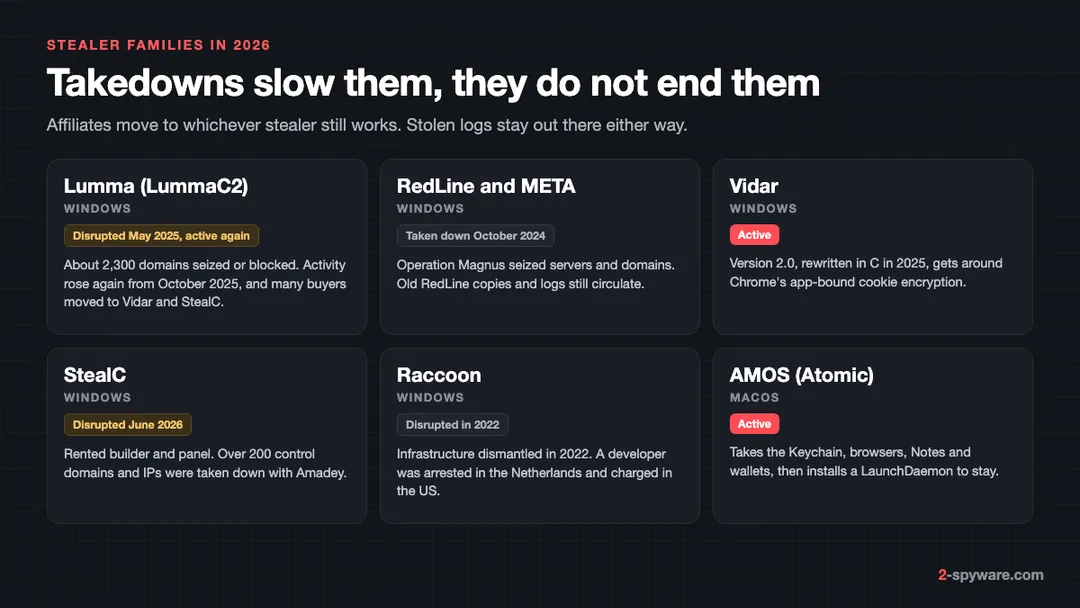
- Lumma (LummaC2). In May 2025 Microsoft's Digital Crimes Unit, the US Department of Justice and Europol took down or blocked about 2,300 domains and Lumma's control panels [1][2][3]. Activity rose again from the week of 20 October 2025, after alleged core members were doxxed and many customers had moved to Vidar and StealC [8].
- RedLine and META. Operation Magnus, led by the Dutch police with the FBI, Eurojust and Europol, took down their infrastructure on 28 October 2024 [5]. The US unsealed charges against a suspected RedLine developer [4]. Our RedLine removal guide covers older detections.
- Vidar. Still active. Version 2.0 was rewritten in C in 2025 and gets around Chrome's app-bound encryption [9]. See the Vidar guide and the TikTok videos that pushed Vidar and StealC.
- StealC. A rented builder and panel that steals browser data, wallets, Steam sessions and screenshots [7]. On 24 June 2026 Microsoft and Europol took down over 200 StealC and Amadey control domains and IPs [7].
- Raccoon. Its infrastructure was dismantled in 2022 and a developer was arrested in the Netherlands and charged in the US.
- AMOS, or Atomic macOS Stealer. The main Mac stealer. In January 2026 Microsoft saw it take the login Keychain, browser data including Safari cookies, Apple Notes, documents and wallet extensions, then install a root launch daemon [10]. See the AMOS topic.
A takedown never returns logs already stolen, so the steps below are the same whatever family your antivirus named.
How stealers reach your computer
- Cracked software, keygens and game cheats. Microsoft found cracked apps bundled with Lumma that show nothing during install and run the stealer after launch [1]. StealC spreads through game cheats as well [7]. See cracked software and malware and the fake Minecraft mods case.
- Search ads for popular software. Fake ads for searches such as Notepad++ download or Chrome update lead to cloned vendor sites [1].
- Fake AI tools. One AMOS campaign led Mac users through several AI-themed domains to a disk image called AlliAi.dmg [10].
- ClickFix pages. A fake CAPTCHA copies a command and tells you to paste it into the Windows Run box, or into Terminal on a Mac [1]. See fake CAPTCHA and ClickFix pages and the loop-lumen.com AMOS case.
- Videos on TikTok and YouTube that promise free premium apps and show you how to run the installer yourself.
- Phishing e-mails with hotel booking or invoice lures, and loaders such as DanaBot that drop Lumma [1].
Signs a stealer has run
On the computer, usually none. The upload takes seconds. The signs show up later, in your accounts:
- sign-in alerts from new places, or password reset mails you did not ask for;
- friends getting links or file requests from your Discord, Telegram, Steam or Facebook account;
- game items or currency moved out, or crypto sent to an unknown address;
- new mail forwarding rules or recovery addresses you did not add;
- a detection with Stealer, PWS or Spy in its name in Windows Security > Virus & threat protection > Protection history [11].
If you pasted a command from a web page into Run, you can check what it was. Windows keeps that history in the registry key HKCU\Software\Microsoft\Windows\CurrentVersion\Explorer\RunMRU, which Microsoft uses to hunt ClickFix [1]. A long line starting with powershell, mshta or curl means you ran a downloader.
What to do after an info stealer, in order
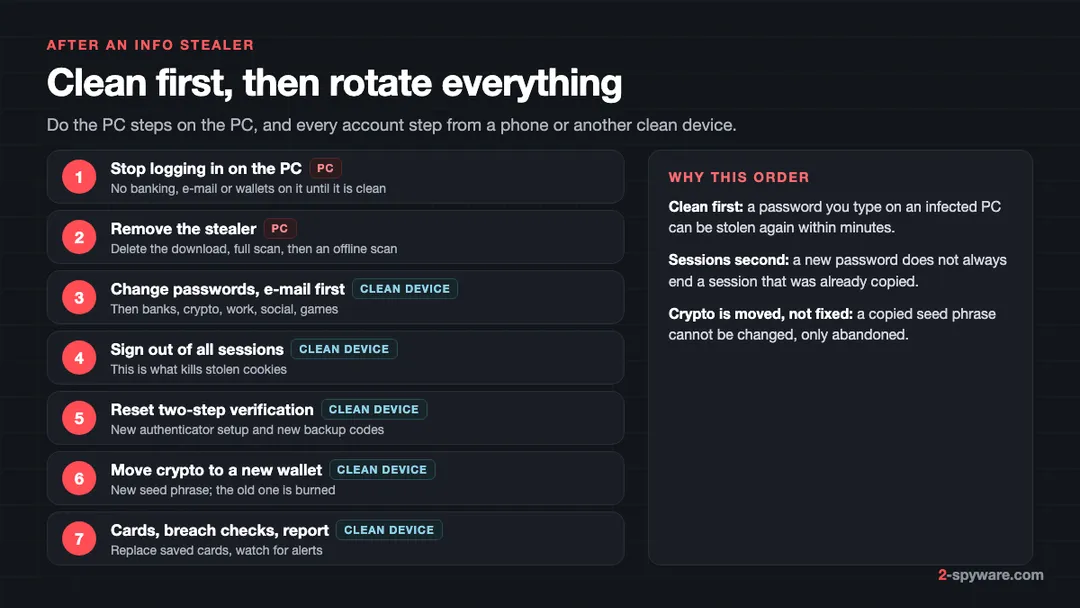
- Stop using the infected computer for anything that needs a login. Do not open your bank, e-mail or wallet on it until it is clean.
- Clean the computer first, using the Windows or Mac steps below. A new password typed on a PC that still runs a stealer or a back door goes straight to the attacker.
- From a phone or another clean computer, change passwords, starting with your main e-mail, because it resets everything else. Then banking, crypto exchanges, work accounts, Apple or Microsoft accounts, social media and games.
- Sign out of every session. Use each service's option to sign out of all devices, or to review devices and remove the ones you do not know. This is the step that kills stolen cookies.
- Reset two-step verification. Remove the old authenticator entry, set it up again and create new backup codes, because old codes saved in a text file may be in the log. Use two-step verification or passkeys where you had none.
- Move crypto to a new wallet created on a clean device, with a new seed phrase. A copied seed phrase or vault file cannot be made safe again.
- Ask your bank to replace cards saved in the browser. US residents whose ID details were on the PC can also freeze their credit. If money was taken, report it.
Our guide to securing your accounts after malware walks through each account type, recovery options and what to do if you are already locked out.
How to remove an info stealer from Windows
- Open Windows Security > Virus & threat protection > Protection history and note what was found and where [11]. A file in Downloads or a Temp folder points to the download that started it.
- Delete that download and the archive it came in. Empty the Recycle Bin.
- Uninstall anything installed at the same time. On Windows 11 open Settings > Apps > Installed apps; on Windows 10, Settings > Apps > Apps & features. Our uninstall guide has the details.
- Open Task Manager > Startup apps (the Startup tab on Windows 10) and disable entries you cannot name. Check Task Scheduler for new tasks with random names.
- Run a full scan from Virus & threat protection > Scan options > Full scan.
- Run an offline scan: Scan options > Microsoft Defender Antivirus (offline scan) > Scan now [11]. The PC restarts and scans before Windows loads, which catches malware that hides while Windows runs [11]. See our offline scan guide.
- If a loader, a remote access tool or repeat detections show up, back up your files and reset Windows.
A second opinion helps when you are not sure what else came with the stealer. Fortect, the tool we offer on this page, includes an antivirus that monitors new downloads, installs and files in real time, and repairs Windows files that malware damaged. Our Fortect review covers what it checks.
How to remove an info stealer from a Mac
AMOS and similar Mac stealers arrive as a disk image or a pasted Terminal command, then install a launch daemon named like /Library/LaunchDaemons/com.random.plist [10]. Work through these places:
- On macOS Sequoia 15 and later open System Settings > General > Login Items & Extensions; on Sonoma 14, Login Items. Switch off background items you do not recognize.
- In Finder choose Go > Go to Folder and check /Library/LaunchDaemons, /Library/LaunchAgents and ~/Library/LaunchAgents. Delete .plist files with random names that appeared on the day of the infection, and the program each one starts.
- Delete the app you installed from /Applications and the .dmg from Downloads, then restart.
- Leave automatic security updates on, so XProtect can block and remove known families.
Because AMOS copies the login Keychain [10], treat every password saved in Keychain and Safari as stolen. Our Mac malware removal guide and Mac virus guides go further, and the Mac help forum can check a file for you.
How to check if your data is in stealer logs
No single service sees every log, because many are traded privately. You can still check the main places:
- Have I Been Pwned. Search your e-mail address and turn on alerts. Since 2025 it also loads stealer logs that researchers obtain, and shows which websites a log held your login for.
- Your password manager's security report, or Password Checkup in Google Password Manager, which flag leaked passwords.
- The recent activity page of your e-mail, bank and social accounts, for sign-ins you do not recognize.
Never pay a Telegram log channel to look up your own data. Rotating passwords and sessions fixes the problem either way. If a message looks off, scan the link first, or ask on our Windows help forum.
How to make the next stealer worth less
- Keep passwords in a password manager rather than saved in every browser, and use passkeys or a hardware key on e-mail and money accounts [1].
- Sign out of accounts you rarely use, and never keep a seed phrase in a file or screenshot.
- Never paste a command from a web page into Run, PowerShell or Terminal.
Frequently asked questions
What is an info stealer?
An info stealer is malware that copies saved passwords, session cookies, autofill data, crypto wallets and app logins from your computer and uploads them to criminals. Most are rented out as a service, so many different groups spread the same stealer. Well-known families include Lumma, RedLine, Vidar, StealC and AMOS on the Mac.
What is the difference between an info stealer and a password stealer?
A password stealer is an older name for the same idea, and Microsoft still labels some detections PWS. Modern info stealers take much more than passwords: session cookies, cards, wallets, Telegram and Discord sessions, documents and a screenshot. So treat a password stealer detection as a full info stealer case.
My antivirus removed the stealer. Is my data safe?
Only if it was caught before it ran, for example when the download was saved or the archive was opened. If you started the file, or are not sure, assume the data left within a minute. Change passwords from a clean device, sign out of all sessions, reset two-step verification and move any crypto.
Can a stealer get past two-step verification?
Yes, by copying session cookies from your browser. A valid cookie stands for a login that already passed the second step, so the attacker opens your account without the password or the code. The fix is to sign out of all devices on each service after you change the password.
Is Lumma Stealer still active after the 2025 takedown?
Microsoft, the US Department of Justice and Europol took down about 2,300 Lumma domains and its control panels in May 2025. Researchers saw Lumma activity rise again from late October 2025, while many of its customers had moved to Vidar and StealC. Treat a Lumma detection today as real.
What happened to RedLine Stealer?
Operation Magnus, led by the Dutch police with the FBI, Eurojust and Europol, took down RedLine and META infrastructure on 28 October 2024, and the US charged a suspected developer. Logs stolen before the takedown are still in circulation.
Can a Mac get an info stealer?
Yes. AMOS, also called Atomic macOS Stealer, is spread through fake app downloads, fake AI tools and pasted Terminal commands. It takes the login Keychain, browser passwords and cookies, Apple Notes, documents and crypto wallet extensions, and can install a launch daemon to stay on the Mac.
How do I know if my passwords are in a stealer log?
Search your e-mail address on Have I Been Pwned and turn on its alerts, run the security check in your password manager or Google Password Checkup, and look at recent sign-ins on your main accounts. No service sees every log, so rotate passwords and sessions after any infection anyway.
Sources
- Microsoft Security Blog: Lumma Stealer, breaking down the delivery techniques and capabilities of a prolific infostealer (21 May 2025) read 2026-10-08
- Microsoft On the Issues: Disrupting Lumma Stealer, Microsoft leads global action against favored cybercrime tool (21 May 2025) read 2026-10-04
- Europol: Europol and Microsoft disrupt world's largest infostealer Lumma read 2026-10-04
- US Department of Justice: U.S. Joins International Action Against RedLine and META Infostealers read 2026-10-04
- Eurojust: Malware targeting millions of people taken down by international coalition (RedLine and META) read 2026-10-04
- Google Security Blog: Improving the security of Chrome cookies on Windows (app-bound encryption) read 2026-10-04
- Microsoft Security Blog: StealC and Amadey, breaking down infostealers and the cybercrime services that deliver them (24 June 2026) read 2026-10-08
- Trend Micro Research: Increase in Lumma Stealer activity coincides with use of adaptive browser fingerprinting tactics (13 November 2025) read 2026-10-08
- Trend Micro Research: How Vidar Stealer 2.0 upgrades infostealer capabilities read 2026-10-08
- Microsoft Defender Experts: Hunting infostealers, macOS threats (Atomic Stealer AMOS) read 2026-10-08
- Microsoft Support: Virus and threat protection in the Windows Security app read 2026-10-08
- Microsoft Learn: How Microsoft names malware read 2026-10-04
 What is a trojan and how to remove it
 Best trojan removal tools in 2026
 Remote access trojans (RATs): how to tell if someone is in your PC and lock them out