
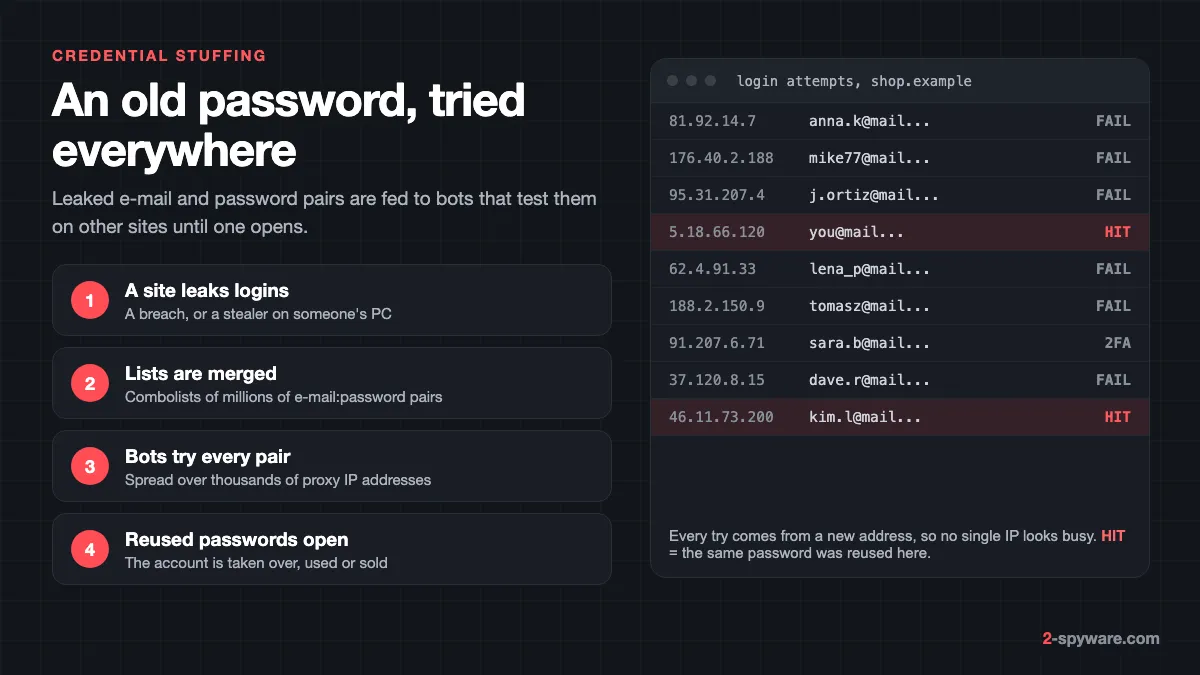
What credential stuffing is
Credential stuffing is an attack where someone takes e-mail and password pairs leaked from one website and tries them, automatically, on many other websites. OWASP defines it as testing username and password pairs obtained from the breach of another site [1]. It needs no malware on your device and no flaw in the site it hits. It only needs you to have used the same password twice.
Our trojans guide covers the malware that steals logins in the first place, and the info stealers guide explains how one infected PC turns into a log of passwords and cookies. This page covers what happens next: how those logins and old breach data become account takeovers, and how you make them useless.
Credential stuffing, password spraying and brute force
The three are often mixed up, but each one needs a different fix. OWASP separates credential stuffing from password spraying, which tests one weak password against a large number of different accounts [1].
| Attack | What the attacker tries | What stops it |
|---|---|---|
| Credential stuffing | Real pairs leaked elsewhere, one try per account | A unique password per site, two-step verification, a passkey |
| Password spraying | One common password, such as Summer2026!, on many accounts | A long password that is not on any common list |
| Brute force | Every possible password on one account | Lockouts and rate limits on the site, a long password |
| Session hijacking | A stolen login cookie, no password at all | Removing the stealer and signing out of every session |
Credential stuffing is hard to spot from the site's side because each attempt looks like an ordinary login. The username is real, the password was real somewhere, and only one or two tries are made per account. Even if only one pair in a thousand works, a list of a million pairs still opens a thousand accounts.
Why reused passwords are the whole problem
Credential stuffing works only because people reuse passwords. When a forum, shop or game you joined years ago leaks its user table, your e-mail and that password stay valid on every other site where you typed the same combination. The site you used in 2016 may be long gone, but the pair is still in circulation.
Small variations, such as adding the year or the site's name to a base password, do not help much. Treat a base password you tweak per site as one password used everywhere.
Where the lists come from
The raw material comes from three places, and you can check all three in our breach database.
1. Old breaches
Every breach that exposes passwords, whether stored in plain text or cracked from weak hashes, adds pairs to the pool. They keep working for years, because people rarely change a password they are not forced to change.
2. Combolists
A combolist, short for combination list, merges many breaches into one file of e-mail:password lines, cleaned of duplicates and ready for a checker tool. The same pairs turn up again and again under new names. The biggest ones we track:
- Synthient Credential Stuffing Threat Data: about 1.96 billion unique e-mail addresses gathered in 2025 from credential stuffing lists, with 1.3 billion unique passwords.
- Collection #1: about 773 million unique e-mail addresses, found on a hacking forum in January 2019. Our Collection #1 explainer covers it in detail.
- Exploit.In and the Anti Public Combo List: 593 million and 458 million unique e-mail addresses, both circulating since late 2016.
- Combolists Posted to Telegram: 361 million unique addresses collected from Telegram channels in May 2024, often with the website the login belonged to.
- Kayo.moe Credential Stuffing List: almost 42 million pairs uploaded to a file sharing service in 2018.
3. Stealer logs
Stealer logs are the newer and more dangerous source. A stealer on an infected PC records the website, the username and the password exactly as saved in the browser. That means the pair is fresh, it is tied to the right site, and it works even if you never reused it. Recent stealer log sets in our database:
- ALIEN TXTBASE Stealer Logs: 23 billion rows from one Telegram channel, 284 million unique e-mail addresses, February 2025.
- Synthient Stealer Log Threat Data: 183 million unique e-mail addresses, each linked to the site and password captured.
- Data Troll Stealer Logs: the June 2025 "16 billion passwords" headline, which turned out to be mostly older logs recycled, with 109 million unique addresses.
- June 2026 Stealer Logs: 56 million unique e-mail addresses and 124 million unique passwords, added in June 2026.
- Stealer Logs Posted to Telegram: 26 million unique addresses from July 2024.
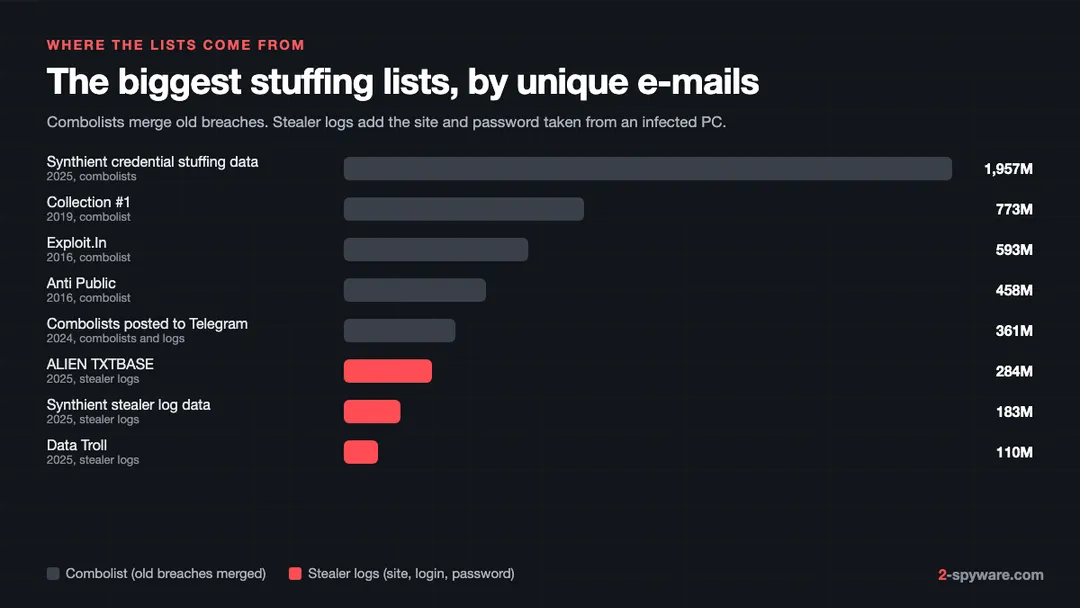
Combolists catch people who reuse passwords. Stealer logs also catch people who do not, which is why the defences below come in layers.
Real cases
23andMe, 2023
In its filing with the US Securities and Exchange Commission, 23andMe said the attacker accessed about 0.1% of user accounts directly [4]. The usernames and passwords used were the same as those used on other websites that had been compromised or were otherwise available [4]. Through those accounts the attacker reached a large number of files with profile data about other users who were connected through the DNA Relatives feature [4]. The company required all users to reset their passwords on 10 October 2023, and from 6 November 2023 it made two-step verification mandatory [4].
Roku, 2024
Roku reported two credential stuffing incidents in 2024. While monitoring after the first one, it found a second that affected about 576,000 more accounts [5].
Snowflake customer accounts, 2024
Mandiant reported that a group it tracks as UNC5537 used stolen credentials to get into Snowflake customer instances, and that about 165 organisations were notified as potentially exposed [3]. The credentials came from infostealer infections including Vidar, RisePro, RedLine, Raccoon Stealer, Lumma and MetaStealer [3]. Some dated back to 2020 and had never been changed [3].
Mandiant named three causes: no multi-factor authentication, passwords still valid years later, and no network allow lists limiting where logins could come from [3].
How attackers get around a site's defences
Sites try to block automated logins, and the attackers' tools are built to slip past each check. That is why your own settings matter more than the site's.
- Proxies. Checker tools such as Sentry MBA spread requests over many unique IP addresses through proxy networks, so no single address looks busy [1]. OWASP notes that blocking IP addresses should not be the sole defence because it is so easy to get around [1].
- CAPTCHA solvers. OWASP warns that tools and services exist that break CAPTCHAs with a reasonably high success rate [1]. A CAPTCHA raises the cost of an attack but rarely ends it.
- Real browsers. When a login page demands JavaScript, attackers move to automation frameworks and headless browsers that run it [1]. Site defences then fall back on device and connection fingerprints [1].
- Session cookies. A stealer log often holds live login cookies as well as passwords. With a cookie the attacker skips the login and the two-step check. For stuffing, it means a password change alone does not end the access.
Signs your account was stuffed
Most people find out from the site, not from their own checks. Look for these:
- A new sign-in alert by e-mail or push for a device, browser or city you do not recognise.
- A one-time code or two-step prompt you did not ask for. That means someone already has your password for that site.
- Your password stops working, or the recovery e-mail or phone number on the account has changed.
- Orders, subscriptions, gift card purchases or loyalty point transfers you did not make.
- Unknown devices on the account's active sessions page, or new profiles on a streaming account.
- Your e-mail address shows up in a combolist or stealer log in our breach database or in a breach alert from your password manager.
Fake security alerts are a common phishing lure, so open the site by typing its address, not through the alert's link. If you are unsure about a link, scan it first.
What to do if your account was stuffed
- Change the password on the affected account to a new, unique one. Use the site's own app or typed address.
- Sign out of all other sessions. Most services have a sign out everywhere or active devices option under security settings. This ends any session the attacker opened.
- Check the recovery e-mail, phone number, delivery addresses, saved cards and, for e-mail accounts, forwarding rules and filters. Attackers change these to keep access.
- Turn on two-step verification. Our step-by-step 2FA guide covers the main services. An authenticator app or passkey beats an SMS code.
- Change the same password on every other site where you used it. Start with e-mail and banking.
- Check whether the leak came from a stealer on your own device. If the site says the password was unique, or your e-mail appears in a stealer log set, assume malware and follow how to secure your accounts after malware.
- Contact the service if money moved or you cannot get back in, and ask your bank to block any card that was saved on the account.
If the alert came from a named breach rather than a takeover, our guide on what to do after a data breach covers the wider steps, such as freezing credit and watching for targeted phishing.
If the logins came from a stealer on your PC
Changing passwords on a computer that still runs a stealer just hands the new ones over. Scan the device before you change anything important. Fortect, the tool we offer on this page, runs a free Windows scan that includes a Malware and PUA stage, and its paid plans add an antivirus that watches new downloads, installs and files in real time. It also repairs Windows files that malware damaged. Our Fortect review shows what each scan stage checks. After the device is clean, change your passwords from it and sign out of every session again.
How to make credential stuffing stop working on you
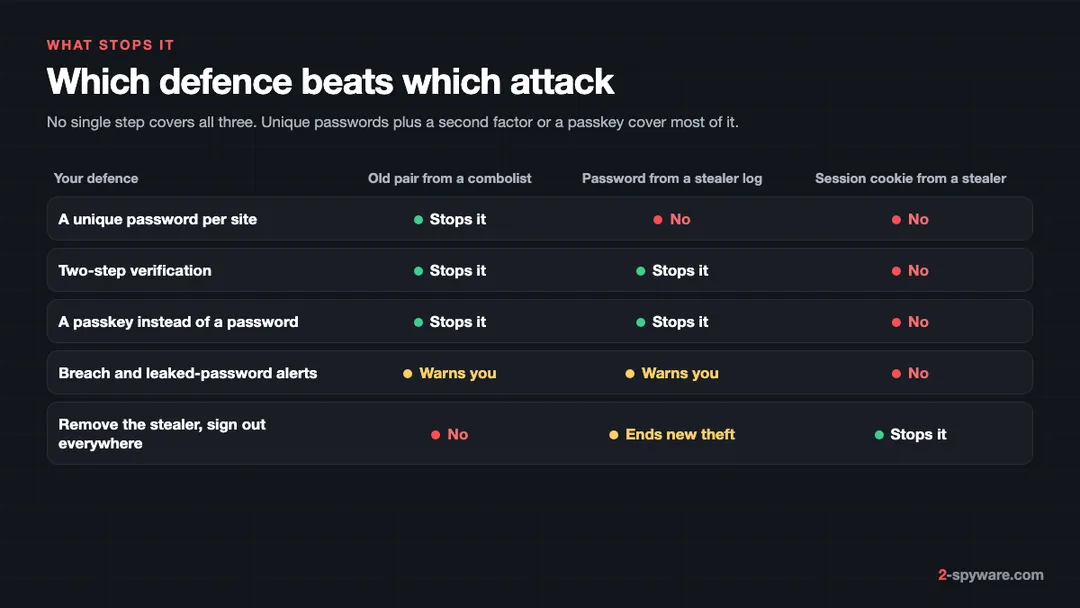
Use a password manager for unique passwords
A password manager creates a different random password for every site and fills it for you, so a leak at one site opens nothing else. Most also warn you about reused or breached passwords. Start with your e-mail account, because it can reset every other password.
Switch to passkeys where you can
A passkey replaces the password with a cryptographic key stored on your device or synced across your devices. There is no password to leak or reuse, so a combolist has nothing to try. NIST counts this kind of authenticator as phishing resistant, because it will not hand its secret to a fake site [2]. Many large services already offer passkeys under their sign-in or security settings.
Turn on two-step verification everywhere it exists
OWASP calls multi-factor authentication by far the best defence against credential stuffing and password spraying [1]. With it on, a correct password alone does not get in. Use an authenticator app or a security key where offered, and keep SMS as a fallback only. Remember that a stolen session cookie skips this step, which is why a clean device still matters.
Get breach alerts
Turn on the leaked-password warnings in your password manager and sign up for breach notifications for your e-mail address. Search your address in our breach database to see which combolists and stealer log sets include it.
For site owners: how to stop credential stuffing
If you run a site with logins, OWASP and NIST set out what works. Layer these controls:
- Offer and encourage multi-factor authentication, and require it for administrators [1]. Add risk-based prompts for new devices, unusual locations and automated behaviour [1].
- Check passwords against known breached passwords when users set or change them. NIST SP 800-63B says verifiers shall compare a new password against a blocklist that includes compromised passwords [2]. OWASP points to Pwned Passwords as a free source for this [1].
- Limit failed attempts per account. NIST requires a rate limit and caps consecutive failed attempts on one account at 100 [2]. Count per account as well as per IP, because stuffing uses one try per account from many addresses.
- Do not force regular password changes. NIST says verifiers shall not require periodic changes, but shall force a change when there is evidence of compromise [2], such as the account appearing in a stealer log.
- Do not impose composition rules such as one capital and one symbol [2]. Require a minimum length instead: 15 characters for a password used alone, 8 when it is part of multi-factor login [2].
- Use device and connection fingerprinting, IP reputation and CAPTCHAs triggered by risk rather than on every login [1].
- Notify users of unusual security events, for example a correct password followed by a failed second factor, and give them a login history and a way to end sessions [1].
- Offer passkeys, which take the password out of the login entirely.
A spike in failed logins spread over many accounts, with many usernames that do not exist, is the fingerprint of a stuffing run. For a second opinion on a suspicious login, ask on our Windows help forum.
Frequently asked questions
What is credential stuffing?
Credential stuffing is an automated attack where leaked e-mail and password pairs from one website are tried on many other websites. It works when people reuse the same password, so a breach at one small site can open accounts at large ones.
What is a combolist?
A combolist is a file of e-mail and password pairs merged from many earlier breaches, cleaned up and formatted for automated login tools. Well-known examples are Collection #1, Exploit.In and Anti Public, each with hundreds of millions of addresses.
What are stealer logs?
Stealer logs are files produced by info stealer malware on infected computers. Each log lists the websites, usernames and passwords saved in the browser, often with session cookies. They are sold or shared in bulk and then used for credential stuffing and account takeover.
How is credential stuffing different from brute force?
Brute force guesses many passwords for one account. Credential stuffing tries one real, previously leaked password per account across many accounts, so it causes few failed logins per user and is harder to detect.
Can two-step verification stop credential stuffing?
Yes, in most cases. A correct password alone does not get past two-step verification. It does not help if the attacker steals a live session cookie from a stealer on your device, so keep the device clean as well.
How do I know if my password is in a combolist?
Search your e-mail address in a breach database such as ours, and turn on the leaked-password check in your password manager. Both tell you whether your address or password appears in known combolists and stealer log sets.
I use a unique password. Can I still be a victim?
Yes, if a stealer on your device records the password for that exact site, or if the site itself is breached. Unique passwords stop reuse attacks; two-step verification or a passkey covers the rest.
Do passkeys stop credential stuffing?
Yes. A passkey has no password that can leak or be reused, so there is nothing for a combolist to try. Accounts that still allow a password as a fallback should also have two-step verification turned on.
Sources
- OWASP Cheat Sheet Series: Credential Stuffing Prevention read 2026-10-09
- NIST SP 800-63B-4: Digital Identity Guidelines, Authentication and Authenticator Management read 2026-10-09
- Google Cloud Threat Intelligence (Mandiant): UNC5537 targets Snowflake customer instances for data theft and extortion (10 June 2024) read 2026-10-09
- 23andMe Holding Co., Form 8-K/A filed with the US Securities and Exchange Commission (December 2023) read 2026-10-09
- Roku: Protecting your Roku account (2024 security incident update) read 2026-10-09
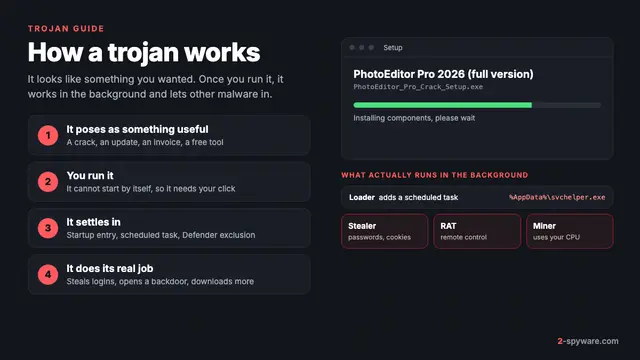 What is a trojan and how to remove it
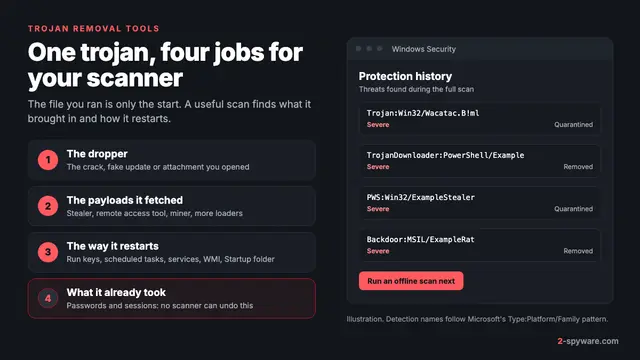 Best trojan removal tools in 2026
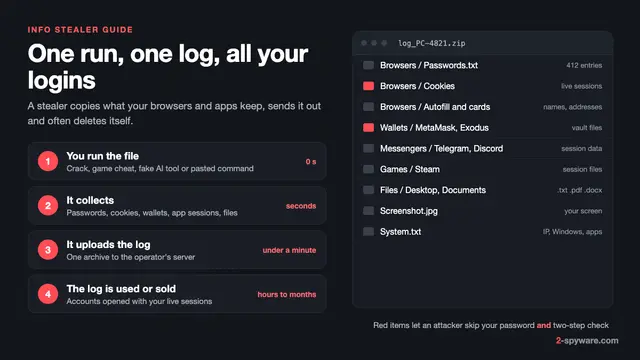 Info stealers: what they take, how fast, and what to do
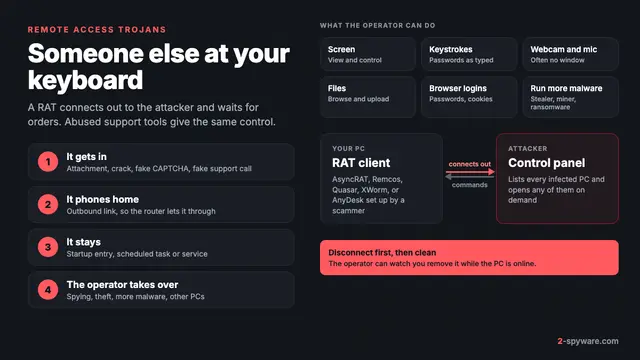 Remote access trojans (RATs): how to tell if someone is in your PC and lock them out