
What a phishing email is
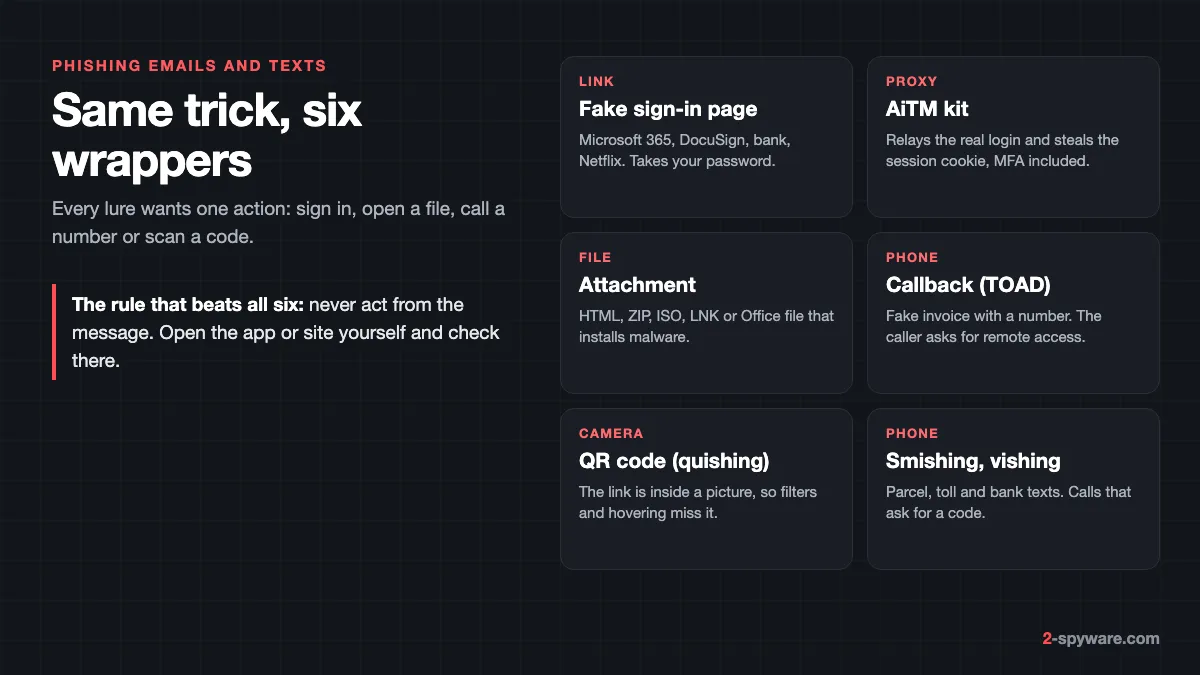
Phishing is fraud by message. The sender copies a brand or a person you trust and asks you to do one thing: sign in, pay, confirm details, call a number, scan a code or open a file. Our spam and scam guide covers the wider family of junk mail and scams. This page goes deeper on phishing itself: the kinds you meet today, how to read a message, and what to do if you already reacted.
Reading the message is not the danger. The damage starts when you act on it. The FTC lists the usual stories: suspicious activity on your account, a problem with your payment details, an invoice you do not recognize, a refund you can claim, or a coupon for free things [3]. None of them are real [3].
Most phishing goes out in bulk to addresses from data breaches and public lists, so getting one does not mean your device is infected. Targeted messages use your name, employer or a real thread copied from a hacked mailbox, so a familiar look proves nothing.
The kinds of phishing you will see
Credential phishing: fake sign-in pages
The message says your mailbox is full, a password expires, a document waits for your signature or a payment failed. The button opens a copy of a real sign-in page for Microsoft 365, Google, your bank or a streaming service. Whatever you type goes to the attacker, who tries it on the real site within minutes.
AiTM kits: phishing that gets past MFA
Adversary-in-the-middle (AiTM) phishing is the reason a one-time code no longer fully protects you. The attacker runs a proxy server between you and the real site, so you see the genuine login flow and pass your real MFA check [1]. The proxy captures your password and the session cookie that proves you are signed in [1].
With that cookie the attacker skips sign-in entirely and acts as you [1]. Microsoft tracked one AiTM campaign that tried to reach more than 10,000 organizations from September 2021 [1]. The attackers then used the stolen mailboxes for business email fraud. They added an inbox rule that moved replies from their target to Archive and marked them read, so the real owner would not notice [1].
Microsoft's advice is phish-resistant sign-in: FIDO2 security keys and certificate-based authentication [1]. For home users the same idea arrives as passkeys, which only work on the real website.
Attachment phishing (malspam)
Here the sender wants you to open a file, not type a password. Common types are HTML files that open a fake login page in your browser, archives (ZIP, RAR, 7z), disk images (ISO, IMG), shortcuts (.lnk), scripts (.js, .vbs) and Office files that ask you to click Enable Content. Opening one can start a loader that installs an information stealer or a trojan. Our malicious email attachments topic tracks current campaigns.
Callback phishing (TOAD)
Telephone-oriented attack delivery has no link at all. You get an invoice or renewal for antivirus, a laptop or crypto that you never ordered, and a phone number to cancel it. The person who answers asks you to install a remote access app "to process the refund". From there it runs exactly like a tech support scam.
QR-code phishing (quishing)
The link sits inside a picture of a QR code, in the email body or an attached PDF. Mail filters read links in text far better than links in images, and you cannot hover over a QR code on a PC. So you scan it with your phone, which takes the sign-in off your protected work laptop and onto a small screen where the address is hard to read.
Smishing and vishing
Smishing is phishing by text: a parcel held for a customs fee, an unpaid toll, a bank payment to confirm. The amount is small on purpose. The form takes your full card number and often the one-time code your bank sends, which the scammer uses for larger payments. Vishing is the same by phone, often a fake bank fraud team asking you to read out a code. See our delivery scams topic for current texts.
Page-based tricks that start in an email
Some links lead to a fake CAPTCHA that tells you to paste a command into Windows Run or Terminal. That is ClickFix, and it installs malware directly. Sextortion emails that claim a webcam recording are covered under sextortion emails. For other generic junk, see scam emails.
Anatomy of a phishing email
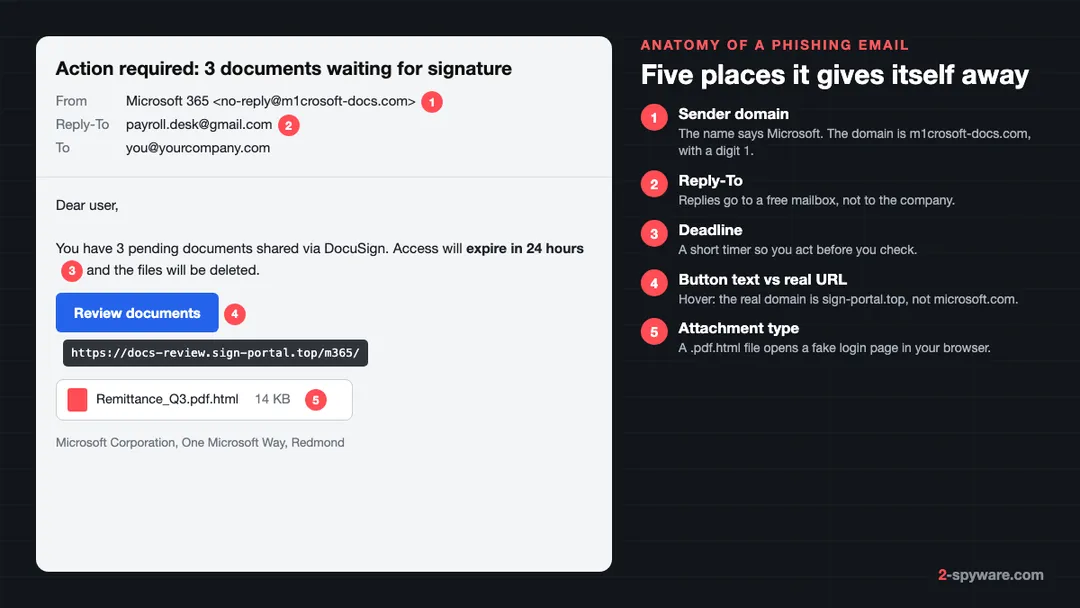
- **Sender domain.** The display name can say anything. Click or tap the name to see the full address, then read the domain after the @ sign. Lookalikes swap letters (rn for m, 1 for l, 0 for o), add words (microsoft-docs-center.com) or change the ending.
- **Reply-To.** If a reply would go to a different address than the sender, often a free mailbox, treat the message as hostile.
- **Urgency.** A deadline of hours, a threat of deletion, a fee that grows tomorrow. The timer exists so you skip the checks below.
- **Link text vs the real address.** The button says Review documents. The address behind it is what counts.
- **Attachment type.** A file named Remittance.pdf.html is a web page, not a PDF. Windows hides known extensions by default, so turn them on in File Explorer under View > Show > File name extensions.
Spelling mistakes used to be a reliable sign. Scammers now write with translation and AI tools, so a clean, polite message is not evidence of anything.
Real lures in circulation now
| Lure | What it says | What it wants |
|---|---|---|
| Microsoft 365, shared file | A document, voicemail or OneDrive file is waiting. See our voicemail and mail quota examples. | Your work password and session cookie |
| DocuSign or e-signature | Contract or payroll file to sign. Example: DocuSign email scam. | Your Microsoft or Google login |
| Package delivery | Parcel held, address incomplete, small fee due | Full card number and the bank code |
| Bank | Unusual sign-in, payment blocked, verify identity | Online banking login, card, codes |
| Netflix or streaming | Payment failed, account on hold | Card details |
| Tax agency | Refund waiting or penalty due | Identity data, bank details, card |
| Email provider | Account validation required. Example: Account Validation Request. | Your mailbox password |
How to check a link without risking anything
- **Hover, do not click.** On a PC, rest the pointer on the link. The real address appears in the bottom-left corner of the browser or in a tooltip in Outlook. On a phone, press and hold the link to preview it, then let go without opening it.
- **Read the domain from right to left.** In https://login.microsoftonline.secure-check.top/, the real domain is secure-check.top. Everything before it is decoration. The domain sits just before the first single slash.
- **Distrust short links and redirects.** A bit.ly link, or a link through a real marketing or file-sharing service, can still end on a fake page.
- **Paste it into our link checker.** Copy the address (right-click > Copy link) and check it there instead of opening it.
- **Never test a page by logging in.** Typing a fake password does not prove anything, and an AiTM kit relays real ones in real time. If you are unsure, close the tab and open the service from your bookmark or app.
A padlock only means the connection is encrypted; phishing sites have one too. Browser warnings such as Chrome's "Dangerous site" or Microsoft Defender SmartScreen block many known pages, but new ones slip past for hours.
What to do if you clicked, in the right order
You only clicked and typed nothing
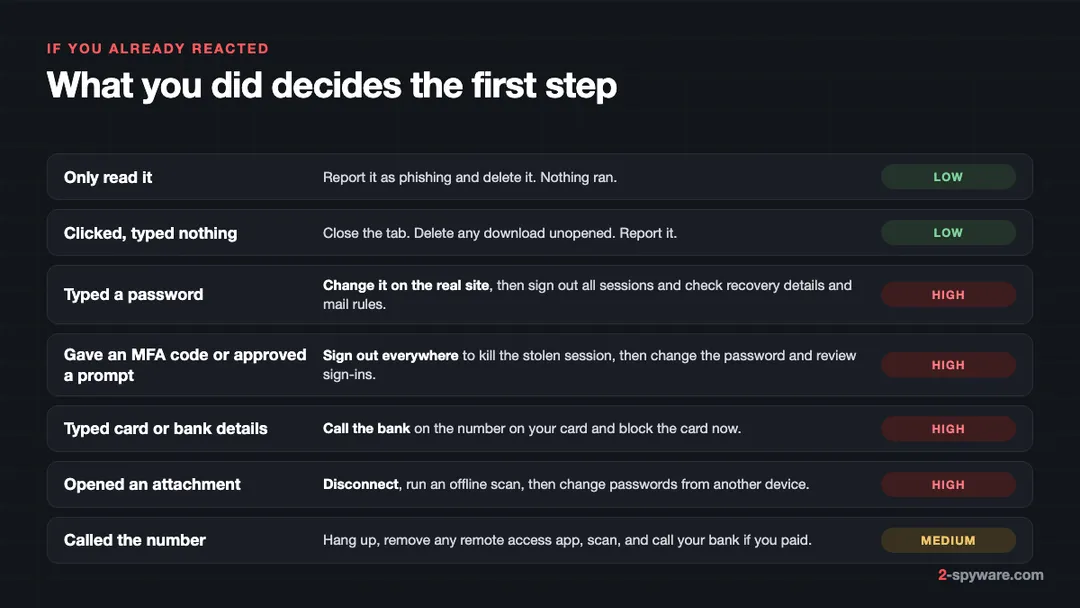
Close the tab. On an up-to-date browser, a visit alone rarely installs anything; the page exists to collect what you type. If a file downloaded on its own, delete it without opening it. Then report the message.
You typed a password
- Open the real site through its app or your bookmark and change the password. Start with your main email account, because it can reset everything else.
- Choose Sign out of all sessions or the equivalent, so a stolen session stops working.
- Change the same password anywhere you reused it.
- Check the account for a new recovery email or phone number, forwarding rules, inbox rules and connected apps. Attackers add these to keep access, as in the Microsoft case above [1].
- Turn on stronger sign-in: two-step verification with an app or a passkey.
The full checklist for each type of account is in securing your accounts.
You gave an MFA code or approved a prompt
Treat this as worse than a stolen password. The attacker may already hold a live session cookie [1], which a password change alone may not end. Sign out of every session first, then change the password, then look at recent sign-in activity for places and devices you do not know. If you cannot get in, use the provider's official recovery page right away.
You typed card or bank details
Call your bank on the number printed on your card and block the card. Do not wait for a charge to appear. If you already paid or sent money, follow what to do after paying a scammer. If you sent ID documents, consider a credit freeze. The FTC points victims who gave away card, bank or Social Security numbers to IdentityTheft.gov for steps by data type [3].
You opened an attachment
Disconnect from the internet, then run a Microsoft Defender Offline scan. The FTC's advice is the same in short: update your security software, scan, and remove what it finds [3]. Because the usual payload is a stealer, change important passwords from a different, clean device.
You called the number
Hang up. If they connected to your PC, uninstall the remote access app they used, scan the PC and change any password you typed during the call. If you paid, call your bank.
How to report phishing
In Gmail and Outlook
- **Gmail on a computer:** open the message, click More next to Reply, then Report phishing [5]. In the Gmail app on Android or iPhone, open the message, tap More and choose Report spam.
- **New Outlook, Outlook on the web and Outlook.com:** select the message, choose Report on the toolbar, then Report phishing.
- **Classic Outlook for Windows:** select the message and use the Report button on the Home tab, then Report phishing. At work, follow your company's reporting button if it has its own.
Do not reply, and do not use the unsubscribe link in a scam. Both confirm that someone reads your address. For other mail apps, see the step-by-step reporting guide.
To authorities
- **United States:** forward phishing emails to reportphishing@apwg.org (the Anti-Phishing Working Group), forward scam texts to SPAM (7726), and report at ReportFraud.ftc.gov [3].
- **United Kingdom:** forward emails to report@phishing.gov.uk [4]. The NCSC says it had removed 454.8k scam URLs as of July 2026 [4]. If you lost money or were hacked, report to Report Fraud at reportfraud.police.uk or 0300 123 2040 in England, Wales and Northern Ireland, or Police Scotland on 101 [4].
- **Other countries:** see where to report cybercrime by country and how to report a scammer.
How to make phishing fail before it starts
- **Use passkeys wherever a service offers them.** A passkey is tied to the real site's domain, so a fake page cannot get one, and an AiTM proxy has nothing to relay. Microsoft calls FIDO-based sign-in phish-resistant for this reason [1].
- **Let a password manager be your phishing detector.** It fills a password only on the domain where you saved it. If it refuses to fill on a login page that looks right, stop and read the address.
- **Use number matching for push sign-ins.** In Microsoft Authenticator, every push shows a number on the sign-in screen that you type into the app to approve [2], and it is on for all Authenticator pushes [2]. If a prompt arrives that you did not start, deny it; nobody legitimate needs it.
- **Go to the service yourself.** For any message about an account, payment or delivery, open the app or a bookmark instead of the link.
- **Call numbers from the card or the real website,** never from an unexpected invoice or text.
Frequently asked questions
How do I spot a phishing email?
Check three things. The real sender address, not the display name: tap the name and read the domain after the @ sign. The real link address: hover over the button and read the domain just before the first single slash. And the request: a password, a code, card details, a fee, a phone call or an unexpected attachment. If any of the three looks wrong, close the message and open the company's app or site yourself.
What are some phishing email examples?
Common ones in 2026: a Microsoft 365 or OneDrive file waiting for you, a DocuSign contract to sign, a parcel held for a small fee, and a bank warning about an unusual sign-in. Others are a Netflix payment failure, a tax refund, and an antivirus renewal invoice with a phone number to cancel it.
What is smishing?
Smishing is phishing by SMS or chat message. Typical texts claim a parcel is held, a toll is unpaid or a bank payment needs confirming. The link opens a payment or login form. In the US, forward these texts to 7726, then delete them. Do not reply STOP to a scam number.
What should I do if I clicked a phishing link?
If you typed nothing, close the tab and delete any file that downloaded without opening it. If you typed a password, change it on the real site and sign out of all sessions. If you gave card details, call your bank. If you opened a file, disconnect and run an offline scan.
Can two-factor authentication stop phishing?
It stops most simple password theft, but not all phishing. Adversary-in-the-middle kits relay your login and code to the real site in real time and keep the session cookie. Passkeys and security keys resist this because they only work on the genuine domain.
I gave a scammer my verification code. What now?
Assume the attacker is signed in. Sign out of all sessions from the real account settings, change the password, then check recent sign-in activity, recovery details and mail forwarding rules. If it was a bank code, call the bank right away so it can stop pending payments.
Is it safe to open a phishing email?
Reading it in a current version of Gmail, Outlook or Apple Mail does not run anything. The risk is acting on it: clicking and typing details, opening the attachment, enabling content in an Office file, replying or calling the number. Report it and delete it.
How do I report a phishing email?
Use Report phishing in your mail app first. In the US, also forward it to reportphishing@apwg.org and report at ReportFraud.ftc.gov. In the UK, forward it to report@phishing.gov.uk. If you lost money, report it to the police or your national fraud service and keep the reference number for your bank.
Are QR codes in emails safe?
Treat a QR code in an unexpected email or PDF exactly like a link, because it is one. Attackers use them because mail filters and hovering do not reveal the address. If you must scan one, read the address your phone shows before opening it, and never sign in from it.
Sources
- Microsoft Security Blog: From cookie theft to BEC, attackers use AiTM phishing sites as entry point to further financial fraud read 2026-10-09
- Microsoft Learn: How number matching works in MFA push notifications for Authenticator read 2026-10-09
- FTC Consumer Advice: How To Recognize and Avoid Phishing Scams read 2026-10-09
- NCSC: Phishing scams, report a scam email read 2026-10-09
- Gmail Help: Avoid and report phishing emails read 2026-10-09