

EMPTY ransomware seeks to render your files useless to extort you
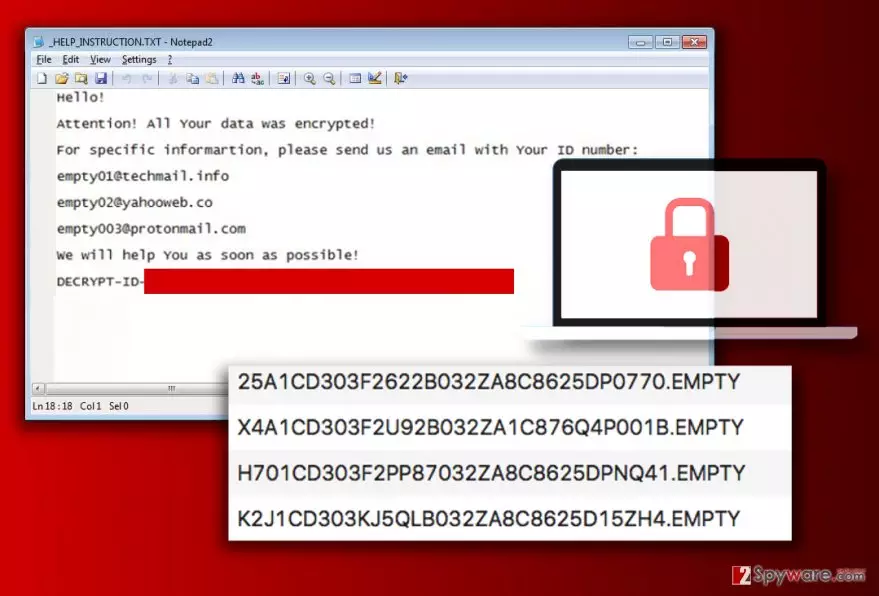
EMPTY ransomware is the latest CryptoMix variant[1] that adds .EMPTY file extension to encrypted files. Once installed, it scans the entire PC system, finds files with target extensions and encodes them using RSA-2048 and AES-128 cryptography algorithms. Encrypted files can’t be restored unless the victim has a backup.
EMPTY virus creates a file called _HELP_INSTRUCTION.TXT in which it outputs three email addresses – empty01@techmail.info, empty02@yahooweb.co, empty003@protonmail.com. The victim is supposed to write to one of these to get information regarding data decryption[2].
CryptoMix EMPTY is just another addition to the infamous ransomware family that already includes AZER, MOLE, ERROR, ZERO, EXTE, ZAYKA and even more malicious computer programs. Similar to previously mentioned viruses, the latest version creates _HELP_INSTRUCTION.TXT file on the compromised system to deliver a message from cyber criminals. The text from the ransom note is provided below.
Hello!
Attention! All Your data was encrypted!
For specific informartion, please send us an email with Your ID number:
empty01@techmail.info
empty02@yahooweb.co
empty003@protonmail.com
We will help You as soon as possible!DECRYPT-ID-[redacted]
Victims who accidentally installed this malicious software on their computers should remember that paying the ransom doesn’t solve the problem and often enlarges it. The criminals can quickly make off with your money and not provide any data recovery solutions. If you are seriously considering the idea of paying the ransom, you should remember that cyber criminals can’t be trusted.

We highly recommend you to remove EMPTY virus from the system. However, it is not an easy task to do, so we strongly suggest that you follow the advice of cyber security experts. The first thing to remember is that the virus might try to interfere with your security program’s processes and prevent it from removing the virus from the system.
In such situation, the computer needs to be rebooted into Safe Mode with Networking. You can find informative EMPTY ransomware removal instructions below the article. We have noticed that many of CryptoMix victims are from Germany, so we also suggest reading malware removal tips on Dieviren.de[3] site.
Distribution of CryptoMix ransomware viruses
CryptoMix viruses usually spread via malicious spam, so you have to be careful when opening new emails to prevent this virus from slipping into your computer using Trojan horse tactics. Nowadays, malicious viruses can be downloaded to your system simply after opening a compromised Word or PDF file.
To protect yourself from ransomware, follow our recommendations:
- Create a data backup. Make sure you store it away from your computer;
- Install a good security software;
- Never open suspicious links or email attachments;
- Keep your programs up-to-date by enabling automatic software updates.
These simple steps will help you avoid ransomware. However, having a data backup is probably the most important step. If a ransomware virus manages to get into the computer system, data backup will save you from a complete data loss.
Remove EMPTY ransomware and recreate your files
Do not delay EMPTY ransomware removal because it is an essential thing to do in order to make your computer function normally again. It is strongly recommended to perform the malware removal using anti-malware tools because they can identify and eliminate all infectious files that malware dropped on your system. It would take much longer to find and delete them manually.
Remove EMPTY virus professionally with the help of programs we recommend – FortectIntego or MalwarebytesMalwarebytes. You also need to restart your computer before using them, so please follow the instructions we wrote below.
Did this guide help?
Be the first to comment