
What a Chrome zero-day is
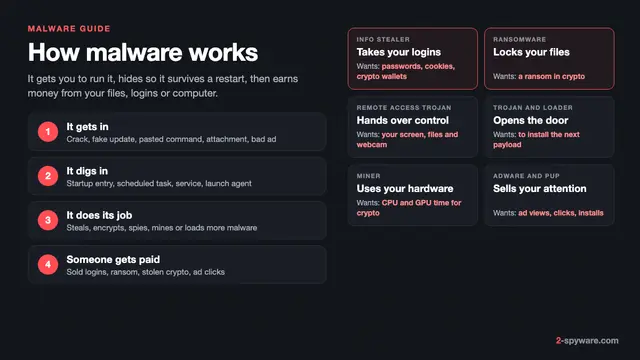
A zero-day is a flaw that attackers exploit before the vendor has a patch out. That is the definition Google's threat intelligence team uses [6]. Our malware and viruses guide covers the threats that such bugs deliver; this page is only about Chrome and the browsers built on its code.
Once Google ships the fix, the same bug becomes an n-day: known, patched, and still useful against everyone who has not updated. That second phase is the one that reaches ordinary users. Google researchers found a 2024 watering hole on Mongolian websites that used Chrome and Safari n-day exploits to steal visitors' credentials [6]. A zero-day headline is a deadline for you, not a sign that you were hit.
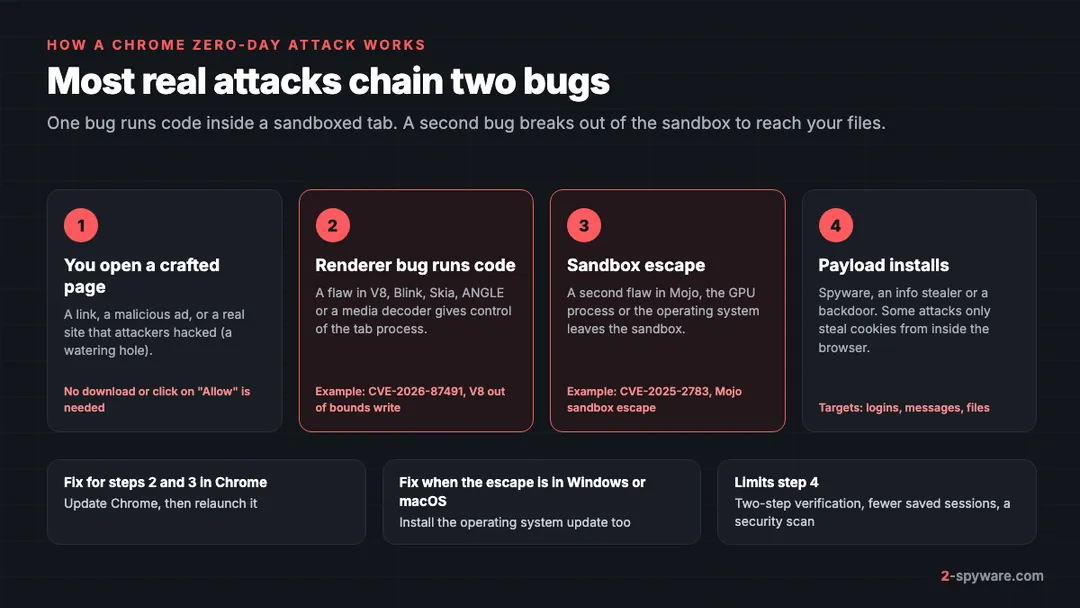
These bugs need no download and no click on Allow. Your browser only has to load a crafted HTML page, which can be a link in a message, a malicious ad or a normal site that was hacked.
How to update Chrome on every device
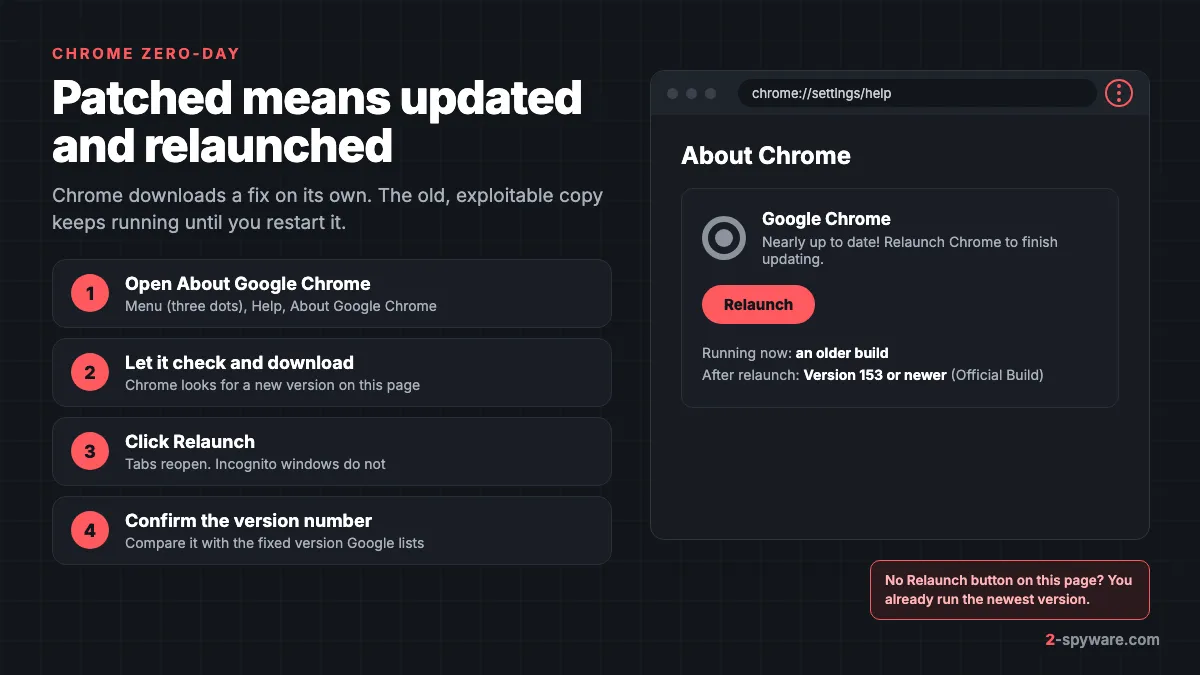
Chrome updates itself, but on a computer the update only takes effect when you close and reopen the browser [1]. If you leave Chrome open for days, a fix can sit downloaded and unused. These steps force the check and finish the job.
Windows 11 and 10
- Open Chrome and click the three-dot menu at the top right.
- Choose Help, then About Google Chrome [1]. Chrome checks for an update as soon as this page opens.
- Wait until it says Nearly up to date, then click Relaunch [1]. If there is no Relaunch button, you already have the newest version.
- If the update will not start, close every Chrome window, including ones on other desktops, and open Chrome again [1].
Chrome on Intel and AMD PCs needs Windows 10 or newer, and on ARM PCs it needs Windows 11 [1]. A PC still on Windows 7 or 8.1 no longer gets Chrome security fixes at all, so no amount of clicking will patch it. See our Windows help page for system updates.
Mac (macOS Ventura, Sonoma, Sequoia and newer)
- Open Chrome, click the three-dot menu, then Help, then About Google Chrome [1].
- Click Relaunch when it appears.
- If Chrome sits in your Applications folder, click Automatically update Chrome for all users on the same page [1]. This stops updates failing on a Mac with several accounts.
Chrome for Mac needs macOS 13 Ventura or newer [1]. On an older Mac the browser is frozen at its last supported version and every later zero-day stays open.
Android phones and tablets
- Open the Play Store app.
- Tap your profile picture at the top right, then Manage apps and device.
- Under Updates available, tap See details, then Update next to Chrome.
- Update Android System WebView in the same list if it appears. It is a separate app that runs web pages inside other apps.
- Close Chrome from the recent apps screen and open it again.
iPhone and iPad
- Open the App Store.
- Tap your profile picture at the top right.
- Scroll to the list of pending updates and tap Update next to Chrome.
- Install the latest iOS or iPadOS update in Settings, then General, then Software Update. Chrome on iPhone uses Apple's WebKit engine, so most browser engine fixes arrive through iOS.
Chromebook and Linux
On a Chromebook, Chrome is part of ChromeOS, so you update the whole operating system to get the fix [1]. Open the clock area, then Settings, then About ChromeOS, then Check for updates, and restart when asked. On Linux, update Chrome with your package manager [1].
Check that the fix is really installed
The version number under the Google Chrome heading on the About page is what counts [1]. Google's security release notes name the version that fixes each in-the-wild bug. For example, the fix for CVE-2026-87491 came with Chrome 153, released to the stable channel on 8 September 2026 [2]. If your About page shows a lower major version, you are still exposed.
Why Chrome needs a relaunch to be patched
Chrome downloads updates in the background and normally applies them when you close and reopen it [1]. Until then, every open window runs the old code from memory. That is the copy the exploit works against.
Chrome reopens your tabs and windows after the restart; only Incognito windows are lost [1]. If you click Not now, the update waits until your next restart [1]. When an update is waiting, the button next to the three-dot menu changes to show it, so a glance at the top right corner tells you whether you are behind.
If Chrome says it is managed by your organization on a home PC, a program added a policy that can block updates.
What exploited in the wild means
Google uses one fixed sentence in its release notes when attacks are confirmed: Google is aware that an exploit for this CVE exists in the wild [2][3]. That sentence appeared four times in Chrome's stable release notes between February and September 2026 alone, for CVE-2026-2441, CVE-2026-3910, CVE-2026-85046 and CVE-2026-87491 [2][3][4][5].
The US Cybersecurity and Infrastructure Security Agency (CISA) then adds the flaw to its Known Exploited Vulnerabilities catalogue. A bug only goes in when three conditions are met: it has a CVE ID, there is reliable evidence of active exploitation in the wild, and there is a clear fix such as a vendor update [7]. Scanning, research and a public proof of concept do not count as exploitation [7]. US federal agencies must patch catalogue entries within set deadlines, and CISA asks every other organization to do the same [7].
| CVE | Browser part | Chrome fix released | Added to CISA's list |
|---|---|---|---|
| CVE-2026-87491 | V8, out of bounds write | 8 September 2026, Chrome 153 [2] | 9 September 2026 |
| CVE-2026-85046 | V8, type confusion | 3 September 2026 [3] | 4 September 2026 |
| CVE-2026-11645 | V8, out of bounds read and write | June 2026 [11] | 9 June 2026 |
| CVE-2026-3910 | V8, memory buffer bounds | 12 March 2026 [4] | 13 March 2026 |
| CVE-2026-2441 | CSS, use after free | February 2026 [5] | 17 February 2026 |
CISA usually lists a Chrome flaw a day after Google ships the fix, so the patch exists before most news stories appear. The live list of every Chrome entry sits under this article; our exploited vulnerabilities tracker covers other vendors.
Why Chrome gets so many zero-days
Chrome is the browser attackers aim at first. Google's threat intelligence group counted 11 browser zero-days exploited in 2024, down from 17 in 2023, and named Chrome the main focus, likely because billions of people use it [6]. Google as a vendor had 11 zero-days exploited that year, second only to Microsoft [6].
V8, the JavaScript engine
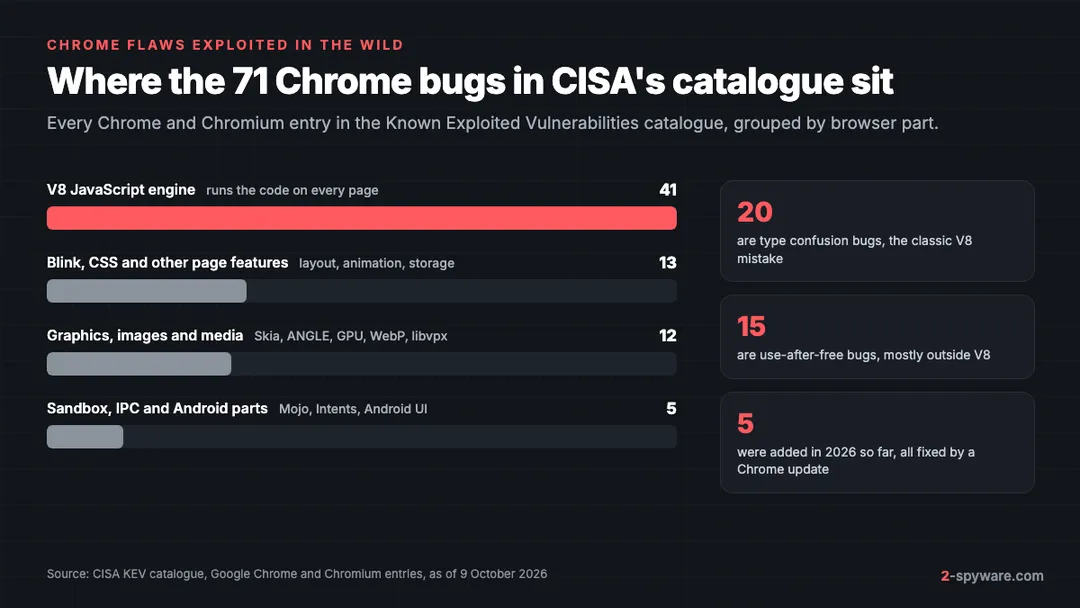
V8 turns the JavaScript on every page into fast machine code with a just-in-time compiler. When the compiler makes a wrong guess about the type of an object, the result is a type confusion bug that lets a page read and write memory it should not touch. Project Zero's review of 2021 counted six in-the-wild V8 zero-days in that one year, and traced several of them to the TurboFan compiler failing to undo an optimization [8]. Of the 71 Chrome entries in CISA's catalogue, 41 are in V8 and 20 are type confusion bugs.
Graphics and media: Skia, ANGLE, GPU and image decoders
Any site can reach the code that draws text, images and video. Skia draws 2D graphics, ANGLE translates WebGL into DirectX, Metal or Vulkan, and libraries such as libwebp and libvpx decode images and video. CVE-2023-4863 in WebP and CVE-2023-5217 in libvpx were exploited in the wild, and CVE-2025-6558 hit ANGLE and the GPU code.
Sandbox escapes
Chrome runs each site in a locked-down renderer process. A bug in V8 alone usually gives the attacker code inside that sandbox, which is why the CISA descriptions say inside the sandbox. To reach your files, the attacker needs a second bug that escapes. CVE-2025-2783 in Mojo, the message system between Chrome's processes, was such an escape. Google's threat analysts also documented CVE-2022-4135, a GPU sandbox bypass on Android that spyware vendors chained with other bugs [10], and Project Zero published its root cause [9].
Who uses these chains? Mostly espionage groups and commercial spyware vendors. In 2024, Google attributed eight zero-days to customers of spyware vendors, and North Korean actors exploited two Chrome zero-days [6]. Once a fix is public, criminal groups can copy the exploit and attack broadly.
Edge, Brave, Opera and Vivaldi get the same bugs
Every browser built on Chromium shares V8, Blink, Skia and ANGLE, so a Chrome zero-day is almost always their zero-day too. CISA's catalogue entries for recent Chrome bugs say so directly: the flaw could affect multiple browsers that use Chromium, including Chrome, Microsoft Edge and Opera. What differs is how quickly each company merges Google's fix and ships its own build. Our browser reviews compare them in detail.
| Browser | Where to check for updates | Usual speed with in-the-wild fixes |
|---|---|---|
| Google Chrome | Menu, Help, About Google Chrome | The fix ships first |
| Microsoft Edge | Menu, Help and feedback, About Microsoft Edge | Usually within a few days |
| Brave | Menu, Help, About Brave | Usually within a day or two |
| Opera | Opera menu, Update and Recovery, Check for update | Often a few days later |
| Vivaldi | Vivaldi menu, Help, Check for Updates | Often a few days later |
| Plain Chromium builds | No automatic updates; download a new build | Depends on where you got it |
Update every Chromium browser you have installed, even one you rarely open. If you installed bare Chromium, you have no auto-update at all. Our Chromium review explains why its updates lag and how to tell a real build from the adware browsers that copy its name.
Android WebView and in-app browsers
Many Android apps show web pages inside the app, through Android System WebView. WebView is Chromium as well, so a V8 bug can reach you through a link opened in a chat, email or social app, not only through Chrome. WebView updates through the Play Store as its own app.
If your phone no longer gets Android updates and the Play Store cannot update WebView, treat it as exposed and avoid opening links on it. If something already got in, see removing malware from Android.
On iPhone and iPad, Chrome, Edge and other browsers run on Apple's WebKit rather than V8 and Blink. That means most Chrome desktop zero-days do not apply to Chrome on iOS, but WebKit has zero-days of its own. Those are fixed by iOS updates, not by the App Store.
What to do if you think you were attacked
Most people who read about a Chrome zero-day were never targeted, and these exploits leave few visible traces. If you browsed with an unpatched Chrome while an exploit was active, these steps cover the realistic risks.
- Update and relaunch Chrome and every other Chromium browser, then install the operating system update.
- Check your extensions and remove anything you did not add; our guide on removing a browser extension shows where to look in each browser.
- Run a full scan with your security software, or a second-opinion scanner.
- From a clean device, change the passwords for email, banking and any account you used in that browser, and sign out of all other sessions. Our account recovery checklist lists the order.
- Turn on two-step verification with an app or a passkey, so stolen passwords and cookies are worth less.
- If you are a journalist, activist or official and expect targeted attacks, contact a specialist such as a digital security helpline before you wipe the device, so evidence is kept.
If the browser itself is still misbehaving after that, with new tabs, changed search or pop-ups, the cause is more likely adware or a hijacker than an exploit. Resetting the browser clears that. You can also paste a suspicious link into our link check before you open it.
Watch out for fake update warnings. Real Chrome updates never arrive as a pop-up on a website asking you to download a file. Criminals know people search for Chrome updates after zero-day news and use fake browser updates and fake CAPTCHA pages to push info stealers.
Habits that blunt the next Chrome zero-day
- Relaunch Chrome at least once a week, and the same day you see a zero-day headline.
- Keep Windows, macOS, Android or iOS current, because sandbox escapes often go through the operating system.
- Turn on Enhanced protection in Chrome under Settings, then Privacy and security, then Security. It checks pages and downloads against Google's live threat lists.
- Keep few extensions. Each one can read pages you visit, and malicious browser extensions are a far more common problem than zero-days.
- Uninstall browsers you no longer use instead of letting them go stale.
- If you face targeted risk, look at the V8 security setting under Chrome's Security page, which can turn off the V8 optimizer for sites you do not trust, at some cost in speed.
For current Chrome threats and fake Chrome downloads, see our Chrome topic page.
Frequently asked questions
Is there a Chrome zero-day right now?
Google patched several Chrome zero-days in 2026, most recently CVE-2026-87491 in Chrome 153 in September. New ones appear every few months. The list under this article updates from CISA's catalogue, and every one of them is fixed in the current Chrome version.
How do I update Google Chrome?
On a computer, open the three-dot menu, then Help, then About Google Chrome, and click Relaunch. On Android, update Chrome in the Play Store under Manage apps and device. On iPhone, update it in the App Store from your profile page.
Does Chrome update automatically?
Yes. Chrome downloads updates in the background on every platform. On a computer the new version only runs after you close and reopen Chrome, so a browser that stays open for weeks can stay unpatched.
Do I need to restart Chrome after an update?
Yes. The fix is not active until Chrome restarts. Clicking Relaunch reopens your tabs and windows, but not Incognito windows, so save anything you need from those first.
How do I check which version of Chrome I have?
Open the three-dot menu, then Help, then About Google Chrome. The version number is under the Google Chrome heading. Compare it with the fixed version named in Google's release notes for the bug.
Are Edge, Brave and Opera affected by Chrome zero-days?
Usually yes, because they share Chrome's Chromium code, including V8. Each company ships its own fixed build, often a day to a few days after Google. Update each of them from its own About page.
Is Chrome on iPhone affected by Chrome zero-days?
Mostly not. Chrome on iPhone and iPad runs on Apple's WebKit engine, so V8 and Blink bugs from Chrome on desktop do not apply. WebKit has its own zero-days, which iOS updates fix.
Can a zero-day infect my computer just by visiting a website?
Yes, that is how most browser exploits work. A crafted page triggers the bug with no download or click. Real attacks normally need a second bug to escape Chrome's sandbox, which is why both browser and system updates matter.
Sources
- Google Chrome Help: Update Google Chrome read 2026-10-09
- Chrome Releases: Stable Channel Update for Desktop, 8 September 2026 (Chrome 153, CVE-2026-87491) read 2026-10-09
- Chrome Releases: Stable Channel Update for Desktop, 3 September 2026 (CVE-2026-85046) read 2026-10-09
- Chrome Releases: Stable Channel Update for Desktop, 12 March 2026 (CVE-2026-3910) read 2026-10-09
- Chrome Releases: Stable Channel Update for Desktop, February 2026 (CVE-2026-2441) read 2026-10-09
- Google Threat Intelligence Group: Hello 0-Days, My Old Friend, a 2024 zero-day exploitation analysis read 2026-10-09
- CISA: Reducing the Significant Risk of Known Exploited Vulnerabilities read 2026-10-09
- Google Project Zero: The More You Know, The More You Know You Don't Know (2021 review of in-the-wild 0-days) read 2026-10-09
- Google Project Zero: 0-days In-the-Wild, root cause analyses read 2026-10-09
- Google Threat Analysis Group: Spyware vendors use 0-days and n-days against popular platforms read 2026-10-09
- Chrome Releases: Stable Channel Update for Desktop, June 2026 (CVE-2026-11645) read 2026-10-09
 What is malware and how to remove it
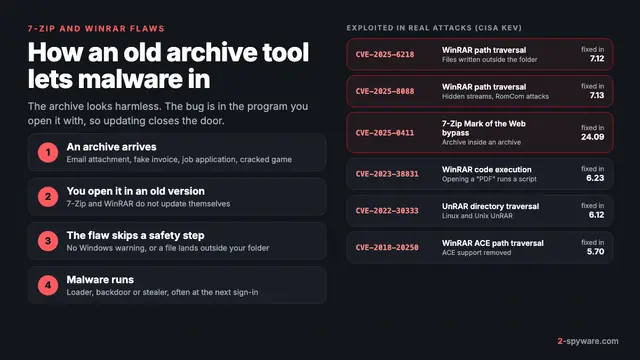 7-Zip and WinRAR vulnerabilities: what was exploited and what to do
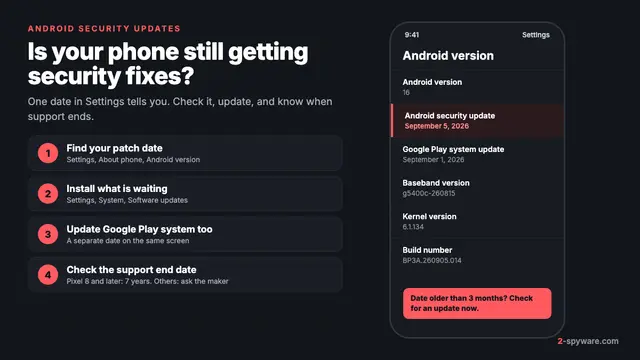 Android security updates: check, install and know when support ends
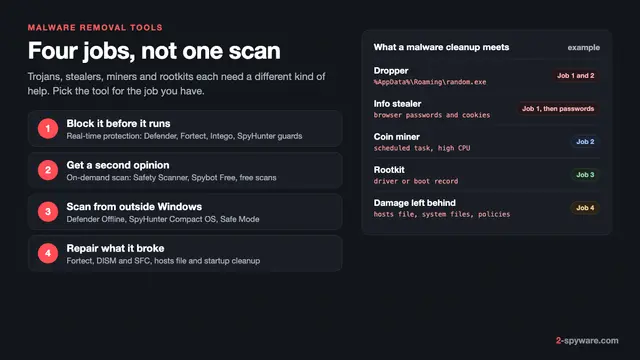 Best malware removal tools in 2026
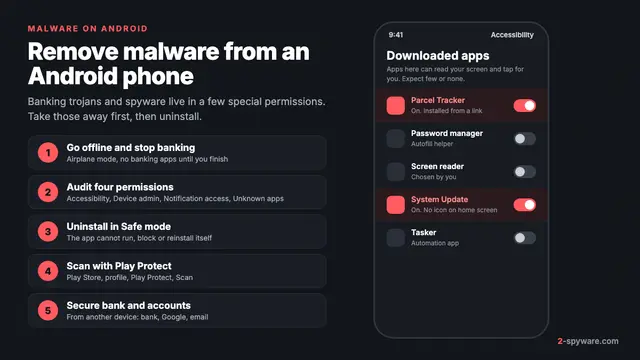 How to remove a virus or malware from an Android phone
 How to remove a virus or malware from a Mac
 Types of malware: what each kind does and how to spot it
 Windows zero-day vulnerabilities: what they are and how to close them