
How security companies name and group malware
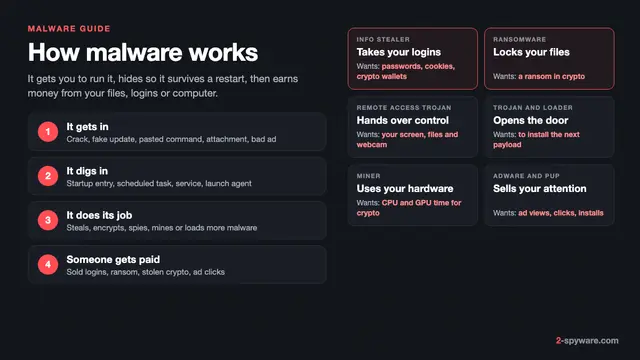
Malware is any program written to harm you, your device or your data. Our malware and viruses guide covers what it is, how it gets in and how to clean it up. This page answers a narrower question: what the different types are, how to tell them apart and how much each one should worry you.
The type in a detection name describes behaviour. Microsoft follows the CARO naming scheme, where the type comes first, then the platform, family and variant, as in Trojan:Win32/Wacatac [1]. Its list of types includes Virus, Worm, Backdoor, Ransom, PWS (password stealer), TrojanDownloader, Rogue, Adware, BrowserModifier and PUAMiner [1]. Our page on antivirus detection names shows how to read any vendor's label.
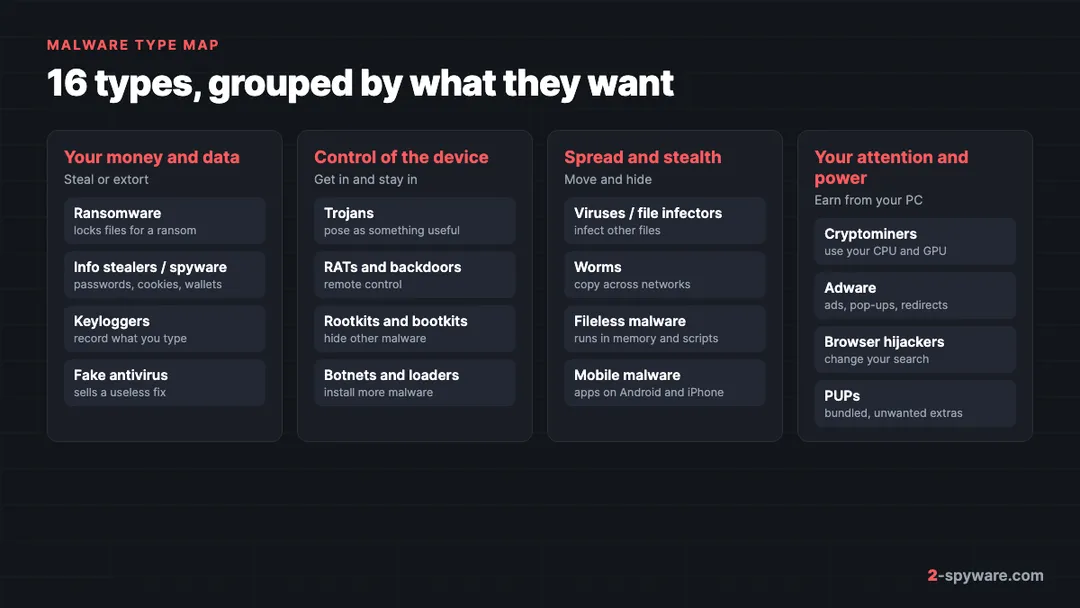
One sample often fits several types at once. A Wacatac detection can be a trojan that downloads a stealer, which then opens a backdoor. So read the type as the job a file does, not as a closed box. The map below groups the 16 types by what they want from you.
Types of malware compared
| Type | What it does | How it spreads | Typical sign | How serious | How it is removed |
|---|---|---|---|---|---|
| Virus / file infector | Adds its code to other programs or documents | Infected files, USB drives, shared folders | Programs crash or grow in size | Medium | Antivirus disinfects or replaces files |
| Worm | Copies itself to other computers on its own | Network flaws, shared drives, chat links | Slow network, same file on many PCs | High | Patch, then full scan on every device |
| Trojan | Poses as a useful file and runs a hidden payload | Cracks, fake updates, attachments | Few at first; new startup items | High | Antivirus scan, then check what it installed |
| Ransomware | Encrypts files and demands payment | Loaders, stolen remote logins, attachments | Renamed files and a ransom note | Critical | Remove it, then restore from backup or a decryptor |
| Info stealer / spyware | Takes passwords, cookies, cards and wallets | Cracks, ClickFix pages, fake installers | Account logins you did not make | Critical | Scan, then change passwords from a clean device |
| Keylogger | Records what you type | Bundled in trojans or installed by someone | Often none; hijacked accounts later | High | Scan, remove monitoring apps, change passwords |
| RAT / backdoor | Gives an attacker remote control | Attachments, fake software, other malware | Mouse moves, webcam light, odd traffic | Critical | Scan offline; reset Windows if in doubt |
| Rootkit / bootkit | Hides malware from Windows and antivirus | Dropped by other malware with admin rights | Scanners find nothing but symptoms stay | Critical | Offline scan or full reinstall |
| Adware | Shows ads, pop-ups and redirects | Free software bundles, notifications | Pop-ups and ads on every site | Low to medium | Uninstall, remove extensions, reset browser |
| Browser hijacker | Changes your search engine and home page | Extensions, bundles, policies | Searches go through an unknown site | Low to medium | Remove extension and policy, reset browser |
| PUP | Unwanted extra that nags or sells | Pre-ticked boxes in installers | Fake scan results, upsell pop-ups | Low | Uninstall in Settings |
| Cryptominer | Uses your processor to mine coins | Cracks, game cheats, hacked sites | Fans loud and CPU near full when idle | Medium | Antivirus scan, remove scheduled tasks |
| Fake antivirus | Shows fake threats to sell a fix | Pop-ups, fake scan sites, bundles | Alarming alerts that demand payment | Medium | Uninstall, block its notifications |
| Botnet / loader | Enlists your PC and installs more malware | Spam, fake updates, other malware | New unknown programs appear | Critical | Full scan, then check for second-stage malware |
| Fileless malware | Runs in memory and system tools | Scripts, macros, pasted commands | PowerShell windows, odd scheduled tasks | High | Behaviour-based scan, clear persistence |
| Mobile malware | Fake apps that steal, spy or show ads | Sideloaded apps, links in texts | Battery drain, ads, banking alerts | High | Remove admin rights, uninstall, reset phone |
Viruses and file infectors
A true virus attaches its code to another file, so the infection runs whenever you open that file.
On a home PC you notice programs that refuse to start, files that change size, or the same detection showing up in many folders. Deleting the files is risky because they may be your own programs, so a scanner that can disinfect is the safer route. Read more in our guide to worms and file infectors.
Worms
A worm spreads by itself from one machine to the next, with no file for you to open. WannaCry in 2017 combined a worm with ransomware and spread through an unpatched Windows file sharing flaw.
Signs include a slow home network, the same strange file on several computers, and friends asking why you sent them a link. Patch Windows first, then scan every device on the network. Our worms topic lists the families we have covered.
Trojans
A trojan pretends to be something you want: a cracked game, a PDF invoice or a browser update. Once you run it, it does a hidden job. Microsoft splits this type by job, with names such as TrojanDownloader, TrojanSpy, TrojanProxy and TrojanClicker [1].
Many trojans show nothing at first, which is the point. Look for new startup items, a program you do not remember installing, or antivirus alerts that name Trojan:Win32 with a family name, often after installing cracked software. The full walkthrough is in our trojans guide.
Ransomware
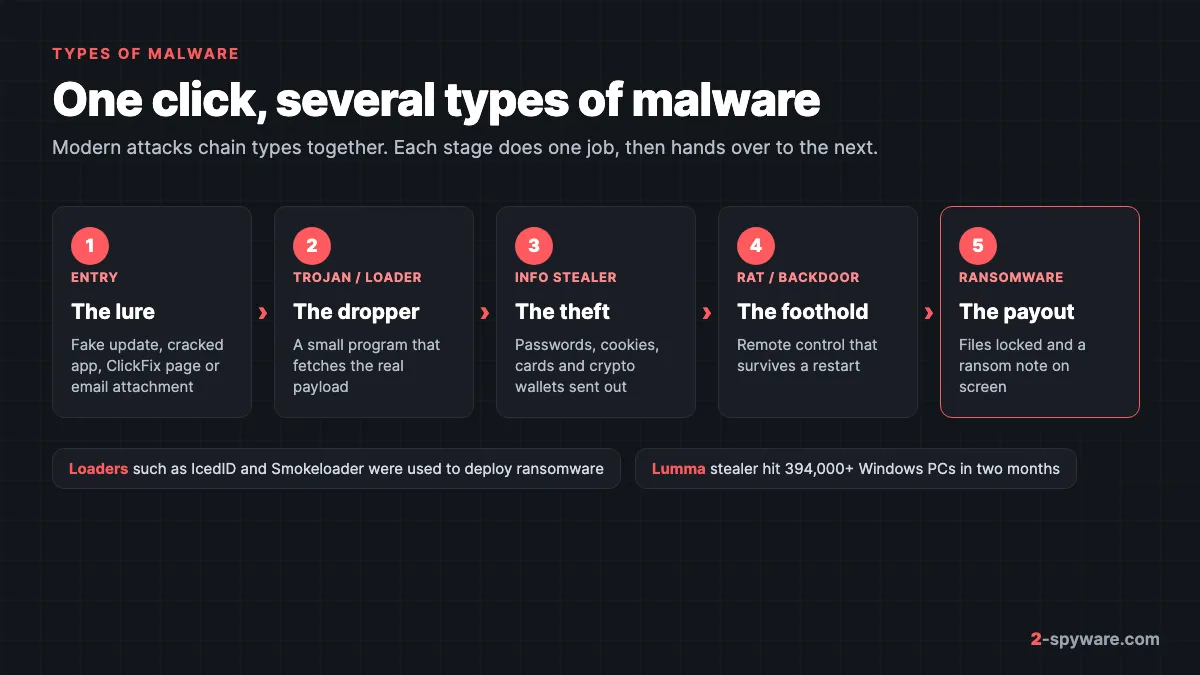
Ransomware encrypts your files and demands payment for the key. Home users still meet STOP/Djvu, which rides in with cracked software and leaves a _readme.txt note. Larger gangs reach victims through loaders: Europol says IcedID, SystemBC, Smokeloader, Bumblebee and others were used to deploy ransomware [5].
The signs are impossible to miss. File names gain a new extension, nothing opens, and a ransom note sits in every folder. Remove the ransomware before restoring anything, then use a backup or a decryptor. Our ransomware guide walks through each step.
Spyware and info stealers
Spyware watches you. Info stealers are the most common form today: they grab saved browser passwords, session cookies, card details and crypto wallets, then send them out within minutes. Microsoft says Lumma Stealer infected over 394,000 Windows computers between March 16 and May 16, 2025 [4]. It worked with law enforcement and Europol to seize about 2,300 of its domains [4].
ESET reported that SnakeStealer became the most detected info stealer in the first half of 2025, after the Lumma disruption [6]. Stealers often arrive through ClickFix pages, where a fake CAPTCHA tells you to paste a command; ESET saw that trick grow by over 500% [6]. Learn to spot it on our ClickFix page.
The PC itself may look normal. The damage shows up elsewhere: a login alert from another country, a hijacked social account or an emptied wallet. See our info stealers guide and then secure your accounts from a clean device.
Keyloggers
A keylogger records your keystrokes, and often screenshots and clipboard contents too. Some arrive inside malware, such as Snake Keylogger, which ESET now tracks as SnakeStealer [6]. Others are commercial monitoring tools, such as Perfect Keylogger, installed by someone with access to your computer. Microsoft labels the second group MonitoringTool [1].
You rarely see a keylogger working. Watch for an unknown program in Settings > Apps > Installed apps on Windows 11 (Apps & features on Windows 10), a new startup item, or accounts hijacked soon after you typed a new password.
Remote access trojans and backdoors
A remote access trojan (RAT) lets an attacker use your computer as if they sat in front of it. Remcos, AsyncRAT and Agent Tesla are families we see often. Microsoft names this type Backdoor [1].
Signs include a mouse that moves by itself, a webcam light switching on, and a firewall prompt for a program you never started. Run an offline scan and consider a reset, since the attacker may have left more than one way back in. Our remote access trojans guide has the details.
Rootkits and bootkits
MITRE ATT&CK describes rootkits as programs that hide malware by intercepting and changing the system calls that report files, processes and network connections [3]. Families it lists under this technique include ZeroAccess, LoJax and Skidmap [3]. A bootkit goes deeper and loads before Windows does, from the boot record or the UEFI firmware.
The tell is a mismatch: the PC behaves as if infected, but scans find nothing from inside Windows. Run a Microsoft Defender Offline scan, which starts outside Windows. If it still fails, back up your files and reinstall. Our Rootkit.TDSS guide shows one family in detail.
Adware
Adware makes money by putting ads in front of you: pop-ups, injected banners, new tabs and redirects. It usually arrives with free software or through a site you allowed to send notifications. Microsoft treats it as unwanted software rather than malware, under the Adware type [1].
You see ads on sites that never had them and alerts in the corner of the screen. Our adware guide covers removal on every system.
Browser hijackers
A browser hijacker changes your search engine, home page or new tab page so your searches pass through its site. Microsoft calls this type BrowserModifier [1]. Some hijackers add a policy, so Chrome shows the line "Managed by your organization".
The sign is a search engine you never chose that returns after you change it back. Remove the extension and the policy, then reset the browser. See our browser hijackers guide.
Potentially unwanted programs (PUPs)
A PUP is software you technically agreed to install but did not want: a driver updater, a system optimizer, a toolbar. Microsoft groups them as PUA, with subtypes such as PUABundler, PUAAdvertising and PUAMiner [1].
On a home PC you see a scan that finds hundreds of "issues" and a button to pay. Uninstall them in Settings > Apps. Our PUP guide explains how they get in.
Cryptominers
A cryptominer uses your processor or graphics card to mine coins, usually Monero with the XMRig miner, for someone else. It comes with cracked games, cheats and fake tools. Some, like Skidmap, even hide with a rootkit [3].
You hear the fans at full speed while the PC sits idle, and Task Manager shows high CPU use that drops the moment you open it. Read our cryptojacking guide and the cryptomining malware topic.
Fake antivirus and scareware
Scareware shows fake infection warnings to make you pay for a useless fix or call a fake support line. Microsoft names this type Rogue [1].
The sign is a loud alert that names a large number of threats, uses a red countdown and asks for payment. Real antivirus does not behave that way. Remove it with our rogue anti-spyware guide.
Botnets and loaders
A loader, also called a dropper, is a small first-stage program whose job is to install other malware. Europol describes droppers as tools used in the first stage of an attack to slip past security and deploy viruses, ransomware or spyware [5]. In May 2024, its Operation Endgame took down over 100 servers used by IcedID, SystemBC, Pikabot, Smokeloader, Bumblebee and Trickbot [5].
Infected machines report to a command server and form a botnet. Older names such as Qakbot and Emotet worked this way. On your PC, the sign is new unknown programs appearing over days, so after cleaning, scan again for second-stage malware.
Fileless malware
Fileless malware avoids leaving a normal program on disk. Microsoft notes there is no single definition and splits it into three groups: no file activity, indirect file use, and files needed only for part of the attack [2]. Examples it gives include Kovter, which hides in the registry, and Poshspy, which stores a PowerShell command in WMI [2].
Watch for PowerShell windows that flash open at startup and scheduled tasks with long encoded commands. Behaviour-based scanning catches more of these than file scans do. Afterwards, clear leftovers with our guide to removing what malware leaves behind.
Mobile malware
Phones get most of the same types in app form: adware, banking trojans, spyware and fake apps that subscribe you to paid services. ESET reported Android adware detections up 160% in the first half of 2025, driven largely by Kaleidoscope, and NFC-based payment fraud up more than thirty-five times [6].
Signs include ads on the home screen, a fast-draining battery, and apps you cannot uninstall because they hold device admin rights. Start with our Android virus guide.
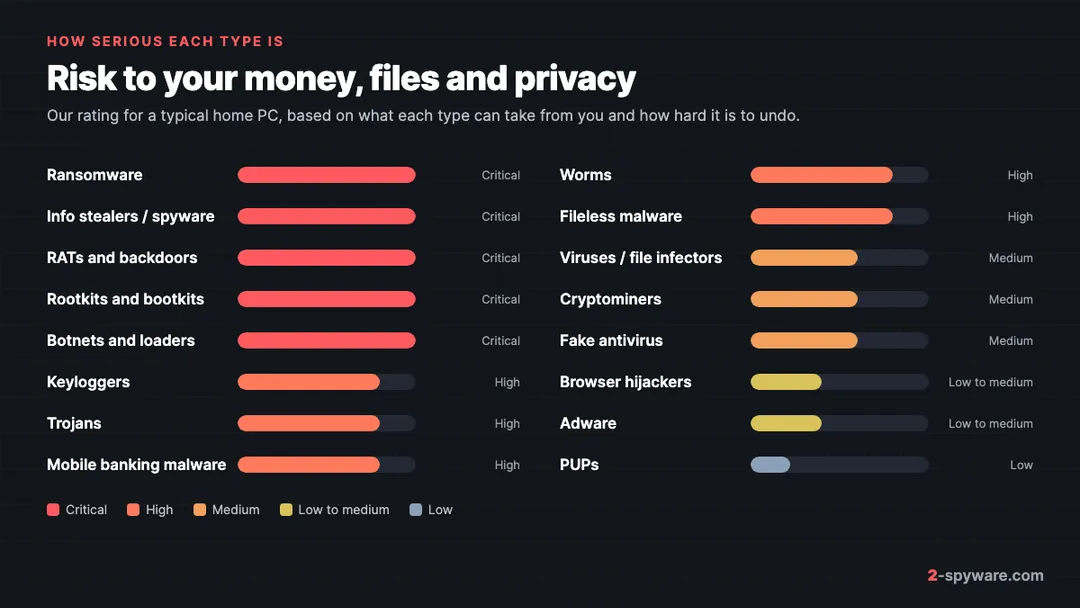
How serious each type is
We rate each type by what it can take from you and how hard that is to undo.
Types arrive together, as the picture at the top shows. Treat any infection as a reason to check for the others.
Which type do you have? A quick check
- Note the exact detection name from Windows Security > Protection history and read its type [1].
- Match what you see to the "Typical sign" column in the table above.
- Run a full scan, then a Defender Offline scan for anything rated high or critical.
- For stealers, keyloggers and RATs, change your passwords from a different, clean device.
- If you are still not sure, ask in our Windows help forum or check a suspicious link with our link checker.
Frequently asked questions
What are the main types of malware?
The main types are viruses, worms, trojans, ransomware, spyware and info stealers, keyloggers, remote access trojans, rootkits, adware, browser hijackers, potentially unwanted programs, cryptominers, fake antivirus, botnets and loaders, fileless malware and mobile malware. Many real infections combine several of them.
What is the most common type of malware?
For home users, trojans and the info stealers they carry are among the most common, along with adware and browser hijackers. Stealers spread through cracked software, fake updates and fake CAPTCHA pages that tell you to paste a command.
What is the most dangerous type of malware?
Ransomware does the most visible damage because it locks your files. Info stealers and remote access trojans can cost as much, because they take your accounts and money quietly. Rootkits are dangerous because they hide the other types from your antivirus.
Is spyware the same as an info stealer?
An info stealer is one kind of spyware. Spyware is any program that watches you. An info stealer grabs saved passwords, cookies and wallets in one quick sweep and sends them to the attacker, often within minutes.
What is the difference between a virus, a worm and a trojan?
A virus needs you to open an infected file. A worm spreads on its own between computers. A trojan pretends to be something useful so you run it yourself. All three can carry the same harmful payload.
Can antivirus detect every type of malware?
Good antivirus catches most known families of every type. Rootkits, fileless malware and brand new stealers are harder to catch, which is why an offline scan and behaviour-based protection help. No scanner catches everything, so backups and two-factor login still matter.
Can phones get the same types of malware as computers?
Yes. Android phones get adware, banking trojans, spyware and fake apps, mostly from apps installed outside Google Play or from links in text messages. iPhones are much harder to infect but still get scam profiles, calendar spam and phishing.
What does Trojan:Win32 mean in a detection name?
It is Microsoft's naming format. Trojan is the type, Win32 is the platform, and the word after the slash is the family name. The type tells you what the file does, so Trojan means it hides a payload inside something that looked harmless.
Sources
- Microsoft Learn: How Microsoft names malware read 2026-10-08
- Microsoft Learn: Fileless threats read 2026-10-08
- MITRE ATT&CK: Rootkit, Technique T1014 read 2026-10-08
- Microsoft On the Issues: Disrupting Lumma Stealer read 2026-10-08
- Europol: Largest ever operation against botnets hits dropper malware ecosystem read 2026-10-08
- ESET WeLiveSecurity: ESET Threat Report H1 2025 read 2026-10-08
 What is malware and how to remove it
 Best malware removal tools in 2026
 How to remove a virus or malware from an Android phone
 How to remove a virus or malware from a Mac