
Disclosure: 2-spyware.com earns a commission if you buy Fortect through links on this page. Other products may also pay us a commission. Our scores and the facts below come from our own published reviews of each tool, linked in every section.
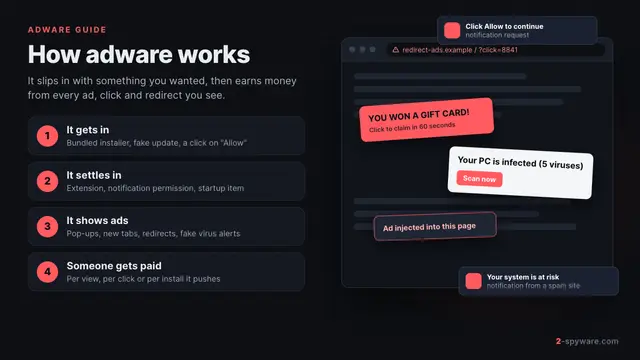
If you are not sure the problem is adware yet, start with our adware guide. It explains the signs, how adware gets in and how to remove it by hand. This page is for the next step: choosing a scanner to find what you missed and to keep it from coming back.
What an adware remover must actually do
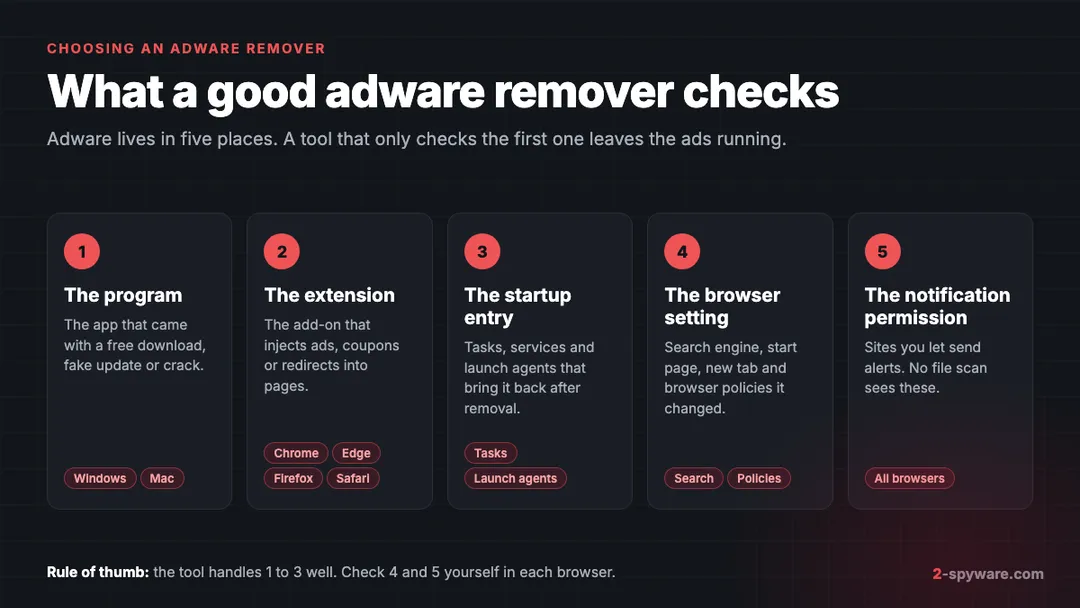
Adware rarely sits in one file. A typical case has five parts, and each one can keep the ads running on its own. Use these five places as your checklist when you judge any tool, including the ones below.
- The program. This is the app that came with a free download, a fake update or a crack. A scanner should find it by name and by behavior, then remove its files and folders.
- The browser extension. Most ad injection, coupon pop-ups and search redirects happen inside an add-on. A good tool checks Chrome, Edge, Firefox and Safari, not only one browser.
- The startup entry. Scheduled tasks, services, Run keys and Mac launch agents reinstall the adware after you delete it. Removing these is what stops the ads from coming back.
- The browser setting. Adware changes your search engine, start page and new tab, and it can add a policy so the change survives a reset. The tool should show you which setting changed.
- The notification permission. A site you allowed to send alerts can push ads to your desktop with no program installed at all. File scanners do not see these, so you remove them in browser settings.
Three more things separate a useful tool from a frustrating one. First, it should let you review each result before removal, since some flagged programs are ones you installed on purpose. Microsoft files most adware as potentially unwanted applications, which it does not consider malware [12]. A tool that asks before deleting a PUA is being careful.
Second, it should be clear about what is free. Many removers scan for free and charge for removal, which is fine if the page says so before you install. Third, it should explain detection names in plain words. Our page on antivirus detection names shows why one adware file can carry five different labels.
Adware removal tools compared
| Tool | Platforms | What it removes | Free part | Price from | Our score |
|---|---|---|---|---|---|
| Fortect | Windows 10 and later; separate Mac product | Malware, PUA and the system damage they leave, plus browser traces | Full scan and one-by-one repair | 30.95 euros first year, 1 PC | 9.2 |
| SpyHunter 5 | Windows 7 to 11, macOS 10.13+ | Adware, hijackers, PUPs, trojans and other malware | Scan, tracking cookie removal | $29.70 per 6 months | 8.6 |
| Combo Cleaner | macOS and Windows | Mac adware, rogue notifications, bad extensions | Scan and Mac cleanup tools | $47.95 per 6 months | 8.4 |
| Intego | macOS 12.4 or later | Mac malware, adware and Windows malware on the Mac | None; 30-day refund window | $29.99 first year | 8.4 |
| Microsoft Safety Scanner | Windows 7 to 11 | Threats in Defender's definitions | Everything; it is free | Free | 7.8 |
| Spybot Search and Destroy | Windows 7 to 11 | Spyware, adware, tracking software | Scan and removal | 18.99 euros a year (Home) | 6.4 |
Fortect: our pick for Windows
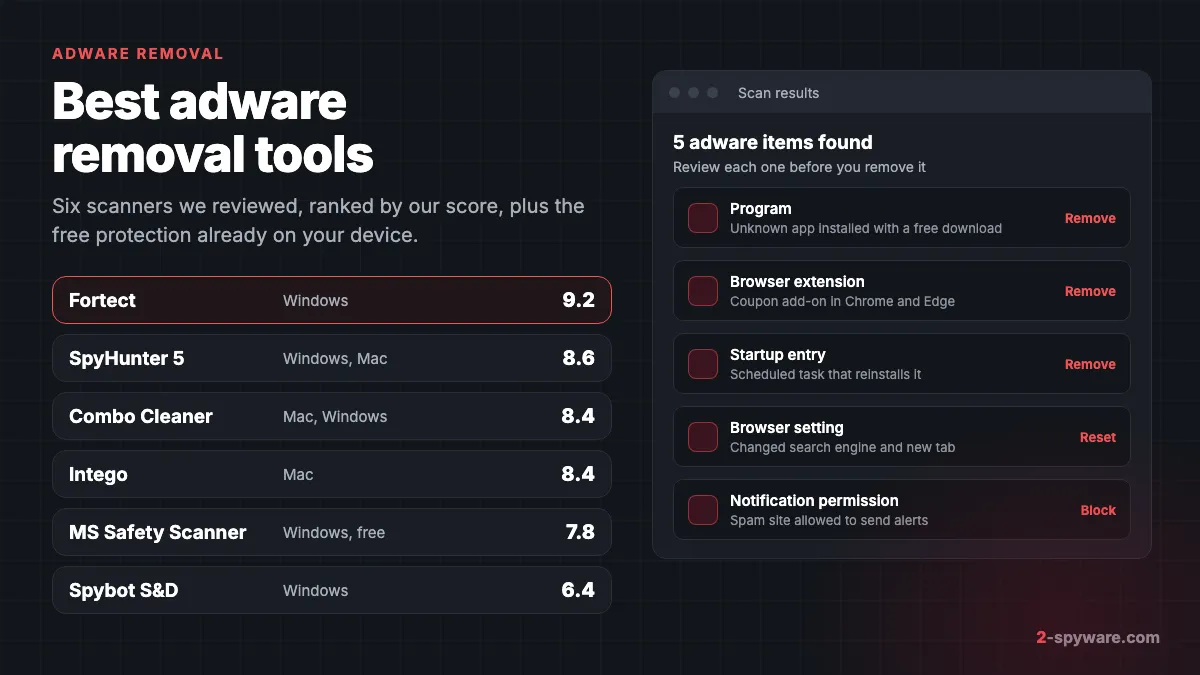
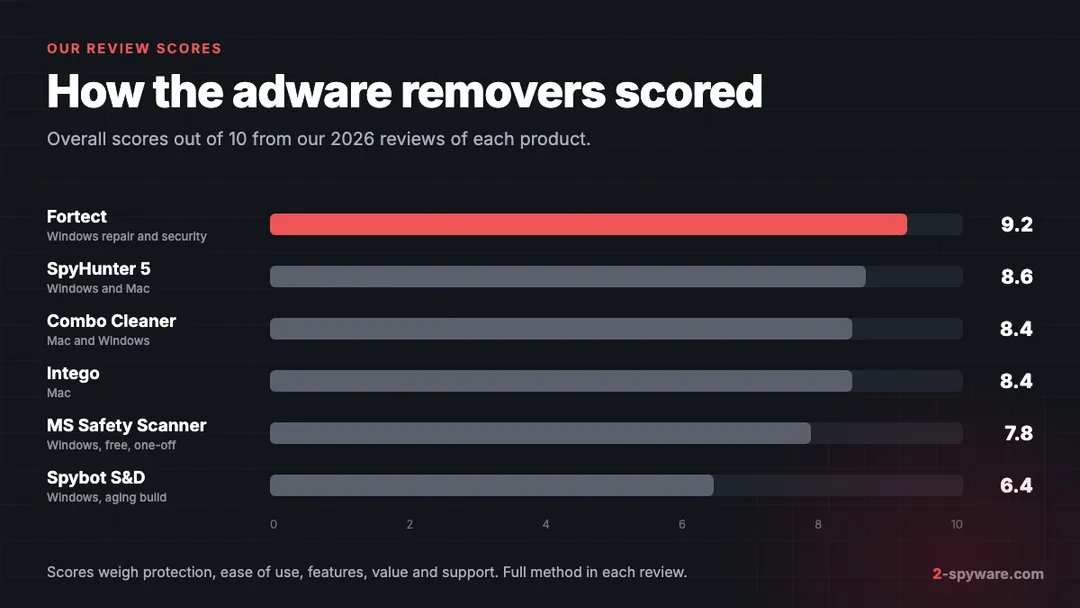
Fortect scores 9.2 in our review, the highest on this list. It is a Windows repair and security suite, and that combination suits adware well. Adware cleanup is not only about deleting a program. It is also about undoing what that program changed.
The free diagnostic scan takes about five minutes. One of its six stages is Malware and PUA, which looks for threats and for the system changes they tend to leave behind, such as modified settings and damaged system files. Fortect flags potentially unwanted programs and lets you decide, because some have legitimate uses. That is the review step we recommend for adware anyway.
The other stages matter for adware too. Fortect replaces damaged or missing Windows files with healthy copies and repairs broken registry entries. Its Privacy Traces stage collects browser caches and cookies from Chrome, Edge, Firefox and Opera, and the app marks that cleanup as free once the scan is done. If a hijack-related issue shows up, open it in View and Fix to see which setting changed.
- Free part: the full scan, plus free one-by-one repair through View and Fix, so you see results on your own PC before paying.
- Paid plans: Essential covers 1 PC for 30.95 euros in the first year, Multi-Device covers 3 PCs for 37.95 euros, and Ultimate covers 5 PCs for 53.95 euros [2].
- Every plan includes automated repair, antivirus with real-time monitoring of downloads, installs and files, driver updates and restore points.
- Refunds: a 60-day refund window on the first purchase, with refunds usually processed within 12 hours. Plans renew yearly at the regular rate shown at checkout [2].
- Extras: Fortect also offers a Chrome extension that blocks malicious websites, and a separate Fortect for Mac security product [1].
Use Fortect when ads keep returning on a Windows PC, when Windows feels broken after an infection, or when you want one tool to scan, repair and protect. Pair it with the browser steps later on this page, since notification permissions live in each browser.
SpyHunter 5: strong support for stubborn cases
SpyHunter 5 scores 8.6. EnigmaSoft lists adware, browser hijackers and unwanted programs among the threats it removes, along with trojans, ransomware and rootkits [3]. It was AV-TEST certified in 2024 with 15 of 18 points and detected every widespread malware sample in that test [4].
Two features help with adware that fights back. The HelpDesk builds a custom fix for your PC from a diagnostic report, at no extra cost. Compact OS boots a small system beneath Windows to remove files that the running adware locks.
- Free part: a malware, PUP and privacy scan, free removal of tracking cookies and a free Web Security extension for Chrome, Firefox and Edge.
- Paid: removal starts at $29.70 per six months for SpyHunter 5 Basic, about $59 a year [3]. SpyHunter for Mac is sold separately.
- Trial and refunds: the trial asks for a card and bills after 7 days unless you cancel. Purchases have a 30-day full refund.
Combo Cleaner: good pick for Mac adware
Combo Cleaner scores 8.4 and our review calls it a good pick for Mac adware cleanup. On a Mac it finds adware and unwanted apps, and its paid plans remove rogue push notification sources and malicious extensions in Chrome, Edge and Firefox. That covers two of the five places a file scanner usually misses.
- Free part: the scan shows what it finds, and Disk Cleaner, Big Files and Duplicates are free on Mac with no time limit.
- Paid: Essential costs $47.95 per six months for one device, and Premium covers 5 devices for $79.95 [5]. Plans renew every six months.
- Testing: VB100 certified through August 2026 [6]. It has no AV-TEST or AV-Comparatives results to compare.
- Refunds: 30-day refund window.
Combo Cleaner updates its Mac malware definitions hourly, which helps with fast-changing adware families.
Intego: full Mac security suite
Intego also scores 8.4. It is a Mac security suite rather than a dedicated adware remover, with real-time antivirus, a per-app firewall and cleanup tools in one app. Intego says it removes viruses, malware, spyware and adware [7]. It got full marks from AV-TEST in March 2026 [8] and an Approved award from AV-Comparatives in its 2026 Mac test [9].
- Free part: none, but every plan has a 30-day refund window, which works as a trial.
- Paid: plans for one Mac start at $29.99 for the first year and renew at $39.99 a year [7]. Higher plans add SmartClean, a VPN and iPhone coverage.
- Lab note: AV-Comparatives measured 96.7 percent on Mac malware in 2026, below the leading suites [9].
Choose Intego if you want ongoing protection on a Mac, not just a one-time cleanup. Choose Combo Cleaner if your main goal is to clear adware, notifications and extensions you already have.
Microsoft Safety Scanner: free one-off second opinion
Microsoft Safety Scanner scores 7.8. It is a free, portable scanner that uses the same security intelligence Microsoft publishes for Defender Antivirus [10]. You run it, it removes what it finds and tries to reverse the changes those threats made, and then you delete it.
There is no real-time protection and no update, and each copy expires 10 days after download [10]. Treat it as a second look after you clean up.
Spybot Search and Destroy: free, but aging
Spybot Search and Destroy scores 6.4. Its free edition scans the registry, processes, browser data and files for spyware, adware and tracking software, and removes what it finds. Startup Tools and Immunization are useful extras for experienced users.
The weak points are age and testing. The current program build dates from February 2023, there are no current independent lab results for Spybot, and purchases are not refundable. Home costs 18.99 euros a year and Professional 29.99 euros [11]. Use the free edition as an extra opinion, not as your only tool.
Free built-in protection to use alongside
Every major platform ships with a scanner. Keep it on, even after you install a third-party tool.
- Microsoft Defender on Windows can detect and block potentially unwanted applications, but PUA blocking needs to be on [12]. In Edge, turn on Block potentially unwanted apps under Privacy, search, and services, which Microsoft says is off by default [12].
- XProtect on macOS updates its signatures apart from system updates, checks apps at launch and moves known malware to the Trash [13]. It does not handle extensions or notification permissions.
- Google Play Protect on Android is on by default, checks apps from Google Play and other sources and may disable or remove harmful ones [14].
These tools are good at known threats. They are less helpful with a grey-area program you agreed to install or with site notifications. That gap is where a dedicated adware remover and the browser steps below earn their place.
How to use any tool on adware correctly
The order of steps matters more than the brand. This routine works with every tool on this page.
- Uninstall what you recognize first. Remove unknown apps from Settings on Windows or Applications on Mac, sorted by install date. This leaves less for the scanner to fight.
- Update the scanner, then run a full scan, not a quick one. Quick scans check common locations and can skip the folder where a launch agent or task lives.
- Review the results. Read each detection name and path. If you installed a flagged program on purpose and trust it, leave it. Otherwise select it.
- Remove and restart. Many removers finish the job after a reboot, especially for files that were in use.
- Clean up each browser. Remove unknown extensions with our extension removal guide, then remove spam sites from notifications with how to stop site notifications.
- Reset the browser if the search engine or start page is still wrong. Our browser reset guide covers Chrome, Edge and Firefox. Google advises checking for unwanted programs before a reset [15].
- Scan once more after a day. If anything returns, check tasks and startup folders with our guide to removing malware leftovers.
If you entered a password on a page you were redirected to, change it from a clean device. The FTC also suggests avoiding banking and shopping logins until the device is clean [16].
How to spot fake adware cleaners
Some "adware cleaners" are themselves unwanted software. They are known as rogue anti-spyware, and they sell themselves by scaring you. The signs are consistent across hundreds of cases.
- You met it through a pop-up, a redirect or a notification that said your device is infected. Real security vendors do not scan your PC from a web page.
- The scan finds dozens of threats in seconds on a PC that was fine yesterday, and every one needs the paid version.
- It has no named company, no refund policy and no independent test results you can check on the lab's own site.
- It arrived bundled with another program, or you cannot uninstall it from the normal app list.
- It shows a countdown, a flashing warning or a price that drops if you act fast.
Before you install any cleaner, look up its review and the vendor's website. You can check whether a site is what it claims with our website safety checker. The FTC advises getting security software from a source you trust and checking recommendations from independent reviewers [16].
Frequently asked questions
What is the best adware removal tool?
In our reviews, Fortect scored highest at 9.2 for Windows, because it scans for adware and PUA and also repairs the system changes adware leaves. On Mac, Combo Cleaner and Intego both scored 8.4. The right choice depends on your system and whether you want a one-time cleanup or ongoing protection.
Is there a free adware cleaner that actually removes adware?
Yes. Microsoft Safety Scanner is free and removes what it detects on Windows, and the free edition of Spybot Search and Destroy removes what it finds. Fortect offers free one-by-one repair after its scan. Most other tools scan for free and charge for removal.
Do I need an adware remover if I have Microsoft Defender?
Not always. Defender catches many known threats, especially with PUA blocking turned on. A dedicated tool helps when ads keep coming back, when you cannot find the program responsible, or when Windows files were damaged along the way.
Can an adware removal tool remove pop-up notifications?
Usually not on its own. Desktop pop-ups from websites come from a notification permission stored in the browser, not from a file. Combo Cleaner removes rogue notification sources on Mac, but on most systems you remove these sites in each browser's notification settings.
What is the best adware remover for Mac?
Combo Cleaner, which our review calls a good pick for Mac adware cleanup, and Intego, which adds a firewall and real-time protection. Both scored 8.4. Keep XProtect enabled alongside either one.
What about other free adware cleaners?
This page covers only tools we have reviewed in full. If you use another free scanner, apply the same checks: a named vendor, a clear free part, results you can review before removal and no scare tactics.
Why does adware come back after I remove it?
Usually because a startup entry, scheduled task, launch agent or browser policy was left behind and reinstalled it. Another cause is a browser that syncs the extension back from your account. Run a full scan, clean up each browser and check startup items again a day later.
Are adware cleaners safe to install?
The tools in our reviews are from named companies with published terms and refund policies. Fake cleaners that appear through pop-ups or fake virus alerts are not safe and are a form of rogue security software. Install only from the vendor's own website.
How much does an adware removal tool cost?
In our reviews, prices start at 30.95 euros for the first year of Fortect for one PC, $29.70 per six months for SpyHunter 5 and $29.99 for the first year of Intego. Microsoft Safety Scanner is free. Check renewal terms at checkout.
Sources
- Fortect homepage: All-in-One Security, Privacy and OS Health Suite read 2026-10-08
- Fortect pricing and checkout page (plans, renewal and money-back terms) read 2026-10-08
- EnigmaSoft: SpyHunter product page (SpyHunter 5 for Windows and SpyHunter for Mac, prices, system requirements) read 2026-10-08
- AV-TEST: Product Review and Certification Report, EnigmaSoft SpyHunter 5.16, Windows 11, March and April 2024 read 2026-10-08
- Combo Cleaner purchase page (plans, prices and renewal) read 2026-10-08
- Virus Bulletin: Combo Cleaner in VB100 read 2026-10-08
- Intego pricing page: Intego ONE plans, renewal prices and system requirements read 2026-10-08
- AV-TEST: Test antivirus software for MacOS Tahoe, March 2026 read 2026-10-08
- AV-Comparatives: Mac Security Test and Review 2026 read 2026-10-08
- Microsoft Learn: Microsoft Safety Scanner Download (how to run a scan, 10-day expiry) read 2026-10-08
- Safer-Networking: Compare Spybot Editions (features and prices) read 2026-10-08
- Microsoft Learn: Detect and block potentially unwanted applications read 2026-10-08
- Apple Platform Security: Protecting against malware in macOS read 2026-10-08
- Google Play Help: Use Google Play Protect to help keep your apps safe and your data private read 2026-10-08
- Google Chrome Help: Remove unwanted ads, pop-ups and malware read 2026-10-08
- FTC Consumer Advice: Malware: How To Protect Against, Detect, and Remove It read 2026-10-08
 What is adware and how to remove it
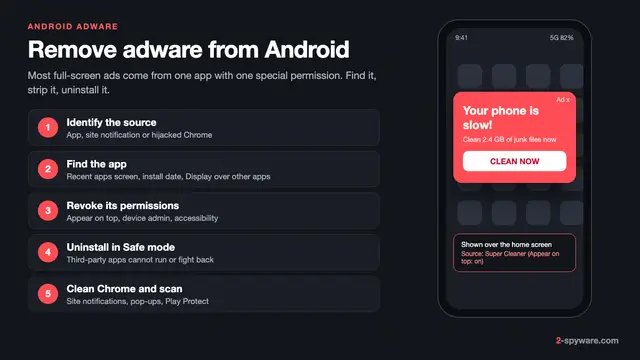 How to remove adware from Android
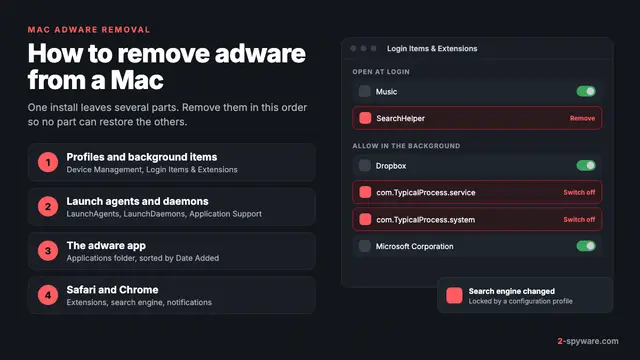 How to remove adware from a Mac