
What a remote access trojan is
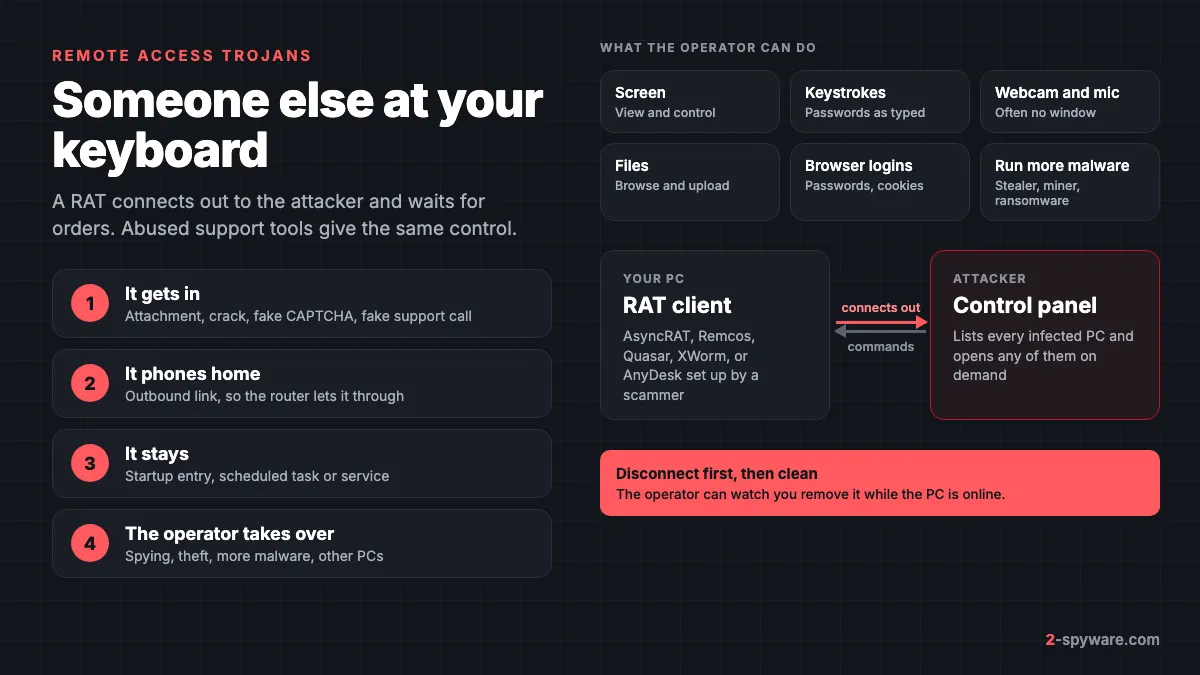
A remote access trojan, or RAT, is malware that opens a hidden control channel from your computer to a server run by an attacker. It is one branch of the wider trojan family: the trojan gets in by looking harmless, and the RAT part keeps the door open afterwards. Once it runs, it reports the new PC to its operator and waits for commands.
The connection starts from inside your network, the same way your browser reaches a website, so a home router lets it through. The operator sees infected PCs in a control panel and can open any of them, often while you are using it.
Many RATs began as open-source or commercial administration tools. Quasar has been public on GitHub since 2015 [3], and free source code is why new variants appear every month. Our remote access trojans topic collects our guides on single families and the files that deliver them.
What an attacker can do with a RAT
Vendor research on the common families shows the same core features. Remcos logs keystrokes and the clipboard, and has commands for the webcam, microphone and screen logger [4]. AsyncRAT can record the desktop, use the camera, disable Windows Defender, run miners and fetch more payloads [5].
| Capability | What the attacker gets |
|---|---|
| Screen view and remote control | Watches you work, or moves the mouse and types when you are away |
| Keylogging and clipboard capture | Passwords you typed, card numbers, messages, copied crypto addresses |
| Browser password and cookie theft | Saved logins and live sessions that skip the password and 2FA |
| Webcam and microphone | Video and sound from the room, often with no window on screen |
| File browser and upload | Documents, photos, ID scans, tax files, wallet files |
| Download and run | A second stage: a stealer, a miner or ransomware |
| Pivot | A foothold to reach other PCs, a NAS or the router on the same network |
In businesses the RAT is often a stepping stone. In one case Microsoft described, criminals who got in through a remote support session deployed SystemBC, a commodity RAT, moved across the network and finished with Black Basta ransomware [2].
RAT or legitimate remote tool?
AnyDesk, TeamViewer, ScreenConnect, Quick Assist, Splashtop and RustDesk let IT staff fix computers from a distance. They have the same powers as a RAT, but they are signed and trusted by antivirus. The difference is who controls the session and whether you agreed to it.
Criminals know this. In a campaign CISA found in October 2022, phishing e-mails led US federal staff to download portable copies of ScreenConnect and AnyDesk that connected to the criminals' server [1]. The callers had victims log in to their bank while connected, then staged a fake refund to steal money [1].
Microsoft reported the same pattern with its own Quick Assist. A group it tracks as Storm-1811 called targets, posed as Microsoft or company IT support, and talked them into granting a session [2]. Microsoft's advice: accept a remote helper only when you started the contact yourself [2]. Our tech support scams guide shows the pop-ups and scripts behind these calls.
| Question | Legitimate support | Backdoor or scam |
|---|---|---|
| Who started it? | You called a number you looked up yourself | A pop-up, a cold call, a Teams message or an e-mail |
| Is the tool installed? | Installed by you or your IT team, with a matching date | A portable file in Downloads or a random folder, or an install you cannot explain |
| When does it run? | Only during the session you agreed to | Starts with Windows or keeps unattended access |
| What do they ask? | To fix a named problem | To open your bank, buy gift cards, or keep the session open |
RAT families you are most likely to meet
- AsyncRAT. An open-source C# RAT that ESET calls a cornerstone of modern malware, with a sprawling tree of forks [3]. Microsoft Defender reports it as Backdoor:MSIL/AsyncRAT; our AsyncRAT topic lists servers that hand it out.
- DcRat and VenomRAT. Forks in the middle of the AsyncRAT tree [3]. DcRat patches AMSI and ETW to blind security tools, and ships a simple ransomware plugin [3].
- Quasar. Public on GitHub since 2015, and the likely model for AsyncRAT [3]. It is the most searched RAT guide on our site.
- Remcos. Usually arrives by phishing and keeps encrypted settings naming the victim, the keylog file and which spying features to start [4]. See our Remcos topic.
- XWorm. Logs keystrokes, takes screenshots, uses the webcam and can drop ransomware [6]. It often comes from PowerShell scripts in open web folders.
- njRAT. An older .NET RAT still shared widely because builders and tutorials are easy to find.
- DarkComet. An early, well-known RAT whose author stopped development in 2012 after reports that it was used to spy on activists in Syria.
How RATs get onto a PC
- E-mail attachments posing as invoices, orders or shipping papers. Fortinet's Remcos case began this way [4].
- Cracked software, game cheats and fake installers.
- Fake CAPTCHA pages that tell you to paste a command into Run or PowerShell.
- Loaders already on the PC that fetch a RAT as their next stage.
- A call or chat from fake support that ends with you installing a remote tool [1][2].
- Someone with physical access, such as a partner, installing remote software directly.
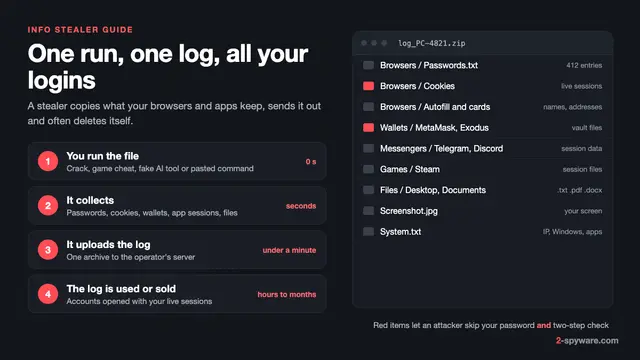
In the last case, think about your safety first, because removal can alert the person who installed it. Our information stealers guide covers what happens to data once it leaves the PC.
Signs someone is remotely accessing your computer
A RAT is built to stay quiet, so many infected PCs show nothing. Most odd behaviour, on the other hand, has an innocent cause. Weigh each sign by how specific it is.
| Sign | How strong | Innocent explanation to rule out |
|---|---|---|
| A remote tool or new user account you did not add | Strong | Your employer, family member or a repair shop installed it |
| Bank transfers, password changes or new devices on your accounts | Strong | Someone else in the household with access |
| The mouse moves and windows open while you watch | Strong | A faulty mouse, touchpad or touchscreen |
| Webcam light on when no app should use it | Medium | A video app or Windows Hello starting in the background |
| Windows Security turned off, or exclusions you did not add | Medium | Another antivirus product took over |
| PC slow, fan loud, high network use when idle | Weak | Updates, OneDrive sync, a game launcher, a miner |
One weak sign is not proof. An unexplained remote tool plus account activity you did not cause is. An e-mail claiming a hacker recorded you with a RAT is almost always a bluff; see the private malware RAT e-mail scam.
How to check Windows 11 and 10 for remote access
1. Look at live network connections
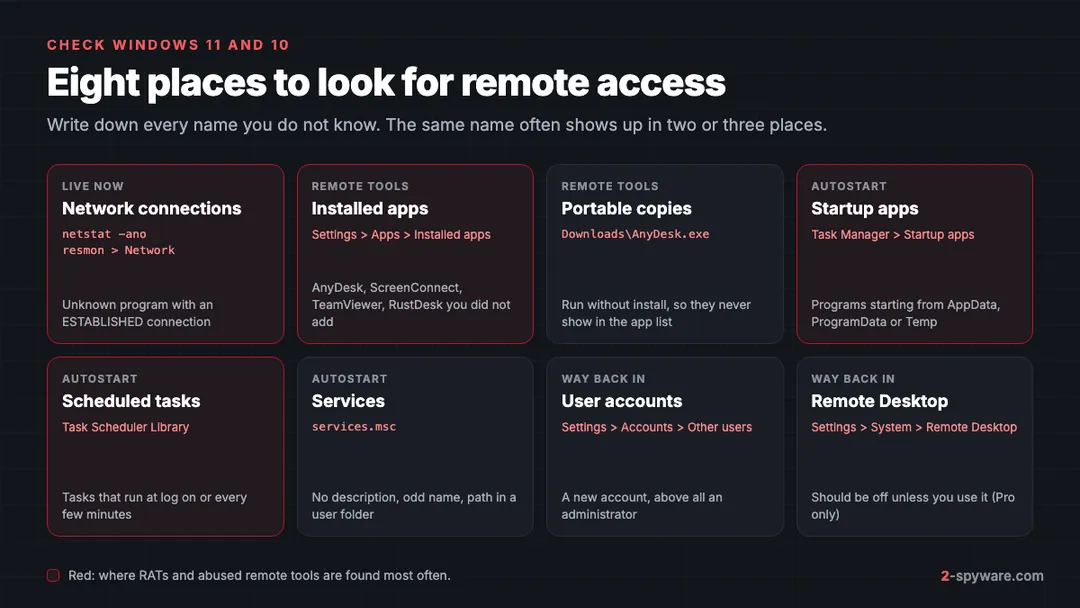
Open Command Prompt as administrator and run netstat -ano. It lists active TCP connections and listening ports, with numeric addresses and the process ID [7]. Note ESTABLISHED connections to addresses you cannot place, then match the PID on the Details tab of Task Manager [7]. netstat -b shows program names directly but can be slow [7].
Resource Monitor shows the same with less typing. Press Windows key + R, type resmon and open the Network tab. TCP Connections lists each program with its remote address. Browsers, OneDrive and Teams will fill most of it; look for an unknown program, or a remote tool, holding a connection you did not start.
The caveat: an idle RAT may hold no connection when you look, and many use port 443 like normal web traffic. A clean result does not clear the PC. You can test a suspicious process with our guide to checking a Windows process.
2. Check installed and portable remote tools
In Windows 11, open Settings > Apps > Installed apps (Apps & features on Windows 10) and sort by install date. Look for AnyDesk, TeamViewer, ScreenConnect, Splashtop, RustDesk, Atera, NetSupport or anything with no publisher. Also search Downloads for portable copies, which never appear in the app list [1].
3. Check startup entries
Open Task Manager with Ctrl + Shift + Esc and choose Startup apps (Windows 11) or the Startup tab (Windows 10). Right-click an unknown entry and choose Open file location. A program starting from AppData, ProgramData or Temp with a vague or random name deserves a closer look.
4. Check scheduled tasks
Open Task Scheduler, select Task Scheduler Library and look for tasks that run at log on or every few minutes. Open the Actions tab of anything unfamiliar and read the program path. AsyncRAT keeps itself running this way [5].
5. Check services
Press Windows key + R, type services.msc and sort by Description. A service with no description, a misspelled Microsoft name or a path in a user folder is suspicious. A remote tool set up for unattended access also installs a service, so it starts before anyone signs in.
6. Check accounts and Remote Desktop
Go to Settings > Accounts > Other users (Family & other users on Windows 10) and remove accounts you did not create. On Windows 11 Pro, Settings > System > Remote Desktop should be off unless you use it. Home editions cannot accept Remote Desktop connections at all.
How to remove a remote access trojan, in order
The operator can watch you clean up, so cut the line first and protect money from another device.
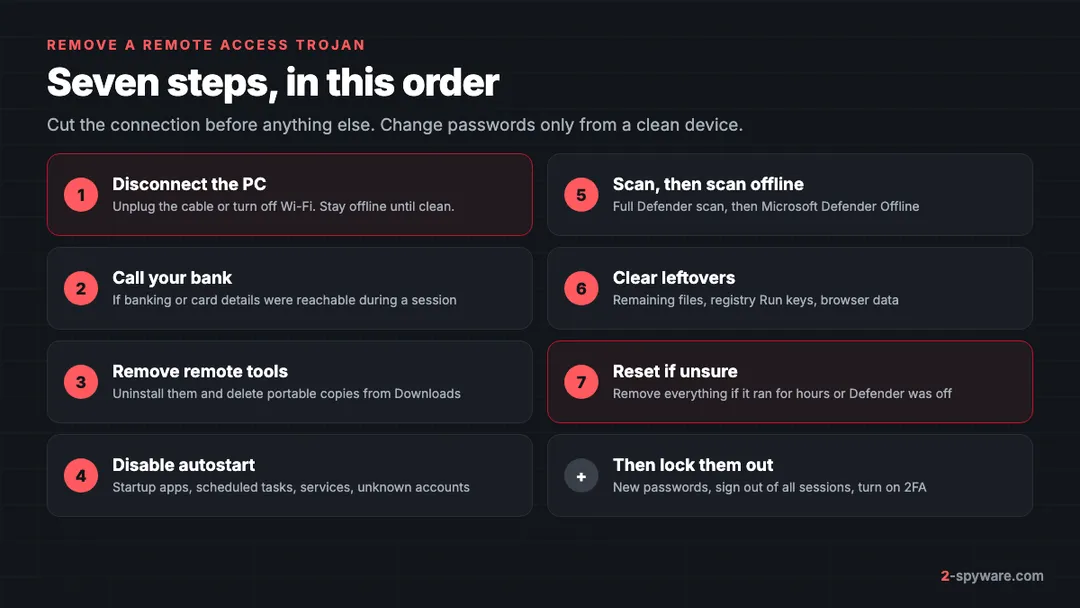
- Disconnect the PC from the internet: unplug the cable or turn off Wi-Fi. Keep it offline until it is clean.
- If the attacker could reach your banking, call your bank on the number on your card now. If you already paid, follow what to do after paying a scammer.
- Uninstall remote tools you did not install and delete portable copies from Downloads: uninstall a program on Windows.
- Disable the startup entries, scheduled tasks and services you noted, and delete user accounts you did not create.
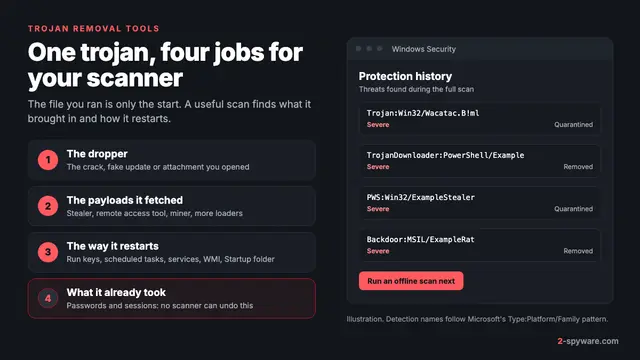
- Run a full Microsoft Defender scan, then a Microsoft Defender Offline scan, which runs before Windows loads so the RAT cannot hide.
- Clear leftover files and registry entries with our malware leftovers guide.
- Decide whether to reset Windows, as below.
When to reinstall Windows instead
A scan removes the RAT it recognises. It cannot tell you what the operator did or added while connected. Reset Windows with Remove everything if any of these apply:
- The RAT ran for more than a few hours, or you do not know when it arrived.
- Windows Security was off, or had exclusions you did not add.
- The scan found several threats, such as a RAT plus a stealer.
- You found a new administrator account or Remote Desktop turned on.
Uninstalling plus scanning is enough only after a scam call you ended quickly, where you watched everything and logged in to nothing. Our guide to cleaning up or resetting Windows explains both paths. Keep only documents and photos, and scan them before you restore.
Lock the attacker out afterwards
Removing the RAT ends access to the PC, not to your accounts. Anything typed or saved while it ran, including session cookies, may be in the attacker's hands. Do these steps from a phone or another clean computer:
- Change the password of your main e-mail first, because it can reset everything else. Then banking, Microsoft or Google, social and work accounts.
- Sign out of all sessions in each account. A new password does not end a session the attacker already holds.
- Turn on two-factor authentication, preferably an authenticator app or passkey.
- Remove recovery addresses, phone numbers, mail forwarding rules and trusted devices the attacker added.
- Change the router admin and Wi-Fi passwords if they were saved on the PC.
Our checklist for securing your accounts after malware covers each account type. If money was taken or you were threatened, report the cybercrime.
Mac and phones: short notes
Mac. RATs for macOS exist but are rare. A scammer using a remote tool or Quick Assist, which also runs on macOS [2], is more likely. Check System Settings > General > Login Items & Extensions, and Privacy & Security > Screen & System Audio Recording and Accessibility, for apps you did not approve. See our Mac viruses guide.
Phones. On Android, remote control apps abuse Accessibility, so check Settings > Accessibility > Installed apps and the Device admin apps list. Third-party apps cannot take over an iPhone; check Settings > General > VPN & Device Management for unknown profiles and your Apple Account device list instead.
Frequently asked questions
How can I tell if someone is remotely accessing my computer right now?
Look for a remote tool you did not install, a new user account, the mouse moving on its own, or account activity you did not cause. Run netstat -ano or open Resource Monitor's Network tab for unknown programs with connections. A quiet result does not prove the PC is clean, so also run an offline scan.
Is AnyDesk or TeamViewer a virus?
No. They are legitimate remote support programs. They become a backdoor when a scammer or attacker controls them without your agreement, for example after a fake support call. If you find one you cannot explain, disconnect the PC, uninstall it and secure your accounts from another device.
Can a RAT turn on my webcam without the light?
Most RAT families include a webcam module. On most laptops the light is wired to the camera, but that is not true of every model or external webcam. Check Settings, Privacy & security, Camera for recent use, and use a physical cover when you are not on a call.
Will antivirus find a remote access trojan?
Known families such as AsyncRAT, Remcos, Quasar and njRAT are detected by Microsoft Defender and other major products, often as Backdoor detections. New or packed variants can slip past a normal scan, so an offline scan helps. Remote tools abused by scammers are usually not flagged.
Is uninstalling the remote tool enough after a scam call?
Only if you ended the call quickly, watched everything the caller did and did not log in to anything. Otherwise the caller may have added a second tool, a scheduled task or a RAT, and may have seen your passwords. Scan offline, check startup, tasks and accounts, and reset Windows if you are unsure.
Does resetting Windows remove a RAT?
A reset with Remove everything deletes the RAT with all programs and settings, which ends it in almost every home case. It does not undo what was stolen, so still change passwords and sign out of sessions from a clean device.
Can a RAT spread to other devices on my network?
It can be used as a stepping stone to reach shared folders, a NAS or other computers, mainly in business networks. Some families, such as XWorm, can also copy themselves to USB drives. After cleaning, scan the other PCs, check USB drives and change the router admin password.
I got an e-mail saying a hacker installed a RAT and recorded me. Is it real?
Almost certainly not. These e-mails are sent in bulk, often quote an old leaked password to seem believable, and demand cryptocurrency. Do not pay or reply. Change the quoted password wherever you still use it and turn on two-factor authentication.
Sources
- CISA, NSA and MS-ISAC: Protecting Against Malicious Use of Remote Monitoring and Management Software (AA23-025A) read 2026-10-08
- Microsoft Security Blog: Threat actors misusing Quick Assist in social engineering attacks leading to ransomware read 2026-10-08
- ESET WeLiveSecurity: Unmasking AsyncRAT, navigating the labyrinth of forks read 2026-10-08
- Fortinet FortiGuard Labs: The Latest Remcos RAT Driven By Phishing Campaign read 2026-10-08
- Check Point: AsyncRAT Malware Explained read 2026-10-08
- Huntress Threat Library: XWorm Malware read 2026-10-08
- Microsoft Learn: netstat command reference read 2026-10-08
 What is a trojan and how to remove it
 Best trojan removal tools in 2026
 Info stealers: what they take, how fast, and what to do