
Disclosure: 2-spyware.com earns a commission if you buy Fortect through links on this page, and other products may also pay us. The scores, prices and features below come from our own published reviews, linked in each section, and from the vendor and lab pages listed under Sources.
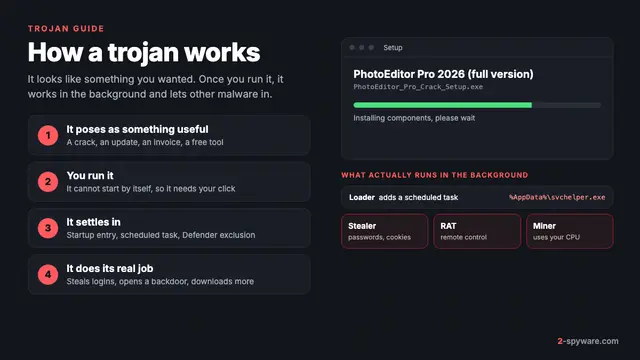
Not sure yet that you have a trojan? Our trojans guide explains what they are, how they get in and the signs. This page is narrower. It covers what a scanner has to catch after a trojan has run, which tools do that well, and the part of the cleanup no tool can do for you. For malware in general, see our comparison of malware removal tools.
What a trojan scan has to catch
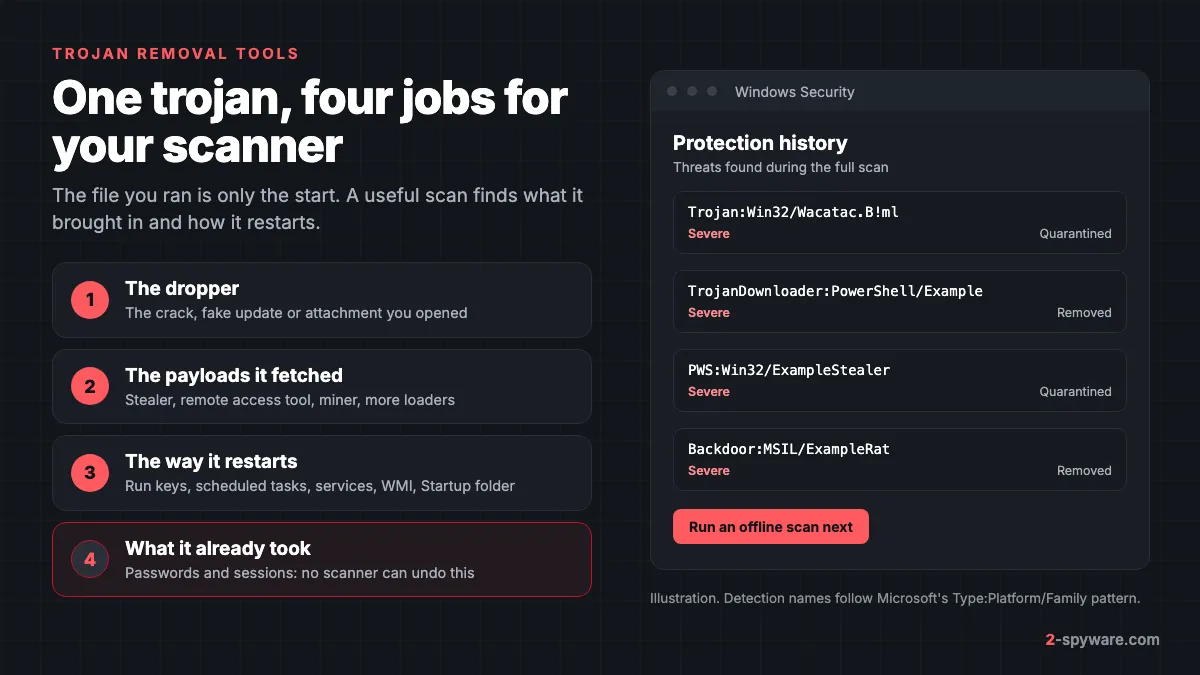
A trojan is rarely one file. The crack, fake update or invoice you opened starts a chain, and a scanner that deletes only that file leaves the rest. Judge every tool on these four parts.
- The dropper. The file you opened, plus anything it unpacked into Temp or AppData. It is the easiest part to find.
- The payloads it fetched. Many trojans are loaders whose job is to download the real malware. Microsoft has seen loaders such as DanaBot deliver the Lumma stealer as an extra payload, and Lumma itself can install coin miners and clipboard stealers [13].
- Persistence. The payload needs a way to start again after a reboot: a Run key, a scheduled task, a service, a WMI subscription or a shortcut in the Startup folder. Miss this and the trojan comes back.
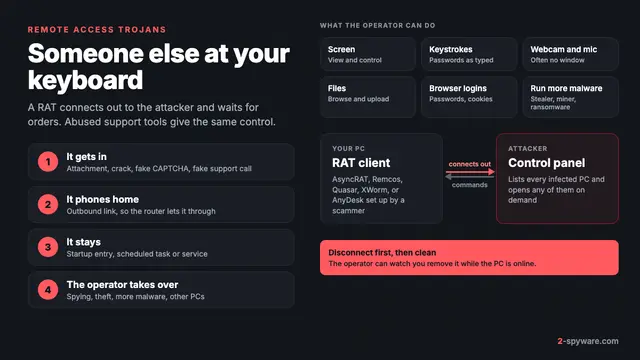
- Remote tools. Some trojans install a remote access trojan or a legitimate remote support app such as AnyDesk, so the attacker can return by hand. A scanner may call that app clean, so judge it yourself.
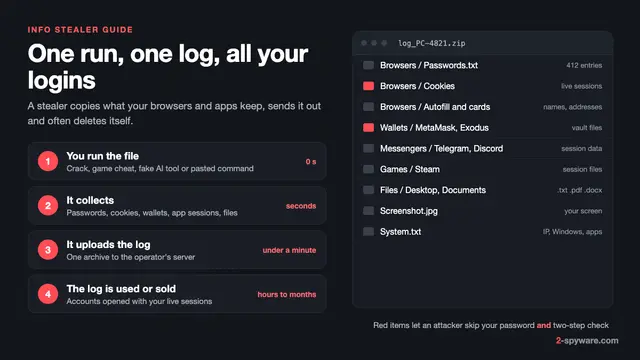
There is also a fifth part that no scanner touches: what already left your PC. Stealers take saved passwords, session cookies, autofill data and crypto wallet files [13]. Deleting the stealer does not bring that data back. Our page on info stealers explains how fast that happens.
Where trojans hide their restart
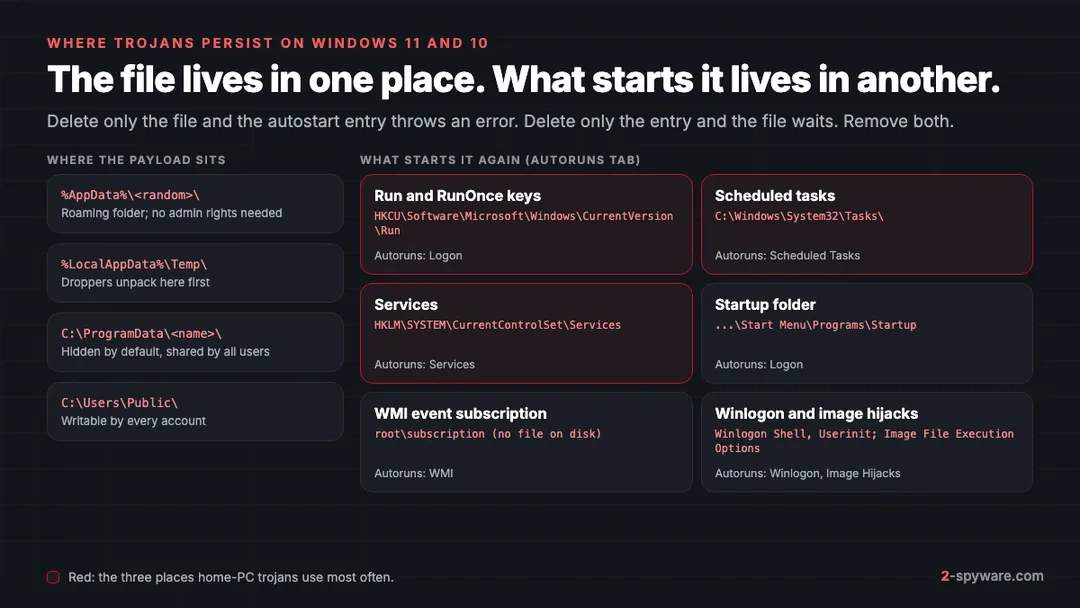
Microsoft's Autoruns tool lists every place Windows can start a program on its own. It covers the Startup folder, Run and RunOnce keys, services, scheduled tasks, Winlogon entries, image hijacks and WMI entries [12]. That list is a good test of a scanner. Ask which of these it checks, not only which files it reads.
- Run and RunOnce keys under HKEY_CURRENT_USER need no admin rights, which is why common trojans use them so often.
- Scheduled tasks can run at log on or every few minutes, so a loader can download a fresh payload on a timer.
- Services start before you log on. One with no description and a path in AppData or ProgramData deserves a close look.
- WMI event subscriptions leave nothing in a startup folder, so many people never find them. Autoruns shows them on its WMI tab [12].
To check these yourself, Autoruns can hide signed Microsoft entries and check files against VirusTotal [12]. Our guide to removing malware leftovers walks through tasks, services and Run keys in Windows 11 and 10. To judge a process name you do not recognize, use how to check if a Windows process is genuine.
Trojan removal tools compared
| Tool | Role in a trojan cleanup | Platforms | Free part | Price from | Our score |
|---|---|---|---|---|---|
| Fortect | Scan, real-time antivirus and repair of what the trojan broke | Windows 10 and later; separate Mac product | Full scan and one-by-one repair | 30.95 euros first year, 1 PC | 9.2 |
| SpyHunter 5 | Stubborn trojans, locked files, personal custom fixes | Windows 7 to 11, macOS 10.13+ | Scan and tracking cookie removal | $29.70 per 6 months | 8.6 |
| Microsoft Defender and Defender Offline | Built-in real-time scanning plus a scan outside running Windows | Windows 11 and 10 | Everything | Free | Built in |
| Microsoft Safety Scanner | Portable scan when Defender is off or broken | Windows 7 to 11 | Everything | Free | 7.8 |
| Combo Cleaner | Mac malware cleanup, flags Windows trojans stored on the Mac | macOS and Windows | Scan | $47.95 per 6 months | 8.4 |
| Intego | Real-time Mac protection and firewall | macOS 12.4 or later | None; 30-day refund window | $29.99 first year | 8.4 |
Fortect: removes the trojan and repairs what it changed
Fortect scores 9.2 in our review, the highest on this list, and it suits trojan cleanups for a simple reason. Trojans do two kinds of harm on the PC itself: they install things, and they change things. Fortect deals with both in one app.
Its paid plans include an antivirus that monitors new downloads, installs and files in real time, with quick, full and custom scans [1][2]. That covers the moment a loader tries to pull in its next payload. The free diagnostic scan takes about five minutes, and its Malware and PUA stage looks for threats and for the system changes they leave behind.
The repair side sets Fortect apart from a plain scanner. Trojans often leave damaged Windows files, broken registry entries and changed settings behind. Fortect replaces damaged system files with healthy copies and repairs broken registry entries, so Windows works normally again.
- Free part: the full scan and free one-by-one repair through View and Fix, so you see results on your own PC before paying [1].
- Plans: Essential covers 1 PC for 30.95 euros in the first year, Multi-Device 3 PCs for 37.95 euros and Ultimate 5 PCs for 53.95 euros [2].
- Every plan includes automated repair, the antivirus, malware removal, driver updates and restore points [2].
- Refunds: a 60-day money-back window on the first purchase, with refunds usually processed within 12 hours [2].
- Also listed: ransomware protection, cloud-based threat detection and a Chrome extension that blocks malicious websites [1].
Use Fortect as your main scan after a trojan has run on a Windows PC, or as the repair step after Defender removed the threat.
SpyHunter 5: when the trojan fights back
SpyHunter 5 scores 8.6. EnigmaSoft lists trojans, rootkits, keyloggers and ransomware among the threats it removes [3]. Two features target trojans that resist. Compact OS boots a small system beneath Windows to delete files the malware locks while Windows runs [3].
The HelpDesk is the other. If a scan cannot clear the infection, you send a diagnostic report and the support team builds a custom fix for your PC, at no extra cost [3].
- Testing: AV-TEST certified version 5.16 in March and April 2024 with 15 of 18 points, and it caught all 19,228 widespread samples [4].
- Free part: the scan and tracking cookie removal. Removal needs a subscription [3].
- Paid: Basic from $29.70 per six months [3]. The 7-day trial asks for a card, and purchases have a 30-day refund.
Microsoft Defender and Defender Offline: the free baseline
Windows 11 and 10 already run Microsoft Defender Antivirus, and most trojan alerts you see come from it. Keep it on. For trojans, its most useful extra is Defender Offline, because some malware hides while Windows runs.
Defender Offline runs from outside the normal Windows kernel, which lets it target rootkits and threats that infect the master boot record [5]. It takes about 15 minutes. Open Windows Security, select Virus & threat protection, then Scan options, choose Microsoft Defender Offline scan and select Scan now [5]. Our Defender Offline guide shows each screen.
- Suspend BitLocker on the system drive first, or Windows may ask for the recovery key when it restarts [5].
- The Windows Recovery Environment must be enabled for the scan to run [5].
- It does not run on Arm versions of Windows 11 and 10 [5].
- Results appear under Virus & threat protection, Scan options, Protection history [5].
Microsoft Safety Scanner: a portable check
Microsoft Safety Scanner scores 7.8. It is a single file, msert.exe, that uses the same security intelligence Microsoft publishes for Defender, removes what it finds and installs nothing [6]. Each copy expires 10 days after download [6].
Because it shares Defender's data, it is not a true second opinion when Defender is healthy. Use it when Defender is off, broken or replaced by another antivirus you suspect missed something.
Combo Cleaner: Mac cleanup, with an eye on Windows files
Mac trojans mostly arrive as fake installers and cracked apps, as Shlayer did. Combo Cleaner scores 8.4 and scans for Mac malware with hourly definition updates.
It also lists Windows malware stored on the Mac, so you do not pass a trojan on to a PC. The scan is free and removal is paid. Essential costs $47.95 per six months for one device [7]. Our guide to removing malware from a Mac covers the manual checks.
Intego: real-time protection on a Mac
Intego also scores 8.4. It is a full Mac suite with real-time scanning and a per-app firewall, which helps when a trojan tries to call home [8]. AV-TEST gave it full marks in March 2026 [9]. In AV-Comparatives' 2026 Mac test it blocked all 100 Windows samples and earned the Approved award [14].
Plans for one Mac start at $29.99 for the first year and renew at $39.99, with a 30-day refund window [8].
Why one scan is not enough
- Loaders fetch more. While you scan, a loader that is still running can pull a new payload with a name the scanner has not seen yet. Disconnecting first stops that.
- Timers bring it back. A scheduled task can sit quietly and reinstall the payload hours later. A second scan a day or two after the first shows whether something survived.
- Hidden parts need another view. Some components hide from tools running inside Windows. An offline scan looks at the disk before the malware loads [5].
Running two real-time antivirus products together is not the answer. On Windows 11 and 10, Defender steps aside when another antivirus becomes your main product [15]. Use on-demand scans from a second vendor instead, such as the free scans in Fortect and SpyHunter.
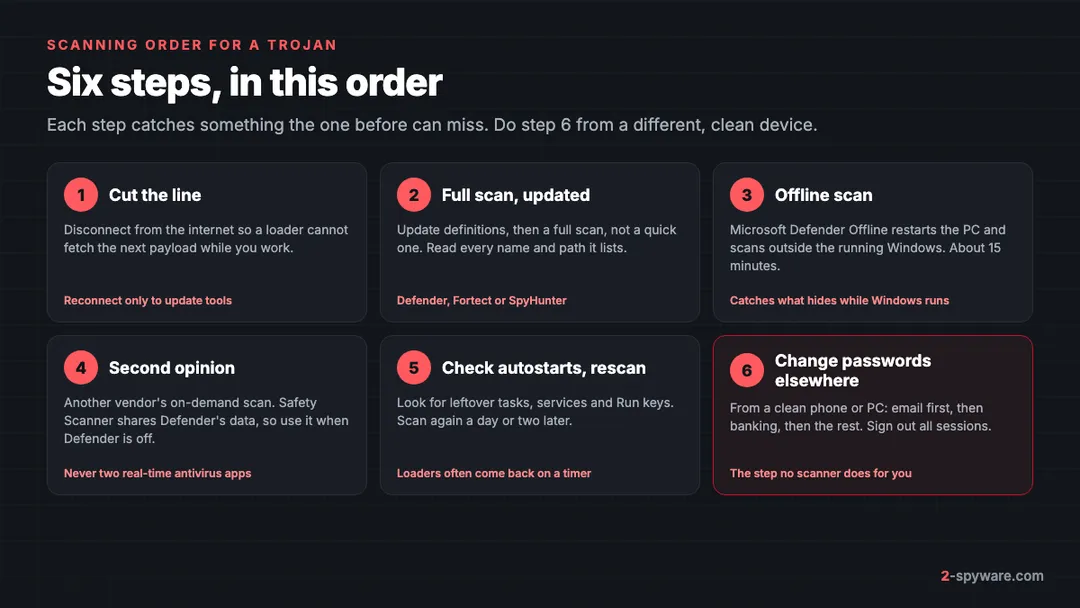
- Disconnect from the internet. Reconnect only to update a tool, then disconnect again.
- Update your scanner and run a full scan, not a quick one. Read every detection name and its path before you remove anything.
- Run Microsoft Defender Offline. It restarts the PC and scans outside the running Windows [5].
- Get a second opinion from a different vendor's on-demand scan. Fortect's free scan also shows the system damage the trojan left.
- Check autostarts by hand, or with Autoruns, for anything the scans did not list [12]. Scan again a day or two later.
- From a clean phone or PC, change your passwords and sign out of all sessions. Start with email, then banking.
If the trojan blocks your tools or keeps returning after all six steps, back up your files and use our guide to cleaning or resetting Windows. Ask in our Windows help forum if you get stuck.
What Defender's Trojan: detections mean
Microsoft names detections with the CARO scheme: type, platform, family and variant letter [10]. In Trojan:Win32/Wacatac.B!ml, Trojan is the type, Win32 the platform, Wacatac the family and B the variant. Microsoft only says a suffix that begins with ! is an internal indicator [10].
The type tells you what to do next. Microsoft uses separate types for TrojanDownloader, TrojanSpy, Password Stealer (PWS) and Backdoor [10]. A downloader means look for payloads. PWS or TrojanSpy means change passwords. Backdoor means check for remote access.
Names such as Wacatac, or vendor labels ending in Generic or Gen, are broad. They describe behavior or a learned pattern, not one known program. Our page on antivirus detection names and the Wacatac detections topic explain how to read them.
When a trojan detection is a false positive
Broad detections sometimes hit clean files, most often small tools from unknown developers, game mods and fresh builds of your own software. Before you trust or delete a flagged file, ask three questions.
- Where did the file come from? A signed installer from the vendor's own site is a likely false alarm. A crack, keygen or a file from a chat link is not. Cracked software is one of the main routes for trojans.
- What did the PC do? Pop-ups, new accounts, password alerts or unknown startup items point to a real infection, whatever the name says.
- Do other engines agree? One hit from one vendor is weak evidence. Several vendors naming the same family is strong.
If you still think it is a mistake, send the file to Microsoft through the Security Intelligence submission site [11]. Microsoft warns that every exclusion lowers your protection and that you should define exclusions sparingly [11]. Never exclude a whole folder such as Downloads to silence one alert.
What no scanner can undo
A trojan that carried a stealer may have copied your browser passwords, session cookies and crypto wallet files before any scan ran [13]. A session cookie can let someone into an account without your password or your second factor. Removing the malware closes the door but does not take back the keys.
Follow our guide to securing your accounts after malware. If a fake CAPTCHA asked you to paste a command, read our page on ClickFix fake CAPTCHAs, since that route often delivers stealers [13]. For the wider picture of malware types, see types of malware.
Frequently asked questions
What is the best trojan removal tool?
In our reviews, Fortect scored highest at 9.2 on Windows, because it removes malware and also repairs the system files and settings a trojan changes. SpyHunter 5 scored 8.6 and adds personal custom fixes. On a Mac, Combo Cleaner and Intego both scored 8.4.
How do I remove a trojan from my computer?
Disconnect from the internet, update your scanner and run a full scan. Then run Microsoft Defender Offline, get a second opinion from a different vendor, check startup items, and scan again a day later. Change your passwords from a clean device.
Is Microsoft Defender enough to remove a trojan?
Often it removes the trojan itself. Add a Defender Offline scan for anything that hides while Windows runs, and a second vendor's on-demand scan for payloads Defender may have missed. Defender does not repair damaged system files or change your passwords.
What is a free trojan scanner?
Microsoft Defender, Defender Offline and Microsoft Safety Scanner are free on Windows. Fortect offers a free full scan and free one-by-one repair. SpyHunter and Combo Cleaner scan for free but charge to remove.
What does Trojan:Win32/Wacatac mean?
It is a broad Microsoft Defender detection for Windows trojans. Wacatac is a family name, and the letter after it is the variant. It can be a real downloader or stealer, and sometimes it flags a clean but unusual file, so check where the file came from.
Can a trojan come back after removal?
Yes. A scheduled task, service, Run key or WMI entry can reinstall it, and a loader may have fetched other malware the first scan missed. Rescan a day or two later and check startup items.
Can a trojan detection be a false positive?
Yes, especially generic or machine learning detections on small tools, game mods and new software. A file from the vendor's own site that other engines call clean is likely a false alarm. A file from a crack or chat link is not.
Do I need to change my passwords after a trojan?
If the detection mentions a stealer, spy or password stealer, or you do not know what the trojan did, yes. Do it from a clean device, start with email and sign out of all sessions.
Sources
- Fortect homepage: All-in-One Security, Privacy and OS Health Suite read 2026-10-08
- Fortect pricing and checkout page (plans, renewal and money-back terms) read 2026-10-08
- EnigmaSoft: SpyHunter product page (SpyHunter 5 for Windows and SpyHunter for Mac, prices, features) read 2026-10-08
- AV-TEST: Product Review and Certification Report, EnigmaSoft SpyHunter 5.16, Windows 11, March and April 2024 read 2026-10-08
- Microsoft Learn: Microsoft Defender Offline scan in Windows read 2026-10-08
- Microsoft Learn: Microsoft Safety Scanner Download read 2026-10-08
- Combo Cleaner purchase page (plans, prices and renewal) read 2026-10-08
- Intego pricing page: Intego ONE plans, renewal prices and system requirements read 2026-10-08
- AV-TEST: Test antivirus software for MacOS Tahoe, March 2026 read 2026-10-08
- Microsoft Learn: How Microsoft names malware read 2026-10-08
- Microsoft Learn: Address false positives and false negatives in Microsoft Defender for Endpoint read 2026-10-08
- Microsoft Learn: Autoruns (Sysinternals) read 2026-10-08
- Microsoft Security Blog: Lumma Stealer, breaking down the delivery techniques and capabilities of a prolific infostealer read 2026-10-08
- AV-Comparatives: Mac Security Test and Review 2026 read 2026-10-08
- Microsoft Learn: Microsoft Defender Antivirus compatibility with other security products read 2026-10-08
 What is a trojan and how to remove it
 Info stealers: what they take, how fast, and what to do
 Remote access trojans (RATs): how to tell if someone is in your PC and lock them out