
Can Macs get viruses?
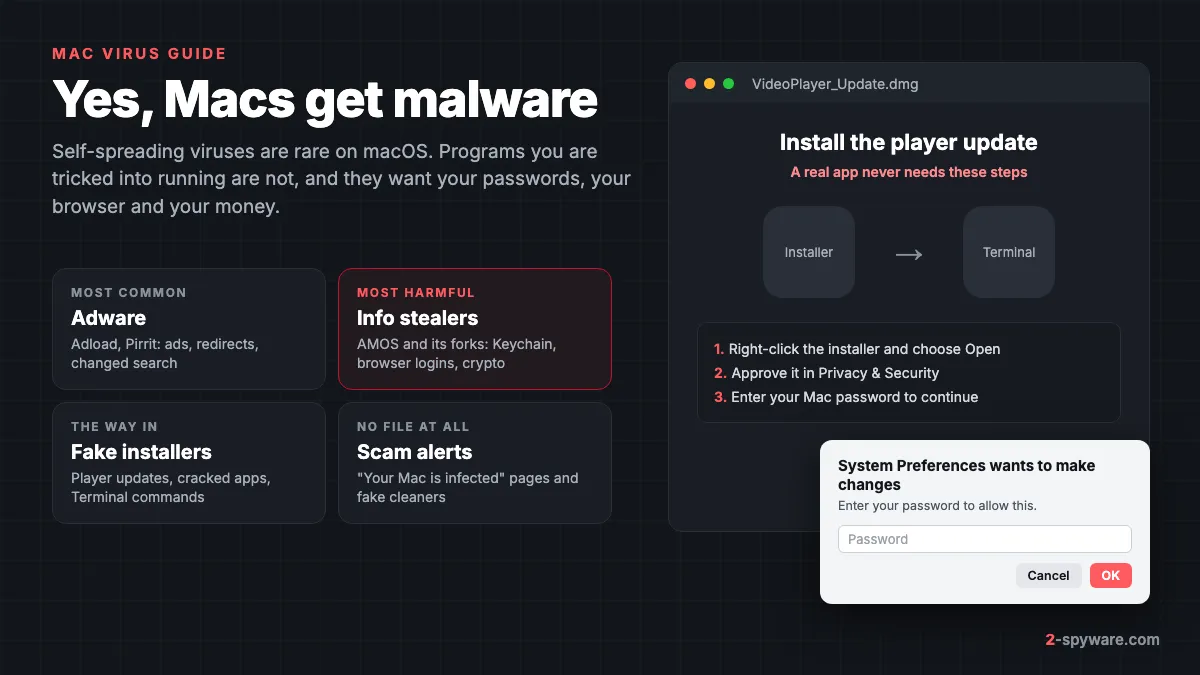
Yes. Macs can get malware, and the number of Mac threats has grown fast in the last three years. What Macs rarely get is a virus in the strict sense: code that copies itself into other files and spreads from one computer to the next on its own. Almost every Mac infection today is a program you were tricked into opening, or a browser setting you were tricked into allowing.
Vendor data shows the scale. Malwarebytes found that 11% of all detections on Macs in 2023 were malware, a group that covers trojans, info stealers, ransomware and similar threats [3]. Most of the rest were adware and other unwanted programs. Kaspersky found that one in ten of its Mac users met the Shlayer trojan at least once in 2019, and that Shlayer alone made up almost 30% of its macOS detections [5].
So people who say Macs do not get viruses are right about the word and wrong about the risk. On this page, a Mac virus means what you mean when you search for one: any malicious or unwanted software on a Mac. Our malware and viruses guide explains the terms across all systems.
Why Macs were safer, and what changed
For years criminals wrote malware for Windows because that was where the victims were. Malwarebytes points out that businesses, schools, hospitals and governments ran almost entirely on Windows for decades, so attackers aimed there [3]. Most Mac threats in that period were browser hijackers and adware that pushed ads and odd links [4].
Three things changed. Macs became common at work and at home, and Malwarebytes cites a 31% share of US desktop operating systems [3]. Criminals began to sell ready-made Mac malware as a service. And they found a delivery method that works on any system: fake download sites promoted through paid search ads [4].
Atomic Stealer, or AMOS, appeared in 2023 and was rented to other criminals for $1,000 a month, later $3,000 [4]. A fork of it called Poseidon accounted for 70% of all info stealer detections on Mac in the final months of 2024, according to Malwarebytes [4]. The LockBit ransomware gang also built a Mac version in 2023, though it was not working when researchers found it [3].
The fake browser update trick that had long targeted Windows users reached the Mac in 2023 as well. Pages copied Apple's style and offered a Safari update that delivered AMOS instead [3]. That is the pattern to remember: Mac malware now uses the same tricks as Windows malware, because the trick targets you, not the system.
What Apple's built-in protection does
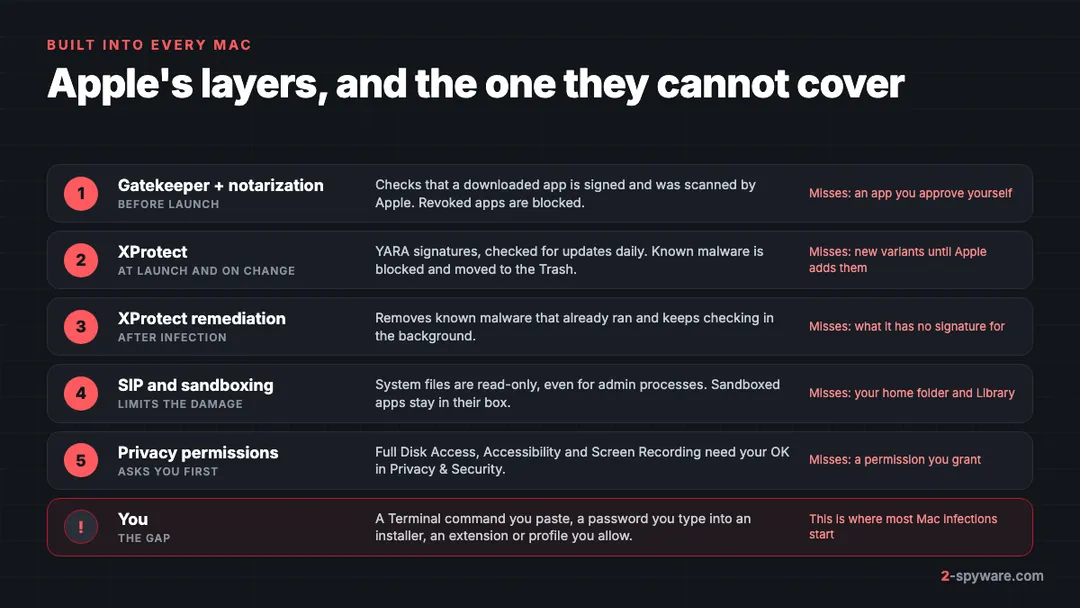
Every Mac ships with several layers of defense, and you do not need to switch them on. Apple describes three goals: stop malware from launching, block it from running, and remove it if it already ran [1]. Here is what each part does and where it stops.
Gatekeeper and notarization
Notarization is Apple's malware scanning service for apps sold outside the App Store. Developers submit their apps, Apple scans them for known malware and issues a ticket that Gatekeeper checks before the app opens [1]. If an app later turns out to be malicious, Apple issues a revocation ticket, and Gatekeeper blocks it even if it was notarized before [1]. Macs check for these tickets in the background much more often than they fetch new XProtect signatures [1].
On macOS Sequoia 15 and later you can no longer skip a Gatekeeper warning with Control-click. You have to open System Settings > Privacy & Security and approve the app there [8]. That extra step explains why fake installers now come with picture instructions that show you exactly where to click.
XProtect and XProtect Remediator
XProtect is the antivirus built into macOS. It uses YARA signatures that Apple updates on its own schedule, apart from macOS updates, and the Mac checks for new ones daily by default [1]. It scans an app when it first launches, when it changes on disk and when the signatures update [1]. When it finds known malware, it blocks it, moves it to the Trash and shows an alert in the Finder [1].
A second engine, usually called XProtect Remediator, removes malware that is already on the Mac once Apple ships new information, and it keeps checking periodically [1]. XProtect also has a behaviour-based engine that looks for unknown malware and reports which software downloaded it [1]. When Apple learns of a new family, it can revoke the developer certificate, issue revocation tickets and ship new signatures within hours or days [1].
System Integrity Protection and sandboxing
System Integrity Protection, or SIP, makes critical system locations read-only, so malicious code cannot change the files macOS runs on. It applies to every process, even one running with administrator rights, and it is on by default [2]. The same mandatory access controls power app sandboxing, which keeps an app inside the files and features it was given [2].
This is why Mac malware rarely touches the system itself. It settles in your home folder, in the Library launch folders and in your browser, which SIP does not lock. Apps that want your files, screen or keystrokes must also ask for permission under Privacy & Security, and that prompt is one more thing a fake installer will try to talk you through.
Where the layers stop
The layers are strong against known malware and weak against your own approval. Signatures follow a family; they do not come before it. SentinelLabs found more than 150 Adload samples in one campaign that XProtect did not detect, and some had been notarized by Apple [6].
A command you paste into Terminal runs as you, so it never meets the checks an app download gets. A browser extension you install, a site you let send notifications and a password you type into an installer window are all your choices as far as macOS can tell. Most of the advice in this guide is about that gap.
How Mac malware gets in
Mac malware almost never arrives by itself. Each of these routes needs one click, one approval or one paste from you.
- Fake updates. A page says your Flash Player, video player or browser needs an update. Shlayer spread mainly through fake Flash Player pages [5], and AMOS through fake Safari updates [3].
- Malicious search ads. Criminals buy ads for popular apps and send you to a copy of the real site. Malwarebytes documented AMOS behind a fake TradingView site and Poseidon behind a fake Arc browser download [3][4].
- Cracked and pirated apps. Free copies of paid Mac software are a favourite wrapper. See why cracked software is a malware risk.
- Paste-a-command pages. A site, chat or fake CAPTCHA tells you to open Terminal and paste one line, which downloads a stealer. Read how ClickFix fake CAPTCHA pages work, and the loop-lumen.com case for a real Mac example.
- Hijacked links on trusted sites. Kaspersky found Shlayer links in YouTube video descriptions and in Wikipedia footnotes that pointed to expired domains bought by the attacker [5].
- Browser prompts. A site asks you to click Allow and then sends ads and fake alerts as notifications. See push notification spam.
Types of Mac malware and real examples
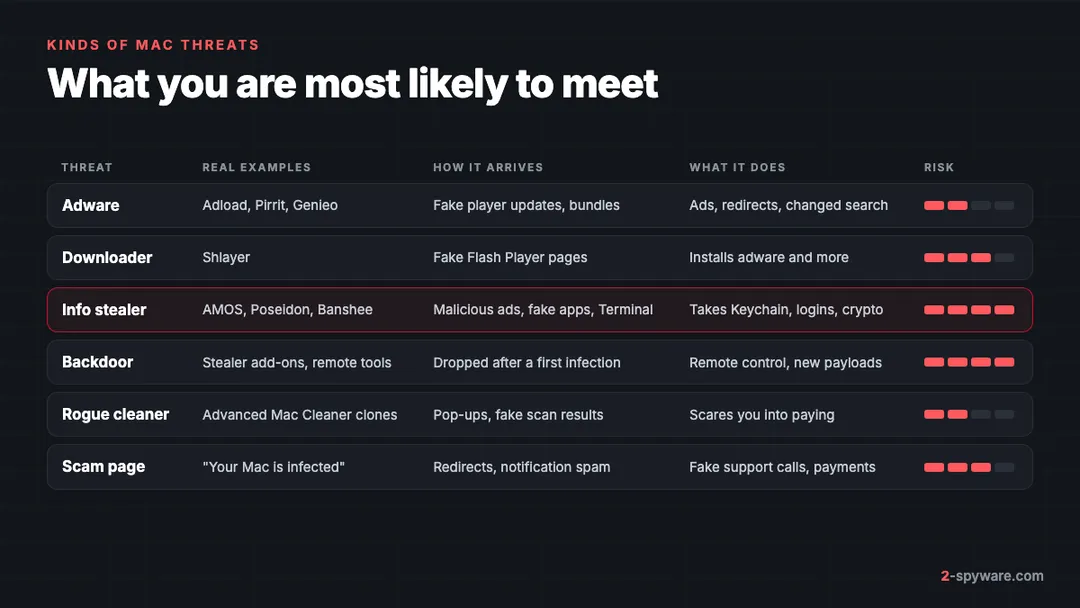
Mac threats fall into a few groups. The table below compares them, and the sections after it name real families from vendor research and from the Mac guides our readers open most.
Adware and Adload
Adware is still the thing you are most likely to find on a Mac. Adload is one of the most persistent families: it installs launch agents that restart it, hides its program in a support folder and keeps changing to slip past signatures [6]. Pirrit and Genieo are older families that inject ads and rewrite search results.
Guides such as Googlesyndication, Imklaunchagent and Libexec virus are among the Mac pages our readers open most. Our adware guide explains how adware works on every system.
Shlayer and other downloaders
A downloader exists to put other software on your Mac. Shlayer was the most common Mac threat for close to two years. Kaspersky collected almost 32,000 samples and counted more than 1,000 partner sites spreading it [5]. Once inside, it installed adware such as Cimpli, Bnodlero and Pirrit, which added a Safari extension and even a trusted certificate to read your web traffic [5]. Our Shlayer Trojan guide has the details.
Info stealers: AMOS and its forks
Info stealers are the most harmful Mac malware today. AMOS and its forks ask for your Mac password in a fake dialog and then take what they can reach. Sophos lists the macOS Keychain, browser passwords, cookies, Apple Notes and crypto wallet data among what AMOS collects [7].
Poseidon advertises that it can steal from more than 160 crypto wallets, plus the Bitwarden and KeePassXC password managers and VPN settings [4]. A stealer can do all this in minutes and leave little behind. Our info stealers guide covers the whole group on every system.
Backdoors and persistence
Some infections do not end with one theft. A backdoor lets the attacker come back, install new payloads or watch what you do. Sophos found AMOS using a launch daemon named com.finder.helper.plist, which runs as root and is named to look like part of Finder [7]. A file like that in /Library/LaunchDaemons is a reason to follow the full malware removal steps, not only the adware ones.
Not every alarming name is malware. com.apple.tcc is a real part of macOS that stores your privacy permissions, while names such as AuthManager_Mac or MyMacUpdater are worth checking. Each of our guides explains how to tell the two apart.
Fake "your Mac is infected" scams
Many Mac viruses are only web pages. A redirect lands you on a page that says Your Mac is infected with 3 viruses or shows an Apple Security Alert, with a countdown and a phone number. No web page can scan your Mac. Close the tab, and if it will not close, quit Safari with Command-Q. If you called the number or gave someone remote access, read our tech support scams guide.
Rogue cleaners and scareware
Some apps sell fixes for problems they invent. Advanced Mac Cleaner and its clones show alarming scan results and ask you to pay to fix them. Cleaner ads are a frequent complaint too, and the MacKeeper topic gathers the pop-up cases readers report, such as MacKeeper pop-up ads. The wider group is covered in our rogue anti-spyware guide.
Signs your Mac has a virus
Most Mac threats show themselves through the browser or through a new background item. Match what you see to the likely cause.
| What you see | What it usually points to |
|---|---|
| Pop-ups, new tabs and redirects in every browser | Adware app or launch agent |
| Ads in one browser only | A browser extension |
| Searches go through a site you never chose | Browser hijacker, often with a configuration profile |
| Chrome says Managed by your organization on a personal Mac | A policy set by adware; see Chrome managed by your organization |
| Ads arriving as notifications | A site you allowed to send notifications |
| A Background Items Added alert for an app you do not know | A new launch agent or daemon |
| A password prompt right after you ran an installer or a command | An info stealer asking for your login password |
| Password reset emails, new sign-ins, missing crypto | Stolen credentials; act from another device |
| Fans running hard and an unknown process high in Activity Monitor | A miner or other background malware |
The most dangerous infections show the fewest signs. A stealer copies what it wants and sends it out in minutes. If you ran an installer that asked for your password in a strange way, or pasted a Terminal command, treat the Mac as compromised even if it seems normal. To check a link before you open it, use our link check.
How dangerous is a Mac virus?
It depends on the kind. Adware wastes your time, slows the browser and leads you to scam pages, but it rarely touches your files. A stealer is different. It can empty a crypto wallet, take over your email and hand strangers your saved logins and session cookies, often before you notice anything.
Ransomware for Mac exists but is rare; Malwarebytes calls it one of the rare instances in its advice to Mac users [4]. So the realistic worst case on a Mac is not locked files. It is a stolen identity. If a stealer may have run, change your passwords from a different device and follow our checklist for securing your accounts after malware.
How to remove a virus from a Mac
Adware and real malware need different work, so the full steps are in two separate guides. Pick the one that matches what you see.
- Ads, redirects, a changed search engine, unknown extensions or a strange profile: follow how to remove adware from a Mac. It covers configuration profiles, Login Items, the three Library launch folders and both browsers, in the order that stops the ads returning.
- A strange installer, a Terminal command you pasted, an unexpected password prompt, or accounts used without you: follow how to remove malware from a Mac. It covers going offline, launch daemons, hidden files, privacy permissions, Activity Monitor and when to erase the Mac.
The short version is the same for both. Disconnect from the internet if you suspect a stealer. Remove apps you did not mean to install. On Sequoia 15, open System Settings > General > Login Items & Extensions; on Sonoma 14 the pane is called Login Items. Switch off background items you do not recognize, then run a full scan with an up-to-date Mac security tool.
If files keep coming back after cleanup, something is still running. The malware guide explains when to erase the Mac and reinstall macOS, and how to bring your files back without bringing the infection with them.
How to remove a virus from Safari and Chrome on a Mac
Much of what people call a Mac virus is only a browser setting: an extension, a notification permission or a changed search engine. Check each browser you use, not only the one that shows ads.
Safari
Open Safari > Settings. On the Extensions tab, uninstall anything you do not use. On the Search tab, set your search engine back. Under Websites, remove unknown sites from Notifications and set Pop-up Windows to Block and Notify. Our Safari topic page covers redirect sites that keep coming back.
Chrome
Open chrome://extensions and remove anything you do not recognize. If Chrome says Managed by your organization on a personal Mac, a profile or policy is forcing settings, and the adware guide shows how to remove it first. Then open Settings > Reset settings > Restore settings to their original defaults. Our browser reset guide and extension removal guide have screenshots for each browser.
Can iPhones and iPads get viruses?
Classic viruses on iPhone and iPad are close to unheard of. Apps come from the App Store, and each app runs in its own sandbox that cannot read other apps' data. What iPhone owners meet instead is mostly scams and settings:
- Scam pages in Safari that say your iPhone is hacked or infected, such as the Pegasus spyware activated scam. Close the tab and clear website data in Settings > Apps > Safari on iOS 18, or Settings > Safari on iOS 17.
- Calendar spam from a calendar you subscribed to by tapping a pop-up. Our calendar virus guide shows how to delete the subscription.
- Configuration profiles you were talked into installing. Check Settings > General > VPN & Device Management and remove any you do not know.
- Phishing texts and fake Apple Account pages, which steal the account rather than infect the phone.
- Targeted spyware such as Pegasus, which is real but aimed at a small number of journalists, activists and officials. Apple's Lockdown Mode, under Settings > Privacy & Security, is meant for people at that level of risk.
Keep iOS updated and do not install profiles or apps from links in messages. Our iPhone help page and iPhone topic collect the current iPhone scams.
Do you need antivirus on a Mac?
Apple's layers do a good job against known malware, and for careful users who install only App Store apps they may be enough. A separate Mac security tool earns its place when you download apps from the web, hold crypto, share the Mac with family or have had an infection already. It adds its own signatures, web protection that blocks fake download sites before you reach them, and a second opinion while XProtect has no signature yet [6].
Fortect for Mac is the tool we offer on this page. It is a security product built for macOS, separate from the Windows repair suite, with real-time malware defense, browsing and phishing protection, cloud-based detection and a VPN [9]. Its browsing and phishing protection fits the way Mac malware spreads today, through ads, fake download pages and scam sites. Our Fortect review explains what each Fortect product covers.
We have reviewed two other Mac tools. Intego ONE combines real-time antivirus with an outbound firewall and a cleanup tool; it scored 96.7% Mac malware protection in AV-Comparatives' 2026 Mac review. Combo Cleaner pairs a Mac malware scanner with disk cleanup tools, and removal needs a subscription that renews every six months.
Whichever you choose, give it Full Disk Access in System Settings > Privacy & Security so it can read your Library folders, and run one real-time scanner at a time. Never install a cleaner that a pop-up or a scan page told you to download.
How to keep viruses off your Mac
- Get apps from the App Store or the developer's own site, typed into the address bar yourself. Do not click search ads to download software [4].
- Treat any installer that asks you to right-click Open, approve it in Privacy & Security or type your password into an odd window as a red flag [8].
- Never paste a command into Terminal from a web page, chat, video or AI answer unless you understand every part of it.
- Skip cracked apps and free copies of paid software.
- Leave automatic updates on, including Install Security Responses and system files under System Settings > General > Software Update > Automatic Updates, so XProtect gets its daily updates [1].
- Leave System Integrity Protection on. It is on by default, and no real app asks you to turn it off [2].
- Say no to notification prompts from sites you do not know.
- Keep crypto seed phrases off the Mac entirely: not in Notes, not in a photo, not in a text file.
- Back up with Time Machine, so erasing the Mac after an infection costs you an evening, not your files.
If a warning about a specific file or process worries you, ask in our Mac help forum or search the name on the Mac topic page, which collects every Mac guide on 2-Spyware.
Frequently asked questions
Can Macs get viruses?
Yes. Self-spreading viruses are rare on macOS, but Macs get adware, info stealers, downloaders and backdoors. Malwarebytes found that 11% of all Mac detections in 2023 were malware. Almost all of it arrives through something you run or allow, such as a fake update or a cracked app.
Do Macs need antivirus?
Not always. Apple's Gatekeeper, notarization and XProtect stop known malware for free. A separate Mac security tool helps if you download apps from the web, hold crypto, share the Mac or have been infected before, because it adds web protection and its own signatures.
Is XProtect enough to protect a Mac?
XProtect blocks and removes known malware and updates its signatures daily, so it handles most known threats. It does not judge extensions, notifications or search settings you approved, and new variants can slip past it until Apple adds a signature.
How do I know if my Mac has a virus?
Look for pop-ups and redirects in every browser, a search engine you did not choose, a Background Items Added alert for an unknown app, or a password prompt right after you ran an installer. Password reset emails or missing crypto point to a stealer, even if the Mac looks normal.
Is the Your Mac is infected pop-up real?
No. A web page cannot scan your Mac. Pages that say your Mac is infected with viruses are scams that want you to call a number or install a fake cleaner. Close the tab or quit Safari with Command-Q, and remove any site you allowed to send notifications.
Can a Mac get a virus from a website?
Rarely by just visiting it, as long as macOS and your browser are up to date. The risk comes from what the site asks you to do: download an update, install an extension, allow notifications or paste a command into Terminal.
Can iPhones get viruses?
Classic viruses on iPhone are close to unheard of, because apps come from the App Store and run in a sandbox. iPhone owners meet scam pages, calendar spam, unwanted configuration profiles and phishing instead. Targeted spyware exists but is aimed at a small number of high-risk people.
What is the most common Mac malware?
Adware such as Adload is the most common. Among serious threats, info stealers lead: Malwarebytes found that Poseidon, a fork of the AMOS stealer, made up 70% of Mac info stealer detections at the end of 2024.
Does reinstalling macOS remove viruses?
Not by itself. Reinstalling macOS from Recovery keeps your apps and files, so malware in your home folder or Library can survive. To be sure, back up your files, erase the Mac, reinstall macOS and install apps fresh.
Can a Mac get ransomware?
It is possible but rare. The LockBit gang built a Mac version in 2023 that did not work when it was found. For most Mac owners, stolen passwords and crypto are a far more likely loss than locked files, so backups and account security matter most.
Sources
- Apple Platform Security: Protecting against malware in macOS read 2026-10-08
- Apple Platform Security: System Integrity Protection read 2026-10-08
- Malwarebytes Labs: No Apple magic as 11% of macOS detections last year came from malware (March 2024) read 2026-10-08
- Malwarebytes Labs: Macs targeted by infostealers in new era of cyberthreats (February 2025) read 2026-10-08
- Kaspersky Securelist: Shlayer Trojan attacks one in ten macOS users read 2026-10-08
- SentinelLabs: Massive new AdLoad campaign goes entirely undetected by Apple's XProtect read 2026-10-08
- Sophos X-Ops: Why AMOS matters: The macOS malware stealing data at scale (May 2026) read 2026-10-08
- Apple Support: Safely open apps on your Mac read 2026-10-08
- Fortect: Fortect for Mac read 2026-10-08