
What you are looking for
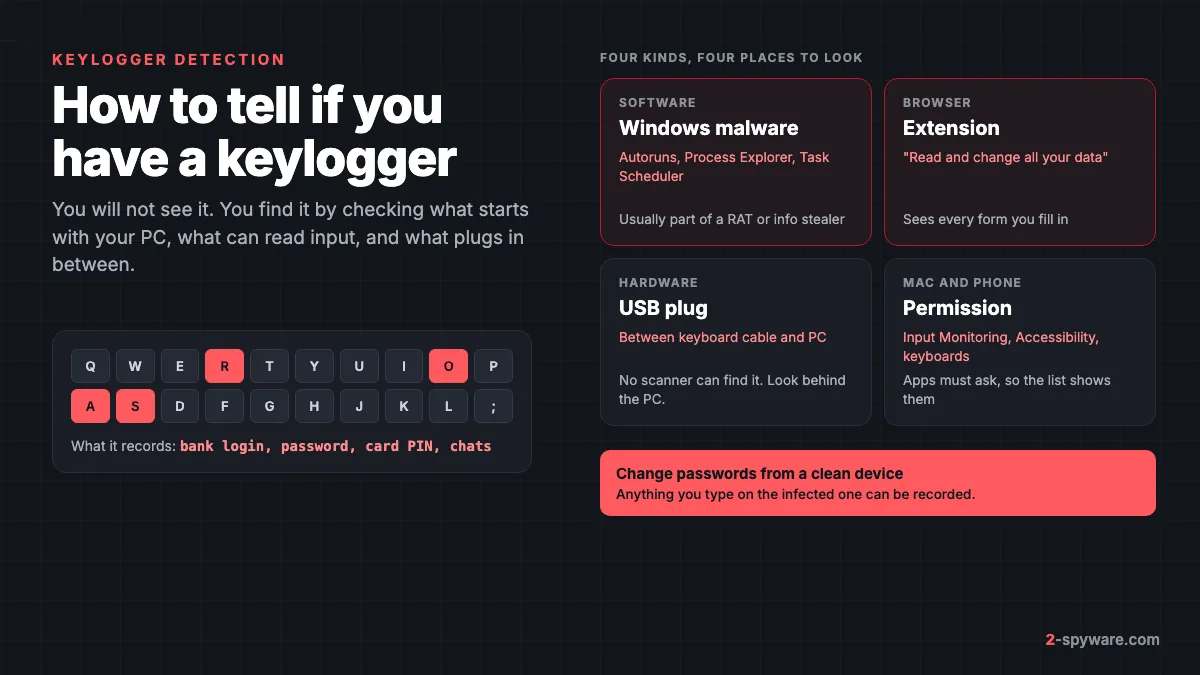
A keylogger records what you type and sends it to someone else. Our keylogger guide explains the types and how they spread. This page is the hands-on part: where to look, what a bad entry looks like, and what to do when you find one.
On Windows, a keylogger is rarely a standalone program today. It usually comes as one feature of a remote access trojan or an info stealer, and the same trojan that drops it can bring other malware with it [6]. Families such as Remcos and FormBook log keystrokes alongside screenshots and saved passwords. Commercial monitoring tools such as Perfect Keylogger and Ardamax are installed by someone with access to your PC.
Windows keyloggers either register a keyboard hook with SetWindowsHookEx, poll every key many times a second with GetAsyncKeyState, or install a driver in the keyboard's driver stack [5]. Every method needs a running program or driver, and that is what the checks below find.
Signs worth taking seriously
- An account was taken over even though you used a strong, unique password, above all if two-step codes were not involved.
- Someone knows things you only typed, such as a message you deleted before sending.
- Your antivirus was switched off and you did not do it, or Windows Security says it is managed by someone else.
- A remote support tool, a new admin account or a program you never installed appeared shortly before the problems started.
- On a shared or work PC, a small plug sits between the keyboard cable and the computer.
Typing lag or a slow PC are weak signs, because modern keyloggers use very little CPU. Treat them as a reason to check, not as proof.
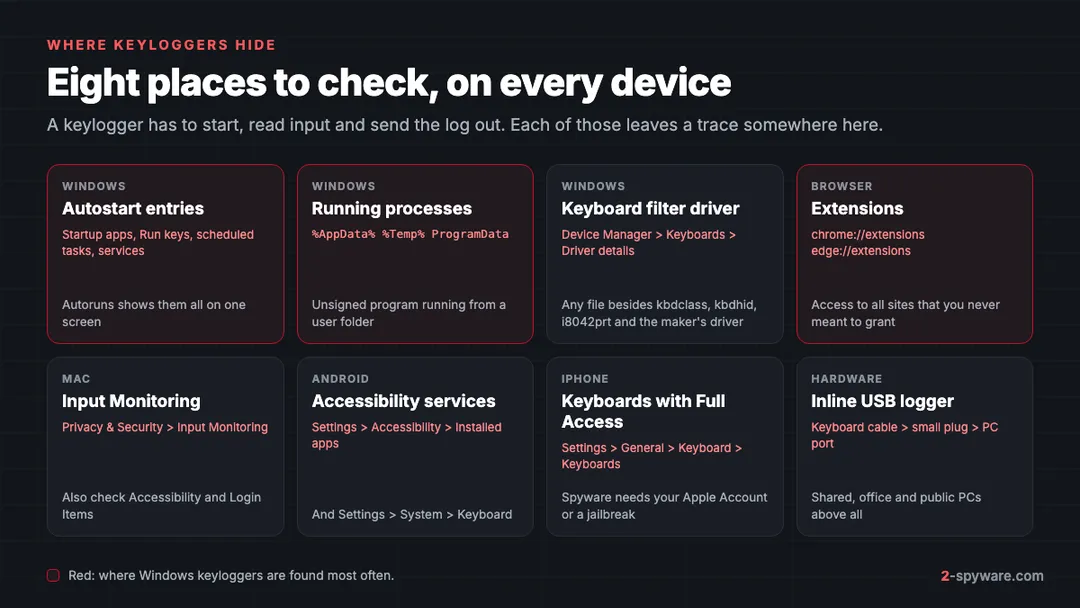
How to detect a keylogger on Windows 11 and 10
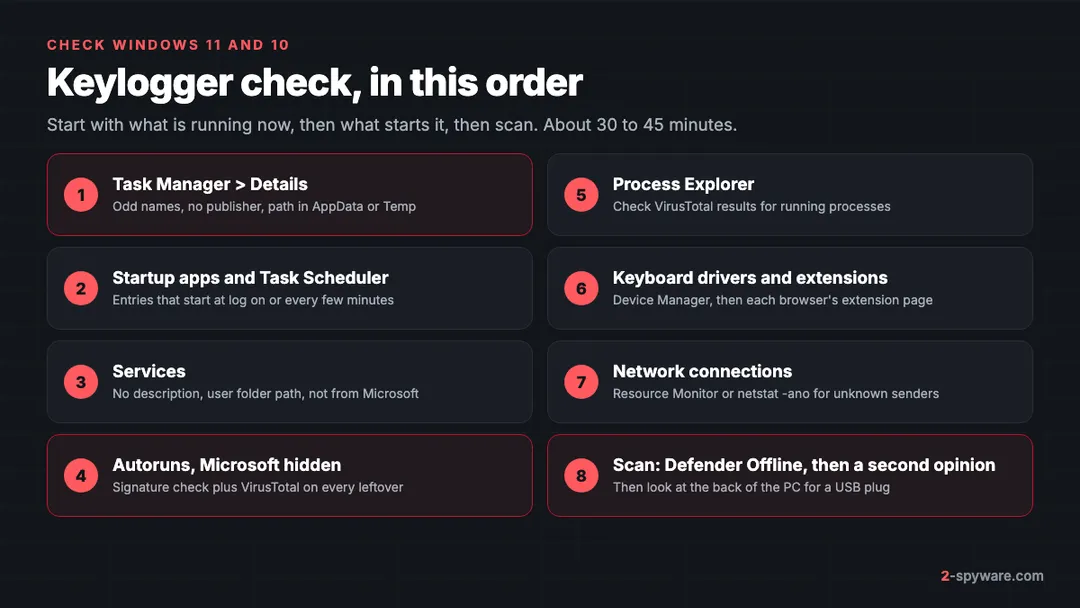
Work through these checks in order and write down every unknown name with its file path. The same name often turns up in two or three places, which is one of the best clues you get.
1. Task Manager: the Details tab
Press Ctrl+Shift+Esc and open Details (on Windows 11 it is in the left menu). Right-click a column header, choose Select columns and add Command line and Publisher if your build offers them. Then right-click any process you do not know and choose Open file location.
Real Windows processes live in C:\Windows\System32 or C:\Program Files. A program running from %AppData%, %LocalAppData%\Temp or C:\ProgramData deserves a closer look, above all if its name copies a system file such as svchost.exe. Our guide on checking whether a Windows process is genuine lists the real locations.
2. Startup apps and Task Scheduler
In Task Manager, open Startup apps (Startup on Windows 10). Each entry shows a publisher; right-click and choose Open file location for any without one. On Windows 11 the same list is also in Settings > Apps > Startup.
Next, open Task Scheduler (type it in the Start menu) and select Task Scheduler Library. Click each task and read the Triggers and Actions tabs. Malware likes tasks that run at log on or repeat every few minutes, with an action pointing to a script or program in a user folder. Tasks inside the Microsoft folder are mostly genuine, but check any with a path outside C:\Windows.
3. Services
Press Windows+R, type services.msc and press Enter. Double-click any service with no description or a random name and read Path to executable. A path in an AppData folder is worth writing down. Leave it running for now; Autoruns, next, shows who signed it.
4. Autoruns from Microsoft Sysinternals
Autoruns is a free Microsoft tool that shows every place Windows can start a program from: the startup folder, Run and RunOnce registry keys, scheduled tasks, services, drivers, Winlogon entries, Explorer add-ons and more [1]. It covers far more locations than Task Manager, which is why it is the main tool for this job. Get it only from Microsoft Learn.
- Right-click Autoruns64.exe and choose Run as administrator.
- Open Options and turn on Hide Microsoft Entries, so only third-party items remain [1].
- Open Options > Scan Options, tick Verify code signatures and Check VirusTotal.com, then click Rescan [1]. You accept the VirusTotal terms the first time.
- Read the Logon, Scheduled Tasks, Services and Drivers tabs. Rows shown in red have no verified publisher or no description; a non-zero VirusTotal score appears in its own column.
- Right-click a suspicious row and choose Jump to Entry or Jump to Image to see where it lives [1].
- To stop an entry from starting, untick its check box. Disable first and delete later, so you can undo a mistake [1].
Unsigned alone is not proof; small utilities are often unsigned. What matters is the combination: unsigned, in a user folder, unknown to you and flagged on VirusTotal.
5. Process Explorer with the VirusTotal check
Process Explorer, also from Sysinternals, lists every running process with its owner, and shows which DLLs each process has loaded [2]. That last part matters, because some keyloggers run as a DLL inside a legitimate process, so the process name looks clean. Run it as administrator, then choose Options > VirusTotal.com > Check VirusTotal.com. A VirusTotal column appears with a score such as 0/72 for each process.
Select any process with a non-zero score and press Ctrl+D to see its loaded DLLs. A score of 0 only means no engine knows the file yet, so a brand-new sample can still be malicious.
6. Keyboard drivers and browser extensions
Open Device Manager, expand Keyboards, double-click your keyboard and open Driver > Driver Details. A normal list shows Microsoft files such as kbdclass.sys, kbdhid.sys or i8042prt.sys, plus a driver from your keyboard's maker if you installed its software. An unknown .sys file here, or an unsigned item on the Drivers tab in Autoruns, is a strong sign of a kernel-mode logger [5].
Then check every browser you use: chrome://extensions in Chrome, edge://extensions in Edge and about:addons in Firefox. Click Details on each extension and look at Site access. An extension set to work on all sites, which Chrome describes when you add it as able to read and change all your data on all websites, sees every form you fill in, including passwords. Remove any you did not choose. Our guide to removing a browser extension shows the steps for each browser.
7. Network connections
A keylogger has to send its log somewhere, by email, FTP, a messaging bot or the attacker's server. Open Resource Monitor (type resmon in the Start menu), go to Network and expand TCP Connections. You see which process talks to which remote address. For a text view, open Command Prompt as administrator and run netstat -abno. It lists each connection with the program name and process ID.
Browsers and sync apps make many connections, so look for the odd one out: an unknown program from a user folder with an established connection. Many loggers send in batches, so check twice, a few minutes apart.
8. Look at the back of the PC
A hardware keylogger is a small plug between the keyboard cable and the USB port, or a module built into a keyboard. It needs no software, so no scan will ever show it. Follow your keyboard cable to the port and remove anything in between that you did not put there. This matters most on shared, office and hotel PCs.
Does the on-screen keyboard protect you?
Only partly. The Windows On-Screen Keyboard (Settings > Accessibility > Keyboard) gets past a hardware logger and some simple hook-based ones. Many keyloggers also take screenshots or read form fields and the clipboard, and info stealers copy saved passwords directly. Treat it as a stopgap for one login, not as protection.
How to detect a keylogger on a Mac
macOS makes keylogging harder, because an app must get your permission to watch the keyboard. That turns detection into a permission review. The paths below are for macOS Sonoma 14, Sequoia 15 and later.
- Input Monitoring: choose Apple menu > System Settings > Privacy & Security > Input Monitoring [4]. Every app here can monitor your keyboard, mouse or trackpad even while you use other apps [4]. Switch off any app you do not recognize or no longer use.
- Accessibility: in the same Privacy & Security pane, open Accessibility. Apps here can control the Mac and read what is on screen. Remote tools and window managers belong here; an unknown helper does not.
- Login Items & Extensions: under System Settings > General, check both Open at Login and the background items list for names you do not know.
- Launch agents and daemons: in Finder, press Shift-Command-G and open ~/Library/LaunchAgents, /Library/LaunchAgents and /Library/LaunchDaemons. Sort by Date Modified and look for .plist files that appeared around the time the problems began.
If you find a match, remove the permission, delete the app and its launch files, then restart. Our guide to removing malware from a Mac covers the full cleanup, including Mac stealers that log keys and copy the Keychain.
How to detect a keylogger on Android and iPhone
Android
On Android, a keylogger nearly always works through an accessibility service or a replacement keyboard. Both read everything you type.
- Open Settings > Accessibility > Installed apps (Downloaded apps or Installed services on Samsung). Anything switched on here that you did not turn on yourself, such as a cleaner, a battery saver or a system update app, should be switched off and uninstalled.
- Open Settings > System > Keyboard (General management > Keyboard list and default on Samsung). Only keyboards you chose, such as Gboard or Samsung Keyboard, should be listed.
- Check Settings > Security and privacy > Device admin apps. Spyware often makes itself an admin so you cannot uninstall it.
Our guide to removing malware from Android covers apps that block removal.
iPhone
iOS does not let apps read keystrokes from other apps. The one route is a third-party keyboard. Go to Settings > General > Keyboard > Keyboards, tap each one that is not from Apple and check whether Allow Full Access is on. Full Access lets the keyboard's maker send what you type to its servers. Remove any keyboard you do not use.
Other iPhone spying usually needs your Apple Account password or physical access to install a profile. Check Settings > General > VPN & Device Management for profiles you did not add, and review the devices signed in to your Apple Account.
Scan to confirm
After the manual checks, run a scan that malware cannot hide from. In the Windows Security app, open Virus & threat protection > Scan options and choose Microsoft Defender Antivirus (offline scan) [3]. It restarts the PC and scans from the Windows Recovery Environment, without loading Windows, so persistent malware has a harder time hiding or defending itself [3]. The results appear under Protection history [3]. Our Defender Offline guide shows each step. While you are there, check Allowed threats, because a threat someone allowed is left alone [3].
Then get a second opinion. Fortect, the tool we offer on this page, includes an antivirus module and a Malware and PUA scan stage, and it repairs Windows files that malware damaged. The scan is free and takes about five minutes, so you can see what it finds before deciding anything. Our Fortect review explains what each stage checks and how the licence works. On a Mac, Fortect offers a separate security product, also covered in the review.
Good scanners also watch behaviour, such as a program capturing keystrokes and screenshots, not only known signatures [6]. You can also run names you wrote down through our link and file check.
What to do if you find a keylogger
- Disconnect the device from the internet, so no new log is sent while you clean up.
- Do not log in to anything on that device until it is clean.
- From a different, clean device, change your email password first, then banking, then everything else. Use our steps to secure your accounts after malware, and sign out of all other sessions.
- Turn on two-step verification wherever you can. A recorded password alone then no longer opens the account.
- Remove the keylogger: disable its Autoruns entries, uninstall the program, delete the files, then run Defender Offline again.
- If the keylogger came with a RAT or stealer, or you cannot tell how long it ran, reset Windows. Our guide on when to clean or reset Windows helps you decide.
- Call your bank if card numbers or banking logins were typed on the device.
A commercial monitoring app on a shared PC was installed on purpose by someone with access. Keep screenshots of what you found before removing it, in case you report it. Our Windows help pages answer questions about specific files.
Frequently asked questions
How can I tell if I have a keylogger?
Check what starts with your PC and what runs now. On Windows, use Task Manager, Task Scheduler, services and Autoruns. On a Mac, review Input Monitoring and Accessibility. On a phone, check accessibility services and keyboards. Accounts taken over despite strong passwords are the most telling sign.
Can Windows Defender detect keyloggers?
Yes, Microsoft Defender detects known keyloggers and the trojans that carry them, and Defender Offline scans before Windows loads. A new or custom keylogger can still be missed, so add the manual checks in this guide.
Can a keylogger be detected by Task Manager?
Sometimes. A keylogger running as its own program shows up in the Details tab, often from an AppData or Temp folder. Many hide inside a legitimate process as a DLL or use a disguised name, and kernel drivers do not appear there at all. Autoruns and Process Explorer show far more.
How do I find a hardware keylogger?
Look at it. A hardware keylogger is a small plug between the keyboard cable and the computer, or a module inside the keyboard. Software cannot detect it. Follow the keyboard cable to the port and remove anything in between that you did not put there.
Does the on-screen keyboard stop keyloggers?
It beats hardware loggers and some simple software ones, because you click instead of pressing physical keys. Many keyloggers also take screenshots or read form fields, and stealers copy saved passwords directly, so it is not real protection. Clean the device instead.
Can someone put a keylogger on my phone?
On Android, yes, usually as an app using an accessibility service or a replacement keyboard, which needs someone to install it and grant access. On iPhone, apps cannot read other apps' keystrokes, so spying usually means a third-party keyboard with Full Access, a stolen Apple Account password or a jailbroken phone.
Is it safe to type passwords after removing a keylogger?
Only once you are confident the device is clean, ideally after an offline scan and, if the logger came with other malware, a reset. Change your important passwords from a different device first, because anything typed before removal may already be in the attacker's hands.
Do Macs get keyloggers?
Rarely, but it happens, mostly through Mac stealers and monitoring apps. macOS requires an app to have Input Monitoring or Accessibility permission to read your keys, so checking those two lists in Privacy & Security is the fastest way to find one.
Sources
- Microsoft Learn: Autoruns (Sysinternals) read 2026-10-08
- Microsoft Learn: Process Explorer (Sysinternals) read 2026-10-08
- Microsoft Support: Virus and threat protection in the Windows Security app read 2026-10-08
- Apple Support: Control access to input monitoring on Mac read 2026-10-08
- Kaspersky Securelist: Implementing keyloggers in Windows, part two read 2026-10-08
- Malwarebytes: What is a keylogger and how to detect and remove one read 2026-10-08