
 How to detect a keylogger on your PC, Mac or phone
What is a keylogger?
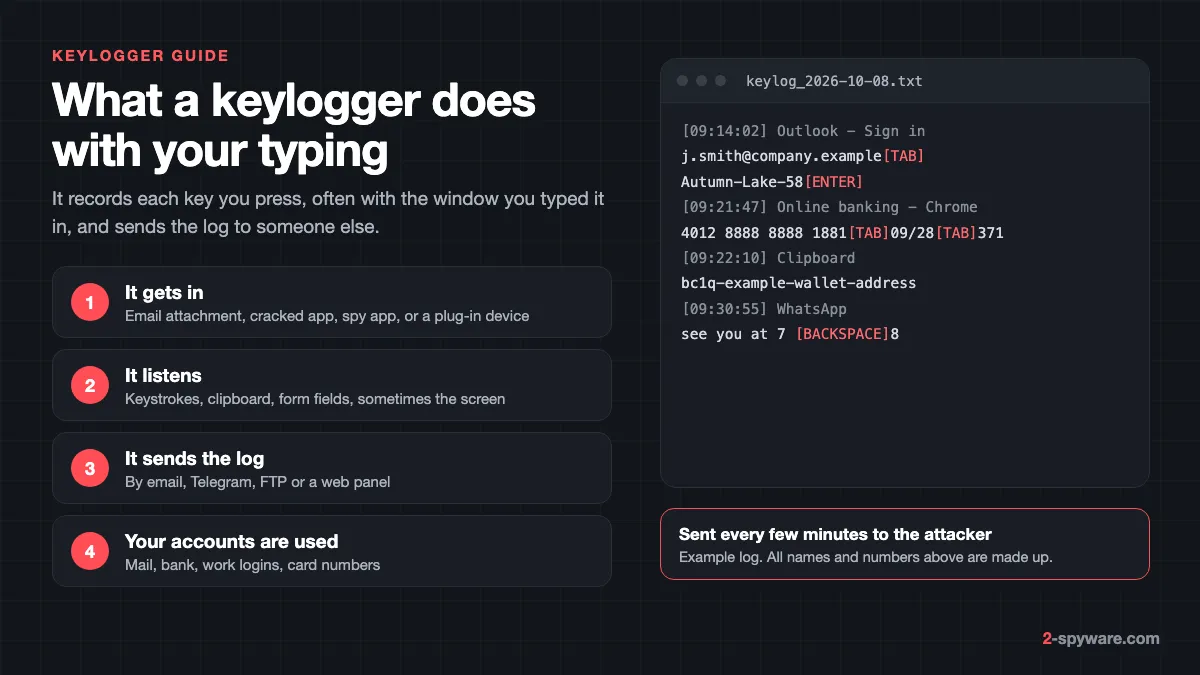
A keylogger, short for keystroke logger, records the keys you press on a keyboard. It saves them to a log, usually with the name of the window or website you typed them in, and sends that log to whoever set it up. The point is simple: whatever you type, someone else can read later.
Most people think of a keylogger as a program, but Kaspersky's researchers point out that it can also be a device [1]. Hardware keyloggers are small parts fixed to the keyboard, placed in the cable or built into the computer itself [1]. They need someone to touch your machine, so they are rarer at home and more of a concern on shared or public computers.
Modern malicious keyloggers rarely stop at keystrokes. They also read the clipboard, grab saved browser passwords and take screenshots. That is why security companies often file them with info stealers, and why one infection can expose your email, bank, work accounts and card numbers at once.
Is a keylogger a virus, and is it always illegal?
A keylogger is not a virus in the strict sense. It does not copy itself into other files. Malicious keyloggers are usually a kind of trojan: they arrive disguised as something else and run quietly in the background. Commercial ones are installed on purpose by someone with access to the device.
Keylogging itself is a neutral technique. Kaspersky lists legitimate uses such as parental control, company security on work computers and law enforcement investigations [1]. Ordinary programs also watch the keyboard to react to hotkeys or switch keyboard layouts [1]. A keyboard shortcut tool is not spyware.
The line is consent and ownership. Monitoring a computer you own, a young child's device, or a company laptop under a written policy is generally lawful in most countries. Installing a keylogger on another adult's phone or computer without their knowledge is a different matter. In many places it breaks wiretapping, computer misuse or stalking laws, even if you paid for the app and even if you share a home.
The FTC calls this kind of hidden monitoring app stalkerware. It describes software someone installs on your phone or other device without your knowledge, which can track your location, read your texts and emails and watch what you do online [5]. Many commercial "monitoring" products sold to parents and employers are used exactly this way.
| Commercial monitoring app | Malicious keylogger | |
|---|---|---|
| Who installs it | A parent, employer or partner with access to the device | A criminal, through a trick or a download |
| How it is sold | Openly, as parental control or employee monitoring | On criminal forums, often as a cheap subscription |
| What it wants | Messages, browsing, location, typed text | Passwords, card numbers, crypto wallets, email access |
| Where the log goes | A web dashboard the buyer logs in to | Email, Telegram bots or a criminal server [3] |
| Examples in our database | Perfect Keylogger, Ardamax, eBlaster | Agent Tesla, HawkEye, FormBook |
| Removal caution | The person who installed it may notice [12] | Remove at once, then change passwords |
Types of keyloggers
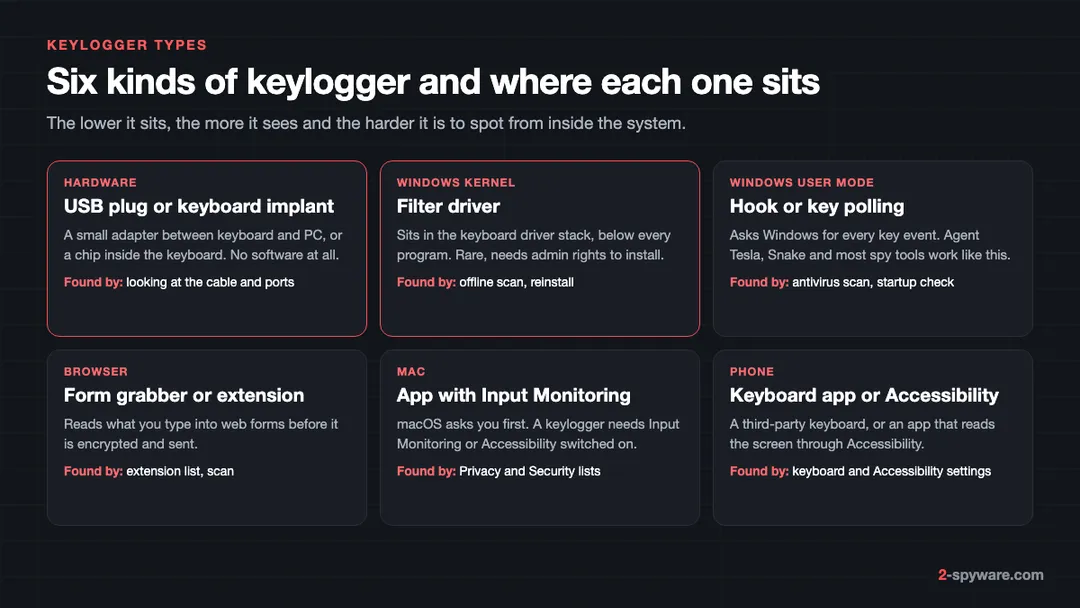
Keyloggers differ in where they sit between your fingers and the app you type into. The lower they sit, the more they see and the harder they are to find from inside the system.
API hooking and key polling on Windows
Most Windows keyloggers ask the operating system for keyboard events. Kaspersky describes two classic methods: a system hook set with the Windows function SetWindowsHook, and a loop that keeps asking for the state of every key with GetAsyncKeyState or GetKeyboardState [1]. These need no special rights, which is why cheap spy tools and malware families alike use them.
Kernel and filter driver keyloggers
A filter driver sits in the keyboard driver stack itself, below every program [1]. It is harder to write and needs administrator rights to install, so it is less common. When one is present, a normal scan from inside Windows may not see it, which is where an offline scan or a full reset comes in.
Form grabbers and stealers
A form grabber does not watch the keyboard. It reads the contents of a web form, such as a login page, just before the browser sends it. CISA describes FormBook as capable of key logging and capturing browser or email client passwords [2]. Our FormBook stealer topic collects the servers and scripts that spread it.
Browser extension keyloggers
An extension with permission to "read and change" the sites you visit can record what you type into any page. It runs only inside the browser, so it misses what you type in other apps, but that covers most logins. Treat coupon tools, PDF converters and "helpers" with broad site access with suspicion. Our malicious browser extensions topic lists known cases.
Mobile keyboard apps and Accessibility abuse
On a phone, the keyboard is an app you can replace. A malicious or careless third-party keyboard sees every word you type. Android malware more often abuses Accessibility, a feature built for people with disabilities that lets an app read everything on the screen and act for you [10]. Since Android 13, apps installed from outside an app store cannot request it until you tap Allow restricted settings [10].
Hardware keyloggers
A USB inline keylogger looks like a short adapter or extension between the keyboard plug and the computer. It stores keystrokes in its own memory, and some models send them over Wi-Fi. A keyboard implant is a small board soldered inside the keyboard case and gives no outside sign. Neither shows up in any antivirus scan, because no software runs on the computer.
Real keylogger examples
These are the families readers search for most in our database, plus the malicious ones security researchers report most often.
- Agent Tesla. Active since 2014 and listed by CISA among the top malware strains of 2021 [2]. It steals data from mail clients, web browsers and FTP servers, and captures screenshots, video and the Windows clipboard [2]. CISA notes it is sold online as a legitimate tool for managing your personal computer and usually arrives as a phishing attachment [2]. Our 2026 update on Agent Tesla covers what it targets now.
- Snake Keylogger. Fortinet described a 2025 variant spread through phishing emails with malicious attachments or links [3]. It logs keystrokes, watches the clipboard and takes credentials and card details from Chrome, Edge and Firefox [3]. It sends the haul out by email (SMTP) and Telegram bots [3].
- HawkEye. A long-running keylogger and password stealer sold on hacking forums, usually delivered by email to businesses. It shares its business model with Agent Tesla: a cheap licence for anyone who wants one.
- Perfect Keylogger. A commercial monitoring program for Windows and the most searched keylogger on our site. It is sold openly, but security tools flag it because it hides itself and records everything typed.
- Ardamax, iSpy, AoBo and eBlaster. Other commercial loggers that people find on shared family or office computers.
- VIP Keylogger and MassLogger. Newer families that criminals deliver through PowerShell scripts on hacked or throwaway servers, such as the one in our qpwot.cfd case.
Microsoft Defender and other scanners give these families names such as Keylogger, Spy, PWS (password stealer) or the family name itself. Our page on antivirus detection names shows how to read them.
How keyloggers get on your device
Kaspersky lists four classic routes: a file attached to an email, a file from a peer-to-peer network, a web page script that exploits a browser flaw, and other malware already on the machine that downloads it [1]. The details have changed since, but the routes have not.
- Malicious email attachments. Fake invoices, shipping notices and purchase orders carry Agent Tesla, Snake and FormBook [2][3]. Archives and disk images hide the real file. Our guide to phishing emails shows the common lures.
- Cracked software and game cheats. The FTC advises against downloading free stuff from unfamiliar sites and peer-to-peer networks [6]. See cracked software and malware.
- Pasted commands. ClickFix pages tell you to paste a command into Run or Terminal to "verify" you are human. That command fetches a stealer or keylogger. Our ClickFix guide explains the trick.
- Other malware. Loaders and remote access trojans download keyloggers as a second stage [1].
- Physical access. Commercial spy apps and hardware loggers need someone to hold your phone or sit at your computer for a few minutes. A shared passcode is often all it takes.
What keyloggers capture, and why 2FA and password managers help
A keylogger sees what you type: usernames, passwords, card numbers, security answers, messages and search terms. Stealer-type keyloggers add saved browser passwords, clipboard contents and screenshots [2][3]. Commercial spy apps add location, photos and call recordings on phones [5].
Two habits blunt most of that. First, two-step verification: a typed password is useless to the attacker without the second factor, and Kaspersky recommends one-time passwords and two-step authentication for exactly this reason [1]. CISA also tells organizations to enforce multifactor authentication [2]. See how to turn on two-step verification.
Second, a password manager that fills logins for you. If you never type the password, a pure keystroke logger never sees it. Passkeys go further, because there is no password to type or steal at all.
There is a catch. Many modern keyloggers are part of a stealer that also copies browser session cookies. A stolen session lets the attacker open your account as if already logged in, skipping both password and second factor. Google added app-bound encryption to Chrome cookies on Windows in 2024, but said malware with admin rights or code injection can still get around it [11]. So after any infection you must sign out of sessions, not just change passwords.
Signs of a keylogger
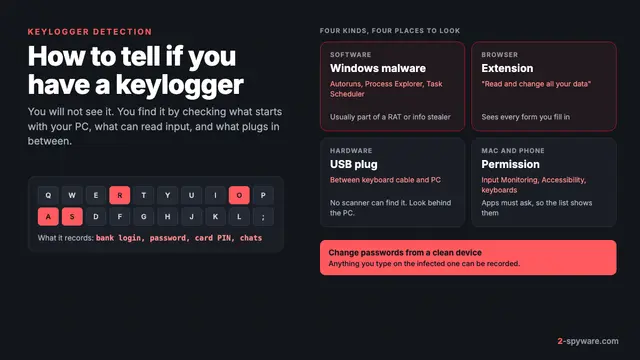
An honest answer first: a well-made keylogger shows no sign at all. Typing lag, a doubled letter or a slow mouse are almost always ordinary glitches, not spyware. Look for these more reliable clues instead.
- Windows Security, or another scanner, reports something with Keylogger, Spy, PWS or a family name like AgentTesla. Check Virus and threat protection, then Protection history [9].
- An app you do not recognize has Input Monitoring or Accessibility permission on a Mac [4], or Accessibility or a keyboard role on Android.
- Sign-in alerts, password reset emails or new devices on your accounts that you cannot explain.
- Someone knows things you only typed, such as private messages or searches. The FTC lists this as a stalkerware warning sign [5].
- On a phone, battery drain, extra data use, heat or random restarts [5]. These are weak signs alone, but count when they appear together with the others.
- A small adapter or extension you did not fit between the keyboard and the computer.
Our detailed checklist on how to detect a keylogger walks through each place to look on every device, with the tools that show hidden processes and network connections.
Is your situation stalkerware? Read this first
If you think a partner, ex-partner or family member installed the keylogger, pause before you remove it. The FTC warns that an abuser who loses access may escalate, and suggests reaching a domestic violence advocate first [5]. The Coalition Against Stalkerware adds that removing the app deletes evidence you may need for a police report [12].
In the US, the National Domestic Violence Hotline answers at 1-800-799-7233, or by texting START to 88788 [5]. Research your options from a device the other person has never had access to [12]. Our Spyzie stalkerware guide shows how one common spy app hides on Android and iPhone.
How to remove a keylogger from Windows
Do not log in to banking or email on the computer until it is clean, as the FTC advises for any malware [6]. Then work through these steps in order.
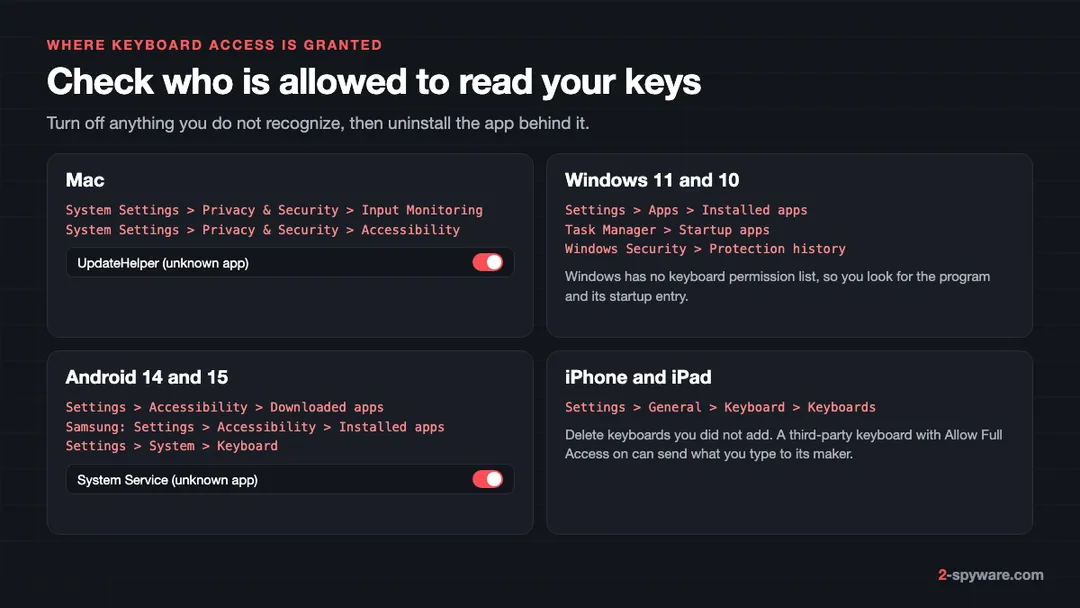
- Open Windows Security, then Virus and threat protection, then Protection history [9]. Note any detection and the file path. A path in Downloads, AppData or a Temp folder points to where it came from.
- Run a full scan from Virus and threat protection, then Scan options, then Full scan. Quarantine or remove what it finds.
- Uninstall programs you do not recognize. On Windows 11 open Settings, then Apps, then Installed apps; on Windows 10 it is Settings, then Apps, then Apps and features. Our uninstall guide has the details. Commercial loggers often hide from this list, so a missing entry proves nothing.
- Open Task Manager, then Startup apps (the Startup tab on Windows 10), and disable entries you cannot name. Snake Keylogger, for example, drops a script called ageless.vbs into the Startup folder so it runs at every boot [3].
- Type shell:startup in the Run box (Windows key plus R) to open your Startup folder, and delete scripts or shortcuts you did not put there. Check Task Scheduler for new tasks with random names too.
- Look for processes running from odd folders. Snake hides inside RegSvcs.exe, a real Windows file, by process hollowing [3]. Our guide on how to check if a Windows process is genuine shows how to tell.
- Run a Microsoft Defender Offline scan. It starts before Windows loads, so a driver-level logger cannot hide from it.
- Clear what is left: services, Run keys and scheduled tasks. Our malware leftovers guide covers each one.
If the scan keeps finding the same thing, if you found a kernel driver, or if the PC holds work or money accounts, reset Windows instead of chasing pieces. Our guide on whether to clean or reset Windows helps you decide. A reset that removes everything is the surest way to get rid of a logger you cannot see.
How to remove a keylogger from a Mac
macOS controls which apps may monitor your keyboard, mouse or trackpad while you use other apps, and lets you switch that off per app [4]. A Mac keylogger cannot read your typing without that permission or Accessibility, so the permission lists are where you start.
- Open the Apple menu, then System Settings, then Privacy and Security, then Input Monitoring [4]. Turn off any app you do not recognize or do not need [4].
- In the same Privacy and Security pane, open Accessibility and Screen and System Audio Recording, and turn off unknown apps there as well.
- Open Finder, then Applications, and move the apps you just switched off to the Trash.
- Open System Settings, then General, then Login Items and Extensions (Login Items on Sonoma), and remove unknown items, including under Allow in the Background.
- Check the LaunchAgents folders in your user Library and in /Library, and /Library/LaunchDaemons. Delete .plist files that belong to the app you removed.
- Look for configuration profiles you did not add under System Settings, then General, then Device Management.
- Restart and check Input Monitoring again. If the app is back, something reinstalled it.
Our full Mac malware removal guide covers each folder in more depth, and the Mac virus guides list current Mac threats by name.
How to remove a keylogger from Chrome, Edge, Firefox and Safari
Browser keyloggers are extensions. Check every browser you have, not only the one you use most.
- Chrome: open the menu, then Extensions, then Manage extensions. Remove anything you did not add. Google recommends checking for unwanted programs first, then using Settings, then Reset settings, then Restore settings to their original defaults [8].
- Edge: open the menu, then Extensions, then Manage extensions, and remove unknown ones. Reset is under Settings, then Reset settings.
- Firefox: open the menu, then Add-ons and themes, then Extensions. Help, then More troubleshooting information, then Refresh Firefox resets it.
- Safari: open Safari, then Settings, then Extensions, and uninstall unknown ones. Remove the app that installed the extension too, or it may return.
Our extension removal guide has screenshots for each browser. If Chrome says it is managed by your organization on a home computer, a program has set a policy, and you need to remove that program first.
How to remove a keylogger from Android and iPhone
Android
- Open Settings, then Accessibility, then Downloaded apps (on Samsung, Installed apps). Turn off any service you do not recognize [10].
- Check your keyboard. On Android 14 and 15 open Settings, then System, then Keyboard, then On-screen keyboard; on Samsung, Settings, then General management, then Keyboard list and default. Remove keyboards you did not choose.
- Remove admin rights from unknown apps under Device admin apps in the security settings, then uninstall them from Settings, then Apps.
- In the Play Store, tap your profile icon, then Play Protect, then Settings, and make sure Scan apps with Play Protect is on [7]. Then run a scan. Play Protect can warn about and remove harmful apps, including ones from outside Google Play [7].
Our Android malware removal guide covers apps that hide their icon or block uninstalling.
iPhone and iPad
iOS does not let apps log system-wide keystrokes, so iPhone spying usually works another way: a keyboard with Full Access, a jailbreak, or someone signed in to your Apple Account who reads your iCloud backup.
- Open Settings, then General, then Keyboard, then Keyboards, and delete keyboards you did not add.
- Check whether the phone is jailbroken, which the FTC lists as something to look for [5]. An app called Cydia or Sileo is a giveaway.
- Change your Apple Account password, turn on two-factor authentication and remove devices you do not recognize from the account's device list.
- Remove profiles you did not install under Settings, then General, then VPN and Device Management.
If you must keep a phone you suspect, the FTC suggests a full factory reset, and warns not to restore apps from the old backup, because that could reinstall the stalkerware [5]. Download the apps again from the store instead [5].
How to check a keyboard and USB ports for a hardware keylogger
No scan finds a hardware logger, so you have to look. This matters most on desktops in offices, libraries, hotels and shared homes.
- Follow the keyboard cable from the keyboard to the computer. Anything between the plug and the port that you did not fit, such as a short adapter, a thick extension or a small dongle, deserves a closer look.
- Check the back of the computer as well as the front. Inline loggers usually sit at the rear, where nobody looks.
- Compare with another identical machine in the same office. A part that only one computer has is suspicious.
- For a keyboard implant, look for signs the case was opened: scratched screws, a loose bottom or a heavier feel. When in doubt, replace the keyboard.
- On a laptop, a hardware logger would have to be built in, which is rare. Software is the more likely risk.
If you find a device on a work computer, do not unplug it yourself. Photograph it and tell your IT or security team, because it may be evidence.
After removal: change passwords from a clean device
Assume that everything typed on the infected device while the keylogger ran is known. Change passwords from a different, clean device, or the logger may record the new ones too.
- Start with your main email account, because it resets everything else. Then banking, payment, work, cloud storage and social accounts.
- Sign out of all sessions on each account, so stolen cookies stop working [11].
- Turn on two-step verification wherever it is offered [1]. An app, passkey or security key is stronger than SMS.
- Tell your bank if you typed card numbers, and watch statements for small test charges.
- Check email forwarding rules and recovery addresses, which attackers add to keep access.
Our step-by-step guide to securing your accounts after malware gives the order for each kind of account. If money was taken, see how to report cybercrime.
How to prevent keyloggers
- Do not open attachments you did not expect, especially archives, disk images and "invoices" from people you do not know [2].
- Download software only from the maker's site or an official store, and avoid cracks and keygens [6].
- Never paste a command from a web page into Run, PowerShell or Terminal.
- Keep the system, browser and antivirus updated, and let the antivirus detect potentially unwanted programs too [1][6].
- Use a password manager and two-step verification, so a typed password is not enough on its own [1].
- Protect your phone with a 6-digit or longer passcode and do not share it [5]. Never tap Allow restricted settings because an app or a caller asks you to [10].
- On shared or public computers, do not log in to email or banking at all.
When to use a keylogger removal tool
Start with what you have. Windows Security runs full and offline scans for free [9], and a second opinion from Microsoft Safety Scanner costs nothing. A dedicated tool helps when detections keep coming back, when you cannot tell which program is responsible, or when you want leftovers and damaged system files dealt with in one pass.
On Windows, Fortect combines a free scan with repair of damaged Windows files, malware leftovers and junk, and its current plans include an antivirus module. On a Mac, our Intego review covers a scanner built for macOS. Our comparison of the best malware removal tools sets the options side by side.
Avoid any "anti-keylogger" product you first met through a pop-up or a fake warning. If you are unsure about a file or a link, our link checker and the Windows help forum can take a look. For a specific keylogger name, search the guide list on this page.
Frequently asked questions
What is a keylogger in simple terms?
A keylogger is a program or a small device that records every key you press and lets someone else read the log. Criminals use it to steal passwords and card numbers. Some parents, employers and abusive partners use commercial versions to monitor another person's typing.
Is a keylogger a virus?
Not strictly. A keylogger does not copy itself into other files like a classic virus. Malicious keyloggers are usually trojans that arrive disguised as something else. Commercial keyloggers are installed on purpose by someone with access to the device, but antivirus tools still flag them.
Are keyloggers illegal?
Keylogging software is legal to sell and to use on your own devices, on a young child's device or on company computers under a clear policy. Installing one on another adult's phone or computer without consent is illegal in many countries under wiretapping, computer misuse or stalking laws.
How do I know if I have a keylogger?
Often you cannot tell by watching the device. Check your antivirus history for detections with Keylogger, Spy or PWS in the name, look for unknown apps with Input Monitoring or Accessibility permission, and watch for account alerts you cannot explain. Typing lag alone is not a reliable sign.
Can antivirus detect keyloggers?
Yes, antivirus detects most known malicious keyloggers and many commercial ones. It cannot detect a hardware keylogger, because no software runs on the computer. A driver-level logger may hide from a normal scan, so run an offline scan when you suspect one.
Does two-factor authentication stop keyloggers?
It stops a stolen password from being enough to log in, which defeats a plain keylogger. It does not help if the malware also steals your browser session cookies, because a live session skips the login. After an infection, sign out of all sessions as well as changing passwords.
Can a keylogger be on my phone?
Yes. On Android, keyloggers come as malicious keyboard apps or apps that abuse Accessibility to read the screen. On iPhone, apps cannot log system-wide keystrokes, so spying usually comes from a jailbreak, a keyboard with Full Access or someone with your Apple Account password.
Can someone install a keylogger remotely?
Yes, a malicious keylogger is usually installed remotely, through an email attachment, a cracked program or a pasted command. Commercial spy apps on phones usually need a few minutes with the unlocked device, and hardware loggers always need physical access.
Does a factory reset remove a keylogger?
A full reset removes software keyloggers on phones and computers in almost all cases. Do not restore apps or programs from an old backup afterward, because that can reinstall the logger. A reset does nothing against a hardware keylogger in the keyboard cable.
What should I do first if I find a keylogger?
Stop logging in to accounts on that device. Remove the keylogger, then change your passwords from a different, clean device, starting with email. If you think a partner or family member installed it, contact a domestic violence advocate before removing it.
Sources
- Kaspersky Securelist: Keyloggers, how they work and how to detect them (Part 1) read 2026-10-08
- CISA: 2021 Top Malware Strains (AA22-216A) read 2026-10-08
- Fortinet FortiGuard Labs: FortiSandbox 5.0 detects evolving Snake Keylogger variant (18 February 2025) read 2026-10-08
- Apple Support: Control access to input monitoring on Mac read 2026-10-08
- FTC Consumer Advice: Stalkerware, what to know read 2026-10-08
- FTC Consumer Advice: Malware, how to protect against, detect and remove it read 2026-10-08
- Google Play Help: Use Google Play Protect to help keep your apps safe and your data private read 2026-10-08
- Google Chrome Help: Remove unwanted ads, pop-ups and malware read 2026-10-08
- Microsoft Support: Virus and threat protection in the Windows Security app read 2026-10-08
- Android Help: Learn about restricted settings read 2026-10-08
- Google Security Blog: Improving the security of Chrome cookies on Windows read 2026-10-08
- Coalition Against Stalkerware: Information for survivors read 2026-10-08