
 Phishing emails and texts: how to spot them and what to do if you clicked
What is spam email?
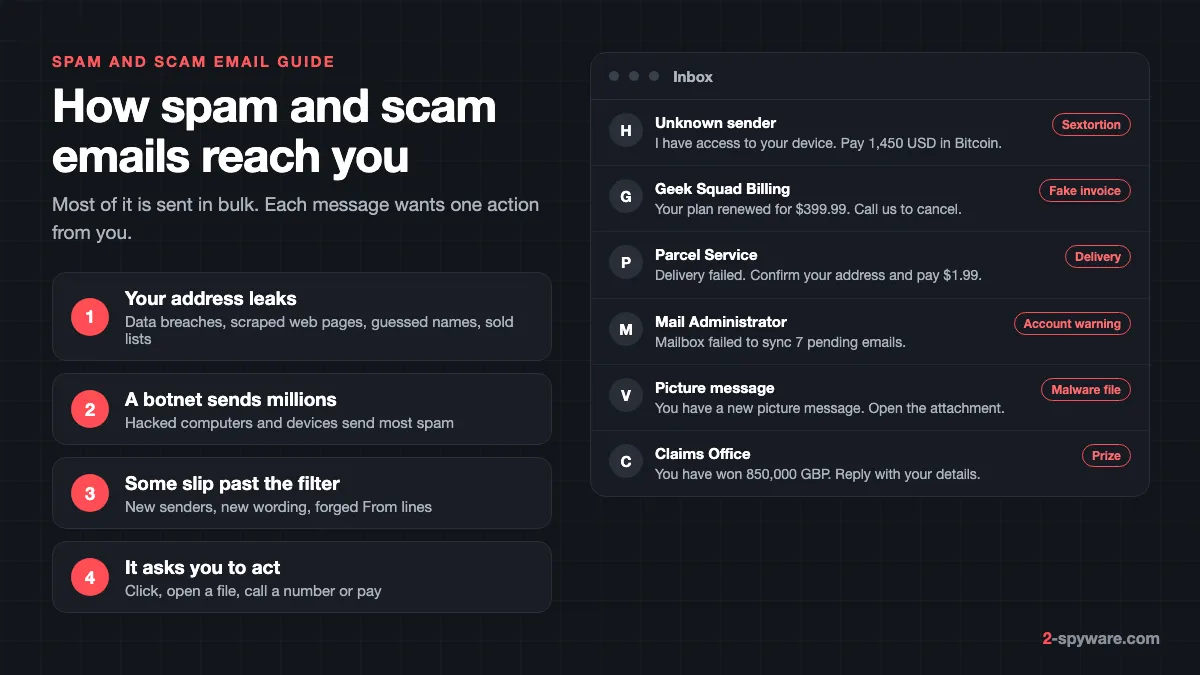
Spam email is any message sent in bulk to people who did not ask for it. Some of it is only advertising for pills, loans or dubious products. A growing share is fraud. The FTC puts it plainly: at best spam is annoying, and at worst it pushes scams or tries to install malware on your device [1].
Email is now the main road scammers use. FTC data shows that email was the top method scammers used to contact people in 2024 [3]. That is why this rubric collects guides on single email campaigns, from sextortion threats to fake antivirus renewals.
It helps to keep four labels apart, because each one needs a different response.
| Type | What it wants | Typical example | What to do |
|---|---|---|---|
| Plain spam | Sell you something | Miracle diet, cheap loans, a newsletter you never joined | Report as spam, delete |
| Scam email | Your money | Sextortion threat, fake invoice with a phone number, lottery win | Do not reply, call or pay; report it |
| Phishing | Your password or card details | Fake mailbox, bank or Microsoft sign-in page | Do not sign in from the link; report it |
| Malspam | Control of your device | Fake parcel or picture message with an attachment | Do not open the file; scan if you did |
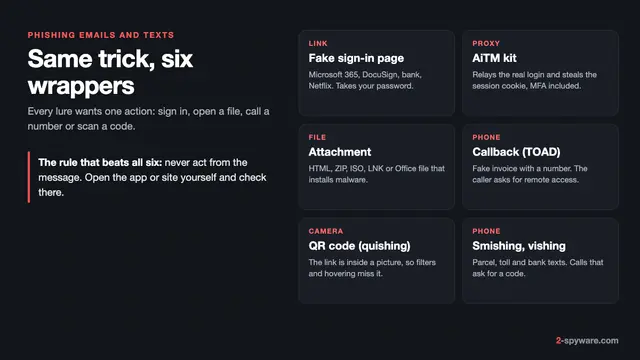
Phishing is the part of email fraud that steals logins. It has its own in-depth guide, phishing emails and texts, so this page keeps it short and covers the wider picture: all the spam and scam campaigns that land in your inbox, and how to get fewer of them.
How spammers get your email address
Getting spam does not mean someone picked you, and it does not mean your computer is hacked. Your address simply ended up on a list. These are the usual ways it gets there.
- Data breaches. When a shop, forum or app you used is breached, its customer list is sold and passed around. That is also where the old password in a sextortion email comes from.
- Scraped web pages. Programs crawl websites, forums, public profiles and online CVs and collect anything that looks like an address.
- Guessed addresses. Spammers combine common first names and surnames with big mail domains, or try every name at a company's domain, and keep the ones that do not bounce.
- Lists that are shared or sold. The FTC warns that when you give a company your email, it might share or sell it to third parties, and suggests reading the privacy policy first [1].
- Test messages. Gmail notes that spammers often send emails with no content in the body or subject to check whether an address is valid, and then send spam to it later [4].
- Tracking pictures. Apple says spammers use email image loading to find out whether your account is active, and that opening junk mail can alert them [10].
The sending side is cheap. The FTC explains that spammers install malware on unprotected computers, phones and smart devices, link them into a botnet, and use it to send millions of emails at once. It adds that most spam is sent this way [1]. A forged From line costs nothing, which is why spam can appear to come from your own address.
Is spam email dangerous? Is it safe to open?
Reading a spam email in Gmail, Outlook, Apple Mail or Yahoo is low risk on its own. Modern mail apps do not run scripts inside messages, and Outlook says it disables malware in mail it moves to the Junk Email folder [8]. Opening one still tells the sender your address is live if pictures load, so deleting it unopened is better [10].
The danger is in what the email asks you to do next. Each scam needs one action from you:
- A link that leads to a fake sign-in page, a payment form or a fake download. The FTC lists "a link to make a payment, but the link has malware" among common tricks [2].
- An attachment that runs a program when opened. Attachments and links might install harmful malware, the FTC says [2].
- A phone number. Fake invoices and renewal notices want you to call, so a person can talk you into paying or into installing a remote access tool. Our tech support scams guide covers what happens on that call.
- A payment. Sextortion and lottery emails ask for Bitcoin, gift cards or a "release fee" sent straight to the scammer.
One more danger is less obvious. Gmail describes a spam attack in which someone fills your inbox with sign-ups and newsletters so you miss a real security alert, for example from your bank, while they try to break into the account [4]. If spam suddenly floods in, search your inbox and Spam for security alerts and run Google's Security Checkup [4].
Types of scam emails, with real examples
Scammers reuse a small set of stories. The names and amounts change every week, but once you know the story you can spot the next version. Each example below links to our full guide on that campaign.
Sextortion: "I hacked your device"
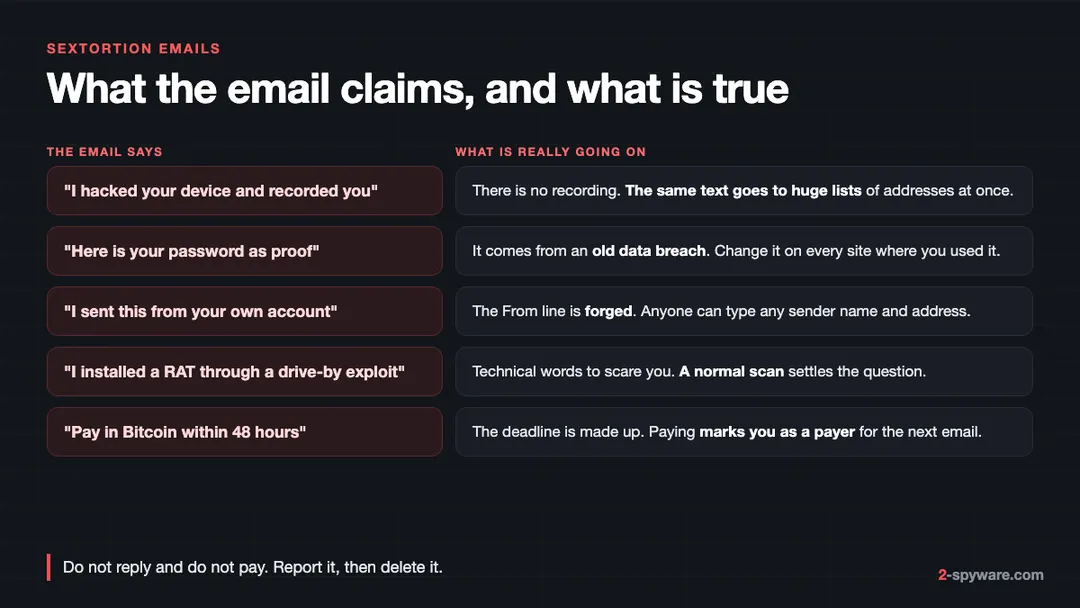
The most searched scam emails in this rubric are blackmail letters. The sender claims to have hacked your camera or planted a remote access tool, says they recorded you on an adult site, and asks for Bitcoin within 48 hours. Variants we track include "I regret to inform you about some sad news for you", "I infected you with my private malware" and the Drive by Exploit email.
None of them has a video. The same text goes to huge lists of addresses. If the email shows one of your passwords, it came from an old data breach, so change that password wherever you used it. If it seems to come from your own address, the From line was forged. Do not reply and do not pay. Our sextortion emails topic lists every variant we have covered.
Fake invoices and subscription renewals
These emails say you were charged for a plan you never bought: Norton, McAfee, Geek Squad, PayPal or Microsoft Defender. The amount is high, often around 300 to 500 dollars, and the only way to "cancel" is to call a number. The FTC is blunt about it: an invoice you do not recognize is fake [2]. Microsoft lists invoices for orders you did not make among the most common phishing types [7].
Our guides cover the Microsoft Defender Subscription Invoice scam, the Geek Squad email scam, Your McAfee Subscription Has Expired and the Norton renewal center scam. More are on our fake invoices and callback scams topic.
Callback phishing
Callback phishing is the engine behind most fake invoices. The email has no link and no attachment, so filters see nothing to block. The trap is the phone number. The person who answers offers a refund, then asks you to install a remote access program and log in to your bank to "receive" it. Never call a number from an unexpected invoice. Look up the company yourself.
Delivery and package scams
A message from a courier says a parcel could not be delivered, asks you to confirm your address, or wants a small redelivery or customs fee. The link leads to a card form. Some versions carry malware instead: our guide on the FedEx tracking email virus describes a campaign that delivered the Hancitor data stealer. See the delivery and parcel scams topic for current cases.
Fake account and mailbox warnings
These emails say your mailbox is full, that messages are stuck, or that your account will be closed. Examples are "Mailbox failed to sync pending emails", the Microsoft Account Deactivation scam and the DocuSign service email scam. The FTC lists suspicious activity, account problems and "confirm your information" among the stories phishing tells [2].
Lottery, inheritance and crypto giveaways
You won a lottery you never entered, a stranger left you millions, or a famous person is doubling any crypto you send, as in the "Biggest crypto giveaway by Elon Musk" scam. Every version ends with a fee you must pay first. The fake prizes and gift cards topic has more.
Malicious attachments
Malspam carries a file that installs malware: a fake picture message, an invoice, a voicemail or a shipping document. The Vzwpix email virus copies a Verizon picture message. Banking trojans such as Emotet and stealers such as Agent Tesla spread mostly this way. Common file types are ZIP and other archives, Office documents, PDF files with links, and shortcuts.
HTML and JavaScript attachments, such as Trojan:JS/Cryxos
Some attachments are small HTML files. When you open one, it runs in your browser and shows a fake sign-in page or a fake alert with a support number. Microsoft Defender often names this kind of script Trojan:JS/Cryxos, which is the most visited guide in this rubric. A Cryxos detection on a file you saved usually means Defender caught the script, not that your PC is taken over.
How to tell if an email is a scam
The FTC suggests one question first: do you have an account with the company, or know the person who contacted you? If not, it could be a scam. If yes, contact the company using a phone number or website you know is real, not the details in the email [2]. Then run these checks.
- Check the real sender address, not the display name. Anyone can call themselves "PayPal Billing". Look at the domain after the @. A free mail address or an odd domain sending a company invoice is a scam.
- Watch for warnings from your mail app. Gmail flags spoofed addresses that swap letters, such as an O for a zero, and messages it cannot confirm came from the sender [4]. Outlook shows a "?" in the sender picture when it cannot verify the sender [7].
- Look for a "via" tag in Outlook. It appears when the address that actually sent the mail differs from the From address. It is not always malicious, but treat unknown senders with it carefully [7].
- Read the headers if you are unsure. In Gmail, open the message, then More, then Show original. In Outlook, open the message details or View source. Check the SPF, DKIM and DMARC results and the real sending domain.
- Hover over links before you click, or long-press on a phone, and read the real web address. Paste anything doubtful into our free link and site check instead of opening it.
- Be wary of every attachment you did not expect, especially HTML, ZIP, ISO, IMG and shortcut files, and Office files that ask you to enable editing or content.
- Distrust any phone number in an unexpected invoice. Look up the real number on the company's own site.
- Notice the pressure. Generic greetings, billing problems and links to update payment details are the signs the FTC points to in a fake Netflix email [2].
For a deeper walk through sender spoofing, lookalike domains and QR codes, see our phishing emails guide. To check one message, look for it among the emails we have already analysed on our scam emails page, or paste it into the form there and an editor will review it.
What to do if you clicked, opened, called or paid
You clicked a link but typed nothing
Close the page. If a file downloaded, delete it without opening it. Most of the time nothing else happened. If the page showed a fake virus alert or asked you to allow notifications, follow our steps on how to stop website notifications.
You typed a password or card number
Change that password now, from the real site, and on every other site where you used it. Turn on two-factor authentication. Call your card issuer about any card details you typed. If you shared your Social Security, bank or card number, the FTC sends you to IdentityTheft.gov for steps based on what you lost [2]. Our guide on how to secure your accounts goes through the order.
You opened an attachment
Treat the device as possibly infected. The FTC advises updating your security software, running a scan and removing anything it finds [2]. If you know the device is infected, take it offline right away [1]. Follow the removal chapters below for Windows, Mac or phone, then change your passwords from a different, clean device.
You called the number or let someone connect
Hang up and disconnect the computer from the internet. Uninstall any remote access program the caller had you install, such as AnyDesk, TeamViewer or a Quick Assist session. Change the passwords for your email and bank from another device and tell your bank. Our tech support scams guide lists what callers usually change on the PC.
You paid
Contact your bank, card issuer, payment app or gift card company at once and ask them to stop or reverse the payment. Then report it. Our step-by-step guide on what to do if you paid a scammer covers each payment method. Expect follow-up "recovery" offers that promise to get your money back for a fee. Those are scams too.
How to stop spam emails in Gmail, Outlook, Apple Mail and Yahoo
Your provider's filter catches most spam, and the FTC notes that big providers such as Gmail and Yahoo have strong spam filters turned on by default [1]. Two habits make them work better: mark every spam message that gets through as spam, and block a sender or domain that keeps coming back [1].
Gmail
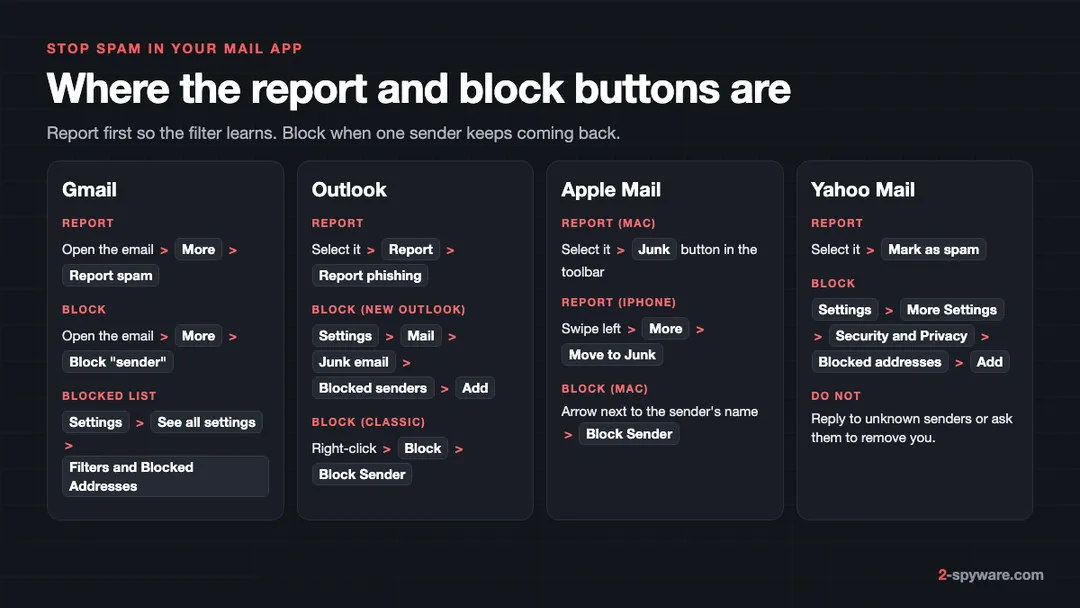
- Report spam: open the email, tap More (three dots) at the top right, then Report spam [4]. Google receives a copy, and the more you report, the better Gmail spots similar mail [4].
- Block a sender on a computer: open the message, click More next to Reply, then Block "sender". Future mail from them goes to Spam [5].
- Review blocked senders: Settings, then See all settings, then Filters and Blocked Addresses [5].
- Filter by keyword or domain: click the search options icon in the search bar, enter the domain or words, click Create filter, then choose Delete it.
- If spam comes from one of your contacts, Gmail says their account has been taken over. Report the message and warn them [4].
Outlook and Outlook.com
- Report: select the message, then Report, then Report phishing. Reporting does not block the sender, so block them too [7].
- Block in new Outlook for Windows: Settings, then Mail, then Junk email. Enter an address under Blocked senders or a domain under Blocked domains, select Add, then Save [6].
- Block in classic Outlook: right-click a message, then Block, then Block Sender. For a list, use Home, then Block, then Junk E-mail Options, then the Blocked Senders tab [6].
- Outlook allows up to 10,000 entries in the blocked and safe senders lists, so block whole domains when you run short [6].
- New Outlook cannot block senders for Gmail, Yahoo or iCloud accounts added to it. Set up blocking at that provider instead [6].
New Outlook removes mail from Junk Email after 14 days [6], and Outlook on the web keeps it for 30 days [8]. Check Junk occasionally so you do not lose real mail.
Apple Mail and iCloud Mail
- On a Mac, select the message and click the Junk button in the toolbar [9]. On iPhone or iPad, swipe left on the message, tap More, then Move to Junk [10].
- Make sure filtering is on: Mail, then Settings, then Junk Mail, and select Enable junk mail filtering [9]. Choose Move it to the Junk mailbox once you trust the filter [9].
- Block a sender on a Mac: point at the sender's name in the message header, click the arrow, then choose Block Sender. You can block up to 3,000 senders [9].
- Stop tracking pictures: turn on Protect Mail Activity. On iPhone, go to Settings, then Apps, then Mail, then Privacy Protection. On a Mac, Mail, then Settings, then Privacy [10].
- With iCloud+, use Hide My Email to give sites a random address that forwards to you, and keep your main address private [10].
Yahoo Mail
- Select the email and click Mark as spam. Future mail from the same sender then goes to the Spam folder [11].
- Block an address: Settings icon, then More Settings, then Security and Privacy. Under Blocked addresses, click Add, enter the address and click Save. You can block up to 1,000 addresses [12].
- Yahoo advises against managing spam in third-party mail apps and suggests doing it in the Yahoo app or webmail [11].
Should you unsubscribe from spam emails?
It depends on who sent it. For newsletters from real companies you once used, unsubscribing is safe and works. Gmail, Apple Mail and Yahoo all show an Unsubscribe option for mailing lists [4][9][11]. Gmail adds that mail sent after you unsubscribe goes straight to Spam [4].
For spam from strangers, do not click the unsubscribe link inside the message. It can lead to a scam page, and it confirms that someone reads the address. Yahoo's advice is to never reply to emails asking to be removed, and to avoid sites that claim to remove your address from spam lists, because many collect addresses for spammers [11]. Report it as spam instead.
How to report spam and scam emails
Reporting takes a minute and helps get sending addresses and fake sites taken down. Use the report button in your mail app first, then the national service for your country.
- United States: forward phishing emails to the Anti-Phishing Working Group at reportphishing@apwg.org, and report the scam to the FTC at ReportFraud.ftc.gov [2][3].
- United Kingdom: forward suspicious emails to report@phishing.gov.uk. You do not need to forward mail that is already in your spam folder [13]. The NCSC says it had removed 454,800 scam URLs as of July 2026 [13].
- If you lost money in England, Wales or Northern Ireland, report it to Report Fraud at reportfraud.police.uk or 0300 123 2040. In Scotland, call Police Scotland on 101 [13].
- Fake tech support: Microsoft collects reports of tech support scams that use its name [7].
Our guide on how to report a phishing email shows the forwarding steps per mail app, and report cybercrime by country lists the right office in other countries.
How to remove email malware from Windows
Use these steps if you opened an attachment, enabled content in an Office file, or ran something a scam email or caller sent you.
- Disconnect from the internet if you think the PC is infected, as the FTC advises [1]. Do not sign in to banking or email on it until it is clean.
- Update Microsoft Defender and run a full scan: open Windows Security, then Virus and threat protection, then Scan options, choose Full scan and click Scan now. Remove what it finds [2].
- Run a Microsoft Defender Offline scan. It restarts the PC and scans before Windows loads, which catches threats that hide while Windows runs.
- Open Settings, then Apps, then Installed apps on Windows 11 (Apps and features on Windows 10). Sort by install date and uninstall anything that appeared when you opened the email, including remote access tools a caller installed.
- Open Task Manager, then the Startup apps tab, and disable entries you do not recognize.
- Clean up what is left with our guide on removing malware leftovers, then change your passwords from a clean device.
If the attachment was a stealer or a trojan, read our trojans guide as well. Those programs may have copied saved browser passwords, so changing passwords is not optional. Ask on our Windows help forum if a detection keeps coming back.
How to remove email malware from a Mac
Most email malware is built for Windows, but Mac users get stealer apps disguised as documents, invoices and fake updates. macOS checks apps you open with XProtect and Gatekeeper, so the risk is highest if you opened a disk image and were asked to right-click and Open, or to type a password.
- Disconnect from the internet and stop using the Mac for passwords or banking [1].
- Open Finder, then Applications, and move apps you do not recognize to the Bin.
- Open System Settings, then General, then Login Items and Extensions on Sequoia and newer (Login Items on Sonoma). Remove unknown items and turn off unknown entries under Allow in the Background.
- Check the LaunchAgents folders in your user Library and in /Library, and /Library/LaunchDaemons, for .plist files with odd names.
- Run a second-opinion scan with a Mac scanner such as Combo Cleaner.
Our full guide on removing malware from a Mac covers stealers, permissions and what they take. The Mac viruses guide lists current families.
How to remove email malware from Android and iPhone
Phones rarely get infected just by opening an email attachment. The risk on a phone is a link that sends you to a fake sign-in page, or a page that pushes you to install an app outside the store.
- Android: if a scam email led you to install an APK file, open Settings, then Apps, and uninstall it. If it will not uninstall, remove its device admin rights first. Our guide on removing malware from Android has the full order.
- iPhone: delete any configuration profile you did not install under Settings, then General, then VPN and Device Management. Clear Safari history and website data, and change any password you typed on a page from the email.
- On both, if you typed a password on your phone, change it from the real app or site and turn on two-factor authentication.
Ask in our Android help forum or iPhone help forum if you are not sure what you installed.
How to get less spam in the future
- Keep your main address private. Use a second address or an alias, such as iCloud Hide My Email, for shops, sign-ups and forums [10].
- Do not reply to unknown senders, and be careful who gets your address [11].
- Turn off remote images or turn on Protect Mail Activity so opening a message does not confirm your address [10].
- Check how a company will use your email before you hand it over [1].
- Keep security software and your devices updated so your computer is not one of the botnet machines that send spam [1].
- Use two-factor authentication on email, so a stolen password alone does not open your account [2].
When to use a malware removal tool
Most spam needs no tool at all: report it and delete it. A scanner matters when you opened an attachment, ran a file, or let a caller onto your computer. Start with what you already have. Microsoft Defender is built into Windows, and the free Microsoft Safety Scanner gives a second opinion.
If problems remain after the scan, such as crashes, broken settings or files a stealer changed, Fortect is our pick for Windows. Its free scan shows what is damaged before you pay, and paid plans repair malware damage and include antivirus. On a Mac, Combo Cleaner is a good choice for cleaning up adware and malware. Never buy software that a scam email or caller recommended.
Frequently asked questions
What is the difference between spam and a scam email?
Spam is any bulk email you did not ask for, such as ads for products. A scam email is spam that lies to you to get money, a password or a click: a fake invoice, a hacker threat, a parcel fee or a prize. All scam emails are spam, but not all spam is a scam.
Is it dangerous to open a spam email?
Opening one in a normal mail app is low risk, because the app does not run code inside the message. Loading its pictures can confirm to the sender that your address is active, so it is better to delete spam unopened. The real risk comes from clicking links, opening attachments, calling numbers or paying.
Why am I suddenly getting so much spam?
Usually your address appeared in a new data breach or on a list that was sold. A sudden flood of sign-up confirmations and newsletters can also be a spam attack meant to hide a real security alert. In that case, look for password reset or bank alerts and check your account security.
How do I know if an email is a scam?
Check the real sender address, not the display name. Ask yourself whether you have an account with that company. Look for pressure, a generic greeting, an unexpected invoice, a phone number to call, a link to update payment details or an unexpected attachment. When in doubt, contact the company through its real website.
A hacker email shows my real password. Is my computer hacked?
No. The password comes from an old data breach of some site you used, not from your computer. The email is mass-sent sextortion. Change that password on every site where you used it, turn on two-factor authentication, and delete the email without replying or paying.
Why does spam look like it came from my own email address?
The From line in an email is easy to forge, so spammers put your own address there to make the hacker story believable. It does not mean they got into your account. If you see messages in your Sent folder that you did not write, then change your password and check your account.
Should I click unsubscribe in spam emails?
Only for newsletters from real companies you know. For spam from strangers, do not click the link inside the message, because it confirms your address is read and may lead to a scam page. Use your mail app's report spam button instead.
Does blocking a sender stop spam?
It stops that exact address or domain. Spammers change sending addresses all the time, so blocking alone will not stop new campaigns. Reporting messages as spam trains the filter to catch similar mail from new senders, so do both.
Where do I report a scam email?
Use the report spam or report phishing button in your mail app first. In the US, forward phishing to reportphishing@apwg.org and report scams to the FTC at ReportFraud.ftc.gov. In the UK, forward suspicious emails to report@phishing.gov.uk.
I opened an attachment from a spam email. What now?
Disconnect the device from the internet, update your security software and run a full scan. Remove anything it finds, then change your passwords from a different device. If you saved passwords in the browser, change those too, because stealer malware often takes them.
What is Trojan:JS/Cryxos?
It is a name Microsoft Defender gives to malicious JavaScript, often found in HTML email attachments and fake alert pages. These scripts show fake sign-in pages or fake virus warnings with a phone number. A detection usually means Defender caught the script before it did harm.
Sources
- FTC Consumer Advice: How To Get Less Spam in Your Email read 2026-10-09
- FTC Consumer Advice: How To Recognize and Avoid Phishing Scams read 2026-10-09
- FTC Consumer Alert: Protect yourself from phishing scams read 2026-10-09
- Gmail Help: Report spam in Gmail read 2026-10-09
- Gmail Help: Block an email address in Gmail read 2026-10-09
- Microsoft Support: Block or unblock senders in Outlook read 2026-10-09
- Microsoft Support: Phishing and suspicious behavior in Outlook read 2026-10-09
- Microsoft Support: Filter junk email and spam in Outlook read 2026-10-09
- Apple Support: Reduce junk mail in Mail on Mac read 2026-10-09
- Apple Support: Report and reduce spam in iCloud Mail read 2026-10-09
- Yahoo Help: Manage spam and mailing lists in Yahoo Mail read 2026-10-09
- Yahoo Help: Block and unblock email addresses in Yahoo Mail read 2026-10-09
- NCSC: Phishing scams, report a scam email read 2026-10-09