
Facebook scams: how to spot it and what to do
Facebook scams encompass fraudulent hoaxes, fake shopping stores, and malware-spreading campaigns designed to steal money and personal information. These schemes exploit the platform's scale and inherent trust among Facebook users.
Facts checked October 5, 2026. Removal steps tested on Windows 11 (26H2) and checked against Microsoft's and the browser makers' current documentation. Sections marked as our earlier report are the original text: they describe the threat as it was then and have not been reviewed since. The 2026 status, the removal steps and the questions are current.
Automatic
Get a free scan and check if your PC is infected.
Fortect finds malware, unwanted programs and the Windows damage they leave behind, and repairs it in one pass.
Do it yourself · free Remove Facebook scams yourself 4 steps, about 12 minutes, no software needed.
Start the steps
Facebook scams: summary
| Name | Facebook scams |
|---|---|
| Type | Phishing message |
| Symptoms | A phishing e-mail asking you to sign in |
| Evidence | 8 write-ups by security sites; details still limited |
| Arrives as | |
| Pretends to be | |
| Removal | Scan the PC with security software to find and remove the malware and anything installed with it. Fortect scans Windows for malware and repairs the system files and settings it damaged. Remove it nowTo use the full-featured product, you have to purchase a license for Fortect. The scan is free. |
Show 4 more facts
| Claim | Your account needs urgent attention |
|---|---|
| Asks for | Your password |
| First seen | 24 August 2021 |
| Facts checked | 5 October 2026 |
What the Facebook scams message looks like
"Now it's official! It has been published in the media. Facebook has just released the entry price: £5.99 to keep the subscription of your status to be set to "private". If you paste this message on your page, it will be offered free (I said paste not share) if not tomorrow, all your posts can become public. Even the messages that have been deleted or the photos not allowed. After all, it does not cost anything for a simple copy and paste."
How to tell the Facebook scams message is fake
From our report of Aug 2021 · not reviewed since
- Malicious links on Messenger and News Feed, corrupted browser extensions, emails, personal messages
- Might steal personal information and install malware
- To uninstall malicious components downloaded from links shared on Facebook, use .
- To strengthen your account, replace your password.
- As of January 4th, 2015 at 5pm Central standard time.
- I do NOT give Facebook, or any entities associated with Facebook, permission to use my pictures, information, or posts, both past and future.
- By this statement I give notice to Facebook that it is strictly forbidden to disclose, copy, distribute, or take any other action against me based on this profile is private and confidential information.
- The violation of privacy can be punished by law (UCC 1-308-11 308-103 and Rome statute).
- NOTE: Facebook is now a public entity.
- All members must post a note like this.
- If you prefer, you can copy and paste this version.
- If you do not publish this statement at least once it will be tactically allowing the use of your photos, as well as information contained in the profile status updates.
- You MUST copy and paste to make this your status.
- I will leave a comment so it will be easier to copy and paste!!!
- I have actually ordered one of the cheap laptops from hxxp://www.hiusmla.com/index.php?route=common%2Fhome I have made the payment as well.
- I received auto-mail confirming my payment success (refer the picture attached).
- But have not heard back since.
- I can claim my money back through my Bank, but i am just seeing how they really operate.
- I am going to get prove that they are a scum or what.
Is Facebook scams dangerous? What the senders want
From our report of Aug 2021 · not reviewed since
Facebook scams is the term used to describe various campaigns of fraudulent conent
Facebook scams are a type of cyber fraud that aims at social network users.
Scammers created various hoaxes that are being spread on Facebook's News Feed and Messenger. Some of them ask to share posts about upcoming paid services or disagreements to use their personal data in order to create chaos and spread misleading news.
Others spread malicious links redirecting to infected websites and ask to install the malware in the form of plugins. Also, you can find various shopping, giveaway, lottery, and fundraiser scams too. However, the main purpose of them all is swindling the money or personal information.
Facebook scams emerged soon after the popularity of the social network reached great heights. Security specialists warned about various different types of hoaxes that are spreading online. However, we have divided them into four categories based on their purposes:
Therefore, these cyber threats might pose a danger to your privacy and computer security. In case of an attack, you need not only remove Facebook scams but change your password too.
- scams that are used for spreading fake news and misleading information (e.g., Facebook will start charging users or share personal information publicly);
- scams that are used for swindling user's money (e.g., fake fundraisers, shopping scams, etc.);
- scams that are used for obtaining personal information (e.g. lottery scams, giveaways, etc.);
- scams that are used for spreading malware (e.g. various versions of Facebook viruses).
From our report of Aug 2021 · not reviewed since
Changed Facebook's terms and policy is one of the most popular scams
It's hard to find a Facebook user who hasn't received a message telling about paid services.
Such a Facebook scam has been spreading since 2012, but the social network is still free of charge. However, the following message occasionally keeps spreading via personal messages:
Of course, there are other variations of this message. However, the point is that this information is untrue. Hence, there's no spam your friend's mailbox with useless and misleading information.
A similar hoax has emerged approximately in 2015. However, instead of receiving a personal message, this time you might be encouraged to post a specific message in order not to let Facebook to use your information:
Similar translated messages are spreading all over the world in a different languages. Researchers from dieviren.de tell that a similar hoax spread in German, Spanish, French, Lithuanian, and many other languages too.
It's hard to tell why this ridiculous scam emerged at first. If you are concerned about your privacy, you should read Facebook's privacy policy, check your account settings and think about what personal information is worth sharing on Facebook.
From our report of Aug 2021 · not reviewed since
Advertisements and links lead to infectious content online
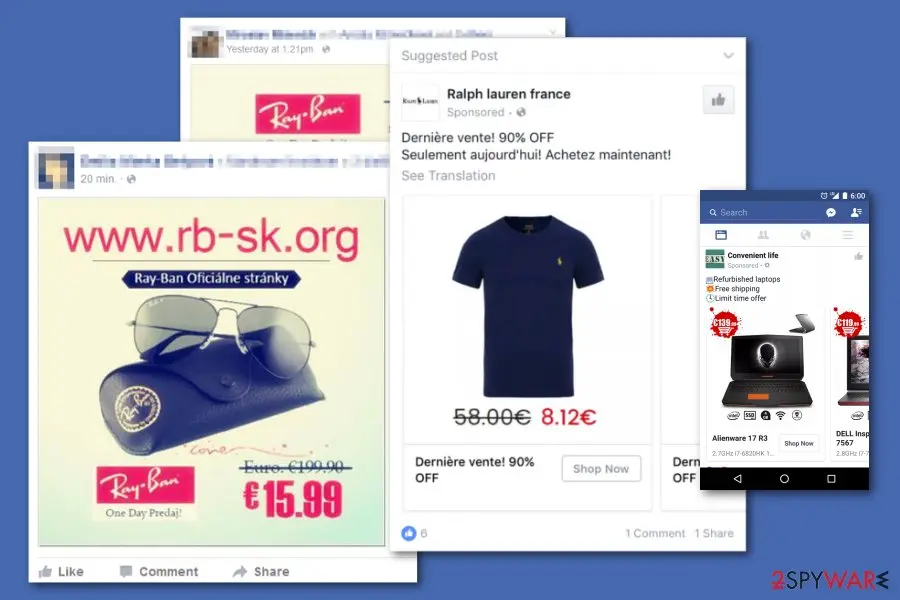
Another type of Facebook scam aims at users who are willing to purchase some clothes or goods for small prices.
Unfortunately, the social network has some flaws in their ads services, so scammers can promote their fake e-shops quite easily.
Some fake e-stores steal pictures from legitimate ones and offer to purchase clothes for low prices. In reality, people receive terrible items that do not look like the ones from the photo. In some cases, victims do not receive their orders at all. Needless to say that they do not have a refund too.
Other fake Facebook ads promote computers or other gadgets at very low prices. The Facebook forum is full of users' reports about fake stores like hxxp://laptopmall.co.uk/ or hxxp://iepcsale.com/ from which they have ordered laptops, but never received them:
We want to warn to be careful with ads. If you see a product available at three or four times lower price, you have to check the information about the retailer. Look for the company name, check its credibility by looking for the information online and reading customer reviews.
From our report of Aug 2021 · not reviewed since
Fake Mark Zuckerberg's account gets used to fake legitimacy of messages you receive
Winning the lottery is always exciting.
However, people always forget that in order to get a chance to win something, you need to enter some competition first. Though, scammers are aware that people do not pay attention to this important fact.
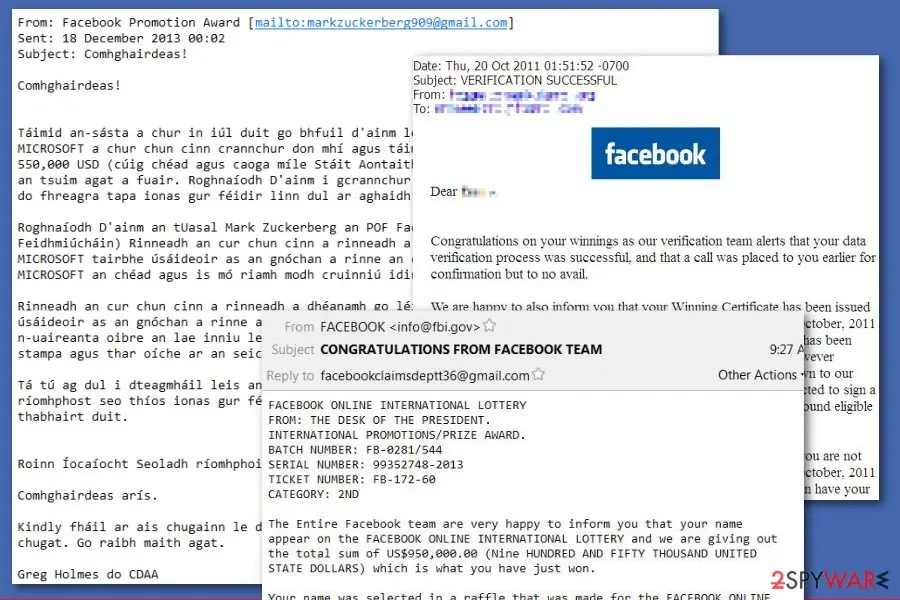
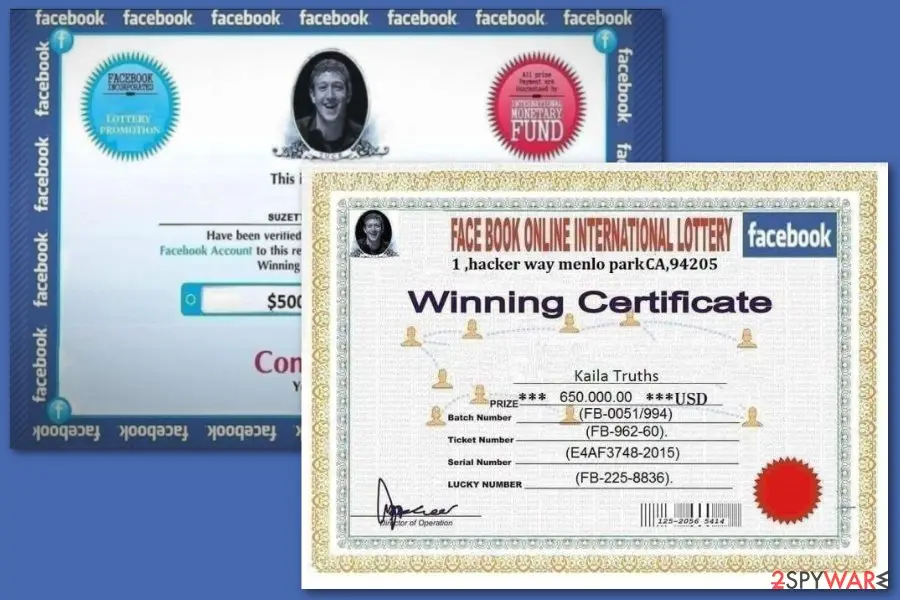
The majority of Facebook lottery scams are spreading via email. These letters look like sent from Facebook and seem legitimate. The scheme usually works in a way that a "lottery winner" has to contact the "agent" who will ask to pay a specific sum of money in order to claim the prize.
Nevertheless, this does not seem logic; many people fall for the hoax and follow ridiculous rules due to the excitement of winning a few hundreds of thousands of dollars.
According to the victims, scammers even use fake identification (ID) to trick people that they are actually working in Facebook. However, we want to point out that any lotteries are not held by the company, thus if you receive such email, delete it immediately.
In April 2018, another Facebook scam has been noticed spreading on the social network tricking people that they won in the lottery too. Dubbed as the Mark Zuckerberg scam, the hoax has been held by using fake accounts.
According to the New York Times, there are about 205 Facebook accounts that impersonate Zuckerberg. Therefore, scammers send messages to victims telling them that they won a few hundred of dollars.
Those, who believed that they received a personal letter from the creator of the social network, were asked to send $200 in iTunes gift cards or/and transfer some money. Therefore, this hoax was used only for swindling the money from Facebook users.
From our report of Aug 2021 · not reviewed since
Facebook scams ba be avoided if you pay attention
The variety of scams makes it challenging to find a cure for stopping these activities on social networks.
However, the main tip is to be critical and do not rush sharing or clicking content that everyone seems to be spreading. Flooded News Feed should motivate you to look up the information about what is going on out there.
Tips to avoid scams:
- Do not participate in suspicious lotteries that offer expensive prizes, such as, iPhones, MacBooks, holiday vouchers, etc. Before entering the contest, make sure that it is arranged by a trusted and authorized page/company.
- Do not send warning messages to your contacts. If you receive a message telling you about upcoming payment, changes to the privacy policy, or similar information that also asks to share it with your friends, it's definitely a scam. If there will be major changes, you would know about them from news outlets or emails from Facebook.
- Do not click on unexpected password reset emails. If you suspect that someone may have tried to hack your account, you should log in to Facebook directly and change the password there. Clicking on links or buttons in such emails might lead to phishing sites created for obtaining credentials.
- Do not rush shopping on unknown e-shops. Scammers learned how to use Facebook ads to promote fake online shops. This hoax is extremely popular among clothes retailers who steal pictures of great-looking clothes to trick people into purchasing them. However, people receive poor-quality clothes that are barely similar to the advertised ones. In some cases, they never received ordered items and never get a refund. Thus, before shopping, always make sure that the seller is reliable. Reading comments in forums helps a lot!
- Do not react to the weird posts you were tagged. If someone tagged you in a video or picture that has a link to a video or some shopping offer, do not click it. It might redirect to a compromised site and hack your account to spread the same hoax.
- Do not add unknown people to your friend list. They might be criminals who are willing not only to perform some type of online crime but rob you in real life.
- If you received a friend request from a friend you know and definitely have in your friends' list, do not rush adding him or her to your circle. It might be a fake account that can be used for swindling the money on behalf of your friend.
- Before donating money to various causes, victims of natural disasters, homeless children, etc. always double-check the information if the issue is real and your money will be used for helping people who actually need it, but not creators of many Facebook scams.
From our report of Aug 2021 · not reviewed since
The malware can be set to steal data or credentials
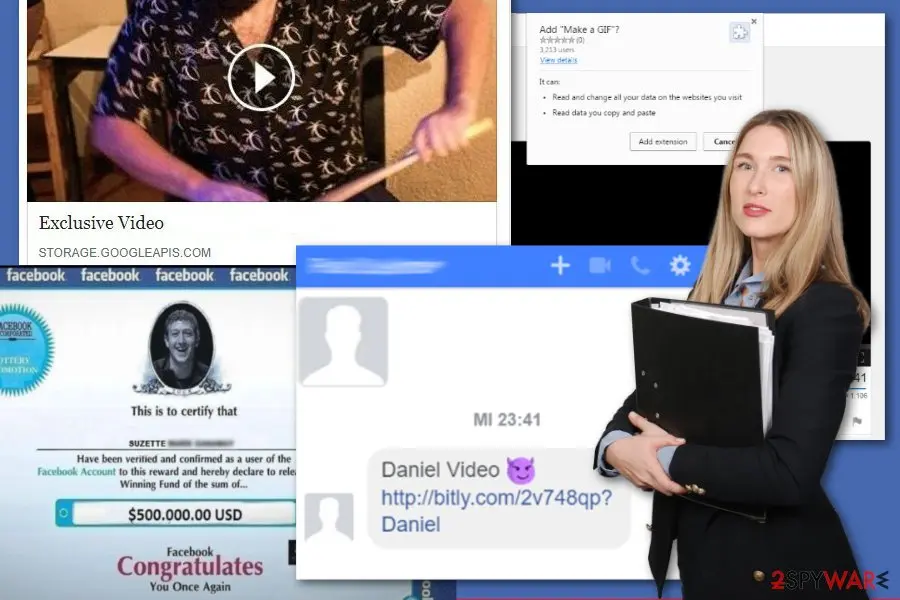
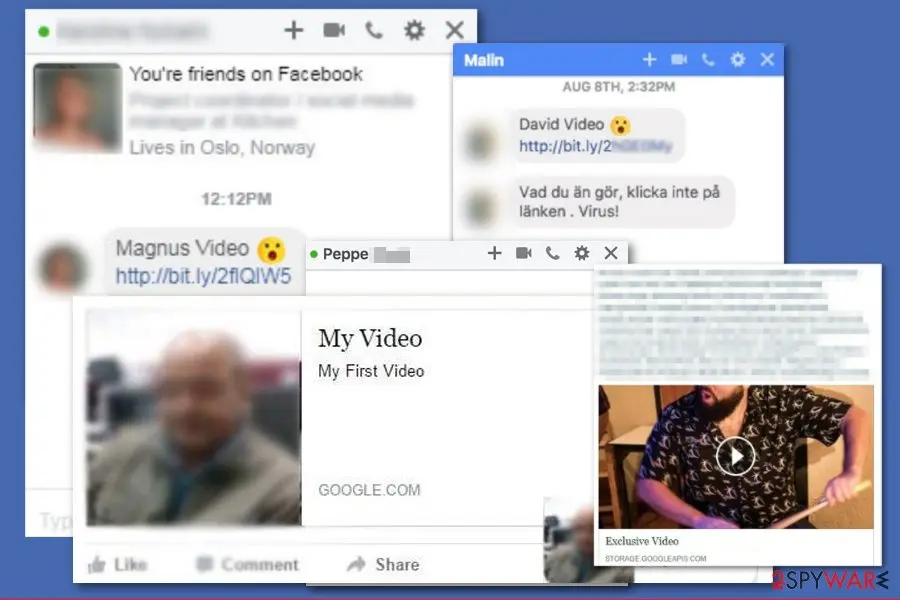
Another type of Facebook scams is usually spread via fake video links on both Messenger and News Feed.
Various versions of Facebook virus suggest watching the different shocking or personal videos. Usually, the link is followed by sayings:
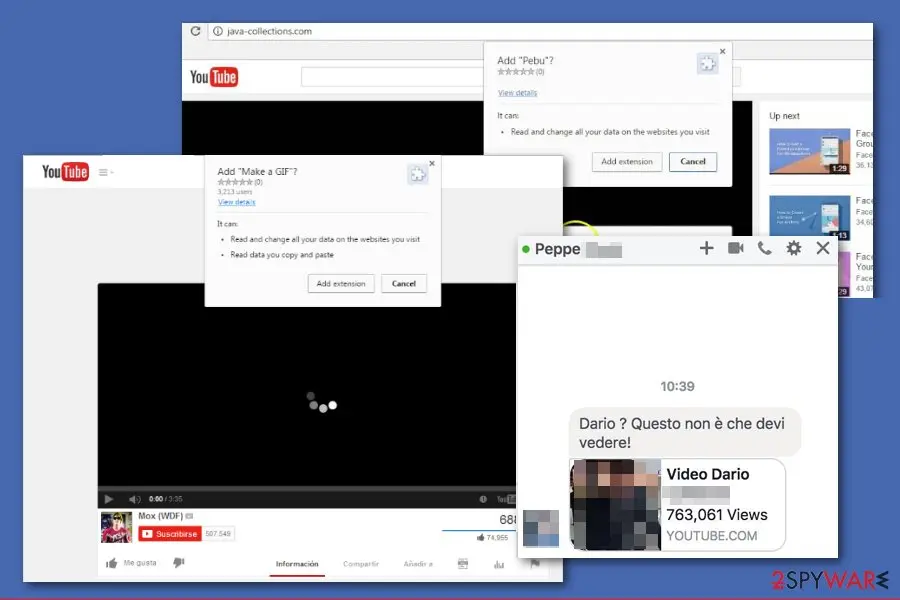
Video links often include a profile picture of the victim and his or her full name. Once clicked, the link redirects to a malicious website that impersonates YouTube or other popular video streaming sites. However, users receive a prompt asking to install a plugin or update needed to access the content.
People who install needed content actually download a malicious program to their devices that execute malware or spyware on the computer. Additionally, their Facebook accounts get hacked and used for spreading the malicious link to their whole contact list.
If you have clicked on a strange video link sent from a friend and installed a suspicious extension, you need to remove the Facebook scam immediately. Uninstall these add-ons from the browser and scan the device with anti-malware software. After that, strengthen your Facebook account's security by changing your password.
- Is this you in this video?
- My Private video
- Exclusive video
- Special video
What to do after the Facebook scams e-mail
If you only received the message and clicked nothing, step 3 is all you need.
If you clicked the link or typed anything on the page it opened, do every step, starting with the password.
Step 1: Change the password you typed on the fake page
If you typed a password on the page the Facebook scams message opened, assume the sender has it. Go to the real site by typing its address yourself and change the password there, choosing one you have never used.
Change it anywhere else the same password was used, and sign out all other sessions if the service offers it. Any browser on Windows 11 or Windows 10 will do, as long as you do not follow the e-mail's link.
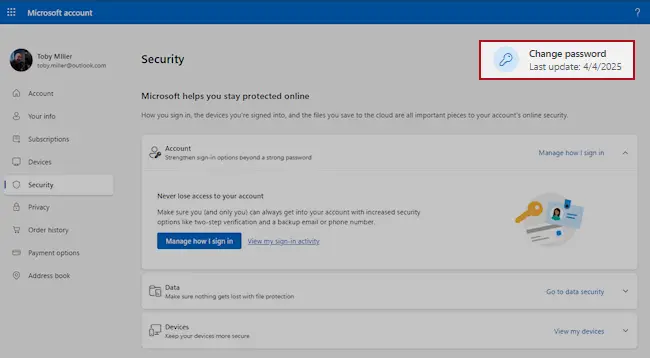
Microsoft account, Security page (account.microsoft.com/security): Change password. Full procedure with screenshots: Turn on two-step verification / secure a hacked account
Step 2: Turn on two-step verification
With two-step verification on, a stolen password alone no longer opens the account, because a sign-in from a new device also needs a code from your phone.
Switch it on for the e-mail account first, then for banking, shopping and social accounts that use that address.
Check the recovery phone, the recovery e-mail and any forwarding rules while you are in the settings, since attackers change them to come back. The pages are the same on Windows 11 and Windows 10.
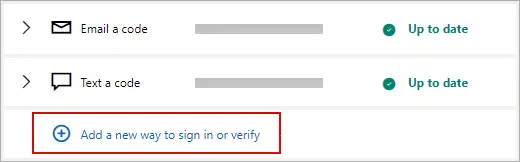
Microsoft account: Manage how I sign in, where two-step verification and the sign-in methods are. Full procedure with screenshots: Turn on two-step verification / secure a hacked account
Step 3: Report the e-mail and delete it
Do not reply and do not click anything else in the message. In Outlook select the e-mail and choose Report > Report phishing; in Gmail open the three-dot menu next to Reply and pick Report phishing.
That trains the filter for everyone on the service, and the message goes to the junk folder. If the e-mail came to a work address, forward it to your IT team as an attachment first.
The steps are the same in the web mail and the mail apps on Windows 11 and Windows 10.
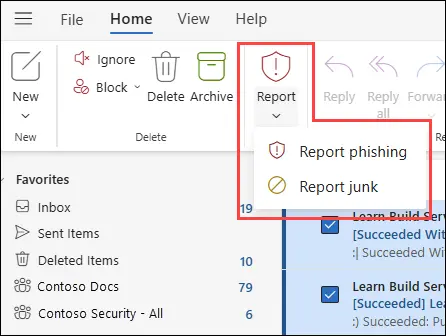
New Outlook for Windows and Outlook on the web: Report > Report phishing. Full procedure with screenshots: Report a phishing e-mail
Step 4: Scan the PC if you opened a file from the message
A fake sign-in page only steals what you type, so most readers can skip this step. If the Facebook scams e-mail made you download or open a file, delete it and scan the PC.
In Windows Security > Virus & threat protection > Scan options, run a Full scan and then Microsoft Defender Antivirus (offline scan) > Scan now. The offline scan restarts Windows 11 or Windows 10 and takes about 15 minutes.

Windows 11: Windows Security > Virus & threat protection > Scan options. Full procedure with screenshots: Run a Microsoft Defender Offline scan
Access your website securely from any location
When you work on the domain, site, blog, or different project that requires constant management, content creation, or coding, you may need to connect to the server and content management service more often. The best solution for creating a tighter network could be a dedicated/fixed IP address.
If you make your IP address static and set to your device, you can connect to the CMS from any location and do not create any additional issues for the server or network manager that needs to monitor connections and activities. VPN software providers like can help you with such settings and offer the option to control the online reputation and manage projects easily from any part of the world.
Recover files after data-affecting malware attacks
While much of the data can be accidentally deleted due to various reasons, malware is one of the main culprits that can cause loss of pictures, documents, videos, and other important files.
More serious malware infections lead to significant data loss when your documents, system files, and images get encrypted. In particular, ransomware is is a type of malware that focuses on such functions, so your files become useless without an ability to access them.
Even though there is little to no possibility to recover after file-locking threats, some applications have features for data recovery in the system. In some cases, can also help to recover at least some portion of your data after data-locking virus infection or general cyber infection.
From our report of Aug 2021 · not reviewed since
Facebook scams removal process including AV tools
Generally speaking, Facebook scams removal is impossible.
Criminals are always looking for new ways to reach potential targets, and a worldwide social network is definitely an excellent place for that. No matter how hard the company works against cybercrime, crooks keep learning new tricks. So, there's no doubt that you will see some fake links, posts, or other hoaxes on Facebook.
The most important task is to stay away from this content. However, if you were tricked or possibly installed something malicious, you have to check your computer's or smartphone's state. If your account was hacked and you keep spreading malicious messages or posts, you need to remove Facebook scams using anti-malware software.
Once you scan all devices you used for accessing Facebook with , or another anti-malware, change your password and look through your account settings. If you see some unauthorized access, disconnect from these devices. Also, remove all unknown third-party apps that your account is associated with.
Questions about Facebook scams
What are Facebook scams?
Facebook scams refer to various fraudulent campaigns spreading across the social network's News Feed and Messenger. Scammers create hoaxes asking users to share posts about upcoming paid services or disagreeing with data usage to create chaos and spread misleading information. Others share malicious links redirecting to infected websites requiring installation of malware plugins.
Common scams include fake shopping offers, giveaways, lotteries, and fundraisers. The main purpose underlying all these schemes is swindling money or extracting personal information from unsuspecting users. Facebook's large user base and inherent trust among connections make it an effective platform for fraud.
What is the 'Facebook will start charging' scam?
This hoax spread since 2012, though Facebook remains free to use. The scam involves messages claiming Facebook will begin charging £5.99or similar amounts to keep account status private, or that posts will become public unless specific actions are taken. Variations demand users paste specific messages or copy-paste statements claiming to forbid Facebook from using their photos and personal information.
These messages cite fake legal references and threaten privacy violations. The scam tricks users into sharing posts believing they're protecting their accounts or getting free service. In reality, sharing these messages accomplishes nothing except spreading misinformation and cluttering friends' feeds with spam.
How do Facebook shopping and giveaway scams work?
These scams exploit Facebook's ad service flaws, allowing scammers to promote fake online stores easily. Fake e-commerce sites steal product photos from legitimate retailers and offer goods at unrealistically low prices.
Victims either receive items completely different from advertised photos or receive nothing at all. Refunds are refused. Other fake Facebook ads promote computers and gadgets at extremely low prices, luring buyers with deals that seem too good to be true.
Scammers create legitimate-looking shops complete with auto-reply confirmation emails to appear credible. Lottery and giveaway scams falsely claim users have won contests they never entered, requesting payment or personal information to claim prizes.
What damage can Facebook scams cause?
Financial scams result in direct monetary losses through fraudulent purchases, fake wire transfers, or MoneyPak payments that cannot be reversed. Shopping scams leave victims with missing or counterfeit items and no recourse for refunds.
Scams designed to obtain personal information lead to identity theft allowing criminals to open accounts or make purchases using stolen details. Malware-spreading campaigns result in computer infections exposing you to ransomware, data stealers, and trojans.
Your compromised account can spread malware to your friends, extending the damage. Phishing attempts through fake account verification links steal login credentials allowing account takeover. Changed passwords and security questions prevent legitimate account access.
How can I identify fake Facebook shopping scams?
Be extremely skeptical of products advertised at prices far below normal market rates—if an offer seems too good to be true, it likely is. Research retailer credibility by looking up company information online and reading customer reviews on independent websites.
Check if the business has a physical address and legitimate contact information. Avoid clicking ads from unknown companies or sellers with no established presence. Legitimate online stores have professional websites with clear return policies and customer support.
Watch for spelling or grammar errors in product descriptions or ads, common in fake shops. Use reputable payment methods offering buyer protection. Never wire money or use irreversible payment methods for unfamiliar sellers.
What should I do if I clicked a malicious Facebook link?
Immediately change your Facebook password using a different device if possible, preferably one that wasn't exposed. Run a full system scan with reputable anti-malware software to detect and remove any malicious programs installed through the link.
Check your email account security and change that password as well, since compromised email provides access to reset credentials for all connected accounts. Review your bank and financial accounts for unauthorized activity. Scan other important accounts—social media, shopping, cloud storage—for login attempts or changes.
Enable two-factor authentication where available. Monitor your credit report for fraudulent activity. If you provided sensitive information like credit card details, contact your bank and consider fraud monitoring services.
How can I protect myself from Facebook scams?
Never click links from unsolicited messages or ads, especially those from strangers or containing suspicious offers. Read Facebook's actual privacy policy rather than trusting viral 'protect your privacy' messages—they're always false.
Verify giveaway and contest legitimacy by checking official company websites or social media accounts. Be extremely cautious with ads promoting unrealistically cheap products. Check retailer credibility before purchasing.
Avoid sharing personal information in response to Facebook requests. Use strong, unique passwords for your Facebook account. Enable two-factor authentication for added security.
Report scams to Facebook using their reporting tools. Educate friends and family about common scams. Keep your computer protected with updated antivirus software.
What should I do if I'm a victim of a Facebook scam?
Document everything—take screenshots of the scam, messages, and any communications with the scammer. Report the scam and the account to Facebook immediately through their Help Center or reporting tools. If you lost money, report the fraud to your bank or payment service provider immediately to attempt reversal.
File a complaint with your country's fraud reporting agency, such as the FBI's IC3 in the US or equivalent authorities elsewhere. If personal information was stolen, place a fraud alert with credit bureaus and monitor your credit report for unauthorized accounts.
Change passwords for all important accounts. Consider reporting the incident to local law enforcement. Spread awareness to friends about the specific scam to help prevent others from falling victim.
Will Fortect remove Facebook scams?
Fortect scans Windows for malware and unwanted programs and repairs the system files and settings they change, and its free scan shows what it finds on your PC before you decide anything.
For Facebook scams, follow the plan above as well: the browser steps take back permissions and settings that no scanner treats as a threat, and uninstalling the program that brought it removes the source.
Run Microsoft Defender's full scan and, if anything was found, its offline scan as a second opinion. If the symptoms are gone after the plan and both scans are clean, there is nothing more to do.
Sources
- DieViren: DieViren (read October 5, 2026)
- Online Threat Alerts: Facebook Lottery Scammers Using Fake Identifications (IDs) (read October 5, 2026)
- FTC: How to recognize and avoid phishing scams (read October 5, 2026)
- CISA: Recognize and report phishing (read October 5, 2026)
- Microsoft Support: Protect yourself from phishing (read October 5, 2026)