
Disclosure: 2-spyware.com earns a commission if you buy Fortect through links on this page. We have no affiliate deal with SpyHunter, Combo Cleaner, Intego or Microsoft and earn nothing from them. Every product fact below comes from our own published review of that tool, linked in its section.
If you are not yet sure your browser is hijacked, start with our browser hijacker guide. It covers the signs and the manual removal order. For a general comparison of the same scanners against pop-up ads, see our best adware removal tools. This page answers a narrower question: which tool actually undoes the locks a hijacker sets on your browser.
Why a hijacker needs more than a file scan
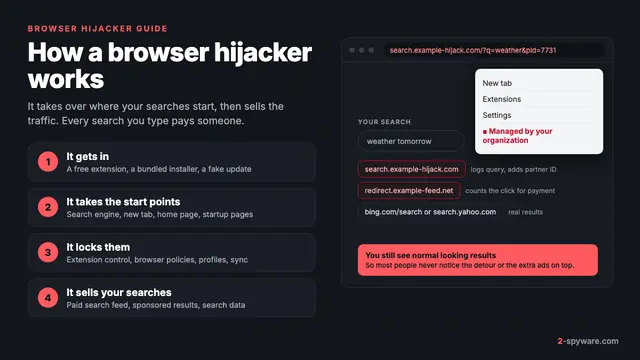
Adware wants to show you ads. A hijacker wants to own the place where your searches start, and then defend it. Delete the program and the changed settings often stay, while a second component puts back whatever you fix.
Microsoft's criteria explain why these programs sit in a grey zone. Software that redirects web traffic without notice and consent, or changes your browsing outside the browser's supported extension model, fails Microsoft's tests [5]. But most hijackers are classed as potentially unwanted applications, and Microsoft states that PUAs aren't considered malware [5]. Some scanners therefore stay quiet about them unless PUA detection is on.
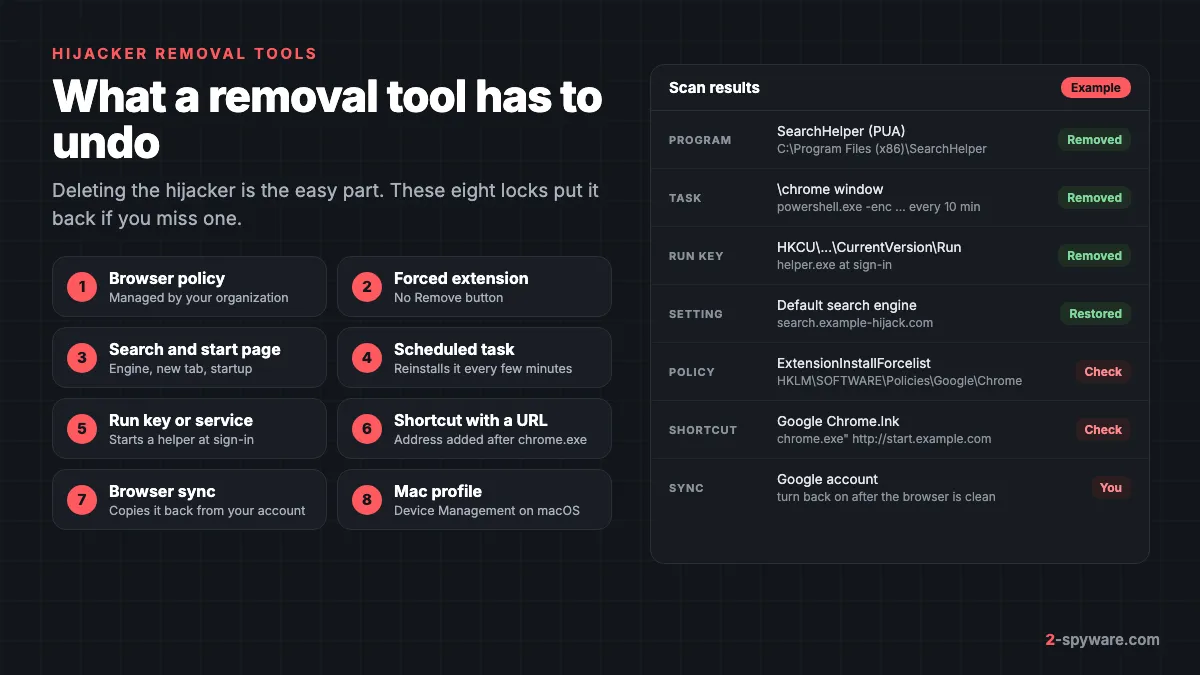
The eight locks a hijacker removal tool must find
| Lock | What it does | Where it lives | Where you check it |
|---|---|---|---|
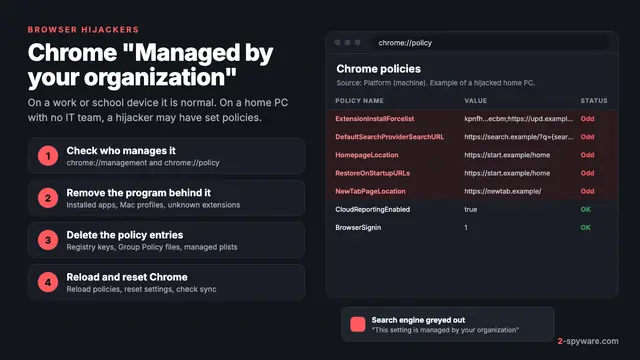
| Browser policy | Sets the search engine or home page and greys out the setting; the menu says Managed by your organization | Registry keys under HKLM or HKCU\SOFTWARE\Policies\Google\Chrome or \Microsoft\Edge; policies.json for Firefox | chrome://policy, edge://policy, about:policies |
| Forced extension | An extension you cannot remove, marked as installed by your administrator | The ExtensionInstallForcelist policy, or a command that loads an extension at launch | chrome://extensions, edge://extensions, about:addons |
| Search and start settings | Default search engine, new tab page, home page and startup pages | The browser profile's settings files | Settings, then Search engine and On startup |
| Scheduled task | Runs a script every few minutes that reinstalls the extension | Task Scheduler Library | Task Scheduler (taskschd.msc) |
| Run key or service | Starts a helper program each time you sign in | HKCU\Software\Microsoft\Windows\CurrentVersion\Run, or a Windows service | Task Manager, Startup apps; services.msc |
| Shortcut with a URL | Opens the hijacker's page whenever you start the browser from that icon | The Target field of desktop, Start and taskbar shortcuts | Right-click, Properties, Shortcut tab |
| Browser sync | Copies the extension and settings back from your account | Your Google, Microsoft or Firefox account | Sync settings in each browser |
| Mac configuration profile | Sets browser options at system level, out of reach of the browser's own settings | System Settings, General, Device Management | Same place; Profiles in System Preferences on older macOS |
The ChromeLoader campaign shows why the persistence rows matter. Palo Alto Networks' Unit 42 found that it spread through cracked games and torrents packed in ISO files [2]. Its installer created a scheduled task that ran an encoded PowerShell command every ten minutes, and that command downloaded and loaded a browser extension into Chrome [2].
A later Windows variant started from a .lnk shortcut and stored its program in a registry Run key, and a macOS variant delivered the same extension [2]. VMware's researchers listed task names that look harmless, such as chrome window, chrome panel, chrome tab and chrome settings [6]. Remove the extension by hand and ten minutes later it is back. The task is what a tool has to find.
What a good hijacker removal tool does
- It detects the program and PUA behind the hijack, and lets you decide on each one.
- It finds persistence: tasks, Run keys, services and startup objects on Windows, launch agents on a Mac.
- It restores the changed settings, or shows you which setting changed.
- It handles files the running hijacker keeps locked.
Hijacker removal tools compared
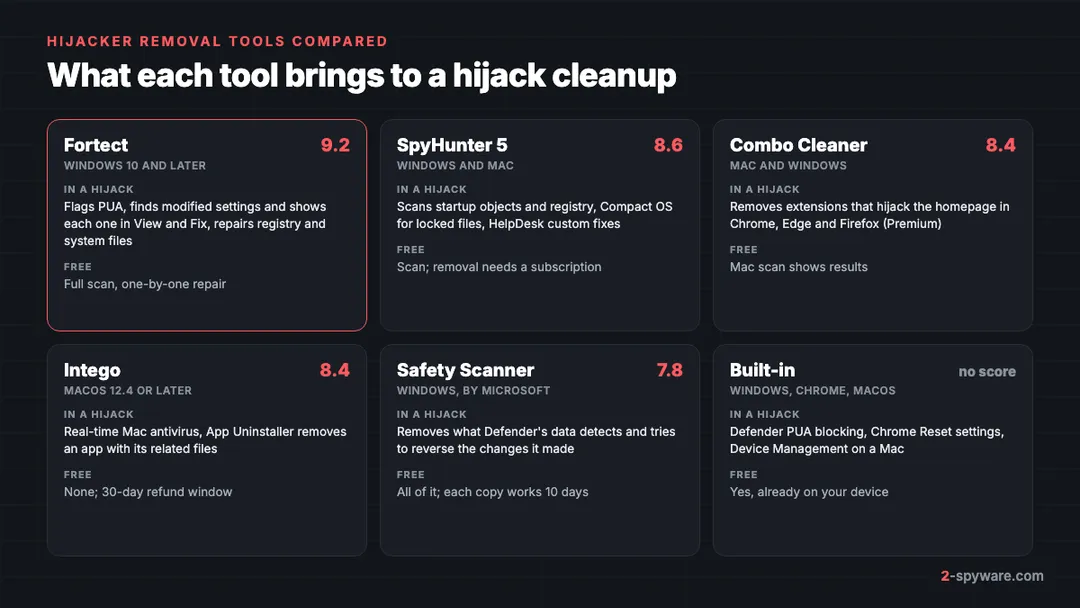
| Tool | Platforms | What it does in a hijack | Free part | Price from | Our score |
|---|---|---|---|---|---|
| Fortect | Windows 10 and later | Flags PUA, finds modified settings, repairs registry and system files | Full scan and one-by-one repair | 30.95 euros first year, 1 PC | 9.2 |
| SpyHunter 5 | Windows 7 to 11, macOS 10.13+ | Scans startup objects and registry, Compact OS, custom HelpDesk fixes | Scan, tracking cookie removal | $29.70 per 6 months | 8.6 |
| Combo Cleaner | macOS and Windows | Removes extensions that hijack the homepage in Chrome, Edge and Firefox | Mac scan shows results | $47.95 per 6 months | 8.4 |
| Intego | macOS 12.4 or later | Real-time Mac antivirus, App Uninstaller removes app and related files | None; 30-day refund window | $29.99 first year | 8.4 |
| Microsoft Safety Scanner | Windows 7 to 11 | Removes what Defender data detects, tries to reverse its changes | Everything; it is free | Free | 7.8 |
| Built-in tools | Windows, Chrome, macOS | Defender PUA blocking, Chrome Reset settings, Device Management | Everything | Free | Not scored |
Fortect: repairs what the hijacker changed
Fortect scores 9.2 in our review, the highest here. Its strength in a hijack is that it looks past the program to the damage. The Malware and PUA stage of its scan searches for viruses, spyware and potentially unwanted applications, and for the system changes they tend to leave, including modified settings and corrupted or missing system files.
In the build we tested, hijack-related findings appear in the Malware and PUA stage. Open an item in View and Fix to see which setting changed before you repair it.
- PUA handling: Fortect flags unwanted programs and leaves the choice to you, which suits search tools that came from an installer you clicked through.
- Registry and system repair: the Broken Registry stage replaces corrupted or missing keys, and damaged Windows files are restored from clean copies.
- Next time: the paid antivirus monitors new downloads, installs and files in real time, where the next bundled hijacker would arrive.
- Free part: the full scan, plus free one-by-one repair, so you can see the results on your own PC first.
- Price: Essential covers 1 PC for 30.95 euros in the first year, Multi-Device covers 3 PCs for 37.95 euros, and Ultimate covers 5 PCs for 53.95 euros. First purchases have a 60-day refund window.
For a hijack, run the Fortect scan after you uninstall the program you recognize. Review the Malware and PUA results, repair the modified settings, then finish with the browser checks at the end of this page. Fortect runs on Windows 10 and later, and Fortect for Mac is a separate security product.
SpyHunter 5: for hijackers that keep coming back
SpyHunter 5 scores 8.6. EnigmaSoft lists browser hijackers, adware and potentially unwanted programs among the threats it removes. Its scanner checks files, memory, startup objects and the registry, and startup objects are exactly where hijacker tasks and Run keys sit.
Two features help when the hijack returns after every cleanup. Compact OS boots a small system beneath Windows and removes files that the running malware keeps locked. The HelpDesk takes a diagnostic report from your PC and sends back a custom fix, which our review notes is useful when malware has changed settings that a normal scan does not restore.
- Free part: a malware and PUP scan and free removal of tracking cookies. You can exclude any program you want to keep.
- Paid: removal starts at $29.70 per six months for SpyHunter 5 Basic. The paid version adds System Guards, which block malware before it starts.
- Trial and refunds: the 7-day trial needs a card and bills unless you cancel; purchases have a 30-day refund.
Combo Cleaner: Mac hijacker extensions
Combo Cleaner scores 8.4 and our review calls it a good pick for Mac adware cleanup. For hijackers, the useful module is the one that removes malicious and unwanted extensions that hijack the homepage, show ads or track browsing in Chrome, Edge and Firefox. Its Mac definitions update every hour, which helps with search hijackers that change names often.
- Free part: the Mac scan shows what it finds; removal and the extension module need Premium.
- Paid: Essential costs $47.95 per six months for one device, with a 30-day refund window.
- Your part: check Device Management yourself, as shown below.
Intego: ongoing protection on a Mac
Intego also scores 8.4. It is a Mac security suite with real-time antivirus, a per-app firewall and, in higher plans, SmartClean with an App Uninstaller that removes an app together with its related files. That uninstaller suits Mac hijackers that arrive as a fake helper app with support files. AV-TEST gave Intego full marks in March 2026.
There is no free version, but every plan has a 30-day refund window, and one Mac costs $29.99 for the first year. To clear a hijacker by hand instead, our Mac adware removal guide covers launch agents and profiles.
Microsoft Safety Scanner: free second look
Microsoft Safety Scanner scores 7.8. It is a free, portable file called msert.exe that uses the same security intelligence as Defender. Microsoft says it removes what it finds and tries to reverse the changes those threats made. Choose the full scan, then read the log at C:\Windows\debug\msert.log to see exactly what it removed.
Each copy expires 10 days after download and there is no real-time protection. For threats that hide while Windows runs, follow it with a Microsoft Defender Offline scan.
Free built-ins: Defender PUA blocking and Chrome's own reset
On Windows, turn on Potentially unwanted app blocking in Windows Security, under App and browser control, then Reputation-based protection settings. Tick both Block apps and Block downloads. In Edge, turn on Block potentially unwanted apps under Settings, Privacy, search, and services. These settings stop many hijacker installers before they run.
Chrome has its own reset. Open Settings, select Reset settings, then Restore settings to their original defaults, and confirm with Reset settings [1]. It resets the default search engine, home page and startup tabs, the new tab page, pinned tabs, content settings, cookies and site data, and extensions and themes [1]. Bookmarks and passwords are kept [1].
Two details make the reset useful against hijackers. It applies to your Chrome profile on every device where you are signed in, so it also cleans what sync would bring back [1]. Chrome also checks your settings at each launch and can restore the search engine, home page, startup pages, pinned tabs and extensions on its own if a program changed them [1].
A reset does not remove a scheduled task or override a policy, and Google notes it is not a full reset [1]. Clear those first, then reset. Our browser reset guide has the steps for Edge and Firefox.
On a Mac with macOS 13 or later, open the Apple menu, then System Settings, General, Device Management [3]. On macOS 12 or earlier it is System Preferences, then Profiles; if there is no Profiles pane, no profile is installed [3]. Select an unknown profile, click the Remove button and restart [3]. Removing a profile deletes all of its settings [4].
How to check that the hijacker is really gone
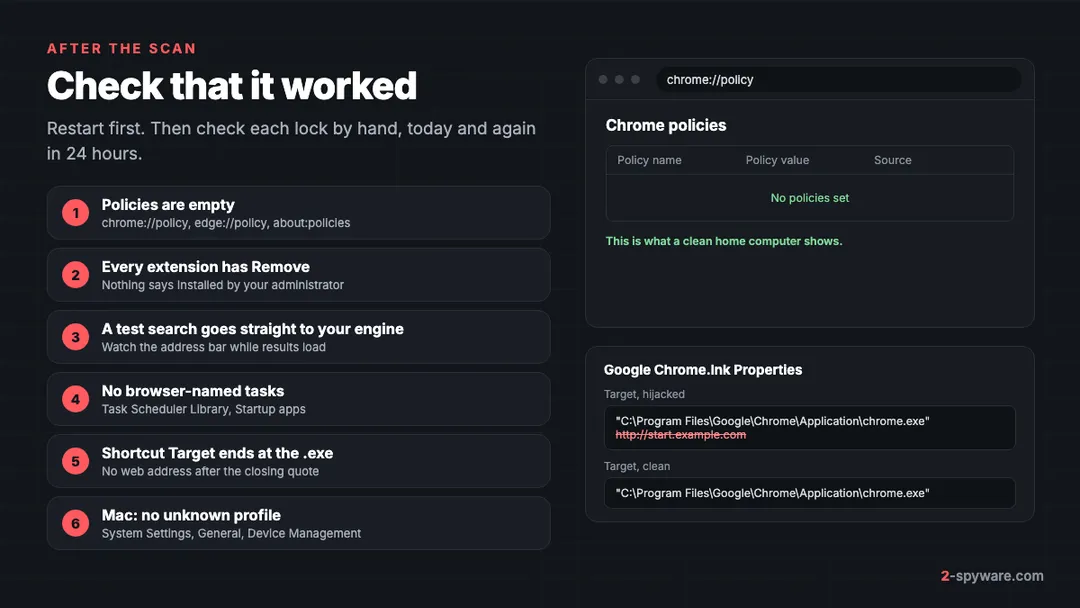
No scanner report proves the browser is clean. Run these checks after the restart that follows your scan, and again 24 hours later, because a task can wait before it reinstalls anything.
- Open chrome://policy, edge://policy or about:policies. On a home computer the list should be empty or hold only policies you know, and the browser menu should no longer say Managed by your organization.
- Open the extensions page. Every extension should have a Remove button and nothing should say installed by your administrator. If an old one is still there, use our extension removal guide.
- Open Settings and look at Search engine, On startup and the new tab page. Then type a test search in the address bar and watch the address while results load. It should go straight to your search engine.
- On Windows, open Task Scheduler and look through Task Scheduler Library for tasks named after a browser that run powershell.exe or a file in AppData. Then check Startup apps in Task Manager.
- Right-click each browser shortcut on the desktop, Start menu and taskbar and select Properties. The Target field should end with the closing quote after the .exe file, with no web address added.
- If pages still redirect, check the hosts file with our hosts file reset guide.
- On a Mac, confirm Device Management shows no unknown profile, and look in Library/LaunchAgents in your home folder for items added on the day the hijack started.
- Turn sync back on only after these checks pass, then watch the search engine for a day.
If anything returns, a component is still running. Run your tool's full scan again and check the leftovers listed in our guide to removing malware leftovers. Still stuck? Post your scan log in our Windows help forum or Mac help forum.
Whatever you choose, get it from the vendor's own site. Fake cleaners that arrive through pop-ups are rogue security software, and some of them hijack the browser themselves. You can test a cleaner's website with our website safety checker, and our guide to potentially unwanted programs explains the bundles most hijackers ride in on.
Frequently asked questions
What is the best browser hijacker removal tool?
In our reviews, Fortect scored highest at 9.2 for Windows. It flags the unwanted program and also finds the modified settings a hijacker leaves behind. On a Mac, Combo Cleaner removes homepage-hijacking extensions and Intego adds real-time protection; both scored 8.4.
Is there a free browser hijacker removal tool?
Yes. Microsoft Safety Scanner is free on Windows, Chrome has a built-in Reset settings option, and Defender can block potentially unwanted apps. Fortect's scan and one-by-one repair are also free. Together they handle many simple hijacks.
Why does my search engine keep changing back after I remove the hijacker?
Something is still putting it back. The usual causes are a browser policy, a scheduled task that reinstalls the extension, a Run key, or browser sync restoring the old settings from your account. Check each one, then reset the browser.
What does Managed by your organization mean on a home PC?
It means a policy is set in the browser. Companies use policies to manage work computers, and hijackers use the same mechanism to lock the search engine or force an extension. On a home PC with no employer software, an unknown policy is a strong sign of a hijack.
Can resetting Chrome remove a browser hijacker?
It restores the search engine, start pages and new tab and disables extensions, and it applies to every device where you are signed in. It does not remove the program, a scheduled task or a policy, so the hijack can return. Remove those first, then reset.
Do hijacker removal tools work on a Mac?
Yes. Combo Cleaner, Intego and SpyHunter for Mac all scan for adware and hijackers. Check Device Management in System Settings yourself, because a configuration profile can keep browser settings locked after the app is gone.
Is a browser hijacker a virus?
Usually not. Most hijackers are classed as potentially unwanted applications, not malware, because they do not spread on their own. They still track your searches and some, like ChromeLoader, load extensions that read every search query.
Should I turn off browser sync before removing a hijacker?
Yes, if the hijack appears on more than one device. Clean each device, run the checks, then turn sync back on. Otherwise the extension and settings can sync back from your account.
Sources
- Google Chrome Help: Reset Chrome settings to default read 2026-10-08
- Palo Alto Networks Unit 42: ChromeLoader: New Stubborn Malware Campaign read 2026-10-08
- Apple Personal Safety User Guide: Review and delete configuration profiles read 2026-10-08
- Apple Mac User Guide: Use configuration profiles to standardize settings on Mac computers read 2026-10-08
- Microsoft Learn: How Microsoft identifies malware and potentially unwanted applications read 2026-10-08
- VMware Security Blog: The Evolution of the Chromeloader Malware read 2026-10-08
 What is a browser hijacker and how to remove it
 Chrome "Managed by your organization": what it means and how to remove it