
What is a computer worm?
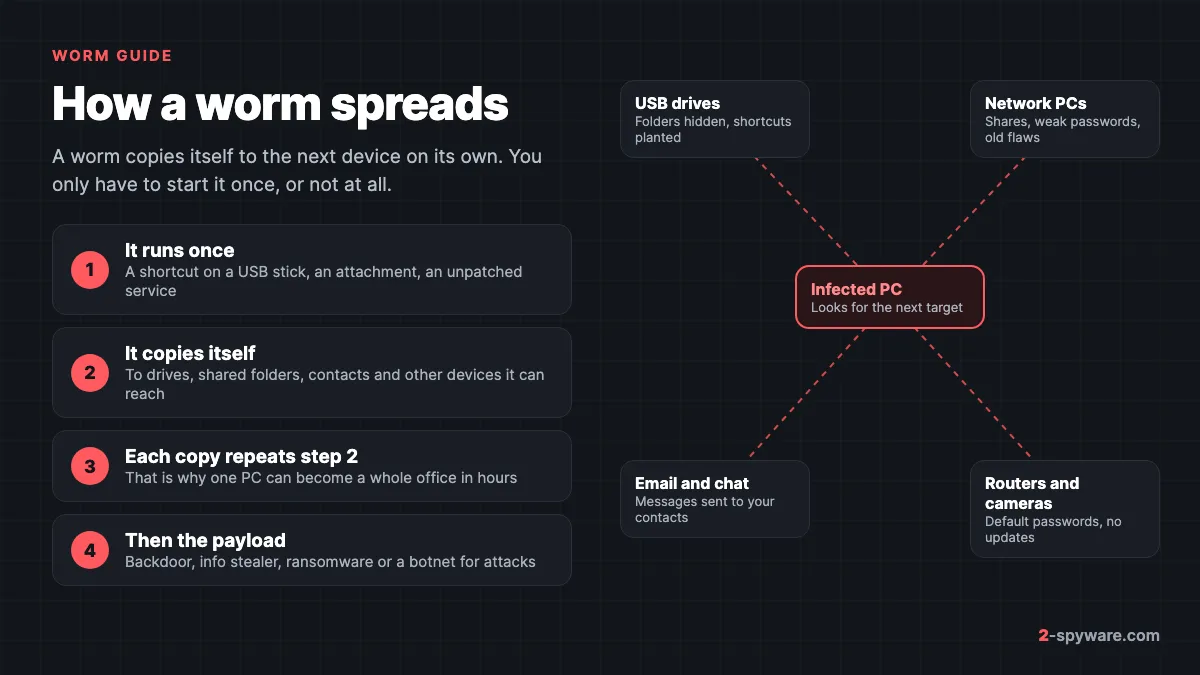
A computer worm is a program that makes copies of itself and sends them to other places. That can be a USB stick you plug in, a folder shared on your home network, another computer with an old security hole, or the contacts in your email or chat app. Each copy is a full worm, and each copy looks for the next target.
Microsoft defines a worm as malware that can copy itself and often spreads through a network by exploiting security vulnerabilities [1]. It lists the routes worms use: email attachments, text messages, file-sharing programs, social networking sites, network shares, removable drives and software vulnerabilities [1].
The key word is self-copying. Most malware you meet today needs you to run it: you open an attachment, start a crack, or paste a command. A worm needs that first start at most, and some worms need no click at all. Once it runs, it spreads without further help, which is how one infected laptop can turn into an infected office in an afternoon.
The term "worm virus" that people search for mixes two names. In everyday speech, "virus" means any malware, so a worm virus simply means a worm. In security, worm and virus are two different kinds of self-spreading code, and the difference decides how you clean it up. Detection names show it: Microsoft uses names that start with Worm:Win32/ for worms and Virus:Win32/ for file infectors. Our page on antivirus detection names explains how to read them.
Worm vs virus vs trojan: what is the difference?
These three words describe how malware moves, not what it does once inside. The FBI puts the worm and virus difference in one line: worms, unlike viruses, do not need a software host and can exist and spread on their own [5]. A trojan does not spread at all; it waits for you to run it because it looks useful.
| Worm | Virus (file infector) | Trojan | |
|---|---|---|---|
| How it spreads | Copies itself to drives, shares, other PCs, contacts | Inserts its code into other programs; spreads when those run or are copied | Does not spread; you install it because it pretends to be useful |
| Needs a host file? | No, it is a complete program | Yes, it lives inside other .exe files | No |
| Needs you to click? | Once, or never for network worms | Each time an infected program runs | Yes, every infection starts with you |
| Typical today | USB shortcut worms, network worms carrying ransomware | Older families on shared PCs and old installers | Fake cracks, fake updates, info stealers |
| Hardest part of clean-up | Finding every drive and PC it reached | Repairing or replacing every infected program | Finding what else it downloaded |
The lines blur in real attacks. WannaCry was ransomware that spread as a worm [6]. Many trojans download worms, and many worms install trojans. Microsoft notes that older worms often spread just because they could, while modern worms usually spread to drop a payload such as ransomware [1]. Our trojan guide and the overview of types of malware cover the other families.
How worms spread
Every worm uses one or more of these five routes. Knowing which one brought it tells you where else to look when you clean up.
USB drives and shortcut files
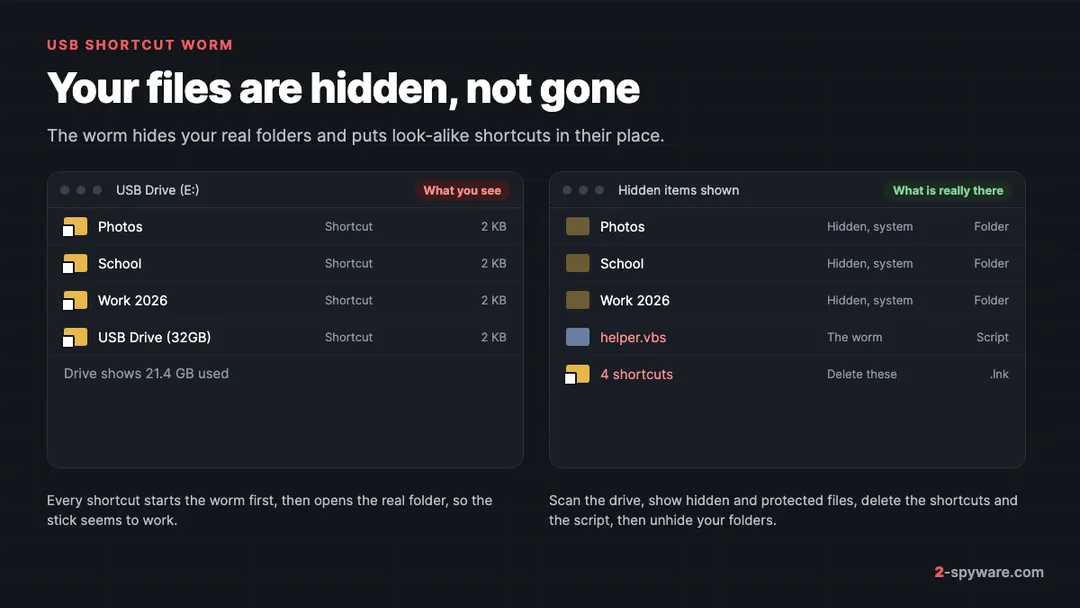
This is the worm most home users meet. The worm copies itself to a USB stick, hides your real folders and creates shortcut files with the same names. When someone double-clicks a shortcut on another PC, the worm runs there and waits for the next stick. Microsoft shows this exact pattern in its worm overview, with a figure of a worm spreading from a shared USB drive [1]. MITRE tracks it as a standard attack technique, replication through removable media [13].
Windows no longer runs programs from USB drives automatically. Microsoft notes that autorun from removable media is disabled by default, which is why current USB worms rely on you clicking a shortcut instead [2]. Our guide to the shortcut virus is the most read worm guide on 2-Spyware for this reason.
Network shares, weak passwords and unpatched services
Network worms do not need a stick. From one infected PC they scan the local network, copy themselves to shared folders, try common passwords, and exploit security holes in Windows services. WannaCry scanned local IP ranges and tried to connect on ports 139 and 445, then spread through the Windows file sharing flaw fixed in update MS17-010 [6]. PCs without that update were infected without anyone clicking anything.
Email, chat and messaging apps
Mass-mailing worms send themselves to everyone in your address book, so the message arrives from a friend. ILOVEYOU did this in 2000 through Outlook, and MyDoom followed in 2004. Today the same idea runs through chat apps and SMS: malware sends a link or a file to your contacts from your account. Microsoft lists text messages and social networking sites among current worm routes [1].
Routers, cameras and other IoT devices
Home routers, network cameras and video recorders run small computers that are rarely updated. Mirai scanned the internet for such devices and logged in with a short list of 62 common default usernames and passwords [7]. That was enough to take over hundreds of thousands of devices [7]. You do not see this kind of infection on your screen; your router simply becomes part of someone's attack network.
Cracked software and infected installers
Worms and file infectors also ride inside pirated programs, game cracks and old installers passed around on sticks. Once one infected setup file runs, it spreads to the drives and programs on that PC. Our page on malware in cracked software and the cracks, keygens and torrents collection show the current cases.
Famous computer worms and what they taught us
The big worms are worth knowing because each one exposed a habit that still matters on your own PC.
| Worm | Year | How it spread | Lesson for you |
|---|---|---|---|
| Morris worm | 1988 | Bugs in Unix email and the finger program | Unpatched services are open doors |
| ILOVEYOU | 2000 | Email attachment sent to every Outlook contact | Show file extensions; a .vbs is not a letter |
| Conficker | 2008 | Windows flaw, weak network passwords, USB drives | Patch, and use strong passwords on shared PCs |
| Stuxnet | 2010 | USB drives into networks with no internet link | Unknown sticks are a real risk |
| WannaCry | 2017 | SMBv1 file sharing flaw MS17-010 | Install updates promptly; turn off old protocols |
| Mirai | 2016 | Default passwords on routers and cameras | Change default passwords on every device |
The Morris worm was released on November 2, 1988, and within 24 hours hit an estimated 6,000 of the roughly 60,000 computers then on the internet [5]. It used several attack routes, including a bug in the finger program [5]. It did not destroy files, but systems slowed to a crawl and some sites disconnected for a week [5]. Its author became the first person convicted under the US Computer Fraud and Abuse Act [5].
ILOVEYOU arrived as an email titled with the same words and an attachment named like a text file that was really a VBScript. Windows hid the .vbs extension by default, so millions of people opened what looked like a letter. The lesson still applies: turn on file name extensions so a script cannot pass as a document. Our I Love You worm guide has the details.
Conficker spread through an unpatched Windows service, guessed weak passwords on network shares and copied itself to removable drives. It was so widespread that Microsoft published a dedicated support alert with manual removal steps for each Windows version [8]. Variants still turn up on old, unpatched machines; see our Conficker.C guide.
Stuxnet showed that a USB stick can reach a computer with no network connection at all. Kaspersky's analysis describes a module whose main job was spreading Stuxnet to removable USB drives, together with an exploit for a then unknown Windows flaw [9]. A stick that moves between PCs carries whatever is on the last one.
WannaCry appeared on May 12, 2017 and reached tens of thousands of systems in over 150 countries within days [6]. Microsoft had released the fix in March 2017, two months earlier [6]. CISA's advice was to apply the patch and, where that was impossible, disable SMBv1 [6]. Our WannaCry collection and the related EternalRocks worm show how that exploit was reused.
Mirai turned routers, cameras and video recorders into a botnet that sent one of the largest denial-of-service attacks on record, over 620 gigabits per second [7]. Its source code was published within weeks, which led to many copycats [7].
Worms home users meet today
The headline worms hit companies. These are the worms readers bring to us from home PCs, school computers and print shops.
- USB shortcut worms. Your folders on a stick turn into shortcuts. Common families include Jenxcus, Gamarue and Bondat, which Microsoft lists among the worms that consistently infect Windows users [1]. Jenxcus also opens a backdoor, and Gamarue becomes a channel for info stealers, spammers and other malware [1]. Our Win32/Bundpil guide covers a USB worm from this group and is the most searched worm guide we have.
- Raspberry Robin. A USB worm that spreads through shortcut files and starts its next stage with built-in Windows tools. Microsoft found it on networks across many sectors and linked it to later ransomware attacks [2].
- Old network worms. Brontok, Conficker and their relatives still run on unpatched PCs in schools, shops and factories, and copy themselves to any stick plugged in there.
- Worms in cracked software. A pirated tool or game can carry a worm or a file infector that then spreads to every drive on your PC. If the trouble began after a crack, read malware in cracked software as well.
- Fake worm alerts. A pop-up that names a "worm" is often a scam, not an infection. E.tre456_worm_osx is the best known case: a fake Mac alert that sends you to a tech support scam.
File infectors: Sality, Virut, Ramnit and Floxif
File-infecting viruses are the worm's older cousins. Instead of copying a separate file, they insert their code into programs already on your PC. Each infected program still runs, but it also runs the virus, which infects more programs. Sality, Virut and Ramnit are the best known families, and many of them also spread through USB drives and network shares like a worm.
Floxif became famous in 2017 when a tampered build of a popular cleaning tool shipped with it. Our report on the CCleaner 5.33 incident explains what happened and how to check whether you were affected.
Signs of a worm infection
A worm tries to stay quiet, but its spreading leaves marks. These are the signs that point to a worm rather than some other malware.
| What you see | What it usually means | Where to look |
|---|---|---|
| Folders on a USB stick turned into 2 KB shortcuts | USB shortcut worm | The stick, then the PC where it was last used |
| The stick shows space used but looks empty | Files hidden with the hidden and system attributes | File Explorer with protected files shown |
| The same detection on several PCs at home or work | Network or USB worm moving between them | Every PC that shared drives or the network |
| Detections come back after each clean-up | A source you have not cleaned | Forgotten sticks, external disks, shared folders |
| Programs crash or fail to start after a scan | File infector damaged or quarantined program files | Reinstall those programs |
| Friends get messages or files you did not send | Mass-mailing or messaging worm | Your email and chat apps, then passwords |
| Unknown .vbs, .js or .lnk files in %AppData% or startup | Worm's start-up entry | Startup apps and Task Scheduler |
| Network slows down, firewall blocks connections | A PC is scanning the network | Windows Security alerts on each PC |
If you have none of these signs but a scan names a worm, read the name. A detection on a single old file in your Downloads folder is very different from the same worm on five PCs. The link and file check helps with a file or address you are unsure about.
How dangerous is a computer worm?
Worms are among the more serious kinds of malware for two reasons. They reach every device around you, and they rarely come alone. Microsoft describes worms that steal sensitive information, change security settings, send information to attackers and block access to files [1].
- Ransomware. WannaCry used a worm to spread ransomware across whole networks [6]. Raspberry Robin has been linked to infections that ended in ransomware [2]. See our ransomware guide.
- Backdoors and stolen data. USB worms such as Jenxcus open a backdoor to the attacker's server, and Gamarue downloads info stealers [1].
- Damaged programs. File infectors can leave programs and even Windows files broken after the clean-up.
- Your devices attack others. A Mirai-style botnet uses your router or camera to attack other networks [7].
- Endless reinfection. Until every drive and PC is clean, the worm keeps coming back.
The good news is that worms are well known to every antivirus product. The hard part is rarely detection; it is finding every place the worm reached.
How to remove a worm from Windows
These steps work on Windows 11 and Windows 10. Where the menus differ, both are given.
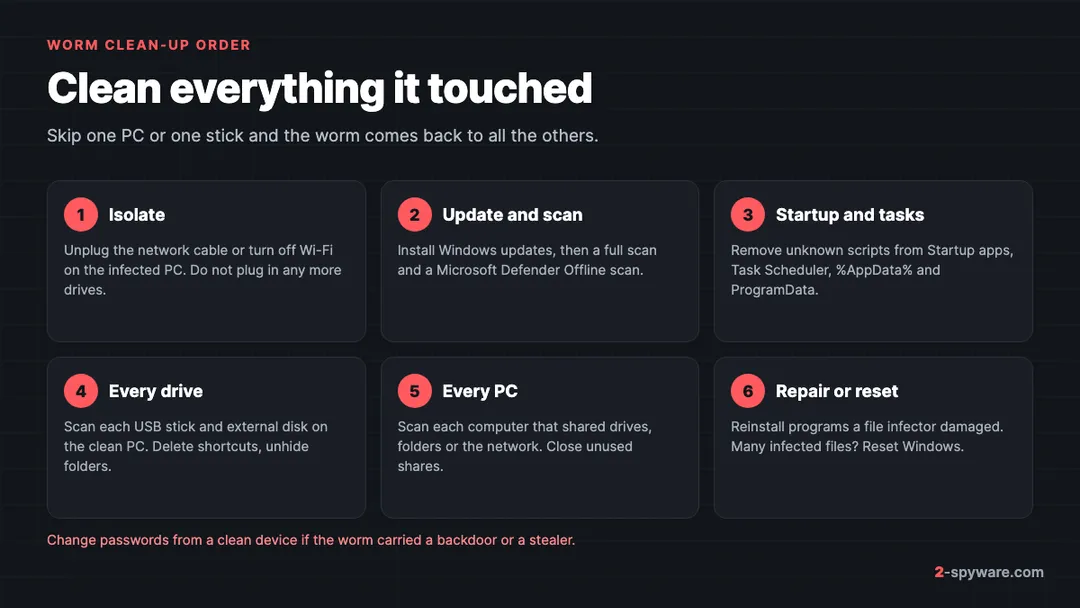
- Disconnect the infected PC from the network. Unplug the cable or turn off Wi-Fi in the quick settings. This stops a network worm from reaching other machines while you work.
- Install every pending update. Reconnect only for this step if you must, then open Settings, then Windows Update, and click Check for updates. On Windows 10 it is Settings, then Update and Security, then Windows Update. This closes the hole a network worm used.
- Run a full scan. Open Windows Security, then Virus and threat protection, then Scan options, choose Full scan and click Scan now [12]. Remove everything it finds.
- Run an offline scan. In the same Scan options list, choose Microsoft Defender Antivirus (offline scan) [12]. The PC restarts and scans before Windows loads, which catches worms that hide while Windows runs. Our step-by-step guide: how to run a Microsoft Defender Offline scan.
- Check startup entries. Open Task Manager, then Startup apps, and disable items you do not recognise, especially scripts run by wscript.exe or programs in %AppData% or C:\ProgramData. On Windows 11 the same list is also under Settings, then Apps, then Startup.
- Check Task Scheduler. Search for Task Scheduler, open Task Scheduler Library, and look for tasks that run .vbs, .js or .exe files from user folders. Delete the ones the scan named.
- Clear leftovers. Our guide on what malware leaves behind in Windows covers services, scheduled tasks and policies.
- Scan again. If the same worm returns, the source is a drive or PC you have not cleaned yet. Go through the next two sections.
How to clean an infected USB drive and get your files back
Clean the PC first, or use a PC you know is clean. Otherwise the worm infects the stick again the moment you plug it in.
- Plug in the drive and do not open anything on it. Never double-click the shortcuts.
- Scan the drive. In File Explorer, right-click the drive and choose Scan with Microsoft Defender. On Windows 11 you may need Show more options first.
- Show hidden and protected files. On Windows 11, click View, then Show, then Hidden items. Then open the three-dot menu, then Options, then the View tab, and untick Hide protected operating system files. On Windows 10, the same options are under View, then Options.
- Delete what the worm left. Remove the shortcut files that copy your folder names and any .vbs, .js, .exe, .lnk or autorun.inf files you did not put there.
- Unhide your folders. Right-click a folder, choose Properties, untick Hidden and click OK. If the box is greyed out, the system attribute is set too. Then use the built-in attrib command, typed yourself, as in Microsoft's documentation: attrib -h -s -r /s /d E:\* where E: is your drive letter [4]. It only changes file attributes on that drive.
- Turn Hide protected operating system files back on when you are done.
- Copy your files to the clean PC, keep a second copy, and format the stick if you want to be sure nothing hidden is left.
Never paste a "USB fix" command from a video or forum. Fake fix commands are a known trick to install more malware. Microsoft's own advice is to use only drives you know and to keep antivirus running before you open a drive used on public computers [3].
How to clean the other PCs on your network
- List every Windows PC that shared a USB drive, an external disk or a shared folder with the infected one in the past weeks.
- On each one, install updates, then run a full scan and an offline scan as above.
- Turn off sharing you do not use. On Windows 11, open Settings, then Network and internet, then Advanced network settings, then Advanced sharing settings, and turn off File and printer sharing. On Windows 10 the same switches are in Control Panel, then Network and Sharing Center, then Change advanced sharing settings.
- Set your home Wi-Fi to Public network if you do not share files between PCs. On Windows 11, open Settings, then Network and internet, then Wi-Fi, then your network's properties.
- Give every Windows account a strong, unique password, because network worms try common ones.
- Restart your router, update its firmware and change its admin password if a Mirai-style worm is suspected. CISA's advice for Mirai is to disconnect, reboot, change the default password, and only then reconnect [7].
- Change your important passwords from a clean device if the detection mentions a backdoor or a stealer: how to secure your accounts after malware.
File infectors: why you may need to reinstall programs
A file infector lives inside dozens or hundreds of programs. Your antivirus tries to cut the virus code out of each one. Files it cannot repair are deleted or quarantined, and some were already broken by the infection.
- Programs that stop working after the scan need a fresh install from the developer's website. Do not reuse installers saved on the infected PC or on old sticks; they may be infected too.
- Do not restore quarantined programs, even if something stops working.
- If Windows itself became unstable, System File Checker can replace damaged Windows files. Our page on checking whether a Windows process is genuine shows how to run it.
- If hundreds of files were infected, a reset is often faster and more reliable than repairs. Copy only documents and photos, scan them, and reinstall programs from scratch. Our guide on whether to clean up or reset Windows helps you decide.
How to remove a worm from a Mac
Real worms on macOS are rare. What Mac owners usually meet is one of three things: a fake "worm detected" alert in the browser, a USB stick carrying a Windows worm, or other Mac malware. Our Mac malware removal guide covers the third case in depth.
- Fake worm alerts. Close the tab, do not call any number, and remove notification permissions for the site. These are scams, not infections.
- Windows worms on a stick. Windows shortcut and script files do not run on macOS, so a Mac is a safe place to rescue files from an infected stick. In Finder, press Command, Shift and the full stop key together to show hidden files. Copy your real folders off, delete the shortcuts and scripts, then scan the stick on a cleaned Windows PC before you use it there again.
- Real Mac malware. macOS has XProtect, which uses signatures that update automatically, checks apps at first launch and when they change, and blocks and removes known malware [10]. Install every macOS update in System Settings, then General, then Software Update.
Then check System Settings, then General, then Login Items for entries you do not recognise, on macOS Sonoma, Sequoia and newer. If you also use Windows PCs at home, clean those first; a Mac often carries the worm between them on a shared stick without being infected itself. More cases are in our Mac topic.
How to remove a worm from Android and iPhone
Phones do not get USB worms in the Windows sense. The worm-like threats on phones spread through messages: an infected Android app sends a link or an app file to your contacts by SMS or chat. Microsoft lists text messages among worm routes [1].
Android
- Turn on airplane mode so the app stops sending messages.
- Check that Play Protect is on. In the Play Store app, tap your profile icon, then Play Protect, then Settings, and turn on Scan apps with Play Protect [11]. Play Protect checks apps from other sources too and may disable or remove harmful ones [11].
- Open Settings, then Apps, and uninstall apps you do not remember installing, especially any installed from a link in a message. On Samsung One UI the path is Settings, then Apps.
- If an app cannot be removed, check Settings, then Security and privacy, then Device admin apps, and turn off admin rights for it first.
- Warn your contacts not to open the link they received from you, and change the password of your Google account from a clean device.
The full walkthrough, with safe mode and accessibility checks, is in our guide on how to remove malware from Android. More cases are on our Android topic.
iPhone and iPad
There are no known worms that spread between iPhones for ordinary users, because apps come from the App Store and cannot copy themselves. Install the latest iOS update in Settings, then General, then Software Update, delete any configuration profile you did not add under General, then VPN and Device Management, and ignore messages that claim your iPhone has a worm. Those are scams.
How to prevent worm infections
Every famous worm in this guide used a habit you can fix in a few minutes.
- Keep Windows, macOS and your phone updated. WannaCry spread through a flaw that had been patched two months before the outbreak [6].
- Turn off SMBv1 on old Windows PCs if it is still on. CISA recommended disabling it during WannaCry [6]. Current Windows 11 installs do not include it.
- Leave AutoPlay off for drives. On Windows 11, open Settings, then Bluetooth and devices, then AutoPlay, and turn off Use AutoPlay for all media and devices. On Windows 10 it is Settings, then Devices, then AutoPlay.
- Show file name extensions. In File Explorer on Windows 11, click View, then Show, then File name extensions, so a script or shortcut cannot pass as a document or folder.
- Do not double-click shortcuts on a USB stick. Open folders from File Explorer's left pane instead.
- Scan sticks used on public PCs before you open them, and do not plug in sticks you find [3].
- Share folders only when you need to, and give every account a strong, unique password.
- Change default passwords on routers, cameras and other connected devices, and install their firmware updates [7].
- Keep a 3-2-1 backup so a worm with ransomware cannot take your only copy: the 3-2-1 backup rule.
When to use a worm removal tool
Microsoft Defender Antivirus, built into Windows, detects and removes known worms, and Microsoft's own advice for worms is to keep it on [1]. For most worm infections, a full scan plus an offline scan on every PC is enough.
A second tool helps when the same detection keeps coming back, when a file infector has left programs and Windows files damaged, or when you want a second opinion on a PC you are about to trust again. Microsoft Safety Scanner is a free on-demand scanner that runs next to your main antivirus.
For the damage a worm or file infector leaves behind, our Fortect review describes a Windows tool that scans for free and repairs damaged or missing Windows files, malware leftovers and broken registry entries. That makes it a good fit for the clean-up after a file infector, when Windows still crashes even though the scan comes back clean. Our comparison of the best malware removal tools sets it next to the other scanners we reviewed.
Avoid any tool you first saw in a pop-up that claimed your PC has a worm. Fake alerts are how rogue security software sells itself. For a specific worm name, search our worm guides, and for general help, ask on the Windows help forum.
Frequently asked questions
What is a computer worm in simple terms?
A computer worm is malware that copies itself from one device to another on its own. Once it runs, it sends copies to USB drives, shared folders, other computers on the network or your contacts, and each copy repeats the process. Many modern worms then install something worse, such as a backdoor or ransomware.
What is the difference between a worm and a virus?
A virus inserts its code into other programs and spreads when those programs run or are copied. A worm is a complete program that copies itself without needing a host file. In everyday speech both are called viruses, and a worm virus simply means a worm. The difference matters for clean-up: a worm means checking every drive and PC, a file infector means repairing or reinstalling programs.
Is a worm worse than a trojan?
A worm spreads to other devices on its own, while a trojan stays on the device where you ran it. That makes a worm harder to contain. What each one does once inside can be equally bad, and the two often work together: trojans download worms, and worms install trojans. Treat both seriously.
Can a worm spread to other computers on my home network?
Yes. Network worms copy themselves to shared folders, try weak passwords and exploit unpatched Windows flaws to reach other PCs. USB worms reach them through sticks and external disks. Scan every PC that shared drives or folders with the infected one, install updates on all of them and turn off file sharing you do not use.
Why did my USB folders turn into shortcuts?
A USB shortcut worm hid your real folders by setting the hidden and system attributes, then created shortcuts with the same names. Each shortcut runs the worm and then opens the real folder. Do not click the shortcuts. Scan the drive, show hidden and protected files in File Explorer, delete the shortcuts and scripts, and unhide your folders. Then clean the PC where the stick was infected.
Can a worm infect my PC just by plugging in a USB stick?
On an updated Windows PC, normally not. Windows no longer runs programs from removable drives automatically, so current USB worms rely on you opening a shortcut or file. Do not double-click anything on an unknown stick, scan it first, and do not plug in sticks you find or receive unexpectedly.
Can Macs and iPhones get worms?
Real worms on macOS and iOS are rare. Macs often carry Windows worms on shared USB sticks without being infected, because Windows scripts and shortcuts do not run on macOS. Pop-ups that say your Mac or iPhone has a worm are scams. Keep both systems updated and remove apps and profiles you did not add.
Will removing a file-infecting virus break my programs?
It can. Antivirus tries to remove the virus code from each infected program, but some files cannot be repaired and are quarantined. Reinstall those programs from fresh downloads from the developer. If many programs and Windows files are affected, resetting Windows is often faster and more reliable than repairing them one at a time.
Does formatting a USB drive remove a worm?
Formatting removes the worm from that stick, along with your files. It does not clean the PC that infected the stick, which will infect it again. Clean the PC first, rescue your files from the stick, scan them, and only then format the drive.
Are worms still a threat in 2026?
Yes. Classic file infectors are rarer, but USB worms such as Raspberry Robin and network worms that carry ransomware remain active. Worms also target routers and cameras with default passwords. Updates, strong passwords and care with USB sticks stop most of them.
Sources
- Microsoft Learn: Worms read 2026-10-08
- Microsoft Security Blog: Raspberry Robin worm part of larger ecosystem facilitating pre-ransomware activity (October 2022) read 2026-10-04
- Microsoft Learn: Prevent malware infection read 2026-10-04
- Microsoft Learn: attrib command read 2026-10-04
- FBI: The Morris Worm, 30 years since first major attack on the internet (November 2018) read 2026-10-08
- CISA Alert TA17-132A: Indicators Associated With WannaCry Ransomware read 2026-10-08
- CISA Alert TA16-288A: Heightened DDoS Threat Posed by Mirai and Other Botnets read 2026-10-08
- Microsoft Support: Virus alert about the Win32/Conficker worm read 2026-10-08
- Kaspersky Securelist: Back to Stuxnet: the missing link read 2026-10-08
- Apple Platform Security: Protecting against malware in macOS read 2026-10-08
- Google Play Help: Use Google Play Protect to help keep your apps safe and your data private read 2026-10-08
- Microsoft Support: Virus and threat protection in the Windows Security app read 2026-10-08
- MITRE ATT&CK: Replication Through Removable Media (T1091) read 2026-10-04