
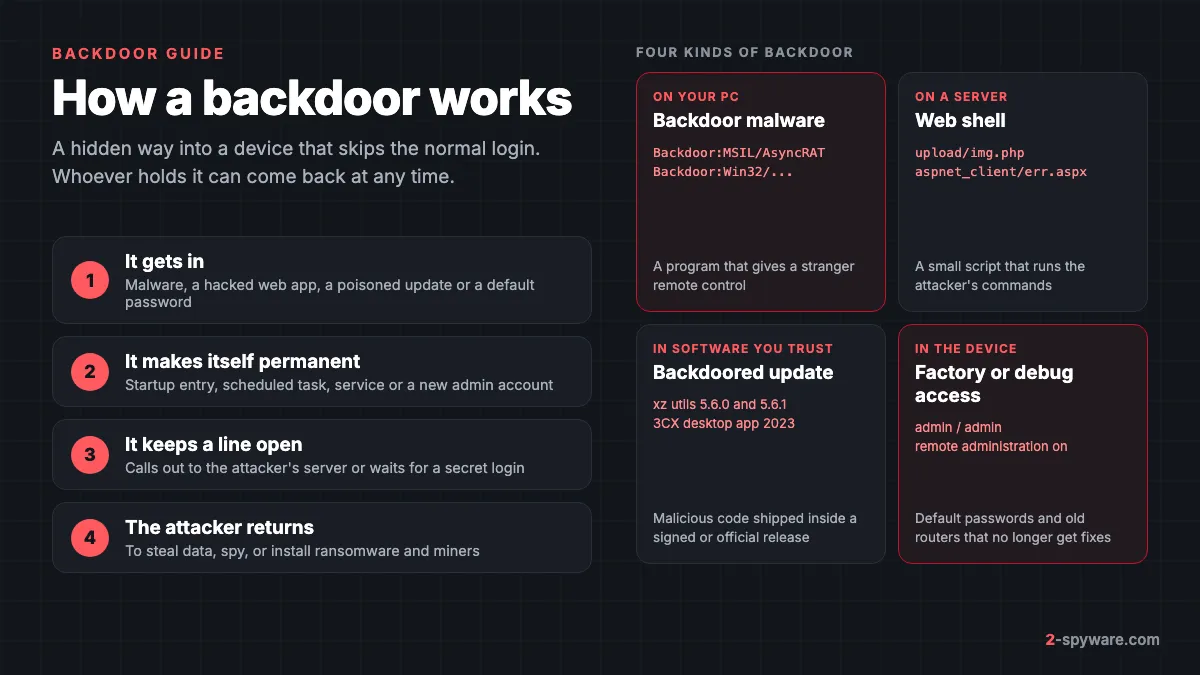
What is a backdoor?
A backdoor is any way into a system that goes around the normal front door: your password, the login screen, the admin page. Whoever knows about it can get in later without asking you, often without leaving a trace you would notice.
In everyday use the word covers two things. The first is backdoor malware: a program running on your device that gives a stranger remote access. Microsoft defines its Backdoor detection type as malware that gives malicious hackers remote access to and control of your device [2]. The second is a weakness built into a product, such as a hidden service account, a debug port or a default password, that someone else can use the same way.
What separates a backdoor from other malware is its purpose. Ransomware wants a payment now and a stealer wants your passwords now. A backdoor wants a way back in. It is often the quiet first stage that lets the attacker return days or months later with something worse.
This page covers the concept and every common form. If what you found is a remote control program such as AsyncRAT, Remcos or an abused AnyDesk session, our in-depth guide to remote access trojans has the step-by-step checks for a PC someone is actively controlling.
Is a backdoor a virus?
Not in the strict sense. A virus copies itself into other files, and most backdoors do not. People still say "backdoor virus" for any malware that opens remote access, and that is fine as shorthand. What matters is that a backdoor is malware, not a nuisance like adware, and you should treat a confirmed one as a full compromise of the device.
Microsoft lists Backdoor as its own malware type, next to Trojan, PWS for password stealers, Ransom, Virus and Worm [1]. A program can do several of these things, but the label shows what the analysts saw as its main job.
| Type | Main job | How it arrives | What you lose |
|---|---|---|---|
| Backdoor | Keep a hidden way back in | Dropped by other malware, exploits, poisoned updates, default passwords | Control of the device over time |
| Remote access trojan | Full remote control with a desktop view | Phishing, cracks, fake support calls | Screen, files, webcam, passwords |
| Trojan | Get in by looking harmless | Fake installers, attachments, cracks | Depends on what it loads next |
| Information stealer | Grab passwords and cookies once | Cracks, fake downloads, ads | Accounts and crypto wallets |
| Virus or worm | Spread to more files or devices | Infected files, USB drives, networks | Damaged files, more infected machines |
Types of backdoors and real examples
Backdoor malware on Windows PCs
This is the kind a home user meets most. A program installs itself, makes sure it starts with Windows and then connects to the attacker's server to wait for commands. Many families sit on the line between backdoor and remote access trojan, which is why Defender reports AsyncRAT as Backdoor:MSIL/AsyncRAT.
- Backdoor:MSIL/AsyncRAT. The most searched backdoor detection on our site. MSIL means it is a .NET program. Our AsyncRAT topic lists files and sites that deliver it.
- Backdoor.SDBot. An older IRC bot family that turns a PC into part of a botnet and opens it to remote commands.
- DoublePulsar. A kernel level backdoor implant that spread with the WannaCry outbreak in 2017 and still turns up on unpatched machines.
- More_eggs. A JavaScript backdoor sent to job seekers and recruiters in fake CV and job offer files.
- FinSpy. Commercial surveillance software sold to governments, a backdoor in everything but name.
Web shells on servers and websites
A web shell is a small script, usually in PHP, ASP or JSP, that attackers plant on a web server to run commands on it remotely [3]. It lets them steal data, take passwords and use the server to reach the rest of the network [3]. If you run a WordPress site, a NAS with a web interface or a small office server, this is your main backdoor risk.
Attackers usually get the shell in through a security hole in a web application that faces the internet [3]. They scan for vulnerable servers in bulk and use old, unpatched flaws as well as brand new ones [3]. When F5 patched a critical flaw in June 2020, Microsoft saw attackers using it to upload web shells the very next day [3].
Web shells are often left behind purely so the attacker can come back, even after the original hole is fixed [3]. Some are tiny upload scripts that look harmless, and some hide inside files that look like images [3]. Microsoft counted an average of 140,000 web shell encounters on servers every month between August 2020 and January 2021 [3].
Backdoored software and supply chain attacks
The hardest backdoors to spot are the ones that arrive inside software you trust. In a supply chain attack, the attacker gets into the project or the company that builds the program, and the backdoor ships to every customer with a normal update.
The xz utils case of March 2024 is the textbook example. Malicious code was found in versions 5.6.0 and 5.6.1 of XZ Utils, a compression library present in many Linux distributions [4]. CISA warned that the code may allow unauthorized access to affected systems and told users to downgrade to a clean version such as 5.4.6 [4]. It was caught before it reached most stable releases.
The 3CX attack a year earlier did reach customers. Signed Windows and macOS versions of the 3CX desktop phone app carried a malicious payload, including Windows versions 18.12.407 and 18.12.416 [5]. A tampered ffmpeg.dll fetched an encoded payload hidden in icon files on GitHub [5]. Sophos saw a browser information stealer as the most common next step [5].
A home version of the same idea is cracked software. A pirated game or Photoshop build from a torrent is a modified program from an unknown person, and a backdoor inside it costs them nothing to add.
Manufacturer, debug and default-password backdoors
Some backdoors are put there by the people who made the device, usually for support or testing rather than for spying. A hidden service account, a test port left open or a password shared by every unit works exactly like a backdoor once someone publishes it.
Routers, IP cameras, smart plugs and NAS boxes are the usual victims, because they run for years without updates. The FBI warned in 2025 that criminals were taking over end-of-life routers, which no longer get security fixes, with a new variant of TheMoon malware [6]. TheMoon needs no password: it scans for open ports and sends a command to a vulnerable script [6]. Hijacked routers were sold as proxies so criminals could hide their identity [6].
Backdoor accounts and abused remote tools
An attacker who has been inside once often leaves a simpler backdoor behind: a new administrator account, Remote Desktop switched on, or a legitimate remote support tool set to unattended access. None of these is malware, so an antivirus scan will not flag them. You have to look for them yourself, as the removal chapters below show.
How backdoors get in
- Through other malware. A trojan or loader that you ran by mistake downloads the backdoor as its next stage.
- Through attachments and fake downloads. Phishing e-mails with invoices, CVs or shipping papers, and fake installers from ads and search results.
- Through pirated software. Cracks, keygens and torrents are a steady source of backdoors on home PCs.
- Through pasted commands. Fake CAPTCHA pages talk you into running a PowerShell command that installs the backdoor for you.
- Through unpatched software. Web applications, VPN gateways and routers with known flaws are scanned and exploited in bulk [3][6].
- Through default or reused passwords on routers, cameras and admin pages.
- Through a trusted update, in a supply chain attack such as xz or 3CX [4][5].
How attackers keep access
Getting in once is not the goal. The point of a backdoor is persistence: surviving a restart, a password change or a cleanup. That is why deleting the one file your antivirus named is often not enough.
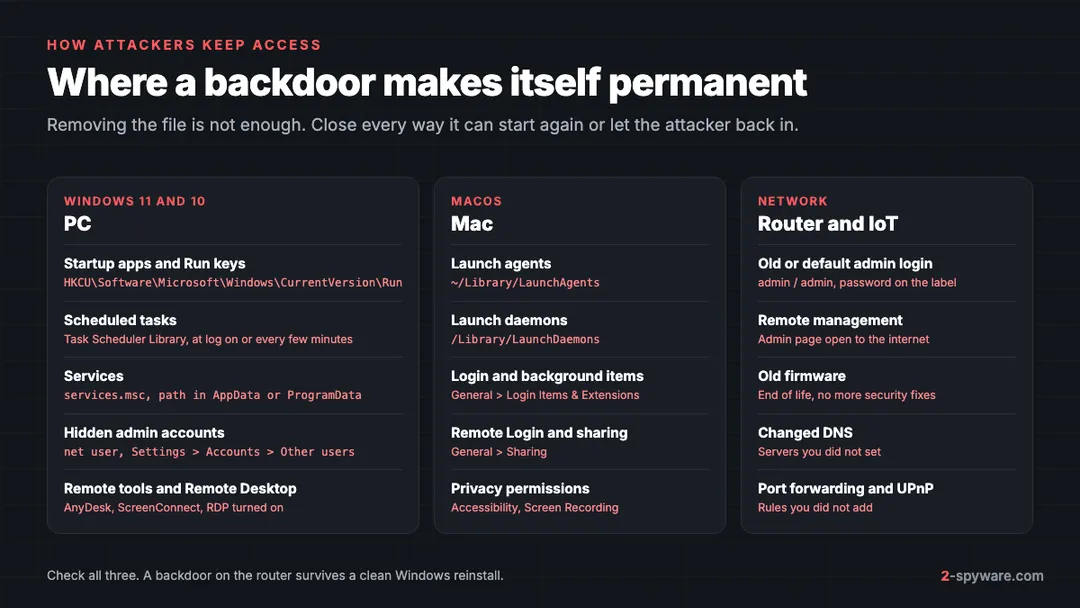
On Windows, backdoors restart through Run keys in the registry, startup folders, scheduled tasks and services. On a Mac they use launch agents, launch daemons and login items. On servers the web shell itself is the persistence [3]. On routers it is the old firmware or the remote management page that stays open [6]. Attackers who expect discovery set up two or three of these at once.
What a Backdoor: detection in Microsoft Defender means
Microsoft names threats with the CARO scheme, so every name tells you something [1]. Take Backdoor:MSIL/AsyncRAT.B!MTB as an example. Each part has a fixed meaning.
| Part | Example | What it tells you |
|---|---|---|
| Type | Backdoor | What the malware does: here, remote access and control [2] |
| Platform | Win32, Win64, MSIL, JS, PHP, Linux | The system or language it runs on. MSIL is .NET, PHP often means a web shell [1] |
| Family | AsyncRAT, Bladabindi, Remcos | The malware family. Other vendors may call the same family something else [1] |
| Variant | .A, .B, .AF | A letter for each distinct version, added in order [1] |
| Suffix | !MTB, !ml, !pz | Extra detail on how it was detected, such as by machine learning |
For a home PC, the type is the part that matters. A Backdoor: label means Defender found a program built to let someone else in. Our list of antivirus detection names decodes the other types you might see.
Then look at the status in Windows Security > Virus & threat protection > Protection history. "Quarantined" or "Removed" means Defender stopped that file. It does not prove nothing else got in. If the backdoor ran before it was caught, the attacker may have added a second way back, so follow the Windows chapter below anyway.
Two cases are less serious. A detection inside an old archive or a Downloads file you never opened usually means the backdoor never ran. And a pop-up in your browser that claims a "backdoor virus detected" is a scam page, not Defender. Close the tab and read our tech support scams guide.
Signs of a backdoor
A good backdoor shows nothing. The signs below are what usually gives one away, ordered from strong to weak.
| Sign | How strong | Innocent cause to rule out |
|---|---|---|
| A Backdoor: detection that keeps coming back after removal | Strong | A file in a backup or sync folder being restored |
| An admin account, remote tool or Remote Desktop you did not set up | Strong | Your employer, family or a repair shop |
| Logins, password resets or transfers you did not make | Strong | Someone else in the household |
| Windows Security turned off or exclusions you did not add | Medium | Another antivirus took over |
| Router settings changed, such as DNS, admin password or port forwarding | Medium | Your internet provider pushed an update |
| Router hot, unstable connection, settings you do not recognise | Medium | Old hardware or a faulty power supply [6] |
| Network activity and a busy fan when the PC is idle | Weak | Updates, cloud sync, game launchers |
If you want to test a single process or file, our guide to checking whether a Windows process is genuine walks you through it. You can also check a suspicious link with our free link check.
Is a backdoor dangerous?
Yes. It is one of the more serious things to find on a device, because it means someone else can act as you, at any time, until it is closed. What happens next depends on who holds it.
- Theft. Saved browser passwords, session cookies, documents and crypto wallets. In the 3CX case the follow-up payload was a browser stealer [5].
- Spying. Keystrokes, screen and files, as with the remote access trojans behind many backdoor detections.
- More malware. Miners, proxies and, in business networks, ransomware. Web shells are a common launch pad for this [3].
- Your device used against others. Hijacked routers and PCs are rented out as proxies and botnet nodes, so crimes trace back to your connection [6].
How to remove a backdoor from Windows
Work in this order. The attacker can see what you do while the PC is online, so cut the line first.
- Disconnect the PC: unplug the cable or turn off Wi-Fi. If money is at risk, call your bank from your phone now.
- Open Windows Security > Virus & threat protection > Protection history and note the full name, path and status of each detection.
- Run a Microsoft Defender Offline scan. It starts before Windows loads, so a backdoor cannot hide from it.
- Check Task Manager > Startup apps (the Startup tab on Windows 10) and disable unknown entries that start from AppData, ProgramData or Temp.
- Open Task Scheduler and services.msc. Delete tasks and stop services whose program path points to a user folder or a random name.
- Check Settings > Accounts > Other users (Family & other users on Windows 10) and remove accounts you did not create. On Windows 11 Pro, turn off Settings > System > Remote Desktop.
- Uninstall remote tools and programs you did not install, then clean up with our malware leftovers guide.
- Run a full scan again and reconnect only when it comes back clean. Then decide on a reset, as below.
If you found a remote tool or a RAT, the remote access trojan guide adds network checks with netstat and Resource Monitor.
How to remove a backdoor from a Mac
Backdoors on macOS are rarer, but they exist, and the 3CX case showed a signed Mac app can carry one [5]. The trojanized Mac app left files in ~/Library/Application Support/3CX Desktop App, including one called UpdateAgent [5].
- Disconnect from Wi-Fi.
- On macOS Ventura, Sonoma, Sequoia and newer, open System Settings > General > Login Items & Extensions. Turn off and remove anything you do not recognise under Open at Login and Allow in the Background.
- In Finder, choose Go > Go to Folder and check ~/Library/LaunchAgents, /Library/LaunchAgents and /Library/LaunchDaemons for .plist files with odd or random names.
- Open System Settings > General > Sharing and turn off Remote Login, Screen Sharing and Remote Management unless you use them.
- Check Privacy & Security > Accessibility and Screen & System Audio Recording for apps you did not approve.
- Delete the app from Applications, empty the Trash and scan with a Mac security tool. Our Mac malware removal guide has each step with screenshots.
How to remove a backdoor from Android and iPhone
Android
On Android a backdoor is usually an app that abuses Accessibility or device admin rights to keep control. On Android 14 and 15, check Settings > Accessibility > Installed apps and turn off anything you did not set up. Then check Settings > Security and privacy > More security settings > Device admin apps.
Remove the rights first, then uninstall the app, then run Google Play Protect from the Play Store menu. Samsung One UI keeps these under Settings > Accessibility > Installed apps and Settings > Security and privacy > Other security settings. If the app will not uninstall, boot into safe mode. Our Android malware removal guide covers stubborn apps.
iPhone and iPad
Normal apps cannot plant a backdoor in iOS. The real risks are a configuration profile, a stolen Apple Account and very targeted spyware. Check Settings > General > VPN & Device Management and remove profiles you did not add. Then review the device list in your Apple Account and change its password.
Keep iOS updated. If you believe you are a target of commercial spyware, turn on Lockdown Mode under Settings > Privacy & Security.
How to remove a backdoor from a router or IoT device
A router backdoor is invisible to your PC's antivirus and survives a Windows reinstall. If you see the signs in the table above, close it with these steps.
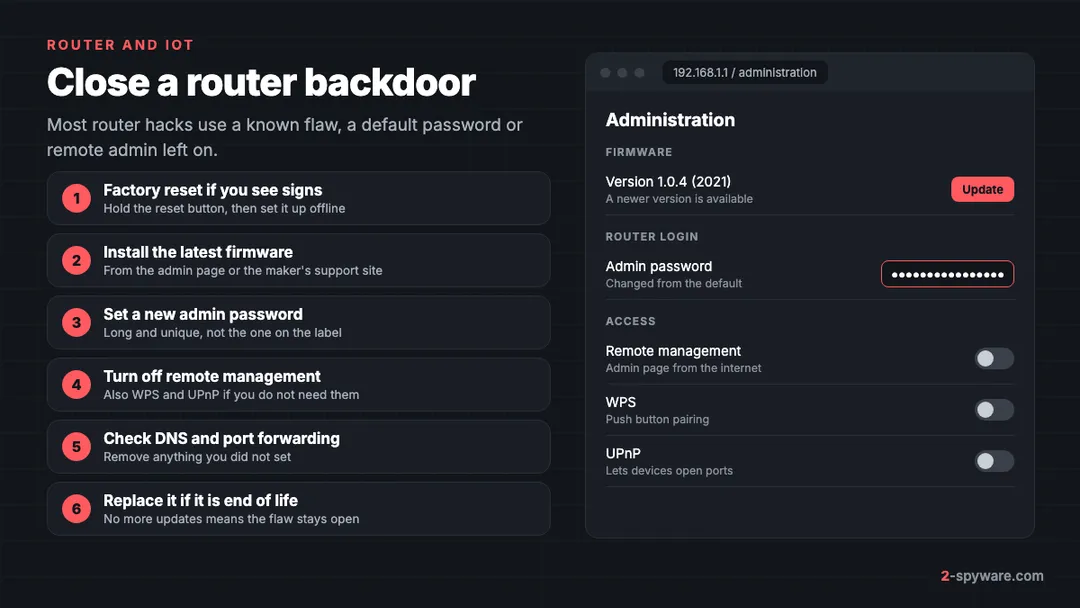
- Factory reset the router with its reset button. This wipes changed settings and most malware that lives in memory.
- Before you connect your devices, install the latest firmware from the router's admin page or the maker's support site. The FBI's first advice for a suspicious router is to apply security patches and firmware updates [6].
- Set a new admin password, not the one printed on the label. The FBI recommends a unique, random password of at least 16 characters [6].
- Turn off remote management or remote administration, save the change and reboot [6]. Turn off WPS and UPnP too if nothing in your home needs them.
- Check that the DNS servers are your provider's or ones you chose, and delete port forwarding rules you did not add.
- If the maker no longer releases updates for the model, replace it. The FBI notes that routers from 2010 or earlier likely get no more fixes [6].
Do the same for cameras, smart plugs and NAS boxes: update, change the default password and remove anything exposed to the internet that you do not need.
When to reset Windows instead of cleaning
A scan removes what it recognises. It cannot tell you what the attacker added while they had access. Reset Windows with Remove everything if any of these apply:
- The backdoor ran for days or you do not know when it arrived.
- Windows Security was turned off or had exclusions you did not add.
- You found an admin account, a service or a remote tool you cannot explain.
- The same Backdoor: detection returns after you removed it.
Our guide to cleaning up or resetting Windows explains both paths and what to save first. Copy only documents and photos, never programs, and scan them before you restore. A 3-2-1 backup made before the infection is the safest copy to restore from.
After removal: lock the attacker out
Closing the backdoor ends access to the device, not to your accounts. Anything typed or saved while it was open may already be with the attacker. Use a clean phone or computer for these steps.
- Change the password of your main e-mail first, then banking, Microsoft or Apple, Google, social and work accounts.
- Sign out of all sessions in each account, because stolen cookies keep working after a password change.
- Turn on two-factor authentication, preferably with an app or a passkey.
- Remove recovery addresses, phone numbers, forwarding rules and trusted devices you did not add.
Our full checklist for securing your accounts after malware covers each account type. If money was taken, report the cybercrime in your country.
How to prevent backdoors
- Install Windows, macOS, phone and router updates soon after they appear. Most backdoors use known flaws that already have a fix [3][6].
- Keep Microsoft Defender on and never add exclusions because an installer or a forum post told you to.
- Do not run cracks, keygens or game cheats. They are modified programs from strangers.
- Never paste a command into Run, Terminal or PowerShell because a web page asked you to.
- Change every default password on routers, cameras and NAS boxes, and turn off remote management you do not use [6].
- Use a standard user account for daily work, so a program that slips through cannot install services or new admins.
- If you run a website, update the CMS and plugins, block script execution in upload folders and review server logs [3].
When to use a backdoor removal tool
Microsoft Defender detects and removes the known backdoor families, so start with it and its offline scan. A second tool helps when a detection keeps coming back, when Defender was disabled, or when you want the damage the backdoor left repaired.
Fortect scans your Windows PC for free and fixes damaged system files, broken registry entries and malware leftovers, and its current plans include an antivirus module. A free second-opinion scanner such as Microsoft Safety Scanner can run next to Defender. On a Mac, see our Combo Cleaner and Intego reviews.
No tool finds a backdoor account, an abused remote tool or a router flaw, so keep the manual checks above. Our comparison of the best malware removal tools sets the scanners side by side. For one detection name, search the guides on this page or ask in our Windows help forum.
Frequently asked questions
What is a backdoor virus?
It is malware that gives someone remote access to your device without the normal login. Strictly speaking most backdoors are not viruses, because they do not copy themselves into other files. Microsoft detects them under the Backdoor type, for example Backdoor:MSIL/AsyncRAT.
What does Backdoor:Win32 mean in Windows Defender?
Backdoor is the type, meaning malware that gives an attacker remote access and control. Win32 is the platform, a Windows program. The word after the slash is the family and the letter after the dot is the variant. Check Protection history to see whether it was quarantined, then check startup items, tasks and accounts.
Defender quarantined a backdoor. Am I safe now?
That file is safe in quarantine, but you do not know what it did before Defender caught it. Run an offline scan, check startup apps, scheduled tasks, services and user accounts, and change important passwords from another device. If it ran for a long time, reset Windows.
What is the difference between a backdoor and a remote access trojan?
A backdoor is any hidden way back into a system, from malware to a default password. A remote access trojan is one kind of backdoor malware that gives a full remote desktop with screen, files, webcam and keylogging. Defender often labels RATs with the Backdoor type.
Can a backdoor survive reinstalling Windows?
A reset with Remove everything deletes backdoors that live in Windows. It does not touch a backdoor on your router, in your online accounts or in a backup you restore afterwards. Fix the router, secure your accounts and scan backups before you restore them.
How do I know if my router has a backdoor?
Look for settings you did not change, such as DNS servers, the admin password, port forwarding or remote management being on. Overheating and dropped connections can also be signs. Reset the router, update its firmware, set a new admin password and replace it if it no longer gets updates.
Can an iPhone get a backdoor?
Normal App Store apps cannot install one. The realistic risks are a configuration profile you were tricked into adding, someone with your Apple Account password, and rare commercial spyware. Remove unknown profiles, change your Apple Account password, keep iOS updated and use Lockdown Mode if you are a likely target.
What was the xz utils backdoor?
In March 2024 malicious code was found in versions 5.6.0 and 5.6.1 of XZ Utils, a compression library used by many Linux systems. It could allow unauthorized access. It was caught early and users were told to go back to a clean version such as 5.4.6. Windows and Mac home users were not affected.
Is a web shell a backdoor?
Yes. A web shell is a small script planted on a web server that lets the attacker run commands on it from a browser. It usually gets in through an unpatched web application and stays as a way back in. If you run a website, update everything and check upload folders for scripts you did not add.
I got a pop-up saying a backdoor virus was detected. Is it real?
A warning inside a web page is a scam that wants you to call a number or install a fake cleaner. Real Defender alerts appear as Windows notifications and are listed in Windows Security under Protection history. Close the tab and do not call any number shown.
Sources
- Microsoft Learn: How Microsoft names malware read 2026-10-08
- Microsoft Learn: How Microsoft identifies malware and potentially unwanted applications read 2026-10-08
- Microsoft Security Blog: Web shell attacks continue to rise read 2026-10-08
- CISA: Reported Supply Chain Compromise Affecting XZ Utils Data Compression Library, CVE-2024-3094 read 2026-10-08
- Sophos: 3CX users under DLL-sideloading attack, what you need to know read 2026-10-08
- FBI IC3: Cyber Criminal Proxy Services Exploiting End of Life Routers (PSA250507) read 2026-10-08