
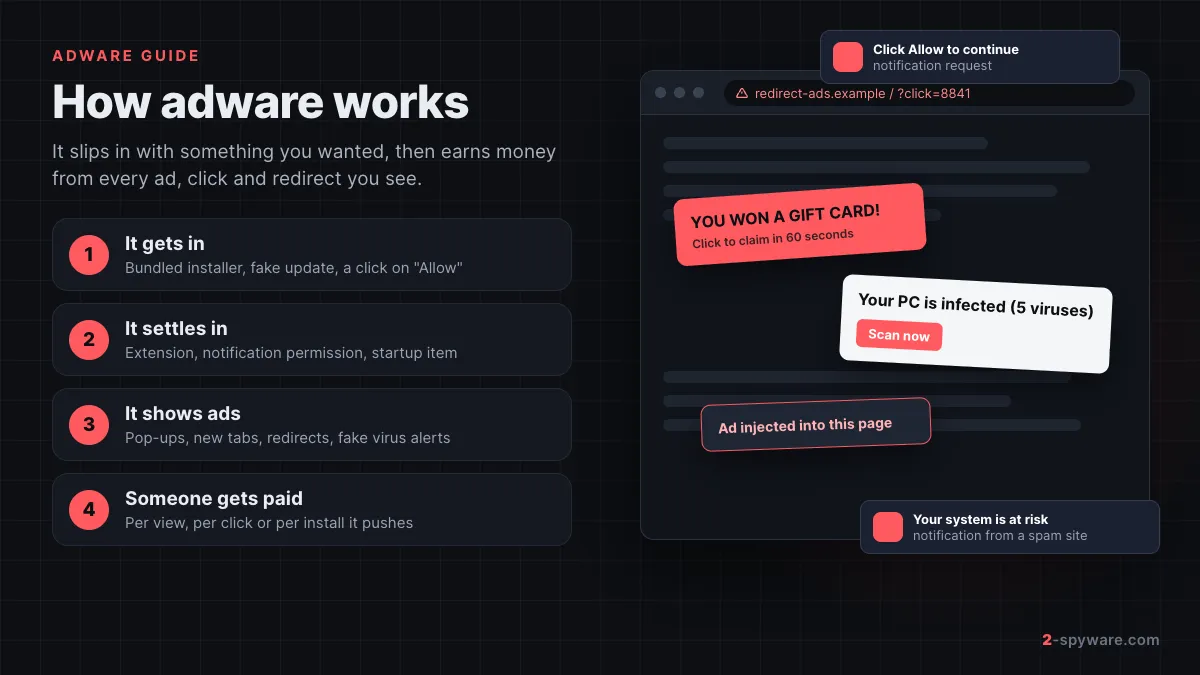
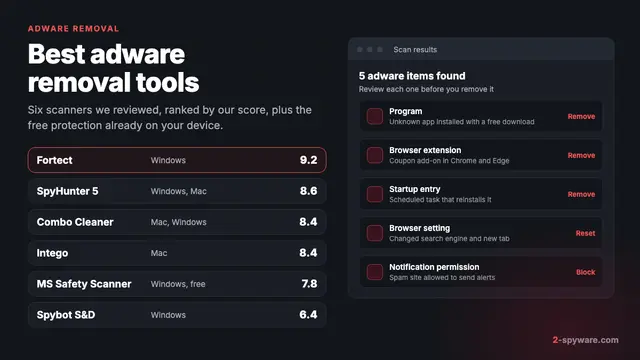
 Best adware removal tools in 2026
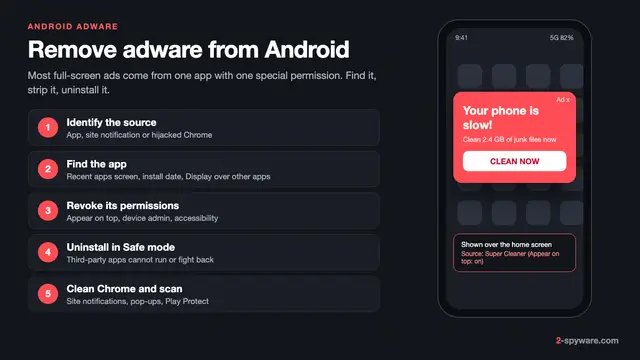 How to remove adware from Android
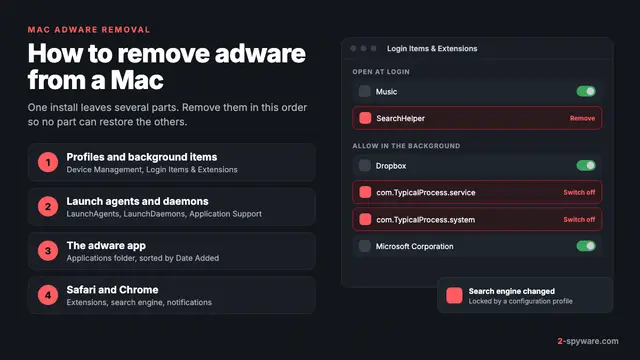 How to remove adware from a Mac
What is adware?
Adware is software that shows you advertising you did not ask for. It puts pop-ups, banners, new tabs, in-text links and desktop notifications in front of you, mostly through your web browser. Each view, click or install it produces earns money for whoever runs it.
The name is short for advertising-supported software. Some free apps are honest about it: they show ads inside their own window and you can close them. The adware people search for help with is different. It shows ads in places that are not its own, such as the sites you visit, your search results or the corner of your desktop.
Microsoft draws the line in a useful way. Its security products flag "advertising software" that shows ads or promotions in software other than itself, including programs that insert ads into web pages [1]. Microsoft also says ads must have an obvious close button, must name the program that showed them, and that closing one must not open another [1].
So in plain terms, an adware infection is any program, browser extension or website permission that puts ads where they do not belong and makes them hard to stop. It is the most common thing behind "my browser keeps opening ads" complaints, and it is the category this page and the 4,600+ adware removal guides below it cover.
Is adware malware or a virus?
Adware is usually not a virus, and security companies often do not call it malware either. It does not copy itself to other files or spread across a network on its own. Most of it arrives because a person clicked something, even if the click was tricked or rushed.
Microsoft files most adware under potentially unwanted applications, or PUA, and states plainly that PUAs are not considered malware [1]. It also lists behaviors that move a program into its stricter "unwanted software" class. Those include opening browser windows without permission, redirecting web traffic without consent and changing page content [1].
That is why one program can carry different labels from different scanners. You may see names like PUA:Win32/InstallCore, Adware.Generic, Program:Win32/Contebrew.A!ml or JS/Adware.Agent.AW. A "Gen" or "Generic" name means the scanner matched a family of similar adware, not one exact file.
The line also blurs from the other side. Real malware sometimes shows ads to earn money, and the FTC lists sending unwanted or inappropriate ads among the things criminals use malware for [8]. If ads come with stolen accounts, disabled security tools or messages you did not send, treat it as malware, not as plain adware.
| Type | What it wants | How it behaves | How serious |
|---|---|---|---|
| Adware | Money from ad views and clicks | Pop-ups, injected ads, notification spam, new tabs | Low to medium |
| PUP or PUA | Installs, upsells, data for marketing | Bundled offers, system "cleaners", toolbars | Low to medium |
| Browser hijacker | Search traffic and ad revenue | Changes your search engine, start page or new tab | Medium |
| Spyware | Your data, logins and activity | Runs quietly and sends information out | High |
| Rogue security software | Your payment | Shows alerts about threats that are not there | High |
| Trojan or virus | Control of the device, theft, more malware | Hides, downloads other code, may spread | High |
Adware and spyware overlap more than the table suggests. Many ad programs track the sites you visit to pick which ads to show you. Microsoft calls this "marketing software" when it monitors what you do and sends it to other services [1]. That tracking is the reason adware is a privacy problem, not just an annoyance.
How adware gets on your computer or phone
Adware almost never arrives as an email attachment. It comes in through a click that looks harmless at the time. These are the six doors we see again and again in reader reports and in the guides we write.
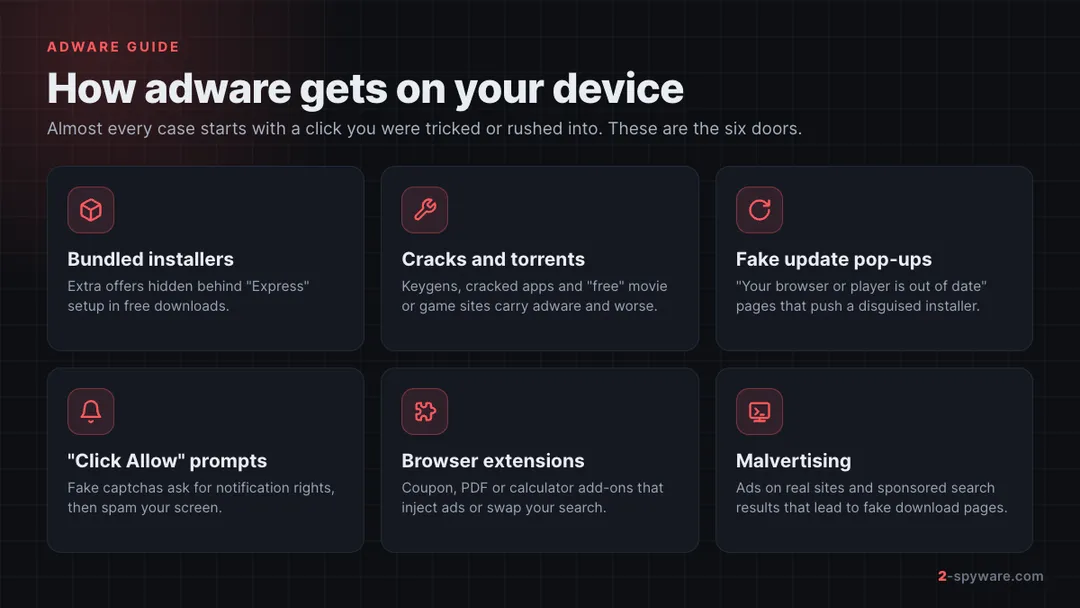
- Software bundling. A free program installs extra "recommended" offers unless you pick Custom or Advanced setup and untick them. Microsoft classes software that offers to install unrelated programs as bundling software [1].
- Cracks, keygens and torrents. Pirated apps and free movie or game sites are a steady source of adware and worse. The FTC advises against downloading free stuff from unfamiliar sites and through peer-to-peer networks [8].
- Fake update pages. A pop-up says your browser or video player is out of date and offers a file. Google's advice is to skip it and go to the program's official site instead [5].
- Push notification spam. A page shows a fake captcha or video player and tells you to click Allow. That click lets the site send ads to your desktop or phone even after you close the tab.
- Malicious browser extensions. Coupon finders, PDF converters, calculators and "search" add-ons can inject ads or swap your search engine. EasyCalc is a typical case.
- Malvertising. Bad ads on normal sites, and paid search results, lead to fake download pages. The FTC warns that scammers place bogus software ads on search engines and social media [8].
Google adds two warnings that are easy to miss. Be wary of password-protected archives, because they can slip past antivirus scans. Be wary of any site that asks you to turn off or ignore a download warning [5].
Signs of adware: how to tell if you have it
You rarely see adware arrive. You notice what it does afterward. Google lists these signs of unwanted software in Chrome: pop-ups and new tabs that will not go away, a homepage or search engine that keeps changing, extensions that keep coming back, redirects and alerts about a virus [5].
| What you see | What it usually means | Where to look first |
|---|---|---|
| Ads pop up at the corner of the screen, even with the browser closed | A site was allowed to send notifications | Browser notification settings |
| Ads on sites that never had them, such as a government site | An extension or program injects ads into pages [8] | Extensions list |
| New tabs open on their own to casinos, dating or prize pages | Adware or a redirecting site permission | Extensions, pop-up and redirect settings |
| Search results come from an unknown engine or Yahoo | Browser hijacker or a forced policy | Search engine settings, installed apps |
| "Your device is infected" warnings with a scan button | Scam page or rogue security software | Close the tab; check notifications |
| Extensions you removed come back | A program or a policy reinstalls them | Installed apps, startup items, profiles |
| The computer or phone is slower and runs hot | Background ad processes or extra installs | Task Manager or Activity Monitor |
One quick test separates the two biggest causes. Open a private or incognito window. If the ads stop there, an extension is the likely source, because most extensions are off in private mode. If desktop pop-ups keep coming with every browser window closed, look at notification permissions and installed programs.
Search results that keep sending you through Yahoo or an odd search page are a hijacker sign. Our Yahoo redirect collection covers that pattern in detail.
Is adware dangerous?
Adware on its own is rarely the end of the story. The ads themselves are a nuisance. The real risk is where they send you and what they record along the way.
- Scam pages. Adware and notification spam lead straight to tech support scams and fake prize and gift card scams. The FTC says never to call a phone number shown in a pop-up [8].
- Fake virus alerts. Pages like Safecomputercheck.com imitate a well-known antivirus scan to sell you something or get you to install more software.
- Tracking. Many ad programs log the sites you visit. Some read what you type into pages, which puts logins and card details at risk.
- More unwanted software. Microsoft notes that PUA can install other software you did not expect [2], and that it raises the risk of real malware infections [2].
- Weaker security settings. Some families add browser policies, proxies or system profiles that are hard to remove and can switch off protections.
So how dangerous is it? On a scale from annoying pop-up to stolen bank account, most adware sits near the low end. It moves up fast when you click through its ads, call a number, or enter details on a page it opened. Remove it promptly and do not interact with its pop-ups while you do.
Types of adware and real examples
Adware takes a few repeat forms. Here are the main ones, with real cases from our database that readers searched for most.
Notification spam domains
These are websites, not programs. You allowed them to send notifications, and now they push ads. Tongtonger.click and Spin The Lucky Wheel are typical. Fake alerts such as E.tre456_worm_osx work the same way and target Mac users with a fake scan.
Ad network and redirect addresses
Some names people search for are real ad-serving addresses, not infections. Googleads.g.doubleclick.net and Tsyndicate.com show up in blockers and redirect chains. They become a problem when adware or a spam site keeps sending you through them. Click.tracksummer.com is a similar redirect case.
Ad-injecting browser extensions
Extensions can add banners, pop-unders and links to every page you open. They often pose as small tools. Detection names like JS/Adware.Agent.AW usually point to this kind of script in the browser.
Mac adware families
The Adload family is one of the most persistent on macOS. It installs launch agents that restart it, and it can route browser traffic to insert ads and search redirects. Not every scary Mac warning is adware, though. Our ReceiverHelper guide explains a case that is usually an old Citrix helper macOS refuses to run.
Ad-supported and bundled programs
On Windows, adware still rides along with free installers and "helper" tools. BonziBuddy, the purple assistant from the early 2000s, is the classic example of a free helper that came with ads and tracking. Today's versions are plainer but work the same way.
Mobile adware
On phones, adware hides inside apps. Kaspersky's 2025 mobile report counts adware as the most common mobile threat, at 62% of all detections [9]. The leading families were MobiDash at 39%, Adlo at 27% and HiddenAd at 20% [9]. Kaspersky changed its counting method in 2025, so compare these figures with older reports carefully [9].
HiddenAd apps do what the name says. They hide their icon after install, so the user cannot find what is showing the ads. In 2024, BrowserAd, HiddenAd and Adlo produced the most new adware packages [10]. Kaspersky also found backdoor code built into the firmware of some Android devices that inflates ad views and hijacks searches [9].
How to remove adware from Windows
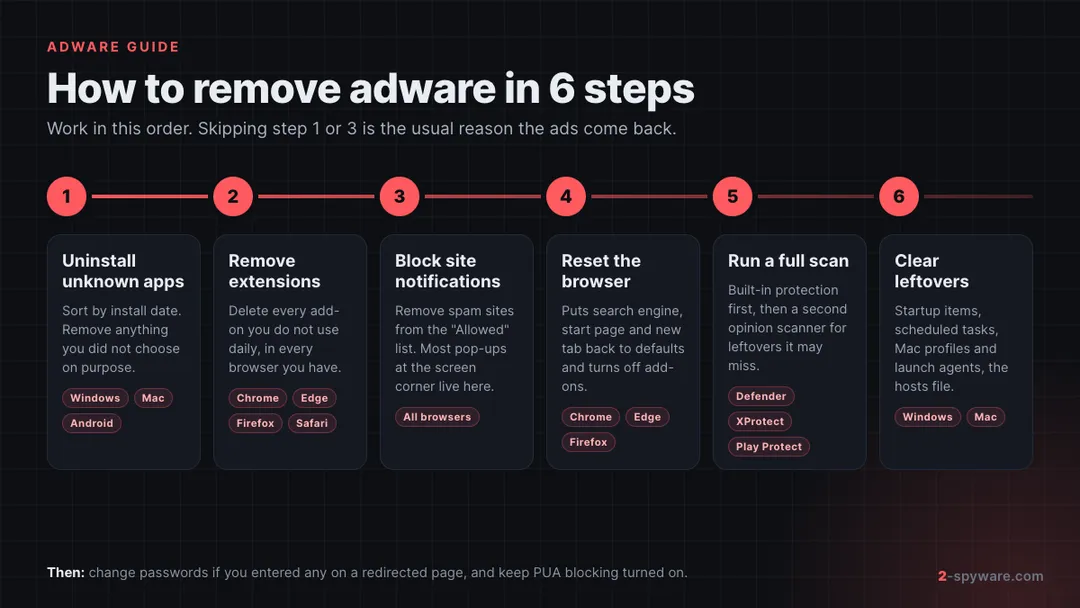
Follow these steps in order. Removing the program first stops it from putting back what you delete in the browser. Google gives the same advice: check your computer for unwanted programs before you reset the browser [5].
- Disconnect from accounts you care about. The FTC suggests not logging in to banking or shopping sites until the device is clean [8].
- Open Settings, then Apps, then Installed apps [5]. Sort by install date. Uninstall anything you do not recognize or did not mean to install, especially around the day the ads began.
- Open Task Manager and the Startup apps tab. Disable entries with odd names or no publisher.
- In every browser, remove extensions you do not use. Our step-by-step extension removal guide covers Chrome, Edge, Firefox and Safari.
- Remove spam sites from the notification allow list in each browser. See how to stop site notifications.
- Reset the browser to restore its search engine, start page and new tab.
- Run a full scan in Windows Security. If something keeps coming back, run a Microsoft Defender Offline scan, which starts before Windows loads.
- Clear what the uninstaller left behind: scheduled tasks, services, Run keys and shortcut changes. Our malware leftovers guide walks through each one.
- If certain sites will not load or you are sent to the wrong address, check the hosts file.
Then turn on PUA blocking so the next bundled offer is stopped at download. In Edge, open Settings, then Privacy, search, and services, and turn on Block potentially unwanted apps under Security [2]. Microsoft notes this Edge setting is off by default [2].
For Microsoft Defender Antivirus, the PowerShell command Set-MpPreference -PUAProtection Enabled turns PUA blocking on [2]. Detections then appear in Windows Security with names that start with "PUA:" [2].
How to remove adware from a Mac
The complete walkthrough, with every folder, profile and browser setting in the order to check them, is in our guide on how to remove adware from a Mac. The short version follows.
Macs have strong built-in protection, but adware gets around it by asking you to approve it. Apple's Gatekeeper checks that downloaded apps come from an identified developer and are notarized, and asks before you open them the first time [4]. Users can still override it, and adware installers often coach people to do exactly that [4].
Apple's XProtect scans with signatures that update automatically, apart from macOS updates [3]. It checks apps at first launch, when they change and when signatures update [3]. When it finds known malware, it blocks it, moves it to the Trash and alerts you [3]. Apple also describes a remediation engine that removes malware it learns about later [3].
- Open Finder, then Applications. Move apps you do not recognize to the Trash and empty it [5].
- Open System Settings, then General, then Login Items. Remove items you do not recognize from the list and from Allow in the Background.
- Look in the LaunchAgents folders in your user Library and in the main Library, and in /Library/LaunchDaemons. Adware like Adload often leaves a .plist file there with a random or fake Apple-like name.
- Check System Settings for configuration profiles you did not add. A profile can force a search engine or a browser setting. On recent macOS versions, look under Privacy and Security or General, then Device Management.
- In Safari, open Settings, then Extensions, and remove what you do not use. Then open Websites, then Notifications, and set unknown sites to Deny or remove them.
- Check Safari's homepage under General and the search engine under Search. Safari has no single reset button, so set these by hand.
- Run a scan with a reputable Mac anti-malware tool to find launch agents and leftovers you missed.
Our Mac topic page collects every current Mac adware guide on 2-Spyware, from fake virus pop-ups to Adload variants.
How to remove adware from Chrome, Edge, Firefox and Safari
Most adware lives in or acts through the browser, so the browser cleanup carries most of the weight. Do these three things in every browser you have, not only the one you use most.
Google Chrome
- Extensions: open the menu, then Extensions, then Manage extensions. Remove anything you did not add yourself.
- Notifications: open Settings, then Privacy and security, then Site settings, then Notifications [6]. Remove spam sites from the allowed list.
- Reset: open Settings, then Reset settings, then Restore settings to their original defaults [5]. Chrome turns your extensions off after a reset, so turn on only the ones you trust [5].
- Intrusive ads: under Site settings, open Additional content settings, then Intrusive ads, and choose to block them [5].
Chrome now helps on its own. It checks at every launch whether unwanted programs changed key settings, and restores safe values [5]. It also blocks notifications from sites it finds intrusive or misleading [6]. If Chrome says it is "managed by your organization" on a home computer, a program has added a policy, and an extension reset alone will not hold. More Chrome cases are on our Chrome topic page.
Microsoft Edge
- Extensions: open the menu, then Extensions, then Manage extensions, and remove unknown ones.
- Notifications: open Settings, then Cookies and site permissions, then Notifications.
- Reset: open Settings, then Reset settings, then Restore settings to their default values.
- Turn on Block potentially unwanted apps under Privacy, search, and services [2].
Mozilla Firefox
- Add-ons: open the menu, then Add-ons and themes, then Extensions, and remove unknown ones.
- Notifications: open Settings, then Privacy and Security, then Permissions, then Notifications, then Settings.
- Reset: open Help, then More troubleshooting information, then Refresh Firefox..
Safari
- Extensions: open Safari Settings, then Extensions, and uninstall unknown ones.
- Notifications: open Safari Settings, then Websites, then Notifications, and deny or remove unknown sites.
- Homepage and search: check them under General and Search, because Safari has no reset button.
Our browser reset guide has screenshots for each browser if a menu has moved in a recent update.
How to remove adware from Android and iPhone
For phones that show full-screen ads, hide the app behind them or block its removal, follow our step-by-step guide on how to remove adware from Android. The short version follows.
Android
Android adware is usually an app. Google Play Protect is on by default, scans apps before you download them from Google Play, checks apps from other sources and may disable or remove harmful ones [7]. It also warns about apps that break Google's Unwanted Software Policy [7].
- Check that Play Protect is on. In the Play Store app, tap your profile icon, then Play Protect, then Settings, and turn on Scan apps with Play Protect [7].
- Open Settings, then Apps. Look for apps you do not remember, apps with no icon on the home screen, and apps installed around the time the ads began. Uninstall them.
- If an app will not uninstall, check Device admin apps in the security settings and remove its admin rights first. Safe mode, which pauses third-party apps, can also help; how to start it differs by phone maker.
- In Chrome for Android, open Settings, then Notifications or Site settings, and turn off notifications for spam sites.
- Be wary of "cleaner" and "booster" apps. Some of them are the source of the ads.
More phone cases are on our Android topic page.
iPhone and iPad
Classic adware apps are rare on iPhone because apps come from the App Store. What iPhone owners usually see is website pop-ups in Safari, spam from a calendar subscription they accepted, or notifications from a site saved to the Home Screen.
- Close the tab, then clear Safari history and website data in Settings.
- Delete unknown subscribed calendars under the Calendar accounts in Settings.
- Remove any configuration profile you did not install yourself, under General, then VPN and Device Management.
- Turn off notifications for unknown web apps in Settings, then Notifications.
How to stop adware from coming back
Adware returns for two reasons: a piece was left behind, or the same habit let it in again. Fix both.
- Pick Custom or Advanced setup in every installer and untick extra offers.
- Download software only from the developer's site or an official store. Do not click ads to get software; type the address yourself [8].
- Never click Allow on a page that demands it to play a video or prove you are not a robot.
- Keep extensions to the few you use, and review them every few months.
- Treat any "your device is infected" pop-up as a scam. Close the tab instead of clicking it.
- Keep PUA blocking on in Windows and Edge [2], keep Play Protect on [7], and let macOS install its background security updates [3].
- Update the operating system, browsers and security software, and let them scan new files automatically [8].
- If you typed a password on a page adware opened, change it and turn on two-step verification [8].
If adware led you to a scam and you paid, see what to do after paying a scammer and how to report cybercrime. The FTC takes reports of ads and sites that spread malware at ReportFraud.ftc.gov [8].
When to use an adware removal tool
You can often remove simple adware by hand with the steps above. A dedicated scanner helps when the ads return after cleanup, when you cannot tell which program is responsible, or when you find launch agents, services or policies you do not understand.
Start with what you already have. Microsoft Defender Antivirus on Windows and XProtect on macOS both detect and remove known threats [2][3]. A free second-opinion scanner such as Microsoft Safety Scanner can run alongside your main antivirus on Windows.
If you choose a paid tool, the FTC suggests checking recommendations from independent review sites [8]. Avoid any product you first met through a pop-up, a fake scan or a notification. That route is how rogue security software sells itself. No scanner catches every adware variant on day one, so keep doing the manual checks for extensions and notifications.
Our comparison of the best adware removal tools sets the scanners we reviewed side by side: what each one removes, what the free part covers and what it costs. It starts with our Fortect review. For a specific adware name, search the guide list below this article.
Frequently asked questions
What is adware in simple terms?
Adware is software that shows you ads you did not ask for, usually in your browser or as desktop notifications. It earns money for its makers from every view, click or install. It often arrives bundled with free programs or through a click on a misleading page.
Is adware a virus?
No, adware is usually not a virus. It does not copy itself into other files or spread on its own. Most adware is classed as a potentially unwanted program. Some malware also shows ads, so a scan is still worth running.
Is adware malware?
Usually it is classed as a potentially unwanted application rather than malware. Microsoft, for example, says such applications are not considered malware. Adware that redirects traffic without consent, steals data or blocks removal is treated more strictly, and some scanners call it malware.
Is adware dangerous?
Adware on its own is low to medium risk. The danger is where it sends you: tech support scams, fake prize pages and fake virus scans. Many ad programs also track the sites you visit. Remove it quickly and do not click its pop-ups.
How do I know if I have adware?
Look for pop-ups that will not stop, new tabs opening on their own, ads on sites that never had them, and a search engine or homepage that changed. Desktop notifications from unknown sites and extensions that return after removal are also strong signs.
How do I get rid of adware for free?
Uninstall unknown programs, remove unknown browser extensions, block notifications from spam sites and reset the browser. Then run a full scan with the free protection built into your system, such as Microsoft Defender or XProtect. A free second-opinion scanner can help with leftovers.
How do I remove adware from Chrome?
Remove unknown extensions, then delete spam sites from Settings, Privacy and security, Site settings, Notifications. If ads continue, open Reset settings and restore Chrome's original defaults. Check your installed programs first, or the adware may reinstall the extension.
Can a Mac get adware?
Yes, a Mac can get adware. Families like Adload install launch agents that restart them and change browser traffic. macOS blocks known threats with Gatekeeper and XProtect, but adware often gets in by persuading the user to approve the installer.
Can my Android phone or iPhone get adware?
Yes, Android phones get adware mostly through apps, and Kaspersky named adware the most common mobile threat in 2025. iPhones rarely get adware apps. On iPhone the usual cause is Safari pop-ups, calendar spam or website notifications.
What is the difference between adware and spyware?
Adware's goal is to show you ads, while spyware's goal is to collect your data without telling you. The two overlap, because many adware programs track browsing to target ads. Spyware is the more serious threat because it can steal logins and personal information.
Sources
- Microsoft Learn: How Microsoft identifies malware and potentially unwanted applications read 2026-10-08
- Microsoft Learn: Detect and block potentially unwanted applications read 2026-10-08
- Apple Platform Security: Protecting against malware in macOS read 2026-10-08
- Apple Platform Security: Gatekeeper and runtime protection in macOS read 2026-10-08
- Google Chrome Help: Remove unwanted ads, pop-ups and malware read 2026-10-08
- Google Chrome Help: Use notifications to get alerts read 2026-10-08
- Google Play Help: Use Google Play Protect to help keep your apps safe and your data private read 2026-10-08
- FTC Consumer Advice: Malware: How To Protect Against, Detect, and Remove It (April 2025) read 2026-10-08
- Kaspersky Securelist: The mobile threat landscape in 2025 (published March 2026) read 2026-10-08
- Kaspersky Securelist: The mobile threat landscape in 2024 (published February 2025) read 2026-10-08