
 Best trojan removal tools in 2026
 Credential stuffing: how leaked passwords open your other accounts
 Info stealers: what they take, how fast, and what to do
 Remote access trojans (RATs): how to tell if someone is in your PC and lock them out
What is a trojan?
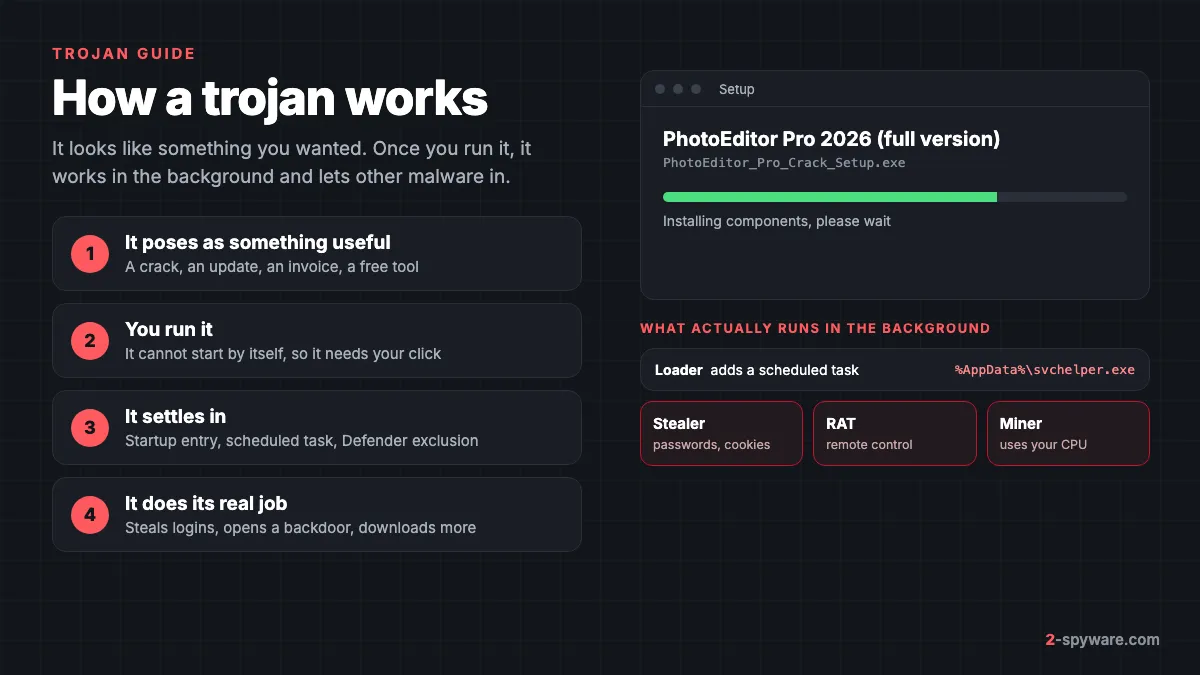
A trojan, or trojan horse, is malware that hides inside something you choose to open. It arrives as a cracked program, a fake browser update, an invoice attachment or a free tool, and it does its real work only after you run it.
The name comes from the Greek story of the wooden horse that carried soldiers through the gates of Troy. The city pulled the horse inside because it looked like a gift. A trojan works the same way: your own click carries it past the defences.
The word describes how the malware gets in, not what it does afterward. Once running, one trojan steals passwords, another gives a stranger remote control, and a third only downloads more malware. That is why security products split it into many detection types. Microsoft uses Trojan, TrojanDownloader, TrojanDropper, TrojanSpy, TrojanProxy, TrojanClicker, Backdoor and PWS as type prefixes in its detection names [1].
This page covers what trojans do, how they get in, the families you are most likely to meet, and how to remove one from Windows, a Mac and a phone. The trojan removal guides below it cover single detection names, from the Csrss.exe trojan to Trojan:Win32/Wacatac.
Trojan vs virus vs worm: what is the difference?
In everyday speech people call any malware a virus. Security people use the three words for three different ways of spreading, and the difference changes how you clean up.
| Type | How it spreads | Needs you to run it? | What cleanup involves |
|---|---|---|---|
| Trojan | Poses as a useful file, app or document | Yes, it cannot start on its own | Remove the file, its startup entries and whatever it downloaded |
| Virus | Copies its code into other files and programs | Yes, the first time | Repair or replace every infected file |
| Worm | Spreads by itself over networks, USB drives or chat apps | No, once one device is infected | Check each device it reached and patch the hole it used |
A trojan does not copy itself. It stays where you put it, which is why one can run for months without anyone noticing. Our page on worms and file infectors covers the other two in detail, and types of malware compares all the main groups.
In practice the labels overlap. A trojan can download a worm, and Emotet arrived as a trojan but spread by replying to stolen email threads. When a scan on a modern PC reports a "virus", it is far more often a trojan than a true file infector. The wider malware and viruses section covers the threats that are not trojans.
What trojans do once they are inside
A trojan runs with the rights of the account that started it. On a normal account it can read anything you can: browser data, documents, desktop files and files synced to the cloud. If you approved an administrator prompt while installing it, it can also change system settings and add services. These are the jobs trojans do most often.
Loaders, downloaders and droppers
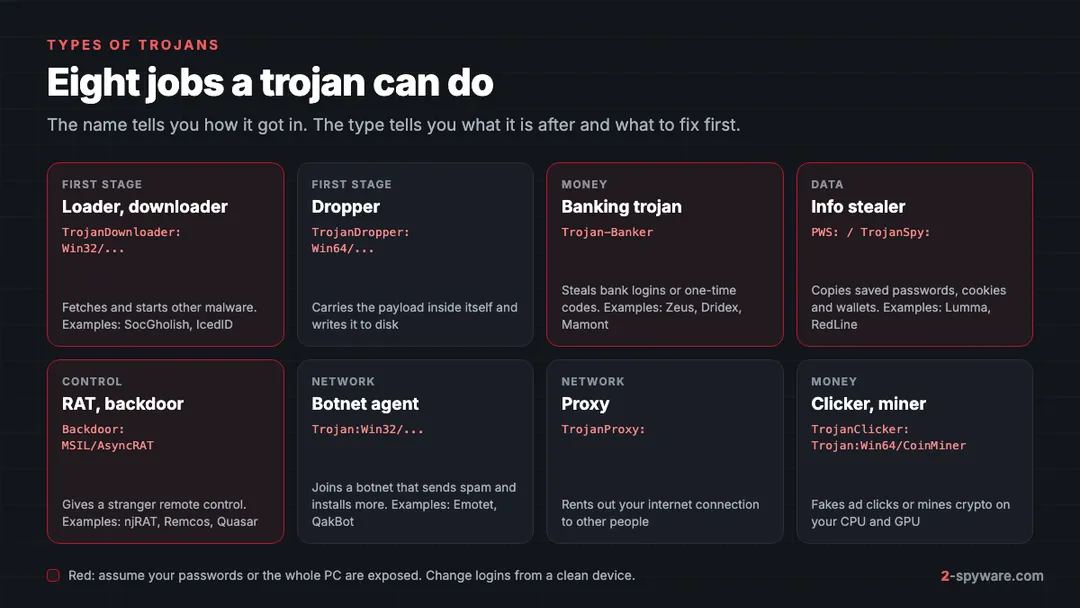
A loader is a small first-stage trojan. Its job is to get in, stay in and run whatever its operator sends. A downloader fetches the next file from the internet, while a dropper carries it inside itself and writes it to disk. Many loaders first check whether they run in a lab or a virtual machine, and deliver nothing to PCs that do not look worth it.
Loaders exist because the malware trade is split into specialists. One group spreads the loader, and other groups pay to have their own malware installed on the PCs it reaches. Europol's Operation Endgame in May 2024 targeted the droppers IcedID, SystemBC, Pikabot, Smokeloader, Bumblebee and Trickbot [5]. Europol said botnets of this kind play a major role in deploying ransomware [5].
The practical point is short. If a scan names a loader or downloader, assume it brought something else too. Trojan.Downloader and TrojanDropper:Win64/Tnega!MSR are two common names for this stage.
Banking trojans
Banking trojans go after money directly. On Windows they injected fake fields into bank pages or copied a session after you logged in. Zeus and Dridex were the classic families. Many old Windows bankers, IcedID and QakBot among them, later became loaders for ransomware gangs.
Today the banking trojan is mostly a phone problem. Kaspersky counted 255,090 new mobile banking trojan installation packages in 2025, several times more than in earlier years [6]. Attacks involving bankers grew 1.5 times [6]. The Mamont family alone made up about half of the new banking apps and half of the banking trojan attacks [6].
Information stealers
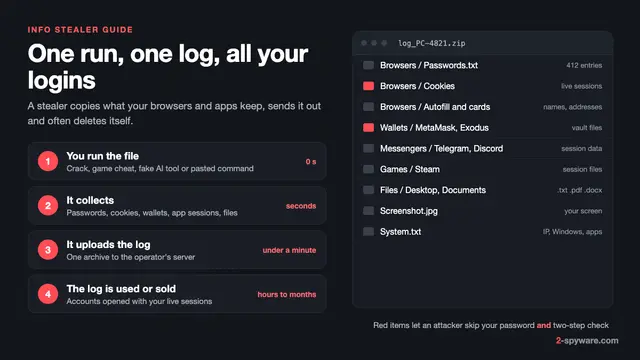
Stealers copy saved passwords, browser cookies, autofill data, card details and crypto wallets, then send them out. Stolen session cookies can let a criminal open your accounts without the password or the second factor. Microsoft identified more than 394,000 Windows computers infected with the Lumma stealer between 16 March and 16 May 2025 [3]. Lumma steals passwords, credit cards, bank accounts and crypto wallets [3].
RedLine, Lumma, Vidar and Agent Tesla are usually the payload that a loader or a cracked installer delivers, not the first file you ran. Our guide to information stealers explains what each one takes and the order to fix your accounts in.
Remote access trojans and backdoors
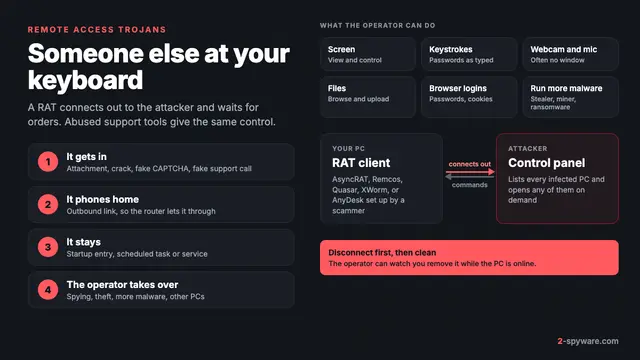
A remote access trojan, or RAT, gives a stranger control of your device: files, screen, keyboard and sometimes the webcam and microphone. njRAT, Quasar and Remcos are common examples. A backdoor is the simpler cousin that only keeps a hidden way in open. Our page on remote access trojans shows how to spot an active session and when to reset instead of cleaning.
Botnet, proxy, clicker and miner trojans
Some trojans want your hardware and your connection rather than your data. Botnet agents wait for commands and install whatever they are told to. Proxy trojans rent out your home connection, so other people's traffic looks like yours. Kaspersky described an Android proxy trojan campaign in Germany in 2025 that did exactly this [6]. Clickers open hidden pages and click ads, and miners use your processor or graphics card to mine cryptocurrency. See cryptominers on Windows.
How trojans get on your computer or phone
A trojan needs you to start it, so every delivery route is a form of persuasion. These are the routes we see most often in reader reports and in the guides we write.
- Cracked software, keygens and game cheats. The archive is often password protected so antivirus cannot look inside, and the instructions tell you to turn protection off first. The program may even work, which hides the loader that came with it. More cases are in cracks, keygens and torrents.
- Fake browser and software updates. A hacked website shows a banner saying your browser is out of date. SocGholish is the best-known family of this kind. The "update" is a script that profiles your PC and then fetches the next stage.
- ClickFix and fake CAPTCHA pages. A page asks you to prove you are human by pressing Windows+R, then Ctrl+V, then Enter. Microsoft documented this exact trick in a fake Booking.com campaign that delivered Lumma [3]. The paste runs the trojan with your own hands.
- Email attachments and links. Fake invoices, delivery notices and shared documents arrive as scripts, shortcut files, disk images or archives. QakBot spread mainly through spam with malicious attachments or links [4]. See phishing emails for how to spot them.
- Malvertising and SEO-poisoned downloads. A search ad or a lookalike site ranks for a popular program name plus "download" and serves a trojanized installer. Microsoft lists malvertising among the routes used to spread Lumma [3].
- Fake and modified apps on phones. Android trojans come as APK files from links in texts and chats, as modified versions of popular messaging apps, and sometimes through official stores [6].
Unpatched software still matters, especially old browsers and plugins. On an updated Windows 11 PC or a current phone, though, the person starting the file is by far the more common first step.
Real trojan families and detection names
Some trojan names belong to criminal operations with years of history. Others are generic labels a scanner gives a file it cannot tie to one family. You will meet both kinds.
| Name | What it is | What to know |
|---|---|---|
| Emotet | Botnet and loader spread by email | Began as a banking trojan and later sold access to other gangs. Cleanup steps are in our Emotet guide. |
| QakBot | Banking trojan turned loader | The FBI found more than 700,000 infected computers in 2023 and sent them an uninstaller [4]. Conti, REvil and Black Basta used it as a first step [4]. |
| IcedID | Banking trojan turned loader | One of the droppers targeted in Operation Endgame in 2024 [5]. |
| SocGholish | Fake browser update loader | A JavaScript file served by hacked websites; see fake updates. |
| Lumma and RedLine | Stealers sold as a service | Usually the payload, not the first file. About 2,300 Lumma domains were seized or blocked in May 2025 [3]. |
| Trojan:Win32/Wacatac | Microsoft Defender detection | Often a machine learning verdict on a cracked or unsigned file. It can be real or a false alarm. |
| Csrss.exe trojan | A file using a Windows process name | The real csrss.exe lives in C:\Windows\System32. A copy anywhere else is suspect. |
| Trojan.MalPack and Trojan.Gen.MBT | Generic names for packed or unknown files | No family signature matched, but the file looked malicious. |
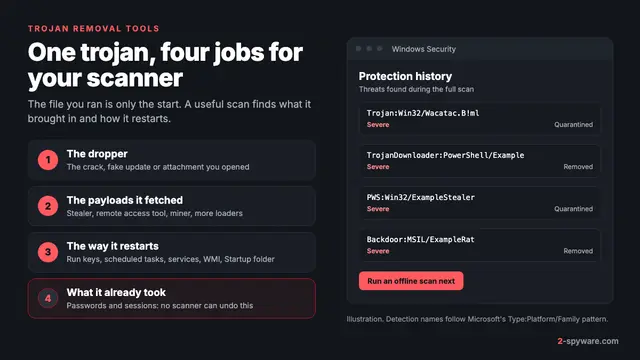
Microsoft's detection names follow a fixed pattern: type, platform, family, variant and an optional suffix [1]. Trojan:Win32/Ymacco.AA9C means a trojan for 32-bit Windows from the Ymacco family. A suffix such as !ml means a machine learning model flagged the file. Our page on antivirus detection names decodes these labels.
Our most read single-name guides cover Trojan:Win32/Ymacco, Trojan:Script/Phonzy.A, Trojan:Win32/CryptInject!ml, Kryptik and the destructive Memz joke trojan, which overwrites the start of the disk.
Signs of a trojan: how to tell if you have one
Trojans are built to show nothing, so a PC without symptoms proves little. When there are signs, they tend to be indirect.
| What you notice | What it can point to | Where to check |
|---|---|---|
| Windows Security reports a Trojan, Backdoor or PWS detection, or the same one again after cleaning | A loader or startup entry is still there | Protection history, Startup apps, Task Scheduler |
| Real-time protection is off, or exclusions you did not add | Malware weakened Microsoft Defender | Virus & threat protection, then Manage settings [2] |
| Sign-in alerts, password reset emails or messages you did not send | A stealer took passwords or cookies | Your email and social accounts, from a clean device |
| Loud fans and the CPU or GPU near full load while idle | A miner was added | Task Manager, Processes tab |
| A remote desktop app you never installed, or the pointer moves by itself | A RAT or a scammer's remote session | Settings, Apps, Installed apps |
| Chrome or Edge says Managed by your organization on a home PC | A policy forces an extension in | chrome://policy or edge://policy |
| New phone apps with no icon, fast battery drain, texts you did not send | An Android trojan with Accessibility or admin rights | Accessibility and Device admin apps in Settings |
Check the dates. In Settings, then Apps, then Installed apps, sort the list by install date and compare it with the day you ran the suspicious file. Programs installed in the same minute nearly always came from the same source. If a process name looks like Windows but you are not sure, our guide on checking whether a Windows process is genuine shows how to tell.
Are trojans dangerous?
Yes. A trojan is not a nuisance like adware. It is a door, and the damage depends on what came through it and how long it stayed open.
- Stolen accounts. Stealers take saved passwords and session cookies. A stolen cookie keeps working until you sign that session out.
- Money. Banking trojans and stolen card data lead to fraud, and a RAT lets a criminal use your own logged-in browser.
- Ransomware. QakBot gave ransomware groups their first step into networks and caused hundreds of millions of dollars in damage worldwide [4]. See ransomware.
- Your device as a tool. Botnet and proxy trojans use your PC and connection for spam, fraud and attacks on other people.
- Privacy. A RAT can open your files, take screenshots and use the webcam and microphone.
Removal stops further damage, but it does not take back data that was already sent. That is why the account steps after removal matter as much as the scan.
How to remove a trojan from Windows
Work in this order on Windows 11 or Windows 10. Removing the startup pieces before the scan stops the loader from fetching a fresh copy while you clean.
- Disconnect the PC from the internet: unplug the cable or turn off Wi-Fi. This stops the trojan sending more data or fetching new payloads. Do not sign in to banking or email on this PC until it is clean [10].
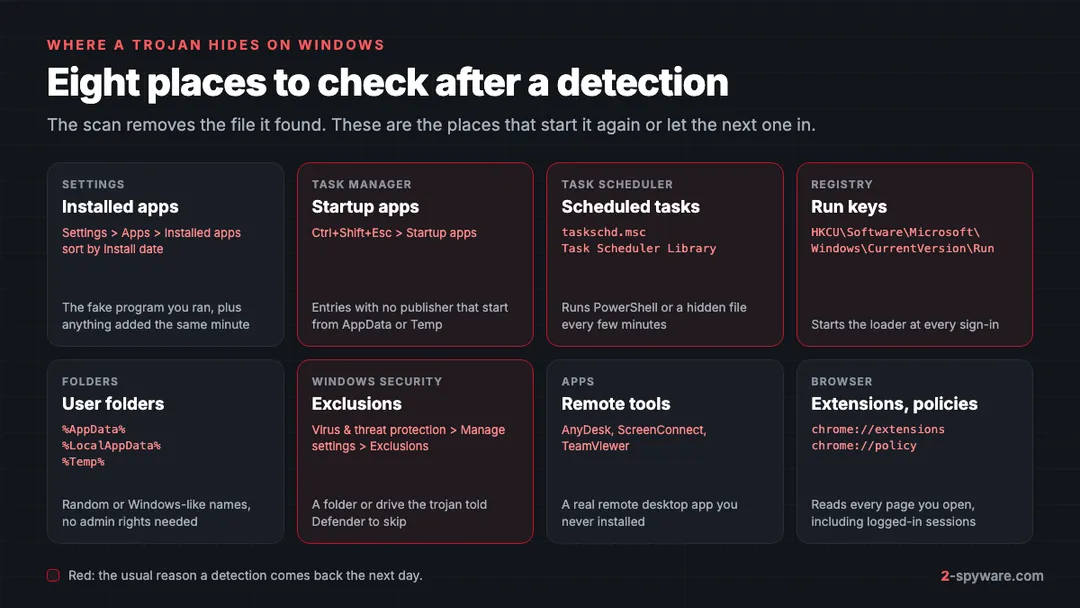
- Open Windows Security, then Virus & threat protection, then Protection history. Write down each detection name, file path and date [2]. They tell you which guide to read and help you find related files.
- Open Settings, then Apps, then Installed apps. Sort by install date and uninstall what you do not recognise, starting with anything added on the day of the infection. Our uninstall guide covers programs that refuse to go.
- Press Ctrl+Shift+Esc and open Startup apps. Disable entries with no publisher or with a path in AppData or Temp. Then open Task Scheduler (taskschd.msc) and delete tasks that run powershell.exe, wscript.exe, mshta.exe or a file from your user folders.
- In Windows Security, open Virus & threat protection, then Manage settings, then Add or remove exclusions. Remove every exclusion you did not add [2]. If you once allowed a threat, select it under Allowed threats and choose Don't allow [2]. Check that Real-time protection and Tamper protection are on [2].
- Run a Full scan, then a Microsoft Defender Antivirus (offline scan). The offline scan restarts the PC and scans without loading Windows, so persistent malware has a harder time hiding [2]. Results appear in Protection history [2]. Steps: how to run a Defender offline scan.
- Run a second-opinion scanner, then clear what malware leaves behind: browser extensions and policies, hosts file entries and leftover folders in AppData. Our guide to removing malware leftovers lists each place.
Reset Windows instead of cleaning it when a RAT or backdoor was active, when security tools were switched off, or when detections return after every cleanup. In Windows 11, open Settings, then System, then Recovery, then Reset this PC, and choose Remove everything. In Windows 10 the same option is under Settings, then Update & Security, then Recovery.
Our guide on whether to clean or reset Windows helps you decide. Back up personal files only, not programs or installers, and scan the backup before you copy it back.
How to remove a trojan from a Mac
Mac trojans are rarer than Windows ones, but they follow the same rule: you have to open them. Shlayer posed as a Flash Player update for years. AMOS, also called Atomic Stealer, arrives as a cracked app or fake installer that asks for your Mac password. Our Mac viruses section covers current cases.
Apple's built-in protection does a lot of the work. Gatekeeper checks that downloaded apps come from an identified developer and are notarized, and asks before you open them the first time [8]. XProtect scans with signatures that update apart from macOS updates, blocks known malware and moves it to the Trash [7]. Mac trojans get around this by talking you into an override, such as a Terminal command to paste.
- Disconnect from the internet and quit the suspicious app. In Activity Monitor, look for unknown processes with high CPU or network use and note their names.
- Open Finder, then Applications, and move apps you did not install or do not recognise to the Trash.
- On macOS Ventura and later, open System Settings, then General, then Login Items (Login Items & Extensions on newer versions). Remove unknown items from Open at Login and turn off unknown entries under Allow in the Background.
- In Finder, press Shift+Command+G and check ~/Library/LaunchAgents, /Library/LaunchAgents and /Library/LaunchDaemons. Delete .plist files that point to the app you removed or that have random names. Check ~/Library/Application Support for a folder with the same name.
- Look for configuration profiles you did not add under System Settings, then General, then Device Management. On Sonoma, profiles are under Privacy & Security, then Profiles.
- Install macOS updates so XProtect has the newest signatures, then run a second-opinion scan.
- If you typed your password into an installer prompt or pasted a Terminal command, treat your Keychain passwords, browser logins and crypto wallets as stolen. Change them from another device.
If a step does not match your screen, ask in our Mac help forum and include your macOS version.
How to remove a trojan from Android and iPhone
Android
Android trojans are apps. Many ask for Accessibility access, which lets them read the screen and tap for you, or for device admin rights, which block uninstalling. Banking trojans use these powers to read one-time codes. Kaspersky also found backdoors such as Triada and Keenadu preinstalled in the firmware of some devices [6].
- Turn on airplane mode so the app cannot send codes or receive commands.
- In the Play Store app, tap your profile icon, then Play Protect, then Settings, and make sure Scan apps with Play Protect is on [9]. Run a scan. Play Protect can disable or remove harmful apps [9].
- Open Settings, then Accessibility. Turn off any app you did not knowingly allow. On Samsung One UI they are listed under Installed apps.
- Remove device admin rights in Settings, then Security and privacy, then Device admin apps. On Samsung the path is Security and privacy, then Other security settings, then Device admin apps.
- Open Settings, then Apps, and uninstall unknown apps, especially any with no home screen icon. If an app still blocks removal, restart in Safe mode, which pauses third-party apps, and try again.
- If a banking app was on the phone, call your bank's fraud line from another phone before you go back online.
If the same trojan returns after a factory reset, it is likely built into the firmware, and the phone maker or seller has to fix it. Current cases are on our Android topic page, and the Android help forum takes questions.
iPhone and iPad
True trojans on iPhone are rare, because apps come only from the App Store and run in a sandbox. iPhone owners usually meet a trojan's goal reached another way: a phishing page that captures the Apple Account, a configuration profile installed from a website, or a remote-access app a caller talked them into.
- Remove profiles you did not install under Settings, then General, then VPN & Device Management.
- Delete apps you did not install, especially screen-sharing or "security" apps a caller asked for.
- Install updates under Settings, then General, then Software Update.
- Change your Apple Account password and remove devices you do not know from the device list under your name in Settings.
- If you think you are personally targeted, turn on Lockdown Mode under Settings, then Privacy & Security.
More iPhone cases are on our iPhone topic page.
How to remove a trojan from Chrome, Edge, Firefox and Safari
Some trojans install a browser extension or a browser policy so they can read every page you open, including logged-in sessions. After the system cleanup, check each browser and each browser profile.
- Extensions: remove any you did not add yourself. Steps for each browser are in how to remove a browser extension.
- Policies: open chrome://policy or edge://policy. On a home PC the list should be empty. In Firefox, open about:policies. If Chrome says it is managed by your organization, a program added a policy.
- Reset: in Chrome, open Settings, then Reset settings, then Restore settings to their original defaults [11]. Our browser reset guide covers Edge, Firefox and Safari.
- Sessions: after you change passwords, sign out of all other sessions in Google, Microsoft and social accounts, so stolen cookies stop working.
After removal: accounts, passwords and banking
If the trojan ran, assume it did its job before it was caught. Do these steps from a clean device, such as your phone or another computer, not the one that was infected.
- Change your email password first, because email can reset every other account. Then change bank, payment, Apple or Google, Microsoft, social and shopping passwords.
- Sign out of all other sessions in each account. This cuts off stolen session cookies, which a password change alone may not do.
- Turn on two-step verification, with an authenticator app or a passkey rather than SMS where you can.
- Call your bank's fraud line if card numbers, banking logins or a banking app were on the device. Ask them to watch the account or replace the cards.
- Move crypto from any wallet that was on the device to a new wallet created on a clean device. Treat saved seed phrases as stolen.
- If ID documents or tax files were on the PC, consider a credit freeze.
- Report the crime. Our list of where to report cybercrime covers each country.
The full order, with the exact menus for each account, is in our guide to securing your accounts after malware.
How to avoid trojans
- Get software only from the developer's own site or an official store. Type the address yourself rather than clicking an ad [10].
- Do not use cracks, keygens, activators or game cheats. They are the most reliable way to get a stealer and a loader at the same time.
- Never paste a command from a web page into Run, Terminal or PowerShell. No real CAPTCHA, update or fix works that way.
- Be suspicious of archives whose password is printed in the email or on the download page, and of attachments that are scripts, shortcuts or disk images.
- Keep Real-time protection and Tamper protection on in Windows Security [2]. Never turn protection off because an installer asks you to.
- Show file extensions in File Explorer, under View, then Show, then File name extensions in Windows 11. Then invoice.pdf.exe cannot pass as a PDF.
- Keep Windows, macOS, browsers and phones updated, and keep Play Protect on [9].
- Keep a backup the PC cannot reach all the time. Our 3-2-1 backup guide shows how.
- Not sure about a link someone sent you? Run it through our link check before you open it.
When to use a trojan removal tool
Microsoft Defender on Windows and XProtect on macOS detect and remove most known trojans, so start with them [2][7]. A dedicated tool earns its place when a detection keeps coming back, when Defender was switched off or tampered with, or when you want a second opinion on a file that only a few engines flag.
A free second-opinion scanner such as Microsoft Safety Scanner can run next to your main antivirus. If you also want the damage repaired, Fortect scans your Windows PC for free and fixes damaged system files, broken registry entries and malware leftovers. Its current plans include an antivirus module as well. On a Mac, see our Combo Cleaner and Intego reviews.
Avoid any tool you first met through a pop-up or a fake scan, because that is how rogue security software sells itself. No scanner catches every new trojan build on its first day, so keep doing the manual checks above. Our comparison of the best trojan removal tools sets the scanners side by side. For one detection name, search the guides below this article or ask in our Windows help forum.
Frequently asked questions
What is a trojan in simple terms?
A trojan is malware disguised as something you wanted, such as a free program, a game cheat, an update or a document. It cannot start on its own, so it waits for you to open it. Once running, it can steal passwords, give a stranger remote access or download more malware.
Is a trojan a virus?
Not in the strict sense. A virus copies its code into other files, while a trojan does not copy itself at all. It relies on you to run it. People often say trojan horse virus for any malware, and antivirus programs detect both, so the words blur in daily use.
What does a trojan horse virus do?
It depends on the type. Loaders and downloaders install other malware. Stealers copy passwords, cookies and crypto wallets. Banking trojans go after bank logins and one-time codes. Remote access trojans give someone control of your device. Botnet, proxy and miner trojans use your PC and internet connection for other people's purposes.
How do I know if I have a trojan?
Most trojans show no obvious signs. Look for antivirus detections that return after cleaning, real-time protection switched off, exclusions you did not add, unknown startup entries or scheduled tasks, high CPU use when idle, and sign-in alerts or messages you did not send. Sort installed apps by date to see what arrived together.
Can Microsoft Defender remove a trojan?
Yes, it detects and removes most known trojans, and its offline scan runs outside Windows to catch files that hide while Windows is running. It does not change your passwords or undo data theft, and it may miss startup entries, browser policies or extensions. Combine the scan with the manual checks and account steps.
How do I remove a trojan from my computer?
Disconnect from the internet, uninstall unknown programs sorted by install date, disable unknown startup apps and scheduled tasks, and remove exclusions you did not add in Windows Security. Then run a full scan and a Defender offline scan. Finally, change your passwords from a clean device and sign out of all sessions.
Can a trojan infect my PC if I only downloaded the file?
Almost never. A trojan has to run to do anything, and a file sitting in Downloads does not run by itself. The risk starts when you open it, extract and run an archive, or allow macros in a document. Delete the file, empty the Recycle Bin and run a quick scan to be sure.
Why does the same trojan keep coming back?
Something is reinstalling it. Usually that is a loader, a scheduled task or a Run key the scan missed, or the original download that gets opened again. Check Startup apps and Task Scheduler, delete the original file and run an offline scan. If it still returns, resetting Windows is quicker than more cleaning.
Do I need to reinstall Windows after a trojan?
Not always. If a scan caught it quickly and an offline scan then finds nothing, cleaning is usually enough. Reset Windows with Remove everything if a remote access trojan or backdoor was active, security tools were switched off, or detections keep returning. A reset does not change passwords, so do the account steps either way.
Can iPhones and Macs get trojans?
Macs can. Families such as Shlayer and the AMOS stealer reach Macs through fake installers and cracked apps. iPhones rarely get true trojans because apps come only from the App Store, but phishing pages, rogue configuration profiles and remote-access apps a scammer talks you into can reach the same goals.
Is Trojan:Win32/Wacatac a false positive?
Sometimes. Wacatac is a broad Microsoft Defender detection that often comes from machine learning, and it flags many cracked and unsigned programs. If the file came from a crack, a keygen or an unknown site, treat the detection as real. If it is software you trust from its official site, check it with a second scanner.
Sources
- Microsoft Learn: How Microsoft names malware read 2026-10-04
- Microsoft Support: Virus and threat protection in the Windows Security app read 2026-10-08
- Microsoft On the Issues: Disrupting Lumma Stealer (May 2025) read 2026-10-08
- U.S. Department of Justice: Qakbot malware disrupted in international cyber takedown (August 2023) read 2026-10-08
- Europol: Largest ever operation against botnets hits dropper malware ecosystem (Operation Endgame, May 2024) read 2026-10-04
- Kaspersky Securelist: The mobile threat landscape in 2025 (published March 2026) read 2026-10-08
- Apple Platform Security: Protecting against malware in macOS read 2026-10-08
- Apple Platform Security: Gatekeeper and runtime protection in macOS read 2026-10-08
- Google Play Help: Use Google Play Protect to help keep your apps safe and your data private read 2026-10-08
- FTC Consumer Advice: Malware: How To Protect Against, Detect, and Remove It read 2026-10-08
- Google Chrome Help: Remove unwanted ads, pop-ups and malware read 2026-10-08